abap2UI5-addons/open-source-libs
Eleven abap2UI5abap2UI5One ABAP class implementing z2ui5_if_app is the whole app: the browser loads a generic UI5 shell once, and every interaction after that is an HTTP roundtrip back into ABAP.community org, abap apps, one per open-source ABAP library, each putting its library to work in the browser on the developer's own system.
Most open-source ABAP libraries come with a README and unit tests but no screen, so seeing what one does means writing a report against it first. Every package in src/ is one abap2UI5 app for one library, written in nothing but ABAP, with the library installed beside it through abapGitabapGitA Git client written in ABAP that runs inside the system, so objects are cloned, pulled and pushed without leaving it; with no package manager in ABAP, a cloned repository is how code is distributed.community org, abap rather than copied in: abap2xlsxabap2xlsxA library that reads and generates .xlsx Excel workbooks directly from ABAP data, without exporting through a list viewer, installed through abapGit and tested from SAP_ABA 731.independent, abap, abap-openapiabap-openapiGenerates ABAP client classes and ICF server stubs from an OpenAPI v3 document, one self-contained global class and interface per definition, through a web client, a Node.js command line or ABAP itself.independent, abap, abap-data-validatorabap-data-validatorA validation library for ABAP that checks values such as dates, emails, URLs, JSON and GUIDs against type rules through one interface, or a whole internal table against a set of rules.independent, abap, abap-tbox-stats, abap_fm_json, ABAP Diff3, JSON2ABAPType, abap-fm-logger, zcl_pdf, zcl_docx and abapFaker. Each package needs abap2UI5 and its own library and nothing else, so only the samples whose libraries are installed can be started, each by its app class with ?app_start=. It runs on Standard ABAP (S/4 Private Cloud or on-premise, or NetWeaver AS ABAP 7.50 and higher) with SAPUI5 1.71 or higher, and the one sample whose charts are sap.viz controls needs the bootstrap switched from OpenUI5 to SAPUI5 in an abap2UI5 user exit.
Facts
Where it sits
Who is behind it

In the atlas: maintains 21@abap2UI5-addonsmaintaineroblomov-devContributes to this

In the atlas: maintains 4, contributes to 44@oblomov-dev1 contributor
Before choosing this
Conditions
PracticalFunctional boundary
Not on ABAP Cloud: most of the libraries use APIs that are not released there, and the repository has no ABAP Cloud gate yet. Not beyond a development system without authorisation checks added first — the samples carry none of their own, the abap-fm-logger sample reads the log table ZAFL_LOG with whatever the logged calls received and returned, and the abap_fm_json sample calls function modules, limited to a hard-coded whitelist.
What it declares
Every artifact
- Type
- Sample
- Origin
- By a community org
- Use as
- A reference
As a sample
- Form
- does not say
Connections
UI5 apps written as one ABAP class, rendered by a generic shell
Git client written in ABAP that runs inside the system
Validation library for ABAP checking dates, emails and GUIDs
Generates ABAP client classes and server stubs from OpenAPI
Library that reads and generates Excel spreadsheets from ABAP
Download
README
quoted from abap2UI5-addons/open-source-libs under MIT, readopen-source-libs








Every open-source ABAP library with a UI - abap2UI5 sample apps that put
eleven community libraries to work in the browser. Each package in src/
is one abap2UI5 app for one library: statistics, Excel, JSON, OpenAPI, diffs,
PDF and Word documents, test data, validation. For ABAP developers who want to
see and try a library on their own system before they use it - written in
nothing but ABAP, with the library installed as a dependency, never copied.
Part of abap2UI5-addons - addons and apps for abap2UI5, installed with abapGit.
Why
The ABAP open-source community has built many good libraries. Most of them come with a README and unit tests, but without a screen. This repository adds one: every package in src/ is an abap2UI5 app that puts one library to work in the browser, on your own system, written in nothing but ABAP. The libraries stay where they are — each sample uses its library as a dependency, it never copies it.
Good for:
- ABAP developers evaluating a library - see what it does before writing a line against it.
- Library authors who want to show their library at work.
- abap2UI5 developers looking for complete apps to learn from.
Installation
Requirements
- Standard ABAP: S/4 Private Cloud or On-Premise, or SAP NetWeaver AS ABAP 7.50
or higher. Not on ABAP Cloud yet: most of the libraries use APIs that are not released for ABAP Cloud (tbox-stats, for example, uses
NAME_FELDandIF_FSBP_CONST_RANGE). - SAPUI5 1.71 or higher
- abap2UI5
- The library of each sample you want to run - see Samples. Each package needs abap2UI5 and its own library, nothing else.
Steps - with abapGit, in this order:
Library notes:
- abap_fm_json brings the authorization object
Z_JSON; users need it for the function modules they call - JSON2ABAPType's type generator is a local class of its report
ZJSON2ABAPTYPE– install the whole repository - abap-data-validator: install the Standard ABAP release (branch
master), not the ABAP Cloud one - zcl_docx: install the whole package, its XSLT transformations are part of the library
Start - every sample is an abap2UI5 app; start its class from the
Samples table, e.g. ?app_start=z2ui5_cl_osl_abap2xlsx. The
tbox-stats sample (src/01) needs SAPUI5 instead of OpenUI5, see below.
SAPUI5 for the charts (src/01)
All samples run on OpenUI5, except tbox-stats (src/01): its charts are sap.viz controls, which ship with SAPUI5 only. abap2UI5 bootstraps OpenUI5 by default, so switch the bootstrap to SAPUI5 in your abap2UI5 user exit — the SAPUI5 of your system or the one of the SAPUI5 CDN. If your installation already has an exit class, add the one line to it:
CLASS zcl_my_abap2ui5_exit DEFINITION PUBLIC FINAL CREATE PUBLIC.
  PUBLIC SECTION.
    INTERFACES z2ui5_if_ui5_exit.
ENDCLASS.

CLASS zcl_my_abap2ui5_exit IMPLEMENTATION.

  METHOD z2ui5_if_ui5_exit~set_config_http_get.
    " or the SAPUI5 of the system: /sap/public/bc/ui5_ui5/resources/sap-ui-core.js
    cs_config-src = `https://ui5.sap.com/resources/sap-ui-core.js`.
  ENDMETHOD.

  METHOD z2ui5_if_ui5_exit~set_config_http_post.
  ENDMETHOD.

ENDCLASS.
Then start the app class, e.g. z2ui5_cl_osl_tbox_stats, like any other abap2UI5 app.
Usage
Start the app of a sample (column App) with ?app_start=<App> and work
with the library in the browser - what each app does is described below.
Samples
| Package | Library | App | What it shows |
|---|---|---|---|
src/01 | abap-tbox-stats | z2ui5_cl_osl_tbox_stats | Descriptive statistics, group-by aggregations and random distributions as tiles and sap.viz charts |
src/02 | abap2xlsx | z2ui5_cl_osl_abap2xlsx | Excel workbench: build styled workbooks with tables, conditional formats, validation and charts, and read uploaded ones back |
src/03 | abap_fm_json | z2ui5_cl_osl_fm_json | Function modules called with JSON in and out: interface, editable JSON input, result as JSON, XML, YAML or Perl |
src/04 | abap-openapi | z2ui5_cl_osl_openapi | OpenAPI 3 JSON to generated ABAP interface, client and ICF handler, plus the parsed operations |
src/05 | ABAP Diff3 | z2ui5_cl_osl_diff3 | Side-by-side line diff, three-way merge with conflict resolution, diff(1) patches |
src/06 | JSON2ABAPType | z2ui5_cl_osl_json2type | JSON pasted in the browser turned into ABAP TYPES, with naming modes, name mappings and the detected structure |
src/07 | abap-fm-logger | z2ui5_cl_osl_fm_logger | The log report ZAFL_VIEWER in the browser: logged function module calls, their parameters as JSON, optional reprocessing |
src/08 | zcl_pdf | z2ui5_cl_osl_pdf | PDF letters and invoices built in ABAP, shown in a PDFViewer and downloadable |
src/09 | zcl_docx | z2ui5_cl_osl_docx | A delivery note or invoice filled into a Word template and downloaded, with a text preview |
src/10 | abapFaker | z2ui5_cl_osl_faker | Test data generator: fake persons, addresses, companies, jobs, phone numbers and dates per locale, as a table and CSV download |
src/11 | abap-data-validator | z2ui5_cl_osl_validator | Rule-based validation of an editable table, invalid cells marked with the library's messages |
tbox-stats – Statistics with ABAP (src/01)
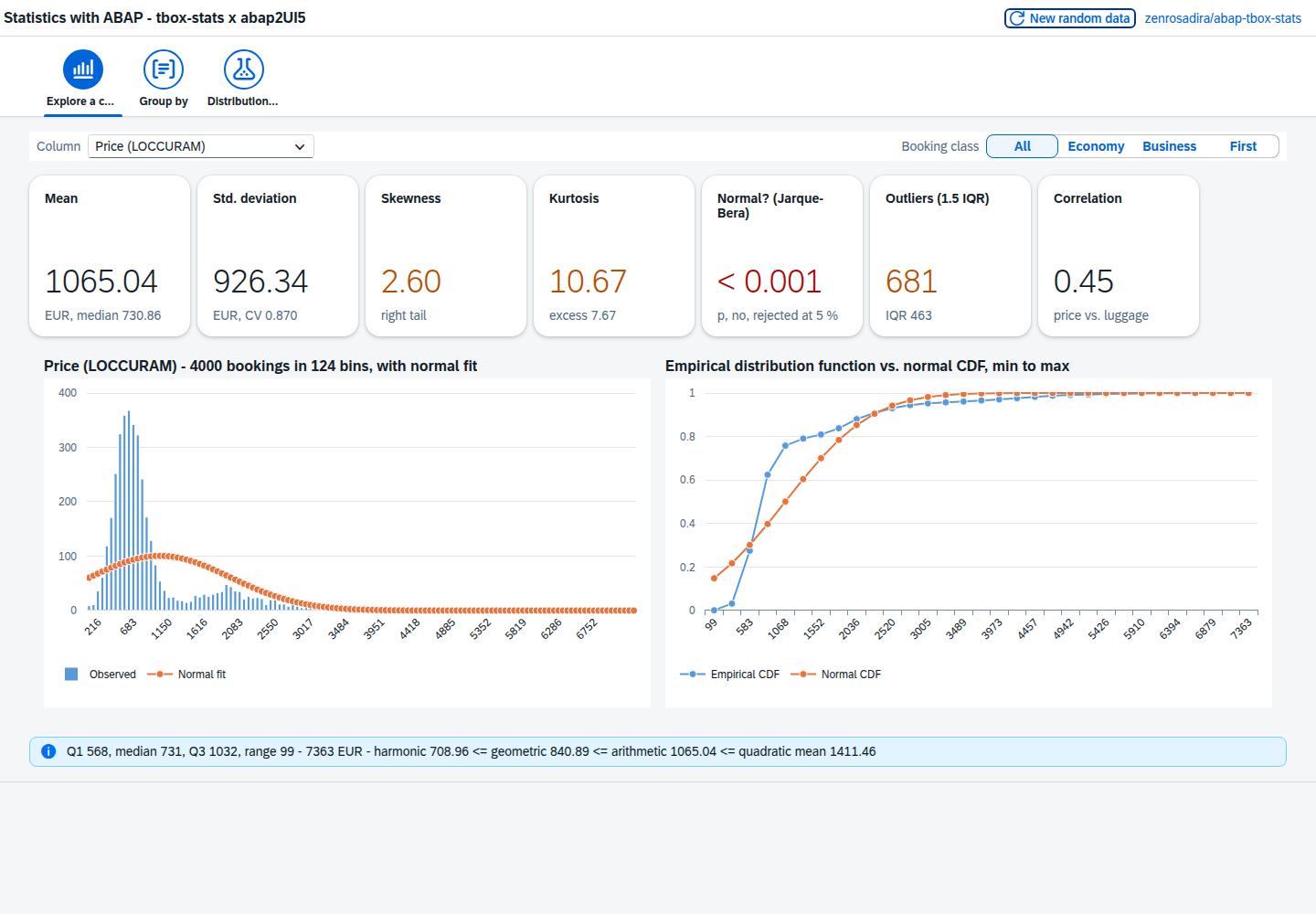
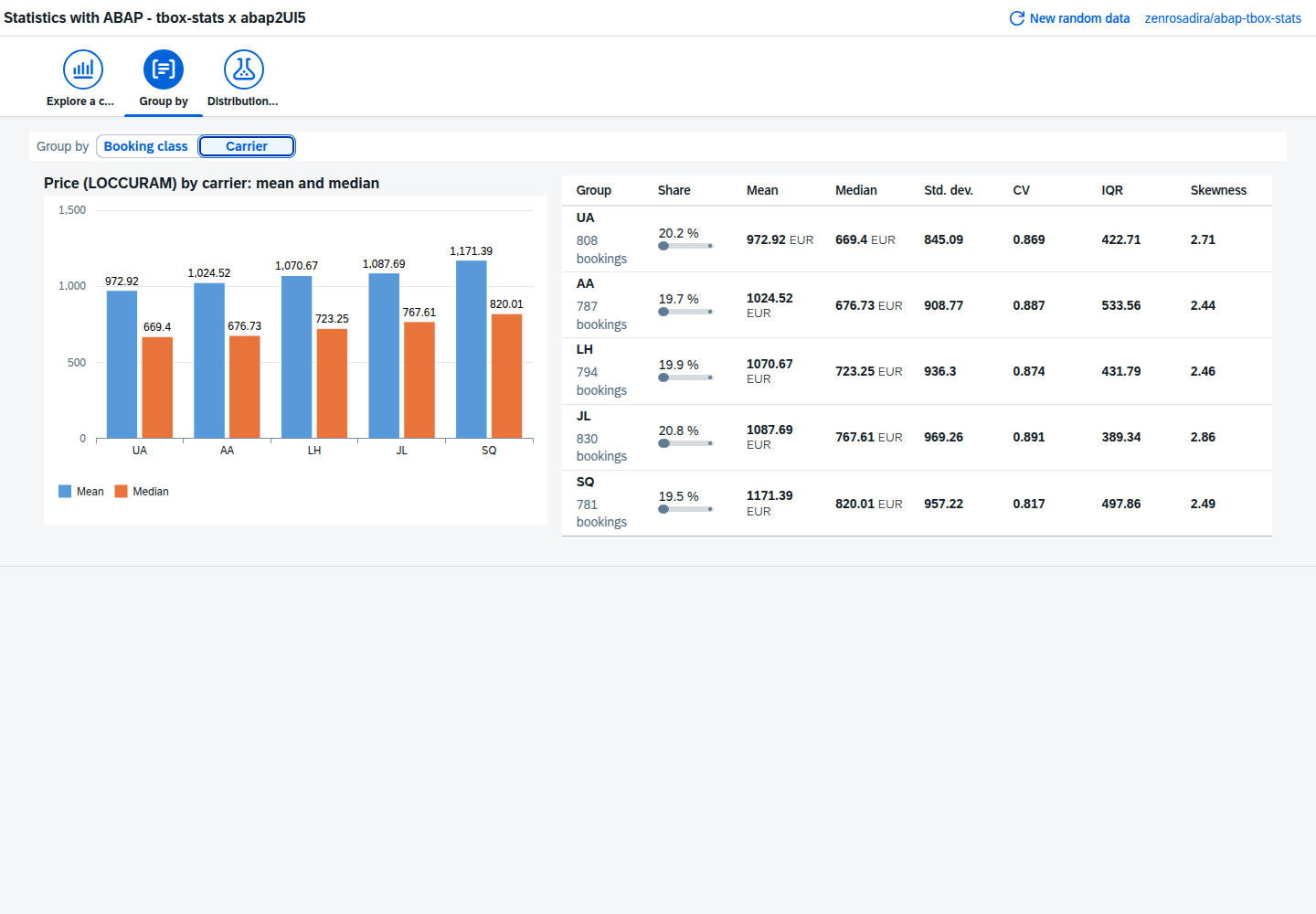
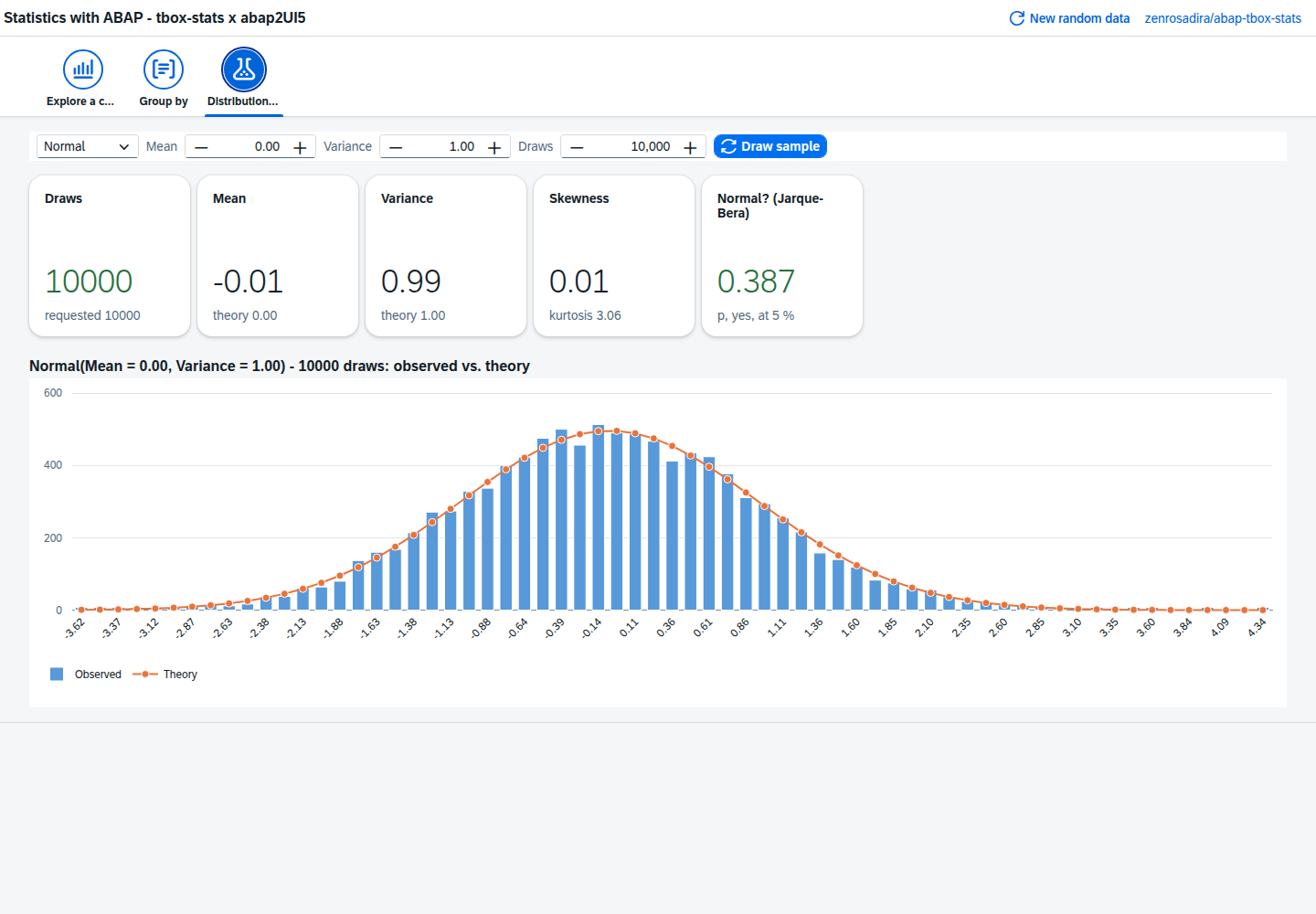
The app generates a stand-in for the flight bookings table SBOOK — 4,000 bookings with price, booking class, carrier and luggage weight, drawn with tbox-stats' own random generators — and puts tbox-stats to work on it:
- Explore a column – mean, standard deviation, skewness, kurtosis, the Jarque–Bera normality test, outliers and a correlation; a histogram with its normal fit and the empirical CDF against the normal CDF; for all bookings or one booking class
- Group by booking class or carrier – count, share, mean, median, standard deviation, coefficient of variation, IQR and skewness per group
- Distribution lab – draw samples from the normal, uniform, Poisson, binomial, geometric and Bernoulli generators, change their parameters and compare the result with the theory
Every number is computed in ABAP by ztbox_cl_stats; the frontend only draws the bound tables.
abap2xlsx – Excel Workbench (src/02)
- Export – 50 generated flight bookings; every option is one abap2xlsx call:
bind_tablewith a table style and a totals row (or a plain range with an autofilter),freeze_panes, a data bar and a cell-is rule on the amount, a dropdown validation and a summary sheet with a bar chart.zcl_excel_writer_2007writes the file, the browser downloads it - The code – a panel shows the exact abap2xlsx calls the chosen options produce
- Import – upload an .xlsx (or read back the exported one);
zcl_excel_reader_2007loads it, pick a sheet, see its cells, and watchzcl_excel_common=>excel_string_to_dateturn the serial numbers of the detected date column into dates
abap_fm_json – Function Modules as JSON (src/03)
The app calls function modules the way the library's ICF handler does, without the HTTP round trip — every step is one of zcl_json_handler's public methods:
- Interface – pick a function module and see its parameters as
build_params( )reads them - JSON input – edit the request, start from an example or a template the library serializes from the interface, choose the deserializer
- Call and result – the result, with any exception raised, as JSON, XML, YAML or Perl, with the handler's
upcase,camelcaseandshow_import_paramsoptions
Only a hard-coded whitelist of harmless standard function modules is offered (STFC_CONNECTION, STFC_STRUCTURE, RFC_SYSTEM_INFO, DATE_GET_WEEK), and every call first passes the library's own authority check on Z_JSON.
abap-openapi – OpenAPI to ABAP (src/04)
- Paste or upload an OpenAPI 3 JSON document (a small petstore is prefilled) and run the library's generator (
zcl_oapi_generator=>generate_v2) - The generated interface, HTTP client, ICF handler and ICF implementation in read-only code editors, each downloadable
- The operations as the library's parser reads them – method, path, operationId, ABAP method name, parameters, request body, responses
ABAP Diff3 – Diff, Patch and Three-Way Merge (src/05)
- Diff – two texts compared line by line with
diff_comm( ), side by side, every row marked unchanged, changed, deleted or inserted, with the LCS length and the hunks in diff(1) notation - Three-way merge – base, mine and theirs merged with
diff3_merge( ); clean changes are taken over, each conflict is resolved with take mine, take theirs or both, and the library's own conflict markers are shown in all three styles - Patch – the diff as a diff(1)-style patch, inverted or stripped, applied with
patch( )and checked against the expected text
JSON2ABAPType – ABAP Types from JSON (src/06)
- Paste JSON and press Generate –
zui2_json=>generate( )builds the data, the library's type generator turns it into ABAPTYPES, shown in a code editor - The library's naming modes, an editable JSON-name to ABAP-component mapping and the optional pretty printer
- A table of the structure the generator detected – structures, table types and components
abap-fm-logger – Function Module Logs in the Browser (src/07)
- A browser version of the log report
ZAFL_VIEWER: search the logged calls by function module, date, status, message and the custom fields - Each call opens with its import, export, changing and tables parameters as indented JSON
- An overview per function module – calls, share, errors, average runtime, last call
- Optional reprocessing through
zcl_afl_utilities=>re_process: off by default, with a confirmation and the library's own authority check
zcl_pdf – PDF without Forms (src/08)
- A letter or invoice typed into a form becomes a PDF written in ABAP by one stand-alone class – no Adobe Document Server, SmartForm or spool
- Shown in a
sap.m.PDFViewerand downloadable, regenerated on every option change - Every library feature as an option: fonts and styles, font size, largest subject that fits, body shrunk into its box, text box alignment, rectangles, page formats, orientation, extra pages and page breaks – plus the measurements behind the layout
zcl_docx – Word Documents from ABAP (src/09)
- A delivery note or invoice form that
zcl_docx3=>get_documentfills into a Word template: fields, an address structure, a repeated table row, repeated paragraphs, checkboxes and read-only protection - No template object needed – the app builds the template in ABAP; download it, change it in Word and upload it again, or upload your own
- A tag check against the template, and a text preview of the generated document
abapFaker – Test Data Generator (src/10)
- Choose a locale, the number of rows and which of the library's 37 generators to include – each with its call, a live example and a button to try it
- The generated records as a table whose columns follow the selection, and a CSV download
abap-data-validator – Validating Internal Tables (src/11)
- An editable table of demo contacts – e-mail, date, time, URL, phone, IMEI, GUID, number, JSON – some of them invalid on purpose
- A rules table: per column required, one of the library's type checks, a custom regex or a reference data element
- Validate runs
zcl_adata_validator->validate( )over the table – every invalid cell turns red with the library's message
Security
Most samples read nothing from your system – they generate their data or work on what you type or upload. Three touch the system, each limited on purpose:
- abap_fm_json (
src/03) calls function modules – only a hard-coded whitelist of harmless ones, after the library'sZ_JSONauthority check - abap-fm-logger (
src/07) reads the log tableZAFL_LOG, which holds whatever the logged function modules received and returned; reprocessing is off by default and runs the function module again - abap-data-validator (
src/11) leaves out the library's HTML check, which would send the cell content to validator.w3.org
The samples carry no authorization check of their own; restrict who may start them before using them beyond a development system.
Your Library Here
Do you know an open-source ABAP library that deserves a UI? Open an issue, or add a sample yourself: one package per library, the library as a dependency — CONTRIBUTING.md has the steps.
Development
npm ci
npm run check   # abaplint Standard, abap2UI5-linter, rename check
npm run check runs the same steps as CI. The manual build-rename workflow
pushes a namespace-renamed copy to a branch rename_<name> for a parallel
installation.
Contributing
Issues and pull requests are welcome - whether you're fixing bugs, adding new functionality, or improving documentation. See CONTRIBUTING.md.
License
MIT - see LICENSE. The libraries keep their own licenses:
- abap-tbox-stats by Marco Marrone, MIT License
- abap2xlsx by the abap2xlsx contributors, Apache License 2.0
- abap_fm_json by César Martín, Apache License 2.0
- abap-openapi by the abap-openapi contributors, MIT License
- ABAP Diff3 by apm.to Inc. (Marc Bernard), MIT License – a port of node-diff3
- JSON2ABAPType by Łukasz Pęgiel, Apache License 2.0
- abap-fm-logger by hhelibeb, Apache License 2.0
- zcl_pdf by Bjørn Espen Raadim, MIT License
- zcl_docx by Anton Sikidin, MIT License
- abapFaker by Uwe Fetzer and contributors, MIT License
- abap-data-validator by hhelibeb, MIT License
Details
Sources
Sources are graph entities: the same page may back several entries, and an unreachable source flags every row that rests on it.
Compatibility and provenance
Flavors
“Standard ABAP: S/4 Private Cloud or On-Premise, or SAP NetWeaver AS ABAP 7.50” — abap2UI5-addons/open-source-libs — README
Contributors
History in the atlas
- First seen.
For your agent
- Ref
artifact:abap2ui5-addons-open-source-libs- JSON
- /artifacts/abap2ui5-addons-open-source-libs.json
- MCP
- Connecting an agent