zcl_docx
An ABAP class that fills a Word .docx template tagged with content controls, with a report, ZDOCX_GET_TYPES, that generates the ABAP types the template needs; the document opens in Word or returns as an xstring.
The template is prepared in Word itself: content controls tagged for the single values, repeated controls for the rows and fragments that recur. The tagged document is stored as a binary object through transaction SMW0, the report ZDOCX_GET_TYPES reads it and generates the ABAP types matching its structure, and zcl_docx3=>get_document fills the tags from a structure of those types. By default the call writes the file to the desktop and opens Word on it; its parameters switch either off, return the document as an xstring to send on, or protect it from editing.
Facts
Where it sits
Who is behind it

In the atlas: maintains 1, contributes to 2@AntonSikidinmaintainerHieunx12Contributes to this

In the atlas: contributes to 1@Hieunx121 contributor
Before choosing this
Signals
ActivityQuietNo published releases; repository quiet for 33 months
It publishes no releases, and its repository has been quiet for at least 24 full months. This may be normal for stable software; check whether its current state still fits your use.
What it declares
Every artifact
- Type
- Package
- Origin
- Independently maintained
As a package
- Where it runs
- Inside its host
- Distributed through
- abapGit
Connections
Producing printed forms, PDFs and filled templates for people
Download
README
quoted from AntonSikidin/zcl_docx under MIT, readBest way to create Microsoft Word docx from ABAP.
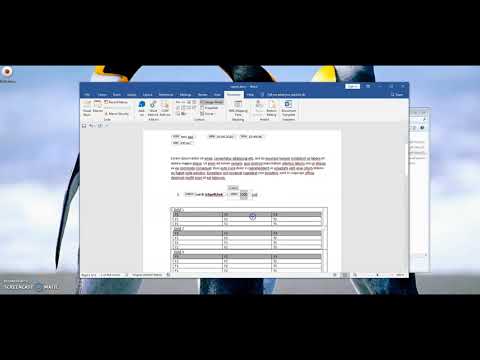
Maybe, this video instruction explain better than me.
Watch in 1080p.
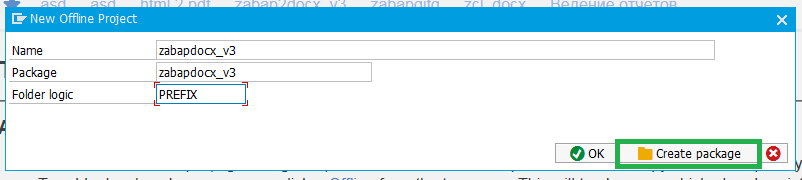
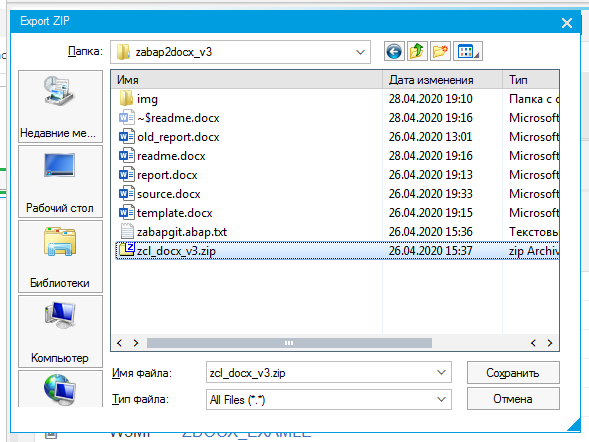
Installation: Install package via ABAPGIT https://docs.abapgit.org/guide-install.html



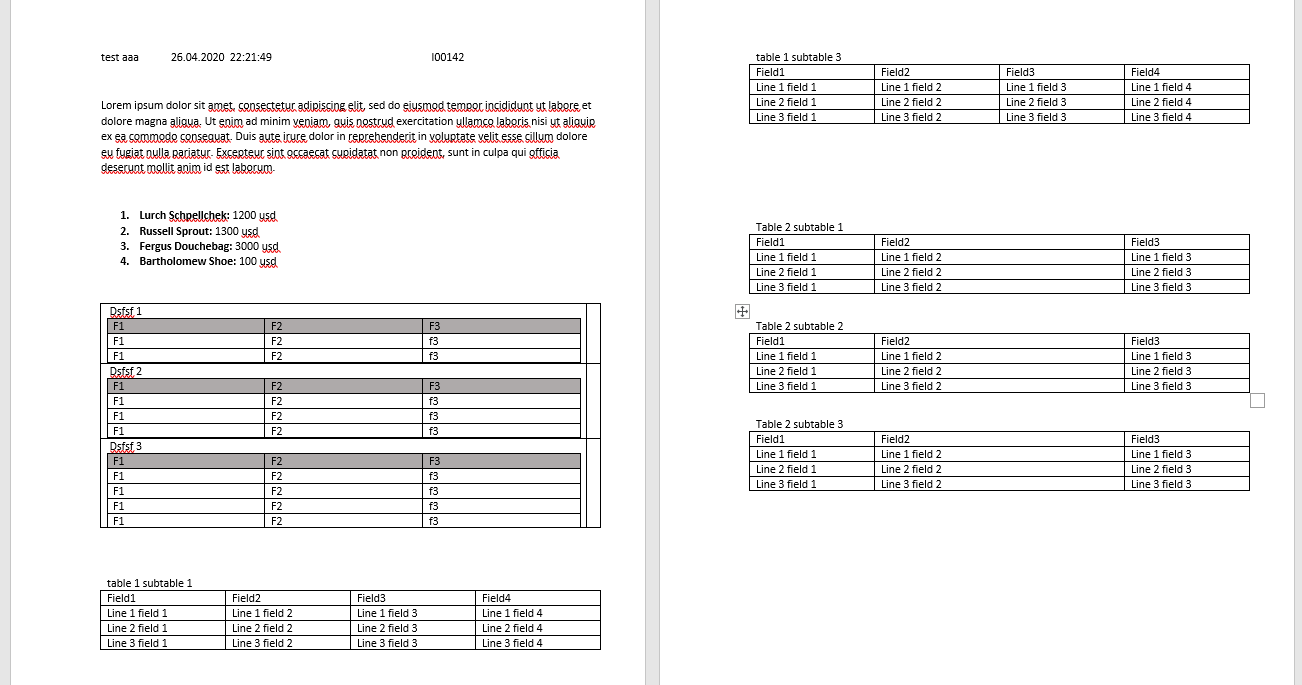
For example, the following document should be created:
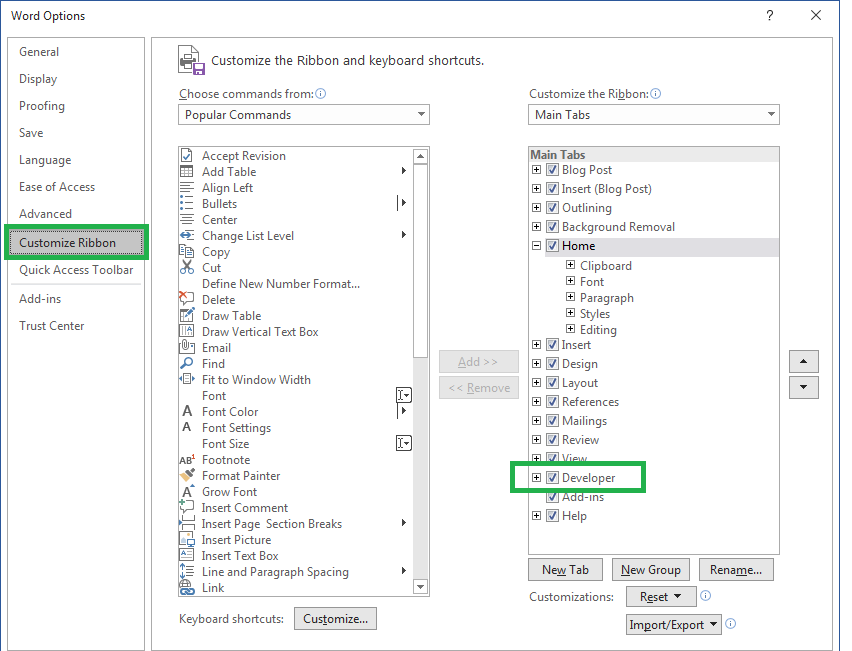
At first toggle developer toolbar. File -> Options -> Customize ribbon
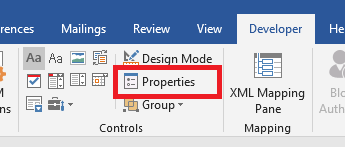
Go to developer tab, turn on “design mode”.

Select text that will be replaced.
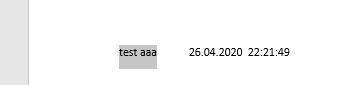
Make tag.

Click properties.
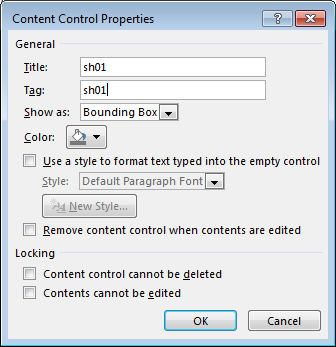
Enter tag name.
Repeat for all variable. For repeated rows or text fragment - select row or text fragment, make repeated control.
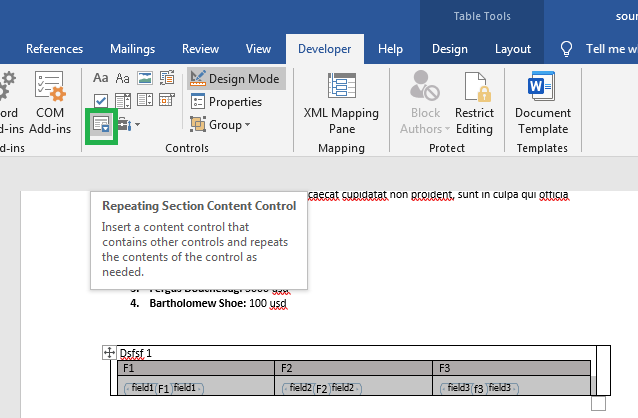
To enter properties of repeated control place cursor in the begin or end control.

Tag all variables and repeated part. Save document. Go to transaction smw0 Select Binary data, enter.
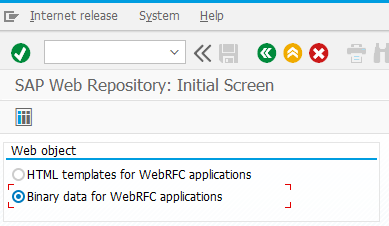
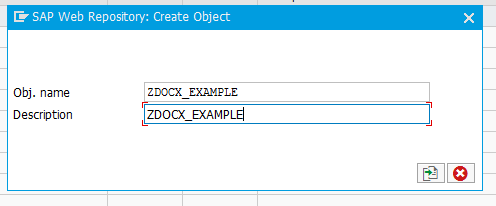
Object name zdocx_example
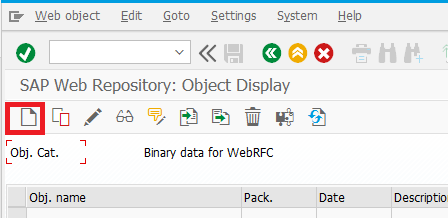
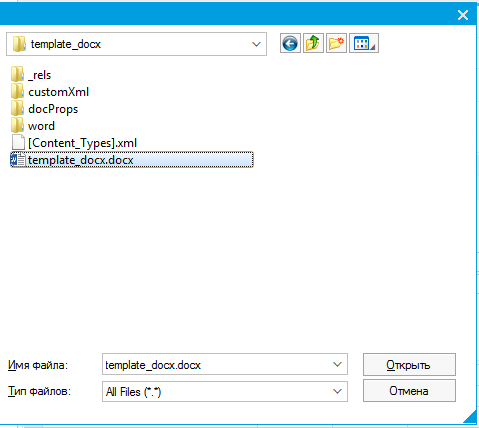
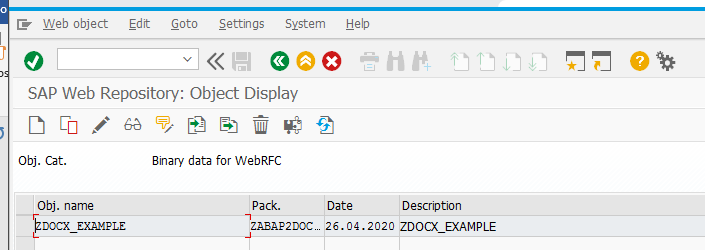
Go to se38. Program ZDOCX_GET_TYPES. Navigate to your template.
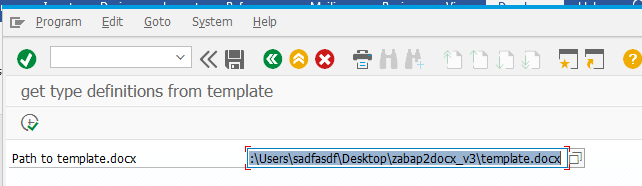
Run. Program generate data types, based on your document structure.
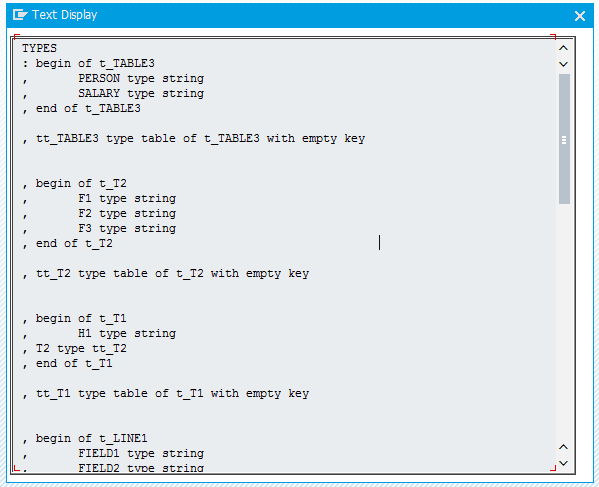
Copy to your program. Define variable.
Data
: gs_templ_data TYPE t_data
.
Fill structure with your data. Then get document.
zcl_docx3=>get_document(
    iv_w3objid    = 'ZDOCX_EXAMLE'   " name of our template
*      iv_template   = ''            " you can feed template as xstring instead of load from smw0
*      iv_folder     = 'report'      " in folder by default 'report'
*      iv_path       = ''            " IF iv_path IS INITIAL  save on desctop or sap_tmp folder
*      iv_file_name  = 'report.docx' " file name by default
*      iv_no_execute = ''            " if filled -- just get document no run office
*      iv_protect    = ''            " if filled protect document from editing, but not protect from sequence
                                   " ctrl+a, ctrl+c, ctrl+n, ctrl+v, edit
    iv_data       = gs_templ_data  " root of our data, obligatory
*      iv_no_save    = ''            " just get binary data not save on disk
    ).
Whole program “ZDOCX_EXAMPLE”:
*&---------------------------------------------------------------------*
*& Report ZDOCX_EXAMPLE
*&---------------------------------------------------------------------*
*&
*&---------------------------------------------------------------------*
REPORT zdocx_example.

*describe types

TYPES
: begin of t_TABLE3
,       PERSON type string
,       SALARY type string
, end of t_TABLE3

, tt_TABLE3 type table of t_TABLE3 with empty key


, begin of t_T2
,       F1 type string
,       F2 type string
,       F3 type string
, end of t_T2

, tt_T2 type table of t_T2 with empty key


, begin of t_T1
,       H1 type string
, T2 type tt_T2
, end of t_T1

, tt_T1 type table of t_T1 with empty key


, begin of t_LINE1
,       FIELD1 type string
,       FIELD2 type string
,       FIELD3 type string
,       FIELD4 type string
, end of t_LINE1

, tt_LINE1 type table of t_LINE1 with empty key


, begin of t_TAB1
,       TITLE1 type string
, LINE1 type tt_LINE1
, end of t_TAB1

, tt_TAB1 type table of t_TAB1 with empty key


, begin of t_LINE2
,       FIELD1 type string
,       FIELD2 type string
,       FIELD3 type string
, end of t_LINE2

, tt_LINE2 type table of t_LINE2 with empty key


, begin of t_TAB2
,       TITLE2 type string
, LINE2 type tt_LINE2
, end of t_TAB2

, tt_TAB2 type table of t_TAB2 with empty key


, begin of t_data
,       SH01 type string
,       DATE type string
,       TIME type string
,       USER type string
, TABLE3 type tt_TABLE3
, T1 type tt_T1
, TAB1 type tt_TAB1
, TAB2 type tt_TAB2
, end of t_data

, tt_data type table of t_data with empty key


.


*some variable
DATA
      : gs_templ_data TYPE t_data
      , lv_index TYPE i
      , lv_index2 TYPE i
      , lv_index3 TYPE i
      .


*fill data

gs_templ_data-DATE = |{ sy-datum date = environment }|.
gs_templ_data-TIME = |{ sy-uzeit   TIME = ENVIRONMENT }|.
gs_templ_data-USER  = sy-uname.


*1.  Lurch Schpellchek: 1200 usd
*2.  Russell Sprout: 1300 usd
*3.  Fergus Douchebag: 3000 usd
*4.  Bartholomew Shoe: 100 usd

APPEND INITIAL LINE TO gs_templ_data-table3 ASSIGNING FIELD-SYMBOL(<ls_3>).
<ls_3>-person = 'Lurch Schpellchek'.
<ls_3>-salary = '1200'.

APPEND INITIAL LINE TO gs_templ_data-table3 ASSIGNING <ls_3>.
<ls_3>-person = 'Russell Sprout'.
<ls_3>-salary = '1300'.

APPEND INITIAL LINE TO gs_templ_data-table3 ASSIGNING <ls_3>.
<ls_3>-person = 'Fergus Douchebag'.
<ls_3>-salary = '3000'.

APPEND INITIAL LINE TO gs_templ_data-table3 ASSIGNING <ls_3>.
<ls_3>-person = 'Bartholomew Shoe'.
<ls_3>-salary = '100'.


gs_templ_data-sh01 = 'test aaa'.

DO 3 TIMES.
  lv_index = sy-index.

  APPEND INITIAL LINE TO gs_templ_data-tab1 ASSIGNING FIELD-SYMBOL(<ls_tab1>).
  <ls_tab1>-title1 = |table 1 subtable { lv_index }|.


  DO 3  TIMES.
    lv_index2 = sy-index.
    APPEND INITIAL LINE TO <ls_tab1>-line1 ASSIGNING FIELD-SYMBOL(<ls_line1>).

    DO 4 TIMES.
      lv_index3 = sy-index.

      ASSIGN COMPONENT lv_index3 OF STRUCTURE <ls_line1> TO FIELD-SYMBOL(<fs_any>).

      <fs_any> = |Line { lv_index2  } field { lv_index3 }|.

    ENDDO.


  ENDDO.


ENDDO.


DO 3 TIMES.
  lv_index = sy-index.

  APPEND INITIAL LINE TO gs_templ_data-tab2 ASSIGNING FIELD-SYMBOL(<ls_tab2>).
  <ls_tab2>-title2 = |Table 2 subtable { lv_index }|.


  DO 3  TIMES.
    lv_index2 = sy-index.
    APPEND INITIAL LINE TO <ls_tab2>-line2 ASSIGNING FIELD-SYMBOL(<ls_line2>).

    DO 3 TIMES.
      lv_index3 = sy-index.

      ASSIGN COMPONENT lv_index3 OF STRUCTURE <ls_line2> TO <fs_any>.

      <fs_any> = |Line { lv_index2  } field { lv_index3 }|.

    ENDDO.


  ENDDO.


ENDDO.

gs_templ_data = VALUE #( BASE gs_templ_data
  t1 = VALUE #(
    ( h1 = |1| t2 = VALUE #(
        ( f1 = 'F1' f2 = 'F2' f3 = 'f3' )
        ( f1 = 'F1' f2 = 'F2' f3 = 'f3' )
      )
    )
    ( h1 = |2| t2 = VALUE #(
        ( f1 = 'F1' f2 = 'F2' f3 = 'f3' )
        ( f1 = 'F1' f2 = 'F2' f3 = 'f3' )
        ( f1 = 'F1' f2 = 'F2' f3 = 'f3' )
      )
    )
    ( h1 = |3| t2 = VALUE #(
        ( f1 = 'F1' f2 = 'F2' f3 = 'f3' )
        ( f1 = 'F1' f2 = 'F2' f3 = 'f3' )
        ( f1 = 'F1' f2 = 'F2' f3 = 'f3' )
        ( f1 = 'F1' f2 = 'F2' f3 = 'f3' )
      )
    )
  )
).


*get document

DATA
       : lv_document TYPE xstring  " variable to hold generated document, can be omitted
       .

*first case:  send document as attachment

lv_document = zcl_docx3=>get_document(
    iv_w3objid    = 'ZDOCX_EXAMLE'
    iv_data       = gs_templ_data
    iv_no_save    = 'X'   ).

PERFORM send_document_as_attachment USING lv_document.


*second case: save on desctop and open document

zcl_docx3=>get_document(
    iv_w3objid    = 'ZDOCX_EXAMLE'   " name of our template
*      iv_template   = ''            " you can feed template as xstring instead of load from smw0
*      iv_on_desktop = 'X'           " by default save document on desktop
*      iv_folder     = 'report'      " in folder by default 'report'
*      iv_path       = ''            " IF iv_path IS INITIAL  save on desctop or sap_tmp folder
*      iv_file_name  = 'report.docx' " file name by default
*      iv_no_execute = ''            " if filled -- just get document no run office
*      iv_protect    = ''            " if filled protect document from editing, but not protect from sequence
                                   " ctrl+a, ctrl+c, ctrl+n, ctrl+v, edit
    iv_data       = gs_templ_data  " root of our data, obligatory
*      iv_no_save    = ''            " just get binary data not save on disk
    ).


FORM send_document_as_attachment USING iv_doc TYPE xstring.

*  implement sending here
  MESSAGE 'Doc sended' TYPE 'S'.
ENDFORM.
Others providing
Compare all 8 on the Document output page →- abap2xlsxabap2xlsxA library that reads and generates .xlsx Excel workbooks directly from ABAP data, without exporting through a list viewer, installed through abapGit and tested from SAP_ABA 731.independent, abapLibrary that reads and generates Excel spreadsheets from ABAP
- zcl_pdfzcl_pdfA standalone ABAP class that draws simple PDFs without Adobe Document Server: text in built-in fonts, text fitted into a box and rectangles, returned as a raw string to store, send or display.independent, abapStandalone ABAP class drawing PDFs without Adobe Document Server
- XTTXTTAn ABAP template engine that merges data, including nested structures, tables and trees, into Excel, Word, HTML and PDF templates prepared in ordinary editors with markers in curly brackets.independent, abapABAP template engine for Excel, Word, HTML and PDF
- SAP Forms Service by AdobeSAP Forms Service by AdobeAdobe Document Services on BTP: renders print and interactive PDF forms from stored templates, called over a REST API from a cloud application or connected to an ABAP system.sap official, btpAdobe Document Services on BTP for print and interactive PDFs
- HandlebarsABAPHandlebarsABAPA single-file Handlebars templating implementation for ABAP 7.40 SP02 and up that fills a template from an ABAP structure or table, with block helpers, partials and custom helpers.independent, abapSingle-file Handlebars templating for ABAP 7.40 SP02 and up
- open-abap-pdfopen-abap-pdfA standalone PDF generator written in ABAP that builds a multi-page document from text, lines, rectangles and circles placed at given coordinates and returns it as a string or an xstring.community org, abapStandalone PDF generator written in ABAP
- SAP Spool PDFSAP Spool PDFAn ABAP class that submits a report to the spool, typically in the background, and converts the resulting spool request into a PDF it can return as an xstring, save, show or email.independent, abapSubmits an ABAP report to the spool and converts the output to PDF
Details
Sources
Sources are graph entities: the same page may back several entries, and an unreachable source flags every row that rests on it.
Compatibility and provenance
abaplint
Flavors
“Save document. Go to transaction smw0 Select Binary data, enter.” — AntonSikidin/zcl_docx — README
Contributors
History in the atlas
- First seen.
For your agent
- Ref
artifact:antonsikidin-zcl-docx- JSON
- /artifacts/antonsikidin-zcl-docx.json
- MCP
- Connecting an agent