abap_fm_json
A JSON adapter that exposes ABAP function modules over HTTP: a handler class in an ICF service calls the module named in the URL and serialises its parameters to and from JSON.
A handler class, ZCL_JSON_HANDLER, that you put first in the handler list of an ICF service you create yourself; from then on a call to http(s)://your_abap_server:<port>/fmcall/<function_module_name> invokes that function module and serialises its import and export parameters to and from JSON. Single-valued import parameters go in the query string, structures and tables in a POST or PUT body, and standard parameters change the response: format= switches the output to XML, YAML or Perl, lowercase and camelcase rename the ABAP fields, and callback= wraps the answer for JSONP. Every call runs an AUTHORITY_CHECK against a custom authorization object named Z_JSON with one field, FNMANE, which you create in SU21 because SAPLink does not transport authorization objects, and action=start_session holds an ABAP session across several calls. It ships two serialisers: the original pure ABAP ones, active by default, and the ABAP built-in transformations, switched on by commenting out the corresponding lines in HANDLE_REQUEST — on a release before 7.31 the calls to the built-in converter have to be commented out instead, because they cannot be used there.
Facts
Where it sits
Who is behind it

In the atlas: maintains 2, contributes to 2@cesar-sapmaintainerTobias LeichContributes to this

In the atlas: contributes to 1@FROGGS1 contributor
Before choosing this
Conditions
PracticalFunctional boundary
Input arrives only as JSON, or as plain XML if the ABAP built-in transformation is switched on, whatever the output format is set to. Cross-site calls are limited to JSONP: the maintainer lists CORS support as planned.
What it declares
Every artifact
- Type
- Package
- Origin
- Independently maintained
As a package
- Where it runs
- Inside its host
- Distributed through
- abapGit
Connections
Calling ABAP function modules from outside the system over RFC
Git client written in ABAP that runs inside the system
Download
README
quoted from cesar-sap/abap_fm_json under Apache-2.0, readJSON Adapter for ABAP Function Modules
Welcome to the JSON adapter for ABAP Function Modules!! (or adaptor)
This adapter was first published in SAP SCN blog (http://scn.sap.com/community/abap/connectivity/blog/2013/03/05/json-adapter-for-abap-function-modules). The blog remains its main reference and discussion place.
This adapter is specific to SAP ABAP systems. It should work on any SAP release from 7.0 onwards, however some slight modifications may be needed for older SP levels.
The purpose of this adaptor is to allow calling ABAP function modules via HTTP and serializing the input and output in JSON format. This allows a very simple way to invoke ABAP functionality from HTML5 and AJAX or Jquery based applications.
How to install
It seems that abapGit is the way to go. This repository should now work with abapGit, please inform me if you find any issue.
SAPLink is still supported and I've updated the nugget and slinkees. However, many people are currently getting trouble to make SAPLink work. If you come accross problems, I have made available a transport request for direct import into an ABAP system in transport/.
In order to install this you need SAPLink. First install SAPLink in your ABAP server following the SAPLink installation instrucctions. Be sure to install the required SAPLink plugins. To minimize trouble, I recommend your installing the Nugget that contains all commonly used plugings.
This adaptor works with any ABAP version from 7.0 onwards. I have tested it in 7.31, 7.40 and 7.50, which are the three releases where I can currently maintain it. If you are using any older release please contact me for indications.
As a rule, to make it work in any pre 7.31 release, you have to comment out all calls to the ABAP built-in JSON converter, that is, the calls to the methods SERIALIZE_ID and DESERIALIZE_ID in HANDLE_REQUEST and the code inside both methods. You cannot use them anyway in pre 7.31 releases.
ABAP Authorization
The module includes an AUTHORITY_CHECK call to a custom authorization object named Z_JSON that validates if the user can access the function module.
You must create and authorization object with the name Z_JSON and just one field named FNMANE as authorization objects are not yet transported with SAPLink. Use transaction SU21 for this.
The authorization object will be included in the corresponding user profile. An asterisk (*) will allow the user to access all function modules. It is very recommended that any user that is going to access function modules through this adaptor has a profile with just the functions that he is allowed to access.
Create ICF service
You must create a service in ICF to make an endpoint for the adaptor. The service must use class ZCL_JSON_HANDLER as the first entry in the Handler List. Here goes an example in transaction SICF:
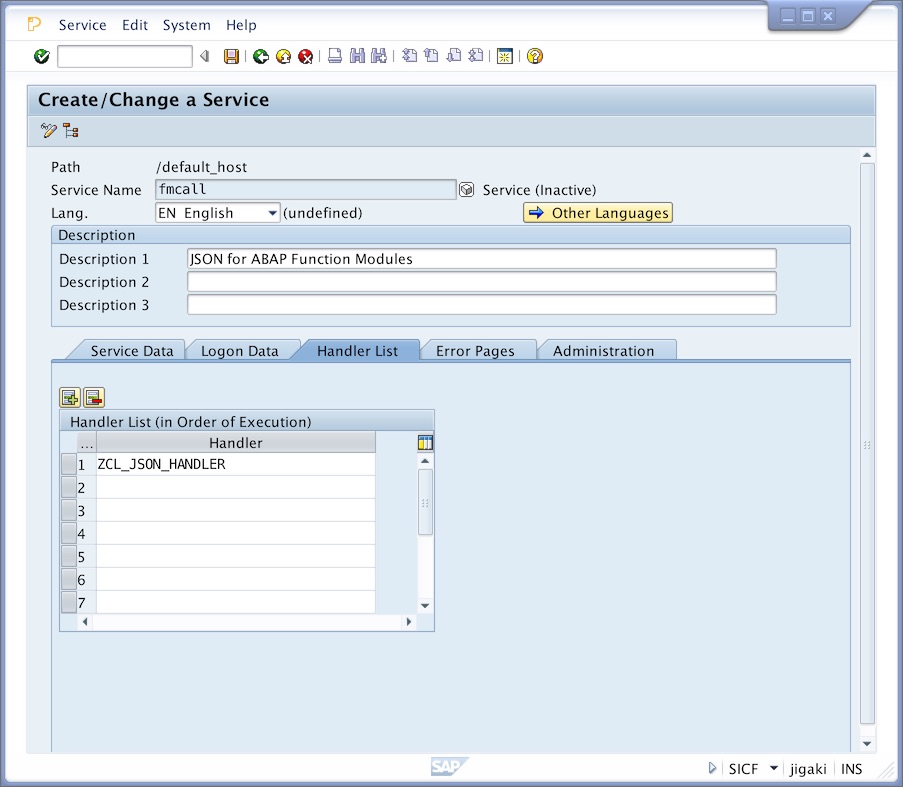
In this example, you will invoke the service using the following syntax:
http(s)://your_abap_server:<port>/fmcall/<function_module_name>?<parameters>
Function module parameters
You can pass as GET query string parameters any of the function IMPORT parameters that are defined and single data types (not structures or tables).
In order to pass structures or tables to the function module, use any of the HTTP methods that support a content body (POST or PUT mainly).
Some parameters exist as standard. Most notably:
format=<output_format> set the format of the response. Valid formats are: json, xml, yaml, perl.
lowercase=X the response will show ABAP variable names in lower case.
camelcase=X the response will show ABAP variable names in lowerCamelCase.
show_import_params=X will include the IMPORT parameters in the response.
callback=<callback_name> wraps response in a JavaScript callback function (for jsonp enabled calls).
Supported output formats
The adaptor can produce output in the following formats: JSON, plain XML, YAML 1.0, and Perl (which I did just for fun, but has itself shown to be quite useful in a number of occassions).
Please note that the output format does not affect the input. The adaptor only supports input in JSON, and (if using the ABAP built-in transformation) in plain XML.
Session and logon support
It is possible to activate ABAP session support for sequential calls to the adaptor (and thus running several calls in the same session context). Call the adaptor including a param action=start_session to activate it and action=end_session to finish it.
All ABAP logon methods are supported. Please configure the required one in SICF (see above).
Cross Site requests
JSONP is supported. CORS support is planned.
ABAP based or transformation based serializers
Originally this adaptor implemented pure ABAP based JSON to ABAP and ABAP to JSON serializers. Since January 2013 ABAP built-in transformations are available. The adaptor offers you the two options. The original pure ABAP serializers are activated by default. In order to use the built-in transformations, please comment out the corresponding lines in the HANDLE_REQUEST method.
Comments
I welcome comments and suggestions for new ideas. Please feel free to contact me.
Others providing
Compare all 7 on the RFC connectivity page →- rfc-connectorrfc-connectorCalls abap2UI5 apps of another system over RFC: an ICF handler on the system the browser talks to forwards each roundtrip through an SM59 destination to the system the apps run on.community org, abapForwards abap2UI5 roundtrips to another system over RFC
- erpl-node-rfcerpl-node-rfcAn SAP RFC client for Node.js and TypeScript that implements the protocol in Rust and ships prebuilt for seven platforms behind node-rfc's API, so there is no SAP NW RFC SDK to download.independent, abapRFC client for Node.js and TypeScript without the NW RFC SDK
- ERPLERPLA DuckDB extension that reads SAP ERP tables, CDS views and BW queries from SQL over RFC, BICS and ODP, and can mount an SAP system as a DuckDB catalog to join against other data.independent, abapDuckDB extension reading SAP ERP tables, CDS views and BW queries
- ADELE RFC APIADELE RFC APIAn RFC-callable ABAP API for extracting SAP data, implemented for the Java-based ADELE tool, with an OLAP mode for group by and count.independent, abapRFC-callable ABAP API for SAP data extraction for ADELE
- Cloud ConnectorCloud ConnectorSAP's on-premises agent that links SAP BTP applications to systems in a customer's own network, as a reverse invoke proxy that exposes only the systems and resources it is configured to allow.sap official, btpSAP's on-premises agent linking SAP BTP to customer-network systems
- srijan9864/zrfcreadsrijan9864/zrfcreadAn RFC-enabled ABAP function module that counts the entries of any table against dynamic where and join criteria.independent, abapAn RFC-enabled ABAP function module that counts the entries of any table against dynamic where and join criteria.
Details
Sources
Sources are graph entities: the same page may back several entries, and an unreachable source flags every row that rests on it.
Compatibility and provenance
abaplint
Flavors
“This adaptor works with any ABAP version from 7.0 onwards. I have tested it in 7.31, 7.40 and 7.50, which are the three releases where I can currently maintain it.” — cesar-sap/abap_fm_json — README, How to install
Contributors
History in the atlas
- First seen.
For your agent
- Ref
artifact:cesar-sap-abap-fm-json- JSON
- /artifacts/cesar-sap-abap-fm-json.json
- MCP
- Connecting an agent