ABAP_LOGGING
An object-oriented wrapper around SAP's Business Application Log (BAL) for ABAP NetWeaver, chaining texts, messages and exceptions onto a log header that persists in its own or the same connection.
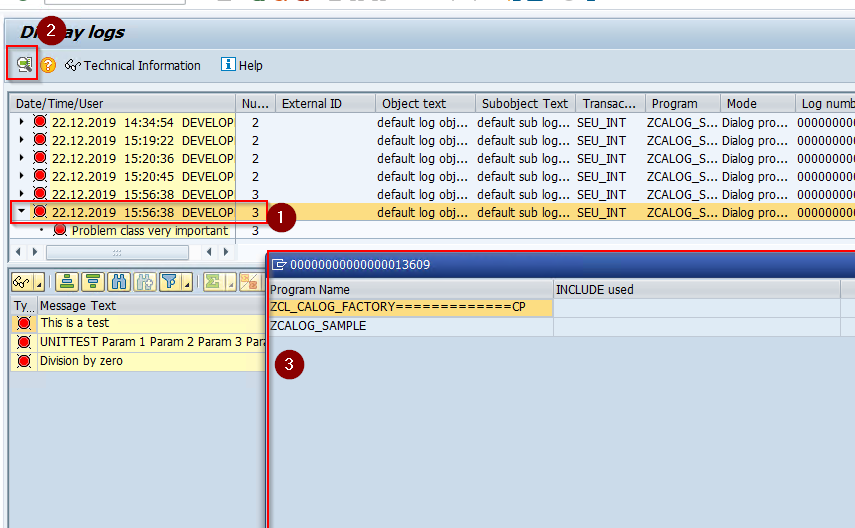
ZCL_CALOG_FACTORY=>CREATE_HEADER returns a log header, and ADD_TEXT, ADD_MESSAGE and ADD_EXCEPTION each return that header again, so the appends chain into one statement ending in PERSIST. PERSIST stores the log either in a parallel database connection, with no dependency on the surrounding transaction, or in the same one, and its IV_WITH_CALLSTACK parameter attaches the call stack to the BAL header, where transaction SLG1 shows it under Details. The maintainer gives the BAL API's verbosity and its lack of an object model as the reason for the wrapper. It installs through ZABAPGIT, the README's name for abapGitabapGitA Git client written in ABAP that runs inside the system, so objects are cloned, pulled and pushed without leaving it; with no package manager in ABAP, a cloned repository is how code is distributed.community org, abap, and needs one post-installation step: a BAL log object and a subobject, both named ZCALOGDEF, created in transaction SLG0.
Facts
Where it sits
Who is behind it

In the atlas: maintains 1, contributes to 1@franzreitmayermaintainer
What it declares
Every artifact
- Type
- Package
- Origin
- Independently maintained
As a package
- Where it runs
- Inside its host
- Distributed through
- abapGit
Connections
Seeing what a running service did, in a readable form
Git client written in ABAP that runs inside the system
Download
README
quoted from franzreitmayer/ABAP_LOGGING under MIT, readABAP_LOGGING
Simple Logging Framework for ABAP Netweaver
Description
This framework is designed to enable fluent, less verbose and isolated logging at ABAP Netweaver stack. ABAP Netweaver Stack offeres the Busines Application Log (BAL) to support logging. However the BAL-API is is still not object oriented and quite verbose. This framework offers an object oriented wrapper to support he most common logging operations.
Installation
The framework is managed on github with the use of ZABAPGIT (https://github.com/larshp/abapGit/blob/master/src/zabapgit.prog.abap) So you can use ZABAPGIT to install the code at your system. As a post installation task you need to create a BAL log object (Transaction SLG0) with the name ZCALOGDEF and a subobject assigned to with the same name ZCALOGDEF. In order to check wether the installation was successful you can run the unit test of class ZCL_CALOG_HEADER.
Usage
The report ZCALOG_SAMPLE report in package ZCALOG demonstrates how the framework can be used.
Use the central class ZCL_CALOG_FACTORY to get a header object to manager further logging:
" create a log header for default log object and sub object...
data(log_header) = ZCL_CALOG_FACTORY=>CREATE_HEADER( ).
Use the header object retrieved to write messages, texts and exceptions
" add a simle text message
log_header->ADD_TEXT( 'This is a test' ).

" add a message with parameters...
log_header->ADD_MESSAGE(
  exporting
    IV_MSGTY           = conv symsgty( 'E' )
    IV_MSGID           = CONV symsgid( 'ZCALOG_TST')
    IV_MSGNO           = CONV symsgno( 0 )
    IV_MSGV1           = 'Param 1'
    IV_MSGV2           = 'Param 2'
    IV_MSGV3           = 'Param 3'
    IV_MSGV4           = 'Param 4'
).

" add an exception
try.
  data(num) = 1 / 0.
catch cx_root into data(exception_ref).
  log_header->ADD_EXCEPTION( exception_ref ).
endtry.
Every method to append the log returns the logheader itself, thus you can chain the appends to keep coding short.
" use chained method calls to keep code short...
  ZCL_CALOG_FACTORY=>CREATE_HEADER(
  )->add_text( 'This is a test'
  )->ADD_MESSAGE( IV_MSGTY           = conv symsgty( 'E' )
    IV_MSGID           = CONV symsgid( 'ZCALOG_TST')
    IV_MSGNO           = CONV symsgno( 0 )
    IV_MSGV1           = 'Param 1'
    IV_MSGV2           = 'Param 2'
    IV_MSGV3           = 'Param 3'
    IV_MSGV4           = 'Param 4'
  )->ADD_EXCEPTION( EXCEPTION_REF )->PERSIST( ).
Call method persist to save the logs to database. the framework support two ways of storing the log (controlled by parameter iv_save_immediately). Please refer to the wikipages for further details:
- Storing in a parallel db connection (no dependency to surrounding TX)
- Storing in same db connection (depends on surrounding TX)
The method persist also has the paramter iv_with_callstack which allows to store the callstack at the BAL logheader. You can open the stacktrace (3) at transaction SLG1 by selecting the header (1) and click at the Details [F7] (2) as shown at the screenshot bellow.
Others providing
Compare all 11 on the Logging page →- ABAP-LoggerABAP-LoggerA logging library for ABAP that records messages into the standard Application Log (BC-SRV-BAL) and displays them from there, installed through abapGit on ABAP 702 or higher.independent, abapLogging library for ABAP over the Application Log
- abap-log-exporterabap-log-exporterExports SAP NetWeaver logs from the Business Application Log to an external log system such as Graylog or Loki, converting entries to GELF or Loki format through a separately configured reader, converter and connector.independent, abapExports Business Application Log entries to Graylog or Loki
- ABAP-PRCABAP-PRCA framework for custom multi-step ABAP processes: a process class declares the states, and the framework runs each document through them and monitors the run.independent, abapFramework for multi-step ABAP processes with monitoring
- abap-logabap-logA logging library for ABAP with one logger interface in front of several targets, from the Application Log and the job log to database tables, files and the Eclipse console.independent, abapABAP logging library with one interface across output targets
- abap-cloud-loggerabap-cloud-loggerA logging library for ABAP Cloud that wraps the released class CL_BALI_LOG in a chainable logger, collecting exceptions, messages and tables, with a stopwatch and a sticky context tag.independent, abapChainable logger for ABAP Cloud around CL_BALI_LOG
- abap-fm-loggerabap-fm-loggerA logger for ABAP function modules (RFC) that stores each call's parameters as JSON in one table, with a viewer report to search the log and reprocess a record, akin to WE10 and WE19.independent, abapLogger storing RFC function module call parameters as JSON
- open-abap-balopen-abap-balApplication logging for ABAP code transpiled to JavaScript and run on Node.js, one of the runtime libraries open-abap.org lists.community org, abapApplication logging for ABAP transpiled to JavaScript on Node.js
- abap-fluentdabap-fluentdA Fluentd client written in ABAP for sending log lines from an ABAP system to a Fluentd collector, where entries are flushed with an explicit COMMIT WORK.independent, abapFluentd client in ABAP for sending log lines to a collector
- sap-usi-logging-apisap-usi-logging-apiAn object-oriented encapsulation around SAP's Application Log (transaction SLG1), controlled by customizing, with attachable data containers that SLG1 shows behind a detail button.independent, abapObject-oriented wrapper around SAP's Application Log (SLG1)
- abap-message-loggerabap-message-loggerA message logger for ABAP Cloud that collects T100 messages, BAPIRET2 structures, exceptions and plain text before saving them to the Application Log.independent, abapMessage logger for ABAP Cloud that saves to the Application Log
Details
Sources
Sources are graph entities: the same page may back several entries, and an unreachable source flags every row that rests on it.
Compatibility and provenance
abaplint
Flavors
“Simple Logging Framework for ABAP Netweaver” — franzreitmayer/ABAP_LOGGING — README
History in the atlas
- First seen.
For your agent
- Ref
artifact:franzreitmayer-abap-logging- JSON
- /artifacts/franzreitmayer-abap-logging.json
- MCP
- Connecting an agent