abap-platform-reuse-services
A sample sales-order RAP business object that draws its key from a number range, records field changes in a change document, and fills a PDF through SAP Forms Service by AdobeSAP Forms Service by AdobeAdobe Document Services on BTP: renders print and interactive PDF forms from stored templates, called over a REST API from a cloud application or connected to an ABAP system.sap official, btp.
A RAP sales-order sample puts number ranges, change documents and SAP Forms Service by AdobeSAP Forms Service by AdobeAdobe Document Services on BTP: renders print and interactive PDF forms from stored templates, called over a REST API from a cloud application or connected to an ABAP system.sap official, btp into one real business object rather than describing each on its own. Creating a sales order draws its semantic key from a number range object using early numbering; editing the order's total amount or overall status is recorded by a change document object and displayed through a custom entity, because the demo app is OData V4; and an action fills a PDF template from the order's data, including its items. Its own known issues note that the change document object currently fails to import and has to be recreated by hand after the repository is pulled.
Facts
Where it sits
Who is behind it

In the atlas: maintains 222@SAP-samplesmaintainerAjinkya PatilContributes to this

In the atlas: contributes to 112@ajinkyapatil8190Andre FischerContributes to this

In the atlas: contributes to 19, wrote 5@anfiscVolker DreesContributes to this

In the atlas: contributes to 9@VolkerDrees3 contributors
What it declares
Every artifact
- Type
- Sample
- Origin
- By SAP
- Use as
- A reference
As a sample
- Form
- does not say
Connections
Keeping a readable business history of changes to a record
Producing printed forms, PDFs and filled templates for people
Adobe Document Services on BTP for print and interactive PDFs
Download
README
quoted from SAP-samples/abap-platform-reuse-services under Apache-2.0, readReuse services in ABAP Cloud
Description
In this repository you will find sample code that shows how to work with the following reuse services:
- Number Ranges
- Change Documents
- Adobe Forms Service
The repository contains a simple sample RAP business objects to create sales orders and items. The semantic key for the sales orders is drawn from a number range object. Changes to two fields of the sales order are recorded using a change document object and to data elements for the total amount and the overall status that have been configured appropriately to record changes.
Using an action the sample also shows how content of a sales order entity including its items can be used to fill a form from the Adobe Forms Service to create a PDF document.
Number Ranges
When you create a sales order a new number will be drawn from a number range. The RAP business object uses early numbering.
Change Documents
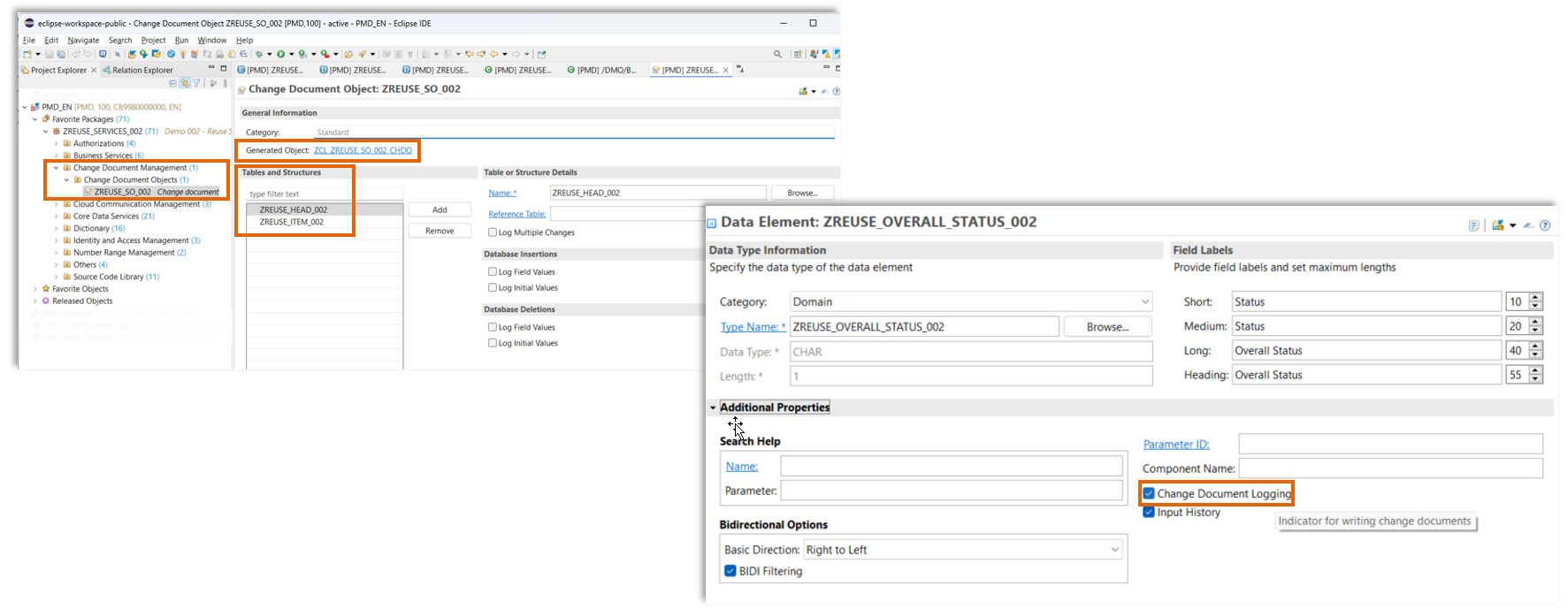
The repository contains a change document object based on the two underlying tables that are used to store the sales order data and the data of the items.
Two fields Amount and Overall Status of the sales order data table use data elements where the Change Documeng Logging has been enabled. Only changes are recorded, not the inital values.
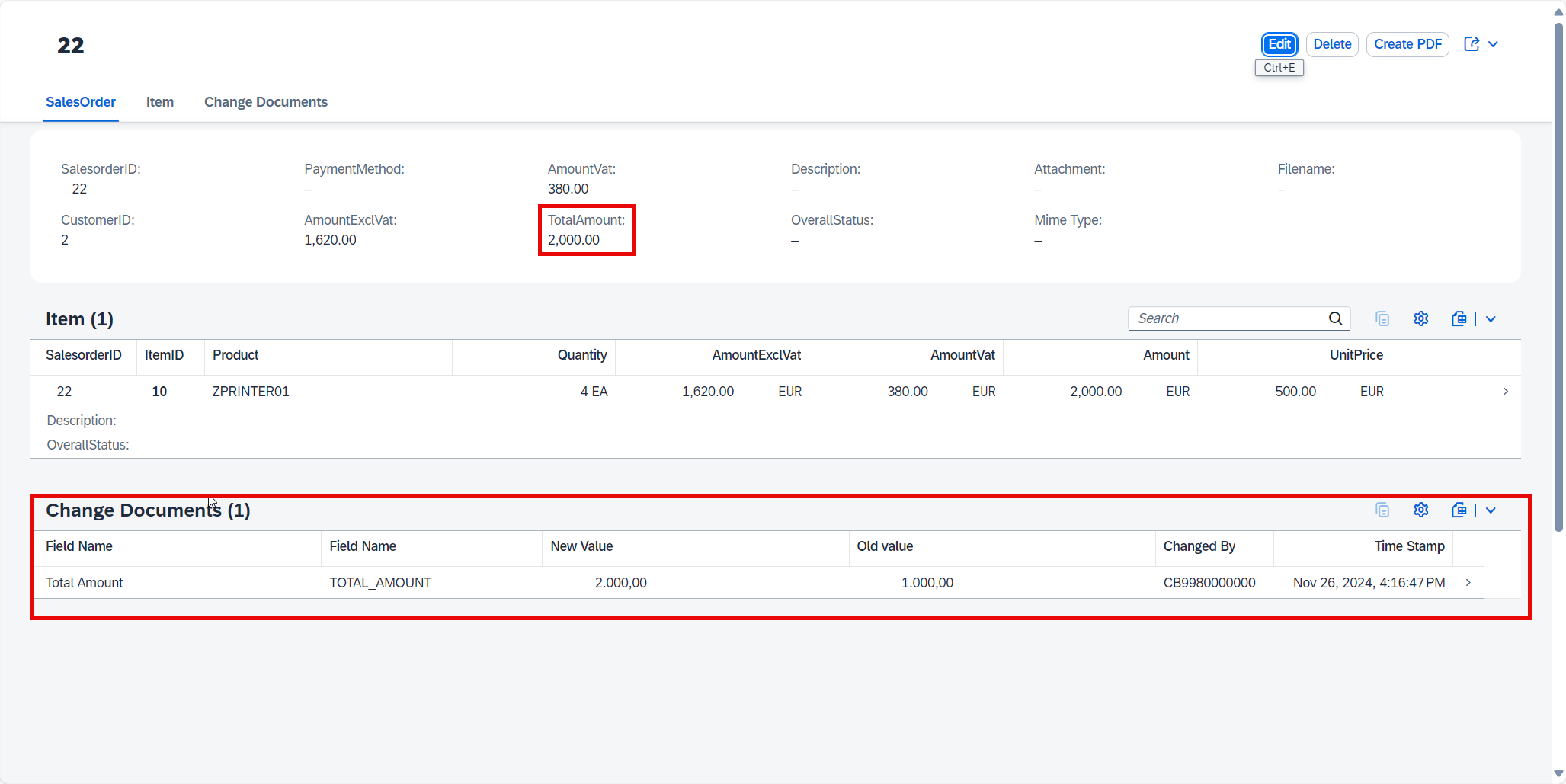
That means that after you have created a sales order and change an item or add an item the total amaount will be changed as well and this change will be recorded and displayed in the Fiori Elements OData V4 app.
Demo Flow:
- Create a new Salesorder
- Create an Item
- Select a product
- Enter a quantity, e.g. "2"
- Press Apply
- Press "Create" to create the SalesOrder
- Press "Edit"
- Change the quantity to another value, e.g. "4"
- Press "Save"
Changes to the field "TotalAmount" are saved and displayed via a custom entity, not the reuse-library, since the demo app is an OData V4 app.
Implementation details
The change document object 'ZREUSE_SO_002' only records changes not any initial values. Therefore the changes are only visible after the initial values for a salesorder are changed. For the data element 'ZREUSE_TOTAL_AMOUNT_002' in the additional properties the flag change document logging has been activated.
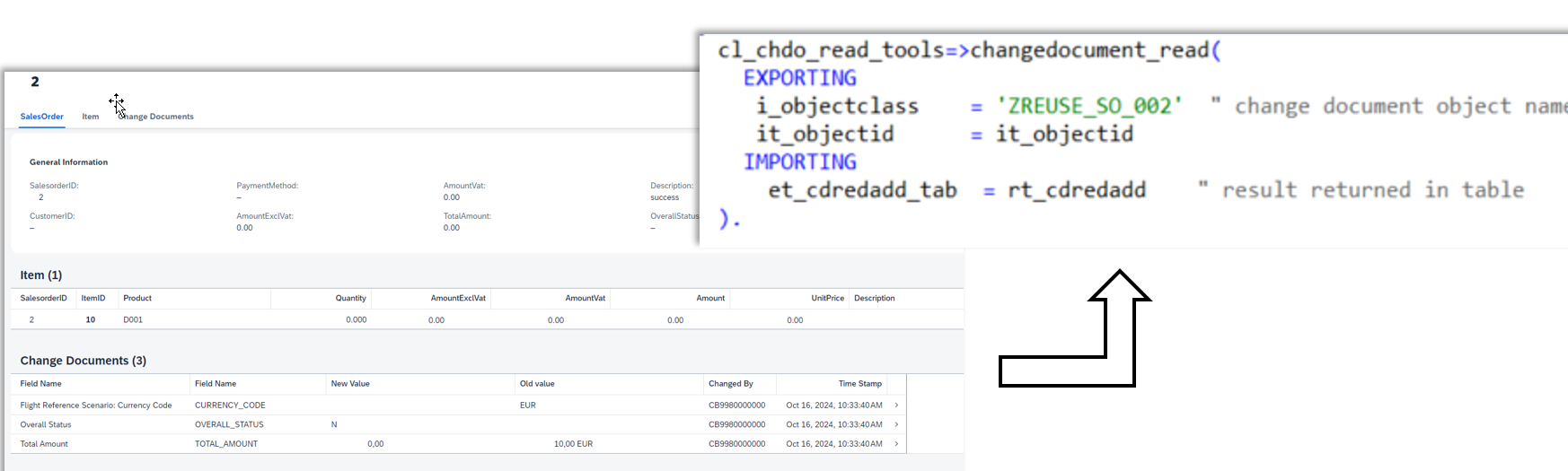
The display of changes is done using a custom entity 'ZREUSEI_CDREDADD_002' that uses the change document API in the query implementation class 'ZREUSECL_GET_CHANGE_DOCS_002' to read the data
Adobe Forms Service
- Create a new Salesorder
- Select a customer
- Create an Item
- Select a product
- Enter a quantity, e.g. "2"
- Press Apply
- Create a second item
- Press "Create" to create the SalesOrder
- Press the "Create PDF" button, the description changes to "PDF generation started" and wait a few seconds
- Refresh the browser
- Description changes to "success" and a PDF is show as an attachement that contains the salesorder data
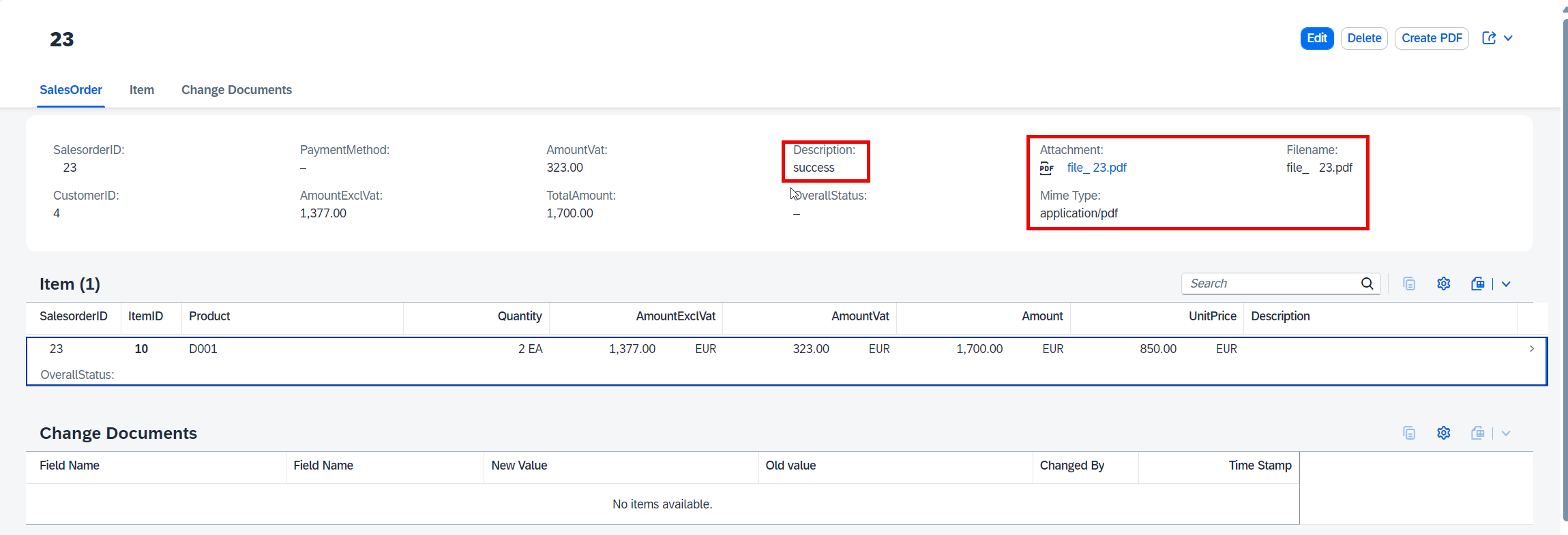
The field "Description" shall contain the value "Success" (the demo will be changed such that the field "overallstatus" will be changed instead)
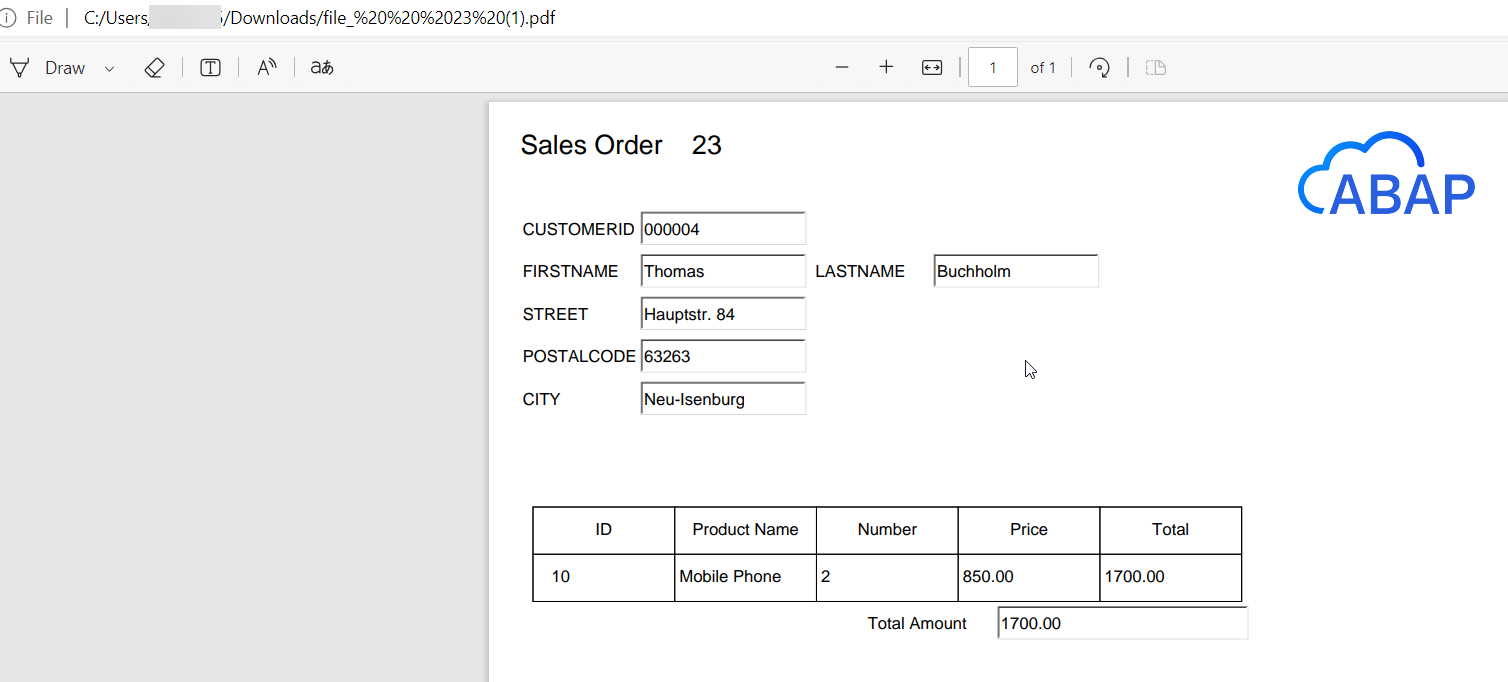
The field attachement will contain the binary data of a PDF that has been generated using the Adobe Forms Service in SAP BTP. The document contains values from the SalesOrder that has been created.
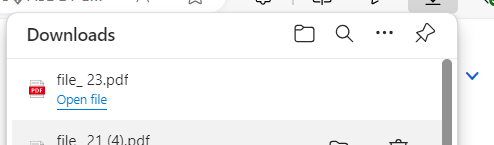
When you click on the link "file_23.pdf" the file will be offered for download and you can open it.
The demo uses a very simple PDF template 'ZREUSEUI_SALESORDER_002_ADS' with a form also called 'ZREUSEUI_SALESORDER_002_ADS'.
Requirements
- Adobe Forms Service
Download and Installation
Create a package, e.g. 'ZREUSE_SERVICES_002' and link this package with the URL of this repository.
Known Issues
The import of the change document object 'ZREUSE_SO_002' currently fails. As a result you have to create the same after the import of the repository manually.
Click to expand!
- Right click on the package where you have imported this repository.
- Choose New --> Other repository object from the context menue.
- Search for Change and select Change Document Object.
- Press Next.
- Enter the following values:
- Name: 'ZREUSE_SO_002'.
- Description: 'Change Documents'.
- Press Next.
- Select or create a transport request.
- Press Finish.
- Press Add and enter the following value.
- Name: 'ZREUSE_HEAD_002'.
- Press Add and enter the following value.
- Name: 'ZREUSE_ITEM_002'.
- Press Save.
- Press Ctrl+F3 to activate your changes.
How to obtain support
Create an issue in this repository if you find a bug or have questions about the content.
For additional support, ask a question in SAP Community.
Contributing
If you wish to contribute code, offer fixes or improvements, please send a pull request. Due to legal reasons, contributors will be asked to accept a DCO when they create the first pull request to this project. This happens in an automated fashion during the submission process. SAP uses the standard DCO text of the Linux Foundation.
License
Copyright (c) 2024-2026 SAP SE or an SAP affiliate company. All rights reserved. This project is licensed under the Apache Software License, version 2.0 except as noted otherwise in the LICENSE file.
Details
Sources
Sources are graph entities: the same page may back several entries, and an unreachable source flags every row that rests on it.
Compatibility and provenance
Flavors
“Reuse services in ABAP Cloud” — SAP-samples/abap-platform-reuse-services — README
Contributors
History in the atlas
- First seen.
For your agent
- Ref
artifact:sap-samples-abap-platform-reuse-services- JSON
- /artifacts/sap-samples-abap-platform-reuse-services.json
- MCP
- Connecting an agent