@cap-js/ord
Generates Open Resource Discovery documents from a CAP model.
Facts
Where it sits
Who is behind it

In the atlas: maintains 34@cap-jsmaintainerAlbin RamovicContributes to this

In the atlas: contributes to 1@aramovic79Christian GeorgiContributes to this

In the atlas: maintains 1, contributes to 53@chgeoChristian SchüringsContributes to this

In the atlas: contributes to 25@cschueringsDuc Tai LyContributes to this

In the atlas: contributes to 1@ductailySimon HeimlerContributes to this

In the atlas: contributes to 1@FannonHenry BrinkContributes to this

In the atlas: contributes to 2@henrybrinkjeevitha011Contributes to this

In the atlas: contributes to 6@jeevitha011Matthias KieferContributes to this

In the atlas: contributes to 1@KegCoderKrish BhardwajContributes to this

In the atlas: contributes to 1@Krish-Bhardwaj-SAPMariusPerleSAPContributes to this

In the atlas: contributes to 1@MariusPerleSAP27 contributors
Before choosing this
Conditions
LicenceSAP Developer License Agreement 3.2 CAP§ 1, 2, 3A cds-plugin is used with SAP CAP materials, or an artifact is explicitly identified as a CAP plugin or application.
- § 1 License. Productive customer applications are limited to SAP BTP or another SAP-licensed platform, and mass extraction to a non-SAP product is restricted except where solely required for SAP interoperability.
- § 2 Intellectual Property. The agreement retains SAP's rights in the covered materials and limits making APIs, tools or software available to third parties, while preserving ownership of customer applications subject to SAP's underlying rights.
- § 3 Artificial Intelligence Training. The agreement prohibits use of the covered materials and customer applications for training artificial-intelligence models or systems.
What it declares
Every artifact
- Type
- CDS plugin
- Origin
- By SAP
- Runtime
- Node.js
As a CDS plugin
- Declared for
- >=8.9.4
- Distributed through
- npm
Connections
Describing a service for clients, registries and discovery
Download
Install
npm add @cap-js/ordDerived from the package name. No recipe recorded; the README has the configuration.
Learn more
- SAP ORD Made Simple: What It Does and Why It’s Crucial in your SAP Landscape + Purpose and ValueSAP ORD Made Simple: What It Does and Why It’s Crucial in your SAP Landscape + Purpose and ValueExplains Open Resource Discovery (ORD), the metadata protocol SAP services use to self-describe their APIs, events and entity types for discovery across SAP Integration Suite, SAP Business Data Cloud and SAP Datasphere. Points to SAP's @cap-js/ord as the reference implementation that lets CAP applications publish ORD-compliant metadata, the piece metadata publishing marks as beyond the EDMX and CSN the core emits on its own. Shows how to confirm ORD support for a published API by checking its ORD ID on the SAP Business Accelerator Hub.Yogananda, published 2026-03-01Yogananda, SAP Community
README
quoted from cap-js/ord under Apache-2.0, readCDS Plugin for ORD
About this project
This plugin adds support for the Open Resource Discovery (ORD) protocol for CAP based applications. When you add the ORD plugin, your application gains a single entry point, which allows to discover and gather machine-readable information or metadata about the application. You can use this information to construct a static metadata catalog or to perform a detailed runtime inspection of your actual system instances / system landscapes.
For more information, have a look at the Open Resource Discovery page.
⚠ By installing this plugin, the metadata describing your CAP application will be made openly accessible. If you want to secure your CAP application's metadata, configure
basicauthentication by setting the environment variables or updating the.cdsrc.jsonfile. The plugin prioritizes environment variables, then checks.cdsrc.json. If neither is configured, metadata remains publicly accessible.
AI Coding Agent Skills
This project ships two Claude Code skills under .skills/ that AI coding agents can use to assist with common tasks:
| Skill | Description |
|---|---|
integrate-ord-plugin | Step-by-step guide for integrating @cap-js/ord into a CAP Node.js project — installation, .cdsrc.json configuration, authentication, and verification. |
custom-ord-annotations | Reference for all @ORD.Extensions.* CDS annotations — title, description, version, visibility, consumption bundles, and more. |
Requirements and Setup
Installation
npm install @cap-js/ordNote:
@cap-js/openapiand@cap-js/asyncapipackages have been migrated from peerDependencies to dependencies inpackage.json. As a result, using globally installed packages may lead to conflicts. If conflicts arises donpm uninstall -g @cap-js/openapi @cap-js/asyncapiand thennpm installin your project directory.
Authentication
The ORD Plugin supports multiple authentication strategies that can be configured through environment variables or .cdsrc.json. Authentication types are automatically detected based on the presence of their configuration - no explicit types array is needed.
Supported Authentication Methods:
- Open: No authentication (default when no other auth is configured)
- Basic: HTTP Basic Authentication with bcrypt-hashed passwords
- CF mTLS: Cloud Foundry mutual TLS authentication
- DwC mTLS: Data Warehouse Cloud mutual TLS authentication
Multiple Authentication Strategies: You can configure multiple authentication methods simultaneously (e.g., both basic and cf-mtls). The plugin implements an Express-like middleware pattern that tries each configured strategy in order until one succeeds.
Note: When any secure authentication method is configured, open authentication is automatically disabled to ensure security. The ORD document will reflect all active authentication strategies.
Open
The open authentication type is the default and bypasses authentication checks. It is automatically used when no other authentication is configured.
Basic Authentication
Configure Basic Authentication using environment variables or .cdsrc.json:
Option 1: Environment Variable
BASIC_AUTH='{"admin":"$2y$05$..."}'Option 2: Configuration File
Add to your .cdsrc.json:
{
    "cds": {
        "ord": {
            "authentication": {
                "basic": {
                    "credentials": {
                        "admin": "$2y$05$..."
                    }
                }
            }
        }
    }
}
To generate bcrypt hashes, use the htpasswd utility:
htpasswd -Bnb <user> <password>This will output something like admin:$2y$05$... - use only the hash part (starting with $2y$) in your BASIC_AUTH JSON.
Important
Make sure to use strong passwords and handle the BASIC_AUTH environment variable securely. Never commit real credentials or .env files to version control.
Using htpasswd in your environment
-
Platform independent:
Prerequisite is to have NodeJS installed on the machine.
npm install -g htpasswdAfter installing package globally, command
htpasswdshould be available in the Terminal. -
macOS:
Installation of any additional packages is not required. Utility
htpasswdis available in Terminal by default. -
Linux:
Install apache2-utils package:
# Debian/Ubuntu
sudo apt-get install apache2-utils

# RHEL/CentOS
sudo yum install httpd-tools
CF mTLS Authentication
Configure Cloud Foundry mutual TLS authentication for SAP BTP Cloud Foundry environments. Possible values include 'sap:cmp-mtls:v1' and 'sap.businesshub:mtls:v1'.
Production Configuration with UCL (Recommended)
For SAP UCL (Unified Customer Landscape) integration, enable mTLS in .cdsrc.json and configure UCL endpoints via environment variable:
{
    "ord": {
        "authentication": {
            "cfMtls": true
        }
    }
}
# Example configuration of the CF_MTLS_TRUSTED_CERTS environment variable
export CF_MTLS_TRUSTED_CERTS='{
"configEndpoints": ["https://your-ucl-endpoint/v1/info"],
"rootCaDn": ["CN=SAP Cloud Root CA,O=SAP SE,L=Walldorf,C=DE"],
"accessStrategies": ["sap:cmp-mtls:v1", "sap.businesshub:mtls:v1"]
}'Production Configuration with Custom Certificates
For custom certificates without UCL:
# Example configuration of the CF_MTLS_TRUSTED_CERTS environment variable
export CF_MTLS_TRUSTED_CERTS='{
  "certs": [{"issuer": "CN=My CA,O=MyOrg", "subject": "CN=my-service,O=MyOrg"}],
  "rootCaDn": ["CN=My Root CA,O=MyOrg"],
  "accessStrategies": ["sap:cmp-mtls:v1", "sap.businesshub:mtls:v1"]
}'
Development Configuration
For local development, configure the full mTLS settings directly in .cdsrc.json:
{
    "ord": {
        "authentication": {
            "cfMtls": {
                "rootCaDn": ["CN=Test Root CA,O=MyOrg,C=DE"],
                "accessStrategies": ["sap:cmp-mtls:v1","sap.businesshub:mtls:v1"],
                "certs": [
                    {
                        "issuer": "CN=Test CA,O=MyOrg,C=DE",
                        "subject": "CN=test-client,O=MyOrg,C=DE"
                    }
                ]
            }
        }
    }
}
Note: For detailed CF mTLS configuration options, see the documentation.
DwC mTLS Authentication
Configure DwC mTLS when a gateway forwards the verified client certificate in the
DwC-Forwarded-Client-Cert header. Its configuration has the same certs,
rootCaDn, configEndpoints, and optional accessStrategies fields as CF mTLS;
use dwcMtls and DWC_MTLS_TRUSTED_CERTS instead. See the
DwC mTLS documentation for an example.
Multiple Authentication Strategies
You can configure multiple authentication methods simultaneously to support different client types. Authentication types are detected automatically based on configuration presence:
Configuration in .cdsrc.json:
{
  "cds": {
    "ord": {
      "authentication": {
        "basic": {
          "credentials": {
            "admin": "$2y$05$..."
          }
        },
        "cfMtls": {
          "certs": [...],
          "rootCaDn": [...]
        }
      }
    }
  }
}
How it works:
- Authentication types are detected based on what you configure (no
typesarray needed) - The plugin tries each configured authentication strategy in order
- The first strategy that successfully authenticates the request is used
- If a request includes Basic auth headers, Basic authentication is attempted
- If a request includes mTLS certificate headers, CF mTLS authentication is attempted
- The ORD document automatically includes all configured authentication methods in its
accessStrategies
Example scenarios:
- Basic + CF mTLS: Supports both API clients using Basic auth and services using mTLS certificates
- Basic only: Only clients with valid Basic auth credentials can access
- CF mTLS only: Only clients with trusted certificates can access
Usage
Programmatic API
const cds = require("@sap/cds");
require("@cap-js/ord");
const csn = cds.context?.model || cds.model;
const ord = cds.compile.to.ord(csn);Command Line
Build all ord related documents, including ordDocument and services resources files:
Supported Options
- workers:
- Description: Max number of workers to use during execution
- Supported Values:
- workers=N - max number of N (int) workers (e.g. 2 workers => workers=2)
- workers=NC - max N (int/float) workers per CPU core (e.g. max 5 workers on a 2 core machine, max 10 workers on a 4 core machine => workers=2.5C)
- Default Value: max 1 worker per every 2 CPU cores => workers=0.5C
- Usage Examples:
cds build --for ord --opts 'workers=2'cds build --for ord --opts 'workers=2.5C'cds build --for ord --opts 'workers=0.5C'(equivalent tocds build --for ord)
cds build --for ord

# By default, it will be generated in /gen/ord dir, e.g.:
# done > wrote output to:
#    gen/ord/ord-document.json
#    gen/ord/sap.sample:apiResource:AdminService:v1/AdminService.edmx
#    gen/ord/sap.sample:apiResource:AdminService:v1/AdminService.oas3.json
Only compile ord document:
cds compile <path to srv folder> --to ord [-o] [destinationFilePath]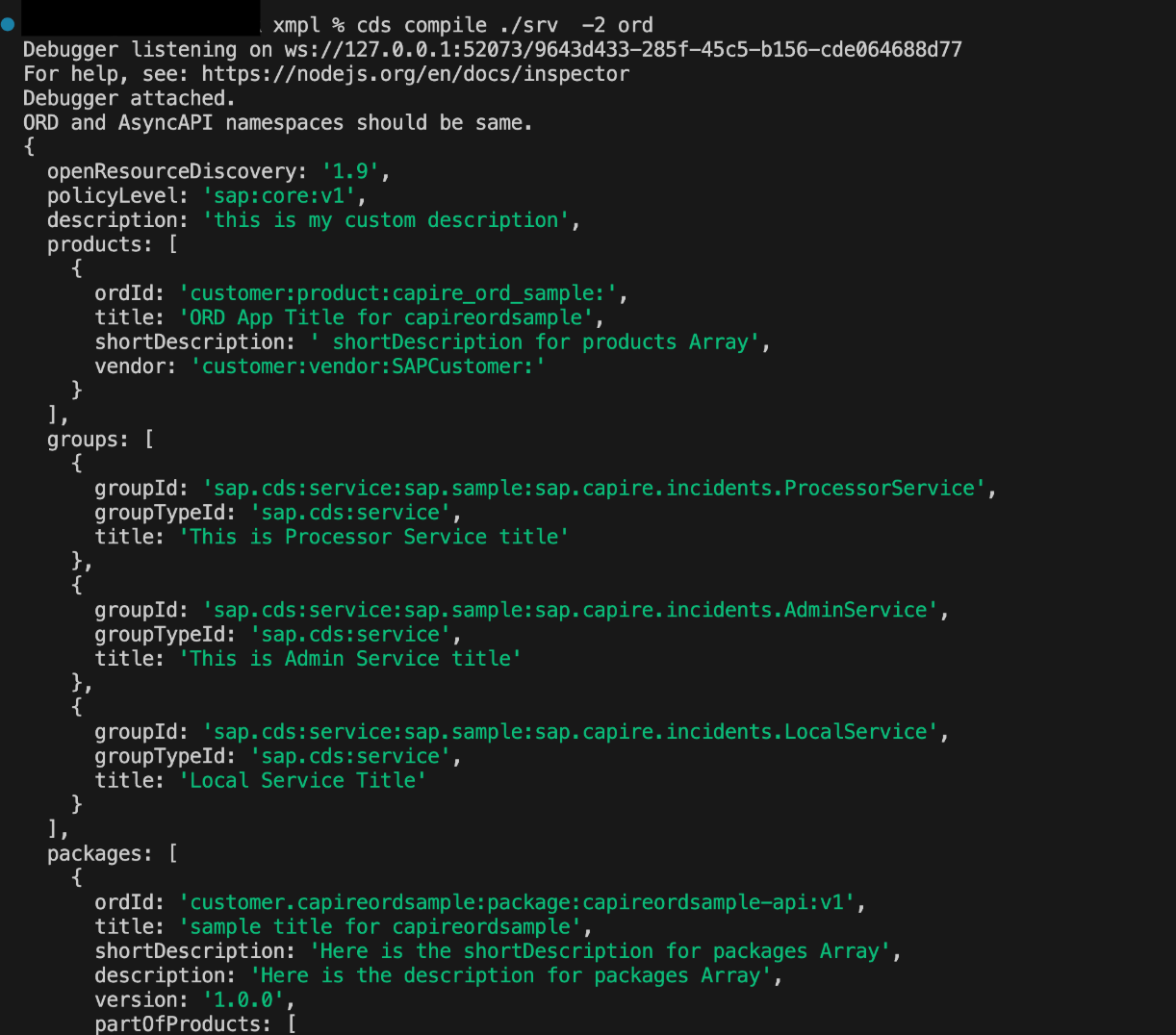
ORD Endpoints
- Run
cds watchin the application's root. - Check the following relative paths for ORD information -
/.well-known/open-resource-discovery,/ord/v1/documents/ord-document.
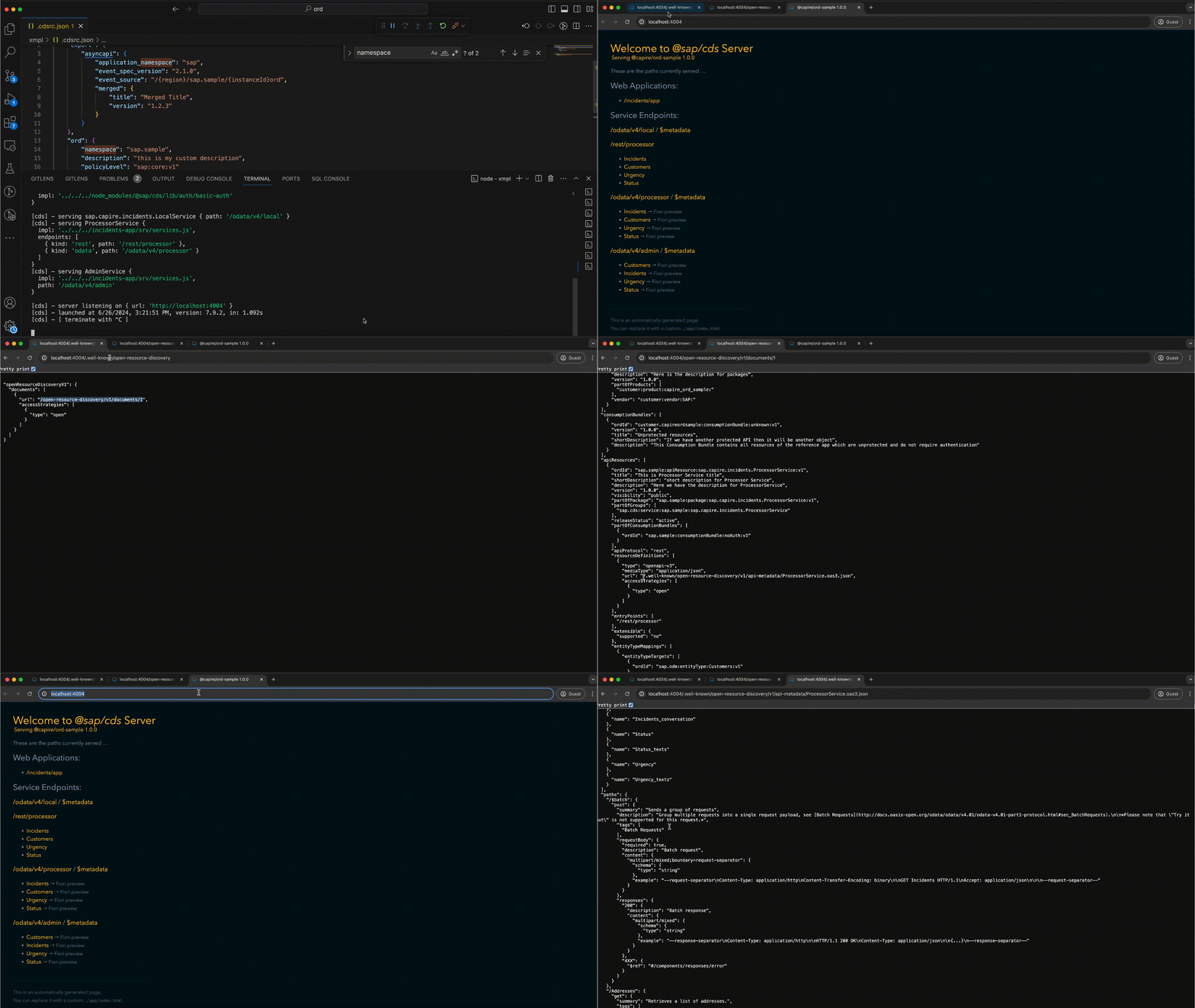
Customizing ORD Document
You can find more information, such as how to customize the ORD Document, in this document.
How to setup dev environment and run xmpl locally
-
Install dependency
npm i -
Run xmpl application
cd xmpl/

# watch xmpl application
cds watch

# build resources files
cds build --for ord
Support, Feedback, Contributing
This project is open to feature requests/suggestions, bug reports etc. via GitHub issues. Contribution and feedback are encouraged and always welcome. For more information about how to contribute, the project structure, as well as additional contribution information, see our Contribution Guidelines.
Security / Disclosure
If you find any bug that may be a security problem, please follow our instructions at in our security policy on how to report it. Please do not create GitHub issues for security-related doubts or problems.
At the current state, the plugin will expose static metadata with open access. This means that the CAP resources are described and documented openly, but it does not imply that the resources themselves can be accessed.
If you have a need to protect your metadata, please refrain from installing this plugin until we support metadata protection.
Code of Conduct
We as members, contributors, and leaders pledge to make participation in our community a harassment-free experience for everyone. By participating in this project, you agree to abide by its Code of Conduct at all times.
Licensing
Copyright 2024 SAP SE or an SAP affiliate company and cds-plugin-for-ord contributors. Please see our LICENSE for copyright and license information. Detailed information including third-party components and their licensing/copyright information is available via the REUSE tool.
History
Other 3
Notes
What's Changed
- Fix: stable dev environment and remove from calesi setup
- Feat: use relative path for resource definitions URL and compatible with windows
- Fix: no event or apiResources when build ord files
Full Changelog: https://github.com/cap-js/ord/compare/v1.3.0...v1.3.1
Other 11
Notes
What's Changed
- Improved handling of
apiResources,eventResources, andentityTypeMappings - Added support for metadata protection with Basic Auth
- Enabled multitenancy and extensibility
- Special handling for services of type
dataProduct - Enhanced support for Business Accelerator Hub
- Improved ORD document compilation and interop CSN generation
- Updated OpenAPI and AsyncAPI versions and dependencies
- Ensured REUSE compliance and updated license files
- Fixed issues related to resource filtering, default values, and endpoint display
- Updated contribution guide with Calesi setup steps
- Various code quality improvements and project maintenance
Full Changelog: https://github.com/cap-js/ord/compare/v1.2.0...v.1.3.0
- Improved handling of
Other 6
Notes
What's Changed
- Version of ORD document generation
- API short description
- Default lastUpdate and consumptionBundles properties
- Filtering of resources based on visibility
- Added Unit tests
- Added logger
Other 9
Notes
What's Changed
- Use package name for product ORD IDs
- ORD.md documentation update
- cds version upgrade to 8
- Omit the consumption bundles creation
- Add Unit tests
- Extend custom ORD content
- Extend @ORD.Extensions
- Custom ORD content update
- Disclaimer: metadata access is currently open access
Full Changelog: https://github.com/cap-js/ord/compare/v1.0.3...v1.1.0
Features 1
Notes
Added
- Initial release that enables generation of ORD document for CAP based applications.
Others providing
Compare all 5 on the Metadata publishing page →- com.sap.cds:cds-feature-ordcom.sap.cds:cds-feature-ordGenerates Open Resource Discovery (ORD) documents from a CAP Java application's model, a single entry point that a static metadata catalog or a runtime landscape inspection can read.sap official, capGenerates Open Resource Discovery documents from a CAP Java modelfrom CAP
- @cap-js/asyncapi@cap-js/asyncapiExports AsyncAPI documents describing the events a CAP service emits and consumes.sap official, capExports AsyncAPI documents for a CAP service's eventsfrom CAP
- @cap-js-community/common@cap-js-community/commonSix independent features for CAP services in one package: replication cache, migration check, rate limiting, a Redis client broker, a local HTML5 repository and a CDM builder.community org, capSix CAP features in one package, from replication cache to rate limitsfrom CAP
- @sap/cds@sap/cdsThe CAP Node.js runtime, which compiles the CDS model, serves the services declared in it, answers generic requests before any handler runs, and loads every cds-plugin.sap official, capCAP Node.js runtimefrom CAP
Details
Sources
Sources are graph entities: the same page may back several entries, and an unreachable source flags every row that rests on it.
Compatibility and provenance
Contributors
















History in the atlas
- First seen.
For your agent
- Ref
artifact:cap-js-ord- JSON
- /artifacts/cap-js-ord.json
- MCP
- Connecting an agent