SAP-samples/teched2022-DT181
A TechEd 2022 workshop that blends a custom SAPUI5 app with SAP Fiori Elements building blocks and controller extensions on one object page, starting from a CAP service in SAP Business Application Studio.
Starting from a CAP service with basic annotations, the exercises assemble a custom Fiori Elements list report and object page: adding a filter bar, a table, a chart and a micro-chart table column as building blocks through the Fiori tools Page Map, then extending the object page with a custom section and a controller extension where the building blocks run out. It runs entirely in SAP Business Application Studio, with no other setup beyond the sample scenario the first exercise generates.
Facts
Where it sits
Who is behind it

In the atlas: maintains 222@SAP-samplesmaintainerAjinkya PatilContributes to this

In the atlas: contributes to 112@ajinkyapatil8190Christian KolbowskiContributes to this

In the atlas: contributes to 3@c-koboChristian NeuContributes to this

In the atlas: contributes to 5@christianneu3 contributors
What it declares
Every artifact
- Type
- Sample
- Origin
- By SAP
As a sample
- Form
- Workshop or CodeJam material
Connections
Describing a service so a Fiori client renders it without UI code
Download
README
quoted from SAP-samples/teched2022-DT181 under Apache-2.0, readDT181 - Boost Your Productivity in Developing SAP Fiori Apps
Description
This repository contains the material for the SAP TechEd 2022 session called
DT181 - Boost Your Productivity in Developing SAP Fiori Apps.
Overview
Welcome to the workshop DT181 - Boost Your Productivity in Developing SAP Fiori Apps.
This workshop will guide you step-by-step through the process of creating a SAPUI5 custom app and blending it with the SAP Fiori Elements Flexible Programming Model which is available with SAP Fiori elements floorplans for OData V4.
Based on a SAP Cloud Application Programming Model service equipped with basic annotations, you will learn how to assemble your custom design from SAP Fiori Elements Building Blocks and leverage Controller Extensions with the help of SAP Fiori tools and the SAP Fiori Elements Flexible Programming Model.
Target Application
Making a wire frame is a great way to visualize the app.
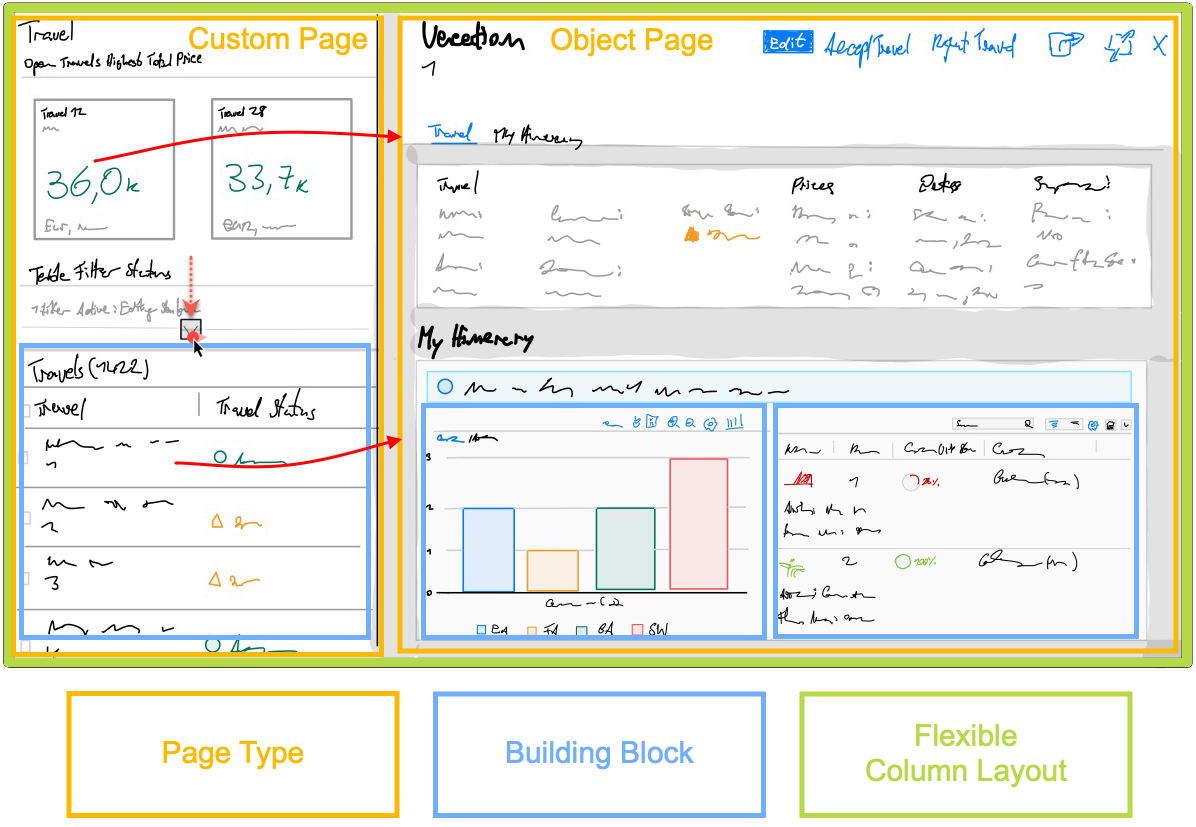
Requirements
There are no special requirements to follow the exercises in this repository.
Exercises
- Getting Started - Setting up your Development Environment
- Exercise 1 - Generating an SAP Fiori Elements App
- Exercise 2 - Flexible Programming Model: Using Fiori Elements Building Blocks on a Custom Page
- Exercise 3 - Improve Page Layout and add UI5 Freestyle Controls
- Exercise 4 - Page Map: Configuring the Object Page Layout
- Exercise 5 - Page Map: Add Micro Chart Table Column
- Exercise 6 - Flexible Programming Model: Extending the Object Page with a Custom Section and Building Blocks
- Exercise 7 - Guided Development: Adding Building Block Chart
- Exercise 8 - Page Map: Adding a Controller Extension
How to obtain support
Support for the content in this repository is available during the actual time of the online session for which this content has been designed. Otherwise, you may request support via the Issues tab.
License
Copyright (c) 2022 SAP SE or an SAP affiliate company. All rights reserved. This project is licensed under the Apache Software License, version 2.0 except as noted otherwise in the LICENSE file.
Details
Sources
Sources are graph entities: the same page may back several entries, and an unreachable source flags every row that rests on it.
Compatibility and provenance
Flavors
“assemble your **custom design** from **SAP Fiori Elements Building Blocks**” — SAP-samples/teched2022-DT181 — README
Contributors
History in the atlas
- First seen.
For your agent
- Ref
artifact:sap-samples-teched2022-dt181- JSON
- /artifacts/sap-samples-teched2022-dt181.json
- MCP
- Connecting an agent