teched2025-DA266
SAP TechEd 2025 session material for two SAP DatabricksDatabricksA unified data and AI platform. sap-bdc-mcp-server creates the Delta shares it registers with SAP Business Data Cloud in a Databricks workspace. scenarios in SAP Business Data CloudSAP Business Data CloudSAP's umbrella over the data estate: installed intelligent content and data products, a governed catalog they are published through, and a path out to SAP Databricks.sap official, btp: cashflow forecasting and payment-delay prediction with SHAP explanations.
Guided Exercise notebooks with matching Solution notebooks, numbered to be followed in order, for two scenarios run inside SAP DatabricksDatabricksA unified data and AI platform. sap-bdc-mcp-server creates the Delta shares it registers with SAP Business Data Cloud in a Databricks workspace. in SAP Business Data CloudSAP Business Data CloudSAP's umbrella over the data estate: installed intelligent content and data products, a governed catalog they are published through, and a path out to SAP Databricks.sap official, btp. The cashflow scenario shares a cashflow data product from S/4HANA into the workspace, prepares the data, trains a time-series forecast and applies it, then re-shares the enriched data product to the BDC data catalogue with sap-bdc-connect-sdk, with MLflow listed for monitoring query performance. The payment-delay scenario determines the key drivers of a delay through SHAP values, optimises hyperparameters with xgboost, configures SAP AI CoreSAP AI CoreSAP's AI service on BTP: the runtime for AI assets, and through the Generative AI Hub inside it the access to foundation models, the orchestration service with its templating, masking, filtering and grounding modules, the Prompt Registry and Document Grounding.sap official, btp orchestration services to turn the drivers into a human-readable explanation, and wraps the model as an MLflow PyFunc model for monitoring and logging. The prerequisites are an administrator's: two Unity Catalog catalogs with write access, the two shared data products, an SAP AI Core service instance with its key, two Python packages and a secret scope.
Facts
Where it sits
Who is behind it

In the atlas: maintains 222@SAP-samplesmaintainerAjay SorengContributes to this

In the atlas: contributes to 36@ajaysorengAjinkya PatilContributes to this

In the atlas: contributes to 112@ajinkyapatil8190chantakkuenContributes to this

In the atlas: contributes to 1@chantakkuenSan TranContributes to this

In the atlas: contributes to 1@d031182Neetha PucknatContributes to this

In the atlas: contributes to 2@neethapucknat5 contributors
What it declares
Every artifact
- Type
- Sample
- Origin
- By SAP
- Use as
- A reference
As a sample
- Form
- Workshop or CodeJam material
Connections
Calling a language model with tenant and credential handling solved
Training, deploying and calling predictive models on tabular data
A unified data and AI platform. sap-bdc-mcp-serversap-bdc-mcp-serverAn MCP server over SAP's BDC Connect SDK that creates, validates, publishes and deletes Databricks Delta shares as data products in SAP Business Data Cloud.independent, btp creates the Delta shares it registers with SAP Business Data CloudSAP Business Data CloudSAP's umbrella over the data estate: installed intelligent content and data products, a governed catalog they are published through, and a path out to SAP Databricks.sap official, btp in a Databricks workspace.
AI runtime on BTP with the Generative AI Hub
Data products, a governed catalog and a path to SAP Databricks
Download
README
quoted from SAP-samples/teched2025-DA266 under Apache-2.0, readDA266 - Operationalizing AI with SAP Databricks in SAP Business Data Cloud
Description
This repository contains the material for the SAP TechEd 2025 session called DA266-Operationalizing AI with SAP Databricks in SAP Business Data Cloud. It covers end-to-end workflows and scripts for two main user case scenarios Cashflow Prediction and Payment Delay Prediction. The repository is organized to support both learning (Exercise) and reference (Solution) use cases, with each scenario broken down into modular notebooks that guide you through the data science lifecycle.
Tip
- Download this github repository, you will need to upload the files into your SAP Databricks workspace
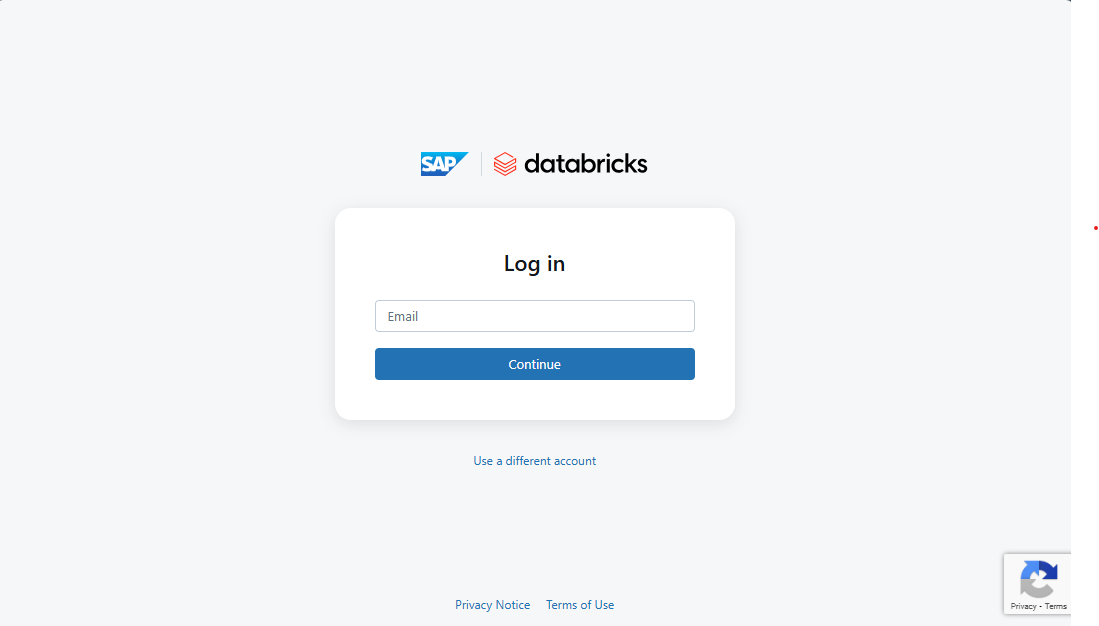
- Login the SAP Databricks instance, and apply the setups steps
- Start with the Exercise notebooks to follow the guided workflow and implement each step yourself.
- Refer to the Solution notebooks for completed code and best practices.
- Follow the notebook order (as indicated by the numbering) for a logical progression from data understanding to publishing a data product.
Loging SAP Databricks instance and first setups
-
Users and Password for SAP Databricks
- Username: ac285809uXX@sapexperienceacademy.com
- Please replace XX above with the number provided to you
- Password: Provided during the session
-
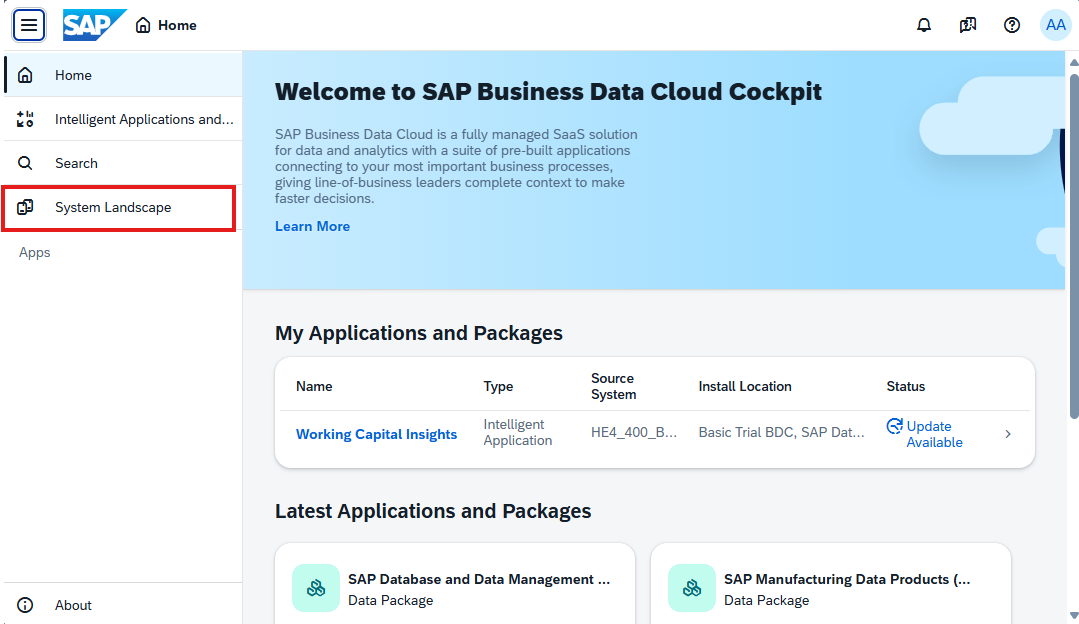
Access to SAP Business Data Cloud Cockpit: https://trial-bdc-core-3.eu10.hcs.cloud.sap/
-
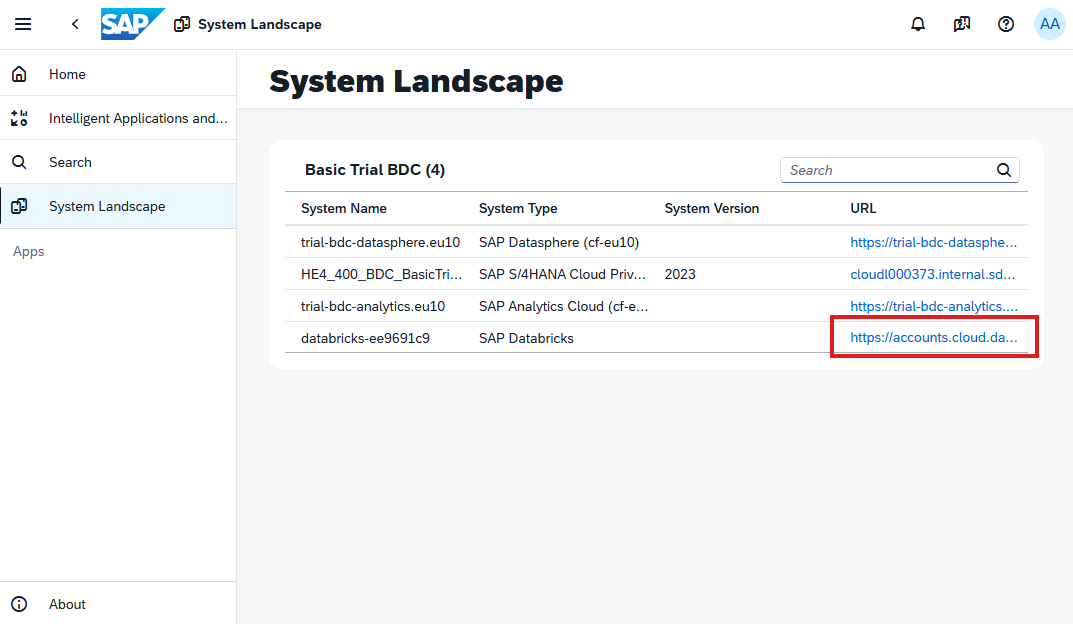
In the
System Landscapepage click on the SAP Databricks link to access the instance. The url link for that should be: https://accounts.cloud.databricks.com/select-workspace?account_id=779c1dfb-54a0-4c0b-ab10-657b3ea0e70b -
Login with the provided user creditials.
-
Before running the exercises, navigate to the Unity Catalog and check in the
My organizationfor the following catalogs:uc_cash_liquidity_forecastuc_delayed_payments
Furthermore, you will find in the
Received Deltas Sharesthe shared data products from SAP Business Data Cloud:CashflowEntry View Journal Entry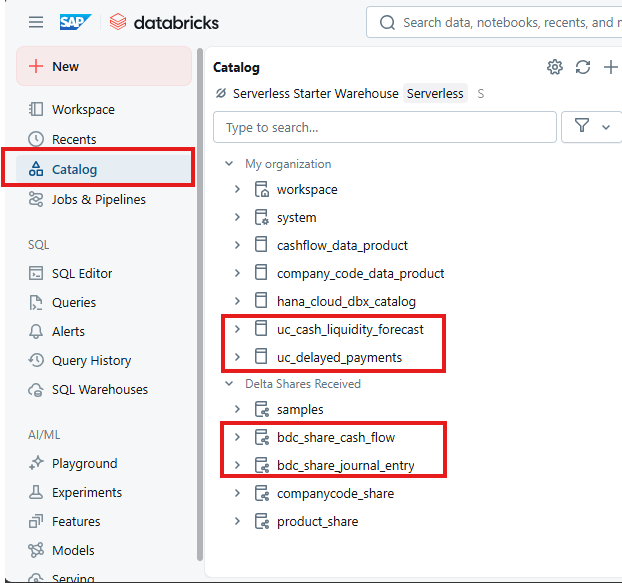
-
Download this github repository into your local PC.
-
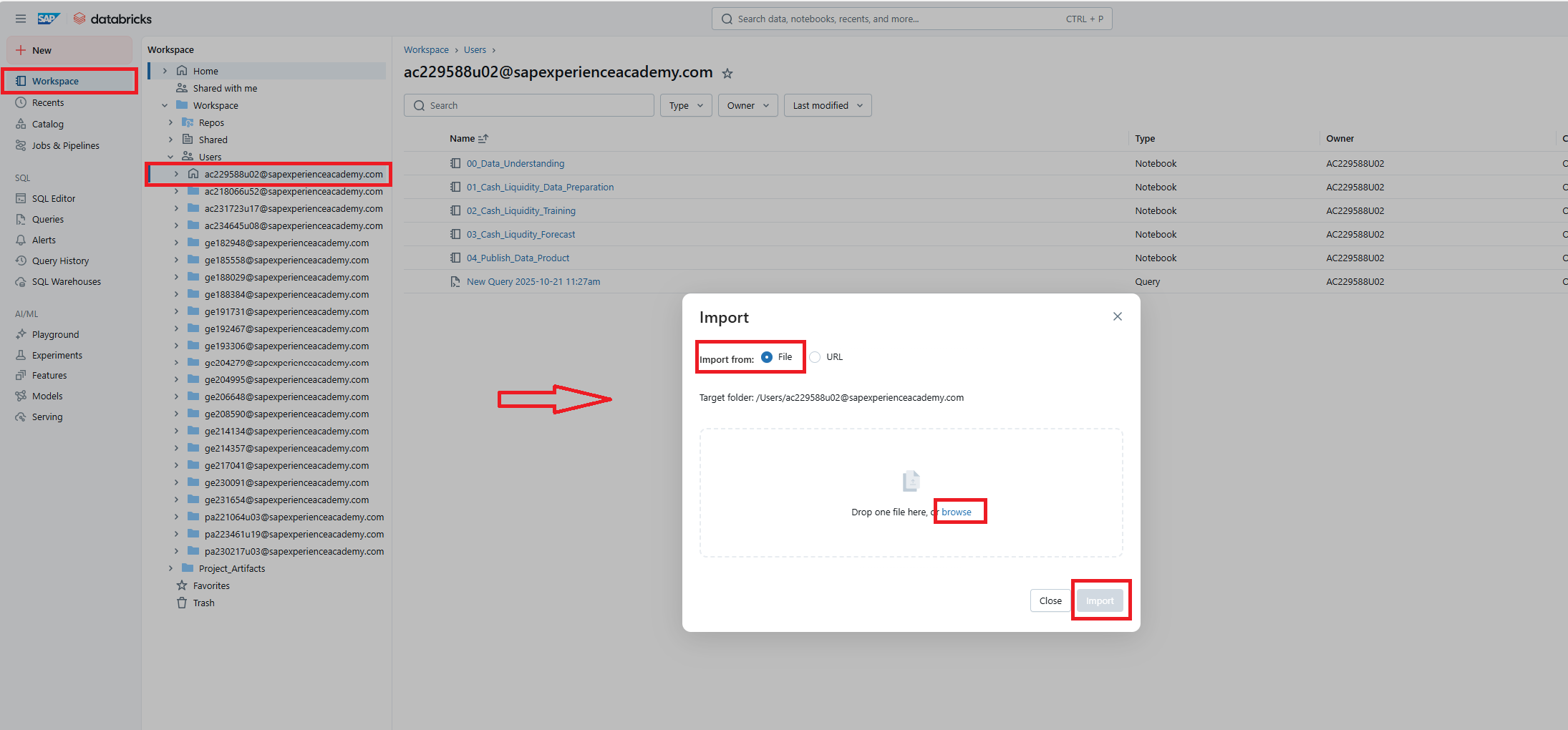
To import the notebook, navigate to your own folder (same as the user email assigned to you) under the
Workspace> Userstab. In the whitespace, right-click or use the context menu and selectImport. Then import the file in question from your system's File Explorer. -
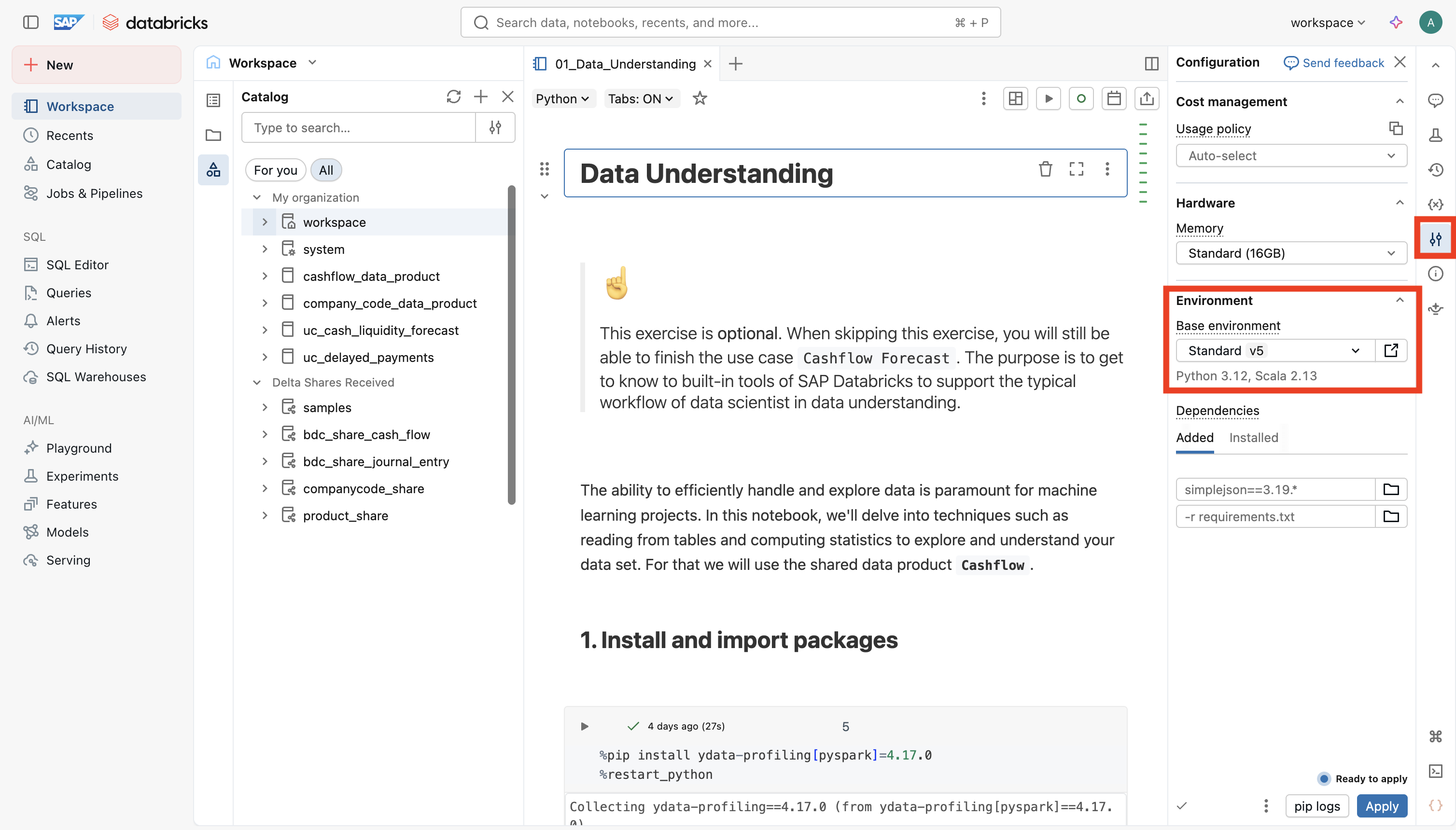
For the Python environment the exercises have been run with the python v5 which is the latest version. Note: Please check for each notebook if you have the environment set properly!
-
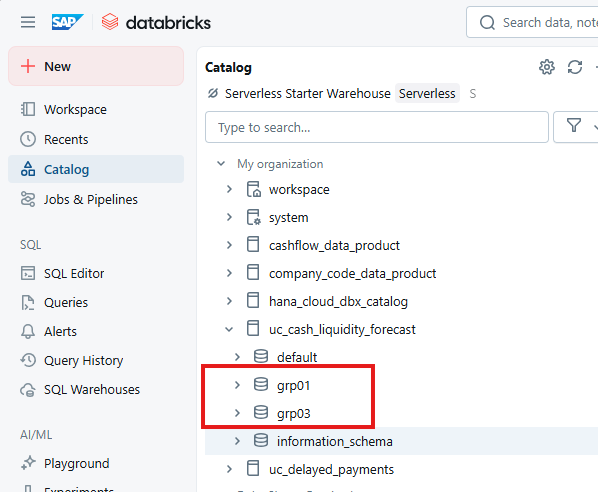
Please note, that in the exercises you will be asked to create in the catalog a
<SCHEMA>, to have a clear separation of the exercise artefacts. The<SCHEMA>will follow the pattern<catalog_name>.dsag+<last_2_digits_of_user>.-
e.g. user ac285809u01 will create correspondingly the schemas
uc_cash_liquidity_forecast.dsag01uc_delayed_payments.dsag01
-
Requirements
Following pre-requisites should have been already prepared by the system administrator:
- Unity Catalog with 2 predefined catalogs with read and write access for all users:
uc_cash_liquidity_forecastuc_delayed_payments
- The following SAP Data Products are shared and accessible by all users:
CashflowEntry View Journal Entry
- Appropriate permissions for all users to create schema within the above mentioned catalogs
- Access to a configured SAP AI Core Service intance with corresponding service key
- Access to required Python packages
sap-bdc-connect-sdksap-ai-sdk-gen
- Configured SECRET SCOPE
- This step has already been done by the administrator to facilitate the sharing process. However, if you need to do it on you own you can follow the steps described here to create a secret scope: To create a secret scope you can either use the following URL
https://<databricks-instance>#secrets/createScope. Replace<databricks-instance>with the workspace URL of your Databricks deployment. - Alternatively, you can run the following command in the terminal by clicking on the terminal icon on the lower right corner:
databricks secrets create-scope sap-bdc-connect-sdk. - The secret scope only has to be created once and can be made accessible to all workspace users by either toggling
manage principaltoall workspace usersor via the terminal using the following commanddatabricks secrets put-acl sap-bdc-connect-sdk users READ. To check whether the assignment worked, you can then use the commanddatabricks secrets list-acls sap-bdc-connect-sdk. - A full explanation can be found here https://docs.databricks.com/aws/en/security/secrets/example-secret-workflow
- This step has already been done by the administrator to facilitate the sharing process. However, if you need to do it on you own you can follow the steps described here to create a secret scope: To create a secret scope you can either use the following URL
Exercises
-
Use Case 1: Cashflow Forecast
-
Scenario: The data scientist wants to forecast the cashflow for the upcoming 6 months and make the result available for reporting. For that he needs to access the cashflow data product from S/4HANA, apply ML/AI model training and forecasting, and share / install the enriched data product in BDC Cockpit and Datasphere.
-
Key Learnings:
- Sharing Data Product to SAP Databricks
- Enrich Data Product with ML/AI Insights, e.g.
- Data understanding and preparation
- Train time series forecast model
- Apply cashflow forecast
- MLFlow for monitoring query performance
- Re-sharing custom Data Product to BDC Data Catalog with
sap-bdc-connect-sdk
-
Exercises:
-
Solution
-
-
Use Case 2: Payment Delay Prediction
-
Scenario: The data scientist needs to predict payment delays and run a root cause analysis. He has to provide the key drivers for the delays and an explanation in a human readable manner. For that he combines SAP Databricks and AI Foundation LLM capabilities to derive the insights. These insights will help the Financial Controller to better understand the payment delays problem and to derive the corresponding actions to mitigate.
-
Key Learnings:
- Advanced ML/AI capabilities
- Determine key drivers for payment delay via SHAP Values
- Visualizing SHAP Values
- Hyperparameter optimization with xgboost
- Integrating SAP AI Core Service for LLM modelling
- Configure SAP AI Core
orchestration services
- Configure SAP AI Core
- Implementing MLFlow custom model with PyFunc for monitoring and logging
- Advanced ML/AI capabilities
-
Exercises:
-
Solution
-
Contributing
Please read the CONTRIBUTING.md to understand the contribution guidelines.
Code of Conduct
Please read the SAP Open Source Code of Conduct.
How to obtain support
Support for the content in this repository is available during the actual time of the online session for which this content has been designed. Otherwise, you may request support via the Issues tab.
License
Copyright (c) 2024 SAP SE or an SAP affiliate company. All rights reserved. This project is licensed under the Apache Software License, version 2.0 except as noted otherwise in the LICENSE file.
Details
Sources
Sources are graph entities: the same page may back several entries, and an unreachable source flags every row that rests on it.
Compatibility and provenance
History in the atlas
- First seen.
For your agent
- Ref
artifact:sap-samples-teched2025-da266- JSON
- /artifacts/sap-samples-teched2025-da266.json
- MCP
- Connecting an agent