ui5-p13n-tutorial
A ten-exercise UI5 tutorial that adds sap.m.p13n.Engine personalisation and sap.ui.fl.variants.VariantManagement to a custom table control: column selection, sorting, grouping, filtering and saved variants.
A custom table control gains column selection, sorting and grouping, filtering with an info toolbar, a changed control state and saved variants, one exercise at a time, built on the two UI5 components the tutorial puts in focus: sap.m.p13n.Engine and sap.ui.fl.variants.VariantManagement. Two further exercises, both marked optional, add a custom filter control and filtering on a GridList. Its own framing is that it is for a custom control you already have and would like to enhance with filtering, sorting or other options, and that the knowledge then applies in your own application or control development.
Facts
Where it sits
Who is behind it

In the atlas: maintains 222@SAP-samplesmaintainerAjinkya PatilContributes to this

In the atlas: contributes to 112@ajinkyapatil8190Janik KöppelContributes to this

In the atlas: contributes to 3@koeppelLucaContributes to this

In the atlas: contributes to 3@lucamueller013 contributors
What it declares
Every artifact
- Type
- Sample
- Origin
- By SAP
As a sample
- Form
- A tutorial's companion code
Connections
Changing a delivered app as layered changes that survive upgrades
Download
README
quoted from SAP-samples/ui5-p13n-tutorial under Apache-2.0, readP13nify Everything - Personalization for Any Control
Description
In this tutorial you can learn how to add personalization capabilities to almost every control. If you have a custom control that you would like to enhance with filtering, sorting, or other options this tutorial is for you.
You will be lead through the enablement of a custom control using the assets provided by UI5. You can also learn, how to use those assets to enhance your application with personalization capabilities. You should be able to apply your knowledge afterwards in your own application or control development.
UI5 Components in Focus
Exercises
- Setup the Application
- Custom Table for P13n (sources, run app)
- Engine Registration (sources, run app)
- Column Selection (sources, run app)
- Sorting and Grouping (sources, run app)
- Filtering & Info Toolbar (sources, run app)
- Changing Control State (sources, run app)
- VariantManagement (sources, run app)
- (optional) Custom Filter Control (sources, run app)
- (optional) Filtering with GridList (sources, run app)
Final Application
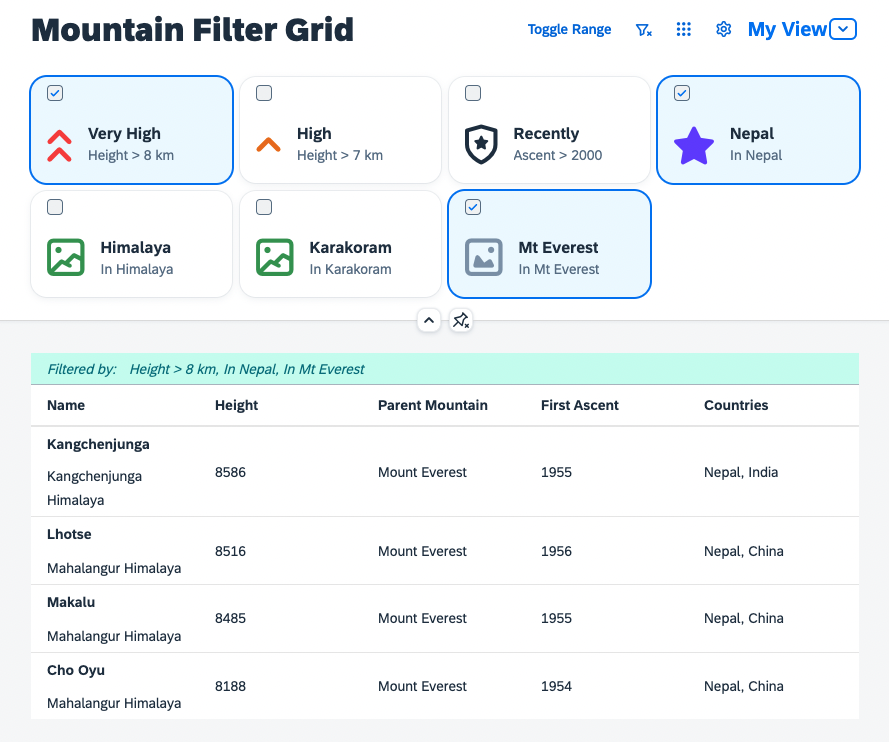
This is the application you build during the tutorial:
Requirements
Technical Requirements
- A current version of Node.js (preferably 18+)
- A code editor supporting TypeScript development
Required Knowledge
- TypeScript knowledge to avoid blind copy and paste without knowing what's going on.
- UI5 knowledge, as this tutorial focuses on the P13n concepts.
Known Issues
No known issues.
How to obtain support
This repository is provided as-is, without any support guarantees. However, you are welcome to report issues via the Issues tab and we'll see what we can do to fix them.
Contributing
If you wish to contribute code, offer fixes or improvements, please send a pull request. Due to legal reasons, contributors will be asked to accept a DCO when they create the first pull request to this project. This happens in an automated fashion during the submission process. SAP uses the standard DCO text of the Linux Foundation.
License
Copyright (c) 2023 SAP SE or an SAP affiliate company. All rights reserved. This project is licensed under the Apache Software License, version 2.0 except as noted otherwise in the LICENSE file.
Details
Sources
Sources are graph entities: the same page may back several entries, and an unreachable source flags every row that rests on it.
Compatibility and provenance
Contributors
History in the atlas
- First seen.
For your agent
- Ref
artifact:sap-samples-ui5-p13n-tutorial- JSON
- /artifacts/sap-samples-ui5-p13n-tutorial.json
- MCP
- Connecting an agent