ABAP CSV Manager
A configurable CSV reader and writer for ABAP, with per-field format, validation and column-mapping options, reading into a flat or a dynamically typed internal table.
Reading a CSV into ABAP normally means fixing a target structure up front; a reader here turns CSV data into a flat internal table with read, or into a dynamically typed table with read_with_reference when the columns are not known beforehand, and a writer turns a table back into a CSV string. Delimiter, quote character, line terminator, escape character and quoting mode are configurable, along with per-country date, time and number formats, and individual fields can be included, excluded, reordered or given a custom header label. Reading also validates each field against its target type, for example flagging an implausible date such as 31 February, and collects the failures for get_validations_fails() instead of silently discarding them; custom validation methods can be registered per field, run before or after the value is converted.
Facts
Where it sits
Who is behind it

In the atlas: maintains 2, contributes to 2@zenrosadiramaintainer
What it declares
Every artifact
- Type
- Package
- Origin
- Independently maintained
As a package
- Where it runs
- does not say
- Distributed through
- abapGit
Connections
Turning typed data into JSON, CSV or protobuf and back
Download
README
quoted from zenrosadira/abap-tbox-csvman under MIT, readABAP CSV Manager
Requirement
☁️ ABAP for Cloud Development edition
Looking for On-Premise edition? Switch to onprem-main branch.
Quick Start
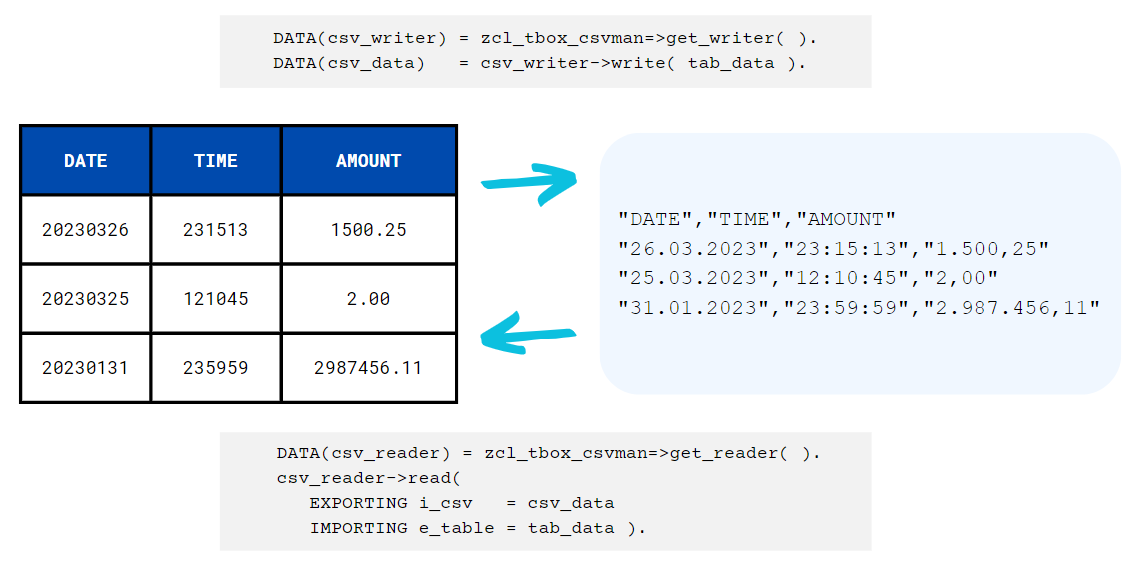
🧑💼 I need to read a CSV, how can I do it?
🧙 Create a reader instance and call read method.
DATA(csv_reader) = zcl_tbox_csvman=>get_reader( ).
csv_reader->read(
  EXPORTING i_csv   = csv_data
IMPORTING e_table = tab_data ).🧑💼 I need to create a CSV, how can I do it?
🧙 Create a writer instance and call write method.
DATA(csv_writer)  = zcl_tbox_csvman=>get_writer( ).
DATA(csv_data)    = csv_reader->write( tab_data ).

* csv_data is a string, if you need the output as a string table:
DATA(csv_data)    = csv_reader->write_to_string_table( tab_data ).
Some remarks about reading a CSV
When you call the read method of a reader instance,
csv_data can be:
- a string
- a table of strings
- a table with one-component table line
tab_data must be a flat table: a table whose table line is a structure, whose components are simple elements.
Sometimes you need to read a CSV but you don't know a priori how many and which columns it contains. In these cases you still have two ways to read it:
- you can get a reference variable to a table whose fields (of type string) are named F1, F2, ..., FN and so on;
DATA(csv_ref) = csv_reader->read_with_reference( csv_data ).

FIELD-SYMBOLS <tab> TYPE STANDARD TABLE.
ASSIGN csv_ref->* TO <tab>.

LOOP AT <tab> ASSIGNING FIELD-SYMBOL(<row>).
DATA(row_index) = sy-tabix.
  DO.
    ASSIGN COMPONENT sy-index OF STRUCTURE <row> TO FIELD-SYMBOL(<val>).
    IF sy-subrc <> 0.
      EXIT.
    ENDIF.
    DATA(info) = |The value at row { row_index } and column { sy-index } is { <val> }| ).
  ENDDO.
ENDLOOP.

* You can always get a statically typed table using dereference method
csv_reader->dereference( EXPORTING i_reference = csv_ref IMPORTING e_table = safe_data ).- or you can get a transposed version of the CSV, that is, a table with two fields: the row index and a table containing the list of its values, for each column.
DATA(csv_tab_t) = csv_reader->read_with_transposition( csv_data ).

LOOP AT csv_tab_t INTO DATA(csv_row).
  LOOP AT csv_row-row INTO DATA(row_values).

    DATA(info) = |The value at row { csv_row-row_index } and column { row_values-column_index } is { row_values-value }| ).

  ENDLOOP.
ENDLOOP.

* You can always get a standard table, if you have a suitable variable, using detranspose method
csv_reader->detranspose( EXPORTING i_transposed = csv_tab_t IMPORTING e_table = safe_data ).
General Configuration
🧑💼 Can I decide which character to use as delimiter, quotechar, and line terminator? And what about escaping special characters?
🧙 Once instantiated you can configure the csv management object:
csv_man->delimiter( `;` ).fields delimiter, default is semicolon:;. Here "delimiter" is a synonym of "separator".csv_man->quotechar( `"` ).*to quote fields, default is none.csv_man->end_of_line( `|` ).line-terminator char, default is Carriage Return and Line Feed%_CR_LF.csv_man->escapechar( `/` ).to escape special characters, both in read and write mode.csv_man->doublequote( ).to escape a quotechar character with a quotechar character.csv_man->quoting( ztbox_cl_csvman=>c_quote_minimal ).to restrict quoting application, with these options:zcl_tbox_csv_writer=>c_quote_allto apply quotechar character to all fields (this is default behaviour if a quotechar is set);zcl_tbox_csv_writer=>c_quote_minimalto apply quotechar character only to fields containing special characters;zcl_tbox_csv_writer=>c_quote_nonnumericto apply quotechar character only to non-numeric fields;zcl_tbox_csv_writer=>c_quote_noneto never quote fields (this is the default behaviour if no quotechar is set).
csv_man->header( ).to write/expect an header line in write/read mode. Default isabap_true.csv_man->header_desc( ).to use field name as header text field. You can column text by calling->label( )method on fields level, see below for details.
Output Format
🧑💼 Nice, but I want also control fields output format, especially for date/time/numeric fields.
🧙 Sure, you can use these configurations:
csv_man->date_format( `yyyy/dd/mm` ).to decide output format for date fields in write mode, or to declare expected format for date fields in read mode. You can use any format containing "dd", "mm", "yy", "yyyy" and an optional separator. Default isdd.mm.yyyy.csv_man->time_format( `hh:mm:ss` ).same as above, but for time fields. Default ishh:mm:ss.csv_man->number_format( ).three options here:1.234.567,89Xto output numbers like1,234,567.89Yto output numbers like1 234 567,89
csv_man->country( `US` ).to output date, time and numbers according to a country rules (less specific than previous methods).csv_man->decimals( 3 ).to write numerical fields with the specified decimals precision.csv_man->condense_values( ).to remove leading and trailing spaces. Default isabap_false.csv_man->keep_init( ).to maintain initial values: if set toabap_falsea numerical field containing only 0, as well as an initial date or initial time, became blank in write mode. Default isabap_true.csv_man->alignment( cl_abap_format=>a_right ).to align fields content according to the following options:cl_abap_format=>a_leftto justify text on the left (default option);cl_abap_format=>a_rightto justify text on the right.
Fields Properties
🧑💼 Ok cool. These are global configuration, valid for all the fields, aren't they? What if I want to set some format property to one field and a different property to another?
🧙 You can restrict the application of the previous methods to a single field by calling field( ) method first, also chaining other methods, e.g.:
csv_man->field( `AMOUNT_USD` )->number_format( `X` ).
csv_man->field( `AMOUNT_EUR` )->country( `IT` )->decimals( 2 ).
You can also exclude some fields from the CSV generation/reading process using exclude( ) method:
csv_man->field( `MANDT` )->exclude( ).Viceversa, if you work with a table having too many fields, you can generate or reading a CSV considering only a small subset of fields using include( ) method. Once you have called include for a field, only fields for which include has been called will be considered.
csv_man->field( `MATNR` )->include( ).
csv_man->field( `WERKS` )->include( ).
If the order of the fields in the table does not match the columns in the CSV to generate or read, you can map each field with the corresponding csv-column position:
csv_man->header_desc( abap_true ).
csv_man->field( `MATNR` )->position( 2 )->label( `Material!!!` ).
csv_man->field( `WERKS` )->position( 1 )->label( `THE Plant` ).
In this way, the following table:
| MATNR | WERKS |
|---|---|
| AAAA01 | US01 |
| BBBB02 | US02 |
gives this CSV as output:
THE Plant,Material!!!
US01,AAAA01
US02,BBBB02
label( ) method set a custom header text when header_desc( ) is used.
Validations
🧑💼 Regarding reading the csv, is there an automatism to help identify errors in the data?
🧙 We have it. When a CSV is read, some validation checks are performed according to the data type of the target fields: date fields (if not blank) must be a valid and plausible date; time fields (if not blank) must contain a valid and plausible time, numerical fields (if not blank) must contain a valid number. Whenever any of these check fail, the contents are not transferred. You get a detailed report for the validation fails by calling get_validations_fails( ).
Suppose you read this CSV:
31/02/2023,10:45:19,"1900,20"
28/02/2023,25:00:00,"-894,23"
31/12/2022,00:00:01,"12A4,43"
into a table with structure DATE [D(8)] | TIME [T(6)] | AMOUNT [P(7) DEC(2)]. The output will be
| DATE | TIME | AMOUNT |
|---|---|---|
| 00000000 | 104519 | 1900.20 |
| 20230228 | 000000 | -894.00 |
| 20221231 | 000001 | 0.00 |
And the get_validation_fails( ) output is this table:
| ROW | COL | TABLE_FIELD | CSV_VALUE | SAP_VALUE | CHECK_FAILED |
|---|---|---|---|---|---|
| 1 | 1 | DATE | 31/02/2023 | 20230231 | DATE_PLAUSIBILITY |
| 2 | 2 | TIME | 25:00:00 | 250000 | TIME_PLAUSIBILITY |
| 3 | 3 | AMOUNT | 12A4,43 | 12A4.43 | VALID_NUMB |
You can add also custom validation checks: it must be an instance method with the following signature
METHODS sample_check IMPORTING i_value TYPE string RETURNING VALUE(r_fail) TYPE flag.If, e.g., an object sample_object implements method sample_check, you can add this check to a field:
csv_man->field( `FIELD_NAME` )->add_post_validation(
  check_object  = sample_object
  check_method  = `SAMPLE_CHECK` ).
in two ways: as a pre validation by calling method add_pre_validation( ), and as a post validation by calling method add_post_validation( ).
- Pre-validation checks are applied to raw data: parameter
valueis a string containing exactly the content of the field in the CSV; - Post-validation checks are applied to transformed data: parameter
valueis a string containing the field value interally formatted for the SAP data type field target, according to the format options configured.
fail = abap_true means the check has not been passed.
Installation
Install this project using abapGit 
History
Other 3
Notes
ABAP CSV Manager compatibile with ABAP for Cloud Development.
- Code refactored and simplified
- Totally Cloud-Ready
- There is no longer automatic application of conversion exits: I can't find released API in Cloud Development that can do this job, suggestions are welcome
Others providing
Compare all 12 on the Serialisation page →- ABAP JSON APIABAP JSON APIA JSON renderer and parser for ABAP built on the standard identity transformation, adding automatic camelCase conversion and support for polymorphic arrays.independent, abapJSON renderer and parser for ABAP with camelCase conversionfrom ABAP
- zcl_mdp_jsonzcl_mdp_jsonAn ABAP library that generates and parses JSON strings, documented in the repository's wiki rather than its README, which names no ABAP release or installation method.independent, abapABAP library generating and parsing JSON stringsfrom ABAP
- JSON2ABAPTypeJSON2ABAPTypeA generator that produces an ABAP type definition from a JSON structure, with the repository holding the code and pointing to a blog article and an SAP blog post for the rest.independent, abapGenerator of ABAP type definitions from JSON structuresfrom ABAP
- abap-protobufabap-protobufAn implementation of Protocol Buffers in ABAP, stating support for proto2 syntax only; its repository description names gRPC, which the README says nothing further about.independent, abapProtocol Buffers (proto2) implementation in ABAPfrom ABAP
- ZASISZASISThe ABAP String Interpreter: an ABAP component that reads named field values out of an unstructured string, such as a barcode or scanner payload, through regex RuleSets configured in a Fiori app and called from ABAP or over HTTP.independent, abapRegex RuleSets that read barcode strings into named fieldsfrom ABAP
- ABAP ArchitectABAP ArchitectAn Eclipse plug-in that generates ABAP type definitions and parsing code from a pasted JSON or XML sample and creates the matching DDIC objects in a connected system over ADT.independent, abapEclipse plug-in turning JSON or XML into ABAP types and DDIC objectsfrom ABAP
- ABAP to JSON serializer and deserializerABAP to JSON serializer and deserializerAn open-source Z* version of SAP's standard /UI2/CL_JSON class, which serialises ABAP data to JSON and reads it back, installed with abapGit and needing SAP_BASIS 7.31 or later.sap official, abapOpen-source Z* version of /UI2/CL_JSON for ABAP to JSONfrom ABAP
- ajsonajsonA JSON parser and serialiser for ABAP that parses into a flexible, unstructured node tree rather than a fixed target structure, converting to one only when asked through to_abap.independent, abapJSON parser and serialiser for ABAP with a node treefrom ABAP
- sbcgua/text2tabsbcgua/text2tabA library that parses TAB-delimited text into an internal table of any flat ABAP structure, with non-strict, header and type-less modes, and serialises tables back to text in configurable formats.independent, abapParser of TAB-delimited text into ABAP internal tables and backfrom ABAP
- ABAP JSON Encoder/DecoderABAP JSON Encoder/DecoderA JSON encoder and decoder for ABAP, modelled on Go's encoding/json package, installed through abapGit with no other required package and documentation still marked under construction.independent, abapJSON encoder and decoder for ABAP, modelled on Go's encoding/jsonfrom ABAP
- ZwdCSVZwdCSVA CSV parser and generator for ABAP that follows RFC 4180, including line breaks embedded inside quoted fields, for strings and for files on the application server and the frontend.independent, abapRFC 4180 CSV parser and generator for ABAPfrom ABAP
Details
Sources
Sources are graph entities: the same page may back several entries, and an unreachable source flags every row that rests on it.
Compatibility and provenance
abaplint
Flavors
“ABAP for Cloud Development edition” — zenrosadira/abap-tbox-csvman — README
“Looking for *On-Premise* edition? Switch to *onprem-main* branch.” — zenrosadira/abap-tbox-csvman — README
History in the atlas
- First seen.
For your agent
- Ref
artifact:zenrosadira-abap-tbox-csvman- JSON
- /artifacts/zenrosadira-abap-tbox-csvman.json
- MCP
- Connecting an agent