SAP-samples/btp-ai-core-consumption-monitor
A CAP and React dashboard that tracks SAP AI CoreSAP AI CoreSAP's AI service on BTP: the runtime for AI assets, and through the Generative AI Hub inside it the access to foundation models, the orchestration service with its templating, masking, filtering and grounding modules, the Prompt Registry and Document Grounding.sap official, btp capacity unit consumption across SAP BTP subaccounts against a monthly spending limit.
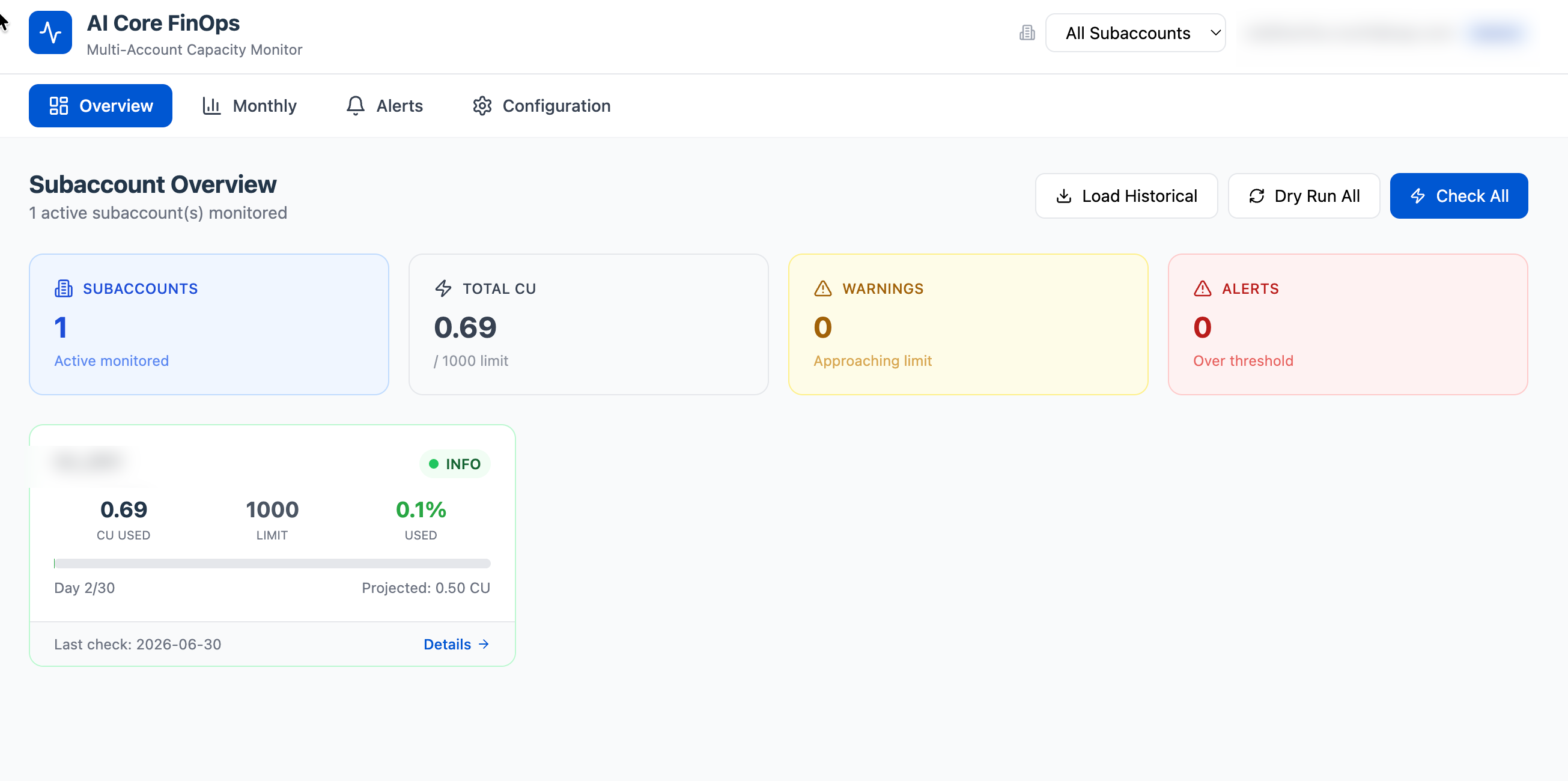
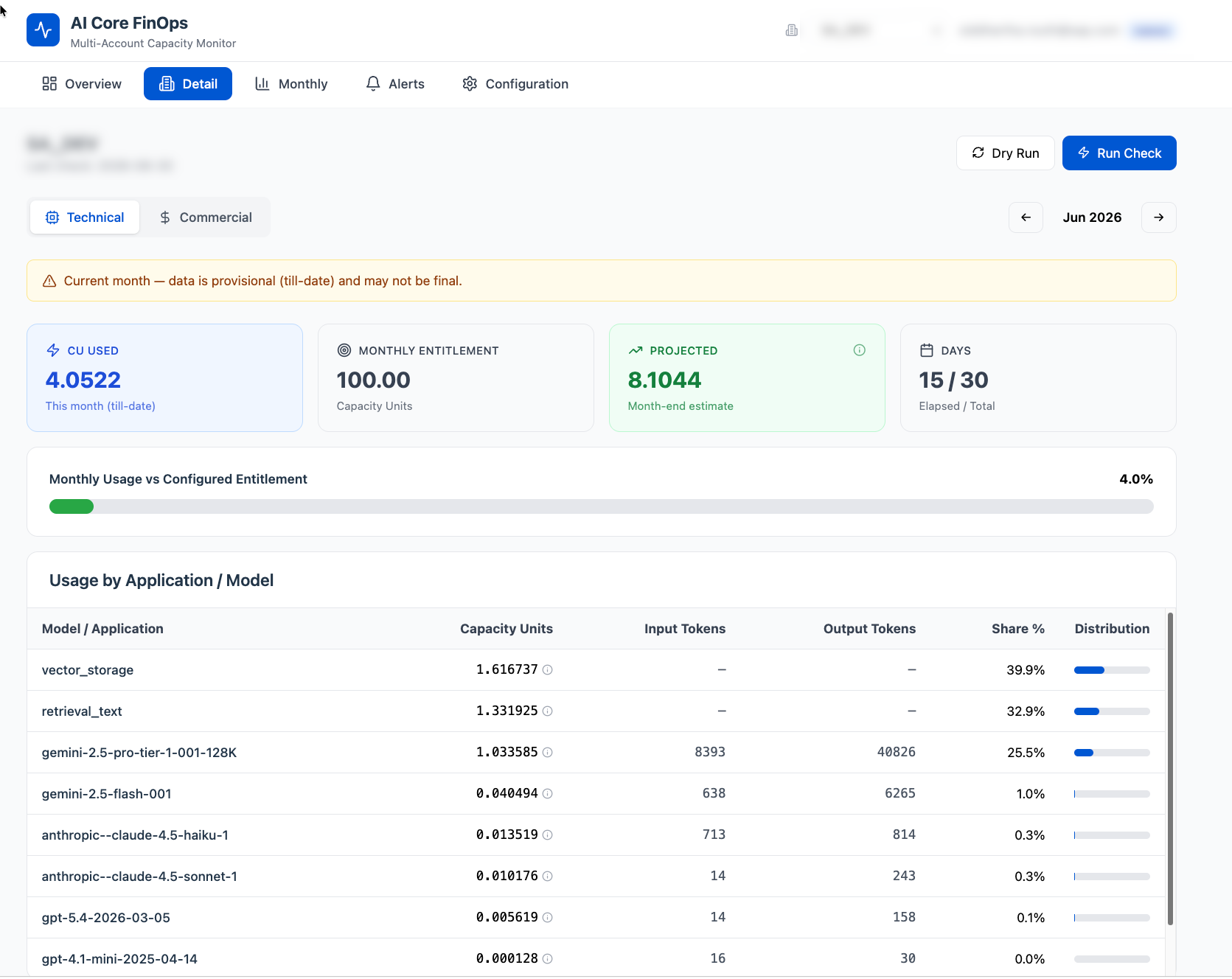
AI Core usage is billed in capacity units, and a FinOps team wants to see the spend before the monthly bill arrives rather than after. This application reads it from the SAP BTP Usage and Accounting Service APIs and shows a technical view of capacity units and tokens per model, a commercial view of billing cost, and an AI breakdown view of cost per token and capacity units by type. Subaccounts are entered by hand, or discovered from the account hierarchy when the optional SAP Cloud Management ServiceSAP Cloud Management Service for SAP BTPREST APIs for the administration of a BTP account: directories and subaccounts, entitlements and quotas, subscriptions to multitenant applications, environment instances, and the events those operations raise.sap official, btp integration is bound, each with its own monthly spending limit and alerts; a breach is notified by SMTP email, by an HTTP endpoint of your own or through SAP Alert Notification serviceSAP Alert Notification service for SAP BTPA BTP service with one API for publishing alerts and subscribing to them: built-in events about BTP resources and an application's own, delivered to a communication channel or monitoring tool.sap official, btp. The daily check at 07:00 UTC runs by itself only once the SAP Job Scheduling serviceSAP Job Scheduling serviceCalls an application's endpoint on a schedule or once at a time and keeps the log of every run — cron without a process of your own to keep alive.sap official, btp resource is uncommented in mta.yaml; without it the Run Check and Check All buttons pull fresh data on demand.
Facts
Where it sits
Who is behind it

In the atlas: maintains 222@SAP-samplesmaintainerSiddhartha RouthContributes to this

In the atlas: contributes to 1@SiddharthaRouth1 contributor
Before choosing this
Conditions
PracticalFunctional boundary
Never as the figure a billing decision rests on: the repository states this is not a replacement for the official billing documents, that the information it provides is purely indicative, and that it recommends verifying against the official BTP Cockpit usage reports. It is published as a sample or reference implementation and says it is not intended for production use without review, testing and hardening.
What it declares
Every artifact
- Type
- Sample
- Origin
- By SAP
- Use as
- A reference
As a sample
- Form
- A reference application
Connections
Tracking what a cloud account consumes, with budget warnings
Publishing and subscribing to alerts about BTP resources and apps
REST APIs for SAP BTP usage per metric and monthly cost
OAuth server issuing JWTs and holding scopes for BTP apps
Named, credentialed addresses of other systems resolved at runtime
Managed SAP HANA database service on BTP
Stores UI5 and HTML5 apps and serves them through the approuter
REST APIs for SAP BTP usage per metric and monthly cost
Publishing and subscribing to alerts about BTP resources and apps
REST APIs for administering a BTP account
Calls an application endpoint on a schedule and logs each run
Download
README
quoted from SAP-samples/btp-ai-core-consumption-monitor under Apache-2.0, readSAP BTP AI Core Consumption Monitor
Disclaimer: This tool is provided as-is and is not covered by SAP Support. This is not a replacement of the official billing documents you receive from SAP. The information provided by this tool is purely indicative. SAP does not guarantee the accuracy of the data displayed.
Description
This application monitors and visualizes SAP AI Core capacity unit (CU) consumption across multiple BTP subaccounts. It fetches data from the SAP BTP Usage and Accounting Service (UAS) APIs and provides a Technical View (CU per model, tokens), a Commercial View (billing costs), and an AI Breakdown View (cost per token, CU by type) of AI Core usage — across a full BTP account hierarchy when the optional Cloud Management Service integration is enabled.
The application helps FinOps teams and platform administrators to:
- Discover BTP subaccounts automatically via the Cloud Management Service (CMS) hierarchy, or manage them manually
- Track AI Core spending against monthly budgets with per-subaccount alerts
- Identify which models consume the most capacity units and at what cost per token
- Get notified when consumption approaches configured thresholds (SMTP email or SAP ANS)
- View historical consumption trends month over month with Recharts visualizations
- Navigate the account hierarchy — Business Unit → Application → Subaccount — from the header
Architecture
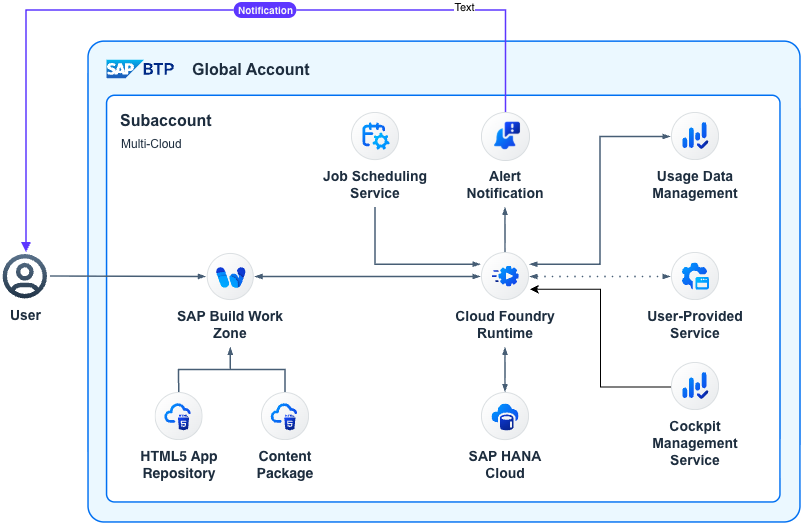
| Layer | Technology |
|---|---|
| Backend | SAP Cloud Application Programming Model (CAP) — Node.js |
| Database | SAP HANA Cloud (HDI Container) |
| Frontend | React 18, Vite, Tailwind CSS, Recharts, Lucide Icons |
| Authentication | SAP XSUAA |
| Data Source | BTP Usage & Accounting Service (UAS) APIs |
| Account Discovery | SAP Cloud Management Service (CMS) — optional |
| Notifications | SMTP (Nodemailer), HTTP API endpoint, SAP Alert Notification Service |
Requirements
SAP BTP Services
| Service | Plan | Required |
|---|---|---|
| SAP HANA Cloud | hdi-shared | ✅ Yes |
| XSUAA | application | ✅ Yes |
| UAS (Usage & Accounting) | reporting-ga-admin | ✅ Yes |
| Destination Service | lite | ✅ Yes |
| HTML5 Application Repository | app-host | ✅ Yes |
| Job Scheduling Service | standard | ❌ Optional (Recommended) |
| Alert Notification Service | standard | ❌ Optional |
| Cloud Management Service (CIS) | central-viewer | ❌ Optional |
Development Tools
- Node.js >= 20
- SAP Cloud Application Programming Model (CAP) —
@sap/cds-dk - Cloud Foundry CLI (
cf) - MBT Build Tool (
mbt) — for MTA builds - SAP BTP Cloud Foundry environment with HANA Cloud
Download and Installation
1. Clone
git clone https://github.com/SAP-samples/btp-ai-core-consumption-monitor.git
cd btp-ai-core-consumption-monitor
2. Install Dependencies
npm install
cd app/dashboard && npm install && cd ../..
3. Build & Deploy
The project uses scripts defined in package.json. Execute them with npm run <script>:
| Script | Command | Description |
|---|---|---|
build | npm run build | Build the MTA archive (ai-core-finops.mtar) |
deploy | npm run deploy | Deploy the MTA archive to Cloud Foundry |
undeploy | npm run undeploy | Remove all deployed apps and services |
# Build MTA archive
npm run build

# Deploy to Cloud Foundry
npm run deploy

# Undeploy (removes all services)
npm run undeploy
Configuration
Without CMS (Manual Mode)
After deployment, subaccounts are managed manually:
- Open the application and navigate to Configuration
- Under Subaccount Discovery, click Add Subaccount Manually
- Enter the Subaccount ID (UUID), display name, and monthly spending limit
- Click "Run Check" on the Overview page to fetch current data
- Click "Load Historical" to backfill historical consumption data
With CMS (Auto-Discovery Mode)
When the Cloud Management Service binding is present (see CMS Account Discovery), the app discovers your BTP account hierarchy automatically:
- On startup, the app syncs your Global Account hierarchy into the Subaccounts master list
- Navigate to Configuration → Subaccount Discovery to see all discovered subaccounts grouped by Business Unit and Application
- Click Enable Monitoring on a subaccount to opt it in and set a spending limit and alert thresholds
- Use the Sync from CMS button to refresh the hierarchy at any time
A subaccount that has not been opted in is visible in the discovery list but will not appear in the monitoring overview or trigger alerts.
Security – Roles & Authorization
The application defines two role templates in xs-security.json:
| Role Collection | Role Template | Access |
|---|---|---|
AICore_FinOps_Admin | Admin | Full access — manage configuration, trigger checks, view all data, manage notifications |
AICore_FinOps_Viewer | Viewer | Read-only — view dashboards, monthly data, and alert history |
Role-based authorization is enforced via @requires annotations in srv/service.cds. Assign the role collections to users or user groups in the BTP Cockpit after deployment.
In local development (
cds watch), a dummy auth provider is used — all users are treated as Admin. In production ([production]profile inpackage.json), XSUAA is enforced.
CMS Account Hierarchy Discovery
The optional Cloud Management Service (service: cis, plan: central-viewer) integration lets the app discover your full BTP account hierarchy — Global Account → Business Units (L1 directories) → Applications (L2 directories) → Subaccounts — without any manual data entry.
Enabling CMS
-
Ensure
cis central-vieweris entitled in your subaccount (BTP Cockpit → Entitlements) -
Create the service instance:
cf create-service cis central-viewer ai-core-finops-cms -
In
mta.yaml, uncomment the CMS resource and its binding:# modules > ai-core-finops-srv > requires: - name: ai-core-finops-cms # resources: - name: ai-core-finops-cms type: org.cloudfoundry.managed-service parameters: service: cis service-plan: central-viewer -
Rebuild and redeploy.
The app reads the CMS API endpoint and OAuth token URL directly from the service binding (credentials.endpoints.accounts_service_url and credentials.uaa.url) — no manual region configuration is needed.
Fallback Behavior
If the CMS service is not bound, the app boots normally and operates in manual mode. The Subaccount Discovery UI will show the Add Manually form instead of the hierarchy browser.
Job Scheduling (Optional but Recommended)
The application can use the SAP BTP Job Scheduling Service for automated daily monitoring checks. Without it, use the "Run Check" or "Check All" buttons in the UI to pull fresh data on demand.
Enabling Job Scheduler
- In
mta.yaml, uncomment the scheduler resource and binding:
# modules > ai-core-finops-srv > requires:
- name: ai-core-finops-scheduler

# resources:
- name: ai-core-finops-scheduler
  type: org.cloudfoundry.managed-service
  parameters:
    service: jobscheduler
    service-plan: standard
    config:
enable-xsuaa-support: true- Rebuild and redeploy.
The application will automatically register a daily cron job (07:00 UTC) that:
- Fetches current month usage for all active subaccounts (technical + commercial)
- Stores/updates consumption records in HANA
- Sends notifications (email/ANS) if thresholds are breached
- On days 1–3 of a new month, also finalizes the previous month's commercial data
Notifications
The application supports three notification channels, all configurable from the Configuration → Notification Settings section:
| Channel | Description |
|---|---|
| SMTP Email | Rich HTML emails with CU breakdown, progress bars, and model details. Supports TLS/STARTTLS. |
| API Endpoint | Posts a JSON alert payload to any HTTP endpoint (e.g. a webhook, a custom notification bus). Supports Bearer token and custom header auth. |
| SAP ANS | Structured events posted to the SAP Alert Notification Service. |
All channels can be independently enabled/disabled. Use the Send Test buttons in the UI to verify connectivity before enabling live alerts.
Known Issues
- Token data (input/output) is only available for GenAI models (GPT, Claude, etc.) — vector_storage and retrieval_text show "—" for tokens
- Commercial cost data from
monthlySubaccountsCostmay not be immediately available for the current month (SAP processes with a delay) - The "Projected" metric uses simple linear extrapolation and may not reflect actual month-end usage
- CMS sync discovers only subaccounts that are children of L1 (Business Unit) and L2 (Application) directories; subaccounts placed directly under the Global Account are not picked up
How to Obtain Support
This is an open-source sample application. SAP does not provide official support.
If you encounter issues or have questions:
- 🐛 Bugs — Please create an issue in this repository
- 💡 Feature Requests — Open an issue with the
enhancementlabel - 💬 Questions — Use GitHub Discussions or open an issue
For additional support, ask a question in SAP Community.
Please check existing issues before creating new ones.
Contributing
If you wish to contribute code, offer fixes or improvements, please send a pull request. Due to legal reasons, contributors will be asked to accept a DCO when they create the first pull request to this project. This happens in an automated fashion during the submission process. SAP uses the standard DCO text of the Linux Foundation.
Code of Conduct
We as members, contributors, and leaders pledge to make participation in our community a harassment-free experience for everyone. Please read and follow our Code of Conduct.
License
Copyright 2026 SAP SE or an SAP affiliate company and btp-ai-core-consumption-monitor contributors. Please see our LICENSE for copyright and license information. Detailed information including third-party components and their licensing/copyright information is available via the REUSE tool.
Note: This application is provided as a sample/reference implementation. It is not intended for production use without proper review, testing, and hardening. SAP does not guarantee the accuracy of the data displayed and recommends verifying against the official BTP Cockpit usage reports.
Details
Sources
Sources are graph entities: the same page may back several entries, and an unreachable source flags every row that rests on it.
Compatibility and provenance
Contributors
History in the atlas
- First seen.
For your agent
- Ref
artifact:sap-samples-btp-ai-core-consumption-monitor- JSON
- /artifacts/sap-samples-btp-ai-core-consumption-monitor.json
- MCP
- Connecting an agent