SAP-samples/smartrecruiters-ai-recruiting-custom-agent
A recruiting agent on SAP AI CoreSAP AI CoreSAP's AI service on BTP: the runtime for AI assets, and through the Generative AI Hub inside it the access to foundation models, the orchestration service with its templating, masking, filtering and grounding modules, the Prompt Registry and Document Grounding.sap official, btp that reads SmartRecruiters pipeline data to flag stalled candidates, score disengagement risk and forecast hiring timelines from fixed funnel rates.
Built on SAP AI CoreSAP AI CoreSAP's AI service on BTP: the runtime for AI assets, and through the Generative AI Hub inside it the access to foundation models, the orchestration service with its templating, masking, filtering and grounding modules, the Prompt Registry and Document Grounding.sap official, btp, the agent compares how long candidates sit in each SmartRecruiters pipeline stage against a benchmark for that stage, scores each candidate's disengagement risk from inactivity, seniority and stage, and forecasts time-to-fill from the fixed funnel rates the code carries: 85% of offers become hires, 50% of interviews become offers, 40% of reviews become interviews. A ReAct loop built with LangChain and LangGraphLangGraphAn agent runtime that describes a loop as a graph of nodes and edges and carries the state between turns. For the things here it is the harness an agent's planning and tool calls run in, and the state that a CDS checkpointer persists. calls deterministic Python functions for the analysis itself and uses the model only to read the question and phrase the answer; daily digests and alerts are pushed to a Microsoft Teams channel through an incoming webhook instead of waiting for a recruiter to open a dashboard. It also ships a multi-currency compensation-analytics module and a toolkit for assessing a migration from SAP SuccessFactorsSAP SuccessFactorsSAP's cloud HR suite, run by SAP as software as a service and reached from outside through its OData APIs. The product behind the SAP SuccessFactors door: what is entered there is the tooling that reaches into it, and the product itself is not an option. Its Extensibility service is a BTP service and sits on the BTP door, where SAP's catalogue lists it. Recruiting, and it runs on mock data with no credentials, falling back to keyword-based routing and template responses when SAP AI Core is unavailable.
Facts
Where it sits
Who is behind it

In the atlas: maintains 222@SAP-samplesmaintainerGuilherme DellagustinContributes to this

In the atlas: contributes to 27@dellagustin-sapSid BhattacharyaContributes to this

In the atlas: contributes to 1@sidbhat2 contributors
What it declares
Every artifact
- Type
- Sample
- Origin
- By SAP
- Use as
- A reference
As a sample
- Form
- does not say
Connections
Building an agent into your own application
AI runtime on BTP with the Generative AI Hub
SAP's cloud HR suite, run by SAP as software as a service and reached from outside through its OData APIs. The product behind the SAP SuccessFactors door: what is entered there is the tooling that reaches into it, and the product itself is not an option. Its Extensibility service is a BTP service and sits on the BTP door, where SAP's catalogue lists it.
AI runtime on BTP with the Generative AI Hub
Download
README
quoted from SAP-samples/smartrecruiters-ai-recruiting-custom-agent under Apache-2.0, readBuilding an AI Recruiting Agent with SAP AI Core








Extending SmartRecruiters with predictive intelligence — helping recruiters act before candidates disengage.
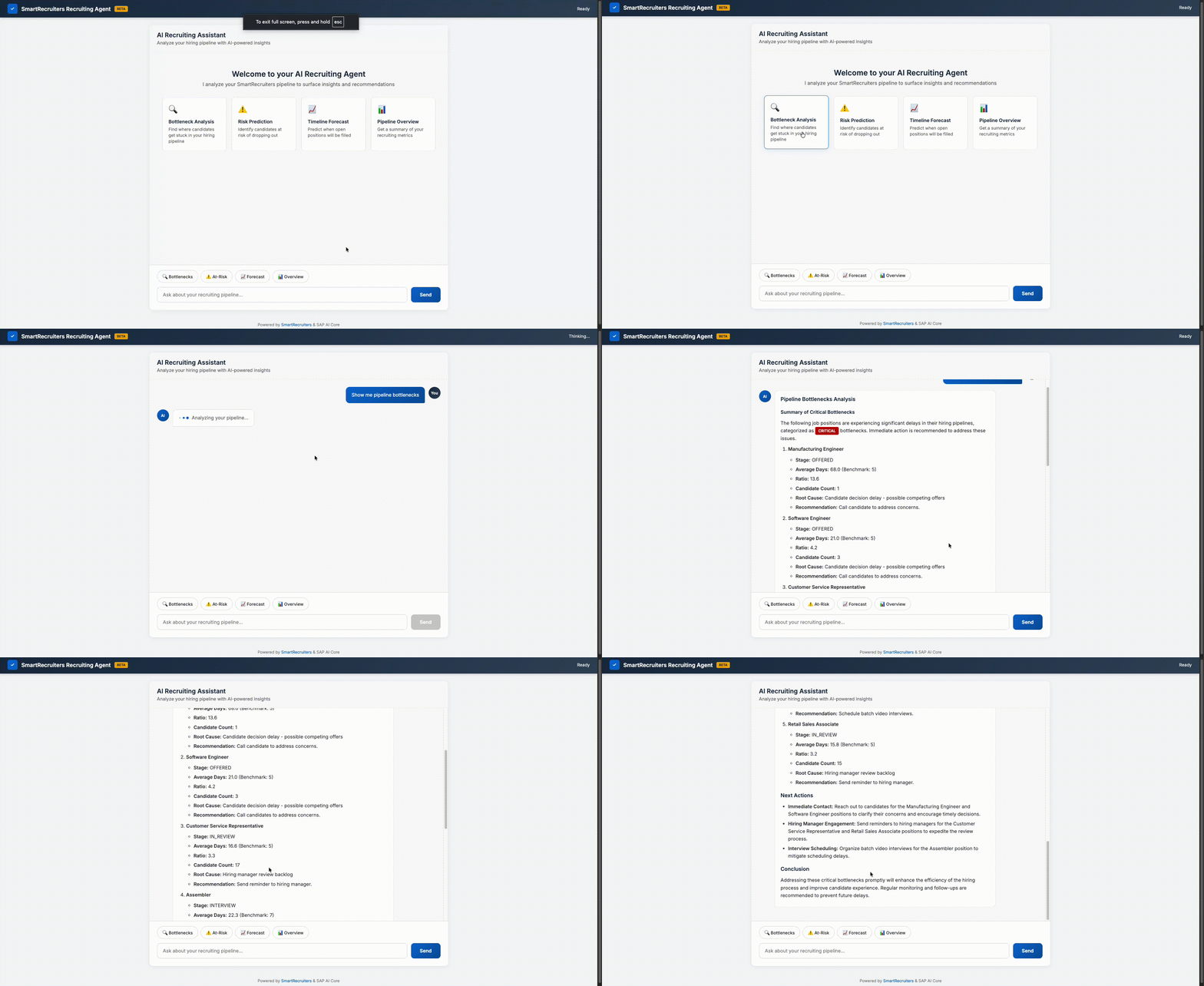
The spark
Every recruiter knows this moment: a hiring manager asks "when will we fill this role?" and it's hard to give a confident answer. You've got 50 candidates in the pipeline, but half of them have been sitting in "Interview" for three weeks. Are they still interested? Did someone forget to schedule the next round?
Or this one: your top candidate — the one with 10 years of experience who crushed the technical interview — just declined your offer. Turns out they had three other offers and the process took too long.
We kept hearing these stories. And we thought: what if an AI agent could catch these issues early and help recruiters take action?
SmartRecruiters already provides powerful tools for sourcing, tracking, and hiring candidates. But now you can add a predictive layer — an agent that proactively surfaces issues before they become problems.
🎯 What We Built
The SmartRecruiters AI Recruiting Agent does three things:
1. Spots bottlenecks. It compares how long candidates sit in each stage against benchmarks. When someone's been in "Interview" for 18 days (benchmark is 7), the agent flags it, identifies likely causes, and suggests next steps.
🚨 CRITICAL: Senior Software Engineer - Interview Stage
   6 candidates stuck avg 18 days (benchmark: 7)
   Root cause: Geographic scheduling delays
   → Schedule batch video interviews this week
2. Predicts disengagement risk. A senior engineer sitting in your pipeline for two weeks likely has other opportunities. The agent scores each candidate's risk based on inactivity, seniority, and stage — then tells you who to prioritize today.
3. Forecasts timelines. Using conversion rates (50% of interviews become offers, 85% of offers get accepted), it predicts when you'll actually fill each role. Data-driven answers instead of estimates.
4. Analyzes compensation competitiveness. Multi-currency salary analysis across 9 currencies (USD, INR, EUR, GBP, AUD, CHF, CAD, HKD, CLP) with interactive dashboards showing compa ratios, regional comparisons, and market competitiveness — all with country flags and beautiful charts.
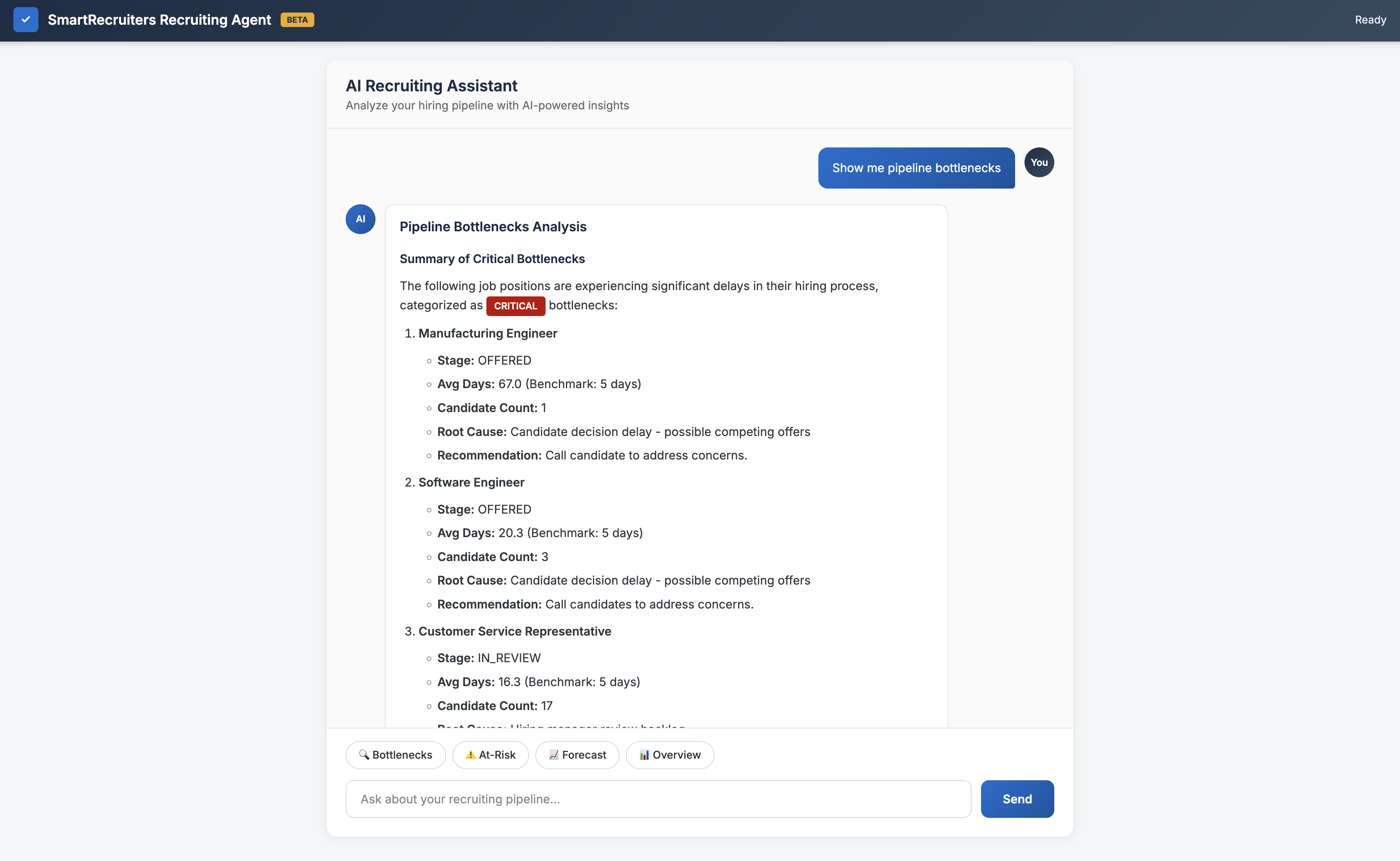
Ask questions in plain English, get actionable answers
Features at a Glance
| Feature | Status | Demo |
|---|---|---|
| 📊 Bottleneck Detection | ✅ Ready | View UI |
| ⚠️ Risk Prediction | ✅ Ready | View UI |
| 📈 Timeline Forecasting | ✅ Ready | View UI |
| 💰 Compensation Dashboard | ✅ Ready | Try It |
| 💬 Teams Integration | ✅ Ready | View Card |
| 🔄 SF Migration Toolkit | ✅ Ready | Read Docs |
| 🤖 LLM Fallback Mode | ✅ Ready | Works without AI Core |
| 📊 Mock Data Demo | ✅ Ready | Zero credentials required |


Extending SmartRecruiters
SmartRecruiters is a leading talent acquisition platform providing:
- Attract — Career sites, sourcing, CRM, job distribution
- Select — ATS, AI matching, screening, scheduling
- Hire — Analytics, offer management, onboarding
This agent adds a predictive intelligence layer on top of SmartRecruiters data:
| SmartRecruiters provides | This agent adds |
|---|---|
| Candidate tracking | Bottleneck detection with root causes |
| Pipeline visibility | Disengagement risk prediction |
| Hiring analytics | Timeline forecasting with confidence |
| Dashboard reporting | Proactive Teams alerts |
Think of it as an early warning system built on your existing SmartRecruiters data.
💡 Why an Agent, Not a Dashboard?
Dashboards are great for exploration, but recruiters are busy — back-to-back calls, juggling multiple open roles, responding to messages. They need insights that come to them at the right moment.
So we built an agent that:
- Pushes alerts to Teams when something needs attention
- Answers questions in plain language ("who's at risk?")
- Explains why — not just "6 candidates stuck" but "scheduling delays in APAC region"
- Suggests actions — not just problems, but what to do about them
Three Personas, Three Experiences
This agent is designed for three distinct users:
👔 Hiring Managers — Need to know if roles will be filled on time
- Get proactive alerts about bottlenecks and at-risk candidates
- See timeline forecasts with confidence levels
- Daily digest at 8 AM with 3-5 critical issues
👥 Recruiters — Need to coordinate and prioritize
- Daily action list (9 AM): "Call John Doe - offer at risk"
- Validate offer competitiveness before sending
- Track actions with status (pending → in_progress → completed)
🌟 Candidates — Need to know what's happening
- Magic link login (no password needed)
- Application timeline with progress tracker
- Stage-specific FAQ ("What is the interview stage?")
💰 Compensation Intelligence
The agent includes a comprehensive compensation analytics module that helps you ensure offers are competitive:
🌍 Multi-Currency Overview
🇺🇸 USD: 14 candidates (avg $118K) ↔ $118K USD
🇮🇳 INR: 4 candidates (avg ₹22.9L) ↔ $27K USD
🇦🇺 AUD: 2 candidates (avg A$131K) ↔ $85K USD
🇨🇭 CHF: 2 candidates (avg CHF 77.5K) ↔ $88K USD
5 Standard Reports
| Report | What It Shows |
|---|---|
| 🌍 Multi-Currency Overview | All offers grouped by currency with country flags and USD equivalents |
| 📊 Offer Competitiveness | Which offers are below/at/above market with compa ratios |
| 🗺️ Regional Comparison | Compare salaries across regions (USD-normalized) |
| 💰 Top 10 Offers | Highest-paid candidates across all currencies |
| 🔍 Data Quality | Coverage stats, data sources, outlier detection |
Features:
- Extracts salary from SmartRecruiters
AnnualSalaryproperty or job compensation ranges - Calculates compa ratios (offered salary / market midpoint)
- Normalizes to USD for cross-currency comparison
- Interactive Chart.js visualizations
- Color-coded badges (🔴 below market, 🟢 at market, 🔵 above market)
- REST API for programmatic access
Quick Start:
# Open dashboard
http://localhost:8080/compensation

# Or query via API
curl http://localhost:8080/api/compensation/reports/multi_currency_overview
See COMPENSATION_DASHBOARD_GUIDE.md for full documentation.
🏗️ The Tech Stack
| Component | Technology | Role |
|---|---|---|
| LLM | SAP AI Core (gpt-4o-mini) | Natural language understanding and response generation |
| Agent Pattern | ReAct (Reasoning + Acting) | Structured decision-making loop |
| Framework | LangChain + LangGraph | Tool orchestration and agent workflow |
| Data Source | SmartRecruiters API | Real-time candidate and job data |
| Backend | FastAPI | Async REST API serving the UI and Teams |
| Notifications | Microsoft Teams Adaptive Cards | Proactive alerts via webhooks |
The core agent is about 8,300 lines of Python. No complex infrastructure, no Kubernetes, no microservices.
Architecture Diagram
APIs vs LLMs: Who does what?
This is important: the LLM doesn't do the analysis. Here's how we split responsibilities:
| Task | Handled by | Why |
|---|---|---|
| Fetch candidates and jobs | SmartRecruiters API | Source of truth for recruiting data |
| Calculate bottleneck severity | Python code | Deterministic, testable, fast |
| Score candidate risk | Python code | Consistent scoring rules |
| Forecast hiring timelines | Python code | Math-based conversion modeling |
| Understand user questions | SAP AI Core LLM | Natural language is messy |
| Generate human-readable responses | SAP AI Core LLM | Makes data conversational |
| Send alerts to Teams | Teams Webhook API | Direct HTTP POST |
The LLM is the "voice" of the agent — it interprets what you're asking and explains results in plain language. But the actual analysis happens in deterministic Python functions. This keeps results consistent and explainable.
The ReAct pattern
ReAct stands for Reasoning + Acting. It's a loop where the agent:
- Thinks — "The user asked about bottlenecks. I should call the bottleneck analysis tool."
- Acts — Calls the
analyze_bottlenecks()function - Observes — Gets back structured data (jobs, stages, days stuck, severity)
- Thinks again — "I have the data. Now I should explain this clearly."
- Responds — Uses the LLM to generate a natural language summary
User: "Show me bottlenecks"
         ↓
    ┌─────────────────┐
    │  THINK          │  → "User wants bottleneck analysis"
    └────────┬────────┘
             ↓
    ┌─────────────────┐
    │  ACT            │  → Call analyze_bottlenecks()
    └────────┬────────┘
             ↓
    ┌─────────────────┐
    │  OBSERVE        │  → Get structured results from API + analysis
    └────────┬────────┘
             ↓
    ┌─────────────────┐
    │  RESPOND        │  → LLM synthesizes into readable answer
    └─────────────────┘
Why ReAct instead of just prompting the LLM with all the data? Control. We decide which tools to call and when. The LLM handles language, not logic.
How the agent processes a request
When you ask "who's at risk?", here's the full flow:
1. USER INPUT
   "Who's at risk of dropping out?"
              ↓
2. INTENT DETECTION
   Keywords: "risk", "dropping" → Route to risk analysis
              ↓
3. API CALL (SmartRecruiters)
   GET /candidates → Returns 100 candidates with status, stage, timestamps
              ↓
4. ANALYSIS (Python)
   For each candidate:
   - Days inactive? → +20 or +40 points
   - Senior in early stage? → +25 points
   - Offer pending too long? → +30 points
   → Returns ranked list with scores
              ↓
5. LLM SYNTHESIS (SAP AI Core)
   Prompt: "Summarize these at-risk candidates for a recruiter..."
   → Returns conversational response
              ↓
6. RESPONSE TO USER
   "You have 3 candidates who need immediate attention..."
Fallback mode
If SAP AI Core is temporarily unavailable, the agent doesn't break. It falls back to:
- Keyword-based intent detection — still routes to the right analysis
- Template responses — pre-formatted summaries of the data
- Full functionality — all the analysis still works, just less conversational
This means the agent is always useful, even without LLM access.
The analysis under the hood
Bottleneck detection
We set benchmarks for each stage:
- In Review: 5 days
- Interview: 7 days
- Offer: 5 days
If the average time exceeds 1.5x the benchmark, it's moderate. Over 2.5x? Critical.
The agent also identifies likely causes. Interview delays in a job with candidates across multiple countries? Probably scheduling across time zones. Long review times? The hiring manager may need a nudge.
Risk scoring
We add up points:
- Inactive over 14 days: +40
- Inactive over 7 days: +20
- Senior candidate (5+ years) in early stage: +25
- Offer pending: +30
- Offer pending over 5 days: +15
- In Interview over 10 days: +20
Scores over 50 mean "reach out this week." Over 80? Prioritize them today.
Timeline forecasting
Simple funnel math:
- 85% of offers become hires
- 50% of interviews become offers
- 40% of reviews become interviews
Multiply through your current pipeline and you get predicted hires. Compare against openings to see if you're on track.
💬 Pushing to Teams
The best feature might be the Teams integration. Instead of recruiters checking the agent, the agent checks on them.
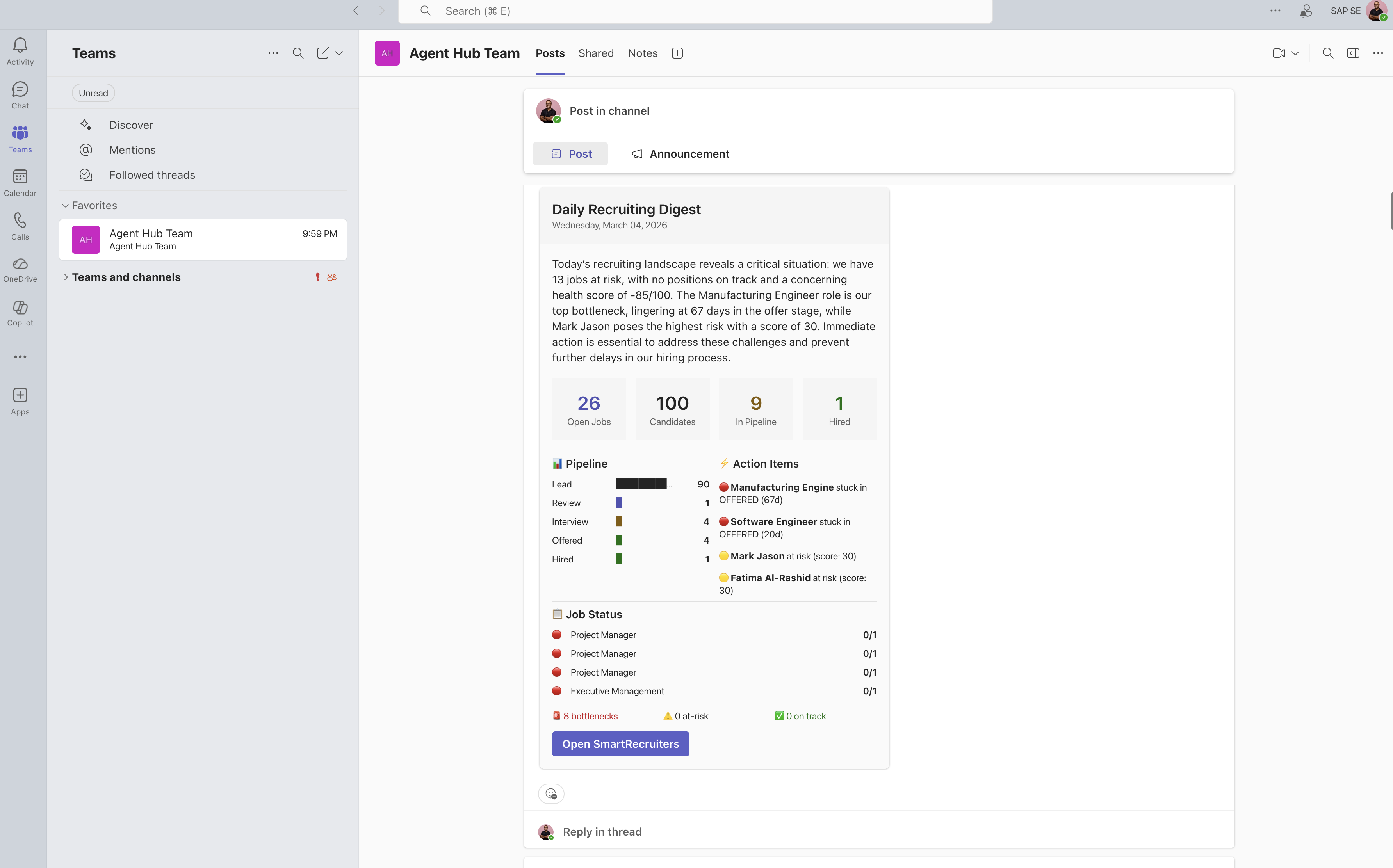
Daily digest lands in your Teams channel every morning
We built four card types:
- Daily digest — summary of everything, with an AI-written executive summary
- Bottleneck alerts — only fires when there's something critical
- Risk alerts — only when candidates need immediate attention
- Forecast updates — weekly "here's where we stand"
Set up an Incoming Webhook in Teams, add the URL to your config, run python scheduler.py digest, and you're done.
Connecting to SmartRecruiters
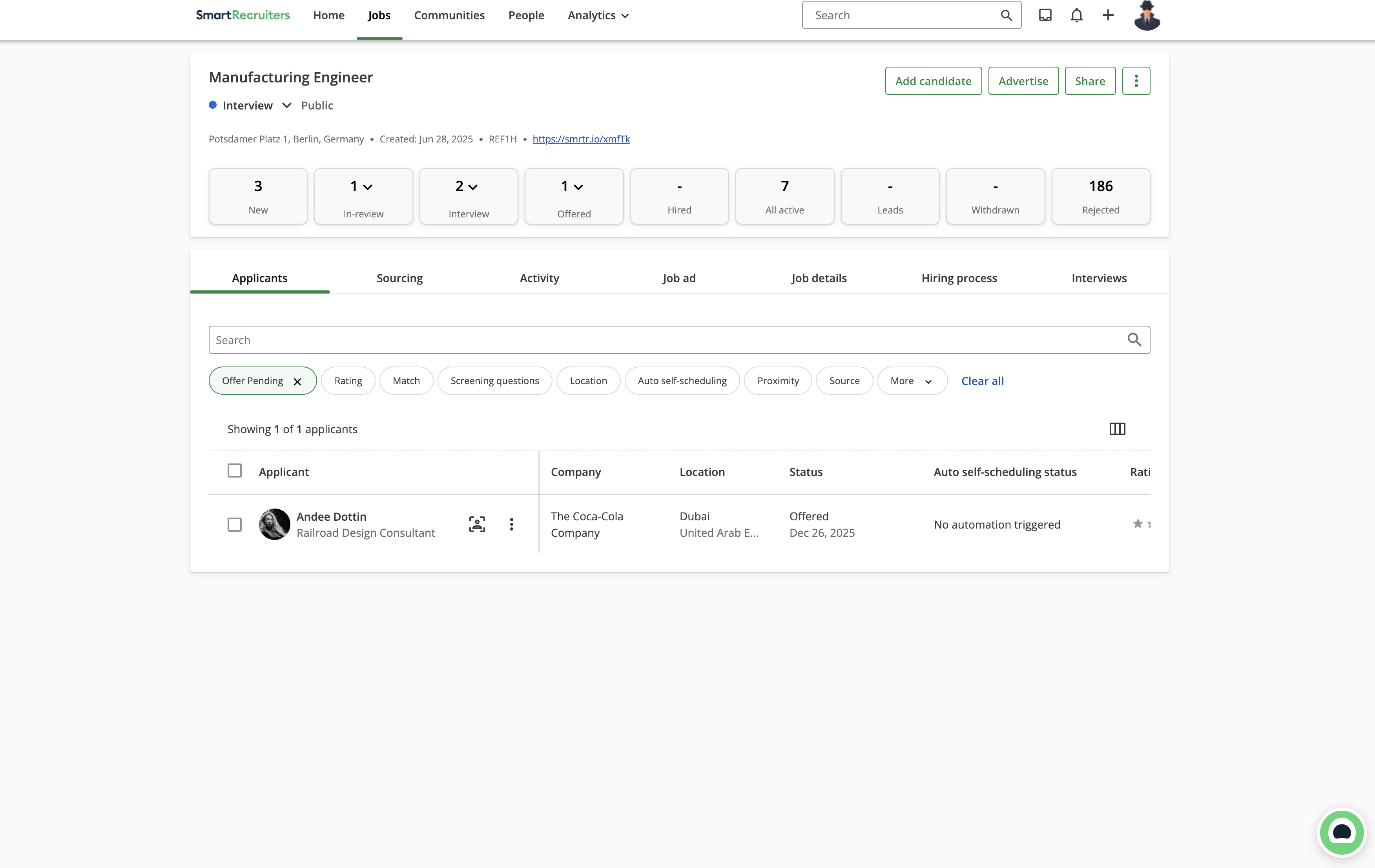
Pulling candidate data via the SmartRecruiters API
The SmartRecruiters API uses OAuth2 client credentials:
# Step 1: Exchange client credentials for access token
token_response = requests.post(
    'https://api.smartrecruiters.com/identity/oauth/token',
    data={'grant_type': 'client_credentials'},
    auth=(client_id, client_secret)
)
token = token_response.json()['access_token']

# Step 2: Use token to fetch data
response = requests.get(
    'https://api.smartrecruiters.com/candidates',
    headers={'Authorization': f'Bearer {token}'},
    params={'limit': 100}
)
We cache tokens and refresh them before expiry. The agent also works with mock data for demos and development — set USE_MOCK_DATA=true and you're ready to go.
What we learned
1. Resilience matters. Building a keyword-based fallback means the agent stays useful even during connectivity issues. Always have a backup plan.
2. "Why" is more important than "what." Telling a recruiter "6 candidates are stuck" isn't helpful. Telling them "6 candidates are stuck because interviews can't be scheduled across time zones — try batch video calls" is actionable.
3. Meet people where they are. The Teams integration drove significantly more engagement than the web UI. Bring insights to where people already work.
4. Mock data is a feature. Not just for development — it's great for demos, onboarding, and showing stakeholders what the tool does without exposing real candidate data.
🔄 SuccessFactors Migration Toolkit
For organizations migrating from SAP SuccessFactors Recruiting to SmartRecruiters, this project includes a comprehensive migration assessment toolkit:
- Data Quality Audit — Validates completeness, validity, and integrity of SF data
- Field Mapping — Normalizes SF statuses and entities to SmartRecruiters schema
- Migration Readiness Score — Calculates overall readiness (0-100) with recommendations
- Dry Run Simulation — Test transformation logic without committing changes
- Bulk Export — Generate CSV files for SmartRecruiters bulk import
- Multi-format Reports — JSON, HTML, Teams cards, and SAP UI5 dashboards
See SF_INTEGRATION_README.md for complete documentation.
⚡ Quick Start
Everything's open source:
GitHub: github.com/SAP-samples/smartrecruiters-ai-recruiting-custom-agent
git clone https://github.com/SAP-samples/smartrecruiters-ai-recruiting-custom-agent.git
cd smartrecruiters-ai-recruiting-custom-agent
pip install -r requirements.txt
python app.py
Works out of the box with mock data. Add your SAP AI Core and SmartRecruiters credentials for the full experience.
📚 Documentation
Core Documentation
- Setup Guide - Detailed installation and configuration
- API Reference - Complete API documentation with examples
- Architecture - System design and data flow diagrams
API Documentation by Persona
See the full API Reference for all endpoints, covering hiring manager intelligence, recruiter workflows, and candidate-facing APIs.
Additional Resources
- Production Improvements - Production-ready enhancements (token caching, rate limiting, cost tracking)
- Code Review - Comprehensive quality assessment
- Compensation Dashboard Guide - Multi-currency compensation analytics
- Contributing - How to contribute to this project
- SuccessFactors Migration - SF to SmartRecruiters toolkit
- Security Policy - Vulnerability reporting and best practices
- Changelog - Version history and release notes
🤝 Contributing
We welcome contributions! Please see our Contributing Guidelines for details on:
- Code standards and style guide
- Pull request process
- Development setup
- Testing requirements
License
Copyright (c) 2026 SAP SE or an SAP affiliate company. All rights reserved. This project is licensed under the Apache Software License, version 2.0 except as noted otherwise in the LICENSE file.
This project started as an experiment in agentic AI for HR tech — and showed us that recruiters really value an assistant that helps them stay ahead of candidate engagement.
🔗 External Links
- SmartRecruiters — Talent acquisition platform
- SmartRecruiters API — Developer documentation
- SAP AI Core — Enterprise AI infrastructure
- LangChain — Agent framework
- Adaptive Cards — Teams card designer
History
Features 6, Changed 4
Notes
Added
- 💰 Compensation Intelligence Dashboard - Multi-currency salary analysis module
- 5 standard reports: Multi-Currency Overview, Competitiveness, Regional Comparison, Top Offers, Data Quality
- Support for 9 currencies: USD, INR, EUR, GBP, AUD, CHF, CAD, HKD, CLP
- Country flags and interactive Chart.js visualizations
- Compa ratio calculation with market competitiveness flagging
- REST API endpoints for programmatic access
- Extracts salary from SmartRecruiters
AnnualSalarycustom property - USD normalization for cross-currency comparison
- Created sr_compensation_data.py - Real SmartRecruiters salary data extraction
- Created compensation_reports.py - Standard report definitions
- Created compensation-dashboard.html - Interactive UI
- Added COMPENSATION_DASHBOARD_GUIDE.md user documentation
- GitHub issue and PR templates for better community contributions
Changed
- Refactored compensation_analytics.py from INR-only to multi-currency aware
- Updated tools.py - Compensation tools now use real SmartRecruiters data
- Updated agent.py - Added compensation query detection in fallback mode
- Enhanced README with compensation section and Mermaid architecture diagram
Security 5, Features 18
Notes
Added
- Initial release of SmartRecruiters AI Recruiting Agent
- Pipeline bottleneck detection with root cause analysis
- Candidate dropout risk prediction with scoring (0-100 scale)
- Hiring timeline forecasting with conversion rates
- SuccessFactors migration toolkit with data audit and bulk export
- Microsoft Teams integration with adaptive cards
- SAP AI Core LLM integration via generative-ai-hub-sdk
- Mock data support for zero-credential demos
- FastAPI REST API with OpenAPI documentation
- Background scheduler for automated Teams alerts
- ReAct agent pattern with LangGraph
- Fallback mode with keyword matching (works without LLM)
- OAuth2 integration with SmartRecruiters API
- Cloud Foundry deployment support (manifest.yml, runtime.txt)
- Token caching and cost tracking
- Rate limiting (30 requests/minute)
- Input validation and prompt injection detection
- Comprehensive documentation:
- SETUP.md - Installation guide
- PRODUCTION_IMPROVEMENTS.md - Production enhancements
- CODE_REVIEW.md - Quality assessment
- SF_INTEGRATION_README.md - SuccessFactors migration
Security
- Apache 2.0 license with REUSE compliance
- Environment variable validation
- CORS middleware configuration
- Rate limiting to prevent abuse
- Input sanitization for chat messages
Details
Sources
Sources are graph entities: the same page may back several entries, and an unreachable source flags every row that rests on it.
Compatibility and provenance
Contributors
History in the atlas
- First seen.
For your agent
- Ref
artifact:sap-samples-smartrecruiters-ai-recruiting-custom-agent- JSON
- /artifacts/sap-samples-smartrecruiters-ai-recruiting-custom-agent.json
- MCP
- Connecting an agent