teched2024-IN280
An SAP TechEd 2024 session that uses SAP Integration SuiteSAP Integration SuiteSAP's integration service on BTP: Cloud Integration for orchestration, API Management in front of it, and an MCP gateway that serves a managed API to agents.sap official, btp as middleware between SAP IBP and non-SAP cloud services.
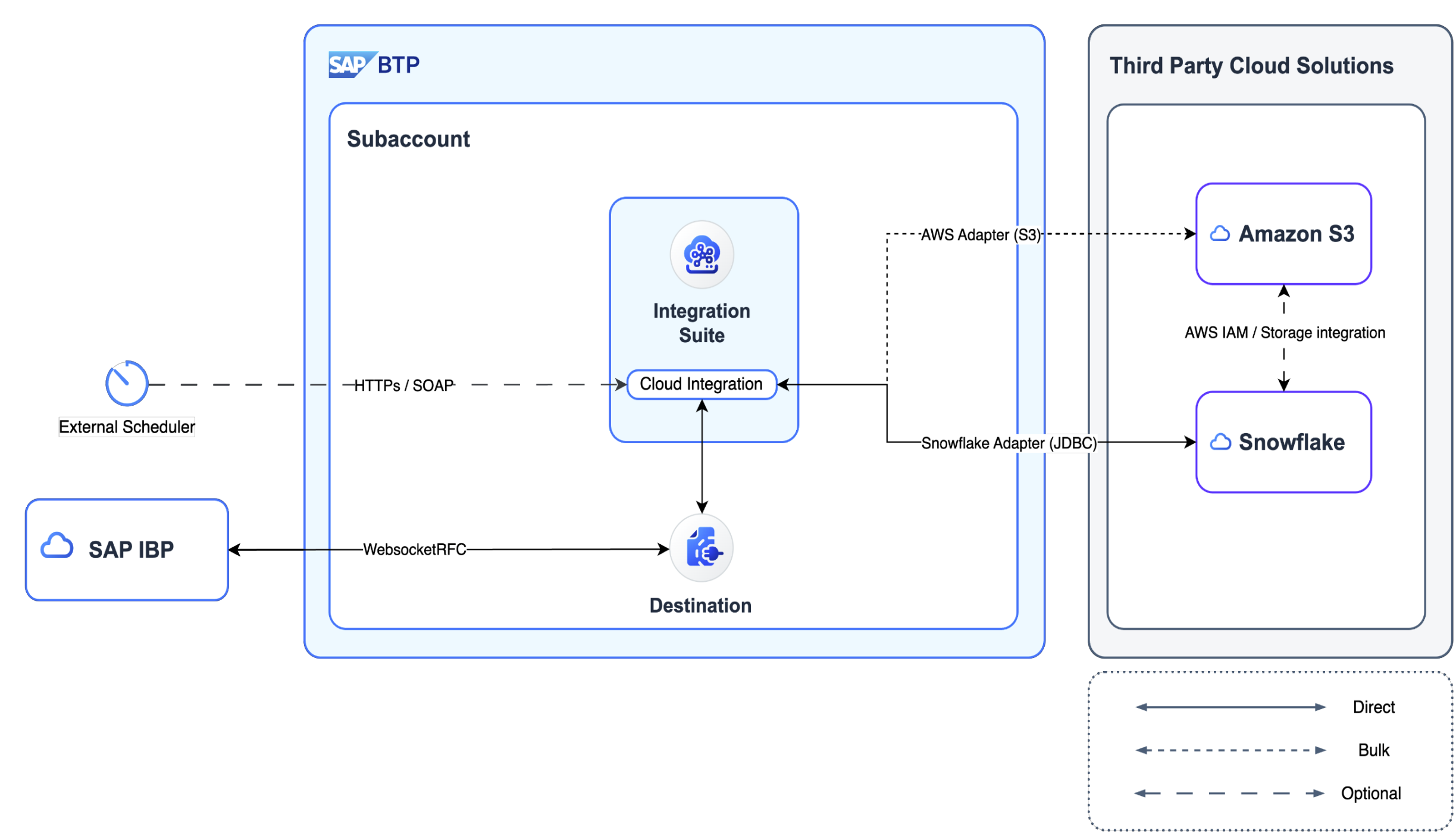
The exercises set up a communication arrangement for communication scenario SAP_COM_0931 in SAP IBP and an RFC destination in the SAP BTP cockpit, deploy SAP's own standard package of reusable SAP IBP integration flows alongside the session's community package, then build the flow that reads from SAP IBP and writes to Snowflake through an external stage on AWS S3, used especially for large datasets, and the flow back the other way. Cloud IntegrationCloud IntegrationBuilds and runs integration flows that process, route and map messages between cloud and on-premise systems, SAP and non-SAP, through prebuilt adapters; available only under an SAP Integration Suite plan.sap official, btp is the middleware throughout, and Amazon AWS S3 and Snowflake are the non-SAP cloud services the session integrates with. The steps are a guide for learning purposes only: the README says the setup might change based on your instance configuration or IT landscape.
Facts
Where it sits
Who is behind it

In the atlas: maintains 222@SAP-samplesmaintainerAjay SorengContributes to this

In the atlas: contributes to 36@ajaysorengAjinkya PatilContributes to this

In the atlas: contributes to 112@ajinkyapatil8190amanvarshney-sapContributes to this

In the atlas: contributes to 1@amanvarshney-sapDomnicContributes to this

In the atlas: contributes to 1@cinmod4 contributors
What it declares
Every artifact
- Type
- Sample
- Origin
- By SAP
- Use as
- A reference
As a sample
- Form
- Workshop or CodeJam material
Connections
Moving and transforming messages between systems in middleware
Builds and runs integration flows between cloud and on premise
Download
README
quoted from SAP-samples/teched2024-IN280 under Apache-2.0, readIN280 - Use SAP Integration Suite with SAP IBP and third-party systems
Description
This repository contains the material for the SAP TechEd 2024 session IN280 - Use SAP Integration Suite with SAP IBP and third-party systems. Click the following link to check the Session IN280 Presentation
Overview
This session is aimed to help participants to use SAP Integration Suite as a middleware for integrating SAP IBP and non-SAP cloud technologies. In this session we will be using Amazon AWS S3 and Snowflake as non-SAP cloud services / third-party systems. A blog on this is also available
Pre-requisites
The requirements to follow the exercises in this repository are:
Exercises
The integration between SAP IBP and 3rd party systems such as Amazon S3 or Snowflake uses SAP Cloud Integration as a middleware. The below steps outline basic setups which can be excercised to exchange data between SAP IBP and Snowflake using Amazon S3 bucket as a external staging(especially for large datasets). Participants are requested to read through the steps and follow them on their own SAP cloud instances.
- Getting Started
- Exercise 1 - Environment Setup - 1
- Exercise 1.1 - Communication Arrangement for communication scenario - SAP_COM_0931 in SAP IBP
- Exercise 1.2 - RFC Destination in SAP BTP Cockpit
- Exercise 1.3 - Copy and Deploy SAP Cloud Integration Standard package "SAP IBP - Reusable Integration Flows"
- Exercise 1.4 - Copy and Deploy SAP Cloud Integration Community package "Session IN280"
- Exercise 2 - Environment Setup - 2
- Exercise 3 - Reading from SAP IBP and Writing to Snowflake
- Exercise 4 - Reading from Snowflake and Writing to SAP IBP
IMPORTANT
These steps are intended to be a guide for learning purposes only. The setup might change based on your instance configuration or IT landscape.
Contributing
Please read the CONTRIBUTING.md to understand the contribution guidelines.
Code of Conduct
Please read the SAP Open Source Code of Conduct.
How to obtain support
Support for the content in this repository is available during the actual time of the online session for which this content has been designed. Otherwise, you may request support via the Issues tab.
License
Copyright (c) 2026 SAP SE or an SAP affiliate company. All rights reserved. This project is licensed under the Apache Software License, version 2.0 except as noted otherwise in the LICENSE file.
Details
Sources
Sources are graph entities: the same page may back several entries, and an unreachable source flags every row that rests on it.
Compatibility and provenance
Contributors
History in the atlas
- First seen.
For your agent
- Ref
artifact:sap-samples-teched2024-in280- JSON
- /artifacts/sap-samples-teched2024-in280.json
- MCP
- Connecting an agent