teched2025-XP267
An SAP TechEd 2025 session that triggers SAP Automation PilotSAP Automation PilotA BTP service that runs operations commands: catalogues SAP ships for BTP DevOps scenarios and commands a team composes, started by hand, on a schedule or by an event.sap official, btp remediation commands from alerts raised in SAP Cloud ALMSAP Cloud ALMSAP's application lifecycle management product, run by SAP as a service: implementation projects with their tasks, requirements, features, documents and test management, and the operations side of a landscape. For the things here it is the system a server reads over the published Cloud ALM APIs, on behalf of an agent., extended with an SAP AI CoreSAP AI CoreSAP's AI service on BTP: the runtime for AI assets, and through the Generative AI Hub inside it the access to foundation models, the orchestration service with its templating, masking, filtering and grounding modules, the Prompt Registry and Document Grounding.sap official, btp assessment step.
SAP Automation PilotSAP Automation PilotA BTP service that runs operations commands: catalogues SAP ships for BTP DevOps scenarios and commands a team composes, started by hand, on a schedule or by an event.sap official, btp is a low-code automation engine for sequences of steps, serverless scripts and SAP's own catalogues of commands for typical Ops tasks, and this session sets up the integration that lets alerts in SAP Cloud ALMSAP Cloud ALMSAP's application lifecycle management product, run by SAP as a service: implementation projects with their tasks, requirements, features, documents and test management, and the operations side of a landscape. For the things here it is the system a server reads over the published Cloud ALM APIs, on behalf of an agent. trigger those commands for troubleshooting and remediation. A second part extends the flow with an SAP AI CoreSAP AI CoreSAP's AI service on BTP: the runtime for AI assets, and through the Generative AI Hub inside it the access to foundation models, the orchestration service with its templating, masking, filtering and grounding modules, the Prompt Registry and Document Grounding.sap official, btp integration that assesses technical data and returns recommendations, and the hands-on also covers building automation workflows of your own or extending existing ones. Every access prerequisite is preconfigured for participants: Automation Pilot, Cloud ALM, a Cloud Foundry CAP application in the subaccount, SAP AI Core credentials with a GPT-4o deployment, and a technical user on the Cloud Foundry space, so the exercises start at the integration itself.
Facts
Where it sits
Who is behind it

In the atlas: maintains 222@SAP-samplesmaintainerAjay SorengContributes to this

In the atlas: contributes to 36@ajaysorengBiser SimeonovContributes to this

In the atlas: contributes to 3@bisinho2 contributors
What it declares
Every artifact
- Type
- Sample
- Origin
- By SAP
- Use as
- A reference
As a sample
- Form
- Workshop or CodeJam material
Connections
Routing alerts and running remediation without someone at the console
AI runtime on BTP with the Generative AI Hub
Runs operations commands on BTP by hand, schedule or event
SAP's application lifecycle management product, run by SAP as a service: implementation projects with their tasks, requirements, features, documents and test management, and the operations side of a landscape. For the things here it is the system a server reads over the published Cloud ALM APIs, on behalf of an agent.
Download
README
quoted from SAP-samples/teched2025-XP267 under Apache-2.0, readSession ID - XP267 | Experience the automation of technical operation tasks on SAP BTP
Description
This repository contains the material for the SAP TechEd 2025 with Session ID XP267 - "Experience the automation of technical operation tasks on SAP BTP"
Overview
This session introduces attendees to SAP Automation Pilot and SAP Cloud ALM in the context of Day 2 Operations. The main goal is for participants to gain practical experience in automating different set of technical operation tasks in SAP Business Technology Platform (SAP BTP). To do so, is needed to set up an integration between SAP Automation Pilot and SAP Cloud ALM. During this hands-on we will explore how to trigger ready-to-use commands in SAP Automation Pilot to do troubleshooting and perform remediation actions based on alerts in SAP Cloud ALM. You will also learn how to build your own automation flows or extend existing ones.
Main scenario covered during this session:
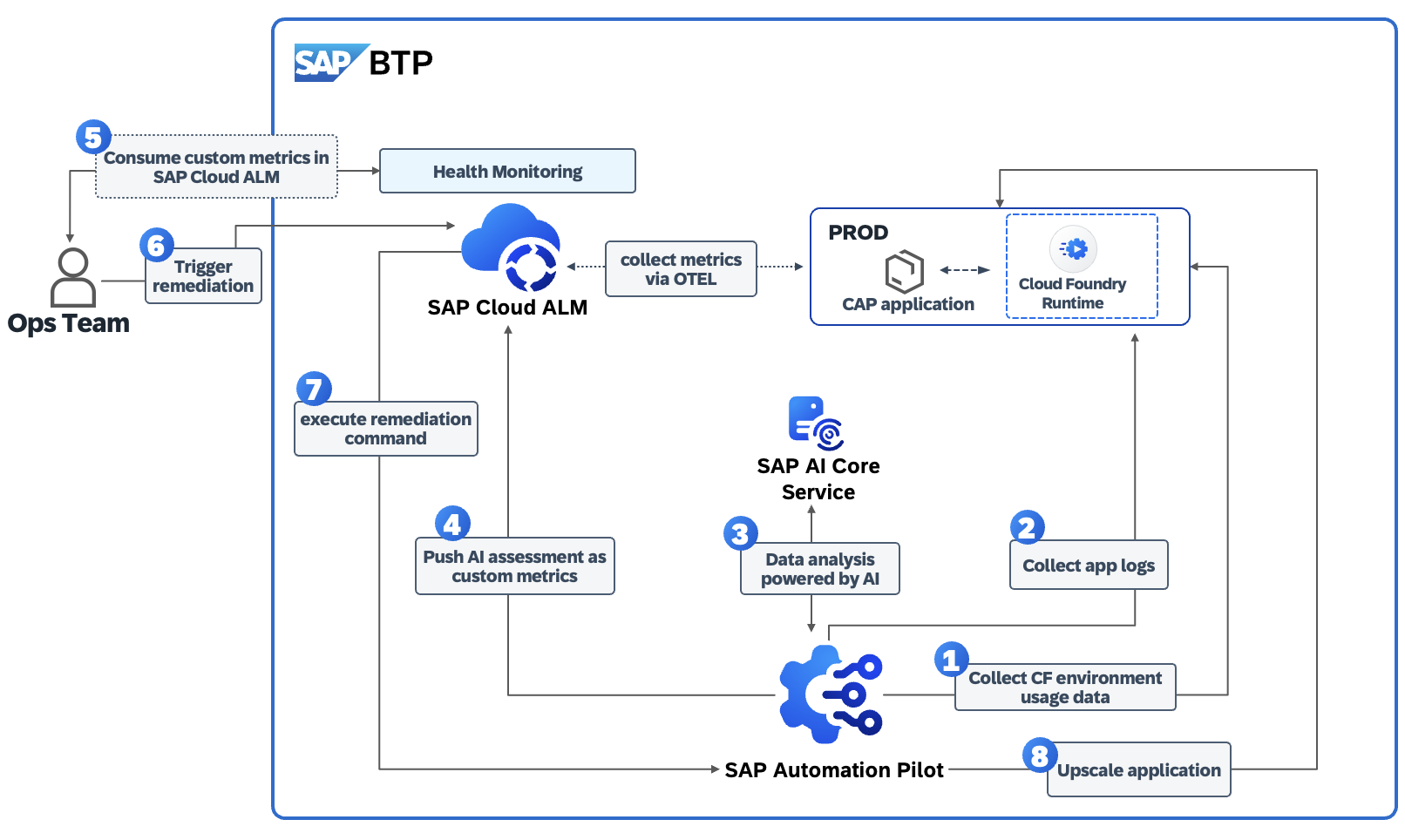 Within the hands-on tutorial we will cover:
- Introduction to SAP Automation Pilot for running repetitive ops tasks
- Introduction to SAP Cloud ALM
- Extending SAP Automation Pilot by an integration to SAP AI Core service for assessment of technical data and recommendations by AI
- Integration between SAP Automation Pilot and SAP Cloud ALM for automating operational tasks and remediations
Hands-on:
- Creating and testing automation workflows for common operational tasks.
- Extending SAP Automation Pilot by integrating it to SAP AI Core service.
- Exploring potential use cases where SAP Automation Pilot and SAP Cloud ALM adds value for Ops teams by using GenAI features provided by SAP
Products in focus
SAP Automation Pilot
The goal of SAP Automation Pilot is to simplify and automate complex manual technical processes and flows. This enables DevOps teams to run their solutions on SAP BTP with minimal operational effort.
SAP Automation Pilot is a low-code / no-code automation engine that allows you to:
- Automate sequences of steps,
- Execute scripts in a serverless manner,
- Use catalogs of commands provided by SAP to automate typical Ops tasks in and outside your SAP BTP landscape,
- Build custom automations.
Automations in SAP Automation Pilot can be triggered in various ways to best fit your operational needs - manually by the DevOps team, through the built-in scheduler, automatically via integration with services and ops platforms like SAP Cloud ALM, or by other applications and systems.
The service is designed to work with low latency, even under a heavy workload, and is capable of triggering hundreds of automations simultaneously.
SAP Cloud ALM for Operations
**SAP Cloud ALM **is SAP’s cloud-based application lifecycle management solution designed to support the implementation and operation of SAP cloud and hybrid landscapes. It provides end-to-end transparency across business processes, integrations, and system health.
Cloud ALM for Operations focuses on ensuring business continuity by monitoring the availability, performance, and exceptions of cloud and on-premise solutions. It enables IT and operations teams to proactively detect and resolve issues through automated alerts, analytics, and intelligent insights. Together, they help organizations achieve efficient, reliable, and compliant operations across your SAP environment.
Let's Build & Automate!
This TechEd session is interactive hands-on, ensuring you gain real-world experience with products and tools delivered by SAP. Get ready for your Day 2 Operations activities!
Prerequisites (Already Prepared for You)
The following setup and access prerequisites have been preconfigured for all participants.
You do not need to perform any setup steps — simply proceed with the hands-on exercises.
- Access to SAP Automation Pilot
- Access to SAP Cloud ALM
- A Cloud Foundry CAP application deployed in your SAP BTP subaccount
- SAP AI Core credentials with a GPT-4o deployment
- A technical user on your SAP BTP Cloud Foundry space (already assigned to each participant)
Exercises
Let's start the exercise - for a better understanding, please follow the exercise as listed below: Continue to:
Contributing
Please read the CONTRIBUTING.md to understand the contribution guidelines.
Code of Conduct
Please read the SAP Open Source Code of Conduct.
How to obtain support
Support for the content in this repository is available during the actual time of the online session for which this content has been designed. Otherwise, you may request support via the Issues tab.
License
Copyright (c) 2024 SAP SE or an SAP affiliate company. All rights reserved. This project is licensed under the Apache Software License, version 2.0 except as noted otherwise in the LICENSE file.
Details
Sources
Sources are graph entities: the same page may back several entries, and an unreachable source flags every row that rests on it.
Compatibility and provenance
Contributors
History in the atlas
- First seen.
For your agent
- Ref
artifact:sap-samples-teched2025-xp267- JSON
- /artifacts/sap-samples-teched2025-xp267.json
- MCP
- Connecting an agent