cds-intellij
SAP CDS language support for IntelliJ IDEA.
Facts
Where it sits
Who is behind it

In the atlas: maintains 34@cap-jsmaintainerAjinkya PatilContributes to this

In the atlas: contributes to 113@ajinkyapatil8190Christian GeorgiContributes to this

In the atlas: maintains 1, contributes to 53@chgeoChristian FuchsContributes to this

In the atlas: contributes to 3@manwithafoxRené JeglinskyContributes to this

In the atlas: contributes to 20@renejeglinskyTim Schulze-HartungContributes to this

In the atlas: contributes to 4@tim-sh5 contributors
What it declares
Every artifact
- Type
- IDE extension
- Origin
- By SAP
As an IDE extension
- Installs into
- IntelliJ IDEA
- Distributed through
- JetBrains Marketplace
Connections
Editor help with source: completion, navigation, errors, refactoring
Download
README
quoted from cap-js/cds-intellij under Apache-2.0, read

SAP CDS Language Support for IntelliJ



Description
Welcome to SAP CDS Language Support for IntelliJ. It is a plugin for IntelliJ IDEs that provides editing and development support for the CDS language as used in the SAP Cloud Application Programming Model (CAP).
Features
Look at our comprehensive list of features.
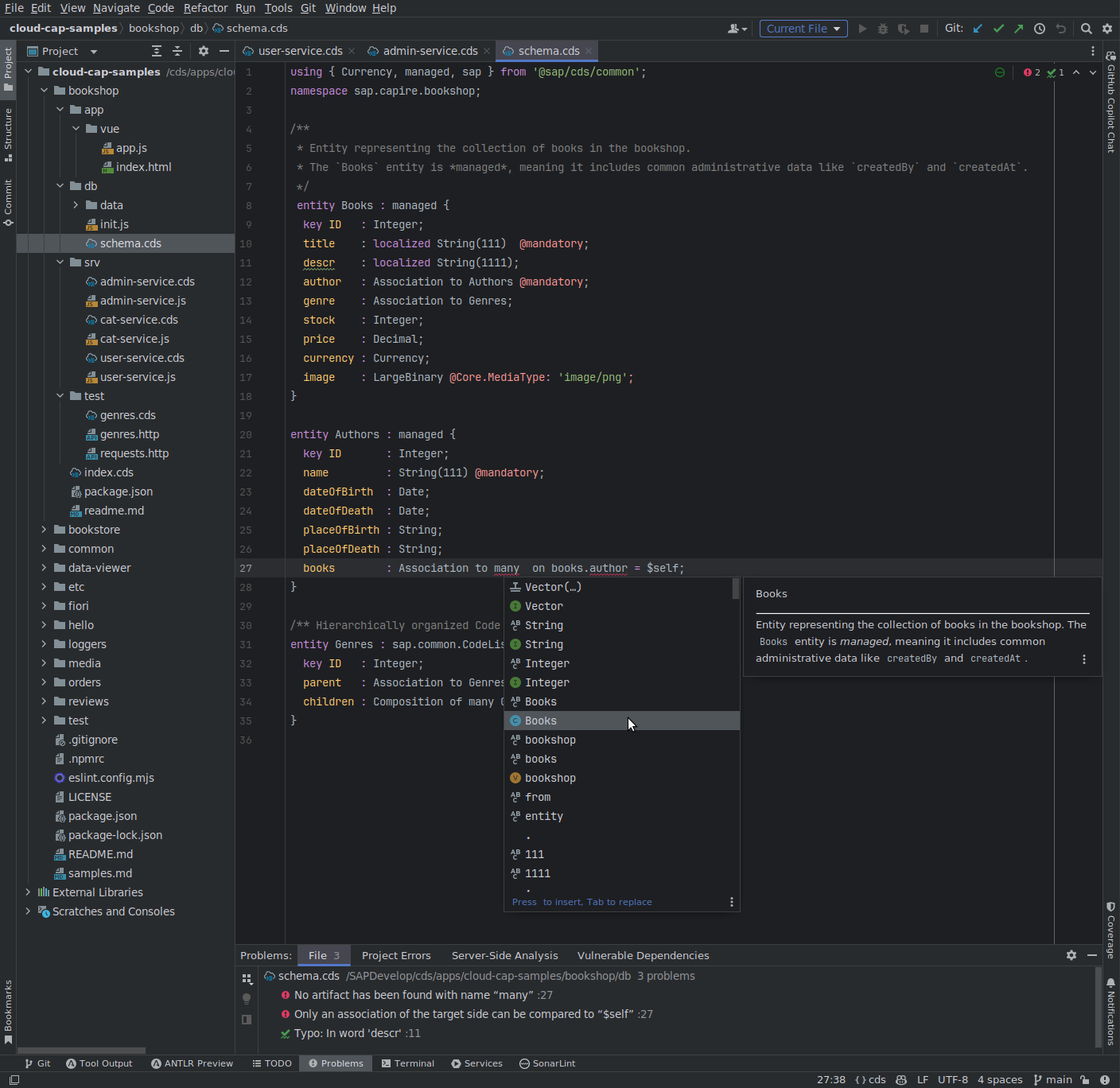
Requirements
Supported IDEs
This plugin is compatible with a variety of IntelliJ IDEs, paid and community editions, including IDEA and WebStorm. Check https://www.jetbrains.com/ to find out which option is best for you.
Operating Systems
Tested on Windows, macOS, and Linux.
Download and Installation
Prepare your environment:
- Install
on your computer if not already present.
- Register the new Node.js installation in your IntelliJ IDE by going to File > Settings > Languages & Frameworks > CDS.
- If you have installed the SAP CDS Language Support for IntelliJ plugin from a ZIP file before, uninstall it.
- Note: we have reset the current plugin version to
1.0.0for the first JetBrains Marketplace release, to clarify that the feature set is still incomplete.
- Note: we have reset the current plugin version to
Install or update the plugin:
- In your IntelliJ IDE, go to File > Settings > Plugins.
- Click the Marketplace tab.
- Search for "SAP CDS Language Support" and click Install.
Note: Support for Community editions of IntelliJ IDEs is currently in beta stage and requires manual installation
from GitHub. Tap Shift twice, then select Install Plugin from Disk...
How to Obtain Support
Create an issue in this repository if you find a bug or have questions about the content.
For additional support, ask a question in SAP Community.
Terms
- Language servers: provide language-specific features like code completion, diagnostics, etc.
- Language Server Protocol (LSP): common protocol for communication between IDEs and language servers.
SAP CDS Language Support for IntelliJ is based on the following components:
| Component | Role | Publisher |
|---|---|---|
| CDS Language Server (cds-lsp, running on Node.js) | SAP CDS Language Support | SAP |
| CDS TextMate bundle | CDS syntax highlighting | (shipped with cds-lsp) |
| LSP4IJ plugin | LSP support in IntelliJ | Red Hat |
Known Compatibility Issues
| Symptom | Solution |
|---|---|
| SAP CDS Language Support for IntelliJ is not enabled in the IDE. | 1.x versions of the plugin are not compatible with the free IntelliJ Community Edition. Make sure you are using a version ≥ 2.x of the plugin. |
| CDS file icons are missing and/or no syntax highlighting | Uninstall any previous versions of the plugin (File > Settings > Plugins). Remove the 'cds' TextMate Bundle (File > Settings > Editor > TextMate Bundles). Restart the IDE. Install the latest plugin version. |
Logs
To aid support, please include relevant log files in your report. Depending on the kind of problem encountered, you may want to include the logs from the IDE, the LSP4IJ plugin, the CDS Language Support Plugin, the LSP client–server (stdio) communication, and/or the LSP server.
IDE Logs
Logs produced by the IDE can be found by opening the Help menu and selecting Show Log in . See Locating IDE log files for more information.
LSP4IJ Plugin Logs and Stdio Communication
To include any errors occurring in the LSP4IJ Plugin in the IDE logs, click View > Tool Windows > Language Servers. Click on CDS Language Server. On the right-hand side, open the Debug tab on the right and select Error reporting: In log. After selecting Trace: Verbose, you'll find the stdio communication after clicking on the language-server instance (below 'CDS Language Server' on the left) and opening the Traces tab on the right.
CDS Language Support Plugin Logs
To include debug logs produced by the SAP CDS Language Support for IntelliJ plugin, you need to enable the corresponding settings in the IDE:
- Open the Help menu and select Diagnostic Tools > Debug Log Settings….
- In the dialog that opens, add the following lines (omit sub-categories if not needed):
cds-intellij
cds-intellij/TextMate Bundle
cds-intellij/Code Style
cds-intellij/Language Server
- Click OK to save the settings.
Plugin Debug Mode
To enable further logging and debugging, enable plugin debug mode by setting the following environment variable for your IDE by modifying your IDE's vmoptions file:
- Edit the file specific to your IntelliJ installation by opening the IDE and going to Help > Edit Custom VM Options....
- Add the following line:
-DDEBUG=cds-lsp
Alternatively, set the following environment variable for your IDE:
DEBUG=cds-lsp
Restart the IDE to apply the changes.
This setting will enable:
- tracing for the LSP server (see below),
- Node.js debugging for the LSP server, allowing you to attach a debugger.
Stdio Logs
Open the stdio logs by going to View > Tool Windows > Language Servers, selecting the CDS Language Server, and viewing the Traces tab.
Alternatively, find the log file in the plugin directory, at lib/cds-lsp/stdio.json.
LSP Server Logs and Tracing
Open the LSP server logs by going to Help > Find Action > CDS > LSP Server Logs > Show Log File in your IDE. Alternatively, copy the file path by going to Tools > CDS > LSP Server Logs > Copy Log File Path.
The log file will be located:
- in your system temporary directory, sub-folder
cdxlsp, by default; - in a subfolder
.cds-lspof your project, if that subfolder contains a.settings.jsonfile.
Trace Level
LSP-server tracing is set to level verbose by default in plugin debug mode.
To change verbosity, add the setting CDS_LSP_TRACE_COMPONENTS=*:debug to the environment variables for the LSP server by going to File > Settings > Languages & Frameworks > CDS in your IDE and adding it to the Additional env for LSP server field (separate multiple env variables with a semicolon). Restart the IDE to apply the changes.
Available trace levels are infrastructure, error, warning, info, verbose, and debug (ascending verbosity).
To disable tracing, set CDS_LSP_TRACE_COMPONENTS= (empty value).
Note that for large projects, more verbose tracing may significantly inflate logs and negatively impact performance. Use it with care.
Contributing
If you wish to contribute code, offer fixes or improvements, please send a pull request. Due to legal reasons, contributors will be asked to accept a DCO when they create the first pull request to this project. This happens in an automated fashion during the submission process. SAP uses the standard DCO text of the Linux Foundation.
Telemetry and Data Collection
This plugin collects usage data to help improve SAP products and enhance the user experience. The collected data is sent to SAP in accordance with our Privacy Statement.
If you prefer not to share usage data, you can disable telemetry by setting sapbas.telemetryEnabled to false in your IDE settings: File > Settings > Languages & Frameworks > CDS > Language Server (section "Telemetry").
License
Copyright (c) 2024 SAP SE or an SAP affiliate company. All rights reserved. This project is licensed under the Apache Software License, version 2.0 except as noted otherwise in the LICENSE file.
Copyright © 2024 JetBrains s.r.o. IntelliJ IDEA and the IntelliJ IDEA logo are registered trademarks of JetBrains s.r.o.
History
Notes
Build 56
Fixed
- Guard blank Node.js interpreter before starting the language server
For details see the <a href=&https://github.com/cap-js/cds-intellij/compare/3.1.0...3.1.1&>full changelog
Notes
Build 55
Changed
- Upgrade @sap/cds-lsp from 10.0.1 to 10.1.1 with the following additions and changes:
- Formatting: new option
maxAlignmentWhitespaceto disable an alignment that would leave more than the configured number of blanks before any of its members, counting the mandatory separating blank - User setting to compile as many model files as possible in one compilation. To enable set
cds.workspace.compileFilesSeparatelytofalse. This will boost performance for many larger models. In caseduplicate definitiondiagnostics appear check the files involved, and in case some files should not be picked up, add the glob patterns tocds.workspace.additionalIgnorePatterns(as workspace setting). - Important: minimum required NodeJS version is now 24.16.0
- Fixed: Syntax highlighting: delimited and quoted identifiers in
using,namespace,contextandextend - Fixed: Syntax highlighting: multiple
;-separated elements or enum values on a single line - Fixed: Syntax highlighting: first segment of a qualified type path (
Foo:bar) - Fixed: cds-typer settings containing spaces no longer break the language server on Windows
- Fixed: Formatting: no longer inserts whitespace after the colon of a colon-prefixed variable (e.g.
:config) when aligning expressions and conditions - Fixed: support for CDS files with >65k lines
- Fixed: JSON configs with null values
- Fixed: indexing of CSN files
- Formatting: new option
- Upgrade LSP4IJ to 0.21.0, fixing compatibility with IntelliJ 2026.2 and reducing IDE freezes and errors
For details see the <a href=&https://github.com/cap-js/cds-intellij/compare/3.0.1...3.1.0&>full changelog
- Upgrade @sap/cds-lsp from 10.0.1 to 10.1.1 with the following additions and changes:
Notes
Build 54
Changed
- Upgrade @sap/cds-lsp from 9.8.0 to 10.0.1 with the following additions and changes:
- Formatting: new option
annotationInNewLineto start elements on a new line after their annotation inannotateblocks - Formatting: new option
asProjectionInNewLineto startas projection on/as select fromin a new line (indented) - Formatting: new option
conditionInNewLineto put ON conditions on a separate line - WorkspaceSymbols: also include models defined in build tasks
- index persistency is enabled by default, can be switched off via user setting
cds.workspace.persistency.enabled - Fixed: Formatting: align post-annotations (e.g.
@mandatory) in parameter lists - Fixed: Formatting: align
virtualandelementkeyword modifiers with element name ifalignAfterKeyis set - Fixed: Support lookup dirs defined in subfolders e.g. pom.xml (resolve cds env per project root instead of workspace root)
- Fixed: WorkspaceSymbols: NodeJS V8 crashed for very large workspaces
- Fixed: WorkspaceSymbols: filter out symbols from ignored files
- Fixed: Add quotes around the binary in the default cds-typer command to support paths with non-alphanumeric characters
- Formatting: new option
- Upgrade LSP4IJ to 0.20.1, fixing memory leaks, editor-thread (EDT) errors, and code-action consistency
For details see the <a href=https://github.com/cap-js/cds-intellij/compare/2.3.1...3.0.0>full changelog
- Upgrade @sap/cds-lsp from 9.8.0 to 10.0.1 with the following additions and changes:
Notes
Build 53
Changed
- Upgrade @sap/cds-lsp from 9.8.0 to 10.0.1 with the following additions and changes:
- Formatting: new option
annotationInNewLineto start elements on a new line after their annotation inannotateblocks - Formatting: new option
asProjectionInNewLineto startas projection on/as select fromin a new line (indented) - Formatting: new option
conditionInNewLineto put ON conditions on a separate line - WorkspaceSymbols: also include models defined in build tasks
- index persistency is enabled by default, can be switched off via user setting
cds.workspace.persistency.enabled - Fixed: Formatting: align post-annotations (e.g.
@mandatory) in parameter lists - Fixed: Formatting: align
virtualandelementkeyword modifiers with element name ifalignAfterKeyis set - Fixed: Support lookup dirs defined in subfolders e.g. pom.xml (resolve cds env per project root instead of workspace root)
- Fixed: WorkspaceSymbols: NodeJS V8 crashed for very large workspaces
- Fixed: WorkspaceSymbols: filter out symbols from ignored files
- Fixed: Add quotes around the binary in the default cds-typer command to support paths with non-alphanumeric characters
- Formatting: new option
- Upgrade LSP4IJ to 0.20.1, fixing memory leaks, editor-thread (EDT) errors, and code-action consistency
For details see the <a href=https://github.com/cap-js/cds-intellij/compare/2.3.1...3.0.0>full changelog
- Upgrade @sap/cds-lsp from 9.8.0 to 10.0.1 with the following additions and changes:
Notes
Build 51
Changed
- Upgrade @sap/cds-lsp from 9.7.0 to 9.8.0 with the following additions and changes:
- Fixed: Running CDS Typer in WSL projects
- Fixed: Indentation of annotations to entities with annotated actions
For details see the <a href=https://github.com/cap-js/cds-intellij/compare/2.3.0...2.3.1>full changelog
- Upgrade @sap/cds-lsp from 9.7.0 to 9.8.0 with the following additions and changes:
Notes
Build 50
Added
- Add setting to disable on-type formatting
Fixed
- Add viewBox attribute to repair SVG icons
- Declaratively enable TextMate bundle and remove legacy entries
- Use client-side on-type formatting
For details see the <a href=https://github.com/cap-js/cds-intellij/compare/2.2.0...2.3.0>full changelog
Notes
Build 49
Changed
- Renewed user-settings page in line with the VSCode extension
- Upgrade @sap/cds-lsp from 9.6.2 to 9.7.0 with the following additions and changes:
- Support for multi-cursor range expansion/shrinking
- Support folding ranges, especially for consecutive statements
- JSON schema for user settings
- Progress reporting for persistency operations
- Disable type generation for current session when preconditions not fulfilled after first try
- Fixed: Formatter: align element names after keyword only
For details see the <a href=https://github.com/cap-js/cds-intellij/compare/2.1.0...2.2.0>full changelog
Notes
Build 48
Added
- Enable telemetry by default (disabled via user setting
sapbas.telemetryEnabled)
Changed
- Upgrade LSP4IJ to 0.19.1, fixing CDS language support in WSL workspaces and tab-size configuration
- Upgrade cds-lsp to 9.6.2 with the following changes since 9.4.0:
- Telemetry support independent from client
- Fixed syntax highlighting in bracketed expressions and
annotatestatements with constraints containing function calls *.jsonfiles are no longer scanned and parsed heuristically if they contain CSN. Those files need to be used from a CDS file to be seen e.g. inWorkspace Symbols. However, files ending with.csn.jsonor.csnare still considered as CSN files.- Removed user setting
cds.workspace.debounceFastChanges, now always enabled - (Experimental) persistency of where-used index (enabled via user setting
cds.workspace.persistency.enabledwith more fine-tuning settings available) - Compatibility with
@sap/cds 9.5
- Update cds-lsp user settings and defaults, improve UX
Fixed
- Always use configured/default CDS tabSize
- Resolve race condition in language-server startup
For details see the <a href=https://github.com/cap-js/cds-intellij/compare/2.0.1...2.1.0>full changelog
- Enable telemetry by default (disabled via user setting
Notes
Build 46
Changed
- Important: minimum required Node.js version is now 22.15.1
- Include @sap/cds-lsp 9.4.0 with the following changes since 9.2.1:
- fix: Code completion for annotations:
- In certain cases proposals added a superfluous &@& character
- Entries in annotation expressions could be shown twice
- SQL functions could have been suggested in annotation expressions
- fix: Element names are now correctly highlighted even without type specification
- Remove temporary user setting &cds.workspace.fastDiagnosticsMode&. The default so far &clear& is now the only mode.
- fix: Code completion for annotations:
- Upgrade LSP4IJ to 0.17.0, fixing Workspace Symbols
Fixed
- Exclude .json files from being handled by CDS LSP server
Notes
Build 45
Added
- Support for Community Editions of IntelliJ IDEs
(The plugin is now based on the LSP4IJ plugin, which therefore gets installed in addition.) - IDE features unlocked via LSP4IJ 0.14.2:
- Go to Declaration and Implementation (navigate to symbol declarations and implementations)
- Highlight Usages in File (highlights symbol usages)
- Structure Tool Window (populates and updates the file structure panel)
- Go to Symbol (find/list symbols in workspace)
- On-the-fly Code Formatting (format block when finishing it with
}or;) - Format Selected Code (range formatting)
- Plugin settings:
- User settings for language server
- Node.js interpreter path (to modify result of automatic search)
- Additional environment variables for CDS Language Server
- Intention to convert HTTP files to IntelliJ-compatible format (useful for .http files created with
cds add http) - Code-Style setting to put multiple parenthesized arguments or filters on a new line
- Actions to open or copy the paths of the log files for LSP stdio and server tracing, respectively
Changed
- Search suitable Node.js interpreter on first start of plugin
- include @sap/cds-lsp 9.2.1 with the following changes since 9.1.0:
- Formatting:
- Added options `whitespaceBeforeColonInParamList` and `whitespaceAfterColonInParamList` to control whitespace around colons in parameter lists
- fix: Colons in type paths are no longer aligned with other colons, nor are they padded with spaces
- Maximum log-file size can now be increased to at most 1 GB (default limit unchanged at 10 MB)
- Performance optimizations when updating dependency net of CDS file dependencies
- fix: Using paths which end with a folder name were not resolved correctly
- fix: Formatter support for
==operator - fix: Goto implementation for NodeJS services, entities, events, actions and functions, services and entities for Java
- Formatting:
- Automatically fix invalid Node.js interpreter path in settings on plugin start or when opening settings
Fixed
- Correctly validate Node.js interpreter path when opening settings
- Support for Community Editions of IntelliJ IDEs
Notes
Build 43
Changes since version 1.6.0
Added
- Support for Community Editions of IntelliJ IDEs
(The plugin is now based on the LSP4IJ plugin, which therefore gets installed in addition.) - IDE features unlocked via LSP4IJ 0.14.2:
- Highlight Usages in File (highlights symbol usages)
- Structure Tool Window (populates and updates the file structure panel)
- Go to Symbol (find/list symbols in workspace)
- On-the-fly Code Formatting (format block when finishing it with
}or;) - Format Selected Code
- User settings:
- Node.js interpreter path (to modify result of automatic search)
- Additional environment variables for CDS Language Server
- Code-Style setting to put multiple parenthesized arguments or filters on a new line
Changed
- Search suitable Node.js interpreter on first start of plugin
- Support for Community Editions of IntelliJ IDEs
Notes
Build 42
Changes since version 1.6.0
Added
- Support for Community Editions of IntelliJ IDEs
(The plugin is now based on the LSP4IJ plugin, which therefore gets installed in addition.) - IDE features unlocked via LSP4IJ 0.14.2:
- Highlight Usages in File (highlights symbol usages)
- Structure Tool Window (populates and updates the file structure panel)
- Go to Symbol (find/list symbols in workspace)
- On-the-fly Code Formatting (format block when finishing it with
}or;) - Format Selected Code
- User settings:
- Node.js interpreter path (to modify result of automatic search)
- Additional environment variables for CDS Language Server
Changed
- Search suitable Node.js interpreter on first start of plugin
- Support for Community Editions of IntelliJ IDEs
Notes
Build 40
Changes since version 1.6.0
Added
- Support for Community Editions of IntelliJ IDEs
(The plugin is now based on the LSP4IJ plugin, which therefore gets installed in addition.) - IDE features unlocked via LSP4IJ 0.14.2:
- Highlight Usages in File (highlights symbol usages)
- Structure Tool Window (populates and updates the file structure panel)
- Go to Symbol (find/list symbols in workspace)
- On-the-fly Code Formatting (format block when finishing it with
}or;) - Format Selected Code
- User settings:
- Node.js interpreter path (to modify result of automatic search)
- Additional environment variables for CDS Language Server
Changed
- Search suitable Node.js interpreter on first start of plugin
- Support for Community Editions of IntelliJ IDEs
Notes
Build 39
Changed
- Include @sap/cds-lsp 9.1.0 with the following changes since 8.9.1:
- Support Node.js 24
- Performance/Responsiveness:
- Reduce "lagging red underline" while typing - configurable via user setting `cds.workspace.fastDiagnosticsMode`
- Outdated compilations in background are aborted fast. This increases responsiveness and reduces CPU usage and is especially useful for large projects with many files.
- Hovering over errors shown explanation for many error types
- Hovering over built-in types shows documentation
- Formatter: New option `boolOpsAtLineEnd` to position `and`, `or` operators at line end
- Formatter: New option `argsInNewLine` to put multiple arguments to e.g. function calls on a new line
- Formatter: Chained method-like function calls are now broken into separate lines
- Formatter: More compact formatting of `case` statements
- Formatter fixes:
- Original empty lines are now correctly preserved before single-lined blocks
- Separate alignment of annotations before resp. within projection-like entities
- Separate alignment of annotations to entity and select items
- Highlighting of parenthesized annotations with strings containing a colon
- Highlighting of comments in queries
- Include @sap/cds-lsp 9.1.0 with the following changes since 8.9.1:
Notes
Build 36
Changed
- Remove upper version limit for IDE platform
- include @sap/cds-lsp 9.0.1 with the following changes since 8.9.0:
- Add support for Node.js 24
- Add formatting option `boolOpsAtLineEnd` to position `and`, `or` operators at line end
- Hovering over errors shows explanation for many error types
- Hovering over built-in types shows documentation
- Where-used functionality now based on new index
- More compact formatting of `case` statements
- Fix separate alignment of annotations to entity and select items
- Fix highlighting of parenthesized annotations with strings containing a colon
- Fix highlighting of comments in queries
- Fix formatting of annotations in parentheses with values containing spaces
Fixed
- via LSP4IJ 0.14.0:
- Various bug fixes
- Performance and stability improvements
Notes
Build 34
- Compatibility with platform 2025.1
- Include @sap/cds-lsp 8.9.1 with the following changes since 8.5.1:
- minimum required NodeJS version is now 20.15.1
- fixed formatting of annotations in parentheses with values containing spaces
- fixed auto-update of Annotation Modeler plugin
- fixed Document highlights which sometimes showed wrong ranges for namespaces
- use new CDS parser
Notes
Build 30
- Consuming @sap/cds-lsp 8.9.0
- Consuming LSP4IJ 0.12.0 (which fixes some IDE freezes among others)
Notes
Build 24
- Create .cdsprettier.json only for CDS projects, determined by a .cds file being opened. This applies to the events of project create, project open, and settings confirmation.
Notes
Build 23
- Only formatting settings differing from the default or previously contained in .cdsprettier.json are now stored in that file.
Fixed
- The TextMate bundle for syntax highlighting is now correctly unregistered when the plugin is disabled or uninstalled.
Notes
Build 22
- CDS Formatting Options can now be configured under Settings > Editor > Code Style > CDS.
- A .cdsprettier.json file in the project root is kept in sync with the options for consumption by the cds-lsp server.
- Options depending on a switched-off option are disabled.
Changed
- include @sap/cds-lsp 8.5.1 with the following changes since 8.4.3:
- enabling
newParserviacds.envwill no longer interfere with language server - improved telemetry messages
- With
@sap/cds 8.5.0one of the default locations for translation folders (assets/i18n) was removed
- enabling
Note: Re-release to remove usage of an internal API.
- CDS Formatting Options can now be configured under Settings > Editor > Code Style > CDS.
Notes
Build 19
- Determine suitable Node.js runtime automatically (no need to modify PATH environment variable anymore).
Changed
- include @sap/cds-lsp 8.4.3 with the following changes since 8.3.2:
- fix: highlighting of escaped identifiers and parameter lists
- fix:
usingpath proposals could have been suggesting JS files instead of CDS files in certain cases - fix: on Windows if client mixes upper- and lowercase drive letters some requests could have failed
- fix: CDS Typer was called when deleting a file which led to a misleading error output
- minimum required NodeJS version is now (back to) 20.9.0
Notes
Build 18
- include @sap/cds-lsp 8.3.2 with:
- support for annotation modeler to remove certain code completions from compiler in favor of more suitable ones
- show absolute name and kind of artifact in hover and completion details
- analyze-dependencies command now supports rendering to
svgorjsonstring - fix: highlighting of CASE-statement keywords when put in their own line
- fix: analysis of dependencies for certain cases
- include @sap/cds-lsp 8.3.2 with:
Notes
Build 16
- Specify platform 2024.3 as highest compatible version
Notes
Build 14
- include @sap/cds-lsp 8.2.1 with:
- code completion for artifacts within
usingstatements now also completes single name segments with complete name - minimum required Node.js version is now 20.9.0
- hover and completion proposal details now show artifact kind
- fix: highlighting of element names in annotate statements and of special element names
entity,type,event - fix: completion: rename of source folders led to wrong using path proposals
- fix: completion: using path proposals did not work in multi-line using statements
- fix: maintain translation quickfix sent wrong document version
- code completion for artifacts within
- include @sap/cds-lsp 8.2.1 with:
Notes
Build 13
- Support Find References
Others providing
Compare all 9 on the Editor support page →- cds-eclipse-plugincds-eclipse-pluginEclipse plugin for the CDS language.independent, capEclipse plugin for the CDS language
- SAP Build CodeSAP Build CodeSAP's development environment on BTP for SAPUI5, SAP Fiori, mobile and CAP applications that run on the SAP BTP, Cloud Foundry Runtime, in which Joule generates models, services, logic, tests and apps.sap official, btpDevelopment environment on BTP for UI5, Fiori, mobile and CAP
- @sap/cds-lsp@sap/cds-lspLanguage server for CDS — the engine behind completion, navigation and inline errors in every supported editor.sap official, capLanguage server for CDS
- cds-textmate-grammarcds-textmate-grammarThe TextMate grammar for the CDS language, which highlights .cds files where the CDS language server does not run, most visibly in GitHub's own file viewer through Linguist.sap official, capTextMate grammar for the CDS language
- @sap/ux-cds-odata-language-server-extension@sap/ux-cds-odata-language-server-extensionAdds the OData annotation features to @sap/vscode-cds, the CDS plug-in for Visual Studio Code: completion, micro-snippets, diagnostics, vocabulary documentation, Go to Definition and an i18n check inside a .cds file.sap official, capOData annotation features for the @sap/vscode-cds extension
- @sap/vscode-cds@sap/vscode-cdsSAP CDS language support for Visual Studio Code and Business Application Studio, published as an npm library.sap official, capCDS language support for VS Code and Business Application Studio
- @saptools/hana-lens@saptools/hana-lensCompiles every CAP package in a workspace into one minified CSN cache, so "where is this entity and what columns does it have" is a query rather than a monorepo load.independent, capWorkspace-wide CSN cache for querying CAP entities and columns
- zed-cds-extensionzed-cds-extensionCDS language support for the Zed editor, wiring the CDS language server into it.independent, capCDS language support for the Zed editor
Details
Sources
Sources are graph entities: the same page may back several entries, and an unreachable source flags every row that rests on it.
Compatibility and provenance
History in the atlas
- First seen.
For your agent
- Ref
artifact:cap-js-cds-intellij- JSON
- /artifacts/cap-js-cds-intellij.json
- MCP
- Connecting an agent