@cap-js/change-tracking
Out-of-the-box change history for annotated entities.
Facts
Where it sits
Who is behind it

In the atlas: maintains 34@cap-jsmaintainerAkshay AvinashContributes to this

In the atlas: contributes to 1@akshay11298Bob den OsContributes to this

In the atlas: contributes to 13@BobdenOsChristian GeorgiContributes to this

In the atlas: maintains 1, contributes to 53@chgeoChristian SchüringsContributes to this

In the atlas: contributes to 25@cschueringsDaniel HutzelContributes to this

In the atlas: contributes to 32, wrote 3@danjoaFrank HufnagelContributes to this

In the atlas: contributes to 8@FrankVisualsTomas RimkusContributes to this

In the atlas: contributes to 4@hakimioJocelynGu135Contributes to this

In the atlas: contributes to 1@JocelynGu135Johannes VogelContributes to this

In the atlas: contributes to 25@johannes-vogelSimon KoblerContributes to this

In the atlas: contributes to 6@KoblerS22 contributors
Before choosing this
Conditions
LicenceSAP Developer License Agreement 3.2 CAP§ 1, 2, 3A cds-plugin is used with SAP CAP materials, or an artifact is explicitly identified as a CAP plugin or application.
- § 1 License. Productive customer applications are limited to SAP BTP or another SAP-licensed platform, and mass extraction to a non-SAP product is restricted except where solely required for SAP interoperability.
- § 2 Intellectual Property. The agreement retains SAP's rights in the covered materials and limits making APIs, tools or software available to third parties, while preserving ownership of customer applications subject to SAP's underlying rights.
- § 3 Artificial Intelligence Training. The agreement prohibits use of the covered materials and customer applications for training artificial-intelligence models or systems.
What it declares
Every artifact
- Type
- CDS plugin
- Origin
- By SAP
- Runtime
- Node.js
As a CDS plugin
- Declared for
- >=8.5
- Distributed through
- npm
Connections
Keeping a readable business history of changes to a record
Download
Install
npm add @cap-js/change-trackingDerived from the package name. No recipe recorded; the README has the configuration.
Learn more
- New and improved: Change Tracking pluginNew and improved: Change Tracking pluginThe 2.0 announcement, and unusually candid about why there is a 2.0 at all: the plugin already existed and was, in the author's words, plagued by many issues. What it records is every insert, update and delete with the user and the timestamp, aimed at root-cause analysis and at detecting changes nobody authorised. Generally available as of this post, having been hinted at as beta in the April release notes.published 2026-06-12rupamaity, SAP Community
- v2.0.0
Changes are captured by database triggers generated for SQLite, SAP HANA, PostgreSQL and H2 instead of by event handlers. The
sap.changelog.ChangeLogentity is folded intosap.changelog.Changes, whereentityIDis renamedobjectIDandserviceEntityPathandkeysare removed, and theconsiderLocalizedValuesoption is gone.Makes stale:Queries, views or annotations that read
sap.changelog.ChangeLogor theentityIDcolumn, and configurations that setconsiderLocalizedValues.
README
quoted from cap-js/change-tracking under Apache-2.0, readChange Tracking Plugin for SAP Cloud Application Programming Model (CAP)
A CDS plugin for automatic capturing, storing, and viewing of change records for modelled entities.
Important
With version 2.0, we completely refactored how changes are tracked. Previously, the logic relied on the application layer, which limited the types of trackable queries and came with major performance penalties in larger projects. With v2.0 the changes are now fully tracked on the database layer via database triggers. Furthermore, the table definition for changes was cleaned up with v2.0. This means any upgrade involves a schema change.
Why This Plugin Works for Both CAP Node.js and CAP Java
This plugin is implemented as a CDS plugin — a Node.js package that hooks into CDS's build pipeline. During the build, it generates native database triggers (SQL DDL) directly from the CDS model. Because the triggers run at the database level, they are completely independent of the application runtime: neither CAP Node.js nor CAP Java needs to do anything special at request time to capture changes.
The annotations (@changelog) are interpreted once at build time by the plugin, and the resulting triggers are then deployed alongside the schema. Any application — regardless of runtime — that writes to the tracked tables will have its changes captured automatically by the database.
Table of Contents
- Try it Locally
- Detailed Explanation
- Advanced Options
- Examples
- Troubleshooting
- Contributing
- Code of Conduct
- Licensing
Try it Locally
To enable change tracking, simply add this self-configuring plugin package to your project and add the @changelog annotation to your data model, as explained in the Detailed Explanation.
npm add @cap-js/change-trackingAlternatively, a full sample application is provided in the tests/bookshop folder:
git clone https://github.com/cap-js/change-tracking
cd change-tracking
npm i
cd tests/bookshop
cds watch
For testing with CAP Java, just execute mvn cds:watch instead of cds watch.
[!Warning]
Please note that if your project is multi-tenant, then the CDS version must be higher than 8.6 and the mtx version higher than 2.5 for change-tracking to work.
[!Warning]
When using multi-tenancy with MTX, the generated database triggers, facets and associations have to be created by the model provider of the MTX component. Therefore, the plugin also must be added to the
package.jsonof the MTX sidecar.
Annotations
Warning
Please be aware that sensitive or personal data (annotated with
@PersonalData) is not change tracked, since viewing the log allows users to circumvent audit-logging.
All you need to do is identify what should be change-tracked by annotating respective entities and elements in your model with the @changelog annotation. Following the best practice of separation of concerns, we do so in a separate file db/change-tracking.cds:
using { sap.capire.Incidents, sap.capire.Conversations } from './schema.cds';

annotate Incidents {
  customer @changelog: [customer.name];
  title    @changelog;
  status   @changelog;
}

annotate Conversations with @changelog: [author, timestamp] {
  message  @changelog @Common.Label: 'Message';
}
The minimal annotation we require for change tracking is @changelog on elements, as for the elements title and status in the sample snippet above.
Additional identifiers or labels can be added to obtain more human-readable change records as described below.
Testing
With the steps above, we have successfully set up change tracking for our reference application. Let's see that in action.
- Start the server:
cds watch- Make a change on your change-tracked elements. This change will automatically be persisted in the database table (
sap.changelog.Changes) and made available in a pre-defined view, namely the Change History view for your convenience.
Change History View
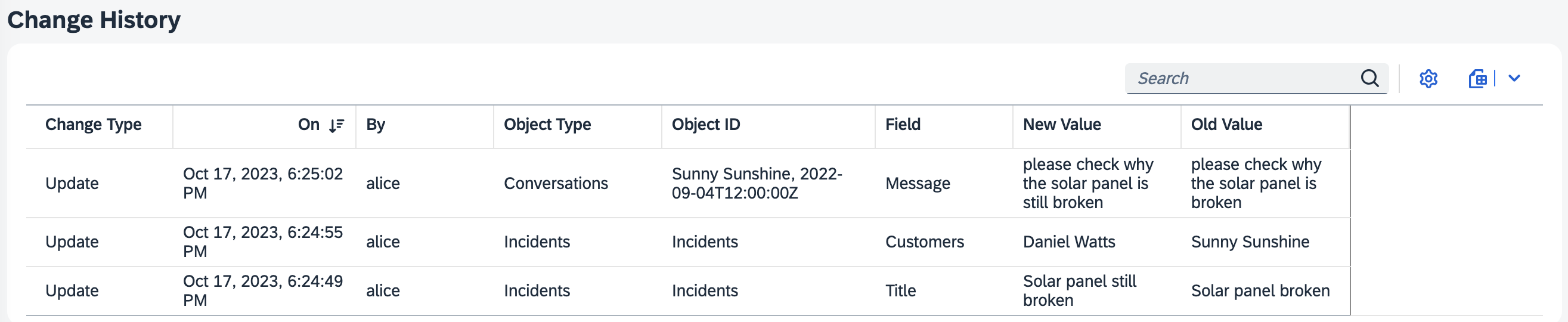
If you have a Fiori Element application, the CDS plugin automatically provides and generates a view sap.changelog.ChangeView, the facet of which is automatically added to the Fiori Object Page of your change-tracked entities/elements. In the UI, this corresponds to the Change History table which serves to help you to view and search the stored change records of your modeled entities.
Detailed Explanation
Human-readable Types and Fields
By default the implementation looks up Object Type names or Field names from respective @title or @Common.Label annotations and uses the technical name as a fall back.
For example, without the @title annotation, changes to conversation entries would show up with the technical entity name:

With an annotation, and possible i18n translations like so:
annotate Incidents.conversations with @title: '{i18n>CONVERSATION}';We get a human-readable display for Object Type:

Human-readable IDs
The changelog annotations for Object ID are defined at entity level.
Having a @changelog annotation without any additional identifiers, changes to conversation entries show up as simple entity IDs:

However, this is not advisable and the readability can be increased with an explicit object ID as follows:
annotate Incidents.conversation with @changelog: [author, timestamp];
The annotation accepts a list of paths, meaning the following examples are all possible as well:
type CustomType : String;

extend Customers with elements {
  note: CustomType
}

annotate Incidents with @changelog: [
  title, customer.note, urgency.name
];
annotate Incidents with @changelog: [
customer.address.city, customer.address.streetAddress, status.criticality
] {
title @changelog;
}ObjectID fallback for NULL values
When some @changelog fields are null, the object ID shows <empty> for the missing values:
annotate Orders with @changelog: [customer, region];If region is null, the objectID would display for example as ACME Corp, <empty>. When all @changelog fields are null, the object ID falls back to the entity's primary key.
Human-readable Values
The changelog annotations for New Value and Old Value are defined at element level.
They are already human-readable by default, unless the @changelog definition cannot be uniquely mapped such as types enum or Association.
For example, having a @changelog annotation on Incident's customer field without any additional identifiers, changes would show up as UUIDs:
customer @changelog;
Hence, here it is essential to add a unique identifier to obtain human-readable value columns:
customer @changelog: [customer.name];
Human-readable IDs for Composition Entries
When a child entity is modified, a composition changelog entry is created on the parent entity with valueDataType = 'cds.Composition'. The Object ID on this entry identifies what was affected. How this Object ID is resolved depends on whether the composition is a composition of one or a composition of many.
Composition of one
For composition of one, the Object ID is derived from the child entity's @changelog annotation. If the child entity has no @changelog, it falls back to the parent entity's @changelog. Any @changelog annotation on the composition field itself is not considered for the Object ID.
@changelog: [name]
entity BookStores {
  key ID   : UUID;
  name     : String;
  registry : Composition of one BookStoreRegistry @changelog: ('Not considered');
}

@changelog: [code]
entity BookStoreRegistry {
  key ID      : UUID;
  code        : String;
  validOn     : Date @changelog;
}
When validOn is changed on BookStoreRegistry, the composition entry on BookStores will have objectID = 'TEST-REG' (from the child's @changelog: [code]), not the parent's name.
Composition of many
For composition of many, the Object ID is not derived from the child entity, since different children can have different identifiers. Instead, it falls back to the parent entity's @changelog annotation.
@changelog: [name]
entity BookStores {
  key ID : UUID;
  name   : String;
  books  : Composition of many Books on books.bookStore = $self @changelog;
}

@changelog: [title]
entity Books {
  key ID    : UUID;
  bookStore : Association to BookStores;
  title     : String @changelog;
}
When a Books entry is modified, the composition entry on BookStores will have objectID = 'Shakespeare and Company' (from the parent's @changelog: [name]).
You can customize the Object ID on the composition field using @changelog with a path or an expression. The annotation must only reference elements from the parent entity, not from the child entity.
Path-based:
annotate BookStores with @changelog: [name] {
  books @changelog: [name];  // uses parent's 'name' as Object ID
}
Expression-based:
annotate BookStores with @changelog: [name] {
  books @changelog: ('Books from ' || name);  // evaluates to e.g. 'Books from Shakespeare and Company'
}
Note
When multiple children are created or deleted in a single transaction, only one composition entry is created per parent. The
modificationtype on composition parent entries is alwaysupdate, regardless of whether children were created, updated, or deleted. This is because a single transaction may involve multiple types of operations on different children, making it impossible to assign a single accurate modification type. The actual modification type is reflected on the child entries themselves.
Results in the following change logs:

Expression-based labels
In addition to plain paths, the @changelog annotation supports CDS expressions for computing human-readable labels. Expressions must be wrapped in parentheses () to distinguish them from paths:
annotate Incidents {
  status @changelog: (status.code || ': ' || status.descr);
  price  @changelog: (price < 100 ? 'Budget' : 'Premium');
}
When status changes from N (New) to R (Resolved), the label would show "N: New" and "R: Resolved" instead of raw key values. For price, a ternary expression classifies the value into a human-readable category.
Localized values
If a human-readable value is annotated for the changelog, it will be localized.
extend Incidents with elements {
  status: Association to one Status @changelog: [status.descr];
}

entity Status {
  key code: String(1);
      descr: localized String(20);
}
By default the value label stored for the change is localized in the language of the user who caused the change. Meaning if a German speaking user changes the status, the human-readable value would be by default in German.
In cases, like above, where the human-readable value only consists of one field, targets a localized property and goes along the (un-)managed association, a dynamic human-readable value is used, meaning if an English-speaking user looks at the changes, the value label will be shown in English, for a French-speaking user in French and so on.
Tracing any kind of change
Change tracking is implemented with Database triggers and supports HANA Cloud, SQLite and Postgres.
Leveraging database triggers means any change will be tracked no matter how it is represented in the service. Thus tracking changes made via unions, or via views with joins will still work.
Tracking datetime fields with a fixed time zone
The plugin supports tracking datetime field changes when the field has a time zone annotated.
extend Incidents with elements {
  closedAt : DateTime @changelog @Common.Timezone : 'Europe/Berlin';
  openedAt : DateTime @changelog @Common.Timezone : openedTimeZone;
  openedTimeZone : String @Common.IsTimezone;
}
In both cases the plugin will show the annotated time zone for change values in changes for the two fields. In the second case the time zone is dynamically fetched and modifications to the time zone field will also reflect in the change records for that field.
Advanced Options
Altered table view
The Change History view can be easily adapted and configured to your own needs by simply changing or extending it. For example, let's assume we only want to show the first 5 columns in equal spacing, we would extend db/change-tracking.cds as follows:
using from '@cap-js/change-tracking';

annotate sap.changelog.ChangeView with @(
  UI.LineItem : [
    { Value: modificationLabel },
    { Value: createdAt },
    { Value: createdBy },
    { Value: entityLabel },
    { Value: objectID }
  ]
);
In the UI, the Change History table now contains only the five columns with the desired properties:

For more information and examples on adding Fiori Annotations, see Adding SAP Fiori Annotations.
Disable lazy loading
To disable the lazy loading feature of the Change History table, you can add the following annotation to your db/change-tracking.cds:
using from '@cap-js/change-tracking';

annotate sap.changelog.aspect @(UI.Facets: [{
  $Type : 'UI.ReferenceFacet',
  ID    : 'ChangeHistoryFacet',
  Label : '{i18n>ChangeHistory}',
  Target: 'changes/@UI.PresentationVariant',
  @UI.PartOfPreview
}]);
The system now uses the SAP Fiori elements default setting @UI.PartOfPreview: true, such that the table will always be shown when navigating to that respective Object page.
Disable UI Facet generation
If you do not want the auto-provided UI facet for viewing changes, you can provide your own facet for the changes association in the @UI.Facets annotation and the plugin won't override it.
Furthermore if you annotate the association as not readable, the facet is also not added. You can achieve this, like
@Capabilities.NavigationRestrictions.RestrictedProperties : [
  {
    NavigationProperty : changes,
    ReadRestrictions : {
      Readable : false,
    },
  },
]
entity SalesOrders {
  key ID : Int16;
      title  : String @changelog;
}
Disable Association to Changes Generation
For some scenarios, e.g. when doing UNION and the @changelog annotation is still propagated, the automatic addition of the association to changes does not make sense. You can use @changelog.disable_assoc for this to be disabled on entity level.
Important
This will also suppress the addition of the UI facet, since the change-view is no longer available as the target entity.
Disabling Change Tracking
When @changelog is defined on the underlying DB entity, all services that expose the entity will automatically track changes due to annotation propagation. Use @changelog: false at the service, entity, or element level to selectively opt out of tracking.
// db/schema.cds — tracked across all services by default
@changelog: [title]
entity Incidents : cuid, managed {
  title    : String @changelog;
  date     : Date @changelog;
}
// srv/services.cds
service ProcessorService {
entity Incidents as projection on db.Incidents;
}
// Disable tracking for the entire admin service
@changelog: false;
service AdminService {
entity Incidents as projection on db.Incidents;
}
// Disable tracking for a specific projection only
service ReportingService {
@changelog: false
entity IncidentStats as projection on db.Incidents;
}
// Disable tracking for a specific element only
annotate ProcessorService.Incidents with {
date @changelog: false;
}Select types of changes to track
If you do not want to track some types of changes, you can disable them using disableCreateTracking, disableUpdateTracking
and disableDeleteTracking configs in your project settings:
{
  "cds": {
    "requires": {
      "change-tracking": {
        "disableCreateTracking": true,
        "disableUpdateTracking": false,
        "disableDeleteTracking": true
      }
    }
  }
}
Preserve change logs of deleted data
By default, deleting a record will also automatically delete all associated change logs. This helps reduce the impact on the size of the database.
You can turn this behavior off globally by adding the following switch to the package.json of your project
"cds": {
  "requires": {
    "change-tracking": {
      "preserveDeletes": true
    }
  }
}
Important
Preserving the change logs of deleted data can have a significant impact on the size of the change logging table, since now such data also survives automated data retention runs. You must implement an own data retention strategy for the change logging table in order to manage the size and performance of your database.
Adjust the depth of the entity hierarchy tracking
By default, the depth of the changes hierarchy for any entity is 3. This means, its changes as well as the changes of its compositions and the compositions of its compositions are shown on the UI.
"cds": {
  "requires": {
    "change-tracking": {
      "maxDisplayHierarchyDepth": 3
    }
  }
}
Important
The depth of the hierarchy has a performance impact, so be careful with increasing it!
Disable Children Change Linking
By default, when a child entity in a composition is change-tracked, an additional changelog is created on the parent entity. This record has valueDataType = 'cds.Composition' and the attribute set to the composition field name (e.g. conversation). It links changes from a child to the parent and allows hierarchical viewing of changes across the composition tree.
To disable this linking behavior for a specific composition, annotate the composition field with @changelog: false:
entity Incidents : cuid, managed {
  title : String @changelog;
  @changelog: false
  conversation : Composition of many {
    key ID    : UUID;
    timestamp : type of managed:createdAt;
    author    : type of managed:createdBy;
    message   : String @changelog;
  };
}
With @changelog: false on the composition field, individual changes on the child entity (e.g. changes to message) are still tracked, but no linking changelog is created on the parent. This means the child's changes will not appear in the parent's change history hierarchy.
Examples
This section describes modelling cases for further reference, from simple to complex, including the following:
- Tracing Changes
- Use Case 1: Trace the changes of child nodes from the current entity and display the meaningful data from child nodes (composition relation)
- Use Case 2: Trace the changes of associated entities from the current entity and display the meaningful data from associated entities (association relation)
- Use Case 3: Trace the changes of chained associated entities from the current entity and display the meaningful data from associated entities (association relation)
- Don'ts
Tracing Changes
Use cases for tracing changes
Use Case 1: Trace the changes of child nodes from the current entity and display the meaningful data from child nodes (composition relation)
Modelling in db/schema.cds
entity Incidents : managed, cuid {
  ...
  title          : String @title: 'Title';
  conversation   : Composition of many Conversation;
  ...
}

aspect Conversation: managed, cuid {
    ...
    message   : String;
}
Add the following @changelog annotations in db/change-tracking.cds
annotate Incidents with @changelog: [title] {
  conversation @changelog;
}

annotate Conversation with @changelog: [message] {
  message @changelog;
}
When a Conversation entry is modified, the composition changelog entry on Incidents will automatically use the child's Object ID derived from Conversation @changelog: [message]. This way, the change history on the parent shows which conversation was affected.
Use Case 2: Trace the changes of associated entities from the current entity and display the meaningful data from associated entities (association relation)
Modelling in db/schema.cds
entity Incidents : cuid, managed {
  ...
  customer       : Association to Customers;
  title          : String @title: 'Title';
  ...
}

entity Customers : cuid, managed {
  ...
  email          : EMailAddress;
  ...
}
Add the following @changelog annotations in db/change-tracking.cds
annotate Incidents with @changelog: [title] {
  customer @changelog: [customer.email];
}
Use Case 3: Trace the changes of chained associated entities from the current entity and display the meaningful data from associated entities (association relation)
Modelling in db/schema.cds
entity Incidents : cuid, managed {
  ...
  title          : String @title: 'Title';
  customer       : Association to Customers;
  ...
}

entity Customers : cuid, managed {
  ...
  address : Composition of one Addresses;
  ...
}
Add the following @changelog annotations in db/change-tracking.cds
annotate Incidents with @changelog: [title] {
  customer @changelog: [customer.address.city, customer.address.streetAddress];
}
Change-tracking supports analyzing chained associated entities from the current entity in case the entity in consumer applications is a pure relation table. However, the usage of chained associated entities is not recommended due to performance cost.
🛑 Don'ts
Use Case 1: Don't trace changes for field(s) with Association to many
entity Customers : cuid, managed {
  ...
  incidents : Association to many Incidents on incidents.customer = $self;
}
The reason is that: the relationship: Association to many is only for modelling purpose and there is no concrete field in database table. In the above sample, there is no column for incidents in the table Customers, but there is a navigation property of incidents in Customers OData entity metadata.
Use Case 2: Don't trace changes for field(s) with Unmanaged Association
entity AggregatedBusinessTransactionData @(cds.autoexpose) : cuid {
    FootprintInventory: Association to one FootprintInventories
                        on  FootprintInventory.month                      = month
                        and FootprintInventory.year                       = year
                        and FootprintInventory.FootprintInventoryScope.ID = FootprintInventoryScope.ID;
    ...
}
The reason is that: When deploying to relational databases, Associations are mapped to foreign keys. Yet, when mapped to non-relational databases they're just references. More details could be found in Prefer Managed Associations. In the above sample, there is no column for FootprintInventory in the table AggregatedBusinessTransactionData, but there is a navigation property FootprintInventory in OData entity metadata.
Troubleshooting
Modifying records directly on the database fails after upgrading to version 2
The database triggers for change tracking leverage session context to retrieve the user id needed for the createdBy field of the change record.
On HANA session_context('APPLICATIONUSER') is being used. All queries going through the CAP database driver @cap-js/hana will have the context. In HANA Cloud Cockpit it is set to the logged in user as well.
On Postgres current_setting('cap.applicationuser', true) is being used to retrieve the user information and again all queries going through @cap-js/postgres have the context.
On SQLite no session context function exists. Thus @cap-js/sqlite defines a UDF called session_context which looks up the session context from the database client used by @cap-js/sqlite. If you manually insert to SQLite circumventing the CAP driver, please make sure the UDF is defined.
"Invalid RID address" error with statement-level HANA triggers
Statement-level triggers could cause "invalid RID address" errors on certain HANA versions. This issue has been fixed with HANA version 2026.2.17 (QRC 1/2026). If you encounter this error, upgrade your HANA instance to at least this version.
As a temporary workaround, you can fall back to row-level triggers by setting the rowLevelTriggers flag in your project configuration:
"cds": {
  "requires": {
    "change-tracking": {
      "rowLevelTriggers": true
    }
  }
}
Note
Row-level triggers are slower than statement-level triggers, especially for bulk operations. The
rowLevelTriggersflag is a temporary workaround and will be removed in a future version.
"no such table" error when starting locally with a persistent SQLite database
When using a file-based SQLite database (e.g. db.sqlite) for local development, starting the server may fail with an error like:
Error: no such table: main.SAP_CAPIRE_BOOKSHOP_BOOKS in:
CREATE TRIGGER IF NOT EXISTS SAP_CAPIRE_BOOKSHOP_BOOKS_ct_create AFTER INSERT ...
CAP only auto-deploys the schema at server startup for in-memory SQLite. For a persistent SQLite file, you must deploy the schema yourself before starting the server, otherwise the change-tracking plugin cannot create its triggers on the (missing) application tables:
cds deploy
cds watch
See the CAP docs on using persistent SQLite databases for details.
Contributing
This project is open to feature requests/suggestions, bug reports etc. via GitHub issues. Contribution and feedback are encouraged and always welcome. For more information about how to contribute, the project structure, as well as additional contribution information, see our Contribution Guidelines.
Code of Conduct
We as members, contributors, and leaders pledge to make participation in our community a harassment-free experience for everyone. By participating in this project, you agree to abide by its Code of Conduct at all times.
Licensing
Copyright 2023 SAP SE or an SAP affiliate company and contributors. Please see our LICENSE for copyright and license information. Detailed information including third-party components and their licensing/copyright information is available via the REUSE tool.
History
Features 1, Fixes 3
Notes
Added
- Support tracking on localized text tables. Changes to annotated localized fields (e.g.
title,descr,locale) are linked to the parent entity's change history.
Fixed
cds deploy --to h2 --dryoutputs valid SQL without prepending the H2 trigger generation log- The trigger Java code for H2 is now using the
applicationusersession context variable for the createdBy column. - The trigger Java code for H2 is now using the
nowsession context variable to have consistent createdAt values throughout the given transaction.
Fixes 1
Notes
Fixed
- Cast the code list key to string in dynamic localization to fix
SqlError: invalid numberin service-levelChangeViewwhen using HANA
- Cast the code list key to string in dynamic localization to fix
Changed 1, Fixes 1
Notes
Changed
- Generate a dedicated Java class per H2 trigger implementation and a shared
AbstractChangeTrackingTriggerbase class instead of inline trigger logic
Fixed
- Preserve v1 transaction grouping during migration by deriving
transactionIDfromchangeLog_IDinstead of the seconds ofcreatedAt
- Generate a dedicated Java class per H2 trigger implementation and a shared
Fixes 5
Notes
Fixed
- Prevent
/changesnavigation from leaking change history for change-tracked fields that are excluded from a service projection - Consider
@changelog: falseon nested composition-of-many targets during deep writes - Fix
Duplicate definition of element "parent_entityKey" (in entity:"sap.changelog.ChangeView"/query:1)compile error during tenant upgrade in multi-tenant apps withextensibility: true - Fix HANA
SqlError: invalid number/invalid DATE, TIME or TIMESTAMP valuewhen reading the Fiori change hierarchy caused by castingvalueChanged*LabelinsteadvalueChanged*inChangeView - Fix trigger generation for H2 for local CAP Java development
- Prevent
Fixes 5
Notes
Fixed
- Prevent SQLite sidecar crash on startup in multi-tenant applications due to trigger/index deployment running before tenant tables exist
- Invoke
enhanceModelin after-deploy handler ofcds.xt.DeploymentServicebecause theloadedhandler is not invoked on the tenant CSN fromModelProviderService.getCsn() - Fix HDI deployment failure (sap.changelog.Changes_CT_INDEX.hdbindex requires db://SAP_CHANGELOG_CHANGES which is not provided by any file) caused by adding
.hdbindexartifacts even when Changes table does not exist in the compiled model - HDI deployment failure (
invalid column name: CHANGEVIEW_0.PARENT_ENTITYKEY) during extensibility upgrades sinceenhanceModelwas not called on the tenant CSN before HANA compilation - Support model enhancement with
xtendedCSN flavor to support extensibility and feature toggle setups
Fixes 3
Notes
Fixed
- Fix
<expr>.cdscompilation error duringcds deploy --to hanawhen expression-based@changelogannotations (CXL) are used as objectIDs on entities with compositions - Prevent
@PersonalDatafield values from leaking intoobjectIDorvalueChangedToLabelcolumns when@changelogannotations reference such fields via path expressions or CXL - Fix missing
cds.Compositionparent entry and brokenparent_IDlinks in generated triggers when a DB-levelselect *view of a parent entity inherits the same composition
- Fix
Fixes 1
Notes
Fixed
- Resolve false "Conflicting @changelog annotations" error when a service projection flattens association and inherits plain
trueinstead of a specific@changelogannotation value (e.g.,[author.name]) due to CDS annotation propagation
- Resolve false "Conflicting @changelog annotations" error when a service projection flattens association and inherits plain
Removed 4, Features 12, Changed 7, Fixes 7
Notes
Added
- Trigger generation for SQLite, HANA, Postgres and H2 to perform change tracking on the database level
- Allow grouping of changes via new
transactionIDcolumn valueChangedFromLabelandvalueChangedToLabelcolumns onsap.changelog.Changesfor localized labels- Allow change tracking skip via session variables for entire transactions, entities, elements (
ct.skip) - Dynamic localized label lookup: if a
@changeloglabel points to a localized property from a code list entity, the label is resolved in the reader's locale at read time - Support CDS expression language (CXL) in
@changelogannotations for custom objectIDs and changelog labels - Customizable objectID for composition changelog entries on parent entities
- Support for tracked Date, DateTime, Time and Timestamp properties with correct formatting
- Support for
@Common.Timezoneon change-tracked entities - Database indexes on
sap.changelog.Changesfor faster parent composition lookups and deduplication queries - Generation of
.hdbmigrationtableand updatingundeploy.jsonviacds add change-tracking-migration - HANA procedure
SAP_CHANGELOG_RESTORE_BACKLINKSto restore parent-child hierarchy for composition changes
Changed
- Display changes with a Tree Table
- Changes from child entities are shown on the parent ChangeView by default (configurable via
maxDisplayHierarchyDepth) - Composition changelog entries on parents always have
updateas modification type - Only skip change tracking for
@PersonalData.IsPotentiallySensitiveand@PersonalData.IsPotentiallyPersonal(not@PersonalData.FieldSemantics) - Localization is performed on database level via
sap.changelog.i18nKeystable - Modifications on
sap.changelog.Changes:- Removed
serviceEntityPath,keysand foreign keychangeLog - Renamed
entityIDtoobjectID - Added
entityKey,createdAtandcreatedByfrom deleted entitysap.changelog.ChangeLog - Added
parentassociation andchildrencomposition
- Removed
- Change History section is hidden in draft mode
Fixed
- Performance issues when working with entities that include a large number of fields and children
- Creation of changelogs at bulk operations
- Search and sort functionality on the
ChangeView LargeStringvalues are truncated and don't lead to failing inserts- Explicit type casts for Date, DateTime, Time, Timestamp and Decimal fields in
ChangeView - Format tracked decimal values with correct precision (e.g., Decimal(11,4) stores 0 as
0.0000) - ObjectID correctly falls back to entity key when all
@changelogfields are NULL
Removed
- Event handler registration for change capture mechanism
- Entity
sap.changelog.ChangeLogand flattened intosap.changelog.Changes - Removed configuration option
considerLocalizedValues - Information about which service a change originated from
Fixes 2
Notes
Fixed
- Server no longer crashes when after a DB migration the service name or attribute name change
- Fix crash when applications uses feature toogles or extensibility
Changed 1
Notes
Changed
- Correctly handle changes on foreign keys when sending them via the document notation on an API level.
Features 2, Changed 1
Notes
Added
- Allow tracking of localized values with
considerLocalizedValues - Added more translations for the UI labels for more languages
Changed
- Correct localisation for
cds.Date,cds.Time,cds.DateTimeandcds.Timestampproperties
- Allow tracking of localized values with
Features 2, Changed 1, Fixes 3
Notes
Added
- License entry
- Added translations for the UI labels for more languages
Fixed
- Handling of multiple records in one request
- Handle cases where the key contains '/'
- Instantiate the changes association correctly so it does not impact other
@cap-jsplugins
Changed
- Prepare for CDS9 in tests
Features 3, Changed 4, Fixes 7
Notes
Added
- Added @UI.MultiLineText to value fields
- Added support for Multi-Tenancy
- Added configuration options to disable tracking of CREATE/UPDATE/DELETE operations on a project level
Fixed
- Handling of numeric and boolean fields was faulty, when an initial value of
0for numeric orfalsefor boolean was supplied - Decimal values were handled differently for HANA and SQlite
- Missing UI Label for one attribute (
ChangeLog.ID) of the Changes UI facet - Support for @UI.HeaderInfo.TypeName as fallback for the UI Label of the key
- Compilation error when an association is used as a key
- Fixed handling of unmanaged composition of many
- Proper casing of the operation enum type
Changed
- Added warning and mitigation for multi-tenant deployments with MTX
- Added a disclaimer of upcoming new version having a minimum requirement of CDS 8.6 for multitenancy fix
- Changed the default limit on non-HANA databases from 255 to 5000 characters for all String values
- Updated peer dependency from CDS7 to CDS8
Features 2, Changed 3, Fixes 8
Notes
Added
- A global switch to preserve change logs for deleted data
- For hierarchical entities, a method to determine their structure and a flag to indicate whether it is a root entity was introduced. For child entities, information about the parent is recorded.
Fixed
- CDS 8 does not support queries for draft-enabled entities on the application service anymore. This was causing: SqliteError: NOT NULL constraint failed: (...).DraftAdministrativeData_DraftUUID
- CDS 8 deprecated cds.transaction, causing change logs of nested documents to be wrong, replaced with req.event
- CDS 8 rejects all direct CRUD requests for auto-exposed Compositions in non-draft cases. This was affecting test cases, since the ChangeView falls into this category
- req._params and req.context are not official APIs and stopped working with CDS 8, replaced with official APIs
- When running test cases in CDS 8, some requests failed with a status code of 404
- ServiceEntity is not captured in the ChangeLog table in some cases
- When modeling an inline entity, a non-existent association and parent ID was recorded
- Fixed handling, when reqData was undefined
Changed
- Peer dependency to @sap/cds changed to ">=7"
- Data marked as personal data using data privacy annotations won't get change-tracked anymore to satisfy product standards
- Restructured Documentation
Features 1, Changed 1, Fixes 3
Notes
Fixed
- Storage of wrong ObjectID in some special scenarios
- Missing localization of managed fields
- Views without keys won't get the association and UI facet pushed anymore
Added
- A method to disable automatic generation of the UI Facet
Changed
- Improved documentation of the @changelog Annotation
Features 1, Changed 1, Fixes 2
Notes
Added
- Side effect annotation now allows automatic refresh after a custom action caused changes
Changed
- Added a check to disable change tracking for views with a UNION
Fixed
- Handling of associations within change tracked entities
- Handling of change log when custom actions on child entities are called
Features 2, Changed 2
Notes
Added
- Added note about using
SAPUI5 v1.120.0or later for proper lazy loading of the Change History table. - In README, add warning about tracking personal data.
Changed
- Support cases where parent/child entries are created simultaneously.
- Allow for lazy loading of change history table (with SAP UI5 release 1.120.0).
- Added note about using
Changed 1
Notes
Changed
- In README, use view of the full change-tracking table instead of the customized one for the main image.
Changed 1, Fixes 1
Notes
Changed
- Flattened README structure.
Fixed
- Labels are looked up from the service entity (not the db entity only).
Others providing
Compare all 3 on the Change tracking page →- com.sap.cds:cds-feature-change-trackingcom.sap.cds:cds-feature-change-trackingRecords who changed which annotated field on a CDS entity and when, as a queryable change log for CAP Java, covering every modifying CQN statement but not native SQL or JDBC.sap official, capChange log of annotated entity fields for CAP Java
- cdsmbt01cdsmbt01This is CDS plugin that enable OData change tracking for CAP applicationsindependent, capCDS plugin for OData change tracking in CAP applications
Details
Sources
Sources are graph entities: the same page may back several entries, and an unreachable source flags every row that rests on it.
Compatibility and provenance
Contributors


History in the atlas
- First seen.
For your agent
- Ref
artifact:cap-js-change-tracking- JSON
- /artifacts/cap-js-change-tracking.json
- MCP
- Connecting an agent