cds-swagger-ui-express
Serves a CAP service's OpenAPI definition as a browsable Swagger UI, which is the page @cap-js/openapi@cap-js/openapiTurns a CDS service into an OpenAPI document, derived from the model so the description cannot drift from what is served.sap official, cap's document does not come with.
Facts
Where it sits
Who is behind it

In the atlas: maintains 1, contributes to 53@chgeomaintainerbandlowContributes to this

In the atlas: contributes to 1@bandlowDaniel HutzelContributes to this

In the atlas: contributes to 32, wrote 3@danjoaGregor WolfContributes to this

In the atlas: maintains 17, contributes to 59, wrote 2@gregorwolfYannick WinterContributes to this

In the atlas: contributes to 1@kyc34 contributors
Before choosing this
Conditions
LicenceSAP Developer License Agreement 3.2 CAP§ 1, 2, 3A cds-plugin is used with SAP CAP materials, or an artifact is explicitly identified as a CAP plugin or application.
- § 1 License. Productive customer applications are limited to SAP BTP or another SAP-licensed platform, and mass extraction to a non-SAP product is restricted except where solely required for SAP interoperability.
- § 2 Intellectual Property. The agreement retains SAP's rights in the covered materials and limits making APIs, tools or software available to third parties, while preserving ownership of customer applications subject to SAP's underlying rights.
- § 3 Artificial Intelligence Training. The agreement prohibits use of the covered materials and customer applications for training artificial-intelligence models or systems.
What it declares
Every artifact
- Type
- CDS plugin
- Origin
- Independently maintained
As a CDS plugin
- Declared for
- >=7
- Distributed through
- npm
Connections
Handing a service description to clients and tools
Download
Install
npm add cds-swagger-ui-expressDerived from the package name. No recipe recorded; the README has the configuration.
Learn more
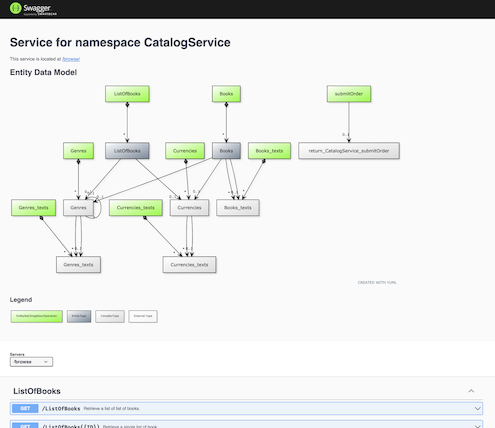
- Part 2 – Empowering SAP BTP CAP Services through Open API Spec and Annotations for Effective Communication, Collaboration and GovernancePart 2 – Empowering SAP BTP CAP Services through Open API Spec and Annotations for Effective Communication, Collaboration and GovernanceWalks through generating an OpenAPI specification for a Node.js CAP service: installing cds-swagger-ui-express, bootstrapping it in server.js, a sample CDS data model with associations and compositions, and the YUML diagram and endpoint details the Open API Preview renders in Business Application Studio. Also shows gating the Swagger UI behind a user-defined environment variable so it is served in development and QA subaccounts but excluded from the production deployment on Cloud Foundry. Second of a three-part series; the first covers the concepts and the third goes deeper into annotations.mohit_bansal3, published 2023-05-24mohit_bansal3, SAP Community
- Adding a Swagger UI to Your SAP Cloud Application Programming Model / Node.js ServiceAdding a Swagger UI to Your SAP Cloud Application Programming Model / Node.js ServiceThe problem stated from the other side of the wire: a CAP and HANA backend consumed by frontend developers with no SAP background, who said in the first meeting that they could not work from what the service offered. A browsable API page is the answer, and this is the post the Swagger UI plugin indexed here exists to serve.published 2020-01-23Thomas Jung, SAP Community
README
quoted from chgeo/cds-swagger-ui-express under MIT, readcds-swagger-ui-express
An CAP plugin to serve OpenAPI definitions for CAP services in Swagger UI. Builds on top of swagger-ui-express.
Setup
In your project, just add a dependency like so:
npm add --save-dev cds-swagger-ui-expressOnce loaded by CAP, the package registers itself as a middleware with a default configuration.
Run
After starting the app with cds watch or so, Swagger UI is served at /$api-docs/<service-path>, like http://localhost:4004/$api-docs/browse/
Configuration
You can set the most prominent options in package.json or .cdsrc.json, as in other CAP apps:
"cds": {
  "swagger": {
    "basePath": "/$api-docs", // the root path to mount the middleware on
    "apiPath": "/", // the root path for the services (useful if behind a reverse proxy)
    "diagram": true, // whether to render the YUML diagram
    "odataVersion": "4.0" // the OData Version to compile the OpenAPI specs. Defaults to 4.01
  }
}
To disable the plugin, set this:
"cds": {
  "swagger": false
}
Note that you can also set environment variables for each option, like CDS_SWAGGER=false. See the cds.env docs for more.
Programmatic Usage (advanced)
If you need to register the plugin programmatically, e.g. in certain conditions only, you can do so in your server.js:
const cds = require ('@sap/cds')
const cds_swagger = require ('cds-swagger-ui-express')
cds.on ('bootstrap', app =>
  app.use (cds_swagger ())
)
In this case, the default 'auto registration' as plugin is disabled automatically to avoid conflicts.
Programmatic Configuration
If the middleware is registered programmatically, you need to pass in the options through the API as well. No configuration from package.json is used here.
Call cds_swagger ({...}) with the following object as first parameter:
{
  "basePath": ...,
  // see section above for more
}
Swagger UI Options
Call cds_swagger ({...}, {...}) with an additional object as second parameter. This object is passed to swagger-ui-express as custom options.
Example:
{
  "customSiteTitle": "My Custom Title",
  "swaggerOptions": {
    "requestInterceptor": ...
  }
}
See the list of all options. For questions to specific properties, contact the maintainers of swagger-ui-express or swagger-ui.
Notes
If you call cds.serve on your own in your server.js, make sure to install this middleware before, as it relies on CDS' serving events.
History
Fixes
Notes
Fixed
Changed 3, Fixes 1
Notes
Changed
- Options from
package.jsonnow get used as defaults even if the middleware is added programmatically. You can now call it w/o options but have them inpackage.jsononly, or mix them, with the programmatic options taking precedence. - Default texts have changed and are now more configurable through
@titlefor service title@Core.Descriptionfor service short text@Core.LongDescriptionfor service description
- This plugin is no longer tested with Node 18, which has reached end of life.
Fixed
- Compatibility with express 5, as
@sap/cds>= 9.7.0 supports it now.
- Options from
Features 1, Changed 1
Notes
Added
- The OpenAPI spec is no available for download on
.../openapi.jsonand linked in the UI.
Changed
- The default value for option
apiPathis now/, allowing more flexible control over the root path where the CDS services are served. Formerly, it was not possible to set root path relative to the current host, likeabc.com/1234-appid/$api-docs/...,abc.com/5678-appid/$api-docs/....
- The OpenAPI spec is no available for download on
Changed 1
Notes
Changed
- Use
@cap-js/openapiinstead of@sap/cds-dk, leading to lighter dependencies
- Use
Features 3, Changed 1
Notes
Added
- Auto-registration mode: the middleware registers itself when loaded as a CAP plugin
- Declarative configuration through
package.json/cds-rc.json - Programmatic registration is still possible, but disables auto mode then
Changed
- Make dependency to
@sap/cds-dkoptional. If running with thecdsexecutable during development, the dependency is fulfilled anyways. Only when running as part of a deployed app withcds-serve, then such a dependency is needed.
Features 1, Changed 4, Fixes 1
Notes
Changed
- Requires
@sap/cds^7 - Requires
@sap/cds-dk^7 - Requires
swagger-ui-express/swagger-ui^5 - Drops Node 14 and 16 support. Minimum Node version is now 18.
Added
- New option
odataVersionto specify the OData version used to compile the OpenAPI specs
Fixed
- Works with
@sap/cds7.4 again
- Requires
Features 2, Changed 2, Fixes 1
Notes
Added
- Way to pass swagger (UI) options. See README.md.
- JSDoc type definitions for options.
Changed
- The default site title is now <Service Name> - Swagger UI (instead of just Swagger UI)
- REST services are now available as well in the Swagger UI. Previously, only OData services were allowed. This was to avoid potential issues as the underlying OpenAPI transformation uses OData as intermediate protocol. So, as long as we don't see issues, allow REST services as well.
Fixed
- Multiple services are now properly served, w/o the previous stale content of
swagger-ui-init.js. Requiresswagger-ui-express>= 4.6.2
Features 1
Notes
Added
- Option
apiPathto configure a root URL path for the services, which is useful if behind a reverse proxy.
- Option
Changed 2
Notes
Changed
- The Preview text on index page has been added to accomodate the change in
@sap/cds-dk4.9.0 that removes that text suffix. - Require
@sap/cds-dk@^4.9.0
- The Preview text on index page has been added to accomodate the change in
Changed 1
Notes
Changed
- The
serving Swagger UI...log lines are not longer sent to console by default to avoid clutter in the default output. They can be enabled withDEBUG=swaggerset as environment variable.
- The
Changed 1, Fixes 1
Notes
Changed
- Requires
@sap/cds-dk4.3.0, no more polyfill for older versions
Fixed
- Options can be provided partially
- Requires
Others providing
Compare all 2 on the OpenAPI page →- @cap-js/openapi@cap-js/openapiTurns a CDS service into an OpenAPI document, derived from the model so the description cannot drift from what is served.sap official, capGenerates OpenAPI documents from a CDS service
Details
Sources
Sources are graph entities: the same page may back several entries, and an unreachable source flags every row that rests on it.
Compatibility and provenance
Flavors
“const cds = require ('@sap/cds')” — chgeo/cds-swagger-ui-express — README
Contributors
History in the atlas
- Serves a CAP service's OpenAPI definition as a browsable Swagger UI, which is the page @cap-js/openapi's document does not come with.
- First seen.
For your agent
- Ref
artifact:chgeo-cds-swagger-ui-express- JSON
- /artifacts/chgeo-cds-swagger-ui-express.json
- MCP
- Connecting an agent