cap-ui5-gpt-chat
A working chat application on CAP and SAPUI5 against the OpenAI API — selectable models, per-user chat history in the database, maintainable chatbot personalities, and streaming responses as an option per chat.
A whole application rather than a call: the CAP service holds messages and personalities as entities, the completion stream is an event emitter the UI consumes as it arrives, and the UI5 side adds a custom list item control with code highlighting. Both halves are TypeScript, the backend using decorators and dependency injection. Personalities are seeded from a CSV, so changing the assistant's character is a data change and a redeploy rather than a code change.
Facts
Where it sits
Who is behind it

In the atlas: maintains 6, contributes to 9, wrote 12@mikezaschkamaintainer
Before choosing this
Conditions
PracticalFunctional boundary
It calls the OpenAI API directly with a key in the environment. It was written in early 2023 and last touched in May 2023, which is before SAP AI Core and the CAP LLM plugins existed — so read it for the shape of the application, not for how a CAP service should reach a model today.
What it declares
Every artifact
- Type
- Sample
- Origin
- Independently maintained
- Runtime
- Node.js
- Runs on
- Cloud Foundry
As a sample
- Type declarations
- declared
- Form
- A reference application
Connections
Calling a language model with tenant and credential handling solved
Whole applications to read rather than snippets to copy
How an application is arranged once written in TypeScript
Download
Learn more
- A ChatGPT-like chat app built with modern SAP technologies (CAP, SAPUI5) – Part 3/3A ChatGPT-like chat app built with modern SAP technologies (CAP, SAPUI5) – Part 3/3The SAPUI5 frontend of the sample, and mostly an argument for writing UI5 in TypeScript: ES imports in place of sap.ui.define, a class with real private members in place of the underscore convention, and the service types generated from the CDS model copied into the UI package, so one IChats interface types the OData object the controller reads. The second half is structure — a formatter class and a singleton LayoutManager called from the XML view through core:require, a confirmation helper taking a callback, a dialog class resolving a promise, a generic createEntity<T> on a service class — all of it to keep every controller under 100 lines. What it says about arranging a UI5 app holds whatever model sits behind the chat; the tooling around it is of its date, and the post calls UI5's TypeScript support experimental.published 2023-02-27Mike Zaschka, SAP Community
- A ChatGPT-like chat app built with modern SAP technologies (CAP, SAPUI5) – Part 2/3A ChatGPT-like chat app built with modern SAP technologies (CAP, SAPUI5) – Part 2/3The backend: CAP with TypeScript, the entities holding chats and personalities, and the service that talks to the API. This is where the streamed completion and the repositories behind the handler come from, which is the part of the sample still worth lifting even though the model access has since been superseded by AI Core.published 2023-02-24Mike Zaschka, SAP Community
- A ChatGPT-like chat app built with modern SAP technologies (CAP, SAPUI5) – Part 1/3A ChatGPT-like chat app built with modern SAP technologies (CAP, SAPUI5) – Part 1/3The concepts before the code: what the GPT model and its API actually offer, and what the finished chat application looks like — personalities included. Written in the weeks when the ground was moving under it, and the post carries its own change log to prove it: GPT-3.5 added on 1 March, GPT-4 on 15 March, and an admission that a series planned as two posts became three.published 2023-02-22Mike Zaschka, SAP Community
Architecture
as mta.yaml states it at 8b89dcc, readDownload
Bound, and not drawn
- capui5gptchat-srvSAP Authorization and Trust Management service, hana
- capui5gptchat-db-deployerSAP Authorization and Trust Management service, hana
- capui5gptchat-ui-contentSAP HTML5 Application Repository service for SAP BTP
- capui5gptchat-destination-contentSAP Authorization and Trust Management service, SAP HTML5 Application Repository service for SAP BTP, SAP Destination service
Documented, with no instance in the document
- @sap/approuter requires Cloud Identity Servicescapui5gptchat-routerAuthenticating the user against Identity Authentication instead of, or alongside, SAP Authorization and Trust Management service. Bound to both, the router picks IAS.@sap/approuter 23.0.0 — README, authenticationType
Bound to both services: prefers ias if both authentication services can be used in the current subaccount, determined via BTP security endpoint (may impact response time)
- @sap/approuter requires SAP Connectivity servicecapui5gptchat-routerForwarding to an on-premise backend: the binding is required once a destination sets its ProxyType to on-premise.@sap/approuter 23.0.0 — README, destination ProxyType
if ProxyType set to `on-premise`, binding to SAP Cloud Platform connectivity service is required.
Bound in the descriptor, not joined to an entry
hana
README
quoted from mikezaschka/cap-ui5-gpt-chat under Apache-2.0, readA ChatGPT-like chat app built with SAP CAP and SAPUI5
This is a full working chat application built with the SAP Cloud Application Programming Model and SAPUI5. It uses a selectable OpenAI model (including the latest ChatGPT model) of the OpenAI API to generate responses to the user's prompts. More details can be found in the related blog posts in the SAP Community:
- ChatGPT-like chat app built with SAP CAP and SAPUI5 - Part 1 – Introduction
- ChatGPT-like chat app built with SAP CAP and SAPUI5 - Part 2 – Backend
- ChatGPT-like chat app built with SAP CAP and SAPUI5 - Part 3 – Frontend
Features
- Chat with a selectable OpenAI model including the GPT-4 and GPT-3.5 models powering ChatGPT
- Multi-user support for individual chats
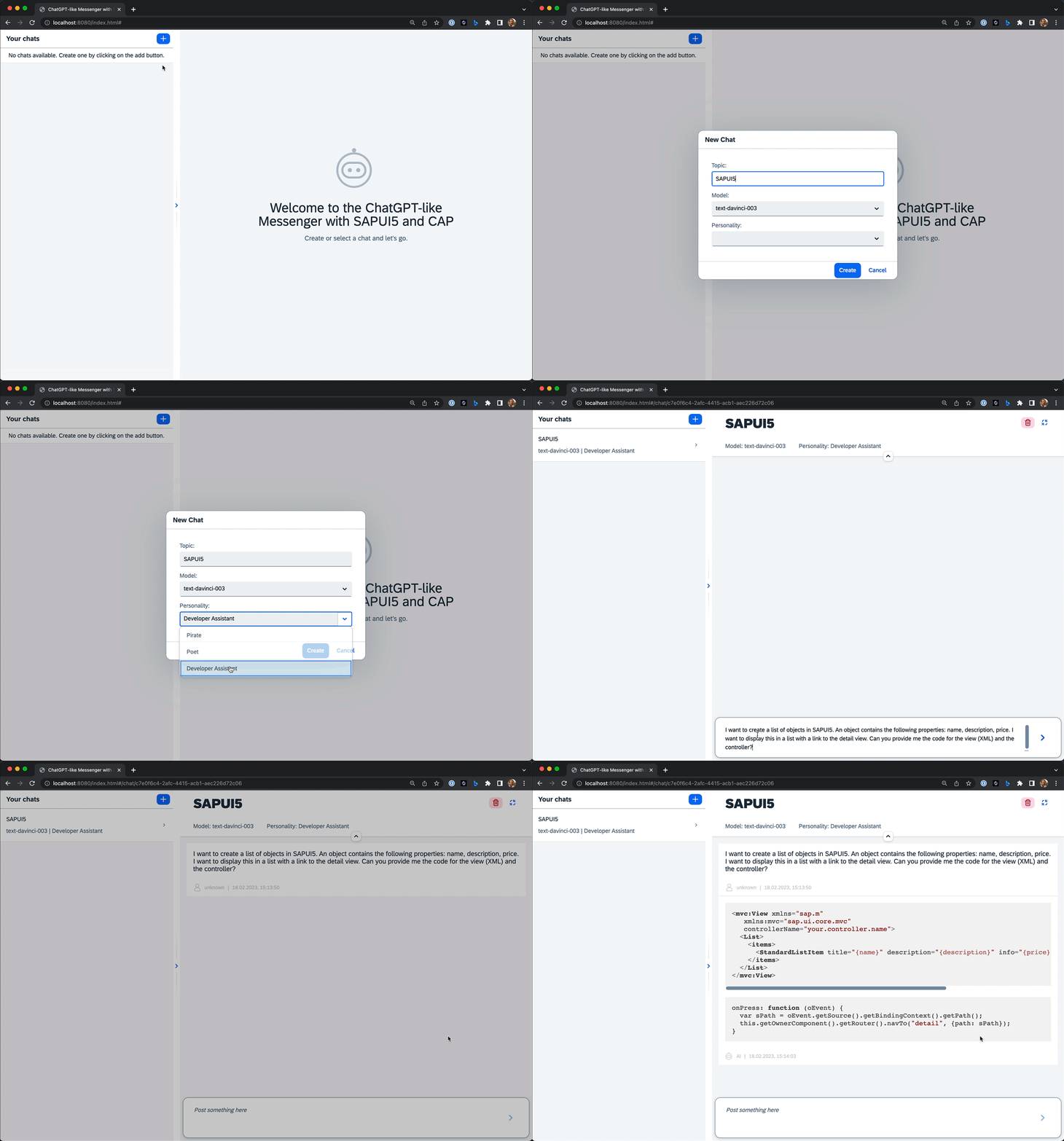
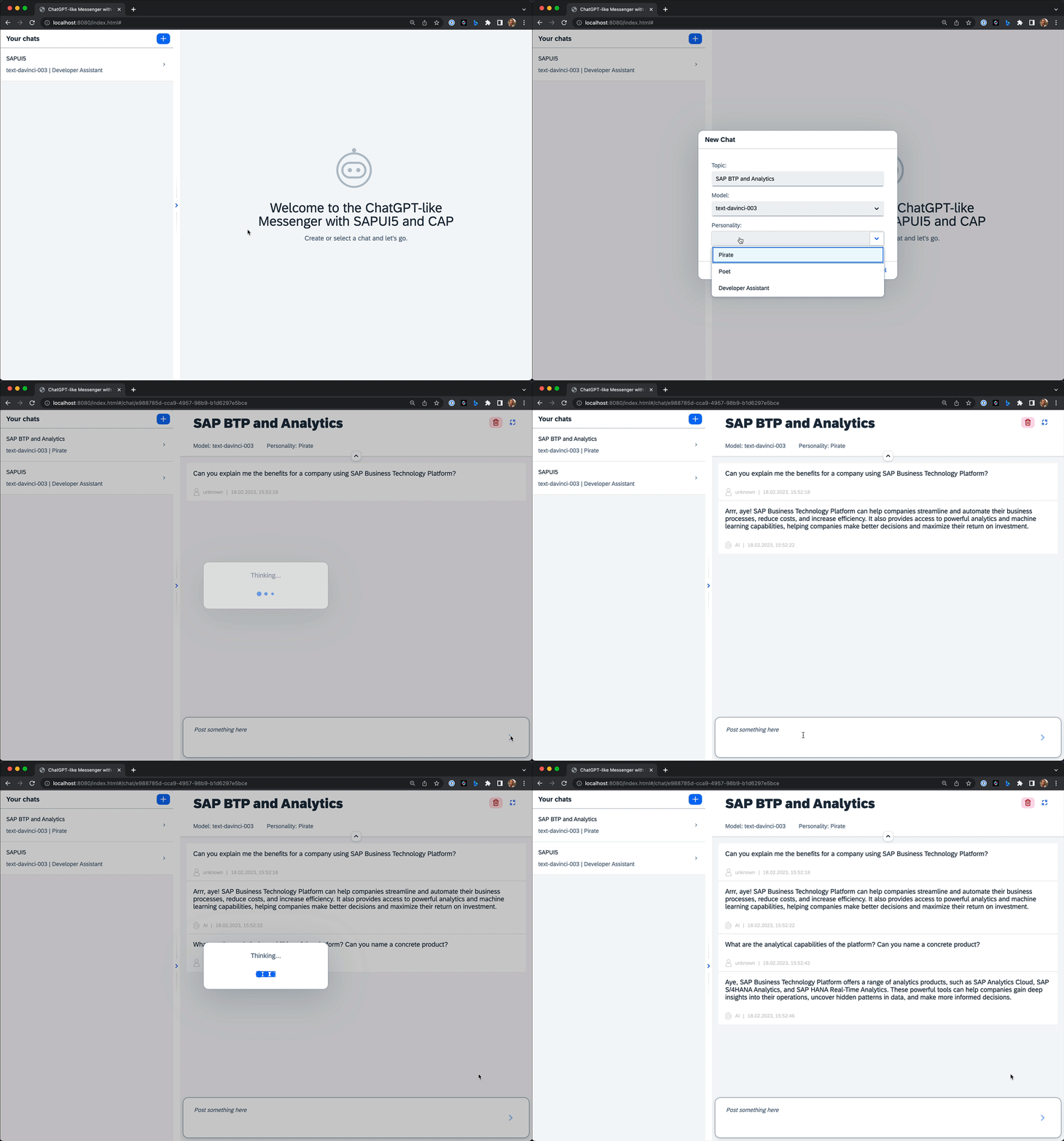
- Selectable and maintainable personalities for the AI chatbot
- Chat history for each user (everything is stored in the database)
- Per chat option to enable streaming responses from the OpenAI API
- Code-Highlighting for code snippets in the chat messages
- Ready to be deployed to SAP BTP Cloud Foundry
Technical Aspects
- Full TypeScript implementation in backend (SAP CAP) and frontend (SAPUI5)
- Usage of advanced TypeScript features like decorators and dependency injection in the backend
- Chat UI built with SAPUI5 including a custom list item control and with the integration of external modules
Demo
Ask the AI for help with SAPUI5:
Ask the AI about SAP BTP:
Customize the app
Since the app is Open Source, you can simply fork the repository and customize it to your needs.
Without a technical deep dive, there are two ways to easily customize the app:
Add a new personality
There is currently no UI to administrate personalities, but they can easily be changed in a csv file. Open the file packages/server/db/data/p36.capui5gpt.chat-Personalities.csv and simply add a new line with the following format:
<name>;<instruction>After changing the file you need to redeploy the entities to the database. In the local enviroment you can do this with the following command (please note that this will delete all data in the local database):
pnpm -r deploy:localIn the Cloud Foundry environment you can simply re-deploy the app (no data will be lost).
Modify the AI model parameters
It is possible to tweak the OpenAI API parameters for the completion request. For more details, see the OpenAI API documentation.
Simply add the following in the default-env.json file in the packages/server folder and change the parameters to your needs:
{
  "app_openai": {
    "apiKey": "YOUR-API-KEY",
    "completionAttributes": {
      "max_tokens": 1200,
      "temperature": 0.8,
      "top_p": 1,
      "frequency_penalty": 0,
      "presence_penalty": 0.6
    }
  }
}
When being deployed to the Cloud Foundry environment, you can also change the parameters by changing the values in the dev.mtaext file.
Run the app locally in development mode
Prerequisites
- Node.js (at least version 16)
- An OpenAI Account and an OpenAI API key
- SQLite
Install pnpm
If you haven't pnpm already installed, you can globally install it via the following command:
npm i -g pnpmInstall dependencies
Install all dependencies using the following command:
pnpm iDeploy the cds entities from the CAP backend to the SQLite database
pnpm -r deploy:localAdd your OpenAI API key
Put a new file in the folder packages/server called default-env.json with the following content and add your OpenAI API key:
{
  "app_openai": {
    "apiKey": "YOUR-API-KEY"
  },
  "VCAP_SERVICES": {}
}
Start the app in development mode
The following command will start the app in development mode. Server and UI will be started in parallel.
pnpm --parallel start:devOpen the app in the browser
Open the following URL in your browser and start chatting: http://localhost:8080/local.html
You need to login with one of the following credentials:
| username | password |
|---|---|
| developer | helloworld |
| pirate | ahoy |
There a no specific roles attached to either user, so feel free to choose.
Deploy the app to the SAP BTP Cloud Foundry environment
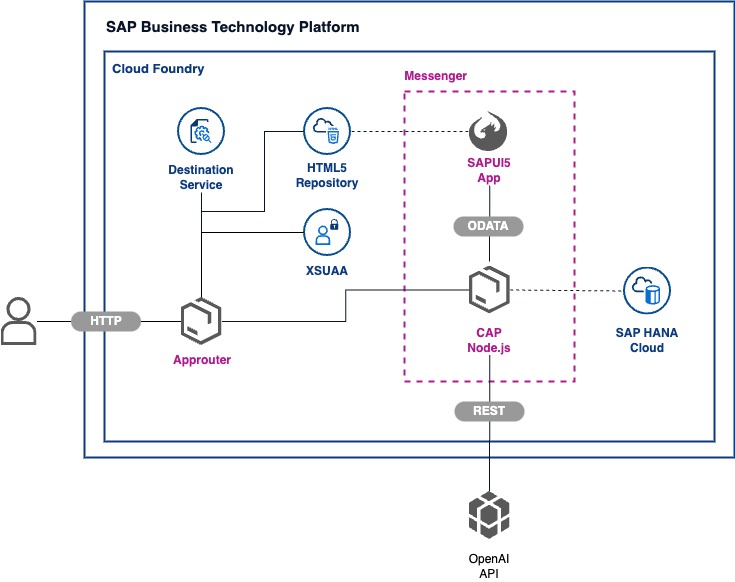
The project is already prepared to be deployed to the SAP BTP Cloud Foundry environment. The following diagram shows the architecture of the app:
The full application can be deployed to SAP BTP without any cost, using a Trial or Free Tier acccount.
Prerequisites
- You have an OpenAI Account and requested an OpenAI API key
- You have a SAP BTP Trial SAP BTP Trial or Free Tier Account
- You have created an SAP HANA Cloud Service instance
- You have installed the Cloud Foundry CLI
- You have installed the MultiApps CF CLI Plugin
Add your OpenAI API key
Edit the file dev.mtaext and add your OpenAI API key to the app_openai property:
modules:
  - name: capui5gptchat-srv
    properties:
      app_openai: >
        {
          "apiKey": "YOUR-API-KEY",
          "completionAttributes": {
            "max_tokens": 1200,
            "temperature": 0.8,
            "top_p": 1,
            "frequency_penalty": 0,
            "presence_penalty": 0.6
          }
        }
Login to the SAP BTP Cloud Foundry environment
cf loginDeploy the MTA
All parts of the application can be deployed with a single command:
pnpm deploy:devThe mta.yaml file contains all relevant services and modules:
- The
capui5gptchat-routermodule for a standalone approuter - The
capui5gptchat-servermodule including the CAP backend - The
capui5gptchat-uimodule including the SAPUI5 frontend
The app will be accessible via managed approuter as well as via the standalone approuter.
Assign the required role to your user
The deployment will create a Role Collection ChatGPT-like App Human in your Cloud Foundry environment. You need to assign the role to your user in order to be able to login to the app.
How to obtain Support
This content is provided "as-is" without warranties or conditions of any kind.
License
Copyright (c) 2023 p36 GmbH. All rights reserved. This project is licensed under the Apache Software License, version 2.0 except as noted otherwise in the LICENSE file.
Details
Sources
Sources are graph entities: the same page may back several entries, and an unreachable source flags every row that rests on it.
Compatibility and provenance
Flavors
“Chat UI built with SAPUI5 including a custom list item control and with the integration of external modules” — mikezaschka/cap-ui5-gpt-chat — README
History in the atlas
- First seen.
For your agent
- Ref
artifact:mikezaschka-cap-ui5-gpt-chat- JSON
- /artifacts/mikezaschka-cap-ui5-gpt-chat.json
- MCP
- Connecting an agent