cap-mcp-bridge


Point it at any SAP CAP / OData v4 service. It reads the service's $metadata and turns it into
MCP tools an LLM can call: list, describe, query with validated filters, expand across
associations, invoke functions and actions. No per-service code, no hand-written tool definitions.
One config, and the service is queryable in natural language.
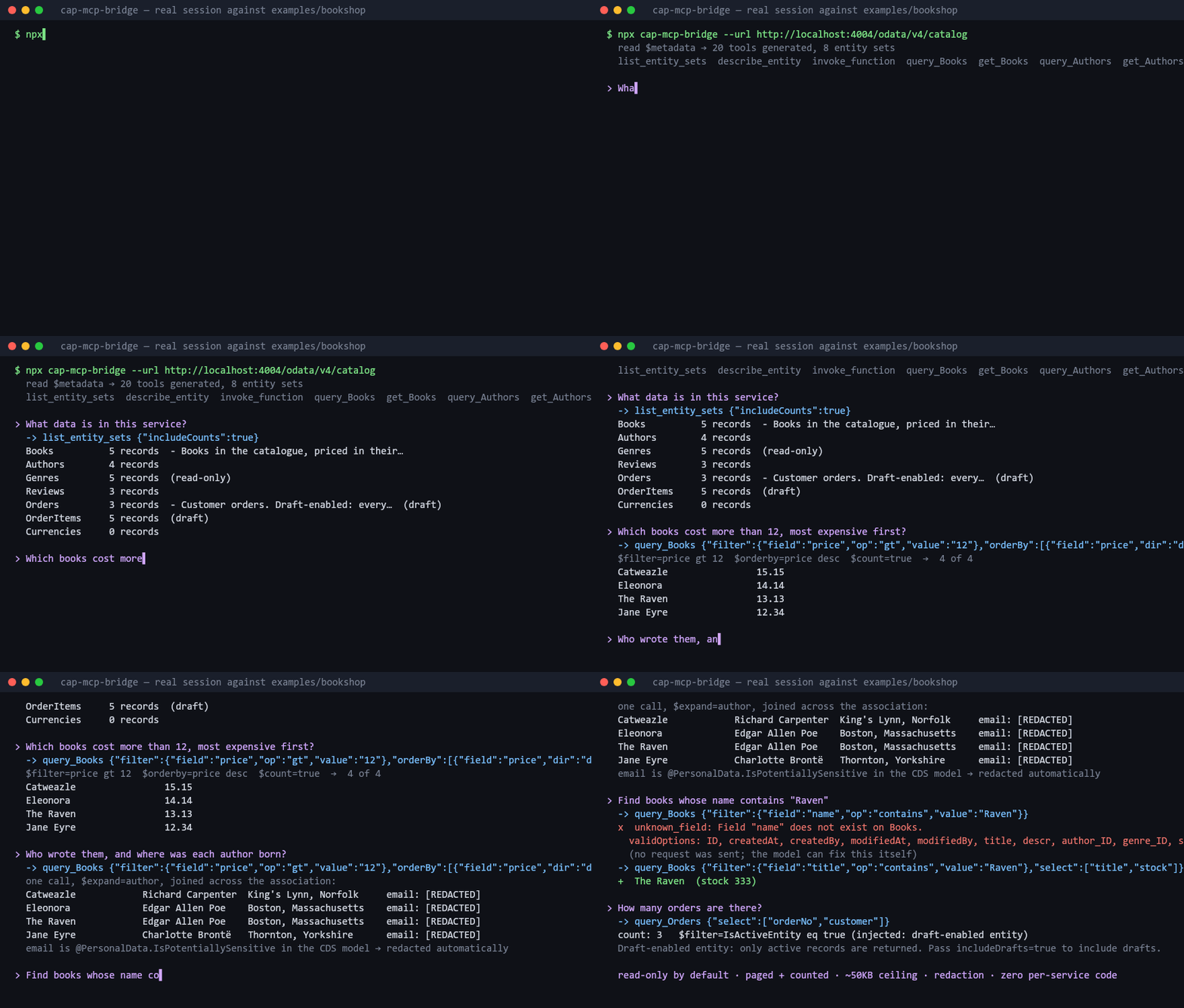
60-second quickstart
Against the public Northwind service (no auth):
npx cap-mcp-bridge --url https://services.odata.org/V4/Northwind/Northwind.svc
That starts an MCP server on stdio. Wire it into Claude Desktop (claude_desktop_config.json):
{
  "mcpServers": {
    "northwind": {
      "command": "npx",
      "args": ["-y", "cap-mcp-bridge", "--url", "https://services.odata.org/V4/Northwind/Northwind.svc"]
    }
  }
}
Or Claude Code:
claude mcp add northwind -- npx -y cap-mcp-bridge --url https://services.odata.org/V4/Northwind/Northwind.svc
Then ask: "Which German customers have orders shipped to Berlin? Include the company name."
Against your own CAP service running locally with cds watch:
npx cap-mcp-bridge --url http://localhost:4004/odata/v4/catalog
To see what the bridge understood about a service without starting the server:
npx cap-mcp-bridge --url http://localhost:4004/odata/v4/catalog --print-model
Add --json for the same thing as JSON. It leaves out the fetch timestamp, so saving it before a
redeploy and diffing afterwards shows exactly which entities, fields and capabilities changed.
What the model gets
A fixed set of tools whose schema is discoverable, rather than four tools per entity set (a real
CAP service has 40+ entity sets, which would blow any tool budget):
| Tool | Purpose |
|---|
list_entity_sets | Names, labels, record counts, draft flag, write capabilities, navigations |
describe_entity | Full schema of one entity set: properties, types, keys, navigations, filterable/sortable fields |
query_entity | The workhorse: filter, select, expand, orderBy, paging, $count |
get_entity | One record by key |
invoke_function | Call a read-only OData function (unbound or bound) |
invoke_action | Call an action. Write mode only |
create_entity / update_entity / delete_entity | Write mode only |
refresh_metadata | Re-read $metadata after a redeploy; re-registers tools if entities changed |
Every entity schema is also an MCP resource at cap://entity/{name} (and cap://service for
the overview), so a client can pull schemas into context without spending a tool call.
Typed per-entity tools. With toolMode: "auto" (the default), a service with ≤ 12 entity sets
gets query_Books, get_Orders, ... instead, with select / expand / orderBy as enums of the
real property names. Easier for a model to call correctly, and affordable at that size. Set
toolMode to generic or per-entity to force either.
Every description is generated from the service's CDS annotations (@title, @Core.Description,
@readonly, @mandatory, @Capabilities.*, @PersonalData.*). Nothing is written per service.
Related work
There is prior art in the CAP ecosystem, and the difference is architectural rather than a
feature list. Versions and descriptions below are from the npm registry at the time of writing.
| Package | What it is | Where it runs | What it reads |
|---|
@gavdi/cap-mcp (1.8.0) | CAP plugin. Scans your service definitions for @mcp annotations and exposes annotated entities as MCP resources with OData v4 query capabilities, functions and actions as tools, plus prompt templates; optional entity wrappers add query / get / create / update tools. Serves MCP from the CAP app itself at /mcp, inheriting the app's authentication. | Inside the CAP application (npm install into the CAP project) | CAP's compiled model and your @mcp annotations |
@neoimpulse/cap-js-mcp (1.0.6) | CAP plugin with API-key authentication and configurable directories for your own tools, prompts and resources. Its default tools are search_model and search_docs, described as a generic implementation based on the SAP server below, using cds.model from the running app. The README marks search_docs as a placeholder, and the npm description is unrelated boilerplate. | Inside the CAP application | The running app's cds.model |
@cap-js/mcp-server (0.0.5) | SAP's own MCP server, aimed at developers building CAP apps ("AI-assisted development of CAP applications"): search_model over a project's compiled CDS definitions and search_docs over the CAP documentation. It does not query a running service's data. | As a separate process (npx -y @cap-js/mcp-server) against a CAP project on disk | The project's CDS sources and the CAP docs |
cap-mcp-bridge (this project) | A generic OData v4 client exposed as MCP tools: query, get, expand, functions, actions, with schema-validated filters and safety rails. | As a separate process, anywhere with HTTP access to the service | $metadata over HTTP, nothing else |
The two plugins run inside the CAP application: you add them to the CAP project's
package.json, and they read CAP's runtime model after the app compiles. cap-mcp-bridge runs
outside the service and consumes $metadata over HTTP. That cuts both ways:
- Where the bridge is the better fit: services you do not own, cannot modify, or cannot
redeploy. Third-party SAP systems, locked-down production landscapes, and any non-CAP OData v4
service. It is the reason the Northwind example works at all: there is no CAP application to
install a plugin into.
- Where the plugins are the better fit: if you own the CAP application and can add a
dependency. In-process access to the compiled CDS model gives them richer semantics than an EDMX
document exposes (CAP-specific annotations that never reach
$metadata, custom handlers, the
app's own authentication and authorisation applied per user), and there is no second process to
run or secure. @gavdi/cap-mcp in particular lets you curate exactly what is exposed through
@mcp annotations, which is a more deliberate surface than "everything in the metadata".
If you are writing the CAP service yourself, look at the plugins first. If you are pointed at
someone else's OData endpoint, this is the tool.
Filters that self-correct
$filter as a raw string is where LLM-driven OData goes wrong: quoting, date literals, eq null,
function syntax. So the preferred form is structured, and the bridge does the quoting:
{
  "entitySet": "Orders",
  "filter": {
    "and": [
      { "field": "ShipCountry", "op": "eq", "value": "Germany" },
      { "field": "Freight", "op": "gt", "value": "100" },
      { "field": "OrderDate", "op": "ge", "value": "1997-01-01" }
    ]
  },
  "select": ["OrderID", "ShipCity", "Freight"],
  "expand": ["Customer"],
  "orderBy": [{ "field": "Freight", "dir": "desc" }],
  "top": 20
}
becomes $filter=ShipCountry eq 'Germany' and Freight gt 100 and OrderDate ge 1997-01-01. Raw
$filter strings are accepted too; they are parsed, validated against the schema, and re-serialised.
Both forms go through the same validator: every field must exist, be filterable/sortable per the
service's Capabilities annotations, the operator must be legal for the type, and the literal
must match it. On failure the model gets something it can act on, before anything reaches the
network:
{
  "error": {
    "code": "not_filterable",
    "message": "\"Picture\" is not filterable on Categories. Filterable fields: CategoryID, CategoryName, Description",
    "target": "Picture",
    "validOptions": ["CategoryID", "CategoryName", "Description"]
  }
}
A model that gets this will self-correct on the next turn. A model that gets 400 Bad Request will not.
Drafts. For CAP draft-enabled entities the bridge injects IsActiveEntity eq true unless the
caller passes includeDrafts: true, and key lookups default to the active record. Without this,
every query on a draft entity returns duplicate rows.
Safety rails
This is what makes the bridge deployable rather than a toy. All on by default:
- Read-only by default. Write tools only exist when
writeEnabled: true (--write).
- Forced pagination.
$top defaults to 25, hard cap 200. $count is always requested. When
there is more, the response says so and gives nextSkip.
- Response size ceiling. ~50KB per response. Rows are dropped from the end with an explicit
note saying how many and why. Never silently.
- Entity allowlist / denylist by name or glob (
entityAllow, entityDeny).
- Field redaction. A configurable list of names/globs (
redactFields), plus automatic redaction
of anything annotated @PersonalData.IsPotentiallySensitive. Applied inside expanded navigations too.
- Timeouts and retries. 30s timeout. Retry with backoff on 5xx and 429 only. Never a 4xx,
never a write.
- Logs go to stderr and never contain tokens, passwords, or URLs with filter values.
Configuration
Precedence: CLI flags > CAP_MCP_* environment > cap-mcp.config.json > defaults.
| JSON key | Env var | Default | Meaning |
|---|
url | CAP_MCP_URL | required | OData v4 service root |
auth.kind | CAP_MCP_AUTH | none | none | basic | bearer | oauth2-cc |
auth.username / auth.password | CAP_MCP_USERNAME / CAP_MCP_PASSWORD | | basic auth |
auth.token | CAP_MCP_TOKEN | | bearer token passed through |
auth.tokenUrl / clientId / clientSecret | CAP_MCP_TOKEN_URL / CAP_MCP_CLIENT_ID / CAP_MCP_CLIENT_SECRET | | XSUAA client credentials |
| CAP_MCP_SERVICE_KEY_FILE | | XSUAA service key JSON; fills the three above |
transport | CAP_MCP_TRANSPORT | stdio | stdio | http |
host / port | CAP_MCP_HOST / CAP_MCP_PORT | 127.0.0.1 / 3333 | HTTP bind address; port 0 picks a free one |
toolMode | CAP_MCP_TOOL_MODE | auto | generic | per-entity | auto |
perEntityThreshold | CAP_MCP_PER_ENTITY_THRESHOLD | 12 | auto switches to generic above this many entity sets |
writeEnabled | CAP_MCP_WRITE_ENABLED | false | register write tools |
defaultTop / maxTop | CAP_MCP_DEFAULT_TOP / CAP_MCP_MAX_TOP | 25 / 200 | paging |
maxResponseBytes | CAP_MCP_MAX_RESPONSE_BYTES | 50000 | response ceiling |
entityAllow / entityDeny | CAP_MCP_ENTITY_ALLOW / CAP_MCP_ENTITY_DENY | | names or globs, comma-separated in env |
redactFields | CAP_MCP_REDACT_FIELDS | | names or globs |
timeoutMs / maxRetries | CAP_MCP_TIMEOUT_MS / CAP_MCP_MAX_RETRIES | 30000 / 3 | |
metadataTtlMs | CAP_MCP_METADATA_TTL_MS | 900000 | metadata cache TTL (15 min) |
logLevel | CAP_MCP_LOG_LEVEL | info | debug | info | warn | error | silent |
Auth kind is inferred when omitted: a token implies bearer, a client id implies oauth2-cc, a
username implies basic.
Auth against a BTP-deployed CAP service
export CAP_MCP_URL=https://<app>.cfapps.<region>.hana.ondemand.com/odata/v4/catalog
export CAP_MCP_SERVICE_KEY_FILE=./service-key.json   # XSUAA service key from the cockpit
npx cap-mcp-bridge
The token is cached, refreshed 60s before expiry, and fetched single-flight so concurrent tool
calls never stampede the token endpoint. See examples/btp.
Streamable HTTP
npx cap-mcp-bridge --url ... --transport http --port 3333
# POST/GET/DELETE http://127.0.0.1:3333/mcp, health at /healthz
One MCP server per session, all sharing the metadata cache and auth provider.
Docker
docker build -t cap-mcp-bridge .
docker run --rm -p 3333:3333 -e CAP_MCP_URL=https://services.odata.org/V4/Northwind/Northwind.svc cap-mcp-bridge
The image runs the HTTP transport bound to 0.0.0.0:3333. Pass any CAP_MCP_* variable.
Examples
- examples/northwind: public service, generic tools, deny list and redaction in use
- examples/bookshop: a small CAP service with every annotation the bridge understands, drafts included. Also the local acceptance target.
- examples/btp: XSUAA client credentials
How it works
$metadata ──► metadata/  parse EDMX → ServiceModel (annotations folded in, drafts detected)
                 │
                 ▼
             tools/      ServiceModel → MCP tools + resources (generic or typed per-entity)
                 │
                 ▼
             odata/      validate filter/select/expand/orderBy → build URL → auth, retry, paging
                 │
                 ▼
             server/     stdio or streamable HTTP
The ServiceModel is the only contract between layers. Adding support for a new CAP service
requires zero code changes because the only input is XML. Design notes and the decisions behind
them are in docs/ARCHITECTURE.md.
Type mapping worth knowing: Edm.Decimal is exposed as a string (CAP serialises decimals as
strings to avoid float precision loss; the bridge also sends IEEE754Compatible=true). Field
descriptions say so.
Development
npm install
npm run typecheck && npm run lint && npm test
npm run dev -- --url https://services.odata.org/V4/Northwind/Northwind.svc --print-model
npx tsx scripts/smoke.ts https://services.odata.org/V4/Northwind/Northwind.svc   # live, over stdio
The end-to-end tests run a real McpServer and Client over an in-memory transport with fetch
stubbed to serve fixture metadata, plus real HTTP servers for the auth and transport suites. The
bookshop under examples/bookshop provides the CAP fixture (npx cds compile srv --to edmx-v4).
Cutting a release
Releases are published by GitHub Actions (release.yml) through
npm trusted publishing (OIDC). There is no NPM_TOKEN secret, and the package page carries a
provenance badge linking the tarball to the exact commit and workflow run.
# 1. on main, bump the version and record the changes
npm version 0.2.0 --no-git-tag-version      # edits package.json + package-lock.json
#    add a 0.2.0 section to CHANGELOG.md, open a PR, merge it
# 2. tag the merged commit and push the tag; the workflow publishes
git checkout main && git pull
git tag v0.2.0 && git push origin v0.2.0
The workflow refuses to publish if the tag does not match package.json. One-time setup: npm
only lets you register a trusted publisher for a package that already exists, so the very first
version is published by hand (npm publish, with 2FA), after which the trusted publisher is added
on npmjs.com under the package's Settings (GitHub Actions, repository
SanoberRehman/cap-mcp-bridge, workflow release.yml). Provenance is requested only by the
workflow (--provenance); a manual publish from a laptop cannot generate it, so it is not set in
publishConfig.
Post-publish check
bash scripts/verify-published.sh            # cap-mcp-bridge@latest
bash scripts/verify-published.sh 0.1.0      # a specific version
It runs npx -y cap-mcp-bridge@<version> --print-model against Northwind from a fresh temp
directory with a fresh npm cache, so nothing resolves from this repository. It is what catches a
missing shebang, an unbuilt dist, or a files array that left something out.
License
MIT