cap-user-info
Resolves the createdBy and modifiedBy of a managed entity to a stored user record of email, given name and family name, and renders the two fields as links with a quickview.
cap-user-info adds a UserTracked aspect that extends CAP's managed, a UserInfo entity holding Email, GivenName and FamilyName, and the associations _toCreatedUserInfo and _toModifiedUserInfo that resolve through createdBy and modifiedBy, so including the aspect is enough and no separate managed declaration is needed. It registers after-CREATE and after-UPDATE handlers on every application-service entity carrying the aspect and upserts the current user, req.user, into UserInfo, which is what fills the record. The same association can be pointed at any other user field on an entity, and UserInfo itself can be extended with further elements such as a Department, as long as the handler that populates them is registered in the root context rather than inside srv.init. Labels ship as English properties in _i18n and are overridden per locale from the app's own i18n folder.
Facts
Where it sits
Who is behind it

In the atlas: maintains 2, contributes to 24, wrote 1@uxkjaermaintainer
Before choosing this
Conditions
LicenceSAP Developer License Agreement 3.2 CAP§ 1, 2, 3A cds-plugin is used with SAP CAP materials, or an artifact is explicitly identified as a CAP plugin or application.
- § 1 License. Productive customer applications are limited to SAP BTP or another SAP-licensed platform, and mass extraction to a non-SAP product is restricted except where solely required for SAP interoperability.
- § 2 Intellectual Property. The agreement retains SAP's rights in the covered materials and limits making APIs, tools or software available to third parties, while preserving ownership of customer applications subject to SAP's underlying rights.
- § 3 Artificial Intelligence Training. The agreement prohibits use of the covered materials and customer applications for training artificial-intelligence models or systems.
What it declares
Every artifact
- Type
- CDS plugin
- Origin
- Independently maintained
- Runtime
- Node.js
As a CDS plugin
- Declared for
- >=8
- Distributed through
- npm
Connections
Defining entities, their relations and the views services consume
Describing a service so a Fiori client renders it without UI code
Download
Install
npm add cap-user-infoDerived from the package name. No recipe recorded; the README has the configuration.
README
quoted from uxkjaer/cap-user-info under MIT, readcap-user-info
CDS plugin that adds user details on managed entities.
Install
npm install cap-user-infoUsage
The userinfo has the following properties by default that is added to the database
entity UserInfo {
        @UI.Hidden
    key ID         : UUID;

        @assert.unique: true  @title: 'Email Address'
        @Communication: {IsEmailAddress: true}
        Email      : String;

        GivenName  : String @title: 'Given Name';
        FamilyName : String @title: 'Family Name';
        FullName   : String = concat(
            GivenName, ' ', FamilyName
        );
}
Import it into your cds file.
using { UserTracked, UserInfo } from 'cap-user-info';

entity MyEntity : cuid, UserTracked {
  // your fields
}
The plugin auto-registers .after("CREATE" | "UPDATE") handlers on every
application-service entity that includes the UserTracked aspect. Each
handler UPSERTs the current user (req.user) into UserInfo. The
associations _toCreatedUserInfo / _toModifiedUserInfo resolve via
createdBy / modifiedBy.
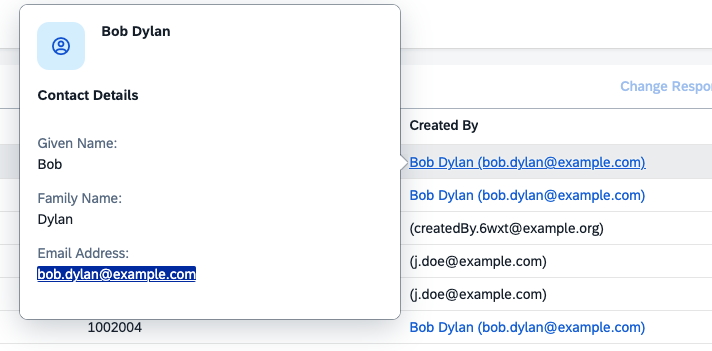
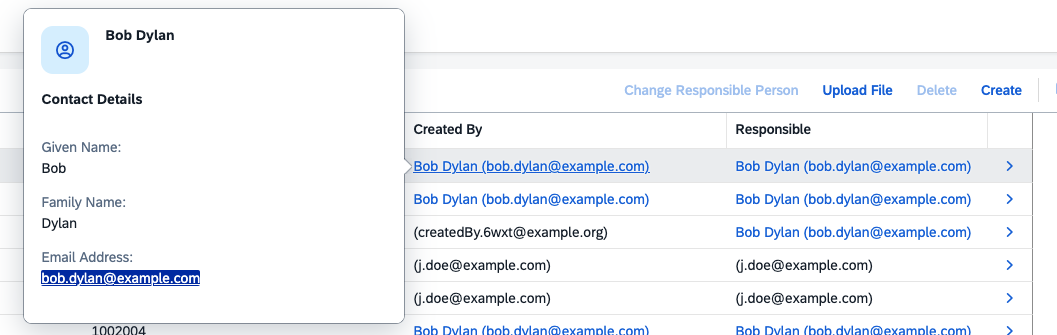
The fields for createdBy and modifiedBy will automatically be shown as links with a quickview with the user details.
How it works
UserTracked extends managed, so consuming entities automatically
inherit createdBy / modifiedBy (and the corresponding timestamps):
It will add a quickview to the createdBy and modifiedBy to show the user details. The details are stored from the req.user upon changes to the entity.
aspect UserTracked : managed { ... }This means no extra managed declaration is required on the consuming
entity — including UserTracked is enough.
Using the plugin for other purposes
Add a field to your entity and a association
using { UserTracked, UserInfo } from 'cap-user-info';

entity MyEntity : cuid, UserTracked {
  // The cds.on.insert is only to insert the userid automatically, otherwise handle it via code.
  Responsible: User @cds.on.insert: $user.id;,
  _toResponsibleUser: association to one UserInfo on _toResponsibleUser.ID = $self.Responsible
}
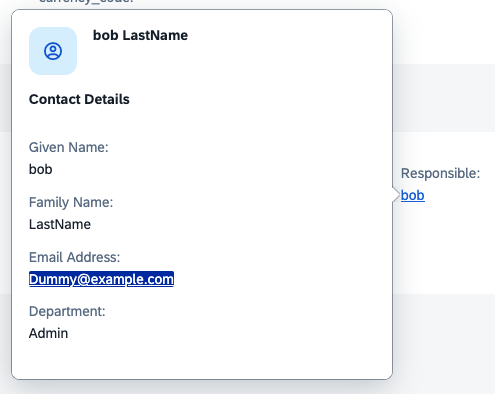
Then the quickview will automatically be active
Extending the quickview
You can extend the UserInfo to add more data into the quickview by adding to the fieldgroup in a cds file.
  // Change the quickview
extend cap.userinfo.UserInfo with
  @UI.FieldGroup: {Data: [
    // Leave the original properties
    {
      $Type: 'UI.DataField',
      Value: GivenName
    },
    {
      $Type: 'UI.DataField',
      Value: FamilyName
    },
    {
      $Type: 'UI.DataField',
      Value: Email
    },
    // your new field
    {
      $Type: 'UI.DataField',
      Value: Department
    },
  ]}

  //Change the
  @UI.HeaderInfo     : {
    ImageUrl    : '',
    TypeImageUrl: 'sap-icon://employee',
    Title       : {
        Value: FullName,
    },
    TypeName    : '',
}
  {
    // your new field iin the entity
    Department : String @title                        : 'Department';
  }
Then register your event handler to populate the data. It's important this piece of code isn't added within your srv.init method. It needs to be in the root context.
cds.on("served", () => {
  const { db } = cds.services;
  const { UserInfo } = cds.entities("cap.userinfo");

  //Register the handler for the Upsert
  db.before("UPSERT", UserInfo, async (req) => {
    //Change the data
    req.data.Department = "Admin";
  });
});History
Others providing
- cds-numberrange-plugincds-numberrange-pluginA CAP plugin that fills an annotated CDS element with the next number from a named range, optionally with prefix, suffix and padding, keeping the counter in a database entity it adds to the model.independent, capFills a CDS element from a database-backed number range
- com.sap.cds:cds-services-bomcom.sap.cds:cds-services-bomThe Maven bill of materials for CAP Java, pinning every com.sap.cds module in a release, from the API and core runtime to the Spring Boot starters and the CQN engine, to the same version.sap official, capMaven bill of materials pinning CAP Java module versions
- @sap/cds-common-content@sap/cds-common-contentISO-standard content for CAP's common definitions — countries, languages, currencies and timezones — so a project does not seed those tables itself.sap official, capISO content for CAP's countries, languages, currencies and timezones
- @sap/cds-compiler@sap/cds-compilerCompiles CDS models to CSN, EDMX and database schemas.sap official, capCompiler from CDS models to CSN, EDMX and database schemas
- @sap/cds@sap/cdsThe CAP Node.js runtime, which compiles the CDS model, serves the services declared in it, answers generic requests before any handler runs, and loads every cds-plugin.sap official, capCAP Node.js runtime
- com.sap.cds:cds-services-bomcom.sap.cds:cds-services-bomThe Maven bill of materials for CAP Java, pinning every com.sap.cds module in a release, from the API and core runtime to the Spring Boot starters and the CQN engine, to the same version.sap official, capMaven bill of materials pinning CAP Java module versions
- urp-vocaburp-vocabA CDS vocabulary for User-Rendered Patterns, with @urp.display annotations describing views, card templates, layouts and sections on an entity, consumed by the author's own matching renderer.independent, capCDS vocabulary for User-Rendered Patterns display annotations
- @mpah/enum-value-help@mpah/enum-value-helpA CAP plugin that generates value help for enum fields from an @enumValueHelp annotation, serving the enum's values from one generated entity instead of hand-written OData annotations.independent, capCAP plugin generating value help for enum fields from an annotation
- @sap/cds-fiori@sap/cds-fioriFiori draft handling and UI-facing behaviour for CAP services.sap official, capFiori draft handling and UI-facing behaviour for CAP services
- @sap/cds@sap/cdsThe CAP Node.js runtime, which compiles the CDS model, serves the services declared in it, answers generic requests before any handler runs, and loads every cds-plugin.sap official, capCAP Node.js runtime
- @sap/generator-fiori@sap/generator-fioriThe single entry point for generating a Fiori application — the user picks a template and the generator produces the project around it.sap official, capEntry point for generating a Fiori application from a template
- @sap-ux/cds-annotation-parser@sap-ux/cds-annotation-parserParses annotations out of CDS source, so tooling can read what a model says about its UI without compiling it.sap official, capParser for annotations in CDS source
- @sap/ux-cds-compiler-facade@sap/ux-cds-compiler-facadeWraps the CAP CDS compiler behind one set of APIs for annotation handling, so tooling reads a model without tracking which compiler version is installed.sap official, capWrapper around the CDS compiler for annotation handling
- @sap-ux/cds-odata-annotation-converter@sap-ux/cds-odata-annotation-converterConverts CDS annotations into their OData form, which is the translation Fiori tooling needs to reason about a service the way a client sees it.sap official, capConverter from CDS annotations to their OData form
- @sap/ux-cds-odata-language-server-extension@sap/ux-cds-odata-language-server-extensionAdds the OData annotation features to @sap/vscode-cds, the CDS plug-in for Visual Studio Code: completion, micro-snippets, diagnostics, vocabulary documentation, Go to Definition and an i18n check inside a .cds file.sap official, capOData annotation features for the @sap/vscode-cds extension
- @sap-ux/fiori-annotation-api@sap-ux/fiori-annotation-apiThe programmatic API Fiori tooling uses to read and write annotations on a project, rather than editing the files as text.sap official, capProgrammatic API for reading and writing project annotations
- @sap-ux/odata-vocabularies@sap-ux/odata-vocabulariesCarries the OASIS and SAP OData vocabularies as a package, with a VocabularyService for asking which terms exist, where they apply and what their types and properties are.sap official, ui5OASIS and SAP OData vocabularies with a VocabularyService
- cap-js-geoloc-plugincap-js-geoloc-pluginA CAP plugin for geocoding, address correction and route calculation, driven by three annotations on the model, with the geocoder and router chosen in configuration from providers such as OSRM and Nominatim.independent, capAnnotation-driven geocoding, address correction and routing for CAP
Details
Sources
Sources are graph entities: the same page may back several entries, and an unreachable source flags every row that rests on it.
Compatibility and provenance
History in the atlas
- First seen.
For your agent
- Ref
artifact:uxkjaer-cap-user-info- JSON
- /artifacts/uxkjaer-cap-user-info.json
- MCP
- Connecting an agent