pod2-config
An agent skill that turns a described POD change into an importable SAP Digital ManufacturingSAP Digital ManufacturingSAP's manufacturing execution system for running production on the shop floor, run by SAP as software as a service. The product behind the SAP Digital Manufacturing door: what is entered there is what people build for it, such as plugins for its Production Operator Dashboard, and the product itself is not an option. POD 2.0 export, built from standard plugins and actions only.
Built as a Joule Desktop skill in the open SKILL.md format, with plain Node.js scripts beside it, so Claude Code and other agents that load skills run it as well. What you can ask for is a button, dialog, tab, page or menu on an existing POD, a Production Process call from a button or on page open, or a KPI dashboard from a short spec; all of it standard POD 2.0 configuration, limited to the plugin and action classes verified from real exports, with bindings and expressions on the POD context and the data coming from Production Processes you already model in DM. The workflow is file-based and makes no tenant calls: start from a real Manage PODs 2.0 export or one of the three bundled SAP templates, the agent prints its plan before writing JSON, and it patches a copy rather than the original. The bundled validator runs against the export's own baseline before and after, and the change is handed over only if it adds no errors; preview-pod.js writes a self-contained Fiori preview with real SAPUI5 controls against a mock POD context, which the README calls a layout check with sample values, not a functional test. A class the harvest never saw in an export is flagged instead of invented, and placeholders stand in for every tenant specific, the Production Process ID and key among them, resolved in the designer after import.
Facts
Where it sits
Who is behind it

In the atlas: maintains 1@robertriedelmaintainerrobertriedel09-blipContributes to this

In the atlas: contributes to 1@robertriedel09-blip1 contributor
Before choosing this
Conditions
PracticalFunctional boundary
A requirement that needs code: the skill generates configuration and states that it says so instead of faking it. Dialog and container targets have no verified enter event, so a dashboard placed there loads only through its Refresh button. Production Processes are outside it — it wires PODs to them and does not design them.
What it declares
Every artifact
- Type
- Skill
- Origin
- Independently maintained
- Runtime
- Node.js
As a skill
- Distributed through
- Copied into the project
Connections
Packaged knowledge that teaches a coding agent a framework
SAP's manufacturing execution system for running production on the shop floor, run by SAP as software as a service. The product behind the SAP Digital Manufacturing door: what is entered there is what people build for it, such as plugins for its Production Operator Dashboard, and the product itself is not an option.
Download
README
quoted from robertriedel/POD2_Config_Skill under MIT, readpod2-config: a Joule Desktop skill for SAP DM POD 2.0 configuration
Configure SAP Digital Manufacturing POD 2.0 (Manage PODs 2.0) by describing what you want. The skill turns a request like "add an OEE tab fed by this Production Process" into a complete POD export, ready for Manage PODs 2.0 → Import.
It is built as a Joule Desktop skill. Because it uses the open SKILL.md format with plain Node.js scripts, it runs just as well in Claude Code and other agents that load skills.
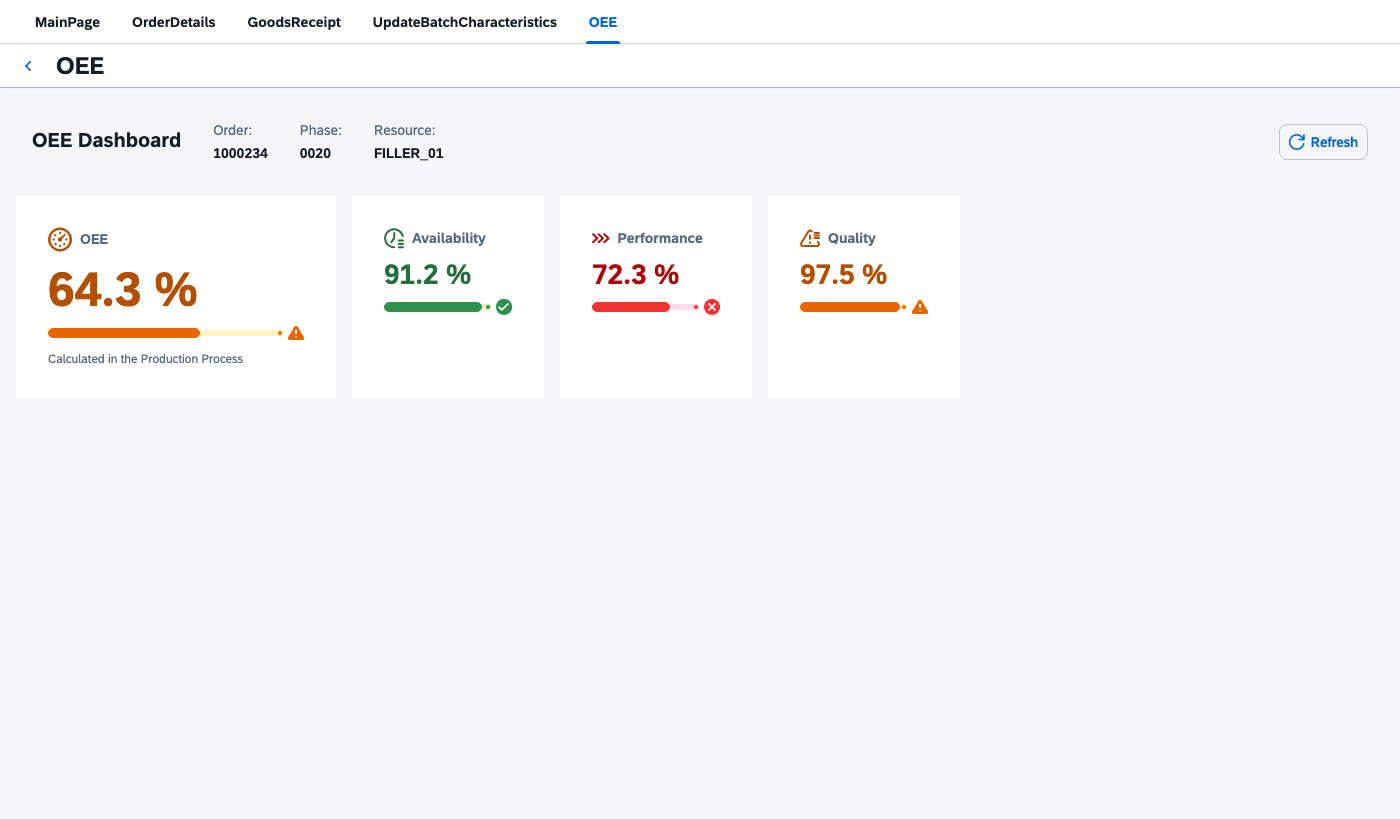 A new OEE page built from scratch: 46 widgets, 20 expression bindings, a Production Process that runs on page enter, and a Refresh button. Validator errors before and after: 0 → 0.
Why: stay in standard
Most POD requirements end in one of two places: hours of clicking in the designer, or a custom plugin that someone has to build, deploy and maintain through every DM release.
This skill takes neither route. No development happens. Everything it generates is standard POD 2.0 configuration:
- only standard SAP plugins and actions, limited to classes verified from real exports (anything unverified is flagged);
- standard bindings and expressions on the POD context (
{/workList/…},{/execution/…},{= … }); - data from Production Processes you already model in DM, called through the standard Production Process action.
After import it is just a POD. Key users and consultants keep editing it in Manage PODs 2.0, there is no code to transport, and nothing breaks because a plugin wasn't upgraded. If a requirement really needs code, the skill says so instead of faking it.
What you can ask for
- Add a button, dialog, tab, page or menu to an existing POD.
- Show/hide or enable/disable controls based on POD context (e.g. only with exactly one SFC selected).
- Call a Production Process from a button or on page/tab open, map inputs from the context, show its outputs.
- KPI / info dashboards (OEE, quantities, status cards) from a short spec, with threshold colours.
- A Fiori preview of any POD config as a single HTML file, before you import anything.
Example prompts:
/pod2-config Add a "Report Scrap" button to the phase toolbar of MY_POD.json
that opens a dialog with quantity and reason, then calls PP Post_Scrap.

/pod2-config Build an OEE dashboard in tab "OEE" from PP Create_Random_Indicators_OEE
with outputs outOEE, outAvailability, outPerformance, outQuality. Preview it.
Install
You need Node.js (any recent LTS). The scripts use only Node built-ins: no npm install, no dependencies. The preview needs internet (it loads SAPUI5 from the public CDN); everything else works offline.
git clone https://github.com/robertriedel/POD2_Config_Skill.git-
Joule Desktop: add the cloned folder as a skill in Joule Desktop (see the Joule Desktop documentation for where skills are configured).
-
Claude Code: clone it straight into the skills folder, then start a new session:
git clone https://github.com/robertriedel/POD2_Config_Skill.git ~/.claude/skills/pod2-config -
Other agents: point them at
SKILL.md. It refers to its scripts as~/.claude/skills/pod2-config/scripts/…; if you install elsewhere, the agent resolves them relative to the skill folder.
How it works
- Start from a real export. Export your POD (Manage PODs 2.0 → ⋯ → Export) or start from a bundled template (
templates/: Work Center, Operation Activity, Order). - Plan first. The agent prints a short plan (target page, new widgets, action chain, bindings, placeholders) before writing JSON, and asks only what it can't default.
- Patch a copy. It writes a new file next to your export; the original is never overwritten.
- Validate against the baseline. Tenant exports often carry old errors. The validator runs before and after, and the change is delivered only if it adds none.
- Hand over. You import the complete POD (Manage PODs 2.0 can't import single pages), resolve the Production Process placeholders in the designer's browse dialog, then Save and Run.
Worked example: an OEE page from scratch
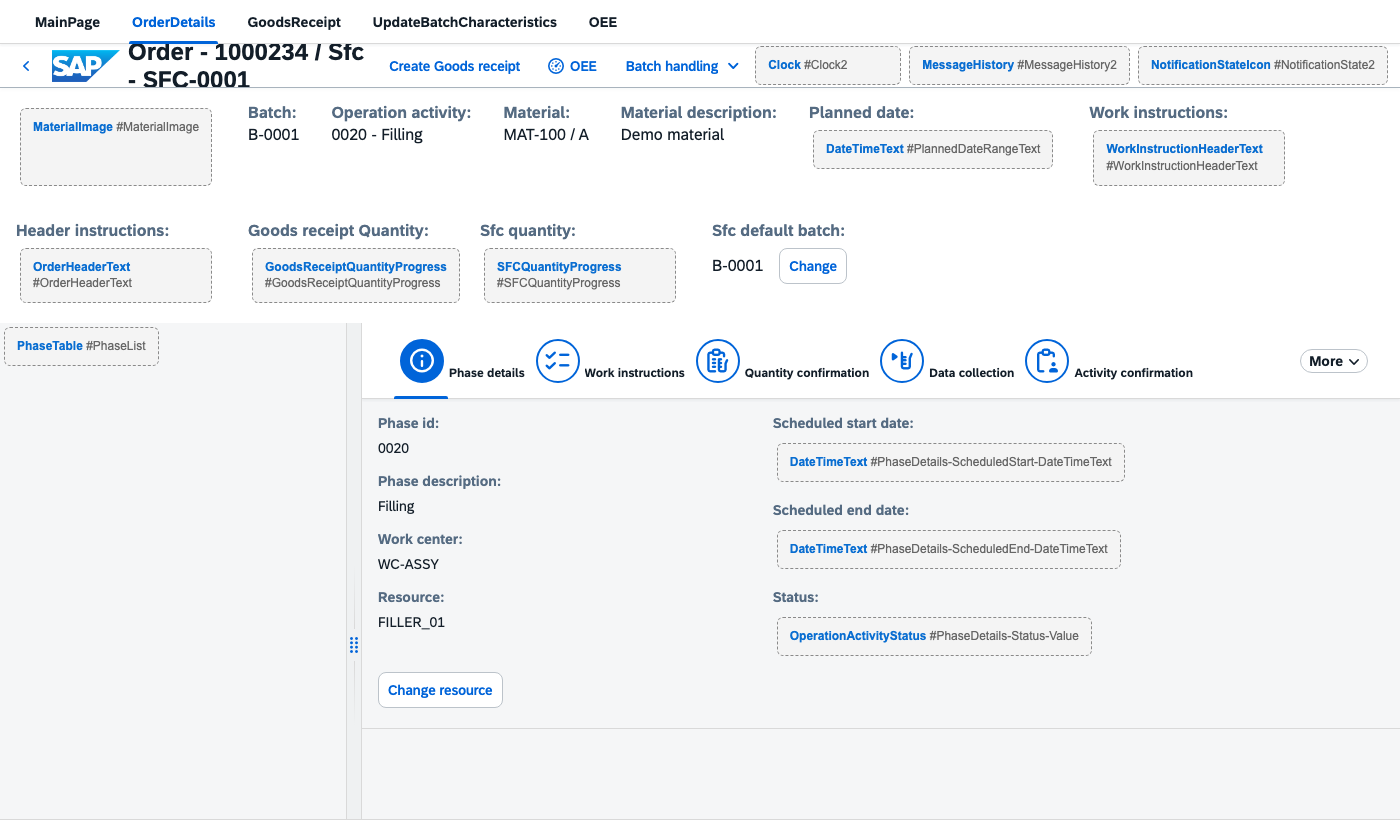
Everything is in examples/oee/. OEE_DEMO.json is the SAP Order template plus an empty OEE page (built like the template's GoodsReceipt page) and an OEE button in the order details header that opens it; add-oee-page.js reproduces that file from templates/ORDER_POD.json. The spec then fills the page:
cd examples/oee
node ../../scripts/build-panel.js OEE_DEMO.json OEE_DEMO.oee.spec.json --preview
wrote OEE_DEMO.oee.json
validator errors: baseline 0 → result 0
wrote OEE_DEMO.oee.preview.html — open in a browser (needs internet for the SAPUI5 CDN)
The spec is the whole design:
{
  "prefix": "OEE",
  "target": { "page": "OEE" },
  "title": "OEE Dashboard",
  "pp": { "name": "Create_Random_Indicators_OEE",
          "inputs": [ { "parameter": "inResource",
                        "value": "{/execution/operationActivity/lastSelected/resource}" } ] },
  "context": [ { "label": "Order",    "path": "/workList/lastSelected/order" },
               { "label": "Phase",    "path": "/execution/operationActivity/lastSelected/operationActivity" },
               { "label": "Resource", "path": "/execution/operationActivity/lastSelected/resource" } ],
  "fields": [
    { "source": "pp:outOEE", "label": "OEE", "scale": "percent", "thresholds": [60, 85],
      "hero": true, "icon": "sap-icon://performance", "caption": "Calculated in the Production Process" },
    { "source": "pp:outAvailability", "label": "Availability", "scale": "percent", "thresholds": [80, 90], "icon": "sap-icon://time-entry-request" },
    { "source": "pp:outPerformance",  "label": "Performance",  "scale": "percent", "thresholds": [80, 95], "icon": "sap-icon://process" },
    { "source": "pp:outQuality",      "label": "Quality",      "scale": "percent", "thresholds": [95, 99], "icon": "sap-icon://quality-issue" }
  ]
}
Page enter. Because the spec targets a page, the data load is wired to the page's own pageEnter event: OEE_Busy (BusyIndicator) → OEE_LoadData (Production Process call, output stored in the POD variable _oee). The tiles bind to /_oee/…, so they fill as soon as the page opens; until then they show "–". Refresh re-runs the same chain. A tab target uses tabEnter the same way.
The output is only stored when the Production Process action runs synchronously; check its call type once in the designer after import. Thresholds are set per KPI (OEE 60/85, Availability 80/90, Performance 80/95, Quality 95/99), and the POD calculates nothing itself: all four values come from the PP.
Re-running with the same prefix replaces the panel in place, so changing thresholds or tiles is a spec edit.
Create_Random_Indicators_OEE stands in for your own Production Process: any PP that returns the same output names works without changing the POD side.
Your OEE, your formula. Plants rarely agree with a one-size-fits-all OEE calculation: what counts as planned downtime, which ideal cycle time to use, whether rework is good quantity. Because the calculation lives in the Production Process, you implement exactly the plant's definition there. The POD dashboard doesn't change, and it all stays standard configuration.
Spec reference (full format in references/patterns.md §18):
| Key | Meaning |
|---|---|
target | { "tab": "<text or id>" }, { "page": "Id" }, { "dialog": "Id" } or { "node": "Id", "aggregation": "items" } |
pp | Production Process name and inputs (value binding or variable). Omit for a context-only panel. |
context | Label/path pairs shown in the panel header |
fields[].source | pp:<output> or any POD context path |
scale | percent (0–100) or fraction (0–1, shown ×100) |
thresholds | [low, high] on the display scale: red below low, orange below high, green at or above high |
lowerIsBetter | Inverts the colours (scrap, downtime) |
type | number (default), string or boolean (trueText/falseText, trueIsBad) |
hero, icon, caption, unit, decimals | Presentation |
Import gotcha: the generator writes
<POD_ID>.<prefix>.json. The Manage PODs 2.0 file picker rejects names with extra dots, so import a copy named<POD_ID>_<PREFIX>.json.
Scripts
All scripts are standalone Node.js files in scripts/.
| Script | Purpose |
|---|---|
build-panel.js <export> <spec> [-o out.json] [--preview] | Spec → dashboard panel in a copy of the export, PP load chain on tab/page enter plus Refresh, validated against the baseline. --self-test available. |
preview-pod.js <export> [-o out.html] | Self-contained Fiori preview: real SAPUI5 controls against a mock POD context, so bindings and expressions resolve. Custom plugins show as placeholders. --self-test available. |
validate-pod.js <file> [--i18n references/i18n-keys.txt] | Structural lint: JSON, widget namespaces, legal aggregation names, dangling page/dialog references, leftover placeholders. Exit code 1 on errors. |
Guardrails
- Standard only. Widget and action classes come from
references/widgets.md/actions.md, verified against real exports. Anything unverified is flagged, and you're asked to configure it once in the designer and paste the JSON back. - No tenant data invented. Production Process IDs, keys and hosts become
REPLACE_WITH_PP_ID_*,REG_REPLACE_WITH_PP_KEY_*andREPLACE_WITH_TENANT, resolved in the designer. - Unique, readable IDs. New nodes follow the naming of their siblings or a prefix (
OEE_Availability_Value), so you find them in the designer and re-runs replace them cleanly. Copied subtrees are re-ID'd. - Complete exports only, never a fragment you can't import.
Repository map
SKILL.md                    instructions the agent follows
references/
  json-grammar.md           export shape, node shape, container → aggregation map
  binding-and-context.md    binding forms, {= } cheat sheet, PP input mapping, i18n
  pod-context.md            runtime POD context schema: what every {/…} can point to
  widgets.md                standard widget classes, property keys, table columns
  actions.md                action classes, chain semantics, Production Process shape
  patterns.md               18 recipes, incl. §18 dashboard spec format
  sap-catalog.md            the 147 SAP POD 2.0 plugins/actions with IDs and help links
  sources.md                sources and how to re-harvest them
  i18n-keys.txt             the only keys allowed in {i18n>…} labels
scripts/                    build-panel.js · preview-pod.js · validate-pod.js
templates/                  SAP-generated Work Center / Operation Activity / Order exports;
                            PALETTE.json = every designer widget dropped once (class reference)
examples/oee/               OEE page from scratch: base POD, generator script for it, spec
docs/img/                   screenshots
Limits
- No tenant calls: the skill works on files, you import.
- It wires PODs to Production Processes; it doesn't design them.
- Dialog and container targets have no verified enter event, so dashboards there load via the Refresh button.
- The preview is a layout check with sample values, not a functional test.
License
MIT © 2026 Robert Riedel. The bundled templates/ are SAP-generated POD exports, included as reference starting points.
Disclaimer
Community project, not an official SAP product and not supported by SAP. SAP, SAP Digital Manufacturing and Joule are trademarks of SAP SE. Always review generated configuration before importing it into a productive tenant.
Others providing
Compare all 2 on the Agent guidance page →- sap-dm-pod2-mcp-serversap-dm-pod2-mcp-serverAn MCP server for SAP Digital Manufacturing POD 2.0 extension development: 23 tools over POD2 pattern docs, the POD2 class API, SAP DM REST and MDO specs and the SAPUI5 API, with five code-generation prompts.independent, digital-manufacturingMCP server for SAP Digital Manufacturing POD 2.0 extensions
Details
Sources
Sources are graph entities: the same page may back several entries, and an unreachable source flags every row that rests on it.
Compatibility and provenance
Contributors
History in the atlas
- First seen.
For your agent
- Ref
artifact:robertriedel-pod2-config-skill- JSON
- /artifacts/robertriedel-pod2-config-skill.json
- MCP
- Connecting an agent