SAP-samples/digital-manufacturing-extension-samples
Worked samples for the six ways SAP Digital ManufacturingSAP Digital ManufacturingSAP's manufacturing execution system for running production on the shop floor, run by SAP as software as a service. The product behind the SAP Digital Manufacturing door: what is entered there is what people build for it, such as plugins for its Production Operator Dashboard, and the product itself is not an option. can be extended, from POD plugins to XSLT inside an integration flow.
SAP lists six extension types for the product: POD plugin, core plugin, side-by-side, integration, in-app service and ML extension, and this repository holds a worked sample for each, with two POD plugin templates meant to be built from scratch. The POD plugin folder carries both architectures: POD 1.0 as a full UI5 MVC component with Component.js, manifest, controller, view and PropertyEditor registered in designer/components.json, and POD 2.0 as a single JavaScript file extending sap/dm/dme/pod2/widget/Widget and registered in extension.json; the repository states POD 2.0 for new development and points existing POD 1.0 plugins at SAP's migration guide. Twenty-seven core plugin samples change standard plugins in place: an extra worklist column with calculated values, a confirmation before an equipment status change, custom work instructions in the viewer. The integration samples work outside the dashboard, as XSLT templates that strip leading zeros or replace special characters in a material number and a copy of SAP's BAPI Service Processor flow in Cloud IntegrationCloud IntegrationBuilds and runs integration flows that process, route and map messages between cloud and on-premise systems, SAP and non-SAP, through prebuilt adapters; available only under an SAP Integration Suite plan.sap official, btp that routes a production order yield confirmation to a non-SAP ERP. Deploying a plugin here is a zip uploaded through the POD Designer or the Manage PODs 2.0 app, so what each sample assumes is a configured tenant rather than a build pipeline.
Facts
Where it sits
Who is behind it

In the atlas: maintains 222@SAP-samplesmaintainerAjinkya PatilContributes to this

In the atlas: contributes to 112@ajinkyapatil8190alisonjiContributes to this

In the atlas: contributes to 1@alisonjiankitshah25Contributes to this

In the atlas: contributes to 1@ankitshah25Brian BernardContributes to this

In the atlas: contributes to 64@btbernardChris PerumalContributes to this

In the atlas: contributes to 1@chrisdavispEason-LingContributes to this

In the atlas: contributes to 1@Eason-LingelenaylzContributes to this

In the atlas: contributes to 1@elenaylzhuschlekContributes to this

In the atlas: contributes to 2@huschleki307698Contributes to this

In the atlas: contributes to 1@i307698ilias-gmailContributes to this

In the atlas: contributes to 1@ilias-gmail20 contributors
Before choosing this
Conditions
PracticalFunctional boundary
Nothing here runs on its own: a plugin sample needs a Digital Manufacturing tenant to be uploaded into, and the integration samples need a Cloud Integration tenant plus an ERP system, or a mock server as the outbound example uses, before they do anything.
What it declares
Every artifact
- Type
- Sample
- Origin
- By SAP
- Use as
- A reference
As a sample
- Form
- Code snippets
Connections
SAP's manufacturing execution system for running production on the shop floor, run by SAP as software as a service. The product behind the SAP Digital Manufacturing door: what is entered there is what people build for it, such as plugins for its Production Operator Dashboard, and the product itself is not an option.
SAP's manufacturing execution system for running production on the shop floor, run by SAP as software as a service. The product behind the SAP Digital Manufacturing door: what is entered there is what people build for it, such as plugins for its Production Operator Dashboard, and the product itself is not an option.
Builds and runs integration flows between cloud and on premise
OAuth server issuing JWTs and holding scopes for BTP apps
Named, credentialed addresses of other systems resolved at runtime
Download
README
quoted from SAP-samples/digital-manufacturing-extension-samples under Apache-2.0, readSAP Digital Manufacturing Extension Samples
SAP Digital Manufacturing provides an out-of-the-box Manufacturing Execution System (MES) to run production on the shop floor. However, based on the experience gained from customer and partner projects, we also know that a successful MES must have the capability to be extended. With the new releases of Digital Manufacturing, the options for extensibility have made a significant step forward. Using the sample extensions provided will allow you to learn and understand how to build your own extensions to use with SAP Digital Manufacturing.
Description
The POD Plugins Developer Guide provides more details on developing custom plugins. Some of the templates can be referred as following code snippets.
- POD Plugin Extension
- Core Plugin Extension
- Side by side Extension
- Integration Extension
- In-App Service Extension
- ML Extension
Sample Extensions
| Name | Description |
|---|---|
| Sample Execution Plugin | This sample demonstrates how to implement a Execution type plugin |
| Sample View Plugin | This sample demonstrates how to implement a View type plugin |
| View POD Plugin Template | This sample demonstrates how to build a sample view plugin from scratch |
| Execution POD Plugin Template | This sample demonstrates how to build a sample execution plugin from scratch |
| Inbound Integration Extension with XSLT | Sample XSLT to map custom fields for Production Order |
| Outbound Integration Extension with customized workflows | This sample demonstrates using customized CPI workflow to pass additional information from DM to ERP |
| Next Number Extension with Mongo DB | This sample demonstrates how to build write an extension function to generate next numbers using Mongo DB |
| Next Number Extension with Postgres | This sample demonstrates how to build write an extension function to generate next numbers using Postgres |
| DM Execution - storing temporary process variables in MSSQL | This sample demonstrates how to store variables from DM execution in an external DB managed from kyma |
| Custom URL Integration POD plugin | This sample demonstrates how to build a sample custom plugin for URL Integration |
| Custom Scrap Confirmation with PPD | This sample demonstrates how to build a sample custom plugin for Scrap Confirmation |
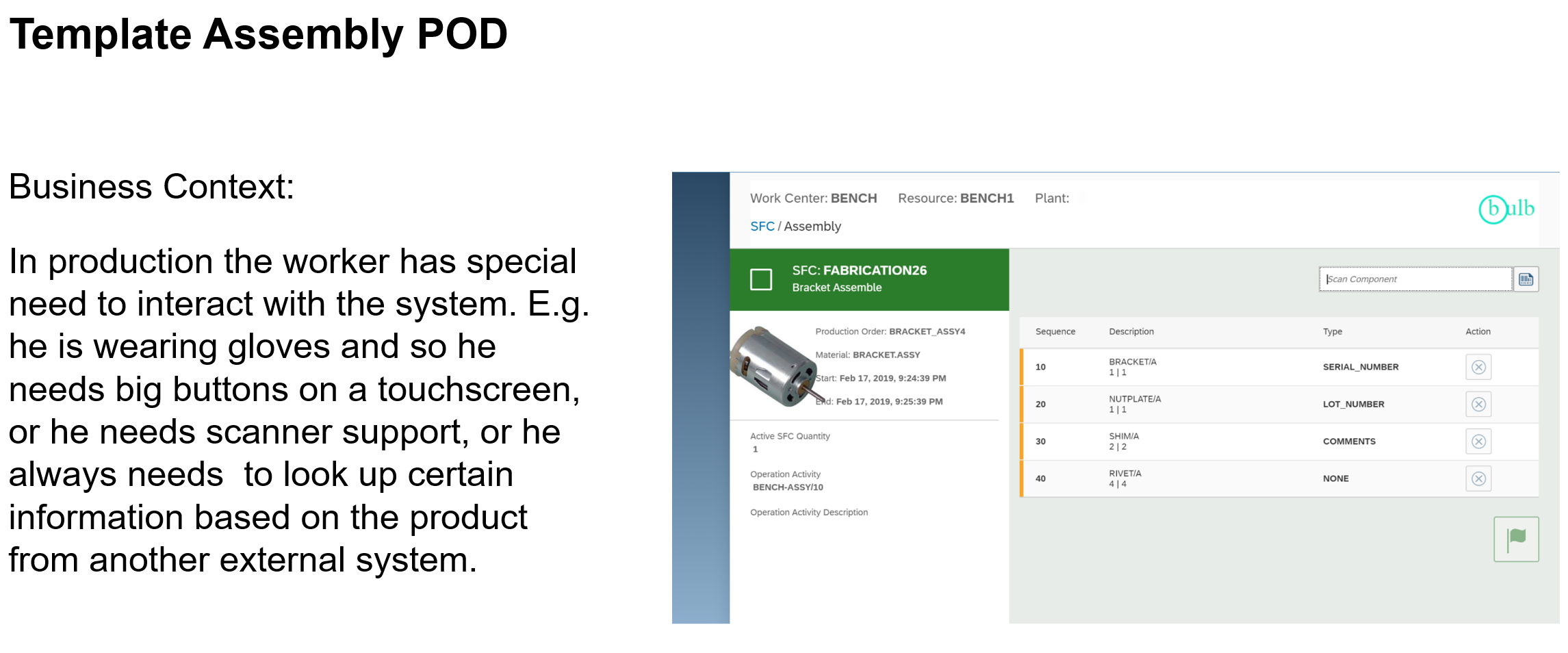
| Custom Assembly POD | This sample demonstrates how to build a side by side extension for Assembly using DM public APIs |
| Side by side Extension Template on Kyma | This sample demonstrates how to build a side by side extension in Kyma |
| Custom AuditLog App | This sample demonstrates how to build a side by side extension for customized auditlog app |
More samples on core plugin extensions can be found here - Core Plugin Extension Samples
Digital Manufacturing Extensibility Bootcamp
| Day | Content |
|---|---|
| Day 1 | PDF - Recording |
| Day 2 | PDF - Recording |
| Day 3 | PDF - Recording |
| Day 4 | PDF - Recording |
| Day 5 | PDF - Recording |
| Day 6 | PDF - Recording |
| Day 7 | PDF - Recording |
Few Real World Customer Examples
Useful Links
- SAP Customer Influence for Digital Manufacturing
How to obtain support
If you have issues with a sample, please open a report using GitHub issues.
License
Copyright © 2020 SAP SE or an SAP affiliate company. All rights reserved. This project is licensed under the Apache Software License, v2.0 except as noted otherwise in the LICENSE.
Details
Sources
Sources are graph entities: the same page may back several entries, and an unreachable source flags every row that rests on it.
Compatibility and provenance
Contributors









History in the atlas
- First seen.
For your agent
- Ref
artifact:sap-samples-digital-manufacturing-extension-samples- JSON
- /artifacts/sap-samples-digital-manufacturing-extension-samples.json
- MCP
- Connecting an agent