srbjslogger
A browser JavaScript logger whose log, warn and error calls write prominent output to the console, loaded into a UI5 app through index.html or the manifest's resources.
Its author wanted the console output of UI5 applications to stand out from standard log output. init(scope, topic, opt) sets a scope and a topic for every message, log, warn and error print them as prominent console output, and developer(showQrCode, customObject) logs environment details such as the browser and screen size, optionally as a QR code that carries the data and any custom fields. In a UI5 app it is instantiated after the index.html bootstrap, or listed in the resources section of the manifest when the app does not start from index.html. Everything it writes goes to the browser console.
Facts
Where it sits
Who is behind it

In the atlas: maintains 2, contributes to 2@michaelhenningersrbSRB Consulting TeamSRB Consulting TeamMaintains this

In the atlas: maintains 2@SRBConsultingTeammaintainers
Before choosing this
Signals
ActivityQuietRelease and repository quiet for 37 months
Both observable publication channels have been quiet for at least 24 full months. This may be normal for stable software; check whether its current state still fits your use.
What it declares
Every artifact
- Type
- Package
- Origin
- Independently maintained
As a package
- Where it runs
- Inside its host
- Distributed through
- does not say
Connections
Seeing what a running service did, in a readable form
Download
Install
npm add srbjsloggerDerived from the package name. No recipe recorded; the README has the configuration.
README
quoted from SRBConsultingTeam/SRBJSLogger under MIT, readSRBJSLogger



Motivation
A while ago I came across this very interesting blog.
I immediately noticed that the content of the Browser Developer Console certainly does not correspond to what I was previously familiar with
Of course, I was intrigued and wanted to try and spice up the content of the browser console a bit myself.
Of course with the ulterior motive that I wanted to better separate the log outputs of our UI5 applications from standard log outputs anyway. It should also be easier for our customers to distinguish really important logs from "standard warnings" etc.
Said and done. The result of my considerations is the following library.
Features:
A number of JS methods that allow us to create very prominent log outputs.
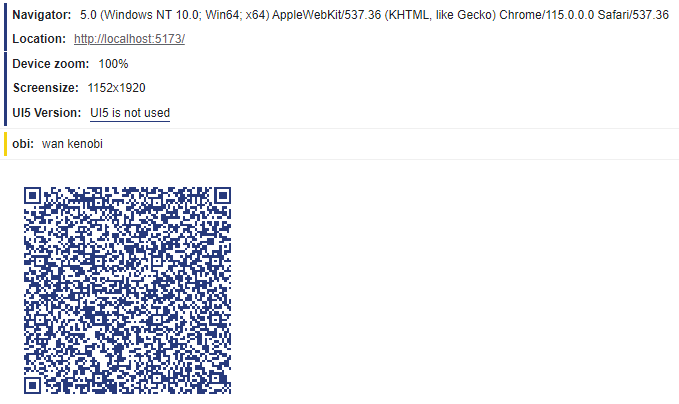
With the creation of the library, I also implemented a requirement that was long overdue. With the command SRBJSLogger.developer(true, {obi: "wan kenobi"}); very important details for us are displayed in the browser log. Among other things, "which browser is used", "screen size" etc. A very nice feature is setting the first parameter to true. If this parameter is activated, the browser console provides a QR code with the content of the most important application information. ( Additional data can also be packed into the QR code - see "Obi Wan Kenobi" )
Getting started
Initialize the SRBJSLogger via the NPM CDN:
For initializing the Logger via CDN, simply copy and paste the following in the index file of the HTML5 app:
<script src="https://npmcdn.com/srbjslogger/SRBJSLogger.min.js"></script>
Initialize the SRBJSLogger via downloading the latest version:
Download the latest minified version from here. Place that file into a directory of the app's folder structure, where it can access that file. For UI5 apps, using the index.html bootrapping, instantiate the Logger like above via
<script src="/path/to/SRBJSLogger.min.js"></script>
For UI5 apps, not using the index.html startup logic, paste the following in the ressources section of the manifest file:
"resources": { "js": [ { "uri": "path/to/SRBJSLogger.min.js" } ] }Initialize the Logger temporarily via the browsers console. Just copy, paste and execute the following snippet in the browsers console:
var script = document.createElement('script');
script.type = 'text/javascript';
script.src = 'https://npmcdn.com/srbjslogger/SRBJSLogger.min.js';
script.addEventListener("load", function() { SRBJSLogger.getVersionInfo(); });

document.head.appendChild(script);
\
Documentation
The init function
SRBJSLogger.init("SCOPE","TOPIC",{verbose: true})Execute Open the console to see the result
Parameters
init(scope[String], topic[String], opt[{}])
-
scope
Sets the scope of all log messages
-
topic
Sets the topic of all log messages
-
opt
- This variable has to contain an object or undefined. Setting the object property
verbosetotrue, logs a badge, after the init function is processed.
- This variable has to contain an object or undefined. Setting the object property
The log function
SRBJSLogger.log("Title", "My message", { scope: "testscope", topic: "testtopic" })Execute Open the console to see the result
Parameters
init(title[String], message[String], opt[{}])
-
title
Sets the title ( left ) of the badge
-
message
Sets the message ( left ) of the badge
-
opt
- This variable has to contain an object or undefined. Setting the propeties
scopeand/ortopic, of this object, overwirtes state and topic, if they were set via theinitmethod
- This variable has to contain an object or undefined. Setting the propeties
Results in

The error function
SRBJSLogger.error("Title", "My message", { scope: "testscope", topic: "testtopic" })Execute Open the console to see the result
Parameters
init(title[String], message[String], opt[{}])
-
title
Sets the title ( left ) of the badge
-
message
Sets the message ( left ) of the badge
-
opt
- This variable has to contain an object or undefined. Setting the propeties
scopeand/ortopic, of this object, overwirtes state and topic, if they were set via theinitmethod
- This variable has to contain an object or undefined. Setting the propeties
Results in

The warn function
SRBJSLogger.warn("Title", "My message", { scope: "testscope", topic: "testtopic" })Execute Open the console to see the result
Parameters
init(title[String], message[String], opt[{}])
-
title
Sets the title ( left ) of the badge
-
message
Sets the message ( left ) of the badge
-
opt
- This variable has to contain an object or undefined. Setting the propeties
scopeand/ortopic, of this object, overwirtes state and topic, if they were set via theinitmethod
- This variable has to contain an object or undefined. Setting the propeties
Results in

The getVersionInfo function
SRBJSLogger.getVersionInfo()Execute Open the console to see the result
Results in
The developer function
SRBJSLogger.developer(true, {obi: "wan kenobi"});Execute Open the console to see the result
Parameters
developer(showQrCode[true|false], customObject[{}])
-
showQrCode
Displays a QRCode in the console if a value is provided resulting in
true -
customObject
Supply a object here. The object is appended in the logoutput and also in the QRCode data like in the example below
Results in
History
Others providing
Compare all 3 on the Logging page →- openui5-error-collectoropenui5-error-collectorA UI5 library that collects a running app's JavaScript errors, unhandled Promise rejections and UI5 log events, and can post them to a backend with navigator.sendBeacon.independent, ui5UI5 library collecting an app's JavaScript errors
- @openui5/sap.ui.core@openui5/sap.ui.coreThe OpenUI5 core: the module loader, the MVC runtime, data binding, routing, theming and the test stack, which is everything a UI5 app does before a single community package is added.sap official, ui5Framework core: module loader, MVC runtime, binding, routing, theming
Details
Sources
Sources are graph entities: the same page may back several entries, and an unreachable source flags every row that rests on it.
Compatibility and provenance
History in the atlas
- Listed on bestofui5.org and absent from the atlas. Entered on the README's motivation sentence, "I wanted to better separate the log outputs of our UI5 applications" (excerpt), and its UI5 setup steps; the npm description alone, "SRB logging library for javascript", names no stack. No provides edge: the logging capability lists no UI5 door.
- First seen.
For your agent
- Ref
artifact:srbconsultingteam-srbjslogger- JSON
- /artifacts/srbconsultingteam-srbjslogger.json
- MCP
- Connecting an agent