abap-soql-query
An ABAP report that runs Salesforce SOQL queries against standard or custom objects through a connected app, shows the rows in an ALV grid and exports them to CSV or Excel.
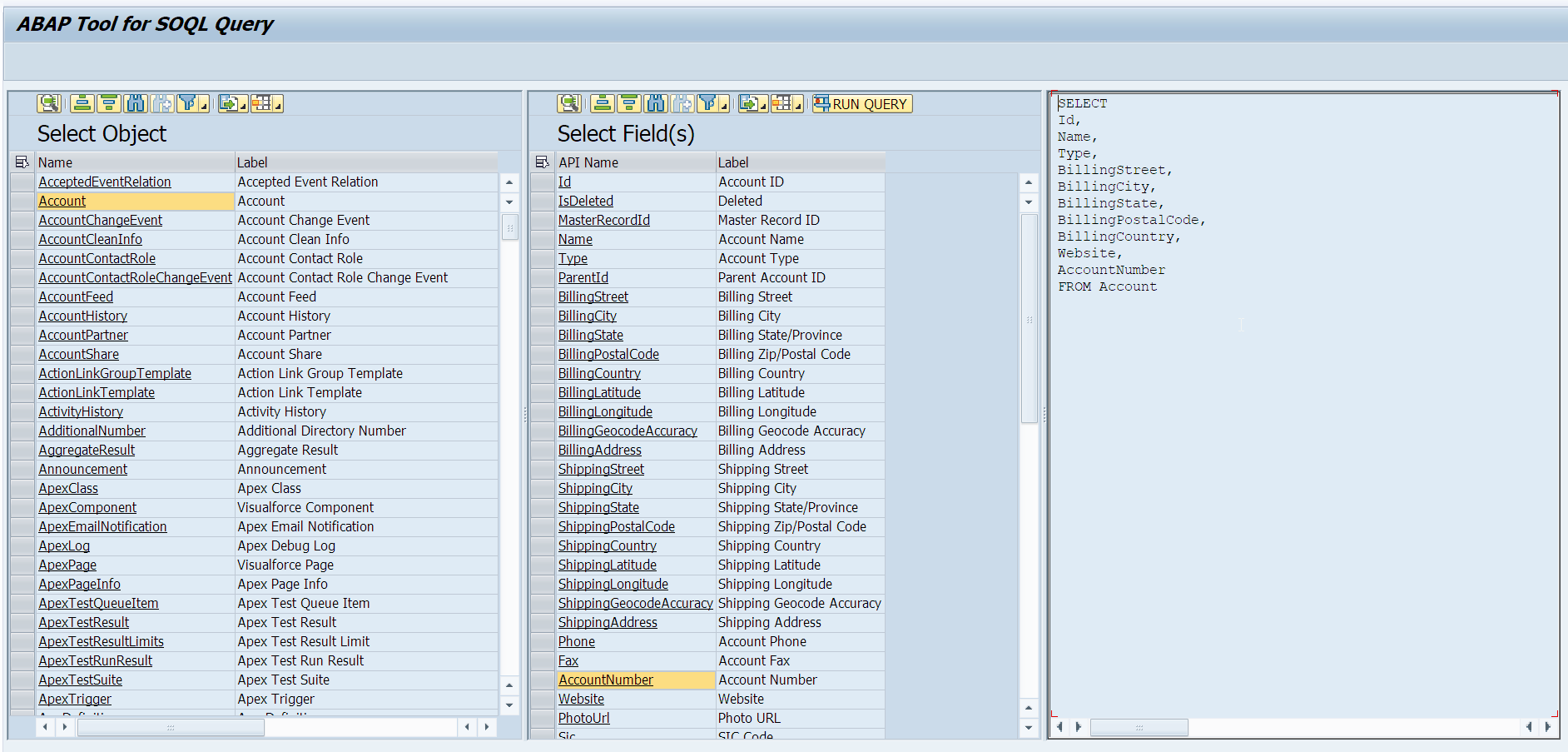
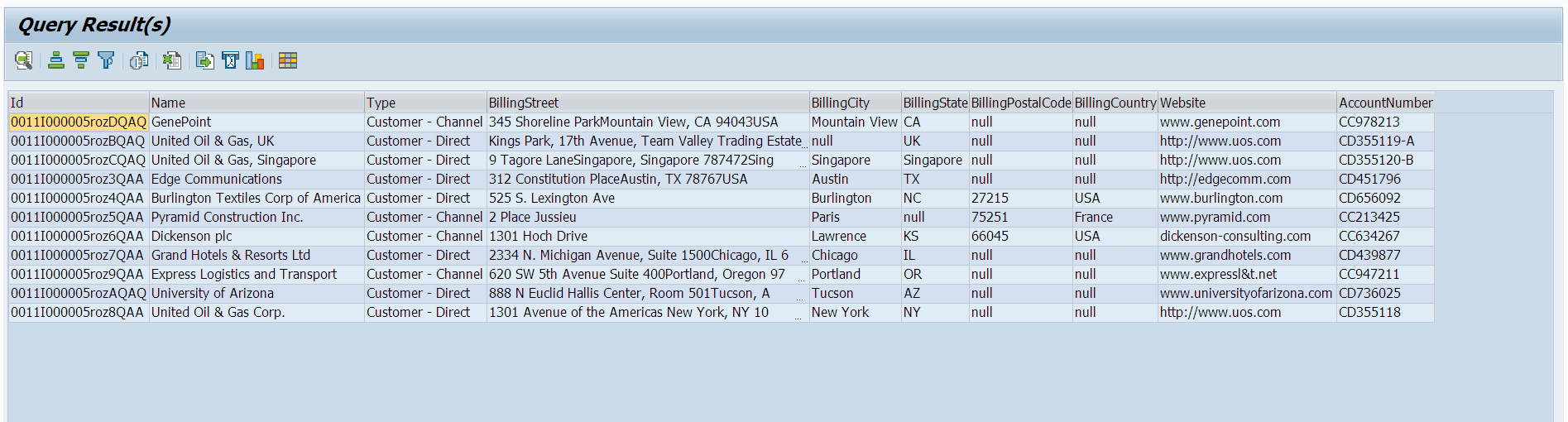
ZABAP_SOQL_BUILDER is the program a user starts: it authenticates against Salesforce with the client id, client secret, username and password of a connected app, runs a SOQL query against standard or custom objects, and shows the rows in an ALV grid that filters and sorts, with export to CSV or Excel. Two steps come first, both outside the ABAP system: the Salesforce certificates go into STRUST under SSL Client (Anonymous), and a connected app is set up in Salesforce for OAuth authentication. Reading is as far as it goes; the README shows the query and the export, and nothing that writes back.
Facts
Where it sits
Who is behind it

In the atlas: maintains 1, contributes to 1@gprs555maintainer
Before choosing this
Signals
ActivityQuietNo published releases; repository quiet for 91 months
It publishes no releases, and its repository has been quiet for at least 24 full months. This may be normal for stable software; check whether its current state still fits your use.
What it declares
Every artifact
- Type
- App
- Origin
- Independently maintained
As an app
- Where it runs
- Inside the system it serves
- Distributed through
- abapGit
Connections
Calling an external HTTP API from application code
Git client written in ABAP that runs inside the system
Download
README
quoted from gprs555/abap-soql-query under MIT, readABAP Tool for SOQL Query
Author: Mark Saksornyuth
Description
ABAP Tool for SOQL Query allows you to easily run SOQL queries in ABAP Platform.
SOQL is similar to the SELECT statement in the widely used Structured Query Language (SQL) but is designed specifically for Salesforce data.
Key Features and Capabilities
- Simple User interface
- Support standard and custom objects
- Filter and sort query results within ALV grid
- Export query results to several standard data formats (CSV,EXCEL)
How do I use it?
- Install and set up abapGit on your SAP System
- Clone the repository using abapGit
Setup
SAP Configuration:
- Import Salesforce certificate in STRUST transaction. Location : SSL Client (Anonymous)
- Go to
https://login.salesforce.com/to get the certificates - Open the "Certification path" tab, start from the parent node to the root node.
Salesforce Configuration
- Setup
a new connected appin Salesforce for OAuth authentication
Usage
Main Program: ZABAP_SOQL_BUILDER
Setup OAuth Authentication
Provide client id, client_secret from Salesforce Configuration step.
  ls_credentials-grant_type    = 'password'.
  ls_credentials-client_id     = <client_id>.
  ls_credentials-client_secret = <client_secret>.
  ls_credentials-user_name     = <user_name>.
  ls_credentials-password      = <password>.
License
MIT-license. See LICENSE file.
Others providing
Compare all 10 on the HTTP clients page →- abapify/fetch-cloudabapify/fetch-cloudA plugin for the abapify/fetch polyfill that supplies its BAdI implementation for ABAP Cloud, where cl_http_client cannot be used directly; the polyfill is installed first.independent, abapCloud-compatible plugin for the abapify Fetch API polyfill
- abapify/fetch-legacyabapify/fetch-legacyA legacy-release implementation of the Fetch API interface for outbound HTTP calls from ABAP, plugging into abapify/fetch so the calling code needs no refactoring when it moves to the cloud.independent, abapLegacy-release Fetch API implementation for outbound HTTP in ABAP
- abapify/fetchabapify/fetchA Fetch API-style polyfill for ABAP: one facade over request, response and destination, with the release-specific HTTP client of cloud or classic systems supplied by a plugin like Cloud fetch.independent, abapFetch API-style HTTP polyfill for cloud and classic ABAP
- ABAPFireABAPFireAn ABAP client library for Firebase's Realtime Database REST API, with email-and-password authentication and methods to read, set, update, push and remove data at a path.independent, abapABAP client for Firebase's Realtime Database REST API
- B-Tocs ABAP SDKB-Tocs ABAP SDKAn ABAP package that carries the outbound web service call for an SAP ABAP server, with the utility and security classes it needs under it and one plugin per integration on top.independent, abapWeb service client and connector layer for calling out of ABAP
- abap2gappsabap2gappsAn ABAP API for Google Apps integration, with a program, ZGAPPS_UPLOAD, that uploads a chosen file from the SAP system to Google Docs through a consumer registered for OAuth 2.0.independent, abapABAP API for Google Apps, with upload to Google Docs
- ABAP SDK for AzureABAP SDK for AzureABAP objects and classes for sending SAP business process data to Azure services such as Event Hub, Service Bus, Key Vault, Blob and Azure OpenAI, without depending on a middleware product.partner, abapABAP classes for calling Azure services from SAP processes
- cross-http-clientcross-http-clientAn ABAP HTTP client intended to work across classic on-premise ABAP and ABAP Cloud, using CL_HTTP_CLIENT on the one and CL_HTTP_DESTINATION_PROVIDER on the other.community org, abapHTTP client for classic on-premise ABAP and ABAP Cloud
- abap2gsheetabap2gsheetAn ABAP framework that wraps the Google Sheets API behind ABAP calls for on-premise SAP S/4HANA, authenticating through SAP's standard OAuth 2.0 client.independent, abapABAP framework wrapping the Google Sheets API for SAP S/4HANA
Details
Sources
Sources are graph entities: the same page may back several entries, and an unreachable source flags every row that rests on it.
Compatibility and provenance
abaplint
History in the atlas
- First seen.
For your agent
- Ref
artifact:gprs555-abap-soql-query- JSON
- /artifacts/gprs555-abap-soql-query.json
- MCP
- Connecting an agent