ui5-tcode-finder
A browser page that searches SAP transaction codes by code, title or description and hands one over on a click: copied plain, copied with an /n or /o prefix, or opened in SAP GUI for HTML.
Searches the transaction codes it carries by code, title or description, alongside tabs for the groups they sit in, and hands one over when a row is clicked: copied plain, copied with an /n or /o prefix, or opened in SAP GUI for HTML. Favourites are marked by hand and stay at the top of the list, the RECENT tab holds the twenty codes copied or opened last, and a code the list does not carry goes into a CUSTOM group with a description of its own. Favourites, custom codes and recents are kept in the browser's IndexedDB and the settings in its local storage, and no data is sent to a server, so they reach another browser by export and import rather than by an account. It installs from the browser as a progressive web app, works without an internet connection, and speaks German where the browser prefers it and English otherwise. It is a page used at its own address rather than something installed into a project, and its overview names the codes a UI5 or Fiori project needs as the work it is for.
Facts
Where it sits
Who is behind it

In the atlas: maintains 8, contributes to 10, wrote 1@mariokernichmaintainer
What it declares
Every artifact
- Type
- Web tool
- Origin
- Independently maintained
- Use as
- A reference
As a web tool
- Access
- does not say
- What it sends to its vendor
- No data is sent to a server.
Connections
Getting from a task to the transaction code that starts it
Download
README
quoted from mariokernich/ui5-tcode-finder under Apache-2.0, read

Welcome to the T-Code Quick Finder project. This application provides a fast and efficient way to search for transaction codes (T-Codes). A live demo is available at tcodes.kernich.de.
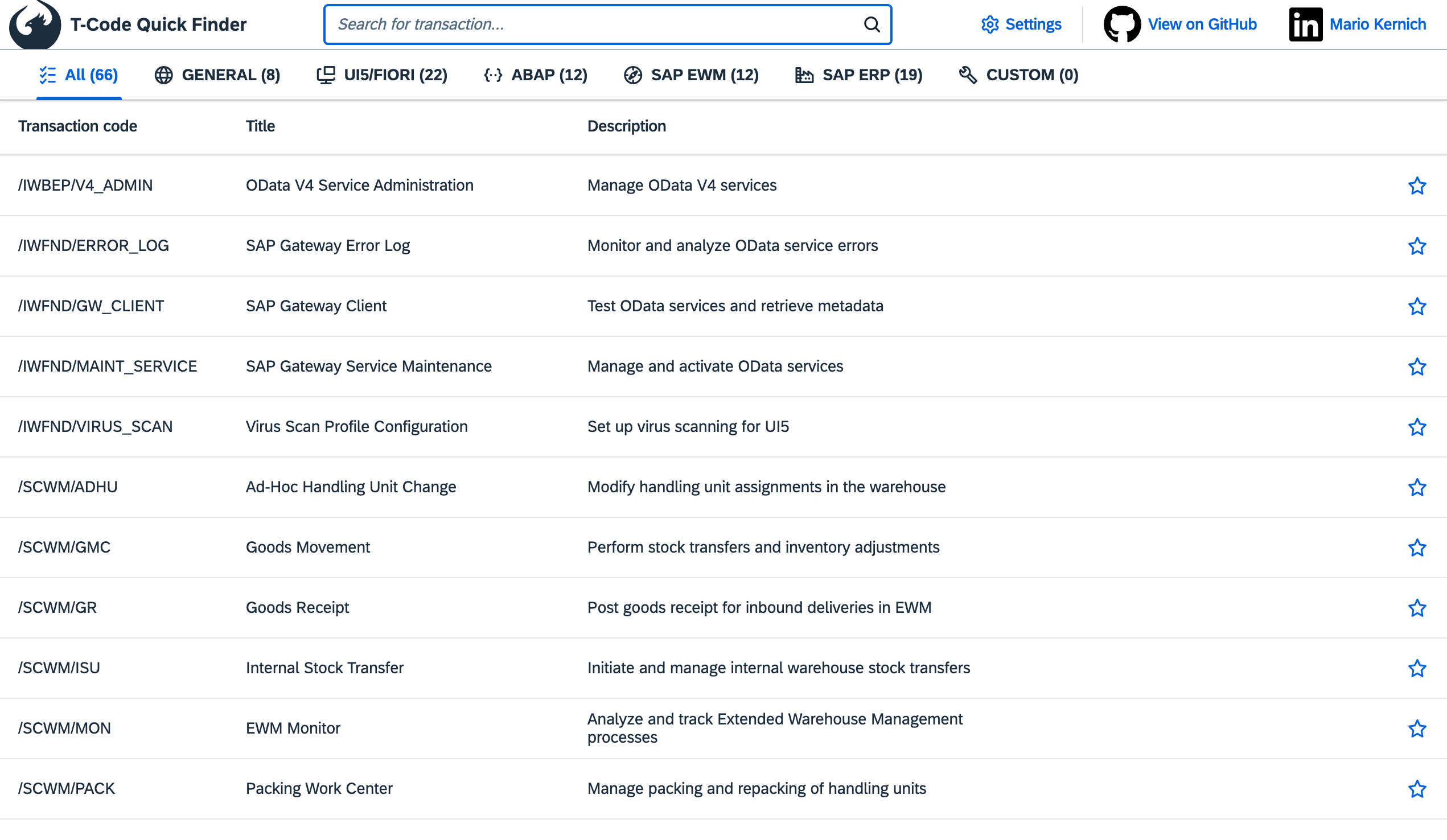
Overview
This project is designed to help developers quickly find and manage T-Codes necessary for UI5 and Fiori projects. The application includes features such as search functionality, copy to clipboard, favorite management, custom T-Codes and more.
Features
- Search Functionality: Quickly search for T-Codes by their code, title, or description. The search works together with the group tabs.
- Copy to Clipboard: Easily copy T-Codes to the clipboard by clicking on a table row.
- Copy behavior: Just copy the T-Code, add an /n or /o prefix (/o while the Shift key is pressed) or open them directly in SAP GUI for HTML (WebGUI).
- Favorite Management: Mark T-Codes as favorites to keep them at the top of the list.
- Recently Used: The RECENT tab lists the 20 T-Codes you copied or opened last.
- Add Custom T-Codes: Add your own T-Codes with descriptions in the CUSTOM group. Use the right click context menu to edit existing ones.
- Theme Selection: Choose between light, dark or the theme of your operating system.
- Group Visibility: Select which groups of transactions are displayed.
- Import/Export: Transfer your settings, favorites and custom T-Codes to another browser.
- Offline Use: Install the app from your browser (progressive web app); it works without an internet connection and offers new versions for reload.
- English and German: The user interface uses German if your browser prefers it and English otherwise. The URL parameter
sap-ui-language=deorsap-ui-language=enoverrides this. - Responsive Design: Optimized for both desktop and mobile devices.
Favorites, custom and recently used T-Codes are stored in the IndexedDB and the settings in the local storage of your browser. No data is sent to a server. The UI5 framework is part of the app, no third-party CDN is involved.
Demo
A live demo of the application can be accessed at tcodes.kernich.de.
Requirements
Installation
To install the dependencies, run:
npm installRunning the App
To run the app locally for development in watch mode (the browser reloads the app automatically when there are changes in the source code), execute:
npm startThe app will be available at http://localhost:8080/index.html.
Debugging
In the browser, you can directly debug the original TypeScript code, which is supplied via sourcemaps. If the browser doesn't automatically jump to the TypeScript code when setting breakpoints, use Ctrl/Cmd + P in Chrome to open the *.ts file you want to debug.
Building the App
To build the app that is deployed, run:
npm run buildThe build is self-contained: it bundles the app with the required parts of OpenUI5 into dist/resources/sap-ui-custom.js and contains the other framework files the app may load, like themes and message bundles. Afterwards, prune-build.mjs removes files that are never requested at runtime, like debug sources and theme sources, and generate-service-worker.mjs creates the service worker for offline use. The build contains the version information of the libraries (resources/sap-ui-version.json) but no build timestamps, so identical sources result in identical files and installed apps are only offered updates that change something. The build reports missing modules of the UI5 support tools, which the app does not need.
To start the built app, run:
npm run start:distIt is available at http://localhost:8090/index.html. The service worker is only registered by the built app, the development server always serves the current sources. It uses its own port because a service worker controls all pages of its origin.
Code Quality
| Command | Description |
|---|---|
npm run lint | Lint the TypeScript code with ESLint |
npm run typecheck | Check the types with the TypeScript compiler |
npm run ui5lint | Check the app for deprecated or unsafe UI5 usage |
npm run test:ui5 | Run the unit and integration tests with coverage |
npm test | Run all of the above |
The unit tests (QUnit) and the integration tests (OPA5) can also be run in the browser: start the app with npm start and open http://localhost:8080/test/testsuite.qunit.html. On its first run, the UI5 Test Runner installs Puppeteer globally to control a headless browser.
UI5 Version
The app uses the long-term maintenance version OpenUI5 1.148, see the version overview. The development server, the tests and the build use the version of ui5.yaml. When updating the version, change it consistently in ui5.yaml, ui5-coverage.yaml, manifest.json (minUI5Version) and the @openui5/types dependency.
Deployment
Every push to the main branch is deployed to tcodes.kernich.de by the CI workflow after linting, type checking, testing and building succeeded.
License
This project is licensed under the Apache Software License, version 2.0. See the LICENSE file for more details.
Contact
For more information, please contact Mario Kernich.
Thank you for checking out the UI5/Fiori T-Code Quick Search project. We hope you find it useful for your UI5 and Fiori development needs.
History
Features 3, Changed 2
Notes
Added
- "Recent" tab with the 20 transactions that were copied or opened last
- The app can be installed as progressive web app and works offline; new versions are offered for reload
- German user interface for browsers that prefer German
Changed
- OpenUI5 is part of the app instead of being loaded from the SAP CDN, the app does not request third-party servers for the user interface anymore
- The deployment contains only the files the app can request at runtime
Changed 11, Fixes 16
Notes
Fixed
- The table showed only the first 100 transactions, e.g. VA01 or SU01 were missing in the "All" tab
- Searching removed the group filter and switching the group removed the search filter
- Clearing the search showed transactions of all groups, including hidden groups
- A click on a transaction was handled twice and caused an error; in WebGUI mode two windows were opened
- The "New" dialog could not be opened again after it was closed with the Escape key
- Dialogs closed with the Escape key were not destroyed
- The operating system's color scheme overrode an explicitly selected light or dark theme
- The GitHub and LinkedIn icons were invisible in the dark theme after saving the settings with the theme "System"
- Importing settings uploaded the file to the web server
- Importing settings with invalid values made it impossible to save the settings, arbitrary keys were written to the local storage and URLs like
javascript:were accepted as SAP system URL - A failed import could delete the custom transactions; the import is atomic now
- Transaction codes were compared case-sensitively, so e.g. "se80" could be added as a custom transaction
- The delete button was enabled without a selection, and after deleting, other transactions could appear selected
- Copy errors (e.g. missing clipboard permission) were not reported
- ST03 was not assigned to any group
- The social media preview images did not exist
Changed
- Settings are validated when they are loaded or imported; settings of older versions are migrated
- A new "Copy the T-Code with /n prefix" option
- The database stores transaction codes in upper case; existing data is migrated
- The app remains usable without favorites and custom transactions if the browser does not allow storing data
- Custom transactions are validated before saving
- The context menu opens only for custom transactions
- All texts are maintained in the i18n resource bundle
- Improved layout of the header on small screens
- OpenUI5 1.148 (long-term maintenance) is loaded in a fixed version instead of the latest version
- Updated the development tooling (TypeScript 6, ESLint 10, UI5 linter, manifest version 2) and added unit and integration tests
- Deployment runs only after linting, type checking, tests and build succeeded
Other 4
Notes
- Adding new transactions
- Searching for transactions now changes the count values of each group
- Input of search field changed to uppercase style
- Import and Export function for settings, favorites and custom transactions
Other 8
Notes
- Search Functionality: Quickly search for T-Codes by their code, title, or description.
- Copy to Clipboard: Easily copy T-Codes to the clipboard by clicking on a table row.
- Copy behavior: Just copy the T-Code, add an /n or /o prefix or open them directly in WebGUI
- Favorite Management: Mark T-Codes as favorites and sort them for easy access. Favorites are stored in local storage.
- Add Custom T-Codes: Add your own T-Codes with descriptions in the CUSTOM group. Use right click context menu to edit existing ones.
- Theme Selection: Choose between light or dark theme.
- Group Visibility: Select which transaction should be displayed.
- Responsive Design: Optimized for both desktop and mobile devices.
Others providing
Compare all 3 on the Finding a transaction code page →- sapguisapguiThirty classic transactions, SE80 and SE16N among them, rebuilt as abap2UI5 apps and installed with abapGit into a standard ABAP system.independent, abapThirty classic transactions rebuilt as abap2UI5 apps
- SAP TCode RunnerSAP TCode RunnerA VS Code extension that opens an SAP transaction inside VS Code's Simple Browser through the system's WebGUI endpoint, with a sidebar for the code, its favourites and the transactions run last.independent, abapVS Code sidebar that opens SAP transactions through WebGUI
Details
Sources
Sources are graph entities: the same page may back several entries, and an unreachable source flags every row that rests on it.
Compatibility and provenance
History in the atlas
- Staged with the capability Finding a transaction code, drafted in the same batch because the corpus held no concern for it. ecosystem: abap is a placement rather than a stated fact: the repository is an OpenUI5 and TypeScript application, but its subject is the transaction codes of a classic SAP system and the only stack its features name is SAP GUI for HTML. serves_ecosystems: ui5 rests on the overview sentence naming the T-Codes a UI5 or Fiori project needs. use_as: reference because it is consulted at its own address rather than installed into a project.
- First seen.
For your agent
- Ref
artifact:mariokernich-ui5-tcode-finder- JSON
- /artifacts/mariokernich-ui5-tcode-finder.json
- MCP
- Connecting an agent