CDS-TS-Repository - BaseRepository















The goal of BaseRepository is to significantly reduce the boilerplate code required to implement data access layers for persistance entities by providing out of the box actions on the database.
Table of Contents
Installation
Install CDS-TS-Repository
npm install @dxfrontier/cds-ts-repository
Important
CDS-TS-Repository uses @sap/cds, @sap/cds-dk version 10 and stays compatible with version 9 — the @sap/cds peer dependency is ^9 || ^10. Node.js >= 22 is required.
If you're using @sap/cds, @sap/cds-dk version 8 then install npm install @dxfrontier/cds-ts-repository@5.
Generate CDS Typed entities
Execute the following commands :
cds add typer
npm install
Tip
If above option is being used, this means whenever we change a .CDS file the changes will be reflected in the generated @cds-models folder.
Important
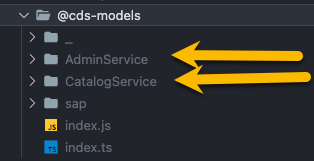
Caution
Import always the generated entities from the service folders and not from the index.ts
Tip
By default cds-typer will create in your package.json a quick path alias like :
"imports": {
  "#cds-models/*": "./@cds-models/*/index.js"
}
Use import helper to import entities from #cds-models like example :
import { Book } from '#cds-models/CatalogService';
(back to top)
Usage
Option 1 : Using BaseRepository with Standard SAP CAP CDS-TS
This guide explains how to use the BaseRepository with the Standard SAP CDS-TS, allowing you to work without the need for the CDS-TS-Dispatcher.
Step 1 : Create MyRepository class
Start by creating MyRepository class, which will extend the BaseRepository<T> to handle operations for your entity.
Example
import { BaseRepository, Request } from '@dxfrontier/cds-ts-repository'
import { MyEntity } from 'LOCATION_OF_YOUR_ENTITY_TYPE'

// Imported to have visibility over INSERT, SELECT, UPDATE, DELETE ...
import { Service } from '@sap/cds';

export class MyRepository extends BaseRepository<MyEntity> {

  constructor() {
    super(MyEntity)
  }

  public aMethod(req: Request<MyEntity>) {
    const result1 = await this.create(...)
    const result2 = await this.createMany(...)
    const result5 = await this.getAll()
    const result6 = await this.paginate(...)
    const result7 = await this.find(...)
    const result8 = await this.findOne(...)
    const result9 = await this.delete(...)
    const result10 = await this.update(...)
    const result11 = await this.updateLocaleTexts(...)
    const result12 = await this.exists(...)
    const result13 = await this.count()
  }

  public anotherMethod(results: MyEntity[], req: Request<MyEntity>) {
    // ...
  }

  // Enhance with custom QL methods ...
  public customQLMethod() {
    const customQL = SELECT(MyEntity).columns(...).where(...)
    // ...
  }
}
Step 2 : Integrate MyRepository class
Now that you have MyRepository class, you can integrate it into your implementation.
- Create a new private field:
private myRepository: MyRepository = new MyRepository();
- Use the handler on the
callback of the events :
this.before('READ', MyEntity, (req) => this.myRepository.aMethod(req));
this.after('READ', MyEntity, (results, req) => this.myRepository.anotherMethod(results, req));
Example
import { MyEntity } from 'LOCATION_OF_YOUR_ENTITY_TYPE';

export class MainService extends cds.ApplicationService {
  private myRepository: MyRepository = new MyRepository();

  init() {
    this.before('READ', MyEntity, (req) => this.myRepository.aMethod(req));
    this.after('READ', MyEntity, (results, req) => this.myRepository.anotherMethod(results, req));

    return super.init();
  }
}
Note
MyEntity was generated using CDS-Typer and imported in the the class.
(back to top)
Option 2 : Using BaseRepository with CDS-TS-Dispatcher
This guide explains how to use the BaseRepository with the CDS-TS-Dispatcher.
Step 1 : Create MyRepository class
Start by creating a MyRepository class, which will extend the BaseRepository<T> to handle operations for your entity.
- Create a new class
MyRepository:
export class MyRepository {}
- Add
@Repository decorator :
@Repository()
export class MyRepository {}
- Extend
MyRepository class to inherit the BaseRepository methods
@Repository()
export class MyRepository extends BaseRepository<MyEntity> {
  constructor() {
    super(MyEntity); // CDS-Typer entity
  }
}
Example
import { BaseRepository } from '@dxfrontier/cds-ts-repository'
import { Repository, Service } from '@dxfrontier/cds-ts-dispatcher'

import { MyEntity } from 'LOCATION_OF_YOUR_ENTITY_TYPE'

@Repository()
export class MyRepository extends BaseRepository<MyEntity> {

  constructor() {
    super(MyEntity) // CDS-Typer entity
  }

  aMethod() {
    const result1 = await this.create(...)
    const result2 = await this.createMany(...)
    const result5 = await this.getAll()
    const result6 = await this.paginate(...)
    const result7 = await this.find(...)
    const result8 = await this.findOne(...)
    const result9 = await this.delete(...)
    const result10 = await this.update(...)
    const result11 = await this.updateLocaleTexts(...)
    const result12 = await this.exists(...)
    const result13 = await this.count()
  }

  // Enhance with custom QL methods ...
  customQLMethod() {
    const customQL = SELECT(MyEntity).columns(...).where(...)
    // ...
  }
}
Step 2 : Inject MyRepository class
Now MyRepository class can be injected in another class using @Inject decorator.
Example
@EntityHandler(Book)
class MyEntityHandler {
  @Inject(MyRepository) private readonly myRepository: MyRepository;
  ...
}
Note
MyEntity was generated using CDS-Typer and imported in the the class.
(back to top)
Drafts : BaseRepositoryDraft
The BaseRepositoryDraft class extends BaseRepository by providing support for draft-enabled entities.
The BaseRepositoryDraft repository provides a clear separation of methods for working with active entities and draft instances.
Use BaseRepository methods when dealing with active entity instances.
updatedeletecreatecreateMany...
Use BaseRepositoryDraft methods when working with draft entity instances.
updateDraftdeleteDraftfindOneDraftfindDrafts...
(back to top)
Usage
Example 1: Integrate BaseRepository & BaseRepositoryDraft using Mixin
import { BaseRepository, BaseRepositoryDraft, Mixin } from '@dxfrontier/cds-ts-repository';
import { MyEntity } from 'LOCATION_OF_YOUR_ENTITY_TYPE';

export class MyRepository extends Mixin(BaseRepository<MyEntity>, BaseRepositoryDraft<MyEntity>) {
  constructor() {
    super(MyEntity);
  }
  // ... define custom CDS-QL actions if BaseRepository ones are not satisfying your needs !
}
Note
MyRepository class will inherit all methods for active entities and drafts.
Active entity methods: .create, createMany, update, exists, delete, deleteMany ...
Draft entity methods: .updateDraft, existsDraft, deleteDraft, deleteManyDrafts ...
Example 2: Use only BaseRepositoryDraft methods
import { BaseRepository, BaseRepositoryDraft, Mixin } from '@dxfrontier/cds-ts-repository';
import { MyEntity } from 'LOCATION_OF_YOUR_ENTITY_TYPE';

export class MyRepository extends BaseRepositoryDraft<MyEntity> {
  constructor() {
    super(MyEntity);
  }
  // ... define custom CDS-QL actions if BaseRepository ones are not satisfying your needs !
}
Important
Entity MyEntity must be annotated with @odata.draft.enabled: true to use BaseRepositoryDraft methods.
(back to top)
Methods
create
(method) this.create(entry: Entry<T>) : Promise<boolean>.
The create method allows you to create a new entry in the table.
Parameters
entry (object): An object representing the entry to be created. The object should match the structure expected by MyEntity
Return
Promise<boolean>: This method returns a Promise that resolves when the insertion operation is completed successfully.
Example 1
import { BaseRepository } from '@dxfrontier/cds-ts-repository';
import { MyEntity } from 'LOCATION_OF_YOUR_ENTITY_TYPE';

export class MyRepository extends BaseRepository<MyEntity> {
  constructor() {
    super(MyEntity); // a CDS Typer entity type
  }

  public async aMethod() {
    const createdInstance = await this.create({
      name: 'Customer 1',
      description: 'Customer 1 description',
    });
    // Further logic with createdInstance
  }
}
Example 2
The method is also able to create deep entities like
import { BaseRepository } from '@dxfrontier/cds-ts-repository';
import { MyEntity } from 'LOCATION_OF_YOUR_ENTITY_TYPE';

export class MyRepository extends BaseRepository<MyEntity> {
  constructor() {
    super(MyEntity); // a CDS Typer entity type
  }

  public async aMethod() {
    const createdInstance = > await this.create({
      name: 'Customer 1',
      description: 'Customer 1 description',
      to_children: [{
        name: 'child 1'
        // ...
      }]
    });
    // Further logic with createdInstance
  }
}
Note
MyEntity was generated using CDS-Typer and imported in the the class.
(back to top)
createMany
(method) this.createMany(...entries: Entries<T>[]) : Promise<boolean>.
The createMany method allows you to add multiple entries in the table.
Parameters
entries (...entries: Entries<T>[]): An array of objects representing the entries to be created. Each object should match the structure expected by MyEntity.
Return
Promise<boolean>: This method returns a Promise that resolves when the insertion operation is completed successfully.
Example 1
import { BaseRepository } from '@dxfrontier/cds-ts-repository';
import { MyEntity } from 'LOCATION_OF_YOUR_ENTITY_TYPE';

export class MyRepository extends BaseRepository<MyEntity> {
  constructor() {
    super(MyEntity); // a CDS Typer entity type
  }

  public async aMethod() {

    const create: MyEntity = {
      name: 'Customer 1',
      description: 'Customer 1 description',
    },
    {
      name: 'Customer 2',
      description: 'Customer 2 description',
    };

    // example 1
    const createdInstance = await this.createMany([create]);

    // example 2
    const createdInstance2 = await this.createMany({
      name: 'Customer 1',
      description: 'Customer 1 description',
    },
    {
      name: 'Customer 2',
      description: 'Customer 2 description',
    });

}
}
Note
MyEntity was generated using CDS-Typer and imported in the the class.
(back to top)
getAll
(method) this.getAll(): Promise<T[] | undefined>
The getAll method retrieves all table entries.
Return
Promise<T[] | undefined>: A Promise resolving to an array of type T (e.g., MyEntity). If no results are found, the Promise resolves to undefined.
Example
import { BaseRepository } from '@dxfrontier/cds-ts-repository';
import { MyEntity } from 'LOCATION_OF_YOUR_ENTITY_TYPE';

export class MyRepository extends BaseRepository<MyEntity> {
  constructor() {
    super(MyEntity); // a CDS Typer entity type
  }

  public async aMethod() {
    // Variant 1
    const results = await this.getAll();
    if (results) {
      // do something with results
    }

    // Variant 2
    const items = results?.length;
    const oneItem = results![0];

    // Further logic with results
  }
}
Note
MyEntity was generated using CDS-Typer and imported in the the class.
(back to top)
getDistinctColumns
(method) this.getDistinctColumns<Column extends keyof T>(columns: Column[]>): Promise<Array<Pick<T, Column>> | undefined>
The getDistinctColumns method retrieves distinct values for the specified columns from the table.
Parameters
Parameters
columns (...columns : Columns<T>[]) : An array of column names to retrieve distinct records for. Each column name should be of a type that matches the entity's schema.
Return
Promise<Array<Pick<T, Column>> | undefined>: A Promise resolving to an array of objects containing the selected columns from the entity. If no results are found, the Promise resolves to undefined.
Example
import { BaseRepository } from '@dxfrontier/cds-ts-repository';
import { MyEntity } from 'LOCATION_OF_YOUR_ENTITY_TYPE';

export class MyRepository extends BaseRepository<MyEntity> {
  constructor() {
    super(MyEntity); // a CDS Typer entity type
  }

  public async aMethod() {
    const results = await this.getDistinctColumns(['currency_code', 'ID', 'name']);
    // or using spread strings
    // const results = await this.getDistinctColumns('currency_code', 'ID', 'name');

    // Variant 1
    if (results) {
      // do something with results
    }

    // Variant 2
    const items = results?.length;
    const oneItem = results![0];
    // Further logic with results
  }
}
Note
MyEntity was generated using CDS-Typer and imported in the the class.
(back to top)
getLocaleTexts
(method) this.getLocaleTexts<Column extends keyof T>(columns: Column[]): Promise<Array<Pick<T, Column> & Locale> | undefined>
The getLocaleTexts method is designed to retrieve a list of items with localized text.
Parameters
columns (...columns : Columns<T>[]) : An array of name of the columns to extract the localized text.
Return
Promise<Array<Pick<T, Column> & Locale> | undefined>: A Promise resolving to an array of objects containing the selected columns from the entity along with locale information. If no results are found, the Promise resolves to undefined.
Example
import { BaseRepository } from '@dxfrontier/cds-ts-repository';
import { MyEntity } from 'LOCATION_OF_YOUR_ENTITY_TYPE';

export class MyRepository extends BaseRepository<MyEntity> {
  constructor() {
    super(MyEntity); // a CDS Typer entity type
  }

  public async aMethod() {
    const results = await this.getLocaleTexts(['descr', 'ID']);
    // or
    const results = await this.getLocaleTexts('descr', 'ID');

    // Variant 1
    if (results) {
      // do something with results
    }

    // Variant 2
    const items = results?.length;
    const oneItem = results![0];
    // Further logic with results
  }
}
Note
MyEntity was generated using CDS-Typer and imported in the the class.
(back to top)
paginate
(method) this.paginate(options: { limit: number; skip?: number | undefined }): Promise<T[]>
The paginate method allows you to find and retrieve a list of items with optional pagination similar to limit from SQL.
Parameters
options (object): An object containing the following properties:
limit (number): The maximum number of items to retrieve.skip? (optional, number): This property, if applied, will 'skip' a certain number of items (default: 0).
Return
Promise<T[] | undefined>: A Promise resolving to an array of objects representing instances of type T (e.g., MyEntity). If no results are found, the Promise resolves to undefined.
Example 1 : Retrieve the first 10 items
import { BaseRepository } from '@dxfrontier/cds-ts-repository';
import { MyEntity } from 'LOCATION_OF_YOUR_ENTITY_TYPE';

export class MyRepository extends BaseRepository<MyEntity> {
  constructor() {
    super(MyEntity); // a CDS Typer entity type
  }

  public async aMethod() {
    const results = await this.paginate({ limit: 10 });

    // Variant 1
    if (results) {
      // do something with results
    }

    // Variant 2
    const items = results?.length;
    const oneItem = results![0];
    // Further logic with results
  }
}
Example 2 : Retrieve items starting from the 20th item, limit to 5 items
import { BaseRepository } from '@dxfrontier/cds-ts-repository';
import { MyEntity } from 'LOCATION_OF_YOUR_ENTITY_TYPE';

export class MyRepository extends BaseRepository<MyEntity> {
  constructor() {
    super(MyEntity); // a CDS Typer entity type
  }

  public async aMethod() {
    const resultsWithSkip = await this.paginate({ limit: 5, skip: 20 });

    // Variant 1
    if (resultsWithSkip) {
      // do something with results
    }

    // Variant 2
    const items = resultsWithSkip?.length;
    const oneItem = resultsWithSkip![0];

    // Further logic with resultsWithSkip
  }
}
Note
MyEntity was generated using CDS-Typer and imported in the the class.
(back to top)
find
The find method allows you to find and retrieve entries from the table that match the specified keys.
Overloads
| Method | Parameters | Description |
|---|
| `this.find(): Promise<T | undefined>` | |
| `this.find(keys: Entry): Promise<T | undefined>` | keys (object) |
this.find(filter :Filter<T>`): Promise<T | undefined>` | filter (Filter) |
Return
Promise<T[] | undefined>: A Promise that resolves to an array of type T (e.g., MyEntity). If no results are found, the Promise resolves to undefined.
Example 1 using object
import { BaseRepository } from '@dxfrontier/cds-ts-repository';
import { MyEntity } from 'LOCATION_OF_YOUR_ENTITY_TYPE';

export class MyRepository extends BaseRepository<MyEntity> {
  constructor() {
    super(MyEntity); // a CDS Typer entity type
  }

  public async aMethod() {
    const results = await this.find({ name: 'Customer', description: 'description' });

    // Variant 1
    if (results) {
      // do something with results
    }

    // Variant 2
    const items = results?.length;
    const oneItem = results![0];
    // Further logic with results
  }
}
Note
MyEntity was generated using CDS-Typer and imported in the the class.
Example 2 using Filter
import { BaseRepository, Filter } from '@dxfrontier/cds-ts-repository';
import { MyEntity } from 'LOCATION_OF_YOUR_ENTITY_TYPE';

export class MyRepository extends BaseRepository<MyEntity> {
  constructor() {
    super(MyEntity); // a CDS Typer entity type
  }

  public async aMethod() {
    const filter = new Filter<MyEntity>({
      field: 'name',
      operator: 'LIKE',
      value: 'Customer',
    });

    // Execute the query using the find
    const results = await this.find(filter);
  }
}
Tip
See Filter for more complex QUERY filters
Note
MyEntity was generated using CDS-Typer and imported in the the class.
(back to top)
findOne
findOne(keys: Entry<T>): Promise<T | undefined>
The findOne method allows you to find and retrieve a single entry from the table that matches the specified keys.
Parameters
keys (object): An object representing the keys to filter the entries. Each key should correspond to a property in the MyEntity, and the values should match the filter criteria.
Return
Promise<T | undefined>: This method returns a Promise with a single entry of type T, where T is MyEntity. If no result is found, the Promise resolves to undefined.
Example
import { BaseRepository } from '@dxfrontier/cds-ts-repository';
import { MyEntity } from 'LOCATION_OF_YOUR_ENTITY_TYPE';

export class MyRepository extends BaseRepository<MyEntity> {
  constructor() {
    super(MyEntity); // a CDS Typer entity type
  }

  public async aMethod() {
    const itemFound = await this.findOne({ name: 'Customer', description: 'description' });
    // Variant 1
    if (itemFound) {
      // do something with result
    }

    // Further logic with result
  }
}
Note
MyEntity was generated using CDS-Typer and imported in the the class.
(back to top)
findOneAndUpdate
findOneAndUpdate(keys: Entry<T>, fieldsToUpdate: Entry<T>): Promise<boolean>
The findOneAndUpdate method performs an atomic find-and-update operation. It first checks if an entity matching the specified keys exists, and if found, updates it with the provided fields.
Parameters
keys (object): An object representing the keys to identify the entity to find. Each key should correspond to a property in MyEntity, and the values should match the filter criteria.fieldsToUpdate (object): An object representing the fields and their new values to update on the found entity.
Return
Promise<boolean>: This method returns a Promise that resolves to:
true if the entity was found and successfully updatedfalse if the entity was not found or the update failed
Example 1: Basic usage
import { BaseRepository } from '@dxfrontier/cds-ts-repository';
import { MyEntity } from 'LOCATION_OF_YOUR_ENTITY_TYPE';

export class MyRepository extends BaseRepository<MyEntity> {
  constructor() {
    super(MyEntity); // a CDS Typer entity type
  }

  public async aMethod() {
    const wasUpdated = await this.findOneAndUpdate(
      { ID: '123' },
      { name: 'Updated Name', status: 'active' }
    );

    if (wasUpdated) {
      console.log('Entity updated successfully');
    } else {
      console.log('Entity not found or update failed');
    }
  }
}
Note
MyEntity was generated using CDS-Typer and imported in the class.
Tip
The method first verifies entity existence before attempting the update, ensuring safe update operations.
(back to top)
builder
.find
Overloads
| Method | Parameters | Description |
|---|
this.builder().find(): FindBuilder<T> | | Get all table items. |
this.builder().find(keys: Entry<T>): FindBuilder<T> | keys (object) | An object representing the keys to filter the entries.
Each key should correspond to a property in MyEntity, and the values should match the filter criteria. |
this.builder().find(filter :Filter<T>): FindBuilder<T> | filter (Filter) | An instance of Filter<T> |
Return
(back to top)
elements
Provides the Metadata of Entity fields.
Example
const results = this.builder().find().columns('ID', 'currency_code').elements;
Warning
Currently SAP does not offer typing on the elements.
(back to top)
distinct
Skip duplicates similar to SQL distinct.
Example
const results = await this.builder()
  .find() // get all items
  .distinct.columns('country')
  .execute();
(back to top)
orderAsc
To order the ASC selected columns, you can use the orderAsc methods. Pass an array of column names to specify the order.
Parameters
columns (...columns : Columns<T>[]) : An array of name of the columns to order by.
Example
const results = await this.builder()
  .find({
    name: 'A company name',
  })
  .orderAsc('name', 'ID', 'company')
  // or
  //.orderAsc(['name', 'ID', 'company'])
  .execute();
(back to top)
orderDesc
To order the DESC selected columns, you can use the orderDesc methods. Pass an array of column names to specify the order.
Parameters
columns (...columns : Columns<T>[]) : An array of name of the columns to order by.
Example
const results = await this.builder()
  .find({
    name: 'A company name',
  })
  .orderDesc('name', 'ID', 'company')
  // or
  //.orderDesc(['name', 'ID', 'company'])
  .execute();
(back to top)
paginate
This method allows retrieve a list of items with optional pagination similar to limit from SQL.
Parameters
options (object): An object containing the following properties:
limit (number): The maximum number of items to retrieve.skip? (number): This property, if applied, will 'skip' a certain number of items (default: 0).
Example
const results = await this.builder()
  .find({
    name: 'A company name',
  })
  .paginate({ limit: 1 })
  .execute();
(back to top)
groupBy
If you want to group the selected columns, use the groupBy method. Pass an array of column names to group by.
Parameters
columns (...columns : Columns<T>[]) : An array of name of the columns to group by.
Example
const results = await this.builder()
  .find({
    name: 'A company name',
  })
  .groupBy('name', 'company')
  // or
  //.groupBy(['name', 'company'])
  .execute();
(back to top)
having
Filters the groups created by groupBy(), the HAVING counterpart of the WHERE clause.
Parameters
filter (Filter<T> | string) : A raw condition string or a Filter<T> instance applied on the groups.
Example
const results = await this.builder()
  .find()
  .columnsFormatter({ column: 'ID', aggregate: 'COUNT', renameAs: 'total' })
  .groupBy('author_ID')
  // raw string, mandatory for aggregate conditions such as count(*)
  .having('count(*) >= 2')
  // or a Filter
  //.having(new Filter<MyEntity>({ field: 'author_ID', operator: 'EQUALS', value: 101 }))
  .execute();
Note
groupBy() must be called before, aggregate conditions (E.g. count(*) >= 2) can only be expressed as a raw string as they are not columns of the entity.
(back to top)
columns
Specifies which columns to be fetched.
Parameters
columns (...columns : Columns<T>[]) : An array of name of the columns to show only.
Example
const results = await this.builder()
  .find({
    name: 'A company name',
  })
  .columns('name', 'currency_code')
  // or
  //.columns(['name', 'currency_code'])
  .execute();
Warning
If columns() method is used together with getExpand() / columnsFormatter() / groupBy() / orderAsc() / orderDesc(), the columns() method can have impact on the final typing
(back to top)
columnsFormatter
The columnsFormatter can be used :
- To
rename columns in your query results.
- To apply
aggregate functions to specific columns, such as calculating averages, sums etc.
Parameters
Example 1
const results = await this.builder()
  .find()
  .columnsFormatter(
    { column: 'price', aggregate: 'AVG', renameAs: 'average' },
    { column: 'stock', renameAs: 'stockRenamed' },
  )
  .execute();
Example 2
const results = this.builder()
  .find({ ID: 201 })
  .getExpand(['reviews'])
  .columns('reviews', 'bookName', 'authorName')
  .columnsFormatter({ column1: 'bookName', column2: 'authorName', aggregate: 'CONCAT', renameAs: 'bookAndAuthorName' })
  .execute();

// above typing will have the following properties
// 'reviews', 'bookName', 'authorName', 'bookAndAuthorName'
Example 3 : Temporal difference between two Date columns
const results = await this.builder()
  .find()
  .columns('name', 'dateOfBirth', 'dateOfDeath')
  .columnsFormatter({
    column1: 'dateOfBirth',
    column2: 'dateOfDeath',
    aggregate: 'DAYS_BETWEEN',
    renameAs: 'daysLived',
  })
  .execute();

// above typing will have the following properties
// 'name', 'dateOfBirth', 'dateOfDeath', 'daysLived' (number)
(back to top)
getExpand
Use getExpand to specify which columns you want to expand from the table.
Overloads
| Type | Method | Parameters | Description |
|---|
Single expand | getExpand(...associations : Columns<T>[]): FindBuilder<T> | ...associations: Array<string> | Use Single expand when you want to expand only certain associations from the root level of the entity.
--------
An array of strings representing the columns to expand, this will expand only first level of associations. |
Deep expand | getExpand(associations : Expand<T>): FindBuilder<T> | associations: object | Use Deep expand option when you want to deep expand certain associations.
--------
An object representing the columns to expand.
Value:
- {} - If empty object is used as a value for an association, the empty object will perform a full expand of the association.
Properties:
- select? : Array<string> [optional]: Fetch only the mentioned columns.
- expand? : object [optional]: Expand nested associations.
|
Auto expand | getExpand(options : { levels : number }): FindBuilder<T> | levels: number | Use Auto expand to deep expand all associations within your entity.
--------
You can control how deeply the method should expand associations by providing the levels. |
Example 1 : Auto expand
Root - Entity
child - (association) - expanded
child - (composition) - expanded- ...
child - (association) - expanded
child (association) - expanded- ...
const results = await this.builder()
  .find({
    name: 'A company name',
  })
  .getExpand({ levels: 2 })
  .execute();
Example 2 : Deep expand
// expand 'author', 'genre' and 'reviews' associations
const results = await this.builder()
  .find({
    name: 'A company name',
  })
  .getExpand({
    // expand 'author'
    author: {},

    // expand 'genre', having only 'ID' and 'name'
    genre: {
      select: ['ID', 'name'],
    },

    // expand 'reviews', having only 'ID', 'book_ID' fields and 'reviewer' association
    reviews: {
      select: ['ID', 'book_ID'],

      // expand 'reviewer', having only the 'ID'
      expand: {
        reviewer: {
          select: ['ID'],
        },
      },
    },
  })
  .execute();
Example 3 : Deep expand stored in a variable & using columns()
import { Expand } from '@dxfrontier/cds-ts-repository';

// expand 'author', and 'reviews' associations
const associations: Expand<MyEntity> = {
  // expand 'author'
  author: {},

  // expand 'reviews' having all fields + expand reviewer association having only 'ID'
  reviews: {
    // expand 'reviewer', having only the 'ID'
    expand: {
      reviewer: {
        select: ['ID'],
      },
    },
  },
};

const results = await this.builder()
  .find() // get all items
  .columns('author', 'reviews')
  .getExpand(associations)
  .execute();
Note
If columns is used with getExpand the columns method will have impact on the final typing.
Example 4 : Simple expand (root only)
// expand only 'orders' and 'reviews' associations
const results = await this.builder()
  .find({
    name: 'A company name',
  })
  .getExpand('orders', 'reviews')
  // or
  //.getExpand(['orders', 'reviews'])
  .execute();
(back to top)
forUpdate
Exclusively locks the selected rows for subsequent updates in the current transaction, thereby preventing concurrent updates by other parallel transactions.
Parameters
options (object): An object containing the following properties:
wait? (number) [optional]: an integer specifying the timeout after which to fail with an error in case a lock couldn't be obtained.
Example
const results = await this.builder()
  .find({
    name: 'A company name',
  })
  .getExpand('orders', 'reviews')
  .forUpdate({ wait: 5 })
  //or
  //.forUpdate()
  .execute();
Tip
More info can be found on the official SAP CAP forUpdate documentation.
forShareLock
Locks the selected rows in the current transaction, thereby preventing concurrent updates by other parallel transactions, until the transaction is committed or rolled back. Using a shared lock allows all transactions to read the locked record.
If a queried record is already exclusively locked by another transaction, the .forShareLock() method waits for the lock to be released.
Example
// Expand only 'orders' association
const results = await this.builder()
  .find({
    name: 'A company name',
  })
  .getExpand('orders', 'reviews')
  .forShareLock()
  .execute();
Tip
More info can be found on the official SAP CAP forShareLock documentation. documentation.
(back to top)
hints
Passes hints to the database query optimizer that can influence the execution plan. The hints can be passed as individual arguments or as an array.
The SQL Optimizer usually determines the access path (for example, index search versus table scan) on the basis of the costs (Cost-Based Optimizer). You can override the SQL Optimizer choice by explicitly specifying hints in the query that enforces a certain access path.
Parameters
...hints (string[]): Query optimizer hings
Example
const results = await this.builder()
  .find({
    name: 'A company name',
  })
  .hints('IGNORE_PLAN_CACHE', 'MAX_CONCURRENCY(1)')
  .execute();
Important
This works only for HANA DB.
Tip
More info can be found on the official SAP CAP hints documentation. documentation.
(back to top)
execute
Finally, to execute the constructed query and retrieve the results as an array of objects, use the execute method. It returns a promise that resolves to the constructed query result.
Return
Promise<T[] | undefined>: This method returns a Promise of T[] or undefined if nothing was found.
Example 1
const results = await this.builder()
  .find({
    name: 'A company name',
  })
  .execute();
Example 2
const results = await this.builder()
  .find({ name: 'A company name' })
  .orderAsc(['name'])
  .paginate({ limit: 5 })
  .getExpand('orders')
  .execute();
Note
MyEntity was generated using CDS-Typer and imported in the the class.
(back to top)
executeAndCount
Executes the query and returns the results together with the total number of rows matching it.
Return
Promise<{ results: T[]; count: number }>: A promise that resolves to the query results and the total count.
Example
const { results, count } = await this.builder()
  .find({
    currency_code: 'GBP',
  })
  .paginate({ limit: 10 })
  .executeAndCount();
// results : the first 10 'GBP' items, count : all 'GBP' items
Note
The count ignores the pagination : with paginate() it is the total of the unpaginated query, with groupBy() the number of groups and with distinct the number of distinct rows.
Important
Currently not supported on External services.
(back to top)
forEach
Executes the query and calls the callback for every row, without materializing the whole result set in memory. Ideal for processing large tables.
Parameters
callback ((row: T) => unknown | Promise<unknown>) : The function called for every row of the result set, async callbacks are awaited before forEach resolves.
Return
Promise<void>: A promise that resolves once every row was processed.
Example
await this.builder()
  .find({
    currency_code: 'GBP',
  })
  .orderAsc('ID')
  .forEach(async (item) => {
    await this.archive(item);
  });
Note
Runs inside a managed transaction, nesting it in an ambient transaction is safe.
Important
Currently not supported on External services.
(back to top)
pipeline
Executes the query and pipes the serialized results into the given writable stream, without materializing the whole result set in memory.
Parameters
destination (Writable) : The writable stream the serialized results are piped into.
Return
Promise<void>: A promise that resolves once every row was written.
Example
await this.builder().find().orderAsc('ID').pipeline(req.http!.res);
Note
The written bytes are the JSON array of the results (E.g. [{"ID":201}, ...]) and not row objects, which makes it a direct fit for an HTTP response. Use forEach() to work on rows. Runs inside a managed transaction, nesting it in an ambient transaction is safe.
Important
Currently not supported on External services.
(back to top)
stream
Executes the query and returns a readable stream of the serialized results, without materializing the whole result set in memory.
Return
Readable: A readable stream emitting the serialized results, query errors are emitted on it.
Example
const stream = this.builder().find().orderAsc('ID').stream();

// The 'error' listener is mandatory, an unhandled stream error crashes the process
stream.on('error', (error) => req.reject(500, error.message));
stream.pipe(req.http!.res);
Note
The emitted bytes are the JSON array of the results (E.g. [{"ID":201}, ...]) and not row objects, which makes it a direct fit for an HTTP response. Use forEach() to work on rows. Runs inside a managed transaction, nesting it in an ambient transaction is safe.
Important
Currently not supported on External services.
(back to top)
.findOne
Overloads
| Method | Parameters | Description |
|---|
this.builder().findOne(keys: Entry<T>): FindOneBuilder<T> | keys (object) | An object representing the keys to filter the entries.
Each key should correspond to a property in MyEntity, and the values should match the filter criteria. |
this.builder().findOne(filter :Filter<T>): FindOneBuilder<T> | filter (Filter) | An instance of Filter<T> |
Return
(back to top)
elements
Provides the Metadata of Entity fields.
Example
const oneResult = this.builder().findOne({ currency_code: 'USD' }).columns('ID', 'currency_code').elements;
Warning
Currently SAP does not offer typing on the elements.
(back to top)
columns
Specifies which columns to be fetched.
Parameters
columns (...columns : Columns<T>[]) : An array of name of the columns to show only.
Example
const oneResult = await this.builder()
  .findOne({
    name: 'A company name',
  })
  .columns('name', 'currency_code')
  // or
  //.columns(['name', 'currency_code'])
  .execute();
Warning
If columns() method is used together with getExpand() / columnsFormatter() the columns() method can have impact on the final typing
(back to top)
columnsFormatter
The columnsFormatter can be used :
- To
rename columns in your query results.
- To apply
aggregate functions to specific columns, such as calculating averages, sums etc.
Parameters
Example 1
const oneResult = this.builder()
  .findOne({ ID: 201 })
  .getExpand(['reviews'])
  .columns('reviews', 'bookName', 'authorName')
  .columnsFormatter({ column1: 'bookName', column2: 'authorName', aggregate: 'CONCAT', renameAs: 'bookAndAuthorName' })
  .execute();

// above typing will have the following properties
// 'reviews', 'bookName', 'authorName', 'bookAndAuthorName'
Example 2 : Temporal difference between two Date columns
const oneResult = await this.builder()
  .findOne({ ID: 101 })
  .columnsFormatter({
    column1: 'dateOfBirth',
    column2: 'dateOfDeath',
    aggregate: 'YEARS_BETWEEN',
    renameAs: 'yearsLived',
  })
  .execute();

// above typing will have the following properties
// original 'Author' properties + 'yearsLived' (number)
(back to top)
getExpand
Use getExpand to specify which columns you want to expand from the table.
Overloads
| Type | Method | Parameters | Description |
|---|
Single expand | getExpand(...associations : Columns<T>[]): FindBuilder<T> | ...associations: Array<string> | Use Single expand when you want to expand only certain associations from the root level of the entity.
--------
An array of strings representing the columns to expand, this will expand only first level of associations. |
Deep expand | getExpand(associations : Expand<T>): FindBuilder<T> | associations: object | Use Deep expand option when you want to deep expand certain associations.
--------
An object representing the columns to expand.
Value:
- {} - If empty object is used as a value for an association, the empty object will perform a full expand of the association.
Properties:
- select? : Array<string> [optional]: Fetch only the mentioned columns.
- expand? : object [optional]: Expand nested associations.
|
Auto expand | getExpand(options : { levels : number }): FindBuilder<T> | levels: number | Use Auto expand to deep expand all associations within your entity.
--------
You can control how deeply the method should expand associations by providing the levels. |
Example 1 : Auto expand
Root - Entity
child - (association) - expanded
child - (composition) - expanded- ...
child - (association) - expanded
child (association) - expanded- ...
const oneResult = await this.builder()
  .findOne({
    name: 'A company name',
  })
  .getExpand({ levels: 2 })
  .execute();
Example 2 : Deep expand
// expand 'author', 'genre' and 'reviews' associations
const oneResult = await this.builder()
  .findOne({
    name: 'A company name',
  })
  .getExpand({
    // expand 'author'
    author: {},

    // expand 'genre', having only 'ID' and 'name'
    genre: {
      select: ['ID', 'name'],
    },

    // expand 'reviews', having only 'ID', 'book_ID' fields and 'reviewer' association
    reviews: {
      select: ['ID', 'book_ID'],

      // expand 'reviewer', having only the 'ID'
      expand: {
        reviewer: {
          select: ['ID'],
        },
      },
    },
  })
  .execute();
Example 3 : Deep expand stored in a variable & using columns()
import { Expand } from '@dxfrontier/cds-ts-repository';

// expand 'author', and 'reviews' associations
const associations: Expand<MyEntity> = {
  // expand 'author'
  author: {},

  // expand 'reviews' having all fields + expand reviewer association having only 'ID'
  reviews: {
    // expand 'reviewer', having only the 'ID'
    expand: {
      reviewer: {
        select: ['ID'],
      },
    },
  },
};

const oneResult = await this.builder()
  .findOne({
    name: 'A company name',
  })
  .columns('author', 'reviews')
  .getExpand(associations)
  .execute();
Note
If columns is used with getExpand the columns method will have impact on the final typing.
Example 4 : Simple expand
// expand only 'orders' and 'reviews' associations
const oneResult = await this.builder()
  .findOne({
    name: 'A company name',
  })
  .getExpand('orders', 'reviews')
  // or
  //.getExpand(['orders', 'reviews'])
  .execute();
(back to top)
forUpdate
Exclusively locks the selected rows for subsequent updates in the current transaction, thereby preventing concurrent updates by other parallel transactions.
Parameters
options (object): An object containing the following properties:
wait? (number) [optional]: an integer specifying the timeout after which to fail with an error in case a lock couldn't be obtained.
Example
const oneResult = await this.builder()
  .findOne({
    name: 'A company name',
  })
  .forUpdate({ wait: 5 })
  //or
  //.forUpdate()
  .execute();
Tip
More info can be found on the official SAP CAP forUpdate documentation.
forShareLock
Locks the selected rows in the current transaction, thereby preventing concurrent updates by other parallel transactions, until the transaction is committed or rolled back. Using a shared lock allows all transactions to read the locked record.
If a queried record is already exclusively locked by another transaction, the .forShareLock() method waits for the lock to be released.
Example
// Expand only 'orders' association
const oneResult = await this.builder()
  .findOne({
    name: 'A company name',
  })
  .forShareLock()
  .execute();
Tip
More info can be found on the official SAP CAP forShareLock documentation. documentation.
(back to top)
hints
Passes hints to the database query optimizer that can influence the execution plan. The hints can be passed as individual arguments or as an array.
The SQL Optimizer usually determines the access path (for example, index search versus table scan) on the basis of the costs (Cost-Based Optimizer). You can override the SQL Optimizer choice by explicitly specifying hints in the query that enforces a certain access path.
Parameters
...hints (string[]): Query optimizer hings
Example
const results = await this.builder()
  .find({
    name: 'A company name',
  })
  .hints('IGNORE_PLAN_CACHE', 'MAX_CONCURRENCY(1)')
  .execute();
Important
This works only for HANA DB
Tip
More info can be found on the official SAP CAP hints documentation. documentation.
(back to top)
execute
Finally, to execute the constructed query and retrieve the result as a single object, use the execute method. It returns a promise that resolves to the constructed query result.
Return
Promise<T | undefined>: This method returns a Promise of T or undefined if nothing was found.
Example 1
const oneResult = await this.builder()
  .findOne({
    name: 'A company name',
  })
  .execute();
Example 2
const oneResult = await this.builder().findOne({ name: 'A company name' }).getExpand('orders').execute();
Note
MyEntity was generated using CDS-Typer and imported in the the class.
(back to top)
update
update(keys: Entry<T>, fieldsToUpdate: Entry<T>): Promise<boolean>
The update method allows you to update entries in the table that match the specified keys with new values for specific fields.
Parameters
keys (object): An object representing the keys to filter the entries. Each key should correspond to a property in the MyEntity, and the values should match the filter criteria.fieldsToUpdate (object): An object representing the fields and their updated values for the matching entries.
Return
Promise<boolean>: This method returns a Promise of true if the update operation is successful, and false otherwise.
Example
import { BaseRepository } from '@dxfrontier/cds-ts-repository';
import { MyEntity } from 'LOCATION_OF_YOUR_ENTITY_TYPE';

export class MyRepository extends BaseRepository<MyEntity> {
  constructor() {
    super(MyEntity); // a CDS Typer entity type
  }

  public async aMethod() {
    const updated = await this.update(
      { ID: 'a51ab5c8-f366-460f-8f28-0eda2e41d6db' },
      { name: 'a new name', description: 'a new description' },
    );
    // Further logic with updated
  }
}
Note
MyEntity was generated using CDS-Typer and imported in the the class.
(back to top)
updateOrCreate
updateOrCreate(...entries: Entries<T>[]): Promise<boolean>
The updateOrCreate method is a database operation that will update an existing row if a specified value already exists in a table, and insert a new row if the specified value doesn't already exist, similar to UPSERT from SQL.
Parameters
entries (...entries: Entries<T>[]): An array of objects representing the entries to be created. Each object should match the structure expected by MyEntity.
Return
Promise<boolean>: This method returns a Promise of true if the update/create operation is successful, and false otherwise.
Example
import { BaseRepository } from '@dxfrontier/cds-ts-repository';
import { MyEntity } from 'LOCATION_OF_YOUR_ENTITY_TYPE';

export class MyRepository extends BaseRepository<MyEntity> {
  constructor() {
    super(MyEntity); // a CDS Typer entity type
  }

  public async aMethod() {
    const updatedOrCreated = await bookRepository.updateOrCreate(
      {
        ID: 123,
        title: 'Magic Forest',
        descr: 'A magical journey through enchanted woods!',
      },
      {
        ID: 456,
        title: 'Mystic Mountain',
        descr: 'Explore the mysteries of the ancient mountain!',
      },
    );
    // Further logic with updated
  }
}
Note
MyEntity was generated using CDS-Typer and imported in the the class.
(back to top)
updateLocaleTexts
updateLocaleTexts(localeCodeKeys: Entry<T> & Locale, fieldsToUpdate: Entry<T>): Promise<boolean>
The updateLocaleTexts method allows you to update entries in the table that match the specified localeCodeKeys with new values for specific fields.
Parameters
localeCodeKeys (object): An object containing language codes 'en', 'de', 'fr', 'ro', ... and entity keys to filter entries.fieldsToUpdate (object): An object representing the keys and values to update. Each key corresponds to a property in the entity.
Return
Promise<boolean>: This method returns a Promise of true if the update operation is successful, and false otherwise.
Example
import { BaseRepository } from '@dxfrontier/cds-ts-repository';
import { MyEntity } from 'LOCATION_OF_YOUR_ENTITY_TYPE';

export class MyRepository extends BaseRepository<MyEntity> {
  constructor() {
    super(MyEntity); // a CDS Typer entity type
  }

  public async aMethod() {
    const updated = await this.updateLocaleTexts({ locale: 'de', ID: 201 }, { name: 'ein neuer Name' });
    // Further logic with updated
  }
}
Note
MyEntity was generated using CDS-Typer and imported in the the class.
(back to top)
delete
delete(keys: Entry<T>): Promise<boolean>
The delete method allows you to delete entries from the table that match the specified keys.
Parameters
keys (object): An object representing the keys to filter the entries. Each key should correspond to a property in the MyEntity, and the values should match the filter criteria.
Return
Promise<boolean>: This method returns a Promise of true if the delete operation is successful, and false otherwise.
Example
import { BaseRepository } from '@dxfrontier/cds-ts-repository';
import { MyEntity } from 'LOCATION_OF_YOUR_ENTITY_TYPE';

export class MyRepository extends BaseRepository<MyEntity> {
  constructor() {
    super(MyEntity); // a CDS Typer entity type
  }

  public async aMethod() {
    const deleted1 = await this.delete({ name: 'Customer' });
    const deleted2 = await this.delete({ ID: '2f12d711-b09e-4b57-b035-2cbd0a02ba19' });
    // Further logic with deleted1 and deleted2
  }
}
Note
MyEntity was generated using CDS-Typer and imported in the the class.
(back to top)
deleteMany
deleteMany(...entries: Entries<T>[]): Promise<boolean>
The deleteMany method allows you to delete multiple entries from the table that match the specified keys.
Parameters
entries (...entries: Entries<T>[]) - An object representing the keys to filter the entries. Each key should correspond to a property in the MyEntity, and the values should match the filter criteria.
Return
Promise<boolean>: This method returns a Promise of true if all instances were successfully deleted and false otherwise.
Example 1
import { BaseRepository } from '@dxfrontier/cds-ts-repository';
import { MyEntity } from 'LOCATION_OF_YOUR_ENTITY_TYPE';

export class MyRepository extends BaseRepository<MyEntity> {
  constructor() {
    super(MyEntity); // a CDS Typer entity type
  }

  public async aMethod() {
    // as an array of objects
    const deleted = await this.deleteMany([
      { ID: '2f12d711-b09e-4b57-b035-2cbd0a02ba19' },
      { ID: 'a51ab5c8-f366-460f-8f28-0eda2e41d6db' },
    ]);

    // as an spread of objects
    const deleted2 = await this.deleteMany(
      { ID: '2f12d711-b09e-4b57-b035-2cbd0a02ba19' },
      { ID: 'a51ab5c8-f366-460f-8f28-0eda2e41d6db' },
    );

    // Further logic with deleted
  }
}
Note
MyEntity was generated using CDS-Typer and imported in the the class.
(back to top)
deleteAll
deleteAll(): Promise<boolean>
The deleteAll method allows you to delete all entries from the table but preserving the table structure, performing a cleanup of the table.
Return
Promise<boolean>: This method returns a Promise of true if all instances were successfully deleted and false otherwise.
Example 1
import { BaseRepository } from '@dxfrontier/cds-ts-repository';
import { MyEntity } from 'LOCATION_OF_YOUR_ENTITY_TYPE';

export class MyRepository extends BaseRepository<MyEntity> {
  constructor() {
    super(MyEntity); // a CDS Typer entity type
  }

  public async aMethod() {
    const deleted = await this.deleteAll();
    // Further logic with deleted
  }
}
Note
MyEntity was generated using CDS-Typer and imported in the the class.
(back to top)
exists
exists(keys: Entry<T>): Promise<boolean>
The exists method allows you to check whether entries exist in the table that match the specified fields. Internally it resolves through a single count(*) query, so it does not materialize the matching rows into memory.
Parameters
keys (object): Each key should correspond to a property in the MyEntity, and the values should match the filter criteria.
Return
Promise<boolean>: This method returns a Promise of true if the item exists in the databse and false otherwise.
Example
import { BaseRepository } from '@dxfrontier/cds-ts-repository';
import { MyEntity } from 'LOCATION_OF_YOUR_ENTITY_TYPE';

export class MyRepository extends BaseRepository<MyEntity> {
  constructor() {
    super(MyEntity); // a CDS Typer entity type
  }

  public async aMethod() {
    const exists = await this.exists({ ID: '2f12d711-b09e-4b57-b035-2cbd0a02ba09' });
    // Further logic with exists
  }
}
Note
MyEntity was generated using CDS-Typer and imported in the the class.
(back to top)
count
count(): Promise<number>
The count method allows you to count all items from the table. It uses a count(*) aggregate query rather than loading every row and reading its length.
Return
Promise<number>: This method returns the count / number of items from MyEntity.
Example
import { BaseRepository } from '@dxfrontier/cds-ts-repository';
import { MyEntity } from 'LOCATION_OF_YOUR_ENTITY_TYPE';

export class MyRepository extends BaseRepository<MyEntity> {
  constructor() {
    super(MyEntity); // a CDS Typer entity type
  }

  public async aMethod() {
    const numberOfItemsInMyEntity = await this.count();
    // Further logic with numberOfItemsInMyEntity
  }
}
Note
MyEntity was generated using CDS-Typer and imported in the the class.
(back to top)
findFirst
findFirst<Column extends keyof T>(column: Column): Promise<T | undefined>
The findFirst method retrieves the first entry ordered by the specified column in ascending order.
Parameters
column (keyof T): The column name to order by when finding the first entry.
Return
Promise<T | undefined>: A Promise resolving to a single entity of type T (e.g., MyEntity), or undefined if no entries exist.
Example
import { BaseRepository } from '@dxfrontier/cds-ts-repository';
import { MyEntity } from 'LOCATION_OF_YOUR_ENTITY_TYPE';

export class MyRepository extends BaseRepository<MyEntity> {
  constructor() {
    super(MyEntity); // a CDS Typer entity type
  }

  public async aMethod() {
    // Get the first entry ordered by 'createdAt' ascending
    const firstCreated = await this.findFirst('createdAt');

    // Get the first entry ordered by 'name' ascending
    const firstByName = await this.findFirst('name');

    if (firstCreated) {
      // do something with the first entry
    }
  }
}
Note
MyEntity was generated using CDS-Typer and imported in the the class.
(back to top)
findLast
findLast<Column extends keyof T>(column: Column): Promise<T | undefined>
The findLast method retrieves the last entry ordered by the specified column in descending order.
Parameters
column (keyof T): The column name to order by when finding the last entry.
Return
Promise<T | undefined>: A Promise resolving to a single entity of type T (e.g., MyEntity), or undefined if no entries exist.
Example
import { BaseRepository } from '@dxfrontier/cds-ts-repository';
import { MyEntity } from 'LOCATION_OF_YOUR_ENTITY_TYPE';

export class MyRepository extends BaseRepository<MyEntity> {
  constructor() {
    super(MyEntity); // a CDS Typer entity type
  }

  public async aMethod() {
    // Get the last entry ordered by 'createdAt' descending
    const lastCreated = await this.findLast('createdAt');

    // Get the last entry ordered by 'name' descending
    const lastByName = await this.findLast('name');

    if (lastCreated) {
      // do something with the last entry
    }
  }
}
Note
MyEntity was generated using CDS-Typer and imported in the the class.
(back to top)
findOrCreate
findOrCreate(keys: Entry<T>, defaults: Entry<T>): Promise<{ created: boolean; entry: T }>
The findOrCreate method finds an entry matching the specified keys, or creates a new one if it doesn't exist. The entry is created by merging the keys and defaults.
Parameters
keys (object): An object representing the keys to find the entry. Each key should correspond to a property in MyEntity.defaults (object): An object representing additional fields to use when creating a new entry. These are merged with keys if the entry doesn't exist.
Return
Promise<{ created: boolean; entry: T }>: A Promise resolving to an object containing:
created: true if a new entry was created, false if an existing entry was found.entry: The found or newly created entity.
Example
import { BaseRepository } from '@dxfrontier/cds-ts-repository';
import { MyEntity } from 'LOCATION_OF_YOUR_ENTITY_TYPE';

export class MyRepository extends BaseRepository<MyEntity> {
  constructor() {
    super(MyEntity); // a CDS Typer entity type
  }

  public async aMethod() {
    const result = await this.findOrCreate(
      { ID: '2f12d711-b09e-4b57-b035-2cbd0a02ba19' },
      { name: 'Default Name', description: 'Default Description' }
    );

    if (result.created) {
      console.log('New entry was created:', result.entry);
    } else {
      console.log('Existing entry was found:', result.entry);
    }
  }
}
Note
MyEntity was generated using CDS-Typer and imported in the the class.
(back to top)
countWhere
The countWhere method counts entries in the table that match the specified criteria. It uses a count(*) aggregate query rather than loading every matching row and reading its length.
Overloads
| Method | Parameters | Description |
|---|
this.countWhere(keys: Entry<T>): Promise<number> | keys (object) | An object representing the keys to filter entries. Each key should correspond to a property in MyEntity. |
this.countWhere(filter:Filter<T>): Promise<number> | filter (Filter) | An instance of Filter<T> for complex filtering. |
Return
Promise<number>: A Promise resolving to the count of matching entries.
Example 1 using object
import { BaseRepository } from '@dxfrontier/cds-ts-repository';
import { MyEntity } from 'LOCATION_OF_YOUR_ENTITY_TYPE';

export class MyRepository extends BaseRepository<MyEntity> {
  constructor() {
    super(MyEntity); // a CDS Typer entity type
  }

  public async aMethod() {
    const activeCount = await this.countWhere({ status: 'active' });
    console.log(`There are ${activeCount} active entries`);
  }
}
Example 2 using Filter
import { BaseRepository, Filter } from '@dxfrontier/cds-ts-repository';
import { MyEntity } from 'LOCATION_OF_YOUR_ENTITY_TYPE';

export class MyRepository extends BaseRepository<MyEntity> {
  constructor() {
    super(MyEntity); // a CDS Typer entity type
  }

  public async aMethod() {
    const filter = new Filter<MyEntity>({
      field: 'price',
      operator: 'GREATER THAN',
      value: 100,
    });

    const expensiveCount = await this.countWhere(filter);
    console.log(`There are ${expensiveCount} entries with price > 100`);
  }
}
Tip
See Filter for more complex QUERY filters
Note
MyEntity was generated using CDS-Typer and imported in the the class.
(back to top)
updateMany
The updateMany method updates multiple entries in the table that match the specified criteria.
Overloads
| Method | Parameters | Description |
|---|
this.updateMany(keys: Entry<T>, fieldsToUpdate: Entry<T>): Promise<number> | keys (object), fieldsToUpdate (object) | An object representing the keys to filter entries, and an object with fields to update. |
this.updateMany(filter:Filter<T>, fieldsToUpdate: Entry<T>): Promise<number> | filter (Filter), fieldsToUpdate (object) | An instance of Filter<T> for complex filtering, and an object with fields to update. |
Return
Promise<number>: A Promise resolving to the number of entries that were updated.
Example 1 using object
import { BaseRepository } from '@dxfrontier/cds-ts-repository';
import { MyEntity } from 'LOCATION_OF_YOUR_ENTITY_TYPE';

export class MyRepository extends BaseRepository<MyEntity> {
  constructor() {
    super(MyEntity); // a CDS Typer entity type
  }

  public async aMethod() {
    const updatedCount = await this.updateMany(
      { status: 'pending' },
      { status: 'processed', processedAt: new Date() }
    );
    console.log(`Updated ${updatedCount} entries from pending to processed`);
  }
}
Example 2 using Filter
import { BaseRepository, Filter } from '@dxfrontier/cds-ts-repository';
import { MyEntity } from 'LOCATION_OF_YOUR_ENTITY_TYPE';

export class MyRepository extends BaseRepository<MyEntity> {
  constructor() {
    super(MyEntity); // a CDS Typer entity type
  }

  public async aMethod() {
    const filter = new Filter<MyEntity>({
      field: 'price',
      operator: 'LESS THAN',
      value: 10,
    });

    const updatedCount = await this.updateMany(filter, { discount: 0.1 });
    console.log(`Applied 10% discount to ${updatedCount} low-priced items`);
  }
}
Tip
See Filter for more complex QUERY filters
Note
MyEntity was generated using CDS-Typer and imported in the the class.
(back to top)
deleteWhere
The deleteWhere method deletes multiple entries from the table that match the specified criteria.
Overloads
| Method | Parameters | Description |
|---|
this.deleteWhere(keys: Entry<T>): Promise<number> | keys (object) | An object representing the keys to filter entries to delete. |
this.deleteWhere(filter:Filter<T>): Promise<number> | filter (Filter) | An instance of Filter<T> for complex filtering. |
Return
Promise<number>: A Promise resolving to the number of entries that were deleted.
Example 1 using object
import { BaseRepository } from '@dxfrontier/cds-ts-repository';
import { MyEntity } from 'LOCATION_OF_YOUR_ENTITY_TYPE';

export class MyRepository extends BaseRepository<MyEntity> {
  constructor() {
    super(MyEntity); // a CDS Typer entity type
  }

  public async aMethod() {
    const deletedCount = await this.deleteWhere({ status: 'expired' });
    console.log(`Deleted ${deletedCount} expired entries`);
  }
}
Example 2 using Filter
import { BaseRepository, Filter } from '@dxfrontier/cds-ts-repository';
import { MyEntity } from 'LOCATION_OF_YOUR_ENTITY_TYPE';

export class MyRepository extends BaseRepository<MyEntity> {
  constructor() {
    super(MyEntity); // a CDS Typer entity type
  }

  public async aMethod() {
    const filter = new Filter<MyEntity>({
      field: 'lastAccessed',
      operator: 'LESS THAN',
      value: '2024-01-01',
    });

    const deletedCount = await this.deleteWhere(filter);
    console.log(`Deleted ${deletedCount} old entries`);
  }
}
Tip
See Filter for more complex QUERY filters
Note
MyEntity was generated using CDS-Typer and imported in the the class.
(back to top)
increment
(method) this.increment(keys: Entry<T>, column: NumericKeys<T>, value?: number): Promise<boolean>
The increment method atomically increments a numeric field by the specified value.
Parameters
keys (object): An object representing the keys to identify the entity to update.column (string): The name of the numeric column to increment.value (number): The value to increment by (default: 1).
Return
Promise<boolean>: A Promise resolving to true if the increment was successful, false otherwise.
Example
import { BaseRepository } from '@dxfrontier/cds-ts-repository';
import { MyEntity } from 'LOCATION_OF_YOUR_ENTITY_TYPE';

export class MyRepository extends BaseRepository<MyEntity> {
  constructor() {
    super(MyEntity); // a CDS Typer entity type
  }

  public async aMethod() {
    // Increment viewCount by 1
    const success = await this.increment({ ID: '123' }, 'viewCount', 1);

    // Increment stock by 10
    const success2 = await this.increment({ ID: '456' }, 'stock', 10);

    if (success) {
      console.log('View count incremented successfully');
    }
  }
}
Note
MyEntity was generated using CDS-Typer and imported in the the class.
(back to top)
decrement
(method) this.decrement(keys: Entry<T>, column: NumericKeys<T>, value?: number): Promise<boolean>
The decrement method atomically decrements a numeric field by the specified value.
Parameters
keys (object): An object representing the keys to identify the entity to update.column (string): The name of the numeric column to decrement.value (number): The value to decrement by (default: 1).
Return
Promise<boolean>: A Promise resolving to true if the decrement was successful, false otherwise.
Example
import { BaseRepository } from '@dxfrontier/cds-ts-repository';
import { MyEntity } from 'LOCATION_OF_YOUR_ENTITY_TYPE';

export class MyRepository extends BaseRepository<MyEntity> {
  constructor() {
    super(MyEntity); // a CDS Typer entity type
  }

  public async aMethod() {
    // Decrement stock by 1
    const success = await this.decrement({ ID: '123' }, 'stock', 1);

    // Decrement quantity by 5
    const success2 = await this.decrement({ ID: '456' }, 'quantity', 5);

    if (success) {
      console.log('Stock decremented successfully');
    }
  }
}
Note
MyEntity was generated using CDS-Typer and imported in the the class.
(back to top)
incrementMany
The incrementMany method atomically increments multiple numeric fields for all entries matching the specified criteria.
Overloads
| Method | Parameters | Description |
|---|
this.incrementMany(keys: Entry<T>, fields: IncrementFields<T>): Promise<number> | keys (object), fields (object) | An object representing the keys to filter entries, and an object with numeric fields to increment. |
this.incrementMany(filter:Filter<T>, fields: IncrementFields<T>): Promise<number> | filter (Filter), fields (object) | An instance of Filter<T> for complex filtering, and an object with numeric fields to increment. |
Return
Promise<number>: A Promise resolving to the number of entries that were updated.
Example 1 using object
import { BaseRepository } from '@dxfrontier/cds-ts-repository';
import { MyEntity } from 'LOCATION_OF_YOUR_ENTITY_TYPE';

export class MyRepository extends BaseRepository<MyEntity> {
  constructor() {
    super(MyEntity); // a CDS Typer entity type
  }

  public async aMethod() {
    // Increment viewCount by 1 and priority by 2 for all active items
    const updatedCount = await this.incrementMany(
      { status: 'active' },
      { viewCount: 1, priority: 2 }
    );
    console.log(`Incremented fields for ${updatedCount} entries`);
  }
}
Example 2 using Filter
import { BaseRepository, Filter } from '@dxfrontier/cds-ts-repository';
import { MyEntity } from 'LOCATION_OF_YOUR_ENTITY_TYPE';

export class MyRepository extends BaseRepository<MyEntity> {
  constructor() {
    super(MyEntity); // a CDS Typer entity type
  }

  public async aMethod() {
    const filter = new Filter<MyEntity>({
      field: 'stock',
      operator: 'GREATER THAN',
      value: 0,
    });

    const updatedCount = await this.incrementMany(filter, { viewCount: 1 });
    console.log(`Incremented viewCount for ${updatedCount} items in stock`);
  }
}
Tip
See Filter for more complex QUERY filters
Note
MyEntity was generated using CDS-Typer and imported in the the class.
(back to top)
decrementMany
The decrementMany method atomically decrements multiple numeric fields for all entries matching the specified criteria.
Overloads
| Method | Parameters | Description |
|---|
this.decrementMany(keys: Entry<T>, fields: IncrementFields<T>): Promise<number> | keys (object), fields (object) | An object representing the keys to filter entries, and an object with numeric fields to decrement. |
this.decrementMany(filter:Filter<T>, fields: IncrementFields<T>): Promise<number> | filter (Filter), fields (object) | An instance of Filter<T> for complex filtering, and an object with numeric fields to decrement. |
Return
Promise<number>: A Promise resolving to the number of entries that were updated.
Example 1 using object
import { BaseRepository } from '@dxfrontier/cds-ts-repository';
import { MyEntity } from 'LOCATION_OF_YOUR_ENTITY_TYPE';

export class MyRepository extends BaseRepository<MyEntity> {
  constructor() {
    super(MyEntity); // a CDS Typer entity type
  }

  public async aMethod() {
    // Decrement stock by 1 for all sold items
    const updatedCount = await this.decrementMany(
      { status: 'sold' },
      { stock: 1 }
    );
    console.log(`Decremented stock for ${updatedCount} sold items`);
  }
}
Example 2 using Filter
import { BaseRepository, Filter } from '@dxfrontier/cds-ts-repository';
import { MyEntity } from 'LOCATION_OF_YOUR_ENTITY_TYPE';

export class MyRepository extends BaseRepository<MyEntity> {
  constructor() {
    super(MyEntity); // a CDS Typer entity type
  }

  public async aMethod() {
    const filter = new Filter<MyEntity>({
      field: 'quantity',
      operator: 'GREATER THAN',
      value: 10,
    });

    const updatedCount = await this.decrementMany(filter, { quantity: 5 });
    console.log(`Decremented quantity for ${updatedCount} items`);
  }
}
Tip
See Filter for more complex QUERY filters
Note
MyEntity was generated using CDS-Typer and imported in the the class.
(back to top)
CRUD — Draft entity
Methods operating directly on the drafts persistence table of a draft-enabled entity.
createDraft
(method) this.createDraft(entry: Draft<T>) : Promise<InsertResult<Draft<T>>>.
The createDraft method allows you to insert a single draft entry directly into the drafts persistence table.
Parameters
entry (object): An object representing the draft entry to be created. The object should match the structure expected by MyEntity.
Return
Promise<InsertResult<Draft<T>>>: This method returns a Promise that resolves when the insertion operation is completed successfully.
Example
import { BaseRepositoryDraft } from '@dxfrontier/cds-ts-repository';
import { MyEntity } from 'LOCATION_OF_YOUR_ENTITY_TYPE';

export class MyRepository extends BaseRepositoryDraft<MyEntity> {
  constructor() {
    super(MyEntity); // a CDS Typer entity type
  }

  public async aMethod() {
    const createdDraft = await this.createDraft({
      name: 'Customer 1',
      IsActiveEntity: false,
    });
    // Further logic with createdDraft
  }
}
Note
This is a repository-level insert directly into the drafts table - no DraftAdministrativeData admin row is created and no Fiori draft-lifecycle events fire. DraftAdministrativeData_DraftUUID is auto-generated when omitted, HasActiveEntity defaults to false when omitted.
Important
Throws when an external service is attached via @ExternalService, the drafts table only exists on the primary database.
(back to top)
createManyDrafts
(method) this.createManyDrafts(...entries: DraftEntries<T>[]) : Promise<InsertResult<Draft<T>>>.
The createManyDrafts method allows you to insert multiple draft entries directly into the drafts persistence table.
Parameters
entries (...entries: DraftEntries<T>[]): An array of objects representing the draft entries to be created. Each object should match the structure expected by MyEntity.
Return
Promise<InsertResult<Draft<T>>>: This method returns a Promise that resolves when the insertion operation is completed successfully.
Example
import { BaseRepositoryDraft } from '@dxfrontier/cds-ts-repository';
import { MyEntity } from 'LOCATION_OF_YOUR_ENTITY_TYPE';

export class MyRepository extends BaseRepositoryDraft<MyEntity> {
  constructor() {
    super(MyEntity); // a CDS Typer entity type
  }

  public async aMethod() {
    const createdInstance = await this.createManyDrafts(
      { name: 'Event draft 1', IsActiveEntity: false },
      { name: 'Event draft 2', IsActiveEntity: false },
    );
    // Further logic with createdInstance
  }
}
Note
Same repository-level insert as createDraft, one per entry - no DraftAdministrativeData admin row is created and no Fiori draft-lifecycle events fire. DraftAdministrativeData_DraftUUID is auto-generated per entry when omitted, HasActiveEntity defaults to false when omitted.
Important
Throws when an external service is attached via @ExternalService, the drafts table only exists on the primary database.
(back to top)
updateOrCreateDraft
updateOrCreateDraft(...entries: DraftEntries<T>[]): Promise<boolean>
The updateOrCreateDraft method is a database operation that will update an existing draft row if a specified value already exists in the drafts table, and insert a new draft row if the specified value doesn't already exist, similar to UPSERT from SQL. Has UPSERT PATCH semantics.
Parameters
entries (...entries: DraftEntries<T>[]): An array of objects representing the draft entries to be created or updated. Each object should match the structure expected by MyEntity.
Return
Promise<boolean>: This method returns a Promise of true if the update/create operation is successful, and false otherwise.
Example
import { BaseRepositoryDraft } from '@dxfrontier/cds-ts-repository';
import { MyEntity } from 'LOCATION_OF_YOUR_ENTITY_TYPE';

export class MyRepository extends BaseRepositoryDraft<MyEntity> {
  constructor() {
    super(MyEntity); // a CDS Typer entity type
  }

  public async aMethod() {
    const updatedOrCreated = await this.updateOrCreateDraft({
      ID: 'a51ab5c8-f366-460f-8f28-0eda2e41d6db',
      IsActiveEntity: false,
      DraftAdministrativeData_DraftUUID: '2f12d711-b09e-4b57-b035-2cbd0a02ba19',
      name: 'a new name',
    });
    // Further logic with updatedOrCreated
  }
}
Note
DraftAdministrativeData_DraftUUID is auto-generated per entry when omitted - pass the existing UUID on an update to preserve its linkage. HasActiveEntity is left untouched when omitted, so an existing draft's value (E.g. true after draftEdit) is not silently reset - on the create path of the upsert it stays NULL unless explicitly provided.
Important
Throws when an external service is attached via @ExternalService, the drafts table only exists on the primary database.
(back to top)
Draft ↔ active twins
All other BaseRepositoryDraft methods delegate to the same implementation as their active counterpart, targeting the drafts persistence table instead of the active one - each is documented by its active twin:
(back to top)
Helpers
Filter
Use Filter to create complex WHERE QUERY filters.
Overloads
| # | Method | Parameters | Description |
|---|
| 1 | new Filter(operator: LogicalOperator, ...filters: Filter<T>) | operator: LogicalOperator ('AND', 'OR')
filters: Array<Filter<T>> | Combines two or more filters with a logical operator. |
| 2 | new Filter<T>(filters: (Filter<T> | LogicalOperator | Filter<T>)[]) | filters: Array<Filter<T> | LogicalOperator> | Creates a multidimensional filter combining nested filters and logical operators ('AND', 'OR') with arrays of other filters. |
Note
T should be a type generated using CDS-Typer.LogicalOperator values are 'AND' and 'OR', used to combine multiple filters.
(back to top)
Discriminated union
| # | Method | Parameters | Description |
|---|
| 1 | new Filter<T>(options: FilterOptions<T>) | options:
- field: keyof T (string)
- operator: FilterOperator
- value: string, number, boolean, null, string[], number[] | Creates a new filter based on a field, operator, and value.
FilterOperator values: 'EQUALS', 'NOT EQUAL', 'LIKE', 'STARTS_WITH', 'ENDS_WITH', 'LESS THAN', 'LESS THAN OR EQUALS', 'GREATER THAN', 'GREATER THAN OR EQUALS', 'IN', 'NOT IN'. |
| 2 | new Filter<T>(options: FilterOptions<T>) | options:
- field: keyof T (string)
- operator: FilterOperator
- value1: string, number, string[], number[]
- value2: string, number, string[], number[] | Creates a new filter for range operations.
FilterOperator values: 'BETWEEN', 'NOT BETWEEN'. |
| 3 | new Filter<T>(options: FilterOptions<T>) | options:
- field: keyof T (string)
- operator: FilterOperator | Creates a new filter for null checks.
FilterOperator values: 'IS NULL', 'IS NOT NULL'. |
| 4 | new Filter<T>(options: FilterOptions<T>) | options:
- field: keyof T (string), an association of T
- operator: FilterOperator
- filters?: Filter<AssociationTarget> [optional] | Creates a new filter checking whether related rows exist on an association.
FilterOperator values: 'EXISTS', 'NOT EXISTS'.
filters is optional, typed on the association target instead of T, and can itself use 'EXISTS' / 'NOT EXISTS' to nest checks. |
Note
FilterOperator values are predefined operators for filtering.T should be a type generated using CDS-Typer.field can also be a one-hop path expression across a to-one association (e.g. 'author.name'), usable with every operator above except 'EXISTS' / 'NOT EXISTS'. Path expressions are fully type-checked and autocompleted by the compiler (typing 'author. suggests 'author.name', 'author.ID', ...).
(back to top)
Example 1 : Single filter
import { MyEntity } from 'LOCATION_OF_YOUR_ENTITY_TYPE';
import { Filter, BaseRepository } from '@dxfrontier/cds-ts-repository';

export class MyRepository extends BaseRepository<MyEntity> {
  constructor() {
    super(MyEntity); // a CDS Typer entity type
  }

  public async aMethod() {
    // create filter
    const filter = new Filter<MyEntity>({
      field: 'name',
      operator: 'LIKE',
      value: 'Customer',
    });

    // execute filter using .find
    const results = await this.builder().find(filter).orderAsc('name', 'location').execute();
    // OR
    const results2 = await this.find(filter);
  }
}
Example 2 : Combination of 2...n filters
import { MyEntity } from 'LOCATION_OF_YOUR_ENTITY_TYPE';
import { Filter, BaseRepository } from '@dxfrontier/cds-ts-repository';

export class MyRepository extends BaseRepository<MyEntity> {
  constructor() {
    super(MyEntity); // a CDS Typer entity type
  }

  public async aMethod() {

    const filter1 = new Filter<MyEntity>({
      field: 'customer_name',
      operator: 'LIKE',
      value: 'abs',
    });

    const filter2 = new Filter<MyEntity>({
      field: 'stock',
      operator: 'BETWEEN',
      value1: 11,
      value2: 333,
    });

    // combinedFilters translates to => customer_name like 'abs' or stock between 11 and 333
    const combinedFilters = new Filter('OR', filter1, filter2);

    const filter3 = new Filter<MyEntity>({
      field: 'ID',
      operator: 'IN',
      value: [201, 203, 207],
    });

    // filters translates to (customer_name LIKE 'abs' OR stock BETWEEN 11 and 333) AND ID IN (201, 203, 207)
    const filters = new Filter('AND', combinedFilters, filter3);

    // execute filter using .find
    const results = await this.builder().find(filters).execute();
    // OR
    const results2 = await this.find(filters);
  }
}
Example 3 : Multidimensional filters
import { MyEntity } from 'LOCATION_OF_YOUR_ENTITY_TYPE';
import { Filter, BaseRepository } from '@dxfrontier/cds-ts-repository';

export class MyRepository extends BaseRepository<MyEntity> {
  constructor() {
    super(MyEntity); // a CDS Typer entity type
  }

  public async aMethod() {
    const filter1 = new Filter<MyEntity>([
      new Filter<MyEntity>({
        field: 'genre_ID',
        operator: 'EQUALS',
        value: 13,
      }),
      'AND',
      new Filter<MyEntity>({
        field: 'price',
        operator: 'EQUALS',
        value: 150,
      }),
    ]);

    const filter2 = new Filter<MyEntity>({
      field: 'stock',
      operator: 'NOT EQUAL',
      value: 100,
    });

    const filter3 = new Filter<MyEntity>({
      field: 'descr',
      operator: 'STARTS_WITH',
      value: 'Catweazle',
    });

    const filter4 = new Filter<MyEntity>({
      field: 'currency_code',
      operator: 'EQUALS',
      value: 'JPY',
    });

    // Combine all filters into a multidimensional structure
    // This translates to: ((genre_ID = 13 AND price = 150) AND stock != 100 AND descr STARTS_WITH 'Catweazle' OR currency_code = 'JPY')
    const filters = new Filter<MyEntity>([
      filter1,
      'AND',
      filter2,
      'AND',
      filter3,
      'OR',
      filter4,
    ]);

    // execute filters using .find
    const results = await this.builder().find(filters).execute();
    // OR
    const results2 = await this.find(filters);
  }
}
Example 4 : One-hop path expression across a to-one association
import { MyEntity } from 'LOCATION_OF_YOUR_ENTITY_TYPE';
import { Filter, BaseRepository } from '@dxfrontier/cds-ts-repository';

export class MyRepository extends BaseRepository<MyEntity> {
  constructor() {
    super(MyEntity); // a CDS Typer entity type
  }

  public async aMethod() {
    // filters on the 'name' field of the to-one 'author' association
    const filter = new Filter<MyEntity>({
      field: 'author.name',
      operator: 'EQUALS',
      value: 'Edgar Allen Poe',
    });

    // execute filter using .find
    const results = await this.builder().find(filter).execute();
    // OR
    const results2 = await this.find(filter);
  }
}
Example 5 : EXISTS / NOT EXISTS
import { MyEntity, MyChildEntity } from 'LOCATION_OF_YOUR_ENTITY_TYPE';
import { Filter, BaseRepository } from '@dxfrontier/cds-ts-repository';

export class MyRepository extends BaseRepository<MyEntity> {
  constructor() {
    super(MyEntity); // a CDS Typer entity type
  }

  public async aMethod() {
    // bare EXISTS : entities having at least one related 'to_children'
    const hasChildren = new Filter<MyEntity>({
      field: 'to_children',
      operator: 'EXISTS',
    });

    // EXISTS with an inner filter, typed on the association target ('MyChildEntity', not 'MyEntity')
    const hasExpensiveChild = new Filter<MyEntity>({
      field: 'to_children',
      operator: 'EXISTS',
      filters: new Filter<MyChildEntity>({
        field: 'price',
        operator: 'GREATER THAN',
        value: 100,
      }),
    });

    // NOT EXISTS, nested inside the inner filter : children having no 'to_notes'
    const hasChildWithoutNotes = new Filter<MyEntity>({
      field: 'to_children',
      operator: 'EXISTS',
      filters: new Filter<MyChildEntity>({
        field: 'to_notes',
        operator: 'NOT EXISTS',
      }),
    });

    // combine with other filters exactly like any other Filter (see 'Combination of 2...n filters')
    const combined = new Filter('AND', hasExpensiveChild, hasChildWithoutNotes);

    // execute filter using .find
    const results = await this.builder().find(combined).execute();
    // OR
    const results2 = await this.find(combined);
  }
}
Note
MyEntity was generated using CDS-Typer and imported in the the class.
(back to top)
Decorators
@ExternalService
@ExternalService(service : string)
The @ExternalService decorator is used to connect the BaseRepository / BaseRepositoryDraft to the class as pointing to an external service.
This decorator connects the class to the specified external service via SAP Cloud SDK's cds.connect.to method.
Parameters
service : The name / or the namespace of the external service to connect to.
Example
import { BaseRepository, ExternalService } from '@dxfrontier/cds-ts-repository';

import { A_BusinessPartner } from '../../@cds-models/API_BUSINESS_PARTNER'; // <= This can be different, depending on your location of the @cds-models

@ExternalService('API_BUSINESS_PARTNER')
export class BusinessPartnerRepository extends BaseRepository<A_BusinessPartner> {
  constructor() {
    super(A_BusinessPartner);
  }
  // ... define custom CDS-QL actions if BaseRepository ones are not satisfying your needs !
}
Tip
You can find all external services SAP Business Accelerator Hub
Tip
The service was imported using the command : cds import API_BUSINESS_PARTNER.edmx and as a result a new folder external under srv/external/ was created containing schema of the entity.
Tip
The entity A_BusinessPartner was generated automatically by the cds-typer after cds import command was used.
Note
API_BUSINESS_PARTNER is just for showing, it can differ from use case to use case.
Samples
Find here a collection of samples for the CDS-TS-Dispatcher & CDS-TS-Repository
Contributing
Pull requests are welcome. For major changes, please open an issue first
to discuss what you would like to change.
Please make sure to update tests as appropriate.
License

Copyright (c) 2024 DXFrontier
Permission is hereby granted, free of charge, to any person obtaining a copy
of this software and associated documentation files (the "Software"), to deal
in the Software without restriction, including without limitation the rights
to use, copy, modify, merge, publish, distribute, sublicense, and/or sell
copies of the Software, and to permit persons to whom the Software is
furnished to do so, subject to the following conditions:
The above copyright notice and this permission notice shall be included in all
copies or substantial portions of the Software.
THE SOFTWARE IS PROVIDED "AS IS", WITHOUT WARRANTY OF ANY KIND, EXPRESS OR
IMPLIED, INCLUDING BUT NOT LIMITED TO THE WARRANTIES OF MERCHANTABILITY,
FITNESS FOR A PARTICULAR PURPOSE AND NONINFRINGEMENT. IN NO EVENT SHALL THE
AUTHORS OR COPYRIGHT HOLDERS BE LIABLE FOR ANY CLAIM, DAMAGES OR OTHER
LIABILITY, WHETHER IN AN ACTION OF CONTRACT, TORT OR OTHERWISE, ARISING FROM,
OUT OF OR IN CONNECTION WITH THE SOFTWARE OR THE USE OR OTHER DEALINGS IN THE
SOFTWARE.
Authors
(back to top)


