trm-server
The server-side component of TRM, installed on source and target SAP systems to expose the RFC APIs a TRM client uses to import and export transports, closed to users not listed in /ATRM/USERS.
TRM is, in its maintainers' words, a package manager inspired solution built leveraging CTS, which introduces package-based software delivery to the SAP ecosystem with semantic versioning, dependency management and automated deployment activities; trm-server is the half that runs inside the SAP system. It acts as the secure bridge between the SAP application server and the TRM client, exposing the APIs that import and export transports, and it is installed only on source and target systems, not on any other system in the landscape. The client reaches it through a System Connector, which the README lists as RFC SDK, REST or BTP, and without trm-server installed the client can still talk to the SAP system directly, with limited capabilities and without extended TRM features. Access is closed by default: no user may execute its RFC functions unless authorized through table /ATRM/USERS, and the function module /ATRM/PING is how the README has you test that. The first installation runs from a standalone installer report, and installing through abapGitabapGitA Git client written in ABAP that runs inside the system, so objects are cloned, pulled and pushed without leaving it; with no package manager in ABAP, a cloned repository is how code is distributed.community org, abap instead is the route for a system whose objects you need to modify, which needs the /ATRM/ namespace.
Facts
Where it sits
Who is behind it

In the atlas: maintains 1@RegestaItaliamaintainerSimone GaffuriniContributes to this

In the atlas: contributes to 1@simonegaffurini1 contributor
What it declares
Every artifact
- Type
- Package
- Origin
- Independently maintained
As a package
- Where it runs
- Inside its host
- Distributed through
- abapGit
Connections
Keeping source and development objects in version control
Download
README
quoted from RegestaItalia/trm-server under MIT, read




| 🚀 This project is funded and maintained by 🏦 | 🔗 |
|---|---|
| Regesta S.p.A. | https://www.regestaitalia.eu/ |
| Clarex S.r.l. | https://www.clarex.it/ |
Minimum tested release: SAP_BASIS 702 SP12 (SAP ECC 6.0 EHP2)
trm-server is the server-side component of TRM.
🚚 TRM (Transport Request Manager) is an open-source package manager for SAP ABAP that publishes, installs, updates, and uninstalls versioned software through CTS transports.

TRM introduces package-based software delivery to the SAP ecosystem, bringing with it semantic versioning, dependency management, and automated deployment activities.
Note
If you're looking for the REST implementation of trm-server, head over to trm-rest
It acts as the secure bridge between the SAP application server and the TRM client.
It exposes the APIs that allow TRM to import/export transports, and, as a consequence, it must be installed only on source and target systems, as its not required on any other system in the landscape.
              ┌──────────────────────────┐
              │        TRM Client        │
              └─────────────┬────────────┘
                            │
                            │  System Connector
                            │  (RFC SDK / REST / BTP / ...)
                            ▼
              ┌──────────────────────────┐
              │        trm-server        │
              │  (Installed on SAP)      │
              └─────────────┬────────────┘
                            │
                            │  Native SAP APIs
                            ▼
              ┌──────────────────────────┐
              │        SAP System        │
              └──────────────────────────┘
Documentation
Full documentation can be seen at https://docs.trmregistry.com.
Basic Usage
In a typical scenario, TRM Client connects to a SAP system through a System Connector (RFC SDK, REST, BTP, etc.).
After checking that trm-server is installed on the system, the client uses its APIs to perform secure and controlled transport export and import operations.
If not installed, the client can still communicate directly with the SAP system, but with limited capabilities and without extended TRM features.
Server setup
trm-server is the server-side component of TRM.
It acts as the secure bridge between the SAP application server and the TRM client.
It exposes the APIs that allow TRM to import/export transports, and, as a consequence, it must be installed only on source and target systems, as its not required on any other system in the landscape.
First Installation
The first installation must be performed using the standalone installer.
The standalone installer is a self-contained ABAP report that allows the installation of trm-server and trm-rest.
The installer imports trm-server transports (and trm-rest transports, if necessary) into your system and automatically moves their objects into the temporary package(s) $TRM/$TRM_*, which it also creates.
The installer does not import the /ATRM/ namespace because trm-server and trm-rest are intended to be used as-is. If you need to modify their objects, consider installing them via abapGit instead.
After the initial installation, we recommend installing subsequent updates through TRM.
- Download the report source code from here
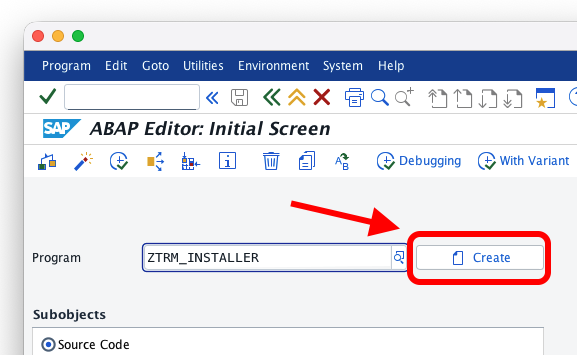
- Open transaction
SE38and create a new report calledZTRM_INSTALLER
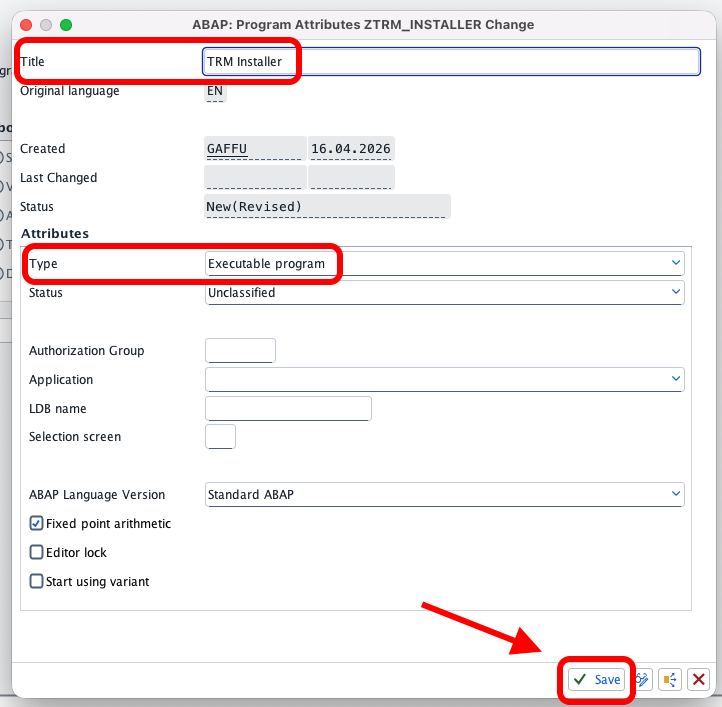
- Give it a title and set the type to "Executable program"
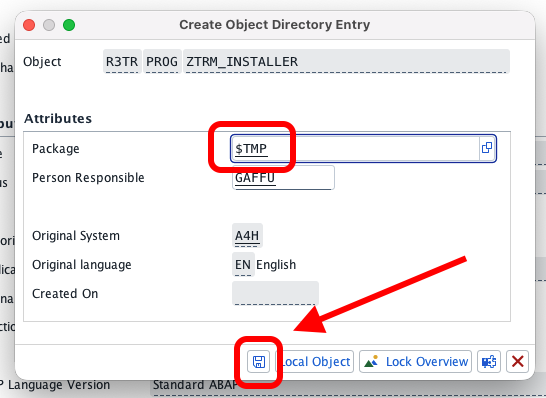
- Save as a local object (or in temporary package
$TMP)
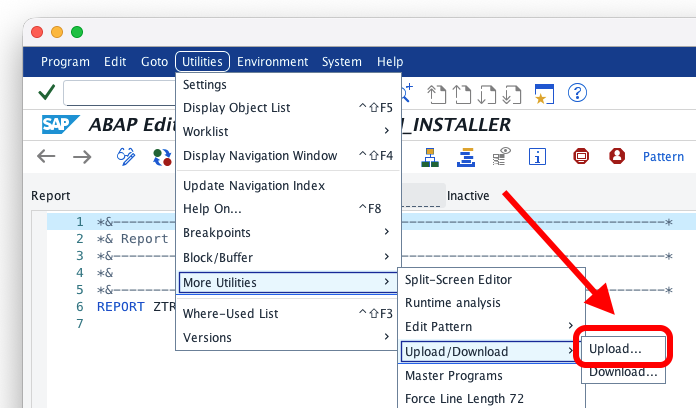
- Paste or upload the report's source code, then activate it
Release file install (From file)
Download the releases
- Go to https://trmregistry.com and search for trm-server
- On the release page, select Download
- Download trm-rest too, if needed
- Open SE38 and run
ZTRM_INSTALLER - Select the file(s) downloaded
- Execute the report and wait for the installation to complete (approximately 10 minutes)
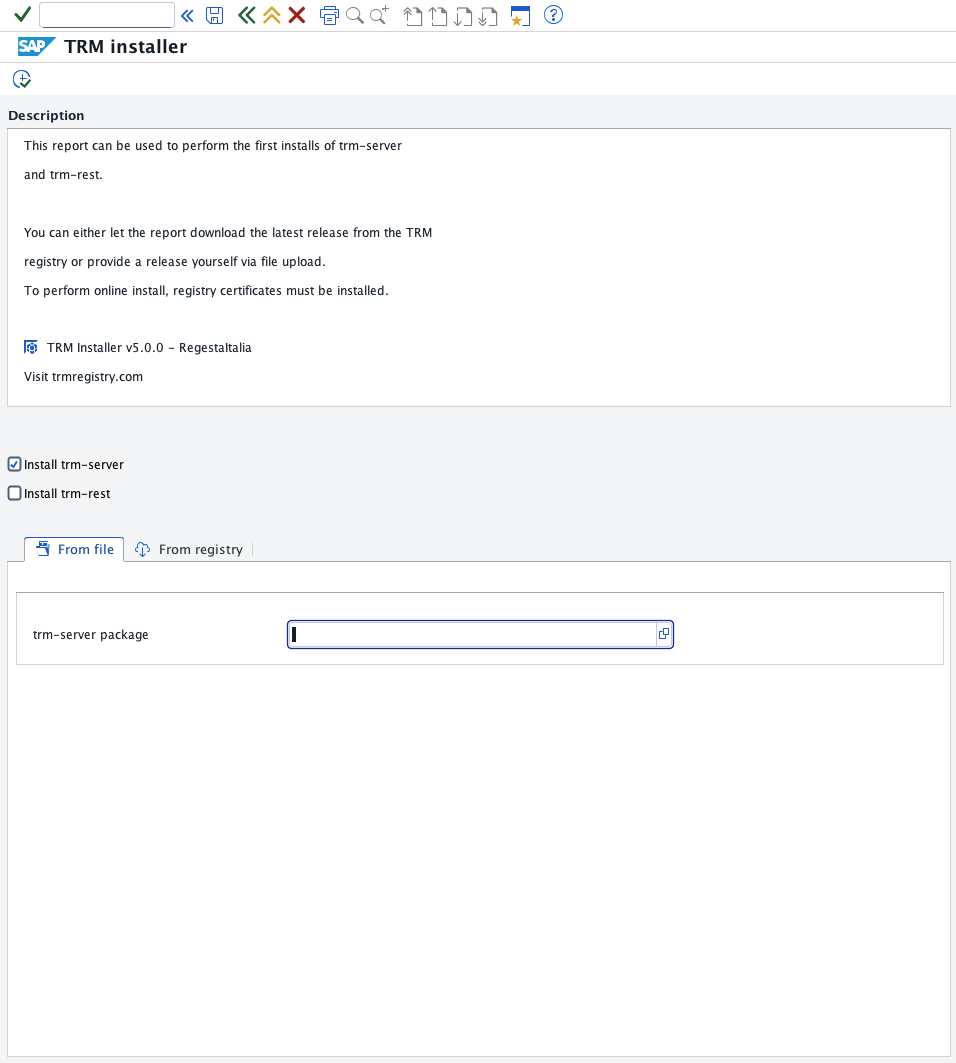
Installation of either package can be performed at any time through this report. However, you should consider using a TRM client when upgrading trm-server or trm-rest.
Online install (From registry)
The online installation is only possible if your system is allowed to connect to the external server https://trmregistry.com.
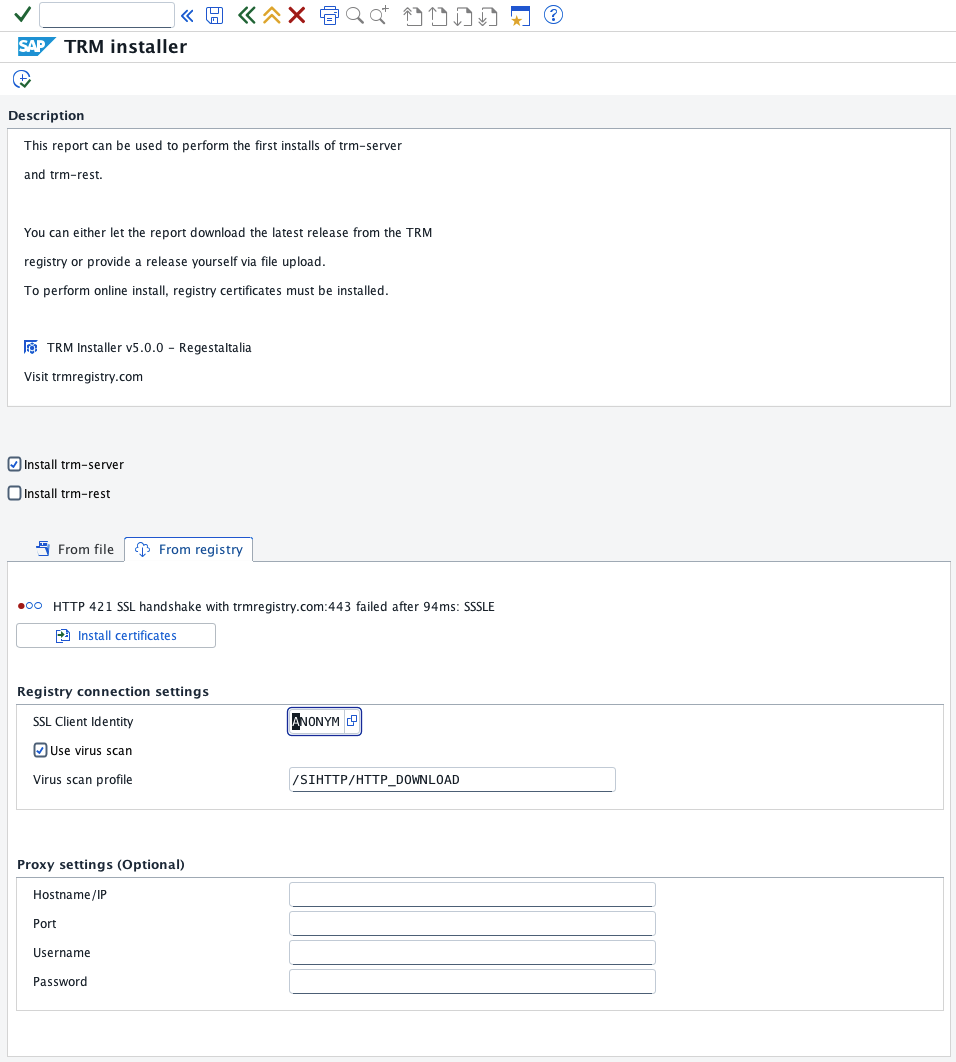
If you see the "Install certificates" button, then your system is missing the required certificates to trust https://trmregistry.com.
You should either install them manually (via STRUST) or let the report install them by pressing that button.
Once certificates are installed, you can proceede with the install.
Installation of either package can be performed at any time through this report. However, you should consider using a TRM client when upgrading trm-server or trm-rest.
Authorize Users
Grant each SAP user who needs to use TRM authorization object ZTRM_AUTH with activity
ACTVT = 16 (Execute), typically through an assigned role.
For security reasons, TRM does not allow a user to execute its functions unless the user has this authorization.
Verify RFC Authorization
To verify that a user has access to RFC functions:
- Log into the system as the user you want to test
- Execute function module
/ATRM/PING
If the user is authorized, no errors should occur. If not authorized, access will be denied.
Install with abapGit
Because this package uses the /ATRM/ namespace, installation through abapGit requires a system with this namespace installed.
Installing via abapGit is not recommended unless you are planning to contribute new features or bug fixes.
Demo systems
If you are running a demo system, you can use the following keys:
Development key: 18531191373370851361
Repair key: 00211665563784583720
Other systems
For abapGit to work, you need to generate a valid developer key using the Development Namespace Application.
Contributing
Like every other TRM open-soruce projects, contributions are always welcomed ❤️.
Make sure to open an issue first.
Contributions will be merged upon approval.
Click here for the full list of TRM contribution guidelines.
History
Features 1, Fixes 3
Notes
- package objects: generated sql views of cds in subpackages were not removed
- package objects: removing generated sql views could delete their database tadir entries
- lock transaction translations in DE, IT and FR
- changes in package transport layer
Removed 1, Features 1, Changed 1
Notes
- outdated number range pa
- regenerate sap_all pa ! /atrm/users -> auth object ZTRM_AUTH
Changed 2
Notes
! remove generated sql views from package objects ! error on namespace missing tadir interface
Removed 1, Features 1, Changed 1
Notes
- optional filter installed packages
- remove useless number range ! update dirty packages
Features 1, Changed 2
Notes
! moved from Z to namespace /ATRM/ ! get objs locks methods
- new api methods
Features 1, Changed 1
Notes
! moved abap class source extraction for badi usage
- transport import status api
Features 1, Changed 3
Notes
! context singleton for installed packages list ! manifest interface with dependencies ! trm-rest with trm-server dependency
- change tr owner api
Removed 1, Features 1, Changed 1
Notes
! set check auth rfc enabled
- unused regen method
- wb transport to installed packages list
Features 4, Changed 1
Notes
! package interface suppress access permission
- abapdoc
- before transport export check/fix
- regen program
- installed packages porting
Features 6, Changed 1
Notes
- handle transports overwriting ! add remove transport comments method
- add remove from skipped trkorr
- abapGit source code download function
- add post activity support
- add new number range interval post activity
- add fiori ui5 cache cleanup post activity
Others providing
Compare all 9 on the Source control page →- abapGitabapGitA Git client written in ABAP that runs inside the system, so objects are cloned, pulled and pushed without leaving it; with no package manager in ABAP, a cloned repository is how code is distributed.community org, abapGit client written in ABAP that runs inside the systemfrom ABAP
- abap-transport-reviewabap-transport-reviewA release check inside the ABAP system that turns every transport task into a GitHub pull request and refuses to release the request until a colleague has approved it.independent, abapTransport release check gated by GitHub pull request approvalfrom ABAP
- abapGitServerabapGitServerA git server implemented in ABAP, so an SAP system can host repositories with branches and merge requests that an abapGit client pulls from and pushes to.independent, abapGit server implemented in ABAP for abapGit clientsfrom ABAP
- Tools for abapGitTools for abapGitA collection of helper programs around abapGit: start variants, mass label maintenance, repository export, a scheduler for the background logic, and the SSL test tool.independent, abapHelper programs around abapGitfrom ABAP
- ABAP remote filesystemABAP remote filesystemA Visual Studio Code extension that opens an ABAP system over ADT as an editable filesystem and exposes system tools to GitHub Copilot and external MCP clients.independent, abapVS Code extension editing ABAP systems over ADT as a filesystemfrom ABAP
- abapgit-commitlintabapgit-commitlintA set of abapGit user exits that checks a commit message against the rules a repository defines and can block the push when it fails, with the rules validated by a separate linter service.independent, abapabapGit user exits checking commit messages against repository rulesfrom ABAP
- abap-file-formatsabap-file-formatsSAP's specification for how ABAP objects serialise to files, which makes the on-disk form of an ABAP object a published contract rather than a tool's private choice.sap official, abapSAP's specification for serialising ABAP objects to filesfrom ABAP
- abap-adt-cliabap-adt-cliPulls an ABAP package to local files over the ADT REST API in parallel, and pushes edited objects back under a transport — bulk sync rather than one object at a time in SE80 or Eclipse.independent, abapCLI that pulls and pushes ABAP packages as local files over ADTfrom ABAP
Details
Sources
Sources are graph entities: the same page may back several entries, and an unreachable source flags every row that rests on it.
Compatibility and provenance
abaplint
Contributors
History in the atlas
- First seen.
For your agent
- Ref
artifact:regestaitalia-trm-server- JSON
- /artifacts/regestaitalia-trm-server.json
- MCP
- Connecting an agent