btp-edge-integration-cell-on-azure
Step-by-step instructions for deploying SAP Integration SuiteSAP Integration SuiteSAP's integration service on BTP: Cloud Integration for orchestration, API Management in front of it, and an MCP gateway that serves a managed API to agents.sap official, btp's Edge Integration Cell, a hybrid integration runtime, onto Microsoft Azure.
Edge Integration Cell manages APIs and runs integration scenarios inside a customer's own private landscape, and this repository covers the Azure side of standing one up: an Azure Virtual Network across at least two availability zones and a Kubernetes cluster on Azure Kubernetes Service at Kubernetes 1.29 to 1.33, plus a PostgreSQLPostgreSQLA relational database. For CAP it is the production database when the answer is not HANA, reached through an adapter that translates CDS queries into its SQL. 15 database, a RedisRedisAn in-memory data store. For the things here it is the shared cache, the queue or the pub/sub channel that lets several application instances behave as one. 6.x or 7.x data store and a load balancer, each of the last three marked optional and required for high availability. There are two guides, a quick setup and a high availability setup, and the minimum sizing rises from 10 CPU and 32 GiB with 101 GiB of persistent volumes to 20 CPU and 64 GiB with 204 GiB. On the SAP side it asks for a global account and subaccount and an SAP Integration Suite entitlement and subscription.
Facts
Where it sits
Who is behind it

In the atlas: maintains 222@SAP-samplesmaintainerAdarsh HegdeContributes to this

In the atlas: contributes to 2@adarshnarayanhegde1 contributor
What it declares
Every artifact
- Type
- Sample
- Origin
- By SAP
As a sample
- Form
- does not say
Connections
Moving and transforming messages between systems in middleware
Managed PostgreSQL from the hyperscaler via a BTP service binding
Managed Redis from the hyperscaler via a BTP service binding
Integration service on BTP with Cloud Integration and API Management
A relational database. For CAP it is the production database when the answer is not HANA, reached through an adapter that translates CDS queries into its SQL.
An in-memory data store. For the things here it is the shared cache, the queue or the pub/sub channel that lets several application instances behave as one.
Download
README
quoted from SAP-samples/btp-edge-integration-cell-on-azure under Apache-2.0, readDeploy SAP Integration Suite - Edge Integration Cell on Microsoft Azure
Description
SAP Edge Integration Cell is a hybrid integration runtime offered as part of SAP Integration Suite, which enables you to manage APIs and run integration scenarios within your private landscape.
This repository provides comprehensive instructions for deploying SAP Edge Integration Cell on Microsoft Azure. By following the guidelines provided, you can configure the necessary Azure resources and deploy SAP Edge Integration Cell.
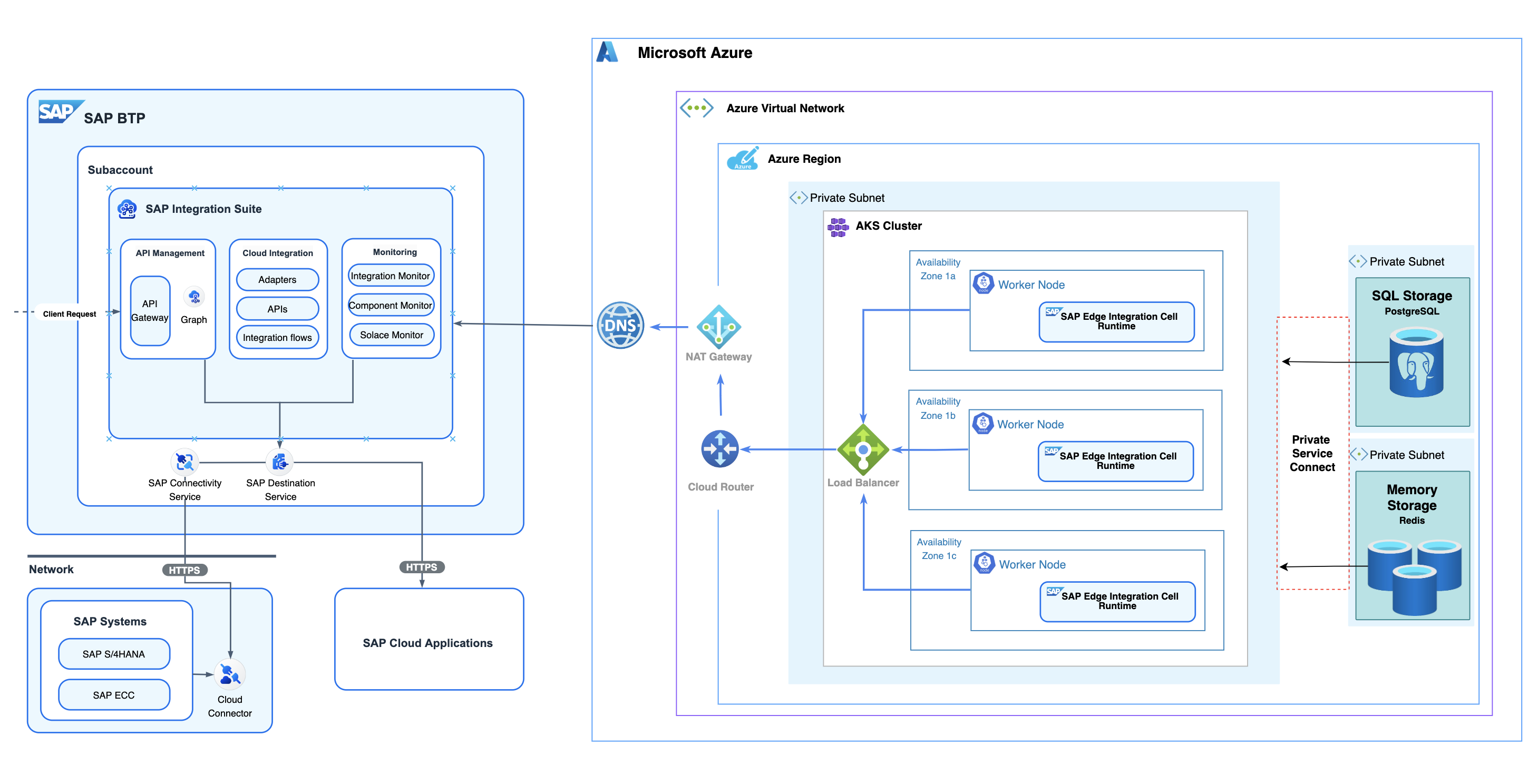
For more information on Edge Integration Cell, refer to SAP Help page.
Requirements
Following infrastructure are required to deploy Edge Integration Cell on Azure.
-
SAP Prerequisites
- SAP BTP Global Account & Subaccount.
- SAP Integration Suite (Standard Edition or Premium Edition) Service Entitlement & Subscription.
- (Optional) SAP Integration Suite - Edge Integration Cell service plan entitlement.
-
External Prerequisites
-
(Required) Azure Virtual Network (VNet)
- At least 2 Availability Zones are needed for a quick start, or 3 Availability Zones with both public and private subnets for high availability.
-
(Required) Kubernetes cluster on Azure Kubernetes Service (AKS)
-
Kubernetes 1.29 - 1.33 are currently supported by Edge Integration Cell on AKS.
-
Minimum sizing per setup:
CPU / Memory Persistent Volumes non-HA 10 CPU / 32 GiB 101 GiB HA 20 CPU / 64 GiB 204 GiB -
Agent / worker nodes with less than 4 CPUs should be avoided as the overhead gets quite high and pod scheduling gets more difficult.
-
A kubeconfig with cluster admin privileges is required for initializing the edge node, enabling CRUD operations on namespaces and CRDs.
-
Maximum number of pods per node depends on the chosen networking plugin and is configurable. Should be >= 50 when only a single node shall be used.
-
-
(Optional; Required for HA) A PostgreSQL database on Azure Database for PostgreSQL
-
PostgreSQL 15 is currently supported by Edge Integration Cell.
-
PostgreSQL authentication is only supported (Microsoft Entra ID Token authentication is not supported).
-
Minimum 1 CPU, 2 GiB memory is required for the PostgreSQL database server.
-
-
(Optional; Required for HA) A Redis data store on Azure Cache for Redis
-
Redis 6.x and 7.x are currently supported by Edge Integration Cell.
-
Access Keys authentication is only supported (Microsoft Entra ID Token authentication is not supported).
-
Minimum 1 CPU, 1 GiB memory is required for the Redis server.
-
-
(Optional; Required for HA) A Load Balancer integrated with AKS cluster
- A load balancer integrated with your Kubernetes infrastructure to expose Edge Integration Cell endpoints and load balance traffic across K8s nodes and services.
-
For more information, please refer to SAP Notes 3247839
Required Infrastructure Sizing Guidelines
Understand the key components of Edge Integration Cell, the factors that influence its performance, and the methods to calculate the size for the hardware resources required.
For detailed sizing guidelines, please refer to Sizing Guide for Edge Integration Cell
Deploy SAP Edge Integration Cell on Azure
Disclaimer: The networking setup, database, and datastore configuration illustrated in this repository are currently intended as a starting point for developers. Please adhere to your organization's specific guidelines on security and network configuration. More detailed guidelines and an enhanced, secure architecture are being developed and will be made available soon.
Ready to get started? Follow the steps for either a quick setup or a high availability setup below.
Quick Setup: Simplified steps to deploy EIC on Azure
High Availability Setup: Comprehensive guide for robust EIC deployment
Known Issues
No known issues.
How to obtain support
Create an issue in this repository if you find a bug or have questions about the content.
For additional support, ask a question in SAP Community.
Contributing
If you wish to contribute code, offer fixes or improvements, please send a pull request. Due to legal reasons, contributors will be asked to accept a DCO when they create the first pull request to this project. This happens in an automated fashion during the submission process. SAP uses the standard DCO text of the Linux Foundation.
License
Copyright (c) 2026 SAP SE or an SAP affiliate company. All rights reserved. This project is licensed under the Apache Software License, version 2.0 except as noted otherwise in the LICENSE file.
Details
Sources
Sources are graph entities: the same page may back several entries, and an unreachable source flags every row that rests on it.
Compatibility and provenance
Contributors
History in the atlas
- First seen.
For your agent
- Ref
artifact:sap-samples-btp-edge-integration-cell-on-azure- JSON
- /artifacts/sap-samples-btp-edge-integration-cell-on-azure.json
- MCP
- Connecting an agent