hana-mcp-server
Schema discovery and guard-railed SQL against SAP HANA and HANA Cloud, with an optional layer of business metadata so an agent reads a coded column the way the business does.
A database exposed to an agent has two failure modes: it runs something it should not, and it misreads what it gets back. This addresses both — SQL executes behind guardrails with documented hard bounds on paging and output, and a separate semantics file can merge business and domain metadata into what the agent sees, so codes and table names carry their meaning instead of being guessed at. Its own framing is careful about the boundary: the metadata layer informs the agent without replacing the database as the system of record. Published on npm, with an environment reference that documents every variable, its default and its bound.
Facts
Where it sits
Who is behind it

In the atlas: maintains 2, contributes to 3@HatriGtmaintainer
Before choosing this
Conditions
PracticalFunctional boundary
This is the database, not an application in front of it, so what an agent can read is whatever the connection user can read — the guardrails bound the shape of a query, not the sensitivity of what it returns. Grant the connection the rights you would grant a person.
PolicySAP API Policy 4.2026a§ 1.1, 1.2, 2.2.2from Agent access to your systemsAn MCP server uses SAP APIs to supply tools, resources or data to an agent.
- § 1.1 Published APIs. Published APIs are made available for the documented purposes identified by SAP, including integration, extensions and data exchange.
- § 1.2 Non-Published APIs. Customer and third-party applications must not access non-published APIs except where documentation permits it or SAP otherwise authorizes it.
- § 2.2.2 AI call sequences and data extraction. Outside SAP-endorsed architectures, data services or expressly identified pathways, the policy prohibits specified agentic API use and systematic or large-scale extraction.
MCP does not replace the API's documented-use boundary. Check that every endpoint is published for the intended use and whether the policy's AI-call or extraction provisions apply to the design.
SAP API Policy 4.2026a →What it declares
Every artifact
- Type
- MCP server
- Origin
- Independently maintained
- Runtime
- Node.js
Connections
Giving an AI agent access to the systems you run over MCP
Forty SAP development plugins for coding agents
Download
Install
npm add hana-mcp-serverDerived from the package name. No recipe recorded; the README has the configuration.
README
quoted from HatriGt/hana-mcp-server under MIT, readSAP HANA MCP Server




SAP HANA MCP Server implements the Model Context Protocol for SAP HANA and SAP HANA Cloud. AI clients discover schema, run SQL with guardrails, and optionally merge business/domain metadata so agents interpret codes and tables consistently—without replacing your database as the system of record.
📚 Documentation
| Document | Purpose |
|---|---|
| This README | Prerequisites, install, how to wire each client, capability summary, configuration cheat sheet, troubleshooting |
| CHANGELOG.md | Release history — features and fixes by version (latest 0.3.1) |
| docs/README.md | Index of /docs |
| docs/ENVIRONMENT.md | Authoritative env reference: every variable, defaults, hard bounds, HTTP auth, security notes |
| docs/configuration-samples.md | Copy-paste: connection profiles (single-container, MDC), semantics JSON, paging pointers |
| docs/local-http-mcp.md | Local HTTP MCP: npm run start:http, Cursor mcp.json, curl smoke checks |
✅ Prerequisites
- Node.js 18+
- A SAP HANA or SAP HANA Cloud database reachable on the SQL port from the machine running the server
- An MCP client (Claude Desktop, Claude Code, VS Code, Cursor, Cline, Windsurf, or custom HTTP client)
- Credentials supplied via env (see Security)
📦 Installation
| Method | Use when |
|---|---|
npx + -y hana-mcp-server in MCP config | Default — no global install |
npm install -g hana-mcp-server | You need hana-mcp-server on PATH |
Clone + node hana-mcp-server.js | Developing or pinning a local build |
HTTP entrypoint (from a clone): npm run start:http — default bind 127.0.0.1:3100, path /mcp. See Hosted & HTTP.
🎯 Use cases
| Audience | Transport | Next step |
|---|---|---|
| Chat / lite users | stdio | Claude Desktop |
| Developers (Claude Code, VS Code, Cline, Cursor, Windsurf) | stdio | IDEs & code agents |
| Business apps with AI agents (you host MCP over HTTP) | HTTP | Hosted & HTTP |
🖥️ Claude Desktop
-
Config file path:
- macOS:
~/Library/Application Support/Claude/claude_desktop_config.json - Windows:
%APPDATA%\claude\claude_desktop_config.json - Linux:
~/.config/claude/claude_desktop_config.json
- macOS:
-
Register the server; put connection settings in
env(see Configuration; full profile JSON in configuration-samples.md). The example below includesHANA_INSTANCE_NUMBER/HANA_DATABASE_NAMEfor MDC—remove them if you use a single-container database.
{
  "mcpServers": {
    "HANA Database": {
      "command": "npx",
      "args": ["-y", "hana-mcp-server"],
      "env": {
        "HANA_HOST": "your-hana-host.com",
        "HANA_PORT": "443",
        "HANA_USER": "your-username",
        "HANA_PASSWORD": "your-password",
        "HANA_SCHEMA": "your-schema",
        "HANA_SSL": "true",
        "HANA_ENCRYPT": "true",
        "HANA_VALIDATE_CERT": "true",
        "HANA_CONNECTION_TYPE": "auto",
        "HANA_INSTANCE_NUMBER": "10",
        "HANA_DATABASE_NAME": "HQQ",
        "LOG_LEVEL": "info",
        "ENABLE_FILE_LOGGING": "true",
        "ENABLE_CONSOLE_LOGGING": "false"
      }
    }
  }
}
If the CLI is on PATH, you may use "command": "hana-mcp-server" and omit args.
- Restart Claude Desktop.
Optional: HANA MCP UI — npx hana-mcp-ui for editing envs and deploying to Claude Desktop.
💻 IDEs & code agents
stdio only; same env keys as above. Canonical example — Claude Code (~/.claude.json or project .mcp.json). The env block below includes HANA_DATABASE_NAME for MDC tenant HANA; omit it for most single-container setups.
{
  "mcpServers": {
    "hana": {
      "type": "stdio",
      "timeout": 600,
      "command": "npx",
      "args": ["-y", "hana-mcp-server"],
      "env": {
        "HANA_HOST": "<host>",
        "HANA_PORT": "31013",
        "HANA_USER": "<user>",
        "HANA_PASSWORD": "<password>",
        "HANA_SCHEMA": "SAPABAP1",
        "HANA_DATABASE_NAME": "HQQ",
        "HANA_SSL": "false",
        "HANA_ENCRYPT": "false",
        "HANA_VALIDATE_CERT": "false",
        "LOG_LEVEL": "info",
        "ENABLE_FILE_LOGGING": "true",
        "ENABLE_CONSOLE_LOGGING": "false"
      }
    }
  }
}
Use the same command, args, and env in VS Code, Cline, Cursor, and Windsurf. After any change to env, restart the MCP server connection in the IDE.
🌐 Hosted & HTTP
Run the HTTP transport from a checkout of this repository (after npm install). The published npx hana-mcp-server path is stdio only.
npm run start:httpCursor / local IDE over HTTP: set HANA_* in the shell (or process manager) that runs start:http, then add an HTTP MCP entry with url http://127.0.0.1:3100/mcp ("type": "fetch" or "type": "http", depending on Cursor version). See docs/local-http-mcp.md and ./scripts/start-http-mcp.sh.
| Topic | Detail |
|---|---|
| Endpoint | POST JSON-RPC to /mcp (default base http://127.0.0.1:3100) |
| Tuning | MCP_HTTP_HOST, MCP_HTTP_PORT |
| Health | GET /health → 200 |
| CORS | MCP_HTTP_ALLOWED_ORIGINS — ENVIRONMENT.md §7 |
Optional Bearer JWT (OAuth2 / OIDC)
| Variable | Role |
|---|---|
MCP_HTTP_AUTH_ENABLED | true → require Authorization: Bearer <token> on POST /mcp |
MCP_HTTP_JWT_ISSUER | Issuer / JWKS (omit on SAP BTP with bound XSUAA) |
MCP_HTTP_JWT_AUDIENCE | Optional expected aud |
MCP_HTTP_JWT_SCOPES_REQUIRED | Optional scope list |
SAP BTP: bind XSUAA, MCP_HTTP_AUTH_ENABLED=true, assign role collections. Details: ENVIRONMENT.md §7.
🔒 Security
- Secrets:
HANA_PASSWORD, JWT material, and URLs with embedded credentials belong in env or a secret manager — not in git. - Supply chain: Prefer
npx -yfrom the published package in CI and shared desktops instead of a mutable global install. - HTTP: Enable JWT validation for anything beyond localhost; put the service behind a reverse proxy for TLS termination and network policy.
Further notes: ENVIRONMENT.md §9.
🎯 Capabilities
34 tools across six areas, all verified on HANA Cloud.
| Area | Tools | What you get |
|---|---|---|
| Connection & config | hana_show_config hana_test_connection hana_show_env_vars hana_get_session_info | Verify connectivity, inspect configuration, see current user / schema / database / version |
| Schema browsing | hana_list_schemas hana_list_tables hana_describe_table hana_explain_table hana_search_tables hana_search_columns | Paginated schema/table lists, column metadata, cross-schema search, optional business-meaning overlay |
| SQL execution | hana_execute_query hana_query_next_page | Parameterized SQL with optional row/column/cell caps, paging (maxRows/offset/includeTotal), and snapshot continuation |
| Structural analysis | hana_list_constraints hana_list_foreign_keys hana_list_indexes hana_describe_index hana_list_views hana_describe_view hana_list_synonyms hana_list_privileges hana_get_ddl | PK/UK/FK/check constraints, indexes, views with SQL definition, synonyms, effective privileges, CREATE statement DDL |
| Code objects | hana_list_procedures hana_describe_procedure hana_list_functions hana_describe_function hana_list_calculation_views hana_list_sequences | Stored procedures, scalar/table functions, SAP BW/S4 calculation views (_SYS_BIC), sequences |
| Data & performance | hana_get_table_stats hana_get_sample_data hana_get_column_stats hana_explain_plan hana_get_dependencies hana_get_partition_info hana_get_expensive_queries | Row counts, sample rows, distinct/null stats, query execution plan, object dependency graph, partition info, top expensive statements |
| DML guard | — | INSERT / UPDATE / DELETE / TRUNCATE blocked by default; opt-in individually via HANA_ALLOW_INSERT / HANA_ALLOW_UPDATE / HANA_ALLOW_DELETE |
| Resources | hana:///schemas hana:///schemas/{s}/tables/{t} | MCP resource URIs for schema and table enumeration; truncated flag on large payloads |
| Domain knowledge | via hana_explain_table | Optional JSON semantics overlay (table descriptions, column meanings, code-value maps) — configuration-samples.md |
🛠️ Configuration
Variables apply to stdio (env in the client config) and HTTP (process environment). Restart after changes.
Source of truth for names, defaults, and clamp ranges: docs/ENVIRONMENT.md.
Copy-paste connection JSON (single-container / MDC): docs/configuration-samples.md#connection-profiles-env-json.
Required
| Parameter | Description | Example |
|---|---|---|
HANA_HOST | Hostname or IP | hana.company.com |
HANA_USER | Database user | DBADMIN |
HANA_PASSWORD | Database password | (secret) |
Connection & TLS
| Parameter | Default | Notes |
|---|---|---|
HANA_PORT | 443 | MDC SQL ports often 3NN13 (e.g. 31013) |
HANA_SCHEMA | — | Default when a tool omits schema_name |
HANA_CONNECTION_TYPE | auto | auto, single_container, mdc_system, mdc_tenant |
HANA_INSTANCE_NUMBER | — | MDC instance id (e.g. 10) |
HANA_DATABASE_NAME | — | Tenant name for MDC (e.g. HQQ, HQP) — session database only |
HANA_SSL / HANA_ENCRYPT / HANA_VALIDATE_CERT | true | TLS and cert validation flags for the driver |
Logging
| Parameter | Default | Notes |
|---|---|---|
LOG_LEVEL | info | error … debug |
ENABLE_FILE_LOGGING | false* | true enables file logs |
ENABLE_CONSOLE_LOGGING | true | Often false for stdio to reduce stderr noise |
*Code default; examples frequently set file logging to true.
Limits (queries, lists, resources)
| Parameter | Default | Purpose |
|---|---|---|
HANA_QUERY_LIMITS_ENABLED | false | Set to true to enable automatic row/column/cell caps. When false, user-provided maxRows, offset, and includeTotal still work. |
HANA_QUERY_TIMEOUT_MS | 0 | Statement timeout (ms); 0 = disabled. Per-call timeout_ms overrides. |
HANA_MAX_RESULT_ROWS | 50 | Max rows per hana_execute_query page (active when limits enabled) |
HANA_MAX_RESULT_COLS | 50 | Max columns per row returned (active when limits enabled) |
HANA_MAX_CELL_CHARS | 200 | Truncate long cell text (active when limits enabled) |
HANA_QUERY_DEFAULT_OFFSET | 0 | Default offset (active when limits enabled) |
HANA_LIST_DEFAULT_LIMIT | 200 | List tools: default and max page size |
HANA_RESOURCE_LIST_MAX_ITEMS | 500 | Cap embedded names in hana:/// payloads |
HANA_QUERY_SNAPSHOT_TTL_MS | 300000 | Snapshot id lifetime for query paging |
HANA_CONNECTION_POOL_SIZE | 3 | HANA connection pool size (1–20) |
DML permissions
INSERT, UPDATE, and DELETE are blocked by default. Set each to true to permit:
| Parameter | Default | Purpose |
|---|---|---|
HANA_ALLOW_INSERT | false | Permit INSERT via hana_execute_query |
HANA_ALLOW_UPDATE | false | Permit UPDATE via hana_execute_query |
HANA_ALLOW_DELETE | false | Permit DELETE and TRUNCATE via hana_execute_query |
Business / domain JSON (HANA_SEMANTICS_*)
| Parameter | Default | Purpose |
|---|---|---|
HANA_SEMANTICS_PATH | — | File path to dictionary JSON (wins over URL) |
HANA_SEMANTICS_URL | — | HTTPS URL to same format |
HANA_SEMANTICS_TTL_MS | 60000 | Cache / reload behavior |
Samples: configuration-samples.md.
🔧 Troubleshooting
| Symptom | Check |
|---|---|
spawn npx ENOENT / spawn hana-mcp-server ENOENT in client logs | Client cannot find npx / hana-mcp-server on PATH — see Client cannot find npx below |
| Connection refused | HANA_HOST, HANA_PORT, network path |
| Auth failed / no client | Password, user, HANA_DATABASE_NAME on tenants; use connection test tool for driver message |
| TLS errors | HANA_VALIDATE_CERT, trust store |
| Wrong or empty objects | MDC: tenant drives visibility; identical schema names can differ by tenant |
| SQL needs another database prefix | hana_execute_query does not rewrite SQL; use the three-part names your HANA expects (e.g. HSP.SAPABAP1.TABLE) while HANA_DATABASE_NAME stays the tenant you connect to (e.g. HQP) |
Debug: LOG_LEVEL=debug, ENABLE_CONSOLE_LOGGING=true, restart.
Client cannot find npx (spawn ENOENT)
GUI clients launched from the Dock or Start Menu (Claude Desktop, Cursor, VS Code, …) inherit a minimal PATH and may not see Node tooling installed under /opt/homebrew/bin, ~/.nvm/..., mise, or volta. This affects every npx-based MCP, not just this server. The error appears in MCP client logs as:
Connection failed: spawn npx ENOENT
Pick one fix:
-
Symlink
npx/nodeinto a GUI-visible path (macOS, Homebrew):ln -s "$(which npx)" /usr/local/bin/npx ln -s "$(which node)" /usr/local/bin/node -
Use absolute paths in the MCP config — most portable, no
PATHdependency. Resolve paths withwhich nodeandnpm root -g:{ "mcpServers": { "hana": { "type": "stdio", "command": "/opt/homebrew/bin/node", "args": ["/opt/homebrew/lib/node_modules/hana-mcp-server/hana-mcp-server.js"], "env": { "HANA_HOST": "...", "HANA_USER": "...", "HANA_PASSWORD": "..." } } } }Requires a one-time
npm install -g hana-mcp-server. -
Inject
PATHinto the MCPenvblock — keeps thenpxform:"env": { "PATH": "/opt/homebrew/bin:/usr/local/bin:/usr/bin:/bin", "HANA_HOST": "...", "HANA_USER": "...", "HANA_PASSWORD": "..." }
Restart the MCP client after the change. If npx then fails with EPERM on ~/.npm/_cacache, the npm cache has root-owned files from a previous sudo npm — fix with sudo chown -R "$(whoami)" ~/.npm or set "NPM_CONFIG_CACHE": "/tmp/hana-mcp-npm-cache" in the same env block.
🖥️ HANA MCP UI
npx hana-mcp-ui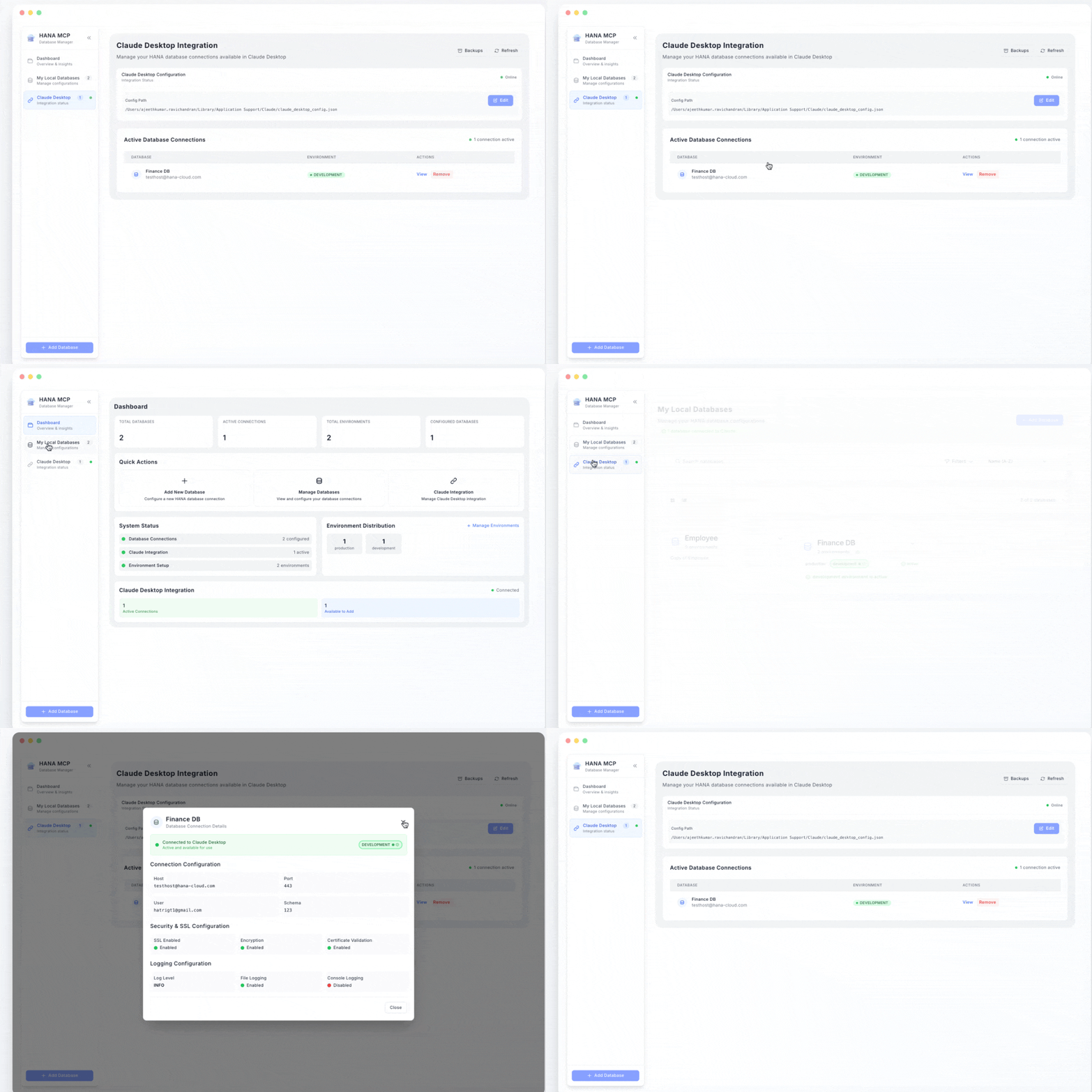
🏗️ Architecture
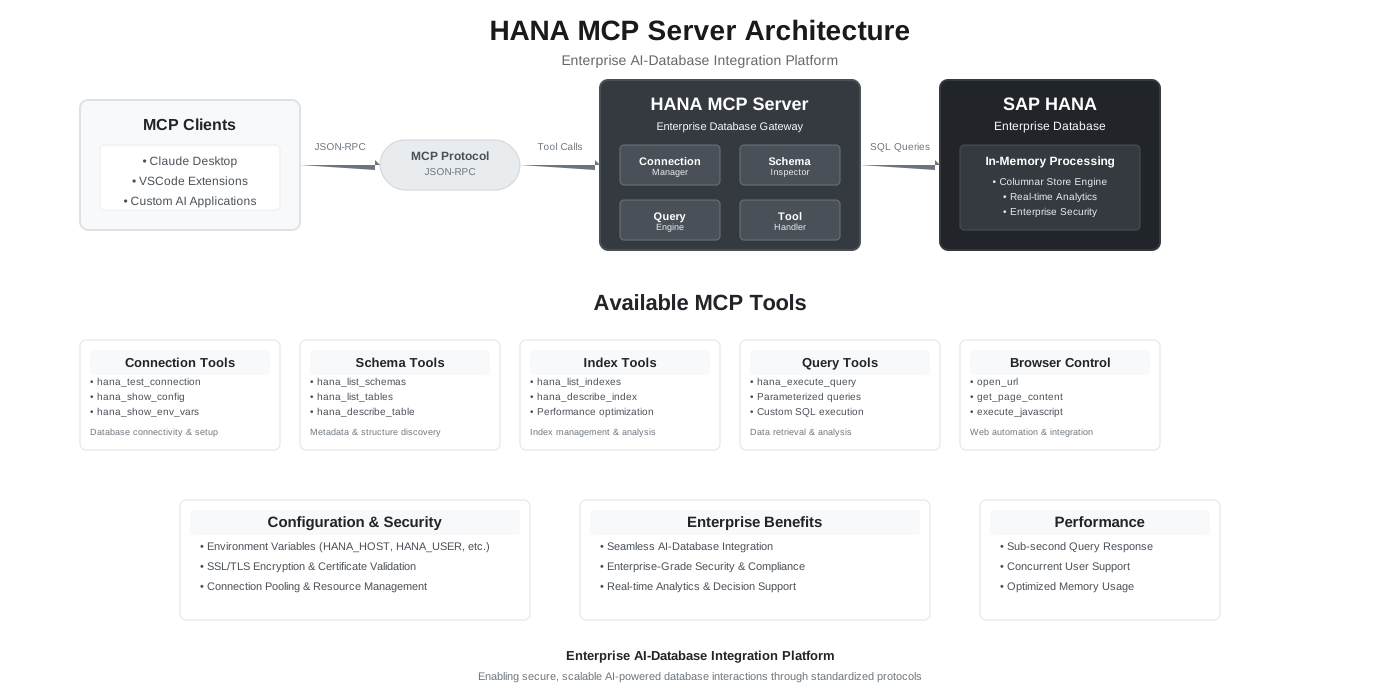
hana-mcp-server/
├── src/
│   ├── server/           # MCP lifecycle, resources, HTTP transport
│   ├── tools/            # 34 tools: schema, SQL, discovery, config
│   ├── database/         # HANA client, connection pool, executor, query runner
│   ├── semantics/        # Optional semantics / domain JSON loader
│   ├── utils/            # Logger, config, validators, formatters
│   ├── query-snapshot-store.js
│   └── constants/        # MCP constants, tool definitions
├── tests/
├── docs/                 # README index, ENVIRONMENT.md, configuration-samples.md, diagrams
└── hana-mcp-server.js    # stdio entry point
📦 Package
| Runtime | Node.js 18+ |
| Platforms | macOS, Linux, Windows |
| Dependencies | @sap/hana-client, axios, jose |
🤝 Support
- Issues: GitHub Issues
- UI: HANA MCP UI
📄 License
MIT — see LICENSE.
History
Fixes 2
Notes
Patch release. Fixes MCP client -32602 rejections of query tool results.
Fixed
hana_execute_query/hana_query_next_pageoutputSchemanow allowsmaxRows: null(emitted when query limits are off and the caller omitsmaxRows). Clients previously rejected successful results withdata/maxRows must be number.- SQL/tool error responses no longer attach a
{message, details}structuredContentobject. That shape does not match the success-onlyoutputSchema, so clients discarded real HANA errors asmissing required property 'kind'.sqlCode/sqlStateremain in the text body.
Fixes 1
Notes
Patch release. Fixes zombie server processes on stdio.
Fixed
- STDIO server now shuts down cleanly when the MCP client closes stdin. Previously the readline
closehandler kept the process alive andlifecycle-managerran asetIntervalkeep-alive, so every Cursor/IDE restart or MCP refresh left an orphaned server process holding open HANA connections (leading to connection buildup and UI hangs). The keep-alive interval was removed; the stdin reader keeps the event loop active while connected and triggers a graceful shutdown on close.
- STDIO server now shuts down cleanly when the MCP client closes stdin. Previously the readline
Fixes 1
Notes
Patch release. Fixes query results being reported as counts only in MCP clients.
Fixed
hana_execute_query/hana_query_next_pagenow render the returned rows as a markdown table inside thecontent[].textblock in addition tostructuredContent. Many MCP clients only surfacecontent[].textto the model and ignorestructuredContent, which caused clients to report row counts instead of actual results even when explicitly asked to fetch them.structuredContent(rows, paging metadata,snapshotId) is unchanged.
Features 2
Notes
Patch release. Adds 11 extended discovery tools covering DDL, column profiling, functions, calculation views, session context, cross-schema search, performance monitoring, dependency analysis, partitions, and sequences.
Added
-
11 extended discovery tools:
hana_get_ddl— DDL (CREATE statement) for any object fromSYS.OBJECT_DEFINITION; supports TABLE, VIEW, PROCEDURE, FUNCTION, TRIGGER, SEQUENCE.hana_get_column_stats— column statistics fromSYS.COLUMN_STATISTICS(cached) or liveCOUNT(DISTINCT)/ null-count queries (live=true).hana_list_functions/hana_describe_function— scalar and table functions fromSYS.FUNCTIONS/SYS.FUNCTION_PARAMETERS; prefix filter and pagination.hana_list_calculation_views— SAP calculation views from_SYS_BIC; useful for BW/S4 analytics landscapes.hana_get_session_info—CURRENT_USER,CURRENT_SCHEMA, database name,SYSTEM_ID, and HANA version fromDUMMYandM_DATABASE.hana_search_tables— cross-schema table-name search viaSYS.TABLESLIKE pattern; optional schema filter; capped at 2000.hana_get_expensive_queries— top N expensive statements fromM_EXPENSIVE_STATEMENTSordered by duration; requires MONITORING privilege.hana_get_dependencies— object dependency graph fromSYS.OBJECT_DEPENDENCIES;directionparam (base,dependent,both); capped at 200.hana_get_partition_info— partition metadata (type, level, record count, loaded state) fromSYS.TABLE_PARTITIONS; returnspartitioned=falsefor unpartitioned tables.hana_list_sequences— sequences fromSYS.SEQUENCESwith start, min, max, increment, cycle, cache, and create-time; prefix filter and pagination.
-
Live integration tests —
test-all-tools.jsextended with coverage for all 11 new tools.
-
Features 8, Changed 3, Fixes 5
Notes
Minor release. Adds 12 discovery tools, opt-in DML guard, explicit connection pool configuration, query limits opt-in flag, and fixes for HANA Cloud catalog column names discovered during live testing.
Added
-
12 discovery tools — comprehensive schema inspection without writing SQL:
hana_list_constraints— primary key, unique, and check constraints for a table.hana_list_foreign_keys— referential constraints with referenced table and delete rule.hana_get_table_stats— row count (liveCOUNT(*)), table type, column-store flag, disk size.hana_get_sample_data—TOP Nrows from any table.hana_search_columns— find columns by pattern across all tables in a schema.hana_list_views/hana_describe_view— list views and fetch their SQL definition and columns.hana_list_synonyms— synonyms with target object schema, name, and type.hana_list_procedures/hana_describe_procedure— list stored procedures and inspect their parameters.hana_explain_plan—EXPLAIN PLANfor anySELECT/WITHquery; returns the operator tree.hana_list_privileges— effective privileges for the current user or a named grantee.
-
DML restrictions — INSERT, UPDATE, DELETE, and TRUNCATE are blocked by default. Opt-in per operation via
HANA_ALLOW_INSERT,HANA_ALLOW_UPDATE,HANA_ALLOW_DELETE. Error returned before the statement reaches HANA. -
Connection pool —
ConnectionPoolclass with lazy slot creation, FIFO request queue,markForReseton connection error, and gracefuldrainon shutdown. Configurable viaHANA_CONNECTION_POOL_SIZE(default3, max20). -
HANA_QUERY_LIMITS_ENABLED— query guardrails are now opt-in (defaultfalse). Server-side row/column/cell caps apply only when set totrue; user-suppliedmaxRows,offset, andincludeTotalalways work. -
HANA_QUERY_TIMEOUT_MS— statement-level timeout forhana_execute_query;0= disabled. Per-calltimeout_msargument overrides. -
Audit logger — optional per-query audit trail (
HANA_AUDIT_ENABLED,HANA_AUDIT_LOG_FILE). Each entry is a JSON line with timestamp, query preview, duration, row count, and error details. -
Live integration tests —
test-all-tools.jsextended with DML restriction checks (all four operations verified blocked; SELECT still passes), concurrent pool queries (3 parallel), and snapshot/next-page round-trip against real HANA. -
Unit tests —
test-connection-pool.js(9 cases: acquire, release, reuse, queue, reset, drain, stats),test-dml-restrictions.js(validators, config env parsing, query-tools gate), expandedtest-config-limits.js(pool size, timeout, limits-enabled flag).
Fixed
hana_list_constraints— replaced non-existentCONSTRAINT_TYPEcolumn withIS_PRIMARY_KEYandIS_UNIQUE_KEYboolean flags (SYS.CONSTRAINTSon HANA Cloud).hana_get_table_stats—RECORD_COUNTabsent fromSYS.TABLESon HANA Cloud; row count now via a separateCOUNT(*)query.hana_explain_plan—OBJECT_NAME/OBJECT_SCHEMAnot present inEXPLAIN_PLAN_TABLEon HANA Cloud; corrected toTABLE_NAME/SCHEMA_NAME.hana_search_columns— live test was passingpatterninstead of the requiredcolumn_patternparameter name.- Query runner —
maxRows,offset, andincludeTotalwere silently ignored whenHANA_QUERY_LIMITS_ENABLED=false; all three now work independently of the limits flag.
Changed
- README — Capabilities table lists all 12 discovery tools and DML guard; Configuration table adds
HANA_QUERY_LIMITS_ENABLED,HANA_QUERY_TIMEOUT_MS,HANA_CONNECTION_POOL_SIZE. docs/ENVIRONMENT.md— §3 clarifiesmaxRows/offset/includeTotalare honoured regardless ofHANA_QUERY_LIMITS_ENABLED; §3a–§3c document pool, audit logging, and DML restrictions..markdownlint.json— suppresses pre-existing project-wide MD013/MD051/MD060 warnings.
-
Features 10, Changed 2
Notes
Patch release after
0.2.1: cross-tenant SYS metadata (HANA_METADATA_CATALOG_DATABASE/catalog_database), semantics forhana_explain_table, query paging (hana_query_next_page/ snapshots), sensitive value redaction, expanded docs (docs/ENVIRONMENT.md, configuration samples, local HTTP guide), and broader automated test coverage.Added
hana_explain_table— column metadata fromSYS.TABLE_COLUMNSmerged with optional business semantics (seeHANA_SEMANTICS_*below).hana_query_next_page— continue largeSELECT/WITHresult sets usingsnapshotIdfromhana_execute_querystructured output.- Cross-tenant / MDC catalog reads —
HANA_METADATA_CATALOG_DATABASEenv and per-tool optionalcatalog_databaseonhana_list_tables,hana_describe_table,hana_explain_table,hana_list_indexes, andhana_describe_indexto readSYS.*from another database (e.g. HSP) while connected to a different tenant. - Semantics loader —
HANA_SEMANTICS_PATH(local JSON) and/orHANA_SEMANTICS_URL(HTTP); table keys asDATABASE.SCHEMA.TABLEwhere applicable. - Sensitive value redaction — utilities to scrub secrets/host patterns from logs and tool-facing text where wired.
- Documentation —
docs/ENVIRONMENT.md(authoritative env reference),docs/configuration-samples.md,docs/local-http-mcp.md, anddocs/README.mdindex; README documentation table expanded. - HTTP helper / tests —
src/server/http-origin.jsand automated coverage for origin allowlists, JWT auth (mock OIDC), semantics URL, metadata catalog, snapshots, query runner, schema/table tools, and related env validation (test-config-all-env.js, etc.). - Semantics samples — JSON shape and env wiring in
docs/configuration-samples.md; optional local fileconfig/finance-fi-ca-semantics.jsonis gitignored. - Scripts —
scripts/start-http-mcp.shfor local HTTP MCP. - Live query scenarios —
tests/automated/run-live-query-scenarios.jsfor optional HANA-backed scenario runs.
Changed
hana_execute_query— structured content reports truncation,nextOffset, optionalsnapshotIdfor paging; aligns with configurable row limits / guardrails.npm test— expanded chain of automated tests (config, resources URI, formatters, redaction, catalog, snapshots, semantics, query runner, HTTP, MCP inspector, etc.).
Features 4
Notes
Added
- Optional HTTP JWT auth — when
MCP_HTTP_AUTH_ENABLED=true, validateAuthorization: Bearer <JWT>via OIDC JWKS (jose). ConfigureMCP_HTTP_JWT_ISSUER, optionalMCP_HTTP_JWT_AUDIENCEandMCP_HTTP_JWT_SCOPES_REQUIRED. On SAP BTP, issuer can be inferred from bound XSUAA (VCAP_SERVICES) whenMCP_HTTP_JWT_ISSUERis omitted. - SAP BTP deploy artifacts —
mta.yaml,xs-security.jsonfor hosting the HTTP MCP entrypoint. GET /health— lightweight JSON health response for load balancers and probes.- README — hosted/HTTP discoverability and configuration pointers for the above.
- Optional HTTP JWT auth — when
Features 2, Changed 1, Fixes 1
Notes
Added
- Streamable HTTP transport —
npm run start:http/src/server/http-index.js:POST /mcpfor JSON-RPC,GETon MCP path for server info; configurableMCP_HTTP_HOST,MCP_HTTP_PORT, optionalMCP_HTTP_ALLOWED_ORIGINS(browser CORS). - MCP protocol alignment (2025-11-25) — resources, tasks, and related handler updates (see merge
feature/mcp-2025-http-resources-tasks).
Fixed
- MDC — connection / catalog behavior fixes for multi-database-container setups (per merge description).
Changed
- Testing & resources — expanded automated tests and resource handling around the new transport and protocol surface.
- Streamable HTTP transport —
Others providing
Compare all 28 on the Agent access to your systems page →- mcp-integration-suitemcp-integration-suiteAn experimental Node MCP server covering the general CPI functions of the Integration Suite, which its author recommends running alongside the TPM server for Trading Partner Management.independent, btpMCP server for the general Integration Suite functions
- mcp-is-tpmmcp-is-tpmA Java MCP server for Trading Partner Management in the Integration Suite, where trading partners, their agreements and their B2B configuration live, paired by its author with the general server.independent, btpJava MCP server for Integration Suite Trading Partner Management
- calmcpcalmcpAn MCP server in front of the SAP Cloud ALM APIs: four read tools over tasks, projects, features, documents, tests and analytics, run over stdio locally or Streamable HTTP on Cloud Foundry.independent, btpMCP server with read tools over the SAP Cloud ALM APIs
- CostingGeek/sap-mcpCostingGeek/sap-mcpA Python server that fetches sales orders from SAP's business data graph and hands them to Claude Desktop — the only entry here pointed at that API rather than at one system's own services.independent, btpPython MCP server fetching sales orders from SAP's business data graph
- mcp-sap-focusedrunmcp-sap-focusedrunSAP Focused Run's Landscape Management Database as MCP tools — hosts, systems, databases, cloud tenants, technical instances, ABAP clients, software components and product versions.independent, btpMCP tools over SAP Focused Run's Landscape Management Database
- cloud-alm-itsm-mcpcloud-alm-itsm-mcpQueries installations through SAP Cloud ALM's ITSM API — filtered by system type or customer number, with OAuth token handling and caching done for you.independent, btpMCP server querying installations via the SAP Cloud ALM ITSM API
- sap_analytics_cloud_mcpsap_analytics_cloud_mcpThe SAP Analytics Cloud REST API as ninety tools across eleven service areas — content, data import and export, user management, transport, scheduling and translation.independent, btpMCP server for the SAP Analytics Cloud REST API
- mcp-sap-cpimcp-sap-cpiThe runtime half of Cloud Integration: failed messages with their full processing logs and traces, artifact deployment, security material, and a health summary.independent, btpMCP server for Cloud Integration runtime: messages, logs, deployment
- AI Core MCP ServerAI Core MCP ServerAn MCP server that exposes SAP AI Core's APIs as tools, defined entirely in one JSON config file for a proxy, so deployments, configurations and scenarios are managed through an assistant.independent, btpSAP AI Core APIs as MCP tools from one JSON config file
- BTP CF MCP ServerBTP CF MCP ServerThe Cloud Foundry V3 API on SAP BTP as MCP tools — apps, orgs, spaces, services, routes and quotas — declared in one JSON config file and run by odata-mcp-proxy.independent, btpCloud Foundry V3 API on SAP BTP as MCP tools
- BTP MCP ServerBTP MCP ServerBTP Core Services as MCP tools, and the only server in this corner that renders dashboards inside the chat — a subaccount overview with drill-down, a geomap of data-centre locations, consumption and users.independent, btpBTP Core Services as MCP tools with in-chat dashboards
- btp-sap-odata-to-mcp-serverbtp-sap-odata-to-mcp-serverExposes every OData service on an S/4HANA or ECC system as MCP tools, in three discovery levels so a large catalogue does not have to be loaded at once.independent, btpExposes S/4HANA or ECC OData services as MCP tools
- CI MCP ServerCI MCP ServerAn MCP server that exposes SAP Cloud Integration's OData APIs as tools, defined entirely in one JSON config file, so an assistant works integration content, logs and configurations in natural language.independent, btpSAP Cloud Integration OData APIs as MCP tools
- odata-mcp-proxyodata-mcp-proxyA config-driven proxy that turns OData and REST endpoints into MCP tools from a JSON file — no code — and runs on BTP Cloud Foundry against BTP Destinations.independent, btpConfig-driven proxy turning OData and REST endpoints into MCP tools
- sap-pi-mcp-serversap-pi-mcp-serverThe only entry pointed at SAP PI and PO rather than at Cloud Integration — monitoring and Integration Directory metadata from the middleware that came before.independent, btpMCP server for SAP PI and PO monitoring and directory metadata
- sap-bdc-mcp-serversap-bdc-mcp-serverAn MCP server over SAP's BDC Connect SDK that creates, validates, publishes and deletes Databricks Delta shares as data products in SAP Business Data Cloud.independent, btpMCP server managing Delta shares in SAP Business Data Cloud
- @mariodefe/sap-datasphere-mcp@mariodefe/sap-datasphere-mcpForty-five tools across a Datasphere tenant — discovery, metadata, analytics, ETL extraction, database users, lineage and column profiling — with config-driven PII masking applied before anything reaches the model.independent, btpMCP server with forty-five tools across a Datasphere tenant
- midasol/sap-mcp-servermidasol/sap-mcp-serverA Python MCP server for SAP Gateway with four read-only tools that authenticate, query, fetch one entity and list services, and one of the few here that publishes its test results.independent, btpPython MCP server for SAP Gateway OData operations
- odata_mcp_goodata_mcp_goA Go binary that bridges any OData v2 or v4 service to MCP — and can collapse the whole service into one tool when the generated tool list is too large to be usable.independent, btpGo binary bridging any OData v2 or v4 service to MCP
- odata_mcpodata_mcpThe Python original: reads an OData v2 service's metadata and generates MCP tools from it, with the SAP-specific conversions the raw protocol leaves to you.independent, btpPython bridge generating MCP tools from OData v2 metadata
- sap-bdc-mcpsap-bdc-mcpDiscovery and contract tooling for SAP Business Data Cloud — ORD discovery, CSN contract checks and non-executing share planning — behind redaction, policy gates and bounded output.independent, btpMCP tooling for SAP Business Data Cloud discovery and contracts
- mcp-sap-datasphere-servermcp-sap-datasphere-serverThe read-only Datasphere server: explore spaces, list assets, preview rows, profile columns and summarise analytical models — and nothing that changes anything, by design.independent, btpRead-only MCP server for exploring SAP Datasphere
- MCP Server for SAP BTP AdministrationMCP Server for SAP BTP AdministrationSAP-hosted MCP endpoint that exposes BTP account administration — accounts, security, services and connectivity — as tools an AI client discovers and calls on your behalf.sap official, btpSAP-hosted MCP endpoint for BTP account administration
- SAP LeanIX MCP ServerSAP LeanIX MCP ServerHosted MCP endpoint onto an SAP LeanIX instance, exposing selected enterprise-architecture APIs as tools — fact sheets, applications, completeness and custom reports.sap official, btpHosted MCP endpoint onto an SAP LeanIX instance
- SAP-samples/hana-cli-claude-pluginSAP-samples/hana-cli-claude-pluginA Claude Code plugin that registers the MCP server of hana-cli, so Claude Code can work on SAP HANA Cloud and on-premise SAP HANA databases.sap official, btpClaude Code plugin registering hana-cli's MCP server
- SAP-samples/hana-developer-cli-tool-exampleSAP-samples/hana-developer-cli-tool-exampleA developer-centric command line for SAP HANA, built for local development outside SAP tooling and connecting to a local, cloud or remote HANA instance the same way.sap official, btpDeveloper-centric command line for SAP HANA
- cpi-mcp-servercpi-mcp-serverA Go server over Cloud Integration's design-time content — integration packages and integration flows, listed and searched by id, version, name, vendor or mode.independent, btpGo MCP server over Cloud Integration packages and integration flows
Details
Sources
Sources are graph entities: the same page may back several entries, and an unreachable source flags every row that rests on it.
Compatibility and provenance
History in the atlas
- The tag came in with the entry on 2026-09-10 and nothing sourced it: the README names HANA and no CAP stack. Removed with the other unsourced tags from that sweep; the entry stays on BTP, its home.
- The concern it answers is reaching into an SAP system from outside, split out of MCP servers on this day; the sentence on the edge is unchanged.
- Triaged out of data/crawled/mcp-candidates.json, the sap-ai-mcp-servers sweep. Filed on the BTP door: Datasphere, Analytics Cloud, Business Data Cloud, BW/4HANA and HANA Cloud are BTP services, and the atlas has no data-and-analytics door — an open question recorded in docs/NEIGHBOURS.md rather than settled by a placement. Written from the repository's own README.
- First seen.
For your agent
- Ref
artifact:hatrigt-hana-mcp-server- JSON
- /artifacts/hatrigt-hana-mcp-server.json
- MCP
- Connecting an agent