ai-enabled-integrations-codejam
A CodeJam that processes customer support requests in SAP Cloud IntegrationCloud IntegrationBuilds and runs integration flows that process, route and map messages between cloud and on-premise systems, SAP and non-SAP, through prebuilt adapters; available only under an SAP Integration Suite plan.sap official, btp with an LLM in SAP AI CoreSAP AI CoreSAP's AI service on BTP: the runtime for AI assets, and through the Generative AI Hub inside it the access to foundation models, the orchestration service with its templating, masking, filtering and grounding modules, the Prompt Registry and Document Grounding.sap official, btp, then exposes APIs to an agent as MCP servers through API ManagementAPI ManagementAPI proxies in front of backend services, with security and traffic management policies attached to them, and Developer Hub where consumers subscribe.sap official, btp's MCP Gateway.
Customer requests submitted through a fictional company's website are processed in SAP Cloud IntegrationCloud IntegrationBuilds and runs integration flows that process, route and map messages between cloud and on-premise systems, SAP and non-SAP, through prebuilt adapters; available only under an SAP Integration Suite plan.sap official, btp with the help of an LLM hosted in SAP AI CoreSAP AI CoreSAP's AI service on BTP: the runtime for AI assets, and through the Generative AI Hub inside it the access to foundation models, the orchestration service with its templating, masking, filtering and grounding modules, the Prompt Registry and Document Grounding.sap official, btp, extracting customer, machine and severity detail and identifying the nearest service centre, before the result reaches a CAP service built for the CodeJam. Two of its eight exercises turn the AI on the development work instead: one generates an iFlow, the next optimises a script inside it. Later exercises wrap an existing API as an MCP server through API ManagementAPI ManagementAPI proxies in front of backend services, with security and traffic management policies attached to them, and Developer Hub where consumers subscribe.sap official, btp's MCP Gateway and configure the servers as tools an LLM can call from a chat client. Completing it needs an SAP Integration SuiteSAP Integration SuiteSAP's integration service on BTP: Cloud Integration for orchestration, API Management in front of it, and an MCP gateway that serves a managed API to agents.sap official, btp tenant with SAP AI Core configured, either supplied live for the event or set up by the participant beforehand.
Facts
Where it sits
Who is behind it

In the atlas: maintains 222@SAP-samplesmaintainerAntonio MaradiagaContributes to this

Developer Advocate
In the atlas: contributes to 10@ajmaradiaga1 contributor
What it declares
Every artifact
- Type
- Sample
- Origin
- By SAP
- Use as
- A reference
As a sample
- Form
- Workshop or CodeJam material
Connections
Moving and transforming messages between systems in middleware
Calling a language model with tenant and credential handling solved
Exposing application data and operations to agents over MCP
AI runtime on BTP with the Generative AI Hub
Integration service on BTP with Cloud Integration and API Management
Download
README
quoted from SAP-samples/ai-enabled-integrations-codejam under Apache-2.0, readAI-enabled Integrations with SAP Integration Suite
¡Hola {userDetails.lastName}! 👋
Welcome to the AI-enabled Integrations CodeJam. In this SAP CodeJam, we will look at SAP Integration Suite and the different AI features that we can leverage to integrate our systems and help improve our integration development activities. We will receive customer request events from a customer website, process them in SAP Cloud Integration with the help of an LLM hosted in SAP AI Core. Then, that information will be sent to the Customer service request system, which is a CAP service built for the CodeJam. Once we complete the integration flow we will get familiar with the new MCP Gateway available in API Management. We will interact with an existing MCP server as we get familiar with the protocol. Then, we will create an MCP server for an existing API. To wrap things up, we will configure our MCP servers as tools available to an LLM and interact with them from a chat interface. By the end of the CodeJam, we will achieve a scenario like the one below in the diagram.
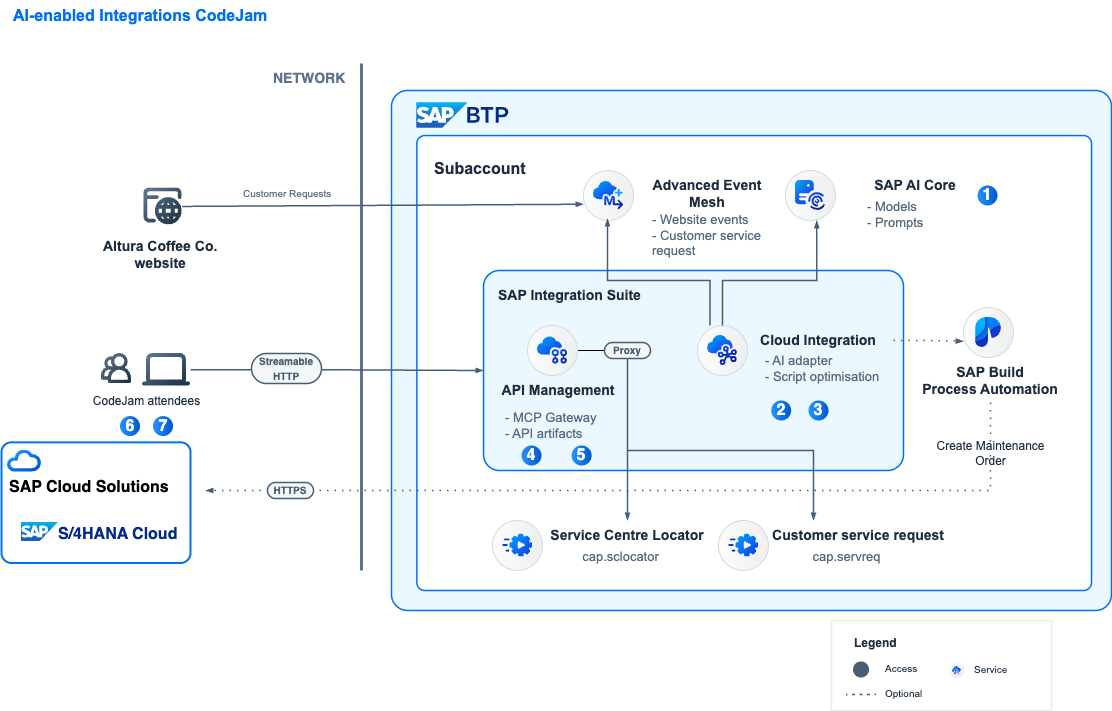
Integration Scenario
Let's imagine we work for a company, Altura Coffee Co. The company sells high-end coffee machines for businesses, e.g. commercial espresso machines for cafes and restaurants, as well as industrial coffee machines perfect for large offices, designed to meet the coffee demands of a busy workforce. Altura Coffee Co. also provides maintenance and customer support for the coffee machines that they sell.
Traditionally, customer requests have been sent to an email address, which is monitored by the support team and processed manually. Now, Altura Coffee Co. receives customer support requests via a form on their website. We oversee enabling the integration scenario that will process these requests (events), extract the relevant information (e.g., customer details, machine information, severity of the request, etc.), identify the closest service centre, and expose the relevant data via MCP server to an agent. Our process moves from manual handling to an AI-enabled integration that reacts in real-time.
Prerequisites
To complete the exercises in this repository, you will need access to an SAP Integration Suite tenant with SAP AI Core configured. The exercises will guide you through setting up and using the different AI capabilities available in SAP Integration Suite. Please review the prerequisites before attending an event.
Live system
As part of this CodeJam we will provide you access to a live SAP Integration Suite instance with SAP AI Core already configured. Whenever you see the following emoji - 🔐 - in the exercises, it means that credentials will be provide to access/configure a live system.
⇟ What if a live system can't be provided as part of the CodeJam or you are going through the CodeJam content on your own?
The participant will need to configure a live SAP Integration Suite system they have access to, along with an SAP AI Core instance. Also, the supporting apps will need to be deployed to SAP BTP. The applications contain README.md files with details on how to deploy them.
Material organisation
The material consists of a series of exercises. These exercises build on each other and should be completed in the given order. For example, we start by getting familiar with the integration scenario and the tools we will be using, proceed to create and enhance our integration flow, and extend this in subsequent exercises to include MCP capabilities and an LLM client.
The repository includes some slides, which will be used when running an SAP CodeJam event. The slides were built using Marp and an HTML export is included here. You can also preview the slides here.
Exercises
During the CodeJam you will complete each exercise one at a time. At the end of each exercise, questions are included to help you think about the content just covered and are to be discussed with the entire CodeJam class, led by the instructor, when everyone has finished that exercise.
If you finish an exercise early, please resist the temptation to continue with the next one. Instead, explore what you've just done and see if you can learn more about the subject covered. That way, we all stay on track together and can benefit from some reflection via the questions (and answers).
See below for an overview of the exercises part of this CodeJam.
- Please ensure that you have completed all the prerequisites.
- Exercises:
- Exercise 00 - Get familiar with Altura Coffee Co. website
- Exercise 01 - SAP AI Core and Prompt Template
- Exercise 02 - Generate an iFlow
- Exercise 03 - Optimise script in iFlow
- Exercise 04 - Customer Service system API as MCP server
- Exercise 05 - Expose existing API via MCP Gateway
- Exercise 06 - Configure LLM client and MCP tools
- Exercise 07 - Test the scenario
Troubleshooting
While going through the exercises, you might encounter common problems not explicitly related to them. Check out the troubleshooting.md page, which includes a list of these common problems and their potential solutions.
Known Issues
None
Feedback
If you can spare a couple of minutes at the end of the session, please help us improve for next time by giving me some feedback.
Simply use this Give Feedback link to create a special "feedback" issue, and follow the instructions there.
Gracias/Thank you/Obrigado/Merçi/Danke!
Rendering the exercises with Docsify
The exercises in this repository can be rendered as a website using Docsify. Docsify serves the Markdown files directly in the browser, adding navigation, search, syntax highlighting and callout styling — no build step required.
To run the site locally:
-
Make sure you have Node.js installed.
-
From the root of the repository, start a local server:
npx serve . -
Open the URL printed in the terminal (by default http://localhost:3000) in your browser.
The entry point is index.html, the navigation is defined in _sidebar.md, and supporting assets (styles, scripts, images) live under _assets/. When running locally, participant credentials are read from the mock file at _assets/mock/get-participant-info.json.
How to obtain support
Support for the content in this repository is available during CodeJam events, for which this content has been designed.
Alternatively, if you are completing this CodeJam on your own, outside of an event, you can create an issue in this repository if you find a bug or have questions about it.
For additional support, ask a question in SAP Community.
Contributing
If you wish to contribute code, offer fixes or improvements, please send a pull request. Due to legal reasons, contributors will be asked to accept a DCO when they create the first pull request to this project. This happens in an automated fashion during the submission process. SAP uses the standard DCO text of the Linux Foundation.
License
Copyright 2026 SAP SE or an SAP affiliate company and ai-enabled-integrations contributors. Please see our LICENSE for copyright and license information. Detailed information including third-party components and their licensing/copyright information is available via the REUSE tool.
Details
Sources
Sources are graph entities: the same page may back several entries, and an unreachable source flags every row that rests on it.
Compatibility and provenance
Contributors
History in the atlas
- First seen.
For your agent
- Ref
artifact:sap-samples-ai-enabled-integrations-codejam- JSON
- /artifacts/sap-samples-ai-enabled-integrations-codejam.json
- MCP
- Connecting an agent