teched2025-AI165
An SAP TechEd 2025 hands-on that builds a custom agent in Joule StudioJoule StudioSAP’s managed development environment for building custom agents, applications and workflows from business intent, in six phases from intent and specification to deployment on an SAP-managed runtime.sap official, umbrella's Agent Builder and has it collaborate with an external partner agent over the Agent2Agent (A2A) protocol.
A fictional Business Partner Invoicing scenario runs through Joule StudioJoule StudioSAP’s managed development environment for building custom agents, applications and workflows from business intent, in six phases from intent and specification to deployment on an SAP-managed runtime.sap official, umbrella's Agent Builder: either attach one of its out-of-the-box tools to an agent or build your own with Joule Skills, which is also what agent collaboration uses. The Business Partner Invoicing Agent answers from the records of known business partners, creates tickets in ServiceNow to have new ones added, and attaches an invoice to the business partner record in SAP S/4HANASAP S/4HANASAP's ERP suite, run on-premise or as a private cloud edition, with its business data and processes reached over OData, RFC and the ABAP platform. For the things here it is the system a tool reads from or writes to. The public cloud edition is its own entry., which the README marks simulated. Where it cannot find the business partner in question, it collaborates in the background with IBM's ServiceNow Ticketing Agent, invoked through IBM watsonx Orchestrate, over the Agent2Agent (A2A) protocol. Joule, SAP's AI Copilot, is what the goal list calls the primary entry point; the agent itself is fictional, built on a pre-release Agent Builder against systems and a machine the session provides.
Facts
Where it sits
Who is behind it

In the atlas: maintains 222@SAP-samplesmaintainerAjay SorengContributes to this

In the atlas: contributes to 36@ajaysorengjulian-schambeckContributes to this

In the atlas: contributes to 6@julian-schambeckKay SchmitteckertContributes to this

In the atlas: contributes to 6@kay-schmitteckertWerner TodContributes to this

In the atlas: contributes to 1@wernertod4 contributors
What it declares
Every artifact
- Type
- Sample
- Origin
- By SAP
- Use as
- A reference
As a sample
- Form
- Workshop or CodeJam material
Connections
Building an agent into your own application
SAP's managed environment for building custom agents and workflows
A cross-platform JavaScript runtime that servers, command line tools and scripts written in JavaScript are run with. For the things here, the prerequisite a repository names when its build is a set of npm scripts.
Download
README
quoted from SAP-samples/teched2025-AI165 under Apache-2.0, readAI165 - Interconnect custom AI agents with your cloud and partner ecosystem
Important
Welcome to the Agent Builder Lab Preview!
You are working with a pre-release version of the Agent Builder in Joule Studio. This gives you an early look at our upcoming capabilities. Please keep the following in mind:
- Features Are Subject to Change: The user interface (UI), terminology, and functionalities you see in this lab may differ from the final, generally available (GA) product.
- For Educational Use Only: This environment is designed for learning and experimentation, not for production use.
- Potential Instability: As a preview version, you may encounter occasional instability or minor bugs. The exercises are designed to work with the current state of the platform. If you get stuck, please notify a session instructor.
This repository contains the material for the SAP TechEd 2025 session called AI165 - Interconnect custom AI agents with your cloud and partner ecosystem.
Goal formulation for this hands-on
By the end of this session, participants will have successfully:
- Built a custom agent in Joule Studio using its new Agent Builder
- Enabled the agent to collaborate with an external partner agent from IBM
- Utilized the Agent2Agent (A2A) protocol for standardized communication between agents and enhanced agent interoperability
- Invoked the custom agent from within Joule (SAP's AI Copilot) as the primary entry point
The scenario: Business Partner Invoicing
Important
The Business Partner Invoicing Agent described here doesn’t exist and is purely a fictional concept created for a hands-on session scenario.
In this hands-on session, we will work with a fictional Business Partner Invoicing scenario in which your company's business partners send invoices for services they have provided. Assume the invoices have been sent via email, for example. The invoice then needs to be attached to the corresponding business partner record in SAP S/4HANA so that it can be paid later. The Business Partner Invoicing Agent assists you with this task and is able to:
- Provide information about business partners from the records of known business partners
- Create tickets in ServiceNow to add new business partners to the records
- Attach an invoice to the business partner record in SAP S/4HANA (simulated)
To build custom agents like the one described above, you use Joule Studio, a capability within SAP Build, and its new built-in Agent Builder. You can either attach one of the out-of-the-box tools to an agent or build your own using Joule Skills. The latter can also be used for agent collaboration, where an agent collaborates with another (external) agent. Joule, SAP's AI Copilot, can then leverage your custom agents and their skills to complete designated tasks.
In this scenario, you as the end user interact only with the Business Partner Invoicing Agent, which maintains knowledge about the business partners. However, if the agent cannot find the business partner in question, it collaborates with IBM's ServiceNow Ticketing Agent (invoked via IBM watsonx Orchestrate in the cloud) in the background to open a ServiceNow ticket requesting business partner creation.
IBM watsonx Orchestrate is IBM’s open platform for building, managing, observing, and governing AI agents. In addition to its low-code and pro-code agent development capabilities, it also provides a catalog of prebuilt agents that simplify access to AI tools from various domains like Human Resources, Sales, Procurement, and Customer Care. This workshop leverages the latter, integrating ServiceNow customer care capabilities like ticket management. Reference: https://www.ibm.com/docs/en/watsonx/watson-orchestrate/base
Note that the two agents communicate using the Agent2Agent (A2A) protocol to facilitate agent interoperability. This workflow minimizes manual work and accelerates the storage and processing of invoices that your company must pay.
Architecture Diagram
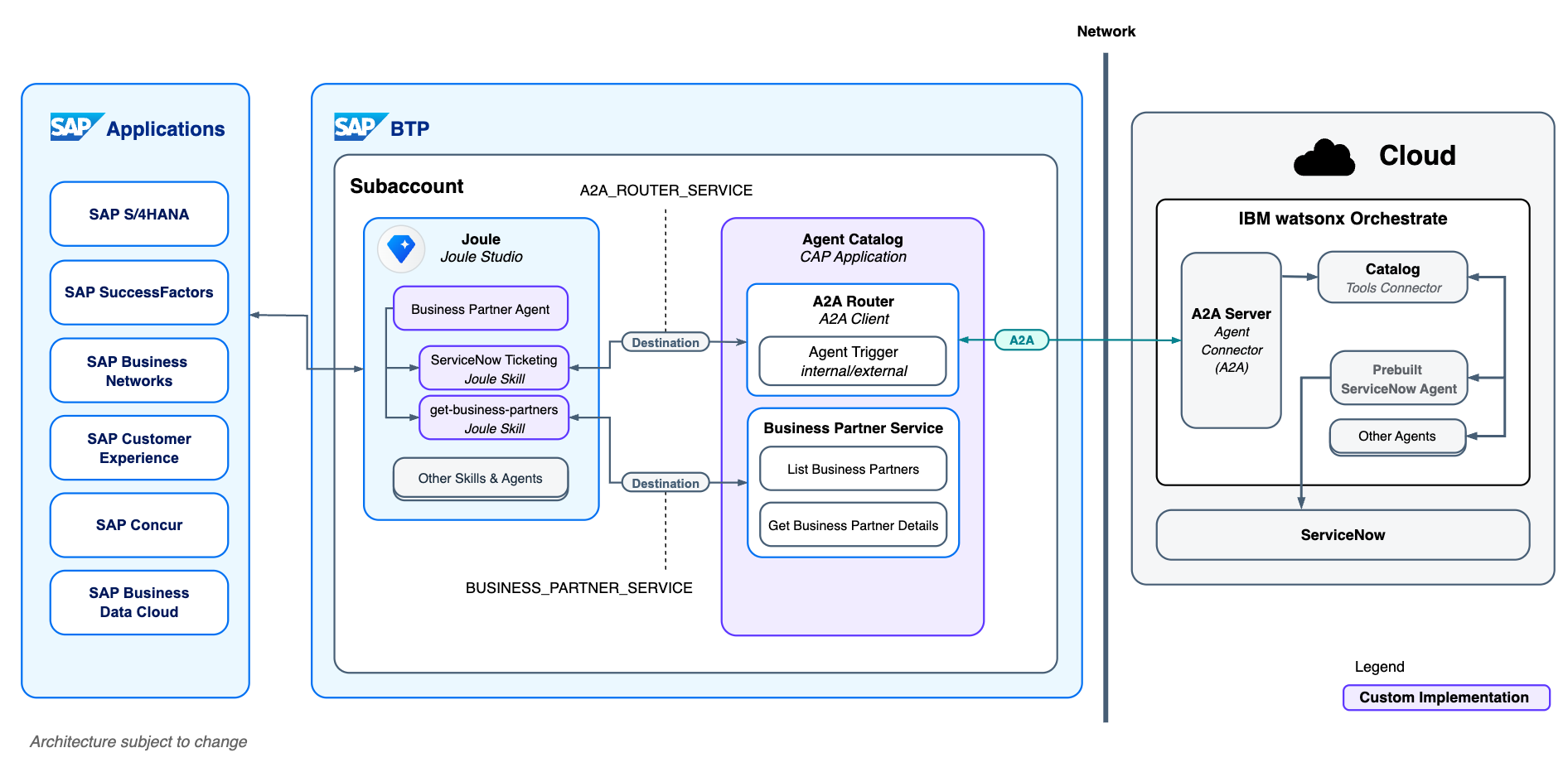 Architecture is subject to change
Requirements
There are only a few requirements to follow the exercises. Everything will already be installed on the machine provided for the live hands-on session. You will also be given access to Joule Studio and its Agent Builder.
- A Chromium-based browser (e.g., Google Chrome)
- Node.js v22.17.0 (LTS)
- A text editor, such as VS Code
- Access to Joule Studio and its Agent Builder
Exercises
- Terms and Definitions
- Exercise 1 - Build Your First Agent in Joule Studio
- Exercise 2 - Discover and Invoke Agent via A2A
- Exercise 3 - Agent Collaboration via A2A
Contributing
Please read the CONTRIBUTING.md to understand the contribution guidelines.
Code of Conduct
Please read the SAP Open Source Code of Conduct.
How to obtain support
Support for the content in this repository is available during the actual time of the online session for which this content has been designed. Otherwise, you may request support via the Issues tab.
License
Copyright (c) 2025 SAP SE or an SAP affiliate company. All rights reserved. This project is licensed under the Apache Software License, version 2.0 except as noted otherwise in the LICENSE file.
Details
Sources
Sources are graph entities: the same page may back several entries, and an unreachable source flags every row that rests on it.
Compatibility and provenance
History in the atlas
- First seen.
For your agent
- Ref
artifact:sap-samples-teched2025-ai165- JSON
- /artifacts/sap-samples-teched2025-ai165.json
- MCP
- Connecting an agent