Reports Assistant with SAP Document Management
A CAP agent that turns a few notes into a status report and saves it in an SAP Document Management repository, where the instructions and the skills it follows are kept too.
The worked example in the repository behind @mi8y/cap-agents-sdm-backend@mi8y/cap-agents-sdm-backendA Deep Agents filesystem backend whose files are documents in an SAP Document Management repository, so what a CAP agent reads and writes stays where people can open it too.independent, cap: a CAP agent built with @cap-js/agents@cap-js/agentsSAP's own CDS plugin for building agents inside a CAP service, wired to audit logging and telemetry through peer dependencies rather than leaving observability to the author.sap official, cap and Deep AgentsDeep AgentsAn agent harness published by LangChain as the npm package deepagents, with planning, filesystem and sub-agent tools included. For the things here, the harness whose filesystem backend protocol an implementation plugs into so the agent's files live in an SAP repository rather than on disk. that copies a controlled template, fills it from the notes a user supplies, and saves a .txt report people can open in the embedded Document Management UI beside the chat. A buildGraph override mounts the backend, with /report/ and /skills/ mapped to folders of the same name in the repository; pnpm setup:sdm creates them and uploads the local seed/ content, whose AGENTS.md lands as the guidance at the repository root and whose three SKILL.md files become the skills the agent discovers. Because that content lives in the repository rather than in the project, editing the copies in SAP Document ManagementSAP Document Management service, integration optionA BTP service of APIs and a reusable UI5 component for adding document management, with folders, versions and status, to a business application over SAP's repository or a CMIS-compliant one.sap official, btp and starting a new chat changes what the agent follows, and the local seed/ directory is starter content rather than a runtime fallback. The README names what has to be bound: a Cloud Foundry space with AI Core, Document Management, Destination, XSUAA and HTML5 Application Repository, with the model set through cds.requires.llm.destinationName. It also separates the two identities in play, since setup uses the SDM service key's client credentials while agent requests use the signed-in user's JWT.
Facts
Where it sits
Who is behind it

In the atlas: maintains 6, contributes to 6@anselm94Mi8Y TechnologiesMi8Y TechnologiesMaintains this

In the atlas: maintains 6@mi8ymaintainers
What it declares
Every artifact
- Type
- Sample
- Origin
- Independently maintained
- Runtime
- Node.js
- Runs on
- Cloud Foundry
As a sample
- Form
- does not say
Connections
CDS plugin for building agents inside a CAP service
Deep Agents filesystem over an SAP Document Management repository
An agent harness published by LangChain as the npm package deepagents, with planning, filesystem and sub-agent tools included. For the things here, the harness whose filesystem backend protocol an implementation plugs into so the agent's files live in an SAP repository rather than on disk.
AI runtime on BTP with the Generative AI Hub
OAuth server issuing JWTs and holding scopes for BTP apps
Named, credentialed addresses of other systems resolved at runtime
APIs and a UI5 component for document management in apps
Stores UI5 and HTML5 apps and serves them through the approuter
Deep Agents filesystem over an SAP Document Management repository
Download
README
quoted from mi8y/cap-agents-addons under MIT, readReports Assistant with SAP Document Management
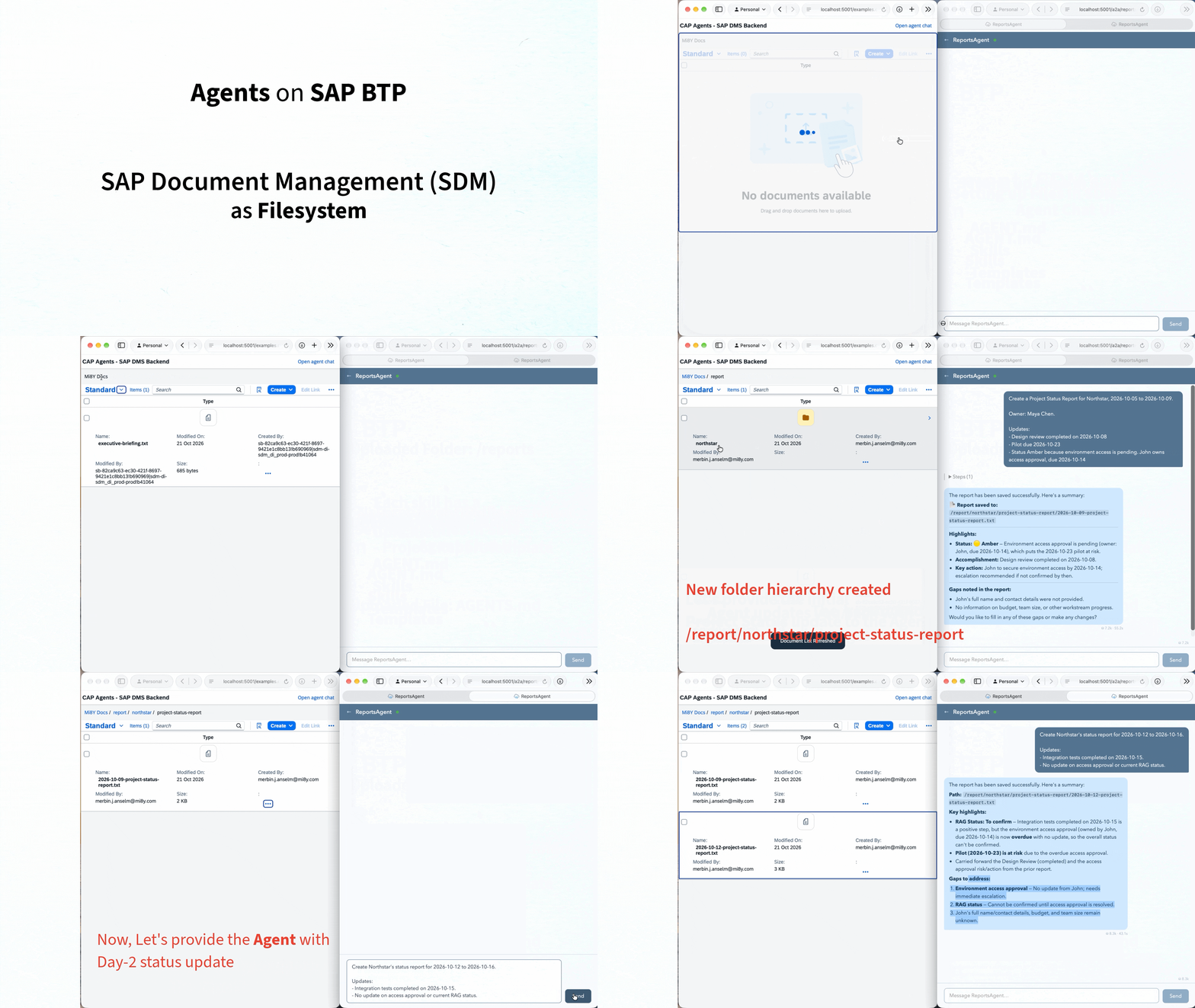
A CAP agent that turns notes into business reports in a shared SAP Document
Management workspace. Built with @cap-js/agents, Deep Agents, and
@mi8y/cap-agents-sdm-backend.
The agent copies a controlled template, fills it, and saves a .txt report that
people can view in the embedded Document Management UI. Business teams maintain
guidance and skills in SDM. Weekly reports build on the previous period's open items. Editing an existing report requires confirmation.
| Skill | Output |
|---|---|
| Project Status Report | Progress, RAG status, risks, and actions |
| Incident Report | Impact, timeline, recovery, and corrective actions |
| Executive Briefing | Findings, recommendation, and next steps |
Setup
Requires a SAP BTP Cloud Foundry environment with AI Core, Document Management, Destination, XSUAA, and HTML5 Application Repository runtime services.
-
From the monorepo root:
pnpm install pnpm build cd examples/cap-agents-sdm-backend -
Configure:
- package.json: set
cds.requires.llm.destinationNameand model. - Onboard an internal repository,
then set
cds.requires.sdm.settings.repositoryIdinpackage.json. - manifest.json: set
sap.ui5.componentUsages.documentTable.settings.repositoryIdto the same repository andobjectIdto its root folder ID. - mta.yaml: review service plans for your environment.
- package.json: set
-
Target your Cloud Foundry org/space, deploy, bind, and start CAP:
cds up cds bind -2 ca-sdm-auth,ca-sdm-destination,ca-sdm-html5-rt,ca-sdm-sdm pnpm setup:sdm cds watch --profile hybrid -
In another terminal, from this example directory:
cds bind --exec -- npm start --prefix .deploy/app-router
Open localhost:5001, sign in, and open the reports app. Select Open agent chat, or open the preview. Refresh the document browser to see saved reports.
The setup command resolves .cdsrc-private.json through cds bind --exec, creates
/report and /skills, and uploads the local seed/ content. Existing files are
skipped; use pnpm setup:sdm --overwrite to reset seeded files. Setup uses the SDM
service key's client credentials; agent requests use the signed-in user's JWT.
Try it
These fictional examples create .txt files in your connected repository.
Run each pair of prompts in order.
Weekly status: carry open items forward
Create a Project Status Report for Northstar, 2026-10-05 to 2026-10-09.

Owner: Maya Chen.

Updates:
- Design review completed on 2026-10-08
- Pilot due 2026-10-23
- Status Amber because environment access is pending. John owns access approval, due 2026-10-14
Create Northstar's status report for 2026-10-12 to 2026-10-16.

Updates:
- Integration tests completed on 2026-10-15.
- No update on access approval or current RAG status.
Look for two reports: new accomplishments, the overdue action carried forward, and missing updates clearly marked.
Incident: reuse the report for a leadership briefing
Create Incident Report INC-1042 for Atlas Order Portal, 2026-10-19.

Timezone: Asia/Kolkata.

Owner: Priya Shah

Severity: SEV-2

Events:
- 09:10: order submission failed for 18 users.
- 09:35: configuration rollback restored service.

Status:
- Root cause is unconfirmed
- Priya's review is due 2026-10-21
Create an Executive Briefing about INC-1042 dated 2026-10-20 for the
Operations Director. For information; no decision requested.
Look for a concise briefing based on the saved incident report, with recovery clearly distinguished from confirmed root cause.
Customize
- AGENTS.md: starter guidance, seeded to
/AGENTS.mdat the repository root. - Skills: starter skills and
templates/*.txt, seeded to/skills/. /report/maps to SDM/report;/skills/maps to SDM/skills.
Edit the SDM copies to change behavior; start a new chat to load updated
guidance and skills. Keep SKILL.md filenames for discovery. Markdown instructions
can be downloaded, edited, and replaced; report templates remain .txt.
The local seed/ directory is starter content, not a runtime fallback.
Existing reports are not moved by setup.
Template protection and confirmation are prompt instructions, not locks or access controls. Live cloud behavior depends on your bindings; local checks cover skill discovery and template file operations.
Details
Sources
Sources are graph entities: the same page may back several entries, and an unreachable source flags every row that rests on it.
Compatibility and provenance
History in the atlas
- First seen.
For your agent
- Ref
artifact:mi8y-cap-agents-sdm-reports-assistant- JSON
- /artifacts/mi8y-cap-agents-sdm-reports-assistant.json
- MCP
- Connecting an agent