cap-nodejs-dev-env
A development container definition for CAP Node.jsNode.jsA cross-platform JavaScript runtime that servers, command line tools and scripts written in JavaScript are run with. For the things here, the prerequisite a repository names when its build is a set of npm scripts. with @sap/cds-dk and the Cloud Foundry CLI, for use with VS Code's Dev Containers extension or GitHubGitHubA hosted git service: repositories, pull requests with reviews, and branch rulesets that decide what may reach a branch. Things here that push objects out of an SAP system, or keep a review record outside it, call its API and open their pull requests on it. Codespaces.
Installing a CAP Node.js toolchain by hand means committing to installing extra tools and runtimes on your own machine; this repository is a development container definition instead. The definition describes the tool setup for developing with CAP Node.js: a Node.jsNode.jsA cross-platform JavaScript runtime that servers, command line tools and scripts written in JavaScript are run with. For the things here, the prerequisite a repository names when its build is a set of npm scripts. environment, the CDS development kit (@sap/cds-dk@sap/cds-dkThe command line client and development toolkit for CAP projects, with the commands cds build, cds deploy, cds watch and cds add among them.sap official, cap), the Cloud Foundry CLI and common command-line tools. There are two documented ways to proceed — VS Code with the Dev Containers extension reopening the cloned repository in a container, or a GitHubGitHubA hosted git service: repositories, pull requests with reviews, and branch rulesets that decide what may reach a branch. Things here that push objects out of an SAP system, or keep a review record outside it, call its API and open their pull requests on it. Codespace created from the repository page, which is a VS Code based environment in the cloud and starts to incur storage charges after a certain amount of time. It stops at the definition: the README offers Capire's Getting Started guide as the alternative, installing the required runtime and tools directly on your own machine, and says that once the container is reopened you are all set.
Facts
Where it sits
Who is behind it

In the atlas: maintains 222@SAP-samplesmaintainerPavan JayashrinathContributes to this

In the atlas: contributes to 1@athreyaspavanDJ AdamsContributes to this

Developer Advocate
In the atlas: contributes to 20, wrote 22@qmacro2 contributors
What it declares
Every artifact
- Type
- Sample
- Origin
- By SAP
As a sample
- Form
- does not say
Connections
Running the whole stack on a laptop against real bindings
A container engine that packages software with the tools it needs and runs it isolated from the host. Things here that ship as an image need it installed, so the reader installs the engine rather than each of the command line tools inside the container.
A hosted git service: repositories, pull requests with reviews, and branch rulesets that decide what may reach a branch. Things here that push objects out of an SAP system, or keep a review record outside it, call its API and open their pull requests on it.
Download
README
quoted from SAP-samples/cap-nodejs-dev-env under Apache-2.0, readCAP Node.js development environment
A handy repo containing a development container definition for use with VS Code or GitHub Codespaces. The definition describes the tool setup for developing with SAP Cloud Application Programming Model (CAP) Node.js:
- A Node.js environment
- The CDS development kit (
@sap/cds-dk) - The Cloud Foundry CLI
- Various common command line tools
Setup
You can of course follow the Getting Started guide in Capire, and install the required runtime and tools directly on your own machine.
Alternatively, you can use the development container definition in this repo. The advantage of using the development container definition is that you don't need to commit to installing extra tools and runtimes on your own machine, you can isolate and abstract that via containers, either running in a container engine locally, or in the cloud.
There are two main ways to proceed - with VS Code on your own machine, or with GitHub Codespaces.
Using VS Code
If you have VS Code installed, and a container manager such as Docker Desktop or Podman:
- ensure you have the Dev Containers extension installed
- clone this repo
- open the directory in VS Code
At this point, thanks to the extension, you will be asked if you want to "reopen in container":
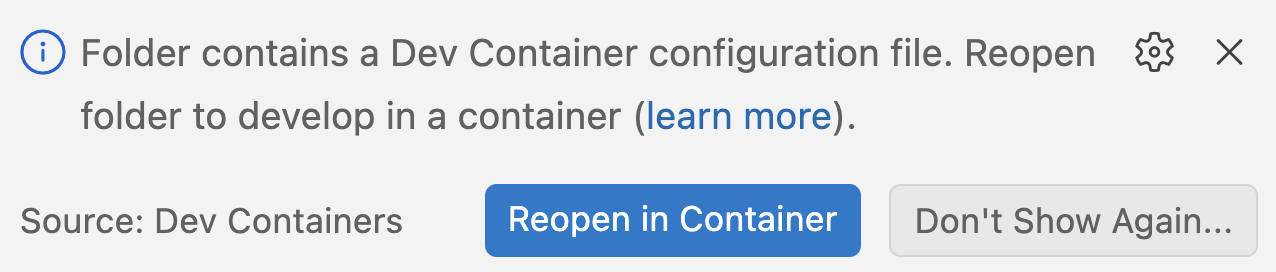
Once you do that, you're all set.
Using GitHub Codespaces
If you have a GitHub account (it can be a free one), you can simply use the "Code" button on this repo's page, and create a Codespace based upon it:
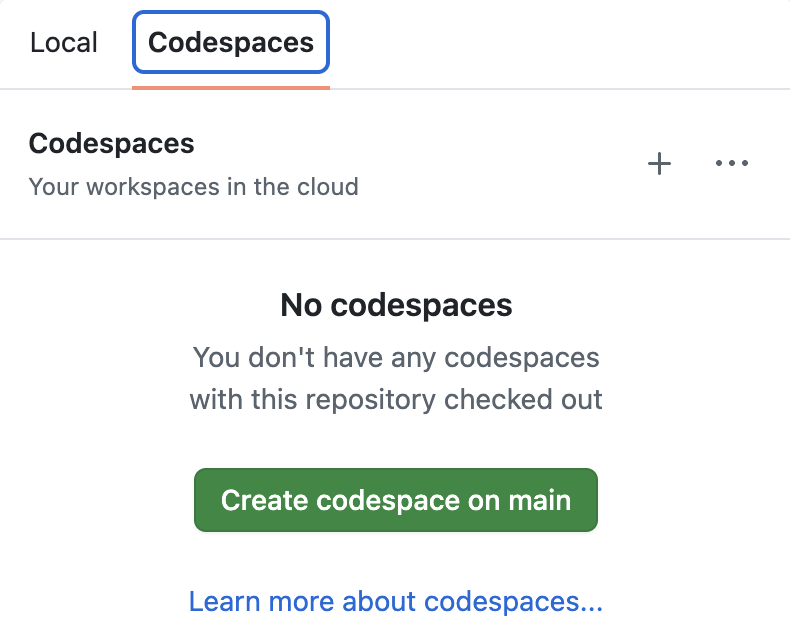
Once a Codespace is launched, you'll find yourself in a VS Code based environment in the cloud, hosted by GitHub.
Tip
GitHub Codespaces start to incur storage charges after a certain amount of time. Be sure to manage your Codespaces appropriately to avoid unncessary fees. See the GitHub Codespaces billing page, which also has information on the free quotas.
License
Copyright (c) 2026 SAP SE or an SAP affiliate company. All rights reserved. This project is licensed under the Apache Software License, version 2.0 except as noted otherwise in the LICENSE file.
Details
Sources
Sources are graph entities: the same page may back several entries, and an unreachable source flags every row that rests on it.
Compatibility and provenance
Flavors
“The definition describes the tool setup for developing with SAP Cloud Application Programming Model (CAP) Node.js:” — SAP-samples/cap-nodejs-dev-env — README
Contributors
History in the atlas
- First seen.
For your agent
- Ref
artifact:sap-samples-cap-nodejs-dev-env- JSON
- /artifacts/sap-samples-cap-nodejs-dev-env.json
- MCP
- Connecting an agent