
CDS pluginCDS plugintypeInstalls into a CAP project and extends the runtime. CAP loads it through cds.requires or the plugin hook.See every one →What this type is →independently maintainedindependently maintainedoriginPublished by one person or a small company outside SAP. Says nothing about quality; the readings say that.See every one →

@tklein1801/cap-js-attachments

A CAP Node.js attachments plugin with a draft-based upload table, Object Store integration and configurable malware scanning for the files that are uploaded.

Facts

Latestv0.1.1ReleasedLast pushLicenceApache-2.0

Where it sits

Lives in
Provides
AttachmentsCAPAttachmentscapabilityStoring a file somebody uploaded next to the record it belongs to, and getting it back out — where the bytes actually live, who may read them, and what the UI shows while they are being scanned.
Flavors
Requires
@sap/cds≥ 8@sap/cdsartifactThe peer range, as published.
Optional
Object Store on SAP BTPObject Store on SAP BTPartifactSAP Object Store storage is selected.SAP Malware Scanning serviceSAP Malware Scanning serviceartifactMalware scanning is enabled.

Who is behind it

ThorbenThorbenPersonMaintains this
In the atlas: maintains 1, contributes to 2
@tklein1801
maintainer

Before choosing this

Conditions

LicenceSAP Developer License Agreement 3.2 CAP§ 1, 2, 3A cds-plugin is used with SAP CAP materials, or an artifact is explicitly identified as a CAP plugin or application.
  • § 1 License. Productive customer applications are limited to SAP BTP or another SAP-licensed platform, and mass extraction to a non-SAP product is restricted except where solely required for SAP interoperability.
  • § 2 Intellectual Property. The agreement retains SAP's rights in the covered materials and limits making APIs, tools or software available to third parties, while preserving ownership of customer applications subject to SAP's underlying rights.
  • § 3 Artificial Intelligence Training. The agreement prohibits use of the covered materials and customer applications for training artificial-intelligence models or systems.
SAP Developer License Agreement 3.2 CAP →

What it declares

Every artifact

Type
CDS plugin
Origin
Independently maintained

As a CDS plugin

Declared for
>=8
Distributed through
npm

For attachments

Storage target
Local database or SAP Object Store bucket
Upload flow
Draft-enabled entity required
Scan behaviour
Enabled by default except in development; configurable

Tasks this contributes to2Beta

Keep each subscriber's attachments apart in a multitenant CAP applicationEach subscriber of a multitenant CAP application uploads and reads only its own attachments, and that tenant's content is removed when it unsubscribes.Node.js, JavaCovers, under conditionstenant separation
What it does

States readiness for multitenancy on a shared object store instance, with attachment URLs prefixed by the tenant id. It documents the prefixing and not the provisioning.

Conditions

A shared SAP Object Store instance with a bucket already exists and is reachable.

Remaining work

Provide the shared instance and its bucket. The README requires one to exist rather than creating it per tenant.

All options on the Attachments page →
Scan an uploaded attachment before anyone can download itA file a user uploads is scanned for malware, and a file that was never scanned does not reach a reader carrying the same status as one that was.Node.js, JavaCovers, under conditionsscanning
What it does

An independent plugin that states scanning on for every profile except development, so the developer machine is the one place a file goes unscanned. The scanner it reaches is the SAP Malware Scanning service, bound as malware-scanner.

Conditions

An SAP Malware Scanning service instance the application can access already exists.; That instance is bound with cds bind malware-scanner.

Remaining work

Provide the service instance and bind it. The README requires one to exist and creates nothing.

All options on the Attachments page →

Connections4

@tklein1801/cap-js-attachments connections@tklein1801/cap-js-attachmentsPROVIDES→ provides1provides stated Uses an Attachments composition on a draft-enabled entity, with local database storage or an SAP Object Store bucket. Shared-store attachment URLs carry a tenant prefix. tklein1801/cap-js-attachments — README: https://raw.githubusercontent.com/tklein1801/cap-js-attachments/1021ab9c3ee9235900ef92e76f30f50fddab524d/README.md tklein1801/cap-js-attachments — README: https://raw.githubusercontent.com/tklein1801/cap-js-attachments/1021ab9c3ee9235900ef92e76f30f50fddab524d/README.md tklein1801/cap-js-attachments — README: https://raw.githubusercontent.com/tklein1801/cap-js-attachments/1021ab9c3ee9235900ef92e76f30f50fddab524d/README.md tklein1801/cap-js-attachments — README: https://raw.githubusercontent.com/tklein1801/cap-js-attachments/1021ab9c3ee9235900ef92e76f30f50fddab524d/README.mdAttachmentsNEEDS→ optionally needs2optionally needs stated If: SAP Object Store storage is selected. tklein1801/cap-js-attachments — README: https://raw.githubusercontent.com/tklein1801/cap-js-attachments/1021ab9c3ee9235900ef92e76f30f50fddab524d/README.mdObject Store on SAP BTPifoptionally needs stated If: Malware scanning is enabled. tklein1801/cap-js-attachments — README: https://raw.githubusercontent.com/tklein1801/cap-js-attachments/1021ab9c3ee9235900ef92e76f30f50fddab524d/README.mdSAP Malware Scanning serviceifLINEAGE→ fork of1fork of stated tklein1801/cap-js-attachments — repository description: https://github.com/tklein1801/cap-js-attachments@cap-js/attachments

Install

npm add @tklein1801/cap-js-attachments

Derived from the package name. No recipe recorded; the README has the configuration.

Where it sits in your app

Download
Your CAP applicationYour SAP BTP subaccountdocumentedmay needif SAP Object Store storage isselecteddocumentedmay needif Malware scanning is enabled@tklein1801/cap-js-attachments, module@tklein1801/cap-js-a…Object Store on SAP BTP, service instanceObject Store onSAP BTPSAP Malware Scanning service, service instanceSAP MalwareScanning service
SAPnot SAP's, or the project's ownunder a condition

README

quoted from tklein1801/cap-js-attachments under Apache-2.0, read
tklein1801/cap-js-attachments/README.mdOn GitHub

REUSE status

Attachments Plugin

The @tklein1801/cap-js-attachments package is a CDS plugin that provides out-of-the box asset storage and handling by using an aspect Attachments. It also provides a CAP-level, easy to use integration of the SAP Object Store.

Table of Contents

Setup

To enable attachments, simply add this self-configuring plugin package to your project:

 npm add @tklein1801/cap-js-attachments

In this guide, we use the Incidents Management reference sample app as the base application, to add Attachments type to the CDS model.

[!Note] To be able to use the Fiori uploadTable feature, you must ensure 1.121.0/ 1.122.0/ ^1.125.0 SAPUI5 version is updated in the application's index.html

Use Attachments

[!Note] To be able to use the plugin, make sure draft is enabled for the entity.

To use Attachments, simply add an element referring to the pre-defined Attachments type as follows:

using { Attachments } from '@tklein1801/cap-js-attachments';

entity Incidents {
  // ...
  attachments: Composition of many Attachments;
}

Test-drive Locally

With the steps above, we have successfully set up asset handling for our reference application. Let's see that in action. We can try out the scenarios where the attachments contents are stored locally in the database.

  1. Start the server:
  • Default scenario (In memory database):
    cds watch
  1. Navigate to the object page of the incident Solar panel broken:

    Go to Object page for incident Solar panel broken

  2. The Attachments type has generated an out-of-the-box Attachments table (see 1) at the bottom of the Object page:
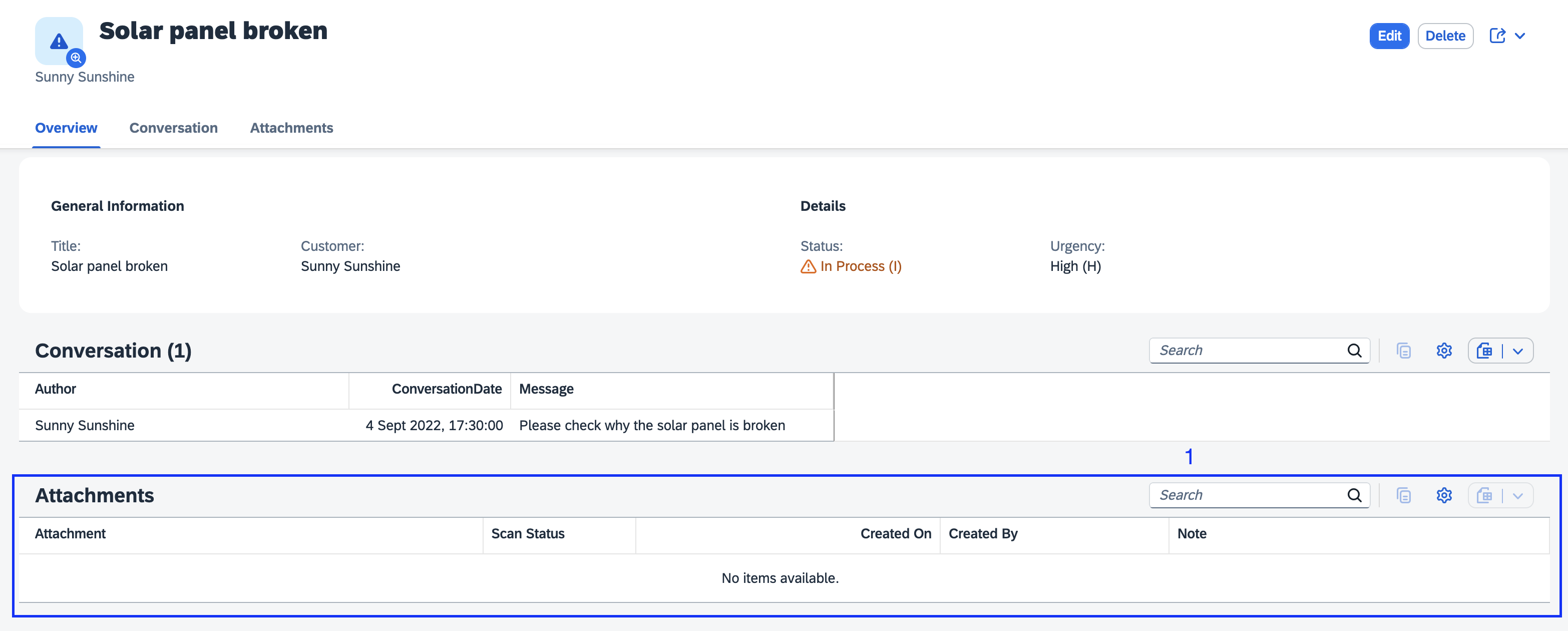
    Attachments Table
  3. Upload a file by going into Edit mode and either using the Upload button on the Attachments table or by drag/drop. Then click the Save button to have that file stored that file in the dedicated resource (database, S3 bucket, etc.). We demonstrate this by uploading the PDF file from xmpl/db/content/Solar Panel Report.pdf:
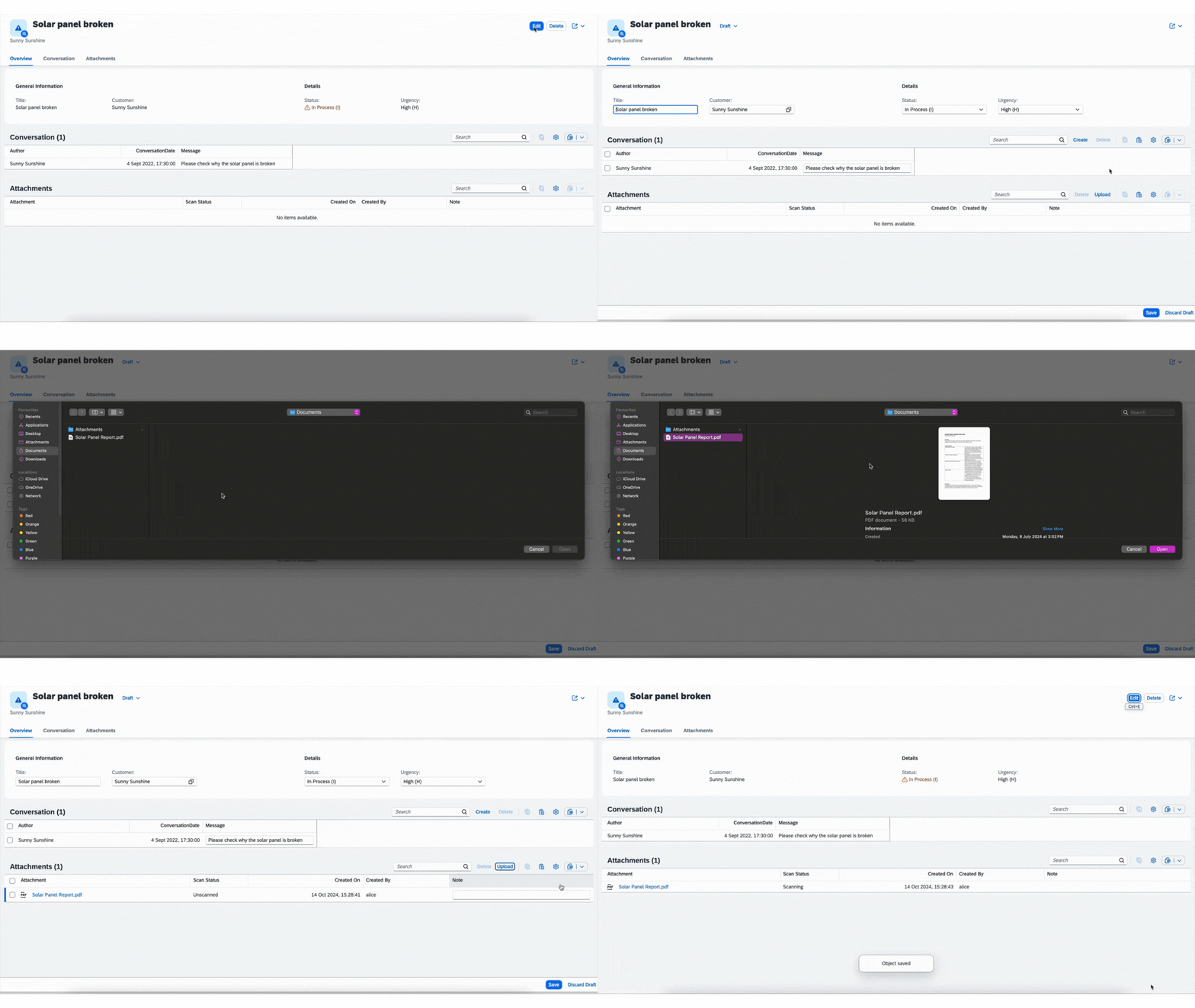
    Upload an attachment
  4. Delete a file by going into Edit mode and selecting the file(s) and by using the Delete button on the Attachments table. Then click the Save button to have that file deleted from the resource (database, S3 bucket, etc.). We demonstrate this by deleting the previously uploaded PDF file: Solar Panel Report.pdf
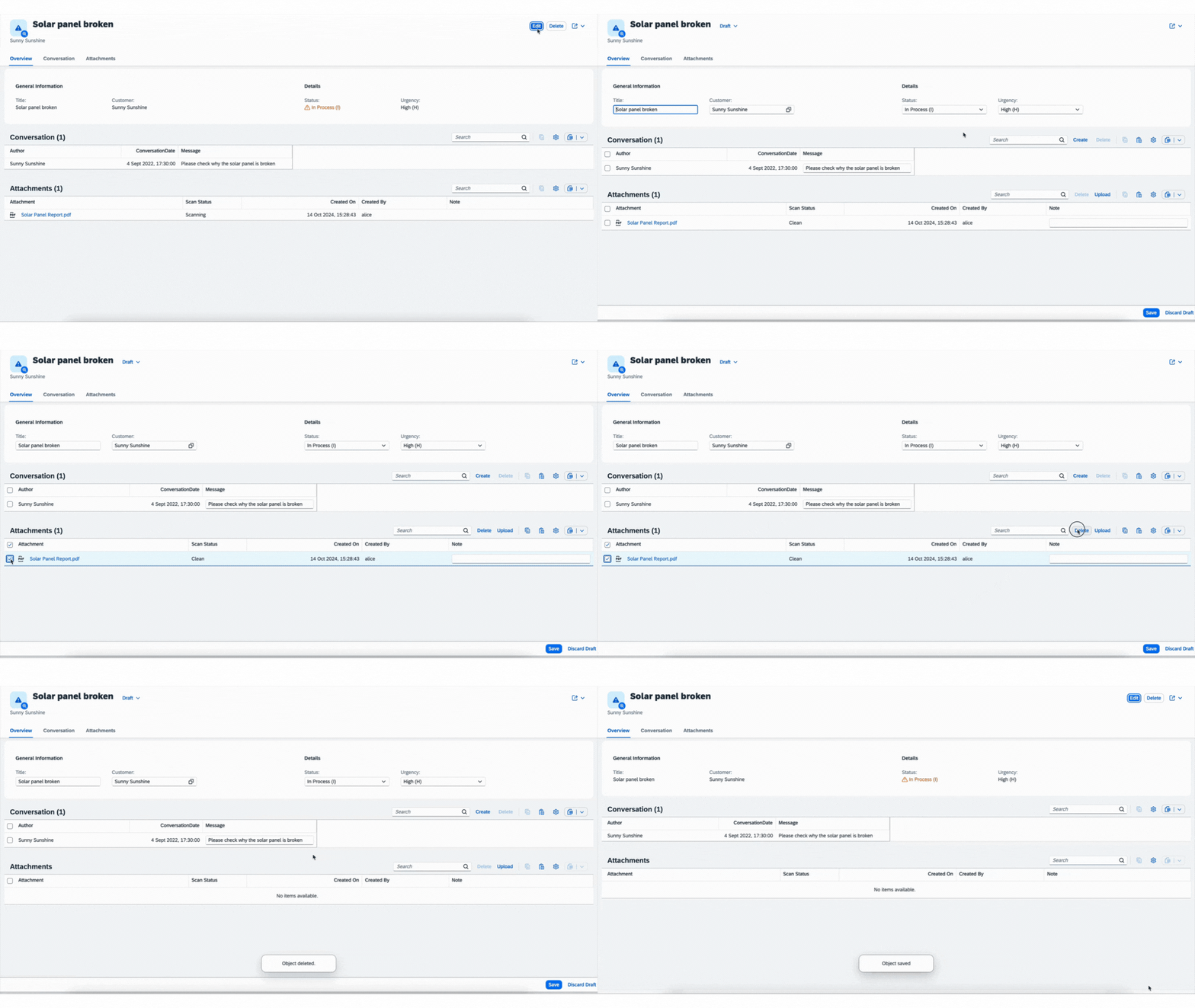
    Delete an attachment

Using SAP Object Store

For using SAP Object Store, you must already have a SAP Object Store service instance with a bucket which you can access. To connect it, follow this setup.

  1. Log in to Cloud Foundry:

    cf login -a <CF-API> -o <ORG-NAME> -s <SPACE-NAME>
  2. To bind to the service continue with the steps below.

    In the project directory, you can generate a new file _.cdsrc-private.json by running:

    cds bind objectstore -2 <INSTANCE>:<SERVICE-KEY> --kind s3

Using SAP Malware Scanning Service

For using SAP Malware Scanning Service, you must already have a service instance which you can access.

  1. To bind to the service continue with the steps below.

    cds bind malware-scanner -2 <INSTANCE>:<SERVICE-KEY>

By default, malware scanning is enabled for all profiles except development profile. You can configure malware scanning by setting:

"attachments": {
    "scan": true
}

Visibility control for Attachments UI Facet generation

By setting the @attachments.disable_facet property to true, developers can hide the plugin from the UI achieving visibility. This feature is particularly useful in scenarios where the visibility of the plugin needs to be dynamically controlled based on certain conditions.

Example Usage
entity Incidents {
  // ...
  @attachments.disable_facet
  attachments: Composition of many Attachments;
}

In this example, the @attachments.disable_facet is set to true, which means the plugin will be hidden by default.

Multi-Tenancy

The feature is ready for multitenancy scenarios utilizing a shared object store instance. Attachment URLs are prefixed with the tenant ID to ensure proper separation and identification of data across different tenants.

Contributing

This project is open to feature requests/suggestions, bug reports etc. via GitHub issues. Contribution and feedback are encouraged and always welcome. For more information about how to contribute, the project structure, as well as additional contribution information, see our Contribution Guidelines.

Code of Conduct

We as members, contributors, and leaders pledge to make participation in our community a harassment-free experience for everyone. By participating in this project, you agree to abide by its Code of Conduct at all times.

Licensing

Copyright 2024 SAP SE or an SAP affiliate company and contributors. Please see our LICENSE for copyright and license information. Detailed information including third-party components and their licensing/copyright information is available via the REUSE tool.

Apache-2.0, read

History

Latest

v2.0.2

Fixes 1

Notes
Fixed
  • Restored Attachments aspect on root namespace.
  1. v2.0.1

    Fixes 1

    Notes
    Fixed
    • Minor bug fixes.
  2. v2.0.0

    Features 1, Changed 2

    Notes
    Changed
    • Removed @sap/xsenv dependency.
    • Attachments usage changed to using { sap.attachments.Attachments } from '@cap-js/attachments'.
    Added
    • Visibility Control: Added visibility control for attachments plugin using @attachments.disable_facet.
  3. v1.2.1

    Fixes 1

    Notes
    Fixed
    • CDS version check added for rendering UI facets in older versions.
  4. v1.2.0

    Features 1, Fixes 1

    Notes
    Added
    • Support for multi-tenant applications utilizing a shared object store instance.
    Fixed
    • Fixed query syntax error for hana cloud bindings.
  5. v1.1.9

    Features 2, Fixes 1

    Notes
    Added
    • File Size Validation: Introduced a new file size validation feature to ensure uploaded attachments comply with defined size limits.
    • This feature is compatible with SAPUI5 version >= 1.131.0.
    Fixed
    • Fixed upload attachment bug after cds 8.7.0 update.
  6. v1.1.8

    Changed 1, Fixes 1

    Notes
    Changed
    • Included test cases for malware scanning within development profile.
    Fixed
    • Fix for viewing stored attachment.
  7. v1.1.7

    Fixes 1

    Notes
    Fixed
    • Fix for scenario where an aspect has a composition.
  8. v1.1.6

    Features 1, Fixes 1

    Notes
    Added
    • Support for cds 8.
    Fixed
    • Fix for adding note for attachments.
  9. v1.1.5

    Changed 3

    Notes
    Changed
    • Set width for columns for Attachments table UI.
    • Scan status is mocked to Clean only in the development profile and otherwise set to Unscanned, when malware scan is disabled.
    • When malware scan is disabled, removed restriction to access uploaded attachment.
  10. v1.1.4

    Changed 1

    Notes
    Changed
    • Updated Node version restriction.
  11. v1.1.3

    Changed 1, Fixes 1

    Notes
    Changed
    • Improved error handling.
    Fixed
    • Minor bug fixes.
  12. v1.1.2

    Features 1, Changed 2, Fixes 2

    Notes
    Added
    • Content of files detected as Infected from malware scanning service are now deleted.
    Changed
    • Attachments aren't served if their scan status isn't Clean.
    • Reduced the delay of setting scan status to Clean to 5 sec, if malware scanning is disabled.
    Fixed
    • Bug fixes for event handlers in production.
    • Bug fix for attachment target condition.
  13. v1.1.1

    Changed 2, Fixes 1

    Notes
    Changed
    • Enabled malware scanning in hybrid profile by default.
    • Added a 10 sec delay before setting scan status to Clean if malware scanning is disabled.
    Fixed
    • Bug fixes for upload functionality in production.
  14. v1.1.0

    Features 1, Fixes 1

    Notes
    Added
    • Attachments are scanned for malware using SAP Malware Scanning Service.
    Fixed
    • Fixes for deployment
  15. v1.0.2

    Fixes 1

    Notes
    Fixed
    • Bug fixes
  16. v1.0.1

    Fixes 1

    Notes
    Fixed
    • Updating the documentation.
  17. v1.0.0

    Features 1

    Notes
    Added
    • Initial release that provides out-of-the box asset storage and handling by using an aspect Attachments. It also provides a CAP-level, easy to use integration of the SAP Object Store.
0downloads per week, npm
Weekly downloads for @tklein1801/cap-js-attachments26 complete calendar weeks from 2026-04-27 to 2026-10-25; the latest total is 0.27 Apr – 3 May: 64 May – 10 May: 711 May – 17 May: 518 May – 24 May: 225 May – 31 May: 51 Jun – 7 Jun: 118 Jun – 14 Jun: 715 Jun – 21 Jun: 322 Jun – 28 Jun: 529 Jun – 5 Jul: 56 Jul – 12 Jul: 513 Jul – 19 Jul: 420 Jul – 26 Jul: 627 Jul – 2 Aug: 13 Aug – 9 Aug: 210 Aug – 16 Aug: 217 Aug – 23 Aug: 1024 Aug – 30 Aug: 631 Aug – 6 Sept: 17 Sept – 13 Sept: 314 Sept – 20 Sept: 421 Sept – 27 Sept: 128 Sept – 4 Oct: 15 Oct – 11 Oct: 012 Oct – 18 Oct: 219 Oct – 25 Oct: 0
Attachments
  1. SAP Document Management service, integration optionAPIs and a UI5 component for document management in apps
  2. cap-attachments-plusCAP Node.js attachments plugin with database or cloud storage
  3. com.sap.cds:cds-feature-attachmentsCAP Java attachments with database storage and an Object Store module
  4. com.sap.cds:sdmCAP Java plugin for attachments in SAP Document Management
  5. @cap-js/attachmentsCAP Node.js attachments with database, S3, Azure or GCP storage
  6. @cap-js/sdmCAP attachments stored in an SAP Document Management repository
  7. @sap/cdsCAP Node.js runtime
  8. sap-cap-sdm-pluginCAP Node.js plugin mapping CDS entities to SAP Document Management

Details

Sources5
npm registrydiscovered herechecked
The discovery passdiscovered herechecked
npm registry, @tklein1801/cap-js-attachmentsversion, releases, installschecked
github.com/git+https://github.com/tklein1801/cap-js-attachments.gittree, pushes, contributors, CIchecked
README.mdquoted, and what the entry declareschecked

Sources are graph entities: the same page may back several entries, and an unreachable source flags every row that rests on it.

Compatibility and provenance
declared for>=8
latestv0.1.1
first release
releases and cadence2
discovered vianpm registry, The discovery pass
first seen in the atlas
GitHub fork ofcap-js/attachments
ecosystem and domaincap, data-and-persistence
Flavors1
Node.js
“npm add @tklein1801/cap-js-attachments” — tklein1801/cap-js-attachments — READMEchecked
History in the atlas4
  1. Uses an Attachments composition on a draft-enabled entity, with local database storage or an SAP Object Store bucket. Shared-store attachment URLs carry a tenant prefix.
  2. fork of artifact:cap-js-attachments
  3. A derived copy of the official attachments plugin published under a personal scope; its readme is @cap-js/attachments' with the name swapped.
  4. First seen.
For your agent
Ref
artifact:tklein1801-cap-js-attachments
JSON
/artifacts/tklein1801-cap-js-attachments.json
MCP
Connecting an agent