CDS pluginCDS plugintypeInstalls into a CAP project and extends the runtime. CAP loads it through cds.requires or the plugin hook.See every one →What this type is →by SAPby SAPoriginPublished by SAP itself. A visible facet, never an input to a reading — a dormant official plugin reads exactly like a dormant independent one.See every one →

@cap-js/attachments

An official CAP Node.js plugin for attachment handling, with local database storage and AWS S3, Azure Blob or GCP Object Store integration.

Facts

Latestv4.0.0ReleasedLast pushLicenceApache-2.0

Where it sits

Lives in
Provides
AttachmentsCAPAttachmentscapabilityStoring a file somebody uploaded next to the record it belongs to, and getting it back out — where the bytes actually live, who may read them, and what the UI shows while they are being scanned.
Flavors
Requires
@sap/cds≥ 9@sap/cdsartifactThe peer range, as published.
Optional
Object Store on SAP BTPObject Store on SAP BTPartifactProductive use of an Object Store storage target.SAP Malware Scanning serviceSAP Malware Scanning serviceartifactMalware scanning is enabled.

Who is behind it

SAP Cloud Application Programming ModelSAP Cloud Application Programming ModelOrganisationMaintains this
In the atlas: maintains 34
@cap-js
maintainerAjinkya PatilPersonContributes to this
In the atlas: contributes to 112
@ajinkyapatil8190
Andreas-Meindl-msggroupPersonContributes to this
In the atlas: contributes to 1
@Andreas-Meindl-msggroup
Ansgar LichterPersonContributes to this
In the atlas: contributes to 1
@ansgarlichter
Christian GeorgiPersonContributes to this
In the atlas: maintains 1, contributes to 53
@chgeo
Christian SchüringsPersonContributes to this
In the atlas: contributes to 25
@cschuerings
Daniel HutzelPersonContributes to this
In the atlas: contributes to 32, wrote 3
@danjoa
Daniel SchlachterPersonContributes to this
In the atlas: contributes to 10, wrote 9
@DanSchlachter
Dr. David A. KunzPersonContributes to this
In the atlas: contributes to 16
@David-Kunz
Eric PPersonContributes to this
In the atlas: contributes to 3
@eric-pSAP
Heiko WitteborgPersonContributes to this
In the atlas: contributes to 18
@hm23
29 contributors

Before choosing this

Conditions

LicenceSAP Developer License Agreement 3.2 CAP§ 1, 2, 3A cds-plugin is used with SAP CAP materials, or an artifact is explicitly identified as a CAP plugin or application.
  • § 1 License. Productive customer applications are limited to SAP BTP or another SAP-licensed platform, and mass extraction to a non-SAP product is restricted except where solely required for SAP interoperability.
  • § 2 Intellectual Property. The agreement retains SAP's rights in the covered materials and limits making APIs, tools or software available to third parties, while preserving ownership of customer applications subject to SAP's underlying rights.
  • § 3 Artificial Intelligence Training. The agreement prohibits use of the covered materials and customer applications for training artificial-intelligence models or systems.
SAP Developer License Agreement 3.2 CAP →

What it declares

Every artifact

Type
CDS plugin
Origin
By SAP

As a CDS plugin

Declared for
>=9
Distributed through
npm

For attachments

Storage target
Local database; AWS S3, Azure Blob or GCP Object Store
Upload flow
Fiori elements uses drafts; non-draft upload uses separate requests
Scan behaviour
Upload fails if scanning is enabled but no scanner is available

Tasks this contributes to5Beta

Keep attachment content out of the application databaseA deployed CAP application keeps uploaded file content in an object store or a document repository, and keeps only the metadata and a reference in its own database.Node.js, JavaCovers, under conditionsstorage
What it does

With a storage target configured, the content goes to that target and the database keeps the reference and the metadata. The README states that productive use requires a valid object store binding.

Conditions

A valid SAP Object Store binding exists for the deployed application.

Remaining work

Provision and bind the Object Store service and set the storage target kind per profile. Without the binding the productive path is the one the README rules out, not a fallback to the database.

All options on the Attachments page →
Keep each subscriber's attachments apart in a multitenant CAP applicationEach subscriber of a multitenant CAP application uploads and reads only its own attachments, and that tenant's content is removed when it unsubscribes.Node.js, JavaCovers, under conditionstenant separation
What it does

In separate mode, the default since 2.1.0, the plugin creates an object store instance for each tenant when it subscribes and deletes it when it unsubscribes. A shared instance can be configured instead, and there the README states that attachment URLs carry the tenant id and says nothing about removing a tenant's content.

Conditions

Separate mode is in use, which is the mode the README states per-tenant provisioning and deletion for, and the default from version 2.1.0.; @cap-js/attachments is in the dependencies of both the application and the mtx sidecar.

Remaining work

Add the plugin to both package.json files, choose separate or shared instances before the first subscription, and bind the shared instance to the mtx module when shared is chosen. On the shared instance the removal half of this outcome is not stated.

All options on the Attachments page →
Keep version history for an attached documentA document attached to a business record keeps its earlier versions, so a reader can see what the file was before it was replaced.Node.js, JavaStated not supportedattachment handling
What it does

The README addresses replacement rather than versions. By default the Attachments aspect marks the content non-updatable, so an upload to an attachment that already has content is rejected with 409; with that annotation overridden the upload overwrites the existing content. Neither path produces a second version, and the README names no place where the earlier file survives.

Remaining work

Keep the earlier file somewhere other than the attachment: a second record, or the document management APIs. Whether the configured storage target retains a previous object is a question for that service and is not answered here.

All options on the Attachments page →
Scan an uploaded attachment before anyone can download itA file a user uploads is scanned for malware, and a file that was never scanned does not reach a reader carrying the same status as one that was.Node.js, JavaCoversscanning
What it does

With scanning left enabled and no scanner available, the upload fails, so the file does not get stored unscanned. Download is tied to the status: the README states that an attachment cannot be downloaded unless its status is Clean.

Remaining work

Bind the SAP Malware Scanning service, or disable scanning deliberately per profile. The plugin states the two outcomes; picking between them is the application's decision.

All options on the Attachments page →
Upload an attachment from a client that is not SAP Fiori elementsA caller that is not an SAP Fiori elements UI, such as a test client, a custom front end or another service, creates an attachment record against an existing business record and uploads its content.Node.js, JavaCovers, under conditionsattachment handling
What it does

Draft enablement is stated as an SAP Fiori elements requirement rather than a plugin one. A caller outside Fiori elements creates the attachment metadata and uploads the content in two separate requests it writes itself.

Conditions

The client is not SAP Fiori elements, in which case draft enablement is not required.; The caller issues metadata creation and content upload as separate HTTP requests.

Remaining work

Write and maintain the two-request sequence in the calling client. The README points at tests/non-draft-request.http as the example and ships no client.

All options on the Attachments page →

Connections7

@cap-js/attachments connections@cap-js/attachmentsPROVIDES→ provides1provides stated Adds the Attachments aspect, Fiori annotations and file handling to CAP Node.js. Database storage is used locally; productive use requires an Object Store binding. Fiori elements requires draft enablement, while non-draft clients send separate metadata and content requests. cap-js/attachments — README: https://raw.githubusercontent.com/cap-js/attachments/cdf7d5012d29c831aa46bb3fa6b3daeab622306c/README.md cap-js/attachments — README: https://raw.githubusercontent.com/cap-js/attachments/cdf7d5012d29c831aa46bb3fa6b3daeab622306c/README.md cap-js/attachments — README: https://raw.githubusercontent.com/cap-js/attachments/cdf7d5012d29c831aa46bb3fa6b3daeab622306c/README.md cap-js/attachments — README: https://raw.githubusercontent.com/cap-js/attachments/cdf7d5012d29c831aa46bb3fa6b3daeab622306c/README.md cap-js/attachments — README: https://raw.githubusercontent.com/cap-js/attachments/cdf7d5012d29c831aa46bb3fa6b3daeab622306c/README.mdAttachmentsUSED BY← used by1used by derived Through: inverted from its requires edgeattachment-reuse-controls-sampleNEEDS→ connects to2connects to stated If: An object store is bound; for local testing the content is kept in a local database. Keeping attachment content in a bound SAP Object Store instance in place of the application database. @cap-js/attachments — README, Object Stores: https://raw.githubusercontent.com/cap-js/attachments/cdf7d5012d29c831aa46bb3fa6b3daeab622306c/README.md @cap-js/attachments — README: https://raw.githubusercontent.com/cap-js/attachments/cdf7d5012d29c831aa46bb3fa6b3daeab622306c/README.md @cap-js/attachments — README: https://raw.githubusercontent.com/cap-js/attachments/cdf7d5012d29c831aa46bb3fa6b3daeab622306c/README.mdObject Store on SAP BTPifconnects to stated If: Malware scanning is enabled. Sending each uploaded attachment to be scanned; a scan the service answers with 429 is retried with exponential backoff. @cap-js/attachments — README, Malware Scanner: https://raw.githubusercontent.com/cap-js/attachments/cdf7d5012d29c831aa46bb3fa6b3daeab622306c/README.md @cap-js/attachments — README, Malware Scanner: https://raw.githubusercontent.com/cap-js/attachments/cdf7d5012d29c831aa46bb3fa6b3daeab622306c/README.md cap-js/attachments — README, malware scanning: https://raw.githubusercontent.com/cap-js/attachments/cdf7d5012d29c831aa46bb3fa6b3daeab622306c/README.mdSAP Malware Scanning serviceifInterface: SAP Malware ScanningService · http · 1.0→ optionally needs2optionally needs stated If: Productive use of an Object Store storage target. cap-js/attachments — README: https://raw.githubusercontent.com/cap-js/attachments/cdf7d5012d29c831aa46bb3fa6b3daeab622306c/README.mdObject Store on SAP BTPifoptionally needs stated If: Malware scanning is enabled. cap-js/attachments — README: https://raw.githubusercontent.com/cap-js/attachments/cdf7d5012d29c831aa46bb3fa6b3daeab622306c/README.mdSAP Malware Scanning serviceifLINEAGE← forked as1forked as derived Through: inverted from its lineage edge@tklein1801/cap-js-attachments

Install

npm add @cap-js/attachments

Derived from the package name. No recipe recorded; the README has the configuration.

Learn more3

Readings
  1. Major updates to the Attachments plugin – multi-cloud support, malware scanning and morerupamaity, SAP Community
  2. Uploading attachment with cap-js/attachment plugins but via External App/Postmanchrisobar, SAP Community
  3. Working with the Attachment plugin - Cloud Application ProgrammingArun Krishnamoorthy, SAP Community

Where it sits in your app

Download
Your CAP applicationYour SAP BTP subaccount@cap-js/attachments — README, Malware Scanner, checked 2026-09-19: “The BTP malware scanning service is used in the `AttachmentService` to scan attachments for vulnerabilities.”HTTPoutbound, lands on SAP MalwareScanning Service, SAP Malware Sc…if Malware scanning is enabled@cap-js/attachments — README, Object Stores, checked 2026-09-19: “For using an Object Store in BTP, you must already have an SAP Object Store service instance on the appropriate landscape created.”connectsif An object store is bound;for local testing the contentis kept in a local database@cap-js/attachments, module@cap-js/attachmentsObject Store on SAP BTP, service instanceObject Store onSAP BTPSAP Malware Scanning service, service instanceSAP MalwareScanning service
SAPnot SAP's, or the project's ownstated in the document

README

quoted from cap-js/attachments under Apache-2.0, read
cap-js/attachments/README.mdOn GitHub

REUSE status

Attachments Plugin

The @cap-js/attachments package is a CDS plugin that provides out-of-the box asset storage and handling by using an aspect called Attachments. It also provides a CAP-level, easy-to-use integration of the SAP Object Store.

Table of Contents

Usage

Quick Start

For a quick local development setup with in-memory storage:

  • The plugin is self-configuring as described, see the following details section. To enable attachments, simply add the plugin package to your project:

    npm add @cap-js/attachments
    The attachments plugin needs to be referenced in the package.json of the consuming CAP NodeJS application:
    "dependencies": {
      "@cap-js/attachments": "<latest-version>",
      // (...)
    }

    In addition, different profiles can be found in package.json as well, such as:

    "cds": {
      "requires": {
        // (...)
        "[hybrid]": {
          "attachments": {
            "kind": "standard"
            // (...)
          }
        }
      }
    }
  • To use Attachments, extend a CDS model by adding an element that refers to the pre-defined Attachments type (see Changes in the CDS Models for more details):

    using { Attachments } from '@cap-js/attachments';
    
    entity Incidents {
        // (...)
        attachments: Composition of many Attachments;
    }

In this guide, we use the Incidents Management reference sample app as the base application to provide a demonstration how to use this plugin. A miniature version of this app can be found within the tests directory for local testing.

For productive use, a valid object store binding is required, see Object Stores and Storage Targets.

Local Walk-Through

With the steps above, we have successfully set up asset handling for our reference application. To test the application locally, use the following steps.

Note

For local testing, the attachment objects are stored in a local database.

  1. Start the server:
  • Default scenario (In memory database):
    cds watch
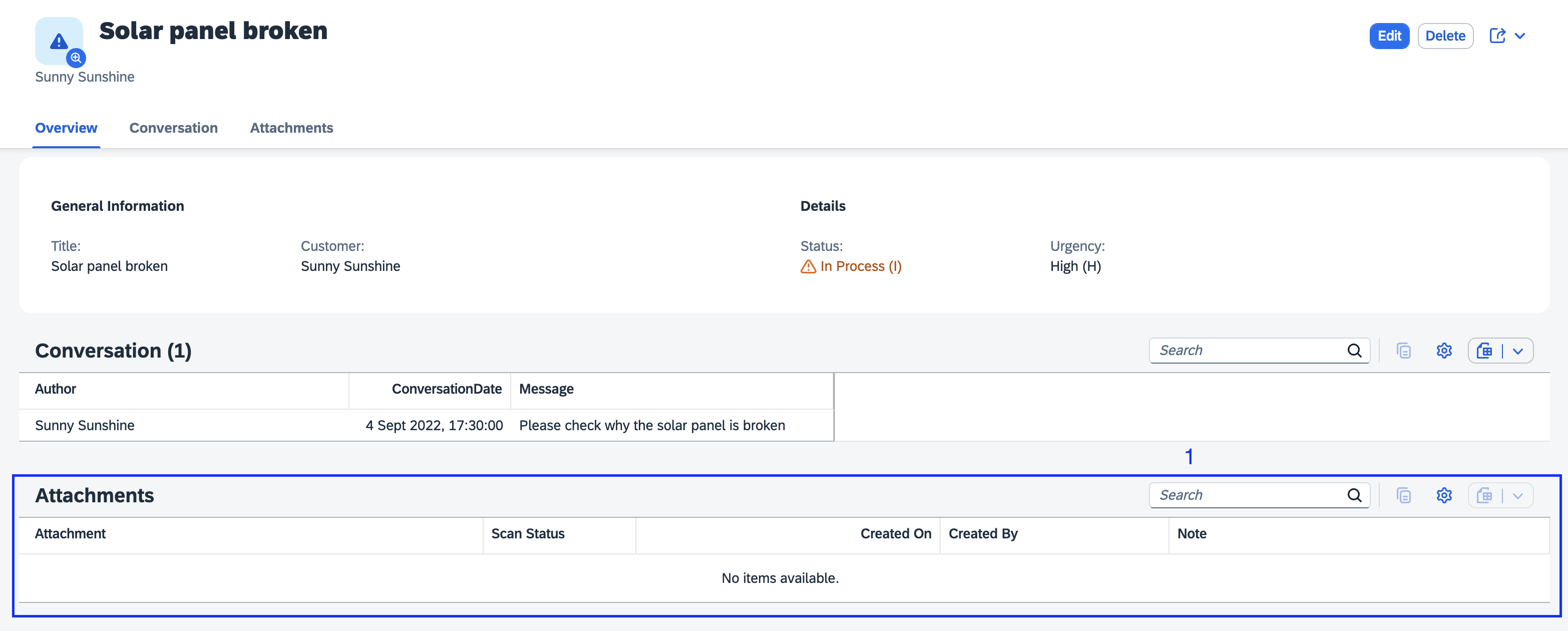
  1. Navigate to the object page of the incident Solar panel broken: Go to object page for incident Solar panel broken

  2. The Attachments type has generated an out-of-the-box Attachments table (see 1) at the bottom of the Object page: Attachments Table
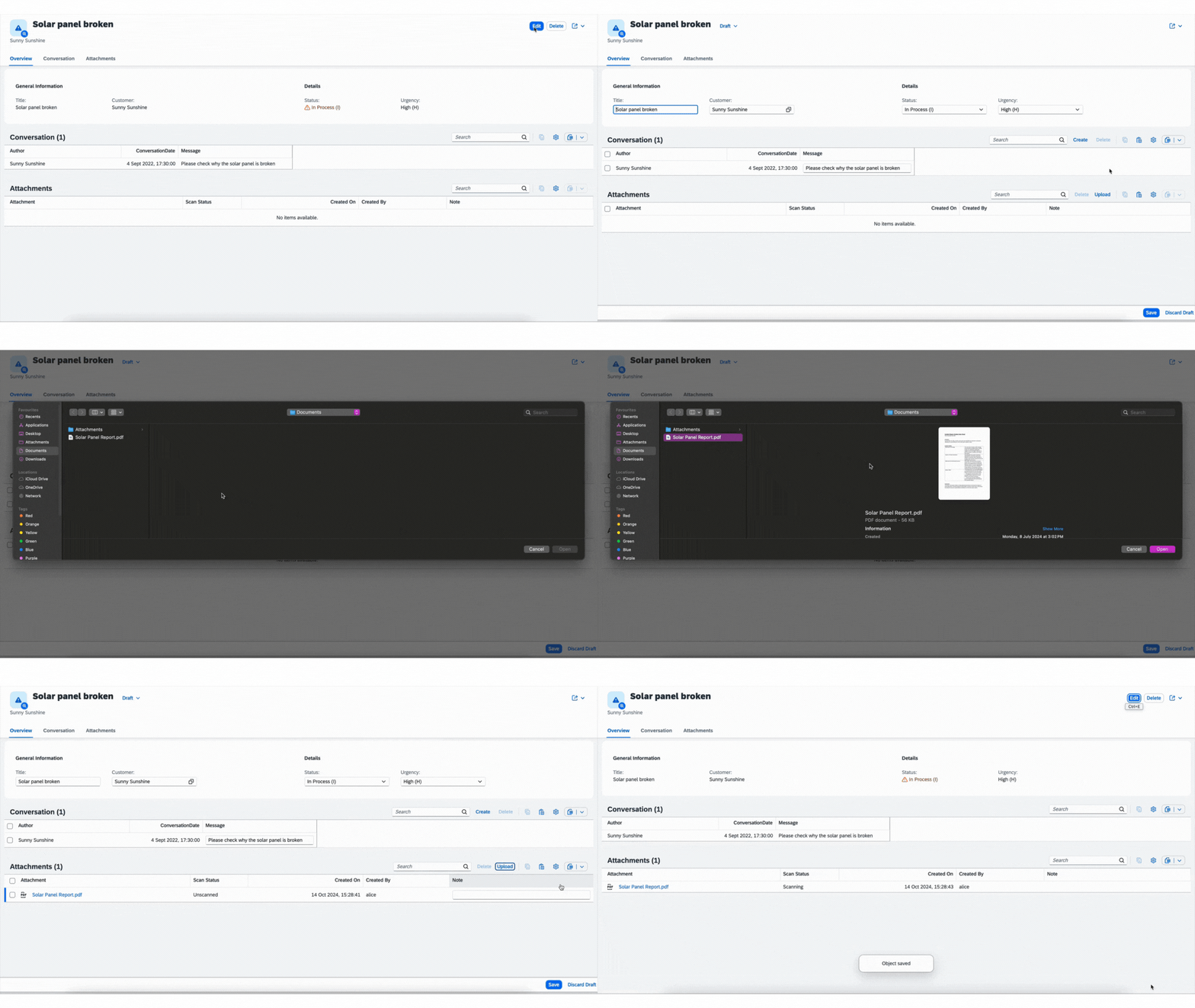
  3. Upload a file by going into Edit mode and either using the Upload button on the Attachments table or by drag/drop. Then click the Save button to have that file stored in the dedicated resource (database, S3 bucket, etc.). We demonstrate this by uploading the PDF file from tests/integration/content/sample.pdf: Upload an attachment
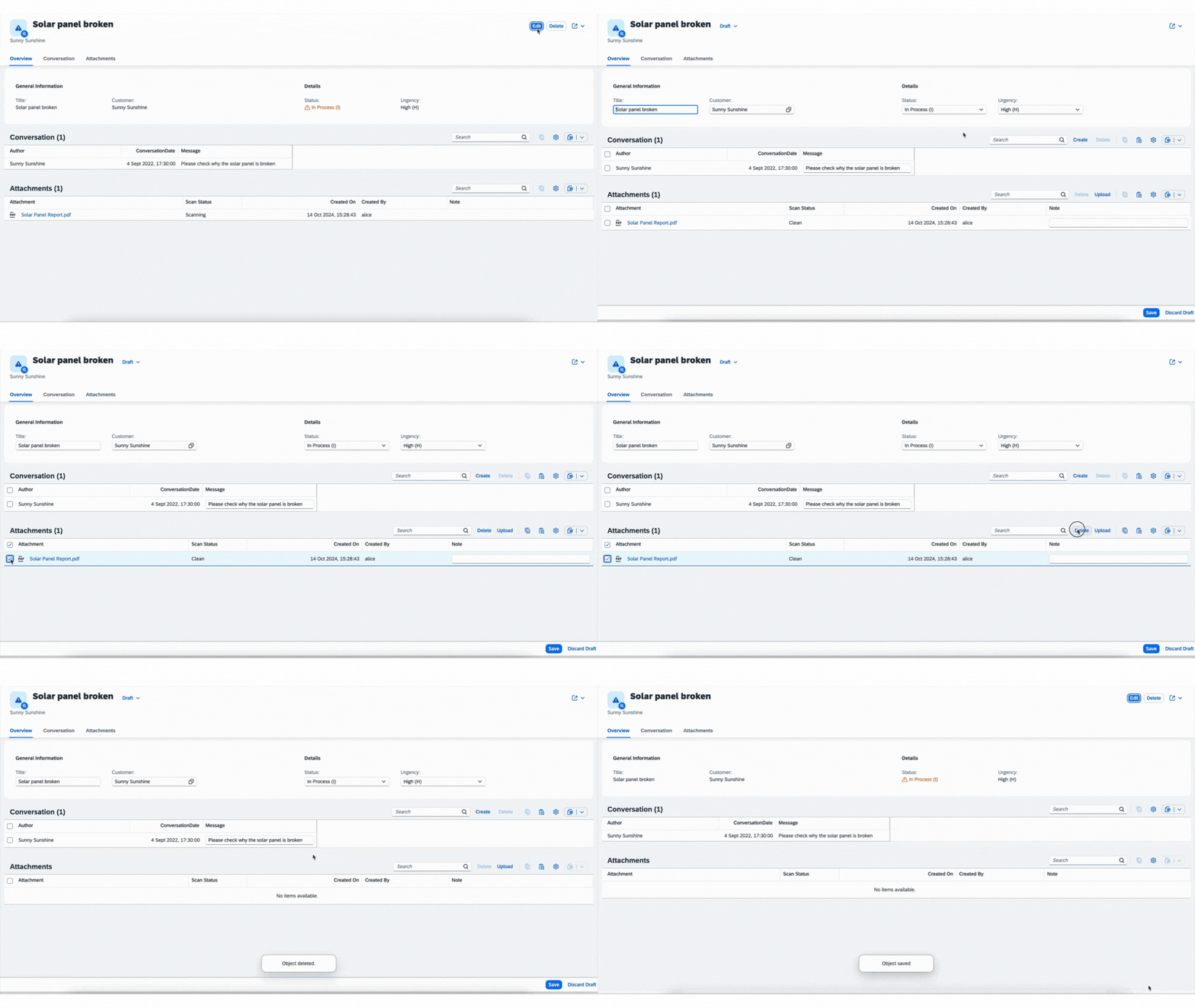
  4. Delete a file by going into Edit mode, selecting the file, and pressing the Delete button above the Attachments table. Clicking the Save button will then delete that file from the resource (database, S3 bucket, etc.). Delete an attachment
Changes in the CDS Models

To use the aspect Attachments on an existing entity, the corresponding entity needs to either include attachments as an element in the model definition or be extended in a CDS file in the srv module. In the quick start, the former was done, adding an element to the model definition:

using { Attachments } from '@cap-js/attachments';

entity Incidents {
  // ...
  attachments: Composition of many Attachments;
}

The entity Incidents can also be extended in the srv module, as seen in the following example:

using { Attachments } from '@cap-js/attachments';

extend my.Incidents with {
  attachments: Composition of many Attachments;
}

service ProcessorService {
  entity Incidents as projection on my.Incidents
}

Both methods directly add the respective UI Facet. To use the plugin with an SAP Fiori elements UI, be sure that draft is enabled for the entity using @odata.draft.enabled. For example:

annotate service.Incidents with @odata.draft.enabled;

If you are not using SAP Fiori elements, draft enablement is not required. For more information, see non-draft upload for an alternative upload flow.

Single Attachments

It is also possible to allow for only 1 attachment by defining the attachments field as a single attachment. This displays a different UI that more clearly shows the single attachment rather than in a list.

using { Attachment } from '@cap-js/attachments';
entity Incidents {
  ...
  attachment: Attachment;
}
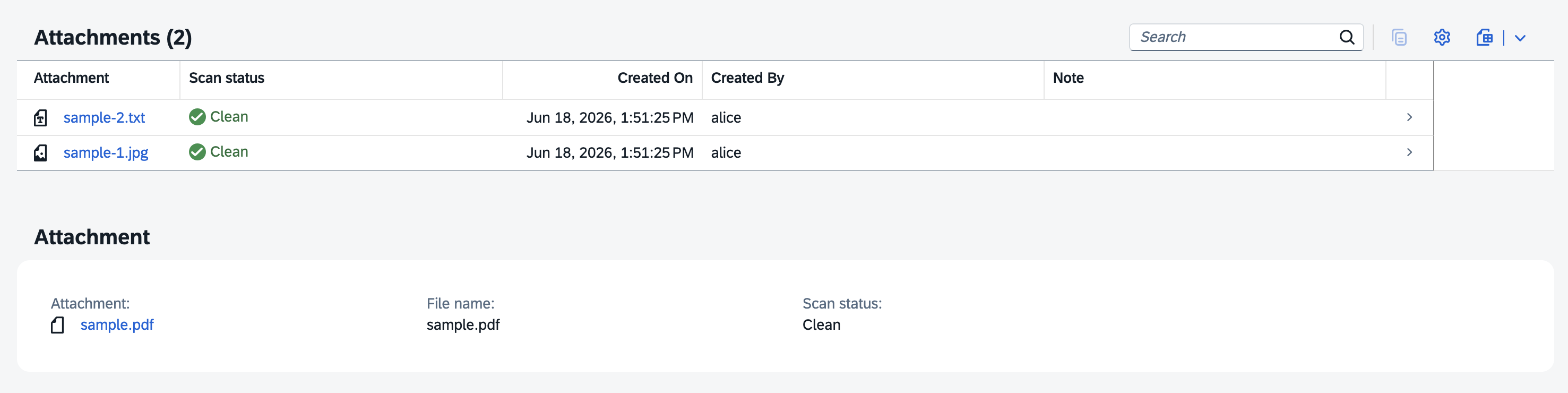
Attachments Table
Storage Targets

When testing locally, the plugin operates without a dedicated storage target, storing attachments directly in the underlying database. In a hybrid setup, a dedicated storage target is preferred. You can bind it by using the cds bind command as described in the CAP documentation for hybrid testing.

Meanwhile, with a dedicated storage target the attachment is not stored in the underlying database; instead, it is saved on the specified storage target and only a reference to the file including metadata is kept in the database, as defined in the CDS model.

For using an Object Store in BTP, you must already have an SAP Object Store service instance on the appropriate landscape created. To bind it in a hybrid setup, follow this setup:

  1. Log in to Cloud Foundry:
cf login -a <CF-API> -o <ORG-NAME> -s <SPACE-NAME> --sso
  1. To bind to the service, generate a new file _.cdsrc-private.json in the project directory by running:
cds bind <HybridObjectStoreName> --to <RemoteObjectStoreName>

Where HybridObjectStoreName can be any name given by the user here and RemoteObjectStoreName is the name of your object store instance in SAP BTP.

  1. To run the application in hybrid mode, run the command:
cds watch --profile hybrid

See Object Stores for further information on SAP Object Store.

Malware Scanner

The BTP malware scanning service is used in the AttachmentService to scan attachments for vulnerabilities.

For using SAP Malware Scanning Service, you must already have a service instance which you can access. To bind it, run the following command:

cds bind <HybridMalwareScannerName> --to <RemoteMalwareScannerName>

By default, malware scanning is enabled for all profiles if a storage provider has been specified. You can configure malware scanning by setting:

{
  "cds": {
    // (...)
    "attachments": {
      "scan": true
    }
  }
}

If there is no malware scanner available and the scanner is not disabled, then the upload will fail.

Scan status codes:

  • Unscanned: Attachment is still unscanned.
  • Scanning: Immediately after upload, the attachment is marked as Scanning. Depending on processing speed, it may already appear as Clean when the page is reloaded.
  • Clean: Only attachments with the status Clean are accessible.
  • Infected: The attachment is infected.
  • Failed: Scanning failed.

[!Note] The malware scanner supports mTLS authentication which requires an annual renewal of the certificate. Previously, basic authentication was used which has now been deprecated.

[!Note] If the malware scanner reports a file size larger than the limit specified via @Validation.Maximum it removes the file and sets the status of the attachment metadata to failed.

Rate Limit Handling (Auto-Retry)

The SAP Malware Scanning Service enforces a rate limit of 30 concurrent requests per subaccount. When this limit is exceeded, the service responds with HTTP 429 Too Many Requests. By default, the plugin automatically retries scan requests that receive a 429 response using exponential backoff with jitter.

You can configure the retry behavior in package.json or .cdsrc.json:

{
  "cds": {
    "requires": {
      "malwareScanner": {
        "retry": {
          "maxAttempts": 5,
          "initialDelay": 1000,
          "maxDelay": 30000
        }
      }
    }
  }
}
OptionDefaultDescription
retry.maxAttempts5Total number of attempts including the initial request
retry.initialDelay1000Base delay in milliseconds before the first retry
retry.maxDelay30000Maximum delay in milliseconds between retries

When a 429 response includes a Retry-After header, the plugin respects that value (capped at maxDelay). Only 429 responses trigger retries — other errors fail immediately.

To disable retry and restore the previous behavior (immediate failure on 429), set retry to false.

Scan Concurrency Limiting

To reduce pressure on the shared rate limit, the plugin limits how many scan requests run concurrently within a single process. Excess scans are queued and processed as slots become available.

{
  "cds": {
    "requires": {
      "malwareScanner": {
        "maxConcurrentScans": 10
      }
    }
  }
}
OptionDefaultDescription
maxConcurrentScans30Maximum number of concurrent scan requests per process. Set to 0 to disable (unbounded parallelism).

A scan that is retrying due to a 429 response holds its concurrency slot during the backoff wait, preventing retry storms from competing with new scans.

Automatic file rescanning

According to the recommendation of the Malware Scanning Service, attachments should be rescanned automatically if the last scan is older than 3 days. This behavior can be configured in the attachments settings by specifying the scanExpiryMs property:

{
  "cds": {
    "requires": {
      "attachments": {
        "scanExpiryMs": 259200000
      }
    }
  }
}

By default, scanExpiryMs is set to 259200000 milliseconds (3 days). Downloading an attachment is not permitted unless its status is Clean.

Audit logging

The attachment service emits the following three events:

  • AttachmentDownloadRejected,
  • AttachmentSizeExceeded,
  • AttachmentUploadRejected

When @cap-js/audit-logging is a dependency of your app, the three events will be automatically logged as security events in the audit log service.

You can register custom handlers for the three events by writing:

const attachments = await cds.connect.to("attachments")
attachments.on("AttachmentDownloadRejected", (msg) => {})
Visibility Control for Attachments UI Facet Generation

By setting the @UI.Hidden property to true, developers can hide the visibility of the plugin in the UI. This feature is particularly useful in scenarios where the visibility of the plugin needs to be dynamically controlled based on certain conditions.

Example Usage
entity Incidents {
  // ...
  @UI.Hidden
  attachments: Composition of many Attachments;
}

In this example, the @UI.Hidden is set to true, which means the plugin will be hidden by default. You can also use dynamic expressions which are then added to the facet.

entity Incidents {
  // ...
  status : Integer enum {
    submitted =  1;
    fulfilled =  2;
    shipped   =  3;
    canceled  = -1;
  };
  @UI.Hidden : (status = #canceled ? true : false)
  attachments: Composition of many Attachments;
}
Copying Attachments

The AttachmentsService exposes a programmatic copy() method that copies an attachment to a new record. On cloud storage backends (AWS S3, Azure Blob Storage, GCP Cloud Storage) this uses a backend-native server-side copy — no binary data is transferred through your application. On database storage it reads and inserts the content directly.

Signature:

const AttachmentsSrv = await cds.connect.to("attachments")
await AttachmentsSrv.copy(
  sourceAttachmentsEntity,
  sourceKeys,
  targetAttachmentsEntity,
  (targetKeys = {}),
)
ParameterDescription
sourceAttachmentsEntityCDS entity definition of the source attachment composition.
sourceKeysKeys of the attachment (e.g. { ID: '...' })
targetAttachmentsEntityCDS entity definition of the target attachment composition.
targetKeysParent FK fields for the new record (e.g. { up__ID: '...' }). When targetAttachmentsEntity is a draft table, must also include DraftAdministrativeData_DraftUUID.

The scan status, lastScan, and hash are inherited from the source — no re-scan is triggered since the binary content is identical. Copying an attachment when the status is not Clean is rejected with a 400 error.

Note

Only copies within the same tenant are supported. Cross-tenant copies are not possible.

Examples
copy between two active records:
const { Incidents } = ProcessorService.entities

await AttachmentsSrv.copy(
  Incidents.attachments,
  { ID: sourceAttachmentID },
  Incidents.attachments,
  { up__ID: targetIncidentID },
)
copy into a new draft record (e.g. creating an incident from a template)
const { Incidents } = ProcessorService.entities

// Look up the draft session UUID for the target incident's open draft
const targetDraft = await SELECT.one
  .from(Incidents.drafts, { ID: targetIncidentID })
  .columns("DraftAdministrativeData_DraftUUID")

await AttachmentsSrv.copy(
  Incidents.attachments,
  { ID: sourceAttachmentID },
  Incidents.attachments.drafts,
  {
    up__ID: targetIncidentID,
    DraftAdministrativeData_DraftUUID:
      targetDraft.DraftAdministrativeData_DraftUUID,
  },
)
Querying Attachments Programmatically

Because Attachments is a standard CDS composition, the resulting attachment entity can be queried directly using cds.ql in the same way as querying any other entity in a CAP service.

The entity is accessible by its fully-qualified name "<Entity>.attachments" via service.entities, for example:

const Attachments = ProcessorService.entities["Incidents.attachments"]

Attachment metadata (ID, filename, mimeType, status, lastScan, note, createdAt, createdBy) for a given parent record can be fetched using SELECT.from. Note that the binary content field is excluded by default, making the operation lightweight:

const attachmentsMeta = await SELECT.from(Attachments).where({
  up__ID: incidentID,
})

The up__ID column is the auto-generated foreign key back to the parent record. The suffix after up__ is the parent entity's key field name (e.g. ID).

Non-Draft Upload

For scenarios where the entity is not draft-enabled, for example tests/non-draft-request.http, separate HTTP requests for metadata creation and asset uploading need to be performed manually.

The typical sequence includes:

  1. POST -> create attachment metadata, returns ID
  2. PUT -> upload file content using the ID
Specify the maximum file size

You can specify the maximum file size by annotating the attachments content property with @Validation.Maximum

entity Incidents {
  ...
  attachments: Composition of many Attachments;
}

annotate Incidents.attachments with {
  content @Validation.Maximum : '20MB';
}

The default is 400MB

Restrict allowed MIME types

You can restrict which MIME types are allowed for attachments by annotating the content property with @Core.AcceptableMediaTypes. This validation is performed during file upload.

entity Incidents {
  ...
  attachments: Composition of many Attachments;
}

annotate Incidents.attachments with {
  content @Core.AcceptableMediaTypes : ['image/jpeg', 'image/png', 'application/pdf'];
}

Wildcard patterns are supported:

annotate Incidents.attachments with {
  content @Core.AcceptableMediaTypes : ['image/*', 'application/pdf'];
}

To allow all MIME types (default behavior), either omit the annotation or use:

annotate Incidents.attachments with {
  content @Core.AcceptableMediaTypes : ['*/*'];
}

When a file with a disallowed MIME type is uploaded, the request will be rejected with a 400 error.

Inline browser preview

By default, attachments are served with Content-Disposition: attachment, which forces a file download and prevents the browser from rendering the content inline. This is the secure default to protect against stored files from XSS attacks that would execute in the application's origin when opened.

To enable inline browser preview (i.e. PDFs and images opening directly in the browser tab instead of downloading), set the inline flag in your CDS config:

"cds": {
  "requires": {
    "attachments": {
      "inline": true
    }
  }
}

Security note: When enabling inline preview, you should restrict the allowed MIME types to a safe allowlist using @Core.AcceptableMediaTypes to prevent script-capable file types from being uploaded. Types such as image/svg+xml, text/html, and application/xhtml+xml can execute embedded JavaScript when rendered inline by a browser and should be excluded:

annotate Incidents.attachments with {
  content @Core.AcceptableMediaTypes : ['image/jpeg', 'image/png', 'application/pdf'];
}
Minimum and Maximum Number of Attachments

You can control the number of attachments allowed for an entity by using the @Validation.MaxItems and @Validation.MinItems annotations. These annotations define the maximum and minimum number of files that can be associated with an entity.

Limit to a Maximum of 2 Attachments
entity Incidents {
  ...
  @Validation.MaxItems: 2
  attachments: Composition of many Attachments;
}
Require a Minimum of 2 Attachments
entity Incidents {
  ...
  @Validation.MinItems: 2
  attachments: Composition of many Attachments;
}
Allow Overwriting Attachment Content

By default, the Attachments aspect annotates the entity with @Capabilities.UpdateRestrictions.NonUpdatableProperties: [content], which prevents overwriting the content of an existing attachment. Any attempt to upload new content to an attachment that already has content will be rejected with a 409 Conflict error.

To allow overwriting attachment content, override the annotation with an empty array on the specific attachment composition:

using { Attachments } from '@cap-js/attachments';

entity Incidents {
  ...
  attachments: Composition of many Attachments;
}

// Allow content to be overwritten
annotate Incidents.attachments with
  @Capabilities.UpdateRestrictions.NonUpdatableProperties: [] {};

With this annotation in place, uploading new content via PUT to an attachment that already has content will overwrite the existing content instead of returning a 409 error.

Note

This annotation is evaluated at runtime by all storage backends. When content overwrite is allowed, uploading to an existing attachment replaces the stored file.

Deduplicate File Names

When multiple attachments with the same file name are uploaded to the same parent entity, the plugin can automatically rename duplicates by appending a numerical suffix (e.g. report.pdf, report-1.pdf, report-2.pdf). This applies to both single uploads and deep inserts.

The behavior is enabled by default. To disable it, set deduplicateFileNames to false in the attachments configuration:

{
  "cds": {
    "requires": {
      "attachments": {
        "deduplicateFileNames": false
      }
    }
  }
}

Releases

Minimum UI5 and CAP NodeJS Version

ComponentMinimum Version
CAP Node8.0.0
UI51.136.0

Architecture Overview

Multitenancy

The plugin supports multi-tenancy scenarios, allowing both shared and tenant-specific object store instances.

[!Note] Starting from version 2.1.0, separate mode for object store instances is the default setting for multi-tenancy.

For multi-tenant applications, @cap-js/attachments must be included in the dependencies of both the application-level and mtx/sidecar/package.json files.

Separate object store instances

By default, the plugin creates its own object store instance for each tenant during the tenant's subscription.

When the tenant unsubscribes, the object store instance is deleted.

Warning

When you remove the plugin from an application after separate object stores already have been created, the object stores are not automatically removed!

Shared Object Store Instance

To configure a shared object store instance, modify both the package.json files as follows:

"cds": {
  "requires": {
    "attachments": {
      "objectStore": {
        "kind": "shared"
      }
    }
  }
}

To ensure tenant identification when using a shared object store instance, the plugin prefixes attachment URLs with the tenant ID. Be sure the shared object store instance is bound to the mtx application module before deployment.

Object Stores

A valid object store service binding is required, typically one provisioned through SAP BTP. See Storage Targets and Deployment to Cloud Foundry on how to use this object store service binding.

Deployment to Cloud Foundry

The corresponding entry in the mta-file possibly looks like:

_schema-version: '0.1'
ID: consuming-app
version: 1.0.0
description: "App consuming the attachments plugin with an object store"
parameters:
  ...
modules:
  - name: consuming-app-srv
# ------------------------------------------------------------
    type: nodejs
    path: srv
    parameters:
      ...
    properties:
      ...
    build-parameters:
      ...
    requires:
      - name: consuming-app-hdi-container
      - name: consuming-app-uaa
      - name: cf-logging
      - name: **object-store-service**
...
resources:
  ...
  - name: **object-store-service**
    type: org.cloudfoundry.managed-service
    parameters:
      service: objectstore
      service-plan: standard
Tests

The unit tests in this module do not need a binding to the respective object stores, run them with npm install. To achieve a clean install, the command rm -rf node_modules should be used before installation.

For testing locally with a Postgres database, create a Podman (or Docker) container and run the command podman compose -f tests/pg.yml up -d. This should be run every time the container is stopped. On the initial setup, the database must be deployed with npm run deploy:postgres. From then on, running the tests with Postgres is simply npm run test:postgres. For more information on Postgres setup, see the official Capire documentation.

The integration tests need a binding to a real object store. Run them with npm run test. To set the binding, please see the section Storage Targets.

Supported Storage Provider
  • Standard (kind: "standard") | Depending on the bound object store credentials, uses AWS S3, Azure Blob Storage or GCP Cloud Storage. You can manually specify the implementation by adjusting the type to:
    • AWS S3 (kind: "s3")
    • Azure Blob Storage (kind: "azure")
    • GCP Cloud Storage (kind: "gcp")
Model Texts

In the model, several fields are annotated with the @title annotation. Default texts are provided in 2 languages. If these defaults are not sufficient for an application, they can be overwritten by applications with custom texts or translations.

The following table gives an overview of the fields and the i18n codes:

Field Namei18n Code
mimeTypeMediaType
fileNameFileName
statusScanStatus
notenote

In addition to the field names, header information (@UI.HeaderInfo) is also annotated:

Header Infoi18n Code
TypeNameAttachment
TypeNamePluralAttachments

Monitoring & Logging

To configure logging for the attachments plugin, add the following configuration to the package.json of the consuming application:

{
  "cds": {
    "log": {
      "levels": {
         // (...)
         "attachments": "debug"
      }
    }
  }
}
...

Support, Feedback, and Contributing

This project is open to feature requests/suggestions, bug reports etc. via GitHub issues. Contribution and feedback are encouraged and always welcome. For more information about how to contribute, the project structure, the local development setup, as well as additional contribution information, see our Contribution Guidelines.

Code of Conduct

We as members, contributors, and leaders pledge to make participation in our community a harassment-free experience for everyone. By participating in this project, you agree to abide by its Code of Conduct at all times.

Licensing

Copyright 2024 SAP SE or an SAP affiliate company and contributors. Please see our LICENSE for copyright and license information. Detailed information including third-party components and their licensing/copyright information is available via the REUSE tool.

Apache-2.0, read

History

Latest

v4.0.0

Changed 2, Fixes 1

Notes

BREAKING CHANGE: The attachments plugin comes now without hyperscaler dependencies, please make sure to install them accordingly! BREAKING CHANGE: Projects that explicitly set attachments.outbox: true in their own CDS configuration must rename the key to outboxed.

Changed
  • The outbox configuration key under cds.requires.attachments has been renamed to outboxed. A deprecation warning is logged at startup when the old key is detected.
  • Cloud storage SDKs (@aws-sdk/client-s3, @aws-sdk/lib-storage, @azure/storage-blob, @google-cloud/storage) are now optional peer dependencies. Install only the SDK(s) for the provider you use (e.g. npm install @aws-sdk/client-s3 @aws-sdk/lib-storage for AWS S3). A clear error message with the exact install command is shown if a required SDK is missing at runtime.
Fixed
  • Attachments are now served with Content-Disposition: attachment by default with inline being a toggle
  1. v3.13.4

    Fixes 2

    Notes
    Fixed
    • Fixed a race condition where a download-triggered re-scan could leave an attachment stuck in Scanning (causing clean files to be rejected on download). The redundant request-path status write in rescan has been removed; the spawned scan (_scanAttachmentsFile) already sets the status to Scanning as its first step. This also avoids holding a DB connection across the request rejection, which could drain the pool on single-connection databases.
    • Non-draft PATCH now allows for deleting attachment arrays from the database.
  2. v3.13.3

    Fixes 2

    Notes
    Fixed
    • Avoid leaking Service Manager credentials when service manager binding is not complete.
    • Replaced axios with the built-in fetch API, removing an external dependency
  3. v3.13.2

    Fixes 4, Other 1

    Notes
    Fixed
    • Multiple single attachments components now are visible in the UI with unique labels
    • Upload of inline attachments with @Core.AcceptableMediaTypes annotation no longer crashes with a TypeError
    • UI facets for inline attachments are now correctly added even when no Attachments composition is present in the application
    • Inline attachments annotated with @UI.Hidden now correctly hide their facet instead of showing an empty section
    Migration Note
    • The per-locale ScanStates_texts_*.csv files (e.g. _de.csv, _ar.csv) were consolidated into a single base CSV in this version. To resolve, add the removed per-locale files to your undeploy.json before upgrading. Alternatively, enable --auto-undeploy in your HDI deploy configuration to automatically undeploy artifacts that no longer exist in the source.
  4. v3.13.1

    Fixes 1

    Notes
    Fixed
    • Multiple single attachments components now are visible in the UI with unique labels
  5. v3.13.0

    Features 1, Fixes 1

    Notes
    Added
    • Ability to use a single attachment instead of a composition. This can be done simply when creating an entity by having a field of type Attachment, without the composition value:
    entity MyEntity {
      title: String;
      attachment: Attachment;
    }
    Fixed
    • Removed hard-coded attributes that were being used. Variable attribute names supports multiple compositions of attachments on a single entity.
  6. v3.12.2

    Fixes 1

    Notes
    Fixed
    • Querying from content column while using object storage now returns expected result.
  7. v3.12.1

    Features 1, Fixes 1

    Notes
    Added
    • File deduplication can now be disabled via cds.requires.attachments.deduplicateFileNames=false
    Fixed
    • Security audit events (AttachmentSizeExceeded, AttachmentUploadRejected, AttachmentDownloadRejected) now log the real client IP on reverse-proxy deployments (e.g. BTP Cloud Foundry) as well by setting X-Forwarded-For as an attribute on the audit log.
  8. v3.12.0

    Features 1, Changed 1, Fixes 2

    Notes
    Added
    • A maximum concurrent amount of scans can now be configured for the malware scanner.
    Changed
    • The retry logic for the malware scanner was improved to be more robust under high loads.
    Fixed
    • Wrong file name being shown when rejecting an attachment due to file size.
    • Fix a server crash when uploading extensions due to wrongfully assuming each request has a query attached.
  9. v3.11.0

    Features 1, Fixes 1

    Notes
    Added
    • Support for controlling content overwrite behavior via @Capabilities.UpdateRestrictions.NonUpdatableProperties. By default, content is listed as non-updateable, preventing overwrites with a 409 error. Setting the annotation to an empty array ([]) on a specific attachment composition allows content to be overwritten.
    Fixed
    • When cds.env.fiori.bypass_draft was enabled attachments were wrongfully deleted
  10. v3.10.0

    Features 5, Fixes 3

    Notes
    Added
    • Emit the following security events on the attachments service: - AttachmentDownloadRejected, AttachmentSizeExceeded AttachmentUploadRejected.
    • If @cap-js/audit-logging is installed automatically trigger audit logs for the security events.
    • Duplicate file names to a single attachment entity are automatically assigned a distinguishing suffix.
    • Local testing using a Postgres database now possible.
    • Native server-side copy() method on AttachmentsService for copying attachments between entities without transferring binary data through the application. Supports all storage backends (DB, AWS S3, Azure Blob Storage, GCP Cloud Storage) with backend-native copy operations.
    Fixed
    • Fixed bug where deeply nested attachments were not properly handled.
    • Fixed bug to allow navigation of self-referencing entities.
    • Fix that POST requests for attachments did not have a response when the plugin is used with an object store.
  11. v3.9.0

    Fixes 5

    Notes
    Fixed
    • Fixed security vulnerability where @Core.AcceptableMediaTypes validation could be bypassed during content upload by manipulating the Content-Type header. The mimeType is now validated against the value stored in the database (derived from filename extension) rather than the request header.
    • Relaxed requirement for Content-Length header; stream length validation is now used as an additional check to leverage support for chunked uploads.
    • Fixed bug where self-referencing entities caused overflow error due to infinite looping.
    • Fixed bug in which discarded drafts would save files to database.
    • Now allows for downloading files while in draft mode.
  12. v3.8.0

    Features 2, Fixes 1

    Notes
    Added
    • Support for all generic MIME types (see mime.js).
    • DB handler for programmatic attachment insertion via INSERT.into():
      const firstID = cds.utils.uuid()
      const secondID = cds.utils.uuid()
      await INSERT.into("sap.capire.incidents.NonDraftTest").entries(
        {
          ID: firstID,
          title: "Test Incident 1",
          description: "This is a test incident 1",
          urgency_code: "L",
          urgency_descr: "Low",
        },
        {
          ID: secondID,
          title: "Urgent Test Incident 2",
          description: "This is a test incident 2",
          urgency_code: "L",
          urgency_descr: "Low",
        },
      )
    Fixed
    • Resolved an issue in draft mode where discarding an active draft incorrectly deleted attachments from the object store. Removed dependency on req.diff().
  13. v3.7.0

    Features 2, Fixes 1

    Notes
    Added
    • Implemented automatic re-scanning of files whose last malware scan occurred more than 3 days ago, in alignment with the BTP Malware Scanning FAQ.
    • Enhanced error messages for file size violations to include the filename, e.g., The size of "myfile.jpeg" exceeds the maximum allowed limit of 5MB.
    Fixed
    • Addressed an issue where files were deleted twice from the underlying object store, which previously resulted in error messages and looping through the outbox.
  14. v3.6.1

    Fixes 2

    Notes
    Fixed
    • Resolved an issue where URLs for nested entities were not generated.
    • Fixed an internal server error in CDS 8 caused by the absence of cds.infer?.target.
  15. v3.6.0

    Features 2, Fixes 4

    Notes
    Added
    • Introduced support for @Validation.MaxItems and @Validation.MinItems annotations, enabling you to define the minimum and maximum number of attachments that can be uploaded.

      Example: Limit to a Maximum of 2 Attachments
      entity Incidents {
          @Validation.MaxItems: 2
          attachments: Composition of many Attachments;
      }
      Example: Require at Least 2 Attachments
      entity Incidents {
          @Validation.MinItems: 2
          attachments: Composition of many Attachments;
      }
    • Enhanced the note field to support multi-line input, improving readability for longer text entries.

    Fixed
    • Prevented unauthorized users from accessing attachments.
    • Improved deletion logic for non-draft entities to ensure all associated attachments are reliably removed, preventing orphaned files and maintaining data consistency.
    • Handling the use of nested POST requests in non-draft mode.
    • Prevent overriding attachments using /content handler.
  16. v3.5.0

    Fixes 2

    Notes
    Fixed
    • Enforced the use of the Content-Length header to prevent server errors.
    • Designated the content property in the Attachments table as a NonSortableProperty to prevent database errors when sorting LargeBinary fields.
  17. v3.4.0

    Features 2, Fixes 2

    Notes
    Added
    • Introduced support for the @Core.AcceptableMediaTypes annotation, allowing specification of permitted MIME types for attachment uploads:
      annotate my.Books.attachments with {
          content @Core.AcceptableMediaTypes: ['image/jpeg'];
      }
    • Added support for the @Validation.Maximum annotation to define the maximum allowed file size for attachments:
      annotate my.Books.attachments with {
          content @Validation.Maximum: '2MB';
      }
    Fixed
    • Removed the previous hard limit of 400 MB for file uploads. Files exceeding this size may still fail during malware scanning and will be marked with a Failed status.
    • Resolved issues with generic handler registration, enabling services to intercept the attachments plugin using middleware.
  18. v3.3.0

    Features 2, Fixes 9

    Notes
    Added
    • Added standard kind and set it as the default so that the configuration needs no adjustment when switching hyper-scalers.
    • Added support for uploading and updating attachments via srv.run(INSERT.into(Attachments).entries()) or srv.run(UPDATE.entity(Attachments).set())
    Fixed
    • Fixed an issue that in multi-tenancy scenarios with separate object stores duplicate object stores per tenant were created when updating the tenant binding via the SaaS dependency service.
    • Fixed a race-condition where tenant isolation in separate object store mode could be broken.
    • Fixed a case where attachments were not correctly deleted.
    • Fixed a server crash when using the AttachmentsSrv.put API to upload an attachment.
    • Fixed a server crash when no object store would be bound to the application on BTP.
    • Fixed a server crash when the filename would not be given when creating new attachment metadata.
    • Fixed an issue where attachment handlers would be missing when all Attachments entity were behind feature toggles.
    • Fixed an issue where with storage kind db attachments could not be uploaded as drafts.
    • Fixed an issue where the content could be uploaded for a not existing attachments entity.
  19. v3.2.0

    Features 4

    Notes
    Added
    • Implemented integration with additional cloud providers for attachment storage:
      • Azure Blob Storage (kind: azure).
      • Google Cloud Platform Object Store (kind: gcp).
    • Added support for mTLS authentication for the malware scanning service.
    • Added criticality status to the attachment scan status.
    • Provided translations for all SAP-supported languages.
  20. v3.1.0

    Features 1, Fixes 3

    Notes
    Added
    • Introduced a sample application in the /tests/ folder to facilitate local development and testing.
    Fixed
    • Resolved a memory leak that could occur during the malware scanning process.
    • Ensured reliable deletion of all related attachments when parent entities are removed, preventing orphaned data.
    • Improved handling of attachment deletion for non-draft entities to ensure consistent cleanup.
  21. v3.0.0

    Features 2, Fixes 3

    Notes

    BREAKING CHANGE: Replaced usage of the CAP req variable with cds.context throughout the codebase.

    Fixed
    • Resolved a crash in the malware scanning process when running the CDS server in a multitenancy setup.
    • Corrected missing translations for column labels.
    • Scan states are now translated.
    Added
    • Deprecated @attachments.disable_facet
    • Introduced support for @UI.Hidden, enabling dynamic hiding of the attachments section in the UI.
  22. v2.2.2

    Features 1, Fixes 1

    Notes
    Added
    • Enhanced logging capabilities by introducing a logging wrapper, providing more comprehensive and structured output to facilitate easier debugging and troubleshooting.
    Fixed
    • Resolved an issue in hybrid mode where an incorrect route path variable was used for attachment uploads in local environments.
  23. v2.2.1

    Fixes 1

    Notes
    Fixed
    • Ensured content is correctly stored and retrievable in non-draft mode.
  24. v2.2.0

    Features 2, Fixes 2

    Notes
    Added
    • Support for the standard plan of the SAP Object Store in multitenant mode. The plugin now attempts to use the standard plan and falls back to the deprecated s3-standard plan if needed.
    • Added support for non-draft attachment handling.
    Fixed
    • Improved error handling and runtime crashes.
    • Fixed support for MTLS authentication via Service Manager.
  25. v2.1.2

    Fixes 1

    Notes
    Fixed
    • Bug fixes.
  26. v2.1.1

    Features 1, Fixes 1

    Notes
    Added
    • MTX: Support for deleting tenant-specific objects from S3 upon tenant unsubscription in shared mode.
    Fixed
    • Deleted attachments are now removed from S3 when a draft is discarded or deleted.
  27. v2.1.0

    Features 1, Fixes 1

    Notes
    Added
    • Support for multitenancy with tenant specific object store instances as the default option.
    Fixed
    • Support for .mov file extension.
  28. v2.0.2

    Fixes 1

    Notes
    Fixed
    • Restored Attachments aspect on root namespace.
  29. v2.0.1

    Fixes 1

    Notes
    Fixed
    • Minor bug fixes.
  30. v2.0.0

    Features 1, Changed 2

    Notes
    Changed
    • Removed @sap/xsenv dependency.
    • Attachments usage changed to using { sap.attachments.Attachments } from '@cap-js/attachments'.
    Added
    • Visibility Control: Added visibility control for attachments plugin using @attachments.disable_facet.
  31. v1.2.1

    Fixes 1

    Notes
    Fixed
    • CDS version check added for rendering UI facets in older versions.
  32. v1.2.0

    Features 1, Fixes 1

    Notes
    Added
    • Support for multi-tenant applications utilizing a shared object store instance.
    Fixed
    • Fixed query syntax error for hana cloud bindings.
  33. v1.1.9

    Features 2, Fixes 1

    Notes
    Added
    • File Size Validation: Introduced a new file size validation feature to ensure uploaded attachments comply with defined size limits.
    • This feature is compatible with SAPUI5 version >= 1.131.0.
    Fixed
    • Fixed upload attachment bug after cds 8.7.0 update.
  34. v1.1.8

    Changed 1, Fixes 1

    Notes
    Changed
    • Included test cases for malware scanning within development profile.
    Fixed
    • Fix for viewing stored attachment.
  35. v1.1.7

    Fixes 1

    Notes
    Fixed
    • Fix for scenario where an aspect has a composition.
  36. v1.1.6

    Features 1, Fixes 1

    Notes
    Added
    • Support for cds 8.
    Fixed
    • Fix for adding note for attachments.
  37. v1.1.5

    Changed 3

    Notes
    Changed
    • Set width for columns for Attachments table UI.
    • Scan status is mocked to Clean only in the development profile and otherwise set to Unscanned, when malware scan is disabled.
    • When malware scan is disabled, removed restriction to access uploaded attachment.
  38. v1.1.4

    Changed 1

    Notes
    Changed
    • Updated Node version restriction.
  39. v1.1.3

    Changed 1, Fixes 1

    Notes
    Changed
    • Improved error handling.
    Fixed
    • Minor bug fixes.
  40. v1.1.2

    Features 1, Changed 2, Fixes 2

    Notes
    Added
    • Content of files detected as Infected from malware scanning service are now deleted.
    Changed
    • Attachments aren't served if their scan status isn't Clean.
    • Reduced the delay of setting scan status to Clean to 5 sec, if malware scanning is disabled.
    Fixed
    • Bug fixes for event handlers in production.
    • Bug fix for attachment target condition.
  41. v1.1.1

    Changed 2, Fixes 1

    Notes
    Changed
    • Enabled malware scanning in hybrid profile by default.
    • Added a 10 sec delay before setting scan status to Clean if malware scanning is disabled.
    Fixed
    • Bug fixes for upload functionality in production.
  42. v1.1.0

    Features 1, Fixes 1

    Notes
    Added
    • Attachments are scanned for malware using SAP Malware Scanning Service.
    Fixed
    • Fixes for deployment
  43. v1.0.2

    Fixes 1

    Notes
    Fixed
    • Bug fixes
  44. v1.0.1

    Fixes 1

    Notes
    Fixed
    • Updating the documentation.
  45. v1.0.0

    Features 1

    Notes
    Added
    • Initial release that provides out-of-the box asset storage and handling by using an aspect Attachments. It also provides a CAP-level, easy to use integration of the SAP Object Store.
2,488downloads per week, npm
Weekly downloads for @cap-js/attachments26 complete calendar weeks from 2026-04-27 to 2026-10-25; the latest total is 2488.27 Apr – 3 May: 5,5594 May – 10 May: 5,96511 May – 17 May: 4,45418 May – 24 May: 5,57825 May – 31 May: 5,3961 Jun – 7 Jun: 4,4848 Jun – 14 Jun: 5,98015 Jun – 21 Jun: 7,01322 Jun – 28 Jun: 7,93229 Jun – 5 Jul: 7,0706 Jul – 12 Jul: 7,33913 Jul – 19 Jul: 7,33020 Jul – 26 Jul: 8,40627 Jul – 2 Aug: 9,5943 Aug – 9 Aug: 9,45010 Aug – 16 Aug: 8,24117 Aug – 23 Aug: 11,37024 Aug – 30 Aug: 10,52631 Aug – 6 Sept: 10,0807 Sept – 13 Sept: 7,82514 Sept – 20 Sept: 9,48521 Sept – 27 Sept: 9,70128 Sept – 4 Oct: 12,5335 Oct – 11 Oct: 10,85712 Oct – 18 Oct: 6,47619 Oct – 25 Oct: 2,488
Attachments
  1. AttachmentCommentODataServiceABAP OData service for attachments and comments via GOSfrom ABAP
  2. SAP Document Management service, application optionReady-to-use web application for enterprise contentfrom BTP/BAIP
  3. SAP Document Management service, integration optionAPIs and a UI5 component for document management in appsfrom BTP/BAIP
  4. cap-attachments-plusCAP Node.js attachments plugin with database or cloud storagefrom CAP
  5. com.sap.cds:cds-feature-attachmentsCAP Java attachments with database storage and an Object Store modulefrom CAP
  6. com.sap.cds:sdmCAP Java plugin for attachments in SAP Document Managementfrom CAP
  7. @cap-js/sdmCAP attachments stored in an SAP Document Management repositoryfrom CAP
  8. ui5-upload-controlsUI5 control library for file upload and download in front of CAPfrom UI5
  9. @sap/cdsCAP Node.js runtimefrom CAP
  10. @tklein1801/cap-js-attachmentsCAP Node.js attachments plugin with Object Store and malware scanningfrom CAP
  11. @ui5/webcomponentsSAP's UI elements as standard custom elementsfrom UI5
  12. sap-cap-sdm-pluginCAP Node.js plugin mapping CDS entities to SAP Document Managementfrom CAP

Details

Connected knowledge — wider context1

Source connections explain where this sits. Implementation claims remain in their exact task assessment.

Attach a document to a business record and retrieve it later · CAP Node.js

Prototype assessment awaiting review · assessed . No Atlas runtime testing.

Related knowledge

Serving Media Data

Official reference for the streaming foundation.

Why included: Reading explains the documented implementation contribution. · SAP CAP documentation

Attachments plugin guide

Setup and storage requirements for the official plugin.

Why included: Reading explains the documented implementation contribution. · cap-js

cap-attachments-plus guide

Maintainer documentation for attachment handling and own-account storage.

Why included: Reading explains the documented implementation contribution. · npm

CAP Framework (Cloud Application Programming Model)

Source subject or learning resource; applicability is established separately by the scoped assessment.

Why included: The CAP framework subject is broader than the Node.js runtime. This is a route to context, not package identity or compatibility. · SAP Developers

Why this assessment is relevant
  1. Attach a document to a business record and retrieve it later → CAP Node.js
Relationships and evidence (15)
  • cap-attachments-plus → provides → Attachments

    Adds an Attachments aspect and Fiori elements upload facet. Cloud attachment content is stored in the application owner’s AWS, Azure or GCP account using credentials from a BTP destination; local development can store content in the database.

    Basis: atlas-record

    plus — README · checked 2026-09-17Credentials come from a **BTP destination** you create yourself

    plus — README · checked 2026-09-17For scenarios where the entity is not draft-enabled, for example [`tests/non-draft-request.http`](./tests/non-draft-request.http), separate HTTP requests for metadata creation and asset uploading need to be performed manually.

    plus — README · checked 2026-09-17The plugin's own `[development]` profile default already wires up a **mocked** scanner (`kind: "malwareScanner-mocked"`) that always reports `Clean` without calling any real service.

    plus — README · checked 2026-09-17Each cloud provider reads its configuration directly from a BTP destination, pointing at your own AWS, Azure or GCP account rather than an SAP Object Store service instance.

  • @cap-js/attachments → provides → Attachments

    Adds the Attachments aspect, Fiori annotations and file handling to CAP Node.js. Database storage is used locally; productive use requires an Object Store binding. Fiori elements requires draft enablement, while non-draft clients send separate metadata and content requests.

    Basis: atlas-record

    cap-js/attachments — README · checked 2026-09-17- **AWS S3** (`kind: "s3"`) - **Azure Blob Storage** (`kind: "azure"`) - **GCP Cloud Storage** (`kind: "gcp"`)

    cap-js/attachments — README · checked 2026-09-17For scenarios where the entity is not draft-enabled, for example [`tests/non-draft-request.http`](./tests/non-draft-request.http), separate HTTP requests for metadata creation and asset uploading need to be performed manually.

    cap-js/attachments — README · checked 2026-09-17If there is no malware scanner available and the scanner is not disabled, then the upload will fail.

    cap-js/attachments — README · checked 2026-09-17For productive use, a valid object store binding is required, see [Object Stores](#object-stores) and [Storage Targets](#storage-targets).

    cap-js/attachments — README · checked 2026-09-17If you are not using SAP Fiori elements, draft enablement is not required.

  • @sap/cds → provides → Attachments

    Serves an element annotated @Core.MediaType as an OData media resource, stored in the database as a LargeBinary or redirected to an external URL, streamed to and from the client.

    Basis: atlas-record

    Serving Media Data — capire · checked 2026-09-27CAP provides out-of-the-box support for serving media and other binary data. Media data can be stored either directly in the database or in an external repository, and can be streamed to and from clients.

    Serving Media Data — capire · checked 2026-09-27The media data is streamed automatically.

  • Attach a document to a business record and retrieve it later → associatedWith → Attachments

    Discover the shared task through the Attachments concern.

    Basis: pilot-assessment

  • Serving Media Data → explains → @sap/cds

    Reading explains the documented implementation contribution.

    Basis: pilot-assessment

    CAP — Serving Media Data · checked 2026-10-06The media data is streamed automatically.

  • Attachments plugin guide → explains → @cap-js/attachments

    Reading explains the documented implementation contribution.

    Basis: pilot-assessment

    @cap-js/attachments README · checked 2026-10-06For productive use, a valid object store binding is required

  • cap-attachments-plus guide → explains → cap-attachments-plus

    Reading explains the documented implementation contribution.

    Basis: pilot-assessment

    cap-attachments-plus npm README, latest 1.0.29 at retrieval · checked 2026-10-06Credentials come from a **BTP destination** you create yourself

  • CAP Framework (Cloud Application Programming Model) → contextualizes → @sap/cds

    The CAP framework subject is broader than the Node.js runtime. This is a route to context, not package identity or compatibility.

    Basis: pilot-mapping

    Mapping: about · pending-human-review · authored from cited sources · checked 2026-10-06

    CAP — Serving Media Data · checked 2026-10-06The media data is streamed automatically.

  • CAP Node.js → assesses → Attach a document to a business record and retrieve it later

    One shared outcome, one scoped assessment.

    Basis: pilot-assessment

  • cap-attachments-plus → contributesTo → CAP Node.js

    Attachment aspect and upload/download UI; own-account AWS, Azure or GCP storage through a BTP destination.

    Basis: pilot-assessment

    cap-attachments-plus npm README, latest 1.0.29 at retrieval · checked 2026-10-06Credentials come from a **BTP destination** you create yourself

  • @cap-js/attachments → contributesTo → CAP Node.js

    Attachment handling through the official CAP Node.js plugin.

    Basis: pilot-assessment

    @cap-js/attachments README · checked 2026-10-06For productive use, a valid object store binding is required

  • @sap/cds → contributesTo → CAP Node.js

    Documented media streaming foundation rather than a complete attachment user flow.

    Basis: pilot-assessment

    CAP — Serving Media Data · checked 2026-10-06The media data is streamed automatically.

  • CAP Node.js → reading → Serving Media Data

    Curated supporting reading for this assessment.

    Basis: pilot-assessment

    CAP — Serving Media Data · checked 2026-10-06The media data is streamed automatically.

  • CAP Node.js → reading → Attachments plugin guide

    Curated supporting reading for this assessment.

    Basis: pilot-assessment

    @cap-js/attachments README · checked 2026-10-06For productive use, a valid object store binding is required

  • CAP Node.js → reading → cap-attachments-plus guide

    Curated supporting reading for this assessment.

    Basis: pilot-assessment

    cap-attachments-plus npm README, latest 1.0.29 at retrieval · checked 2026-10-06Credentials come from a **BTP destination** you create yourself

Gaps, source snapshot and retrieval limits
  • This assessment does not establish repository versioning, retention policy or tenant isolation for a chosen deployment.
  • Independent origin follows the existing atlas artifact classification; it is not a license or quality rating.
  • Retrieval uses at most four typed steps within a bounded source index. Source relationships do not establish compatibility.

Developers snapshot checked 2026-10-05 · 33 indexed records from a 9,023-node source snapshot. This is a bounded retrieval view; absence is not evidence that no solution exists. Source relationships and proximity do not establish runtime compatibility.

Mapping version: connected-tasks-2026-10-06-v4+mcp-records-b256b58cfb844590. Task and mapping evidence remain separate from implementation evidence.

Sources5
npm registrydiscovered herechecked
The discovery passdiscovered herechecked
npm registry, @cap-js/attachmentsversion, releases, installschecked
github.com/git+https://github.com/cap-js/attachments.gittree, pushes, contributors, CIchecked
README.mdquoted, and what the entry declareschecked

Sources are graph entities: the same page may back several entries, and an unreachable source flags every row that rests on it.

Compatibility and provenance
declared for>=9
latestv4.0.0
first release
releases and cadence47, ~9d median
discovered vianpm registry, The discovery pass
first seen in the atlas
ecosystem and domaincap, data-and-persistence
Flavors1
Node.js
“The attachments plugin needs to be referenced in the package.json of the consuming CAP NodeJS application:” — cap-js/attachments — READMEchecked
Contributors29
History in the atlas6
  1. The README names the scan and the HTTP 429 the service answers with, so the connection lands on the scan API SAP Malware Scanning service states (CONCEPT-005 §3.3, decision 10); the Object Store edge stays at the box, since the README says a bound instance and no more.
  2. Malware scanning is enabled.
  3. btp-malware-scanning, btp-object-store
  4. Adds the Attachments aspect, Fiori annotations and file handling to CAP Node.js. Database storage is used locally; productive use requires an Object Store binding. Fiori elements requires draft enablement, while non-draft clients send separate metadata and content requests.
  5. The official attachments plugin: annotate an entity and get upload, storage and retrieval, with S3 and Azure Blob as the stores it can put the bytes in.
  6. First seen.
For your agent
Ref
artifact:cap-js-attachments
JSON
/artifacts/cap-js-attachments.json
MCP
Connecting an agent