mockup_loader
A tool that loads ABAP unit test data prepared in Excel as TAB-delimited text into ABAP structures and tables, and generates interface stubs that return that mock data.
Preparing table data for ABAP unit tests by hand is slow to write and hard to keep readable, especially for wide structures such as an FI document's BKPF and BSEG lines. Mockup loader takes TAB-delimited text extracted from Excel, bundled into a MIME object with the development package, and loads it into a structure or table while auto-detecting fields and optionally skipping ones the test does not need. It also builds interface stubs that connect one or more methods of a data-accessor interface directly to that mock data, with optional filtering by key field, plus a store/retrieve mode for substituting database selects in code that has no accessor interface to stub. It stops at the loading and stubbing itself: the tab-delimited parsing is text2tabsbcgua/text2tabA library that parses TAB-delimited text into an internal table of any flat ABAP structure, with non-strict, header and type-less modes, and serialises tables back to text in configurable formats.independent, abap, which the README names as a mandatory prerequisite, and turning the Excel files into the text format it reads is done by the separate mockup loader toolkit in ABAP or mockup compiler JS on the developer's machine.
Facts
Where it sits
Who is behind it

In the atlas: maintains 5, contributes to 11@sbcguamaintainerAlexander TsybulskyContributes to this

In the atlas: contributes to 1@a-fasJohannes GerbershagenContributes to this

In the atlas: maintains 1, contributes to 7@germanysourcesLars HvamContributes to this

In the atlas: maintains 13, contributes to 92, wrote 1@larshpStefan WixfortContributes to this

In the atlas: maintains 1, contributes to 2@swixfort4 contributors
What it declares
Every artifact
- Type
- Package
- Origin
- Independently maintained
As a package
- Where it runs
- Inside its host
- Distributed through
- abapGit
Connections
Testing application logic, with test doubles for its dependencies
Git client written in ABAP that runs inside the system
Parser of TAB-delimited text into ABAP internal tables and back
Download
README
quoted from sbcgua/mockup_loader under MIT, read


Mockup Loader for ABAP unit testing

Mockup loader is a tool to simplify data preparation for SAP ABAP unit tests. Create unit test data in Excel, easily convert it into MIME object that travels with ABAP package, easily consume the data from your unit test code. The tool was created with the following high level goals in mind:
- simplify communication process between a developer and a business analyst (from client side in particular)
- simplify test data preparation and maintenance - do and store it in Excel (and commit the Excel file to git)
- simplify test data consumption - in particular, reduce volume of code required for a complex data tests
Features:
- Interface stubbing - dynamically create double implementations of data accessor interfaces and connect their methods to files in mocks. Does not depend on ABAP test double framework. See 'Data delivery' section
- Singleton memory storage to be able to substitute data selections in the legacy code without data accessor interfaces. See 'Store/Retrieve' section below
- Strict and non-strict parsing - skip irrelevant table fields in your test data
- "Deep" data loading - load master-detail structures in one step. See 'Deep data loading' section
- Load source redirection - convenient utility to temporarily redirect loading from in-system-MIME object to local file, while you are working on or enhancing your test dataset. See Load source redirection section
- Tools to simplify conversion from Excel to MIME object inside the system, CI flows and viewing mocks
- Utilities for table data filtering
- Starting from v2.4.0 supports text MIME file format, which is diffable and thus suites better for git repositories.
Contents
- Synopsis
- Data delivery features
- Installation
- Load source redirection
- Conversion from Excel
- Examples and Reference
- Contributing
- Publications
- License
Synopsis
The tool is created to simplify data preparation/loading for SAP ABAP unit tests. In one of our projects we had to prepare a lot of table data for unit tests. For example, a set of content from BKPF, BSEG, BSET tables (FI document). The output of the methods under test is also often a table or a complex structure.
Hard-coding all of that data was not an option - too much to code, difficult to maintain and terrible code readability. So we decided to write a tool which would get the data from TAB delimited .txt files, which, in turn, would be prepared in Excel in a convenient way. Certain objectives were set:
- all the test data should be combined together in one file (zip or text bundle)
- ... and uploaded to SAP - test data should be a part of the dev package (W3MI binary object would fit)
- loading routine should identify the file structure (fields) automatically and verify its compatibility with a target container (structure or table)
- it should also be able to safely skip fields, missing in
.txtfile, if required (non strict mode) e.g. when processing structures (like FI document) with too many fields, most of which are irrelevant to a specific test.
" Test class (o_ml is mockup_loader instance)
...
o_ml->load_data( " Load test data (structure) from mockup
  exporting
    i_obj       = 'TEST1/bkpf'
    i_strict    = abap_true
  importing
    e_container = ls_bkpf ).

o_ml->load_data( " Load test data (table) from mockup
  exporting
    i_obj       = 'TEST1/bseg'
    i_strict    = abap_false
  importing
    e_container = lt_bseg ).
...

" Call to the code-under-test
o_test_object->some_processing(
  exporting
    i_bkpf   = ls_bkpf
    it_bseg  = lt_bseg ).

assert_equals(...).
The first part of the code takes TAB delimited text file bkpf.txt in TEST1 directory (file names are case-insensitive) of ZIP file uploaded as binary object via SMW0 transaction...
BUKRS BELNR GJAHR BUZEI BSCHL KOART ...
1000  10    2015  1     40    S     ...
1000  10    2015  2     50    S     ...
... and puts it (with proper ALPHA exits and etc) to an internal table with BSEG line type.
On-the-fly data filtering is supported. For more information see REFERENCE.md.
Alternative invocation
Calls with importing/exporting are less readable, especially when stack together. In search of more readable options there are several experimental forms to achieve the same result. Use with care yet, they might be changed. Feedback via github issues is appreaciated.
ml->to( lr )->load_data( 'test-mock-path' ).
" where lr is a `ref to data`
" works nicely in newer releases, but requires extra `get reference of` in older
" so also:
ml->load( 'test-mock-path' )->into( changing data = lt_data ).
" which works in 7.02 and reads well enough
Data delivery
Interface stubbing
Since 2.0.0 mockup loader supports generating of interface stubs. 🎉
It creates an instance object which implements the given interface where one or more methods retrieve the data from the mockup.
- Optional filtering is supported:
- thus one of the method parameters is treated as the value to filter the mockup data by the given key field
- Multiple field filtering also supported
- Single-value and ranges are supported, as well as addressing structure attribute!
  data lo_factory type ref to zcl_mockup_loader_stub_factory.
  data lo_ml      type ref to zcl_mockup_loader.

  lo_ml = zcl_mockup_loader=>create(
    i_type = 'MIME'
    i_path = 'ZMOCKUP_LOADER_EXAMPLE' ). " <INIT YOUR MOCKUP>

  create object lo_factory
    exporting
      io_ml_instance   = lo_ml
      i_interface_name = 'ZIF_MOCKUP_LOADER_STUB_DUMMY'. " <YOUR INTERFACE TO STUB>

  " Connect one or MANY methods to respective mockups
  lo_factory->connect_method(
    i_method_name     = 'TAB_RETURN'         " <METHOD TO STUB>
    i_mock_name       = 'EXAMPLE/sflight' ). " <MOCK PATH>

  data li_ifstub type ref to ZIF_MOCKUP_LOADER_STUB_DUMMY.
  li_ifstub ?= lo_factory->generate_stub( ).

  " Pass the stub to code-under-test, the effect is:
  ...
  data lt_res type flighttab.
  lt_res = li_ifstub->tab_return( i_connid = '1000' ).
  " lt_res contains the mock data ...
... and with filtering
  ...
  lo_factory->connect_method(
    i_method_name     = 'TAB_RETURN'         " <METHOD TO STUB>
    i_sift_param      = 'I_CONNID'           " <FILTERING PARAM>
    i_mock_tab_key    = 'CONNID'             " <MOCK HEADER FIELD>
    i_mock_name       = 'EXAMPLE/sflight' ). " <MOCK PATH>
  ...
This will result in the data set where key field CONNID will be equal to I_CONNID parameter actually passed to interface call.
- Structured addressing also supported, e.g.
IS_PARAMS-CONNID. - ranges also supported -
I_CONNIDabove can be a range parameter
Returning, exporting and changing parameters are supported. For more information see REFERENCE.md.
In addition, forwarding calls to another object (implementing same interface) is supported. For example if some of accessor methods must be connected to mocks and some others were implemented manually in a supporting test (or real production) class. See REFERENCE.md.
It is possible to return just one field of the first matching record e.g. Document type of a document selected by number. For this specify the field to return in I_FIELD_ONLY param. See REFERENCE.md.
And finally a feature that is not related to mocks - passing I_CONST_VALUE would return this value instead of loading data from text mock.
String connectors
Available since v2.1.6.
The above connect_method/proxy configuration can be also done with a single string. See REFERENCE.md for details.
  ...
  lo_factory->connect( 'tab_return -> EXAMPLE/sflight' ).
  lo_factory->connect( 'tab_return -> EXAMPLE/sflight [connid = i_connid]' ).
  lo_factory->connect( 'tab_return -> EXAMPLE/sflight [connid = "XYZ_ID"]' ).
  lo_factory->connect( 'tab_return -> EXAMPLE/sflight(this_field_only) [connid = i_connid]' ).
  lo_factory->connect( 'tab_return -> EXAMPLE/sflight(?) [connid = i_connid]' ). " boolc("record exists")
  lo_factory->connect( 'tab_export(e_tab) -> EXAMPLE/sflight' ). " write output to e_tab param (exports)
  lo_factory->connect( 'tab_return -> ~EXAMPLE/sflight [connid = i_connid]' ). " corresponding only
  lo_factory->connect( 'tab_return -> =exact_value' ).
  lo_factory->connect( 'tab_return -> *' ). " proxy

  " and also a shorter version, using the set_default_mock()
  lo_factory->set_default_mock( 'EXAMPLE' ).
  lo_factory->connect( 'tab_return -> ./sflight [connid = i_connid]' ).

  " Multi condition also supported
  lo_factory->connect( 'tab_return -> ./sflight [connid = i_connid, fldate = i_fldate]' ). " AND
  lo_factory->connect( 'tab_return -> ./sflight [connid = i_connid & fldate = i_fldate]' ). " AND
  lo_factory->connect( 'tab_return -> ./sflight [connid = i_connid | fldate = i_fldate]' ). " OR
  lo_factory->connect( 'tab_return_2conn -> ./sflight [connid = i_connid | connid = i_connid2 ]' ). " Same field multi-filter

  " Multiple connection for exporting params of the same method is supported
  lo_factory->connect( 'read_sales_invoice(e_vbrk) -> ./vbrk [vbeln = i_vbeln]' ).
  lo_factory->connect( 'read_sales_invoice(e_vbrp) -> ./vbrp [vbeln = i_vbeln]' ). " Same method, another exporting param
Stub control
Generated stub instance implements ZIF_MOCKUP_LOADER_STUB_CONTROL interface, which allows:
- temporarily enable/disable separate or all stubbed methods, which might be useful for some specific testing situations
- accessing to call counters (method was called X times)
- in plans: potentially, caching call parameters
Deep data loading
Available since v2.1.0.
If you have a target data with deep fields - tables or structures - it is possible to fill them in one run. Let's consider a simple example: assume you have 2 linked tables - header and lines - the tables are represented by separate files in zip.
DOCUMENT
========
ID   DATE   ...
1    ...
2    ...

LINES
========
DOCID   LINEID   AMOUNT   ...
1       1        100.00   ...
1       2        123.00   ...
2       1        990.00   ...
The target structure is:
types:
  begin of ty_line,
    docid  type numc10,
    lineid type numc3,
    " ...
  end of ty_line,
  tt_line type table of ty_line,
  begin of ty_document,
    id   type numc10,
    " ...
    lines type tt_line, " <<< DEEP FIELD, supposed to be filled with lines of the document
  end of ty_document.
  tt_documents type table of ty_document.
The following code will load this kind of structure
  o_ml->load_data(
    exporting
      i_obj  = 'path_to_head_file'
      i_deep = abap_true            " <<< ENABLE DEEP LOADING
    importing
      e_container = lt_docs ).      " <<< type tt_documents
To instruct mockup loader how to find the data for deep components you have to fill these components in the text in special format: <source_path>[<source_id_field>=<value|@reference_field>] which means "go find source_path file, parse it, extract the lines, filter those where source_id_field = value or reference_field value of the current header record". For example:
DOCUMENT
========
ID   DATE   ...   LINES
1    ...          path_to_lines_file[docid=@id]
2    ...          path_to_lines_file[docid=12345]
For the first record the mockup loader will find file path_to_lines_file.txt and load the lines with docid = 1 (value of id field of the first record). For the second record the explicit value 12345 will be used as the filter.
Store/Retrieve
Disclaimer: There is an opinion that adding test-related code to the production code is a 'code smell'. I sincerely agree in general. If the code was designed to use e.g. accessor interfaces from the beginning this is good. Still 'store' functionality can be useful for older pieces of code to be tested without much refactoring.
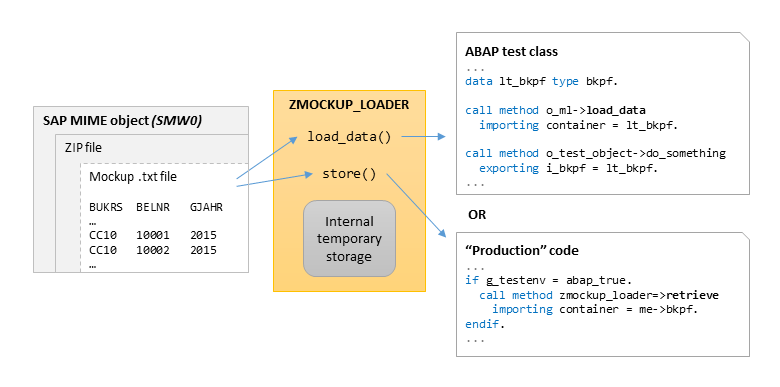
Some code is quite difficult to test when it has a db select in the middle. Of course, good code design would assume isolation of DB operations from business logic code, but it is not always possible (or was not done in proper time). So we needed to create a way to substitute selects in code to a simple call, which would take the prepared test data instead if test environment was identified. We came up with the solution we called store.
" Test class (o_mls is mockup_loader_STORE instance)
...
o_mls->store( " Store some data with 'BKPF' label
  i_name = 'BKPF'
  i_data = ls_bkpf ). " One line structure
...

" Working class method
...
if is_test_env = abap_false. " Production environment detected
  select ... from db ...

else.                        " Test environment detected
  zcl_mockup_loader_store=>retrieve(
    exporting i_name  = 'BKPF'
    importing e_data  = ls_fi_doc_header
    exceptions others = 4 ).
endif.

if sy-subrc is not initial.
  " Data not selected -> do error handling
endif.
In case of multiple test cases it can also be convenient to load a number of table records and then filter it based on some key field, available in the working code. This option is also possible:
" Test class
...
o_mls->store( " Store some data with 'BKPF' label
  i_name   = 'BKPF'
  i_tabkey = 'BELNR'    " Key field for the stored table
  i_data   = lt_bkpf ). " Table with MANY different documents
...

" Working class method
...
if is_test_env = abap_false. " Production environment detected
  " Do DB selects here

else.                        " Test environment detected
  zcl_mockup_loader_store=>retrieve(
    exporting
      i_name  = 'BKPF'
      i_sift  = l_document_number " <<< Filter key from real local variable
    importing
      e_data  = ls_fi_doc_header  " Still a flat structure here
    exceptions others = 4 ).
endif.

if sy-subrc is not initial.
  " Data not selected -> error handling
endif.
As the final result we can perform completely dynamic unit tests, covering most of code, including DB select related code without actually accessing the database. Of course, it is not only the mockup loader which ensures that. This requires accurate design of the project code, separating DB selection and processing code. The mockup loader and "store" functionality makes it more convenient.
The zcl_mockup_loader has a shortcut method load_and_store to load data to the store directly without technical variables. For more information see REFERENCE.md.
Some design facts about the store:
- The store class
ZCL_MOCKUP_LOADER_STOREis designed as a singleton class. So it is initiated once in a test class and the exists in one instance only. RETRIEVEmethod, which takes data from the "Store" is static. It is assumed to be called from "production" code instead of DB selects. It acquires the instance inside and throws non-class based exception on error. This is made to avoid the necessity to handle test-related exceptions, irrelevant to the main code, and also to be able to catch the exception asSY-SUBRCvalue.SY-SUBRCcan be checked later similarly to regular DB select. So the interference with the main code is minimal.
Installation
The most convenient way to install the package is to use abapGit - it is easily installed itself and then a couple of click to clone the repo into the system. There is also an option for offline installation - download the repo as zip file and import it with abapGit. Unit test execution is always recommended after installation.
The package contains 2 subpackages: core (the tool itself), devtools (switch source program), and examples (example programs). The latter 2 can be skipped for the deserialization in target systems (abapGit supports filename filtering - specify */examples/* in the corresponding repo setting).
Dependencies (to install before mockup loader):
- text2tab - tab-delimited text parser (was a part of mockup loader but now a separate reusable tool). Mandatory prerequisite.
Load source redirection
Zipped mockups slug is supposed to be uploaded as a MIME object via SMW0. However, during data or test creation, it is more convenient (and faster) to read local file. In particular, not to upload 'draft' test data to the system before it is ready, interfering with other developers. It is also very convenient to use in conjunction with java script mockup compiler (see "Conversion from Excel" section below).
To normally code the mockup source via i_type and i_path parameters to the create method. To temporarily switch to another source you can use the transaction ZMOCKUP_LOADER_SWSRC. It will initialize SET/GET parameters ZMOCKUP_LOADER_STYPE and ZMOCKUP_LOADER_SPATH/ZMOCKUP_LOADER_SMIME which will override defaults for the current session only.
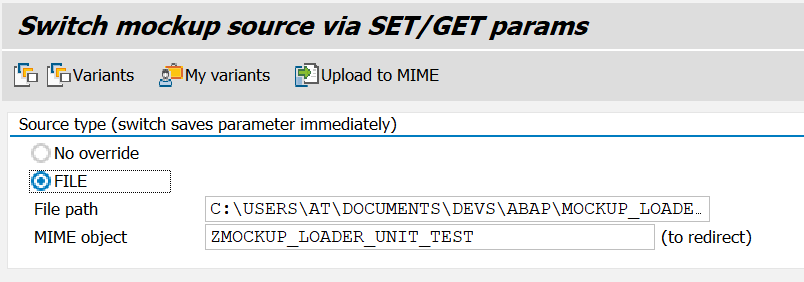
Code-wise, you can also find out if the mockup loader instance is redirected by calling is_redirected method. E.g. to issue redirection warning within your unit tests (see example in REFERENCE.md)
User's manual:
- Type change in the selection screen immediately changes the parameters in session memory, no run is required ('enter' must be pressed though after manual text fields change to trigger
on screenevent) Upload to MIMEtoolbar button uploads the file to MIME storage instead of going throughSMW0(the MIME object must exist)- Saving variants is also convenient. You can then call the variant by
VariantsorMy variants(created by your user) toolbar commands. Prefer these commands to the native variant selection (the very first button), because native variant command does not triggeron screen, so you must press Enter after choosing your variant (which is less convenient).
Conversion from Excel
You may have a lot of data prepared in Excel files. Many files, many sheets in each. Although Ctrl+C in Excel actually copies TAB-delimited text, which greatly simplifies the matter for minor cases, it is boring and time consuming to copy all the test cases to text. Here are special tools to simplify this workflow. Briefly: they take directory of excel files with mockup data and convert them into format compatible with mockup loader.
-
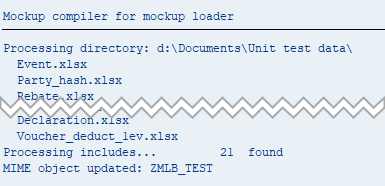
mockup compiler - ABAP implementation.
-
mockup compiler JS - java script implementation [RECOMMENDED], requires nodejs environment at the developer's machine. This tool also make it possible to compile the target zip via continuous integration flows - so the test data in excel can be a part of source repository.
- the JS compiler is recommenended because:
- it is faster (in particular with
ZMOCKUP_LOADER_SWSRC), - it allows designing UT data without uploads to ABAP repository (via
ZMOCKUP_LOADER_SWSRC), it may be convenient in case of multiple developers who work with the code base (yet with the same Excel UT data sorce)
- it is faster (in particular with
- the JS compiler support new text bundle format which is diffable and thus suites better for git repositories
- the JS compiler also supports zipping the above text bundle - which increase reactivity for changes watching (as smaller data package must travel from the frontend). The MIME object is still updated with the unzipped text bundle in this case.
- the JS compiler can run without nodejs installation (see its Installation section)
- the JS compiler is recommenended because:
See EXCEL2TXT.md for more info.
Examples and Reference
- Complete reference of classes and methods can be found in REFERENCE.md.
- A simple example can be found in /src/examples/zmockup_loader_example.prog.abap.
- Also see unit tests - these are the most up-to-date examples
- Have a look at the how-to section in the project Wiki.
- Gitlab CI example - idea is to commit UTs sources as well as SMW0 object to repo and see the text-based diffs (which is not possible for binary objects obviously)
Contributing
You are welcomed to suggest ideas and code improvements ! :) Let's make ABAP development more convenient. Please kindly respect the code conventions
Publications
- Unit testing mockup loader for ABAP @SCN
- How to do convenient multi-case unit tests with zmockup_loader @SCN
- zmockup_loader and unit tests with interface stubbing
- zmockup_loader: unit test data preparation flow
License
The code is licensed under MIT License. Please see the LICENSE for details.
History
Other 8
Notes
- Major: new 'stub' feature connects global interface and mockup loader via dynamically generated interface implementation. Wow !
- Added
check_version_fitsandassert_versionmethods - Added 'create_from_sys_settings' method, takes default paras from
tvarvctable (tr.stvarv) - Added 'load_raw_x' method
- 'load_data' accepts data references as a target container
- Added ZMOCKUP_LOADER_SWSRC check for production env
- VBA script removed
- Unification of public utility methods, in particular table filtering
Notes
Customer date parser. Now date format can be changed with parameter, see Reference
Notes
The code proved to be stable so releasing it with 1.0.0.
The repo is now using abapGit as the main code exchange tool.Notes
This version proved to be nice and stable. I'm going to migrate the repo to abapGit format so this is the last SAPLink version of the repo
Notes
The first public release of code
Others providing
Compare all 21 on the Unit testing page →- abap2UI5 headless frontendabap2UI5 headless frontendPlays the frontend's side of the abap2UI5 request/response contract in ABAP, so an app class is driven and asserted on from a plain ABAP Unit test.community org, abapDrives abap2UI5 app classes from ABAP Unit tests
- @abap2ui5/mcp-server@abap2ui5/mcp-serverAn MCP server that puts the abap2UI5 development loop on the machine an agent runs on: check the view the ABAP builds, photograph it, deploy the class into a sandbox, boot the app headless and read the errors.community org, abapMCP server for the abap2UI5 check, deploy and run loop
- assertassertA fluent assertion helper for ABAP Unit tests that wraps cl_abap_unit_assert in chained calls such as assert(x)->equals(y), also usable outside tests through ZCL_ASSERTABLE.independent, abapFluent assertion helper for ABAP Unit tests
- @abaplint/transpiler@abaplint/transpilerTranspiles ABAP 7.02 syntax to ES6 JavaScript, so ABAP code and its unit tests run on Node.js in CI without an ABAP system, with optional SQLite, PostgreSQL, Snowflake or SAP HANA drivers.community org, abapTranspiles ABAP to JavaScript to run on Node.js
- Modernization Agents for SAP on AWSModernization Agents for SAP on AWSAWS's suite of agents for SAP modernisation work: custom ABAP converted for S/4HANA, PI/PO interfaces moved to Integration Suite, BW objects moved to SAP Datasphere, deployed into a customer's own AWS account and reached only after registration.partner, abapAWS agents for ABAP, PI/PO and BW modernisation work
- abap_db_preparatorabap_db_preparatorA wrapper over ABAP's OpenSQL replacement service that exports chosen rows into a stored bundle and, in a unit test's setup, replays it as fake table content in two method calls.independent, abapReplays stored database snapshots in ABAP unit tests
- cacamber-BDD-for-ABAPcacamber-BDD-for-ABAPA BDD framework for ABAP that turns Gherkin-style Given/When/Then scenarios into ABAP Unit test steps, matching each step against a regular expression and calling the test class method it maps to.independent, abapBDD framework turning Given/When/Then into ABAP Unit steps
- abap-utesthelpabap-utesthelpTwo helper classes for ABAP Unit tests: one verifies a domain constant class against its domain's fixed values, the other creates test doubles without naming the interface.independent, abapHelper classes for ABAP Unit tests and test doubles
- regression_testregression_testA snapshot library for ABAP that records a value once and compares against it on every later run, from either the debugger or a unit test, storing snapshots in eCATT test data containers.independent, abapSnapshot testing library for ABAP, from debugger or unit test
- abapCovabapCovA report, ZABAPCOV, that uploads ABAP Unit test code coverage results to codecov.io, once the repository is installed through abapGit and codecov.io's certificates through STRUST.independent, abapUploads ABAP Unit code coverage to codecov.io
- ABAP remote filesystemABAP remote filesystemA Visual Studio Code extension that opens an ABAP system over ADT as an editable filesystem and exposes system tools to GitHub Copilot and external MCP clients.independent, abapVS Code extension editing ABAP systems over ADT as a filesystem
- open-steamgateopen-steamgateAn ABAP application server you clone and run on your own machine: transpiled ABAP serving classic /IWBEP/ OData v2 to Fiori over a local database, with no SAP system attached.independent, abapLocal ABAP server serving /IWBEP/ OData v2 without an SAP system
- express-icf-shimexpress-icf-shimA shim that runs an ABAP ICF handler written against if_http_extension behind an Express 4.x server, for ABAP transpiled to JavaScript and run on Node.js in testing and continuous integration.community org, abapShim running an ABAP ICF handler behind an Express 4.x server
- open-abap-coreopen-abap-coreReusable ABAP functionality for code transpiled by @abaplint/transpiler: the core ABAP artifacts that code runs against on Node.js.community org, abapCore ABAP artifacts for code transpiled by @abaplint/transpiler
- mockAmockAA free mocking framework for ABAP, published under the Apache License 2.0.independent, abapA free mocking framework for ABAP, published under the Apache License 2.0.
- Vise_for_ABAPVise_for_ABAPA characterisation-test helper: ZCL_VISE=>GRIP records a field's value once and fails a later run if it has changed.independent, abapA characterisation-test helper: `ZCL_VISE=>GRIP` records a field's value once and fails a later run if it has changed.
- abap-senchaabap-senchaA BDD/TDD assertion library for ABAP Unit, styled after the JavaScript library Chai.js, that wraps cl_abap_unit_assert in chainable expect, should and assert styles.independent, abapBDD/TDD assertion library for ABAP Unit, styled after Chai.js
- abap-test-containerabap-test-containerA test data container for ABAP Cloud that loads unit test data in JSON, XML or raw formats from GitHub and maps it onto the target structure, filling the platform's missing native one.independent, abapGitHub-hosted test data container for ABAP Cloud
- abap-unit-runnerabap-unit-runnerAn application job that runs and schedules ABAP Unit tests in SAP's ABAP Environment through the SAP_COM_0735 API, where the on-premise test runner has no SAP GUI to run from.independent, abapApplication job that runs and schedules ABAP Unit tests in the cloud
- adash-servicesadash-servicesThe backend service behind ADASH Cli, exposing ABAP Unit test runs and coverage as REST and OData services for CI/CD pipelines, with a report scheduled to run tests per package.independent, abapBackend exposing ABAP Unit runs and coverage over REST and OData
Details
Sources
Sources are graph entities: the same page may back several entries, and an unreachable source flags every row that rests on it.
Compatibility and provenance
abaplint
History in the atlas
- First seen.
For your agent
- Ref
artifact:sbcgua-mockup-loader- JSON
- /artifacts/sbcgua-mockup-loader.json
- MCP
- Connecting an agent