CDS-TS-Dispatcher









)





The goal of CDS-TS-Dispatcher is to significantly reduce the boilerplate code required to implement Typescript handlers provided by the SAP CAP framework.
Table of Contents
- Prerequisites
- Installation
- Migration guides
- Usage
- Architecture
- CDSDispatcher
- Decorators
- Class
- Field
- Parameter
- Method — CRUD, active entity
- Before: @BeforeCreate, @BeforeRead, @BeforeUpdate, @BeforeDelete, @BeforeAction, @BeforeBoundAction, @BeforeFunction, @BeforeBoundFunction, @BeforeAll
- After: @AfterCreate, @AfterRead, @AfterReadEachInstance, @AfterUpdate, @AfterDelete, @AfterAction, @AfterAll
- On: @OnCreate, @OnRead, @OnUpdate, @OnDelete, @OnAction, @OnFunction, @OnBoundAction, @OnBoundFunction, @OnAll
- Method — CRUD, draft entity
- Before: @BeforeNewDraft, @BeforeCancelDraft, @BeforePatchDraft, @BeforeDiscardDraft, @BeforeEditDraft, @BeforeSaveDraft
- After: @AfterNewDraft, @AfterCancelDraft, @AfterPatchDraft, @AfterDiscardDraft, @AfterEditDraft, @AfterSaveDraft
- On: @OnNewDraft, @OnCancelDraft, @OnPatchDraft, @OnDiscardDraft, @OnEditDraft, @OnSaveDraft
- Other draft decorators
- Method — Events & messaging
- Method — Request lifecycle
- Method — Server lifecycle
- Method — Scheduling
- Method — Streaming
- Method — WebSocket
- Method — Middleware & guards
- Method — Utilities
- Deployment to BTP using MTA
- Best practices & tips
- Samples
- Contributing
- License
- Authors
Prerequisites
Install @sap/cds-dk, typescript, ts-node globally:
npm i -g @sap/cds-dk typescript ts-node tsx
Installation
Option 1 : Install CDS-TS-Dispatcher - New project
Use the following steps if you want to create a new SAP CAP project.
- Create new folder :
mkdir project
cd project
- Initialize the CDS folder structure :
cds init
- Add
TypeScript and CDS-Typer to your npm package.json:
cds add typescript
- Add
CDS-TS-Dispatcher to your npm package.json :
npm install @dxfrontier/cds-ts-dispatcher
- It is recommended to use the following tsconfig.json properties:
{
  "compilerOptions": {
    "esModuleInterop": true,
    "skipLibCheck": true,
    "allowJs": true,
    "resolveJsonModule": true,
    "isolatedModules": true,
    "strictNullChecks": true,
    "strictPropertyInitialization": false,
    "forceConsistentCasingInFileNames": true,
    "allowSyntheticDefaultImports": true,

    "strict": true,

    "experimentalDecorators": true,
    "emitDecoratorMetadata": true,

    "target": "esnext",
    "module": "NodeNext",
    "moduleResolution": "NodeNext",

    "outDir": "./gen/srv",
    "rootDir": ".",

    "paths": {
      "#cds-models/*": ["./@cds-models/*/index.ts"]
    }
  },
  "include": ["./srv", "./@dispatcher"]
}
- Install packages
npm install
- Run the
CDS-TS server
cds-ts w
Important
CDS-TS-Dispatcher uses @sap/cds, @sap/cds-dk version 9.
If you're using @sap/cds, @sap/cds-dk version 8 then install npm install @dxfrontier/cds-ts-dispatcher@4.
(back to top)
Option 2 : Install CDS-TS-Dispatcher - Existing TypeScript project
Use the following steps if you want to add only the @dxfrontier/cds-ts-dispatcher to an existing project :
npm install @dxfrontier/cds-ts-dispatcher
It is recommended to use the following tsconfig.json properties:
{
  "compilerOptions": {
    "esModuleInterop": true,
    "skipLibCheck": true,
    "allowJs": true,
    "strictPropertyInitialization": false,
    "forceConsistentCasingInFileNames": true,
    "allowSyntheticDefaultImports": true,
    "strictNullChecks": true,
    "target": "esnext",
    "module": "NodeNext",
    "moduleResolution": "NodeNext",

    "experimentalDecorators": true,
    "emitDecoratorMetadata": true,

    "strict": true,

    "lib": ["es2022"],

    "outDir": "./gen/srv"
  },
  "include": ["./srv"]
}
Warning
If below message appears
-----------------------------------------------------------------------
WARNING: Package '@sap/cds' was loaded from different installations: [
 '***/node_modules/@sap/cds/lib/index.js',
 '***/node_modules/@dxfrontier/cds-ts-dispatcher/node_modules/@sap/cds/lib/index.js'
] Rather ensure a single install only to avoid hard-to-resolve errors.
-----------------------------------------------------------------------
Run the following command :
npm install -g @sap/cds-dk@latest
(back to top)
Generate CDS Typed entities
Execute the following commands :
cds add typer
npm install
Tip
If above option is being used, this means whenever we change a .CDS file the changes will reflect in the generated @cds-models folder.
(back to top)
Execute the command :
npx @cap-js/cds-typer "*" --outputDirectory ./srv/util/types/entities
- Target folder :
./srv/util/types/entities - Change to your desired destination folder.
(back to top)
-->
Important
Important
Import always the generated entities from the service folders and not from the index.ts
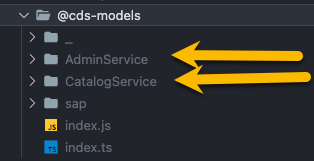
Tip
By default cds-typer will create in your package.json a quick path alias like :
"imports": {
  "#cds-models/*": "./@cds-models/*/index.js"
}
Use import helper to import entities from #cds-models like example :
import { Book } from '#cds-models/CatalogService';
(back to top)
Migration guides
Migration: from @sap/cds v7 to v8
Use the following steps if you want to migrate from @sap/cds@7 to @sap/cds@8:
- Verify you've installed the
cds@v8 globally by running the following command:
cds -v -i
| packages | version |
|---|
| @cap-js/asyncapi | 1.0.1 |
| @cap-js/cds-typer | 0.24.0 |
| @cap-js/cds-types | 0.6.4 |
| @cap-js/openapi | 1.0.4 |
| @cap-js/sqlite | 1.7.3 |
@sap/cds | 8.1.0 |
| @sap/cds-compiler | 5.1.2 |
@sap/cds-dk (global) | 8.0.2 |
| @sap/cds-fiori | 1.2.7 |
| @sap/cds-foss | 5.0.1 |
| @sap/cds-lsp | 8.0.0 |
| @sap/cds-mtxs | 1.18.2 |
| @sap/eslint-plugin-cds | 3.0.4 |
| Node.js | v22.4.1 |
Tip
If you see a smaller version than @sap/cds-dk (global) 8.0.2 run the following command :
npm install -g @sap/cds-dk@8
- Run the following command inside of your project:
cds add typescript
Tip
Command above will add the following packages:
@types/node@cap-js/cds-types@cap-js/cds-typertypescript
- After running command above the
package.json will look similar to :
{
  "dependencies": {
    "@dxfrontier/cds-ts-dispatcher": "^4.0.0",
    "@dxfrontier/cds-ts-repository": "^5.1.6",
    "@sap/cds": "^8.7.2"
  },
  "devDependencies": {
    "@cap-js/sqlite": "^1.8.0",
    "@cap-js/cds-types": "^0.9.0",
    "typescript": "^5.5.4",
    "@types/node": "^22.1.0",
    "@cap-js/cds-typer": "0.33.0"
  },
  "scripts": {
    "start": "cds-serve",
    "watch": "cds-ts w",
  },
}
Important
You might delete the node_modules folder and package-lock.json in case npm run watch fails working.
Re-run the following command :
npm install
Migration: from @sap/cds v8 to v9
Use the following steps if you want to migrate from @sap/cds@8 to @sap/cds@9:
- Verify you've installed the
cds@v9 globally by running the following command:
cds -v -i
| packages | version |
|---|
| @cap-js/asyncapi | 1.0.3 |
| @cap-js/cds-typer | 0.35.0 |
| @cap-js/cds-types | 0.11.0 |
| @cap-js/db-service | 2.1.1 |
| @cap-js/openapi | 1.2.3 |
| @cap-js/sqlite | 2.0.1 |
@sap/cds | 9.0.3 |
| @sap/cds-compiler | 6.0.12 |
@sap/cds-dk (local) | 9.0.4 |
@sap/cds-dk (global) | 9.0.4 |
| @sap/cds-fiori | 2.0.1 |
| @sap/cds-mtxs | 3.0.1 |
| Node.js | v22.14.0 |
| home | /Users/dragolea/Developer/abs-projects/cds-ts-dispatcher/node_modules/@sap/cds |
Tip
If you see a smaller version than @sap/cds-dk (global) 9.0.0 run the following command :
npm install -g @sap/cds-dk@latest
- Run the following command inside of your project:
cds add typescript
Tip
Command above will add the following packages:
@types/node@cap-js/cds-types@cap-js/cds-typertypescript
- After running command above the
package.json will look similar to :
{
  "dependencies": {
    "@sap/cds": "^9",
    "express": "^4"
  },
  "engines": {
    "node": "^22"
  },
  "dependencies": {
    "@dxfrontier/cds-ts-dispatcher": "^5.0.0",
    "@dxfrontier/cds-ts-repository": "^6.0.0",
    "@sap/cds": "^8.7.2",
    "express": "^4"
  },
  "devDependencies": {
    "@cap-js/cds-test": "^0.4.0",
    "@cap-js/cds-typer": ">=0.1",
    "@cap-js/cds-types": "^0.10.0",
    "@cap-js/sqlite": "^2",
    "@types/jest": "^30.0.0",
    "@types/node": "^22.0.0",
    "jest": "^30.0.3",
    "ts-jest": "^29.4.0",
    "tsx": "^4",
    "typescript": "^5"
  },
  "scripts": {
    "start": "cds-serve"
  },
  "imports": {
    "#cds-models/*": "./@cds-models/*/index.js"
  }
}
Important
You might delete the node_modules folder and package-lock.json in case npm run watch fails working.
Re-run the following command :
npm install
Migration: from @sap/cds v9 to v10
Use the following steps if you want to migrate from @sap/cds@9 to @sap/cds@10:
- Verify you've installed the
cds@v10 globally by running the following command:
cds -v -i
| packages | version |
|---|
| @cap-js/cds-types | 0.18.0 |
| @cap-js/db-service | 3.0.1 |
| @cap-js/sqlite | 3.0.2 |
@sap/cds | 10.0.3 |
| @sap/cds-compiler | 7.0.2 |
@sap/cds-dk | 10.0.5 |
| Node.js | v22.14.0 |
| home | /Users/dragolea/Developer/abs-projects/cds-ts-dispatcher/node_modules/@sap/cds |
Tip
If you see a smaller version than @sap/cds-dk 10.0.5 run the following command :
npm install -g @sap/cds-dk@latest
- Update the
@sap/cds-related dependencies in your package.json:
{
  "dependencies": {
    "@dxfrontier/cds-ts-dispatcher": "^6.0.0",
    "@sap/cds": "^10",
    "express": "^4"
  },
  "devDependencies": {
    "@cap-js/cds-types": "^0.18",
    "@cap-js/sqlite": "^3"
  },
  "engines": {
    "node": ">=22"
  }
}
- Review the following
@sap/cds@10 specifics relevant to this dispatcher:
Important
Node.js >= 22 is required (Node.js 20 support was dropped).@cap-js/cds-types >= 0.18 no longer symlinks into node_modules/@types — run cds add typescript, or add to tsconfig.json: "paths": { "@sap/cds": ["./node_modules/@cap-js/cds-types"] }.- Write operations (
srv.create / srv.update / srv.delete) now resolve to an array with an additional .affected property. The dispatcher's @AfterCreate, @AfterUpdate and @AfterDelete decorators keep their previous contract (entity data / deleted: boolean) — no handler changes are required.
- The validation error code
ASSERT_NOT_NULL was replaced by ASSERT_MANDATORY.
- Draft-enabled entities now accept direct CRUD operations on their active data by default (
cds.fiori.bypass_draft: true).
See the official migration guide for the full list of breaking changes. Running cds upgrade (available with @sap/cds-dk@10) analyzes your project and reports what needs to change.
Usage
Architecture
We recommend adhering to the Controller-Service-Repository design pattern using the following folder structure:
- EntityHandler
(Controller) - Responsible for managing the REST interface to the business logic implemented in ServiceLogic
- ServiceLogic
(Service) - Contains business logic implementations
- Repository
(Repository) - This component is dedicated to handling entity manipulation operations by leveraging the power of CDS-QL.
Controller-Service-Repository suggested folder structure
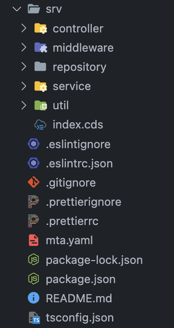 <= expanded folders =>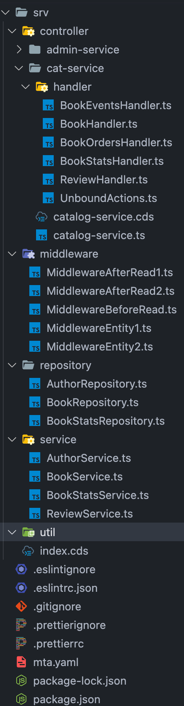
(back to top)
Tip
You can have a look over the CDS-TS-Dispatcher-Samples where we use the Controller-Service-Repository pattern and Dispatcher.
CDSDispatcher
CDSDispatcher(entities : Constructable[])
The CDSDispatcher constructor allows you to create an instance for dispatching and managing entities.
Parameters
entities (Array): An array of Entity handler(s) (Constructable) that represent the entities in the CDS.
Method
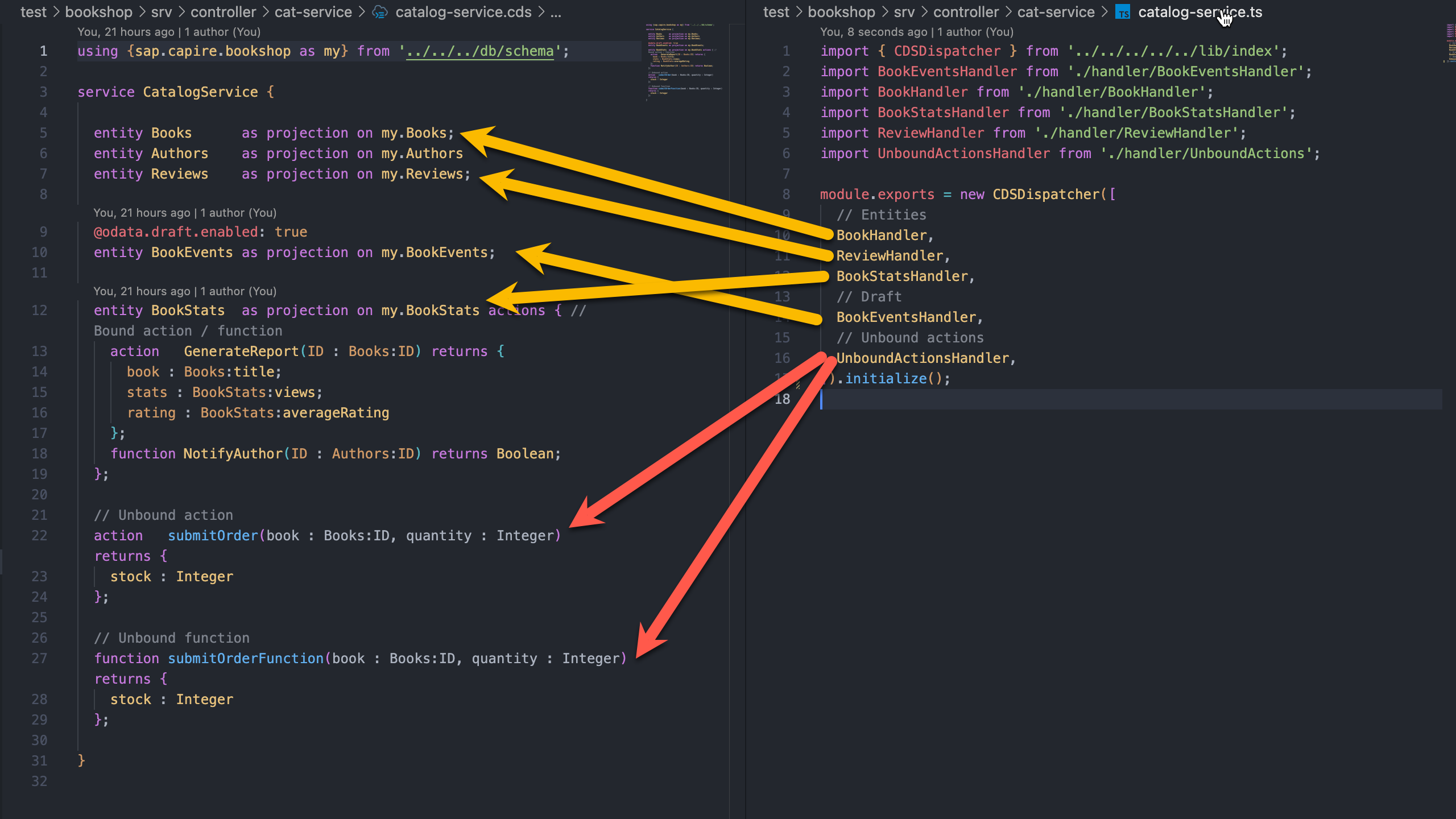
Example
import { CDSDispatcher } from '@dxfrontier/cds-ts-dispatcher';

export = new CDSDispatcher([
  // Entities
  BookHandler,
  ReviewHandler,
  BookStatsHandler,
  // Draft
  BookEventsHandler,
  // Unbound actions
  UnboundActionsHandler,
]).initialize();

// or use
// module.exports = new CDSDispatcher([ ...
Visual image
(back to top)
Decorators
Class
@EntityHandler
The @EntityHandler decorator is utilized at the class-level to annotate a class with:
- A specific
entity that will serve as the base entity for all handler decorators within the class.
'*' as all entities that will serve as the base entity for all handler decorators within the class.
Overloads
| Method | Parameters | Description |
|---|
1. EntityHandler(entity: CDSTyper) | Must be a CDS-Typer generated class | It ensures that all handlers within the class operate with the specified entity context. |
2. EntityHandler(entity: '*') | A wildcard '*' indicating all entities | It ensures that all handlers within the class operate with a generic context indicating that registered events will be triggered for all all entities (active entities and draft entities)
Excluded will be @OnAction(), @OnFunction(), @OnEvent(), @OnError() as these actions belongs to the Service itself. |
Parameters
entity (CDSTyperEntity | '*'): A specialized class generated using the CDS-Typer or generic wild card '*' applicable to all entities.
Example 1 using CDS-Typer
import { EntityHandler } from '@dxfrontier/cds-ts-dispatcher';
import { MyEntity } from 'YOUR_CDS_TYPER_ENTITIES_LOCATION';

@EntityHandler(MyEntity)
export class BookHandler {
  // ...
  constructor() {}
  // All events like @AfterRead, @BeforeRead, ... will be triggered based on 'MyEntity'
}
Tip
After creation of BookHandler class, you can import it into the CDSDispatcher.
import { CDSDispatcher } from '@dxfrontier/cds-ts-dispatcher';

export = new CDSDispatcher([
  // Entities
  BookHandler,
  // Unbound actions
  // ...
]).initialize();
Example 2 using * wildcard indicating that events will be triggered for all entities
import { EntityHandler, CDS_DISPATCHER } from '@dxfrontier/cds-ts-dispatcher';

@EntityHandler(CDS_DISPATCHER.ALL_ENTITIES) // or use the '*'
export class AllEntities {
  // ...
  constructor() {}
  // All events like @AfterRead, @BeforeRead, ... will be triggered on all entities using wildcard '*'
}
Tip
After creation of AllEntities class, you can import it into the CDSDispatcher.
import { CDSDispatcher } from '@dxfrontier/cds-ts-dispatcher';

export = new CDSDispatcher([
  // Entities
  AllEntities,
  // Unbound actions
  // ...
]).initialize();
Note
MyEntity was generated using CDS-Typer and imported in the class.
(back to top)
@ServiceLogic
@ServiceLogic()
The @ServiceLogic decorator is utilized at the class-level to annotate a class as a specialized class containing only business logic.
This decorator configures the dependency injection scope for the service class, allowing control over instance lifecycle and sharing across the application.
Parameters
-
scope [Optional] - The dependency injection scope for the service class:
'Singleton' - Single instance shared per CDSDispatcher container (one per CAP service implementation)'Transient' - New instance created for each injection (default)
If not provided, defaults to 'Transient' scope behavior.
Example 1 - Default Transient scope
import { ServiceLogic } from '@dxfrontier/cds-ts-dispatcher';

@ServiceLogic()
export class CustomerService {
  private customerCount = 0;

  constructor() {}

  public processCustomer(): void {
    this.customerCount++;
    console.log(`Processing customer #${this.customerCount}`);
  }

  public getCustomerCount(): number {
    return this.customerCount;
  }
}
Example 2 - Singleton scope
import { ServiceLogic } from '@dxfrontier/cds-ts-dispatcher';

@ServiceLogic('Singleton')
export class AnyService {
  private message: string;

  constructor() {}

  public setMessage(message: string): void {
    this.message = message;
  }

  public getMessage(): any {
    return this.message;
  }
}
Important
When using @ServiceLogic('Singleton'), the same instance is shared across the owning CDSDispatcher container — i.e. one CAP service implementation. Any values set in the class properties (like message in the example above) persist across requests within that dispatcher; a class injected by SEPARATE dispatchers gets a separate instance per dispatcher.
This means:
- State modifications made by one handler class are visible in all other classes of the same dispatcher
- Data stored in singleton services persists across multiple requests
- All classes that
@Inject this singleton service will receive the exact same instance with the same state
Use 'Singleton' scope carefully and only when you need shared state across a service implementation.
Tip
When applying @ServiceLogic() decorator, the class becomes eligible to be used with Inject decorator for Dependency injection.
(back to top)
@Repository
@Repository()
The @Repository decorator is utilized as a class-level annotation that designates a particular class as a specialized Repository, this class should contain only CDS-QL code.
import { Repository } from '@dxfrontier/cds-ts-dispatcher';

@Repository()
export class CustomerRepository {
  // ...
  constructor() {}
  // ...
}
Tip
When applying @Repository() decorator, the class becomes eligible to be used with Inject decorator for Dependency injection.
[Optional] - CDS-TS-Repository - BaseRepository
The CDS-TS-Repository - BaseRepository was designed to reduce the boilerplate code required to implement data access layer for persistance entities.
It simplifies the implementation by offering a set of ready-to-use actions for interacting with the database. These actions include:
.create(): Create new records in the database..getAll(): Retrieve all records from the database..find(): Query the database to find specific data..delete(): Remove records from the database..exists(): Check the existence of data in the database.- and many more ...
Example
import { Repository } from '@dxfrontier/cds-ts-dispatcher';
import { BaseRepository } from '@dxfrontier/cds-ts-repository';

import { MyEntity } from 'YOUR_CDS_TYPER_ENTITIES_LOCATION';

@Repository()
export class CustomerRepository extends BaseRepository<MyEntity> {
  constructor() {
    super(MyEntity);
  }

  public async aMethod() {
    const created = await this.create(...)
    const createdMany = await this.createMany(...)
    const updated = await this.update(...)
    // ...
  }
}
To get started, refer to the official documentation CDS-TS-Repository - BaseRepository.
Explore the capabilities it offers and enhance your data access layer with ease.
Note
MyEntity was generated using CDS-Typer and imported in the class.
(back to top)
@UnboundActions
@UnboundActions()
The @UnboundActions decorator is utilized at the class-level to annotate a class as a specialized class which will be used only for Unbound actions.
The following decorators can be used inside of @UnboundActions() :
Example
import { UnboundActions, OnAction, OnFunction, OnEvent, Req, Next, Error, OnSubscribe } from '@dxfrontier/cds-ts-dispatcher';
import { MyAction, MyFunction, MyEvent } from 'YOUR_CDS_TYPER_ENTITIES_LOCATION';

import type { ActionRequest, ActionReturn, Request, NextEvent } from '@dxfrontier/cds-ts-dispatcher';

@UnboundActions()
export class UnboundActionsHandler {
  // ... @Inject dependencies, if needed.

  constructor() {}

  // Unbound action
  @OnAction(MyAction)
  private async onActionMethod(
    @Req() req: ActionRequest<typeof MyAction>,
    @Next() next: NextEvent,
  ): ActionReturn<typeof MyAction> {
    // ...
  }

  // Unbound Function
  @OnFunction(MyFunction)
  private async onFunctionMethod(
    @Req() req: ActionRequest<typeof MyFunction>,
    @Next() next: NextEvent,
  ): ActionReturn<typeof MyFunction> {
    // ...
  }

  // Unbound event
  @OnEvent(MyEvent)
  private async onEventMethod(@Req() req: Request<MyEvent>) {
    // ...
  }

  // Unbound error
  @OnError()
  private onErrorMethod(@Error() err: Error, @Req() req: Request) {
    // ...
  }

  // Unbound event
  @OnSubscribe({
    eventName: 'event_name'
    type: 'SAME_NODE_PROCESS'
  })
  private async onSubscribe(@Req() req: Request<{foo: string, bar: number}>): Promise<void> {
    //
  }
}
Imported it in the CDSDispatcher
import { CDSDispatcher } from '@dxfrontier/cds-ts-dispatcher';

export = new CDSDispatcher([ UnboundActionsHandler, ...])
// or
// use module.exports = new CDSDispatcher( ... )
Note
The reason behind introducing a distinct decorator for Unbound actions stems from the fact that these actions are not associated with any specific Entity but instead these actions belongs to the Service itself.
(back to top)
@ServerLifecycle
@ServerLifecycle()
The @ServerLifecycle decorator is utilized at the class-level to annotate a class as the host for the server lifecycle method decorators. Unlike every other host class, it does not register against srv - the three decorators it hosts register against CAP's process-global cds.on('served' | 'listening' | 'shutdown', ...) events instead, because server lifecycle has nothing to do with "the unbound actions of this service".
The following decorators can be used inside of @ServerLifecycle():
Example
import { ServerLifecycle, OnServed, OnListening, OnShutdown } from '@dxfrontier/cds-ts-dispatcher';

@ServerLifecycle()
export class Bootstrap {
  @OnServed()
  public async seed(services: object) {
    // ... one-time startup work, may throw to abort the boot
  }

  @OnListening()
  public logUrl(payload: { server: unknown; url: string }) {
    console.log(`Listening on ${payload.url}`);
  }

  @OnShutdown()
  public async cleanup(error: Error | null) {
    // ... release resources, may run more than once
  }
}
Imported it in the CDSDispatcher
import { CDSDispatcher } from '@dxfrontier/cds-ts-dispatcher';

export = new CDSDispatcher([Bootstrap, ...]).initialize();
Important
A @ServerLifecycle class registers once per process, no matter how many CDSDispatcher instances (or bootstraps, e.g. in tests) list it - the first dispatcher to initialize() resolves the instance the callbacks stay bound to; later dispatchers do not re-register or re-bind.
Note
That once-per-process guard lives in this package's own module scope, so it is per loaded bundle - a consumer that ends up loading both the CJS and ESM build of @dxfrontier/cds-ts-dispatcher in the same process (e.g. through a bundler that duplicates the dependency) would register a @ServerLifecycle class twice. Stick to a single resolved build of the package.
Important
@Use middleware does not apply to @ServerLifecycle classes (lifecycle hooks are not request handlers) - stacking @Use on one fails fast at bootstrap.
Note
A @ServerLifecycle class may only host @OnServed(), @OnListening(), @OnShutdown() - any other handler decorator on the class throws at bootstrap. Conversely, those three decorators throw at bootstrap if hosted outside a @ServerLifecycle class.
(back to top)
@Use
@Use(...Middleware[])
The @Use decorator simplifies the integration of middlewares into your classes.
When @Use decorator applied at the class-level this decorator inject middlewares into the class and gain access to the req: Request and next: NextMiddleware middleware across all events (@AfterRead, @OnRead ...) within that class.
Middleware decorators can perform the following tasks:
- Execute any code.
- Make changes to the request object.
- End the request-response cycle.
- Call the next middleware function in the stack.
- If the current middleware function does not end the request-response cycle, it must call
next() to pass control to the next middleware function. Otherwise, the request will be left hanging.
Parameters
...Middleware[]): Middleware classes to be injected.
Example: middleware implementation:
import type { MiddlewareImpl, NextMiddleware, Request } from '@dxfrontier/cds-ts-dispatcher';

export class MiddlewareClass implements MiddlewareImpl {
  public async use(req: Request, next: NextMiddleware) {
    console.log('Middleware use method called.');

    await next(); // call next middleware
  }
}
Tip
Inside of the decorator use method you can use @CatchAndSetErrorCode and @CatchAndSetErrorMessage decorators.
Example usage:
import { EntityHandler, Use, Inject, CDS_DISPATCHER } from '@dxfrontier/cds-ts-dispatcher';

import { MyEntity } from 'YOUR_CDS_TYPER_ENTITIES_LOCATION';
import { Middleware1, Middleware2, MiddlewareN } from 'YOUR_MIDDLEWARE_LOCATION';

import type { Service } from '@dxfrontier/cds-ts-dispatcher';

@EntityHandler(MyEntity)
@Use(Middleware1, Middleware2, MiddlewareN)
export class CustomerHandler {
  // ...
  @Inject(CDS_DISPATCHER.SRV) private srv: Service;
  // ...
  constructor() {}
  // ...
}
Tip
- Think of it (middleware) like as a reusable class, enhancing the functionality of all events within the class.
- Middlewares when applied with
@Use are executed before the normal events.
- If you need to apply middleware to a
method you should use the method specific @Use decorator .
Warning
If req.reject() is used inside of middleware this will stop the stack of middlewares, this means that next middleware will not be executed.
Note
MyEntity was generated using CDS-Typer and imported in the class.
(back to top)
Field
@Inject
@Inject(serviceIdentifier: ServiceIdentifierOrFunc<unknown>)
The @Inject decorator is utilized as a field-level decorator and allows you to inject dependencies into your classes.
Parameters
serviceIdentifier(ServiceIdentifierOrFunc<unknown>): A Class representing the service to inject.
Example
import { EntityHandler, Inject, CDS_DISPATCHER } from "@dxfrontier/cds-ts-dispatcher";
import type { Service } from '@dxfrontier/cds-ts-dispatcher';

import { MyEntity } from 'YOUR_CDS_TYPER_ENTITIES_LOCATION';

@EntityHandler(MyEntity)
export class CustomerHandler {
  ...
  @Inject(CustomerService) private customerService: CustomerService
  @Inject(CustomerRepository) private customerService: CustomerRepository
  @Inject(AnyOtherInjectableClass) private repository: AnyOtherInjectableClass

  @Inject(CDS_DISPATCHER.SRV) private srv: Service
  // ...
  constructor() {}
  // ...
}
Note
MyEntity was generated using CDS-Typer and imported in the class.
(back to top)
@Inject(CDS_DISPATCHER.SRV)
@Inject(CDS_DISPATCHER.SRV) private srv: Service
This specialized @Inject can be used as a constant in and contains the CDS.ApplicationService for further enhancements.
It can be injected in the following :
Example
import { EntityHandler, Inject, CDS_DISPATCHER } from '@dxfrontier/cds-ts-dispatcher';

import { MyEntity } from 'YOUR_CDS_TYPER_ENTITIES_LOCATION';

import type { Service } from '@dxfrontier/cds-ts-dispatcher';

@EntityHandler(MyEntity)
// OR @ServiceLogic()
// OR @Repository()
// OR @UnboundActions()
export class CustomerHandler {
  // @Inject dependencies
  @Inject(CDS_DISPATCHER.SRV) private readonly srv: Service;

  constructor() {}
  // ...
}
Tip
The CDS.ApplicationService can be accessed trough this.srv.
Note
MyEntity was generated using CDS-Typer and imported in the the class.
(back to top)
@Inject(CDS_DISPATCHER.OUTBOXED_SRV)
@Inject(CDS_DISPATCHER.OUTBOXED_SRV) private srv: Service
This specialized @Inject can be used as a constant and contains the CDS.outboxed service.
It can be injected in the following :
Example
import { EntityHandler, Inject, CDS_DISPATCHER } from '@dxfrontier/cds-ts-dispatcher';

import { MyEntity } from 'YOUR_CDS_TYPER_ENTITIES_LOCATION';

import type { Service } from '@dxfrontier/cds-ts-dispatcher';

@EntityHandler(MyEntity)
// OR @ServiceLogic()
// OR @Repository()
// OR @UnboundActions()
export class CustomerHandler {
  // @Inject dependencies
  @Inject(CDS_DISPATCHER.OUTBOXED_SRV) private readonly outboxedSrv: Service;

  constructor() {}
  // ...
}
Tip
More info about outboxed ca be found at SAP CAP Node.js Outboxed
Tip
The CDS.ApplicationService can be accessed trough this.outboxedSrv
Note
MyEntity was generated using CDS-Typer and imported in the the class.
(back to top)
Parameter
@Req
@Req()
The @Req decorator is utilized at the parameter level to annotate a parameter with the Request object, providing access to request-related information of the current event.
Return
Request: An instance of @sap/cds - Request
Example
import { EntityHandler, Req, Results } from '@dxfrontier/cds-ts-dispatcher';
import { MyEntity } from 'YOUR_CDS_TYPER_ENTITIES_LOCATION';

import type { Request } from '@dxfrontier/cds-ts-dispatcher';

@EntityHandler(MyEntity)
export class BookHandler {
  // ...
  constructor() {}
  // ... all events like @AfterRead, @BeforeRead ...

  @AfterRead()
  private async aMethod(@Req() req: Request, @Results() results: MyEntity[]) {
    // ... req...
  }
}
(back to top)
@Res
@Res()
The @Res decorator is utilized at the parameter level to annotate a parameter with the Request.http.res - (Response) object, providing access to response-related information of the current event and it can be used to enhance the Response.
Return
RequestResponse: An instance of RequestResponse providing you response-related information.
Example
import { EntityHandler, Req, Results } from '@dxfrontier/cds-ts-dispatcher';
import { MyEntity } from 'YOUR_CDS_TYPER_ENTITIES_LOCATION';

import type { Request, RequestResponse } from '@dxfrontier/cds-ts-dispatcher';

@EntityHandler(MyEntity)
export class BookHandler {
  // ...
  constructor() {}
  // ... all events like @AfterRead, @BeforeRead ...

  @AfterRead()
  private async aMethod(@Req() req: Request, @Res() response: RequestResponse, @Results() results: MyEntity[]) {
    // Example: we assume we want to add a new header language on the response
    // We use => res.setHeader('Accept-Language', 'DE_de');
  }
}
Tip
Decorator @Res can be used in all After, Before and On events.
(back to top)
@Results / @Result
@Results() / @Result
The @Results decorator is utilized at the parameter level to annotate a parameter with the request Results.
Return
Array / object: Contains the OData Request Body.
Example
import { EntityHandler, Req, Results } from '@dxfrontier/cds-ts-dispatcher';
import { MyEntity } from 'YOUR_CDS_TYPER_ENTITIES_LOCATION';

import type { Request } from '@dxfrontier/cds-ts-dispatcher';

@EntityHandler(MyEntity)
export class BookHandler {
  // ...
  constructor() {}
  // ... all events like @AfterRead, @BeforeRead ...

  @AfterRead()
  private async aMethod(@Req() req: Request, @Results() results: MyEntity[]) {
    // ...
  }
}
Tip
When using @AfterCreate(), @AfterUpdate() and @AfterDelete() it's recommended to use the @Result decorator for single object result and @Results for arrays of objects.
@AfterCreate()
@AfterUpdate()
private async aMethod(
   @Result() result: Book, // <== @Result() decorator used to annotate it's a an object and not an array
   @Req() req: Request,
 ) {
   // ...
 }

@AfterRead()
private async aMethod(
  @Results() result: Book[], // <== @Results() decorator used to annotate as array of objects
  @Req() req: Request,
) {
  // ...
}

@AfterDelete()
private async aMethod(
@Result() deleted: boolean, // <== @Result() decorator used to annotate as a boolean
@Req() req: Request,
) {
  // ...
}
Tip
Decorators @Results() and @Result() can be applied to all After events.
(back to top)
@Next
@Next()
The @Next decorator is utilized at the parameter level to annotate a parameter with the Next function, which is used to proceed to the next event in the chain of execution.
Return
NextEvent: The next event in chain to be called.
Example
import { EntityHandler, Req, Results } from '@dxfrontier/cds-ts-dispatcher';
import { MyEntity } from 'YOUR_CDS_TYPER_ENTITIES_LOCATION';

import type { Request, NextEvent } from '@dxfrontier/cds-ts-dispatcher';

@EntityHandler(MyEntity)
export class BookHandler {
  // ...
  constructor() {}
  // ... all events like @AfterRead, @BeforeRead, @OnCreate ...

  @OnCreate()
  public async onCreate(@Req() req: Request<MyEntity>, @Next() next: NextEvent) {
    return next();
  }
}
Tip
Decorator @Next can be applied to all On, On - draft event decorators.
(back to top)
@Error
@Error()
The @Error decorator is utilized at the parameter level to annotate a parameter with the Error and contains information regarding the failed Request.
Return
Error: An instance of type Error.
Example
import { UnboundActions, Req, Error } from '@dxfrontier/cds-ts-dispatcher';
import { MyEntity } from 'YOUR_CDS_TYPER_ENTITIES_LOCATION';

import type { Request } from '@dxfrontier/cds-ts-dispatcher';

@UnboundActions()
export class UnboundActionsHandler {
  // ...
  constructor() {}

  @OnError()
  public onError(@Error() err: Error, @Req() req: Request): void {
    // ...
  }
}
Tip
Decorator @Error can be applied to @OnError() decorator which resides inside of the @UnboundActions().
@Jwt
@Jwt()
The @Jwt decorator is utilized at the parameter level. It will retrieve the to retrieve JWT from the Request that is based on the node req.http.req - IncomingMessage.
Fails if no authorization header is given or has the wrong format.
Return
string | undefined : The retrieved JWT token or undefined if no token was found.
Example
import { EntityHandler, Req, Results, Jwt } from '@dxfrontier/cds-ts-dispatcher';
import { MyEntity } from 'YOUR_CDS_TYPER_ENTITIES_LOCATION';

import type { Request } from '@dxfrontier/cds-ts-dispatcher';

@EntityHandler(MyEntity)
export class BookHandler {
  // ...
  constructor() {}
  // ... all events like @AfterRead, @BeforeRead ...

  @AfterRead()
  private async aMethod(@Req() req: Request, @Results() results: MyEntity[], @Jwt() jwt: string | undefined) {
    // ... req...
  }
}
Important
Expected format is Bearer <TOKEN>.
(back to top)
@IsPresent
@IsPresent<Key extends CRUDQueryKeys>(key: Key, property: PickQueryPropsByKey<Key>)
The @IsPresent decorator is utilized at the parameter level. It allows you to verify the existence of a specified Query property values.
Parameters
key (string): Specifies the type of query operation. Accepted values are INSERT, SELECT, UPDATE, UPSERT, DELETE.property (string): Specifies the property based on the key.
Return
boolean: This decorator returns true if property value is filled, false otherwise
Example
import { EntityHandler, Req, Results, IsPresent } from '@dxfrontier/cds-ts-dispatcher';
import { MyEntity } from 'YOUR_CDS_TYPER_ENTITIES_LOCATION';

import type { Request } from '@dxfrontier/cds-ts-dispatcher';

@EntityHandler(MyEntity)
class BookHandler {
  // ...
  constructor() {}

  @AfterRead()
  private async aMethod(
    @Req() req: Request,
    @Results() results: MyEntity[],

    @IsPresent('SELECT', 'columns') columnsPresent: boolean,
  ) {
    if (columnsPresent) {
      // ...
    }

    // ...
  }
}
Tip
Decorator @IsPresent() works well with @GetQuery().
Note
Protocol creates build INSERT...entries(data) without a .columns list — @IsPresent('INSERT', 'columns') is true only for queries that set columns explicitly (programmatic CQN).
(back to top)
@IsRole
@IsRole(...roles: string[])
The @IsRole decorator is utilized at the parameter level. It allows you to verify
if the User has assigned a given role.
It applies an logical OR on the specified roles, meaning it checks if at least one of the specified roles is assigned
Parameters
role (...string[]): An array of role names to check if are assigned.
Return
boolean: This decorator returns true if at least one of the specified roles is assigned to the current request user, otherwise false.
Example
import { EntityHandler, Req, Results, IsPresent, IsRole } from '@dxfrontier/cds-ts-dispatcher';
import { MyEntity } from 'YOUR_CDS_TYPER_ENTITIES_LOCATION';

import type { Request } from '@dxfrontier/cds-ts-dispatcher';

@EntityHandler(MyEntity)
class BookHandler {
  // ...
  constructor() {}

  @AfterRead()
  private async aMethod(
    @Req() req: Request,
    @Results() results: MyEntity[],

    @IsRole('role', 'anotherRole') roleAssigned: boolean,
  ) {
    if (roleAssigned) {
      // ...
    }

    // ...
  }
}
Tip
The role names correspond to the values of @requires and the @restrict.grants.to annotations in your CDS models.
(back to top)
@IsColumnSupplied
@IsColumnSupplied<T>(field : keyof T)
The @IsColumnSupplied<T>(field : keyof T) decorator is utilized at the parameter level. It allows your to verify the existence of a column in the SELECT, INSERT or UPSERT Query.
Parameters
field (string): A string representing the name of the column to be verified.
Type Parameters
T: The entity type (e.g., MyEntity) representing the table or collection on which the decorator operates. This allows TypeScript to enforce type safety for the field parameter.
Return :
boolean: This decorator returns true if field / column was found, false otherwise
Note
For INSERT / UPSERT queries an explicit .columns list wins when present; otherwise the field is looked up in the entries keys (the shape protocol POST requests produce); false when neither is present.
Example
import { EntityHandler, Req, Results, IsPresent } from '@dxfrontier/cds-ts-dispatcher';
import { MyEntity } from 'YOUR_CDS_TYPER_ENTITIES_LOCATION';

import type { Request } from '@dxfrontier/cds-ts-dispatcher';

@EntityHandler(MyEntity)
class BookHandler {
  // ...
  constructor() {}

  @AfterRead()
  private async aMethod(
    @Req() req: Request,
    @Results() results: MyEntity[],

    @IsColumnSupplied<MyEntity>('price') priceSupplied: boolean,
  ) {
    if (priceSupplied) {
      // ...
    }

    // ...
  }
}
(back to top)
@GetQuery
@GetQuery<Key extends CRUDQueryKeys>(key: Key, property: PickQueryPropsByKey<Key>)
The @GetQuery decorator is utilized at the parameter level. It allows you to retrieve Query property values.
Parameters
key (string): Specifies the type of query operation. Accepted values are INSERT, SELECT, UPDATE, UPSERT, DELETE.property (string): Specifies the property based on the key.
Return: Varies based on the specified property :
-
SELECT
- @GetQuery(
'SELECT', 'columns') columns: GetQueryType['columns']['forSelect']
- @GetQuery(
'SELECT', 'distinct') distinct: GetQueryType['distinct']
- @GetQuery(
'SELECT', 'excluding') excluding: GetQueryType['excluding']
- @GetQuery(
'SELECT', 'from') from: GetQueryType['from']['forSelect']
- @GetQuery(
'SELECT', 'groupBy') groupBy: GetQueryType['groupBy']
- @GetQuery(
'SELECT', 'having') having: GetQueryType['having']
- @GetQuery(
'SELECT', 'limit') limit: GetQueryType['limit']
- @GetQuery(
'SELECT', 'limit.rows') limitRows: GetQueryType['limit']['rows']
- @GetQuery(
'SELECT', 'limit.offset') limitOffset: GetQueryType['limit']['offset']
- @GetQuery(
'SELECT', 'mixin') mixin: GetQueryType['mixin']
- @GetQuery(
'SELECT', 'one') one: GetQueryType['one']
- @GetQuery(
'SELECT', 'orderBy') orderBy: GetQueryType['orderBy']
- @GetQuery(
'SELECT', 'where') where: GetQueryType['where']
-
INSERT
- @GetQuery(
'INSERT', 'columns') columns: GetQueryType['columns']['forInsert']
- @GetQuery(
'INSERT', 'entries') entries: GetQueryType['entries']
- @GetQuery(
'INSERT', 'into') into: GetQueryType['into']
- @GetQuery(
'INSERT', 'rows') rows: GetQueryType['rows']
- @GetQuery(
'INSERT', 'values') values: GetQueryType['values']
-
UPDATE
- @GetQuery(
'UPDATE', 'data') data: GetQueryType['data']
- @GetQuery(
'UPDATE', 'entity') entity: GetQueryType['entity']
- @GetQuery(
'UPDATE', 'where') where: GetQueryType['where']
-
UPSERT
- @GetQuery(
'UPSERT', 'columns') columns: GetQueryType['columns'][forUpsert]
- @GetQuery(
'UPSERT', 'entries') entries: GetQueryType['entries']
- @GetQuery(
'UPSERT', 'into') into: GetQueryType['into']
- @GetQuery(
'UPSERT', 'rows') rows: GetQueryType['rows']
- @GetQuery(
'UPSERT', 'values') values: GetQueryType['values']
-
DELETE
-
@GetQuery('DELETE', 'from') from: GetQueryType['from'][forDelete]
-
@GetQuery('DELETE', 'where') columns: GetQueryType['where']
Example
import { EntityHandler, Req, Results, IsPresent, GetQuery } from '@dxfrontier/cds-ts-dispatcher';
import { MyEntity } from 'YOUR_CDS_TYPER_ENTITIES_LOCATION';

import type { Request, GetQueryType } from '@dxfrontier/cds-ts-dispatcher';

@EntityHandler(MyEntity)
class BookHandler {
  // ...
  constructor() {}

  @AfterRead()
  private async aMethod(
    @Req() req: Request,
    @Results() results: MyEntity[],

    // Check existence of columns
    @IsPresent('SELECT', 'columns') columnsPresent: boolean,

    // Get columns
    @GetQuery('SELECT', 'columns') columns: GetQueryType['columns']['forSelect'],

    @GetQuery('SELECT', 'orderBy') orderBy: GetQueryType['orderBy'],
    @GetQuery('SELECT', 'groupBy') groupBy: GetQueryType['groupBy'],
  ) {
    if (columnsPresent) {
      // do something with columns values
      // columns.forEach(...)
    }

    // ...
  }
}
Tip
Decorator @GetQuery() can be used to get the Query property and @IsPresent() can check if the Query property is empty or not.
(back to top)
@GetRequest
@GetRequest(property : keyof Request)
The @GetRequest decorator is utilized at the parameter level. It allows you to retrieve the specified property value from the Request object.
Parameters
property (string): Specifies the property to retrieve from the Request object.
Return: Varies based on the specified property :
- @GetRequest(
'entity') entity: Request['entity'],
- @GetRequest(
'event') event: Request['event'],
- @GetRequest(
'features') features: Request['features'],
- @GetRequest(
'headers') headers: Request['headers'],
- @GetRequest(
'http') http: Request['http'],
- @GetRequest(
'id') id: Request['id'],
- @GetRequest(
'locale') locale: Request['locale'],
- @GetRequest(
'method') method: Request['method'],
- @GetRequest(
'params') params: Request['params'],
- @GetRequest(
'query') query: Request['query'],
- @GetRequest(
'subject') subject: Request['subject'],
- @GetRequest(
'target') target: Request['target'],
- @GetRequest(
'tenant') tenant: Request['tenant'],
- @GetRequest(
'timestamp') timestamp: Request['timestamp'],
- @GetRequest(
'user') user: Request['user'],
Example
import { EntityHandler, Results, GetRequest } from '@dxfrontier/cds-ts-dispatcher';
import { MyEntity } from 'YOUR_CDS_TYPER_ENTITIES_LOCATION';

import type { Request } from '@dxfrontier/cds-ts-dispatcher';

@EntityHandler(MyEntity)
class BookHandler {
  // ...
  constructor() {}

  @AfterRead()
  private async aMethod(
    // @Req() req: Request, we assume we don't need the hole Request object and we need only 'locale' and 'method'
    @Results() results: MyEntity[],

    @GetRequest('locale') locale: Request['locale'],
    @GetRequest('method') method: Request['method'],
  ) {
    // do something with 'locale' and 'method' ...
  }
}
Tip
Type Request can be import from :
import type { Request } from '@dxfrontier/cds-ts-dispatcher';
(back to top)
@SingleInstanceSwitch
@SingleInstanceSwitch
The @SingleInstanceSwitch() decorator is applied at the parameter level.
It allows you to manage different behaviors based on whether the request is for a single entity instance or an entity set, the parameter assigned to the decorator will behave like a switch.
Return
true when the Request is single instancefalse when the Request is entity set
Example 1
Single request : http://localhost:4004/odata/v4/main/`MyEntity(ID=2f12d711-b09e-4b57-b035-2cbd0a023a09)`
import { AfterRead, SingleInstanceCapable } from "@dxfrontier/cds-ts-dispatcher";
import type { Request } from '@dxfrontier/cds-ts-dispatcher';

import { MyEntity } from 'YOUR_CDS_TYPER_ENTITIES_LOCATION';

@AfterRead()
private async singeInstanceMethodAndEntitySet(@Results() results : MyEntity[], @Req() req: Request<MyEntity>, @SingleInstanceSwitch() isSingleInstance: boolean) {
  if(isSingleInstance) {
    // This will be executed only when single instance is called : http://localhost:4004/odata/v4/main/MyEntity(ID=2f12d711-b09e-4b57-b035-2cbd0a023a09)
    return this.customerService.handleSingleInstance(req)
  }

  // nothing to entity set
}
Example 2
Entity request : http://localhost:4004/odata/v4/main/`MyEntity`
import { AfterRead, SingleInstanceCapable } from "@dxfrontier/cds-ts-dispatcher";
import type { Request } from '@dxfrontier/cds-ts-dispatcher';

import { MyEntity } from 'YOUR_CDS_TYPER_ENTITIES_LOCATION';

@AfterRead()
private async singeInstanceMethodAndEntitySet(@Results() results : MyEntity[], @Req() req: Request<MyEntity>, @SingleInstanceSwitch() isSingleInstance: boolean) {
  if(isSingleInstance) {
    // This will be executed only when single instance is called : http://localhost:4004/odata/v4/main/MyEntity(ID=2f12d711-b09e-4b57-b035-2cbd0a023a09)
    // ...
  }

  // ... this will be executed when entity set is called : http://localhost:4004/odata/v4/main/MyEntity
  results[0] = {
    name : 'new value'
  }
}
Tip
Decorator @SingleInstanceSwitch can be used together with the following decorator events:
Note
MyEntity was generated using CDS-Typer and imported in the the class.
(back to top)
@ValidationResults
@ValidationResults
The @ValidationResults decorator allows to capture and inject validation results directly into a method parameter, allowing access to individual validation flags within the decorated method.
When used alongside the @Validate decorator, it enables you to perform conditional logic based on specific validation outcomes.
Example
@BeforeCreate()
@Validate<MyEntity>({ action: 'isLowercase', exposeValidatorResult: true }, 'comment')
@Validate<MyEntity>({ action: 'endsWith', target: 'N', exposeValidatorResult: true }, 'description')
public async beforeCreate(
  @Req() req: Request<MyEntity>,
  @ValidationResults() validator: ValidatorFlags<'isLowercase' | 'endsWith'>
) {
    // Conditional handling based on validation flags
    if (validator.isLowercase) {
      // Execute logic when field `comment` is lowercase
    }
    else {
      // Execute logic when field `comment` is not lowercase
    }

    if (validator.endsWith) {
      // Execute logic when field `description` is endsWith with letter 'N'
    }
    else {
      // Execute logic when field `description` doesn't endsWith with letter 'N'
    }
}
Important
For @ValidationResults to work, each @Validate decorator must set the exposeValidatorResult option to true. This ensures that the validation results are available as flags in the method.
(back to top)
@Locale
@Locale
Parameter decorator used to inject locale information into a method parameter.
Example
@BeforeCreate()
public async beforeCreate(
  @Req() req: Request<MyEntity>,
  @Locale() locale: string
) {
  if (locale === 'en-US') {
    // handle logic specific to the 'en-US' locale
  }
}
(back to top)
@Env
@Env<T>(env: PropertyStringPath<T>)
The @Env decorator is a parameter decorator used to inject values from the cds.env configuration object directly into a method parameter.
Parameters
env (string): A string path representing a property from cds.env. This path follows the format property string path, which allows access to deeply nested configuration properties.
- E.g. :
'requires.db.credentials.url' corresponds to cds.env.requires.db.credentials.url object.
Type Parameters
T: The CDS environmental variables type (e.g., cds env get) representing the collection on which the decorator operates. This allows TypeScript to enforce type safety.
Return :
- The decorator returns the value of the specified
cds.env property value.
Example
import { CDS_ENV } from '#dispatcher';

@BeforeCreate()
public async beforeCreate(
  @Req() req: Request<MyEntity>,
  @Env<CDS_ENV>('requires.db.credentials.url') dbUrl: CDS_ENV['requires']['db']['credentials']['url'],
  // or @Env<CDS_ENV>('requires.db.credentials.url') dbUrl: string
  // or @Env<CDS_ENV>('requires.db.credentials.url') dbUrl: any
  // or any other type if you do not want to use the CDS_ENV generated types
) {
  if (dbUrl) {
    // handle custom logic ...
  }
}
Note
When you install cds-ts-dispatcher (e.g. npm install @dxfrontier/cds-ts-dispatcher) or run a general npm install, the following will be generated or updated :
- New
@dispatcher folder is generated at the project root.
This folder contains the CDS ENV TS interfaces, generated based on the structure of your current cds.env project specific configuration (read programmatically from your project's @sap/cds, equivalent to the cds env get cli command output).
...
@dispatcher
...
package.json will be updated with a new import:
 "imports": {
   "#dispatcher": "./@dispatcher/index.js"
 }
tsconfig.json will be updated:
 "include": [
   "...",
   "./@dispatcher"
 ]
.gitignore will be updated::
...
@dispatcher
Note
The @dispatcher folder is regenerated each time you run npm install.
Tip
You can import the generated CDS env from the generated @dispatcher folder by using :
import { CDS_ENV } from '#dispatcher';
(back to top)
@Subject
@Subject()
The @Subject decorator is utilized at the parameter level. It injects req.subject — the CQN ref identifying the request's target instance — directly into a method parameter.
It is the sanctioned replacement for req.query on bound actions / functions in @sap/cds 10 (req.query on bound operations is planned for removal in @sap/cds 11).
Return
ref : The CQN ref pointing to the request's target instance.
Example
import { OnBoundFunction, Req, Subject } from '@dxfrontier/cds-ts-dispatcher';
import type { Request } from '@dxfrontier/cds-ts-dispatcher';
import type { ref } from '@sap/cds';

import { MyEntity } from 'YOUR_CDS_TYPER_ENTITIES_LOCATION';

@OnBoundFunction(MyEntity.actions.SomeFunction)
public async someBoundFunction(@Req() req: Request, @Subject() subject: ref) {
  const instance = await SELECT.one.from(subject);
}
Tip
Import the ref type from @sap/cds to type the injected subject.
(back to top)
@Affected
@Affected()
The @Affected decorator is utilized at the parameter level. It injects the database affected row count of the current request into a method parameter.
It is defined for CREATE / UPDATE / DELETE @After* handlers under @sap/cds >= 10 (the row count reported by the database) and is undefined for READ.
Return
number | undefined : The number of rows affected by the current request, or undefined for READ.
Example
import { AfterDelete, Affected, Req } from '@dxfrontier/cds-ts-dispatcher';
import type { Request } from '@dxfrontier/cds-ts-dispatcher';

import { MyEntity } from 'YOUR_CDS_TYPER_ENTITIES_LOCATION';

@AfterDelete()
public async afterDelete(@Req() req: Request<MyEntity>, @Affected() affected: number | undefined) {
  req.notify(`Deleted ${affected} row(s)`);
}
Note
@Affected does not change what @Results / @Result receive, it only exposes the database row count.
(back to top)
@Data
@Data()
The @Data decorator is utilized at the parameter level. It injects req.data — the payload of the current request — directly into a method parameter, typed.
Return
T : The payload of the current request (req.data).
Example
import { OnCreate, Data } from '@dxfrontier/cds-ts-dispatcher';

import { MyEntity } from 'YOUR_CDS_TYPER_ENTITIES_LOCATION';

@OnCreate()
public async onCreate(@Data() data: MyEntity) {
  // ... custom logic based on data
}
Tip
@Data keeps handler signatures and unit tests simple — pass a plain object instead of mocking the whole Request.
(back to top)
@Param
@Param<T>(field: keyof T)
The @Param decorator is utilized at the parameter level. It injects req.data[field] — a single field of the current request's payload — directly into a method parameter.
Parameters
field (keyof T) : The name of the field to get within req.data.
Type Parameters
T : The entity type the field is checked against, allowing TypeScript to enforce type safety.
Return
- The value of
req.data[field].
Example
import { OnCreate, Param } from '@dxfrontier/cds-ts-dispatcher';

import { MyEntity } from 'YOUR_CDS_TYPER_ENTITIES_LOCATION';

@OnCreate()
public async onCreate(@Param<MyEntity>('title') title: string, @Param<MyEntity>('stock') stock: number) {
  // ... custom logic based on title and stock
}
Tip
@Param is repeatable — decorate as many parameters as the fields you need from req.data.
(back to top)
@UserInfo
@UserInfo()
The @UserInfo decorator is utilized at the parameter level. It injects req.user — the authenticated user of the current request — directly into a method parameter.
Return
User : The authenticated user of the current request.
Example
import { OnUpdate, UserInfo } from '@dxfrontier/cds-ts-dispatcher';
import type { User } from '@sap/cds';

@OnUpdate()
public async onUpdate(@UserInfo() user: User) {
  if (user.is('Manager')) {
    // ... custom ownership / authorization logic
  }
}
Tip
Import the User type from @sap/cds to type the injected user.
(back to top)
@Tenant
@Tenant()
The @Tenant decorator is utilized at the parameter level. It injects req.tenant — the tenant of the current request — directly into a method parameter.
Return
string | undefined : The tenant of the current request.
Example
import { OnRead, Tenant } from '@dxfrontier/cds-ts-dispatcher';

@OnRead()
public async onRead(@Tenant() tenant: string | undefined) {
  // ... custom logic based on tenant
}
(back to top)
@Diff
@Diff()
The @Diff decorator is utilized at the parameter level. It injects await req.diff() — CAP's deep old-vs-new change-set of the current request against the current database state (compositions expanded, draft-aware) — directly into a method parameter.
Return
T : The before/after delta of the request's target entity.
Example
import { BeforeUpdate, Diff } from '@dxfrontier/cds-ts-dispatcher';
import type { Request } from '@dxfrontier/cds-ts-dispatcher';

import { MyEntity } from 'YOUR_CDS_TYPER_ENTITIES_LOCATION';

@BeforeUpdate()
public async beforeUpdate(@Req() req: Request<MyEntity>, @Diff() diff: MyEntity) {
  // ... custom logic based on diff
}
Important
@Diff costs one extra database read (it re-reads the current state to compute the delta) and resolves asynchronously - the handler body starts a microtask later than sibling handlers on the same event. Do not rely on synchronous side-effect ordering against sibling handlers. @Diff is only supported on @EntityHandler write events and is not supported on @OnError (a decoration-time error).
Note
req.diff() is a semi-stable @sap/cds API not documented in the current capire docs. Observed payload shape on @sap/cds 10 (pinned by the dispatcher's integration tests): for an UPDATE the top-level fields hold the NEW (incoming) values, the OLD (pre-update) values sit nested under _old, plus an _op: 'update' marker — unchanged fields are omitted entirely, key fields are always present. Do not assume diff.<field> is the old value.
(back to top)
@Msg
@Msg()
Warning
DEPRECATED: The @Msg decorator is deprecated and will be removed in a future version. Please use @Req decorator instead for handling message data in event subscribers.
The @Msg decorator is a parameter decorator used to inject response Emitter directly into a method parameter.
Parameters
Return :
- The decorator returns an object of type :
{
  event: string,
  data: T,
  headers: any,
  inbound: boolean
}
Example
import { OnSubscribe, Req } from '@dxfrontier/cds-ts-dispatcher';
import type { Request } from '@dxfrontier/cds-ts-dispatcher';

@OnSubscribe({
  eventName: 'AnEventName',
  type: 'MESSAGE_BROKER',
})
public async onSubscribe(@Req() req: Request<{ foo: number; bar: string }>): Promise<void> {
  // ...
}
Important
To have the req typed you can use type Request<T> where T can be a CDS event or a plain object.
Tip
Decorator @Req should be used on decorator @OnSubscribe.
(back to top)
Method — CRUD, active entity
Before
Use @BeforeCreate(), @BeforeRead(), @BeforeUpdate(), @BeforeDelete() to register handlers to run before .on handlers, frequently used for validating user input.
The handlers receive one argument:
See also the official SAP JS CDS-Before event
Tip
If @odata.draft.enabled: true to manage event handlers for draft version you can use
@BeforeCreateDraft()@BeforeReadDraft()@BeforeUpdateDraft()@BeforeDeleteDraft()
(back to top)
@BeforeCreate
@BeforeCreate()
Example
import { BeforeCreate } from "@dxfrontier/cds-ts-dispatcher";
import type { Request } from '@dxfrontier/cds-ts-dispatcher';

import { MyEntity } from 'YOUR_CDS_TYPER_ENTITIES_LOCATION';

@BeforeCreate()
private async beforeCreateMethod(@Req() req: Request<MyEntity>) {
  // ...
}
Equivalent to 'JS'
this.before('CREATE', MyEntity, async (req) => {
  // ...
});
Important
It is important to note that the decorator @BeforeCreate() will be triggered based on the EntityHandler argument => MyEntity.
Note
MyEntity was generated using CDS-Typer and imported in the the class.
(back to top)
@BeforeRead
@BeforeRead()
Example
import { BeforeRead } from "@dxfrontier/cds-ts-dispatcher";
import type { Request } from '@dxfrontier/cds-ts-dispatcher';

import { MyEntity } from 'YOUR_CDS_TYPER_ENTITIES_LOCATION';

@BeforeRead()
private async beforeReadMethod(@Req() req: Request<MyEntity>) {
  // ...
}
Equivalent to 'JS'
this.before('READ', MyEntity, async (req) => {
  // ...
});
Important
Decorator @BeforeRead() will be triggered based on the EntityHandler argument => MyEntity.
Note
MyEntity was generated using CDS-Typer and imported in the the class.
(back to top)
@BeforeUpdate
@BeforeUpdate()
Example
import { BeforeUpdate } from "@dxfrontier/cds-ts-dispatcher";
import type { Request } from '@dxfrontier/cds-ts-dispatcher';

import { MyEntity } from 'YOUR_CDS_TYPER_ENTITIES_LOCATION';

@BeforeUpdate()
private async beforeUpdateMethod(@Req() req: Request<MyEntity>) {
  // ...
}
Equivalent to 'JS'
this.before('UPDATE', MyEntity, async (req) => {
  // ...
});
Important
Decorator @BeforeUpdate() will be triggered based on the EntityHandler argument => MyEntity
Note
MyEntity was generated using CDS-Typer and imported in the the class.
(back to top)
@BeforeDelete
@BeforeDelete()
Example
import { BeforeDelete } from "@dxfrontier/cds-ts-dispatcher";
import type { Request } from '@dxfrontier/cds-ts-dispatcher';

import { MyEntity } from 'YOUR_CDS_TYPER_ENTITIES_LOCATION';

@BeforeDelete()
private async beforeDeleteMethod(@Req() req: Request<MyEntity>) {
  // ...
}
Equivalent to 'JS'
this.before('DELETE', MyEntity, async (req) => {
  // ...
});
Important
Decorator @BeforeDelete() will be triggered based on the EntityHandler argument => MyEntity.
Note
MyEntity was generated using CDS-Typer and imported in the the class.
(back to top)
@BeforeAction
@BeforeAction(name : CdsAction)
The @BeforeAction decorator is utilized as a method-level decorator to execute custom logic before an unbound action is triggered.
This decorator allows you to run validation, authorization, or preparation logic before the actual action implementation is executed.
Parameters
name (CdsAction) : Representing the CDS action defined in the CDS file.
Example
import { BeforeAction, Req } from '@dxfrontier/cds-ts-dispatcher';
import type { ActionRequest } from '@dxfrontier/cds-ts-dispatcher';

import { MyAction } from 'YOUR_CDS_TYPER_ENTITIES_LOCATION';

@BeforeAction(MyAction)
private async beforeMyAction(@Req() req: ActionRequest<typeof MyAction>): Promise<void> {
  // Validate input parameters before action execution
  if (!req.data.requiredParam) {
    req.reject(400, 'Required parameter is missing');
  }

  // Additional validation or preparation logic
  console.log('Action validation completed');
}
Equivalent to 'JS'
this.before(MyAction, async (req) => {
  // ...
});
Note
MyAction was generated using CDS-Typer and imported in the class.
Important
Decorator @BeforeAction should be used inside @UnboundActions() class.
Tip
Use @BeforeAction to:
- Validate action parameters before execution
- Perform authorization checks
- Log action invocations
- Prepare or transform input data
(back to top)
@BeforeBoundAction
@BeforeBoundAction(name : CdsFunction | string)
The @BeforeBoundAction decorator is utilized as a method-level decorator to execute custom logic before a bound action is triggered on an entity.
This decorator allows you to run validation, authorization, or preparation logic before the actual bound action implementation is executed on a specific entity instance.
Parameters
name (CdsFunction | string) : Representing the CDS bound action defined in the CDS file or the name of the action as string.
Example
import { BeforeBoundAction, Req } from '@dxfrontier/cds-ts-dispatcher';
import type { ActionRequest } from '@dxfrontier/cds-ts-dispatcher';

import { MyEntity } from 'YOUR_CDS_TYPER_ENTITIES_LOCATION';

@BeforeBoundAction(MyEntity.actions.approve)
private async beforeApprove(@Req() req: ActionRequest<typeof MyEntity.actions.approve>) {
  console.log('Bound action validation completed');
}
Equivalent to 'JS'
this.before(MyEntity.actions.approve, MyEntity, async (req) => {
  // ...
});
Note
MyEntity was generated using CDS-Typer and imported in the class.
Important
Decorator @BeforeBoundAction should be used inside @EntityHandler() class as it operates on a specific entity.
Tip
Use @BeforeBoundAction to:
- Validate entity state before bound action execution
- Perform authorization checks on specific entity instances
- Log bound action invocations
- Prepare or transform entity data before processing
- Check business rules specific to the entity instance
(back to top)
@BeforeFunction
@BeforeFunction(name : CdsFunction | string)
The @BeforeFunction decorator is utilized as a method-level decorator to execute custom logic before an unbound function is triggered.
This decorator allows you to run validation, authorization, or preparation logic before the actual function implementation is executed.
Parameters
name (CdsFunction | string) : Representing the CDS function defined in the CDS file.
Example
import { BeforeFunction, Req } from '@dxfrontier/cds-ts-dispatcher';
import type { Request, ActionRequest } from '@dxfrontier/cds-ts-dispatcher';

import { MyFunction } from 'YOUR_CDS_TYPER_ENTITIES_LOCATION';

@BeforeFunction(MyFunction)
private async beforeMyFunction(@Req() req: ActionRequest<typeof MyFunction>): Promise<void> {
  // Additional validation or preparation logic
  console.log('Function validation completed');
}
Equivalent to 'JS'
this.before(MyFunction, async (req) => {
  // ...
});
Note
MyFunction was generated using CDS-Typer and imported in the class.
Important
Decorator @BeforeFunction should be used inside @UnboundActions() class.
Tip
Use @BeforeFunction to:
- Validate function parameters before execution
- Perform authorization checks
- Log function invocations
- Prepare or transform input data
- Check system prerequisites before function execution
(back to top)
@BeforeBoundFunction
@BeforeBoundFunction(name : CdsFunction | string)
The @BeforeBoundFunction decorator is utilized as a method-level decorator to execute custom logic before a bound function is triggered on an entity.
This decorator allows you to run validation, authorization, or preparation logic before the actual bound function implementation is executed on a specific entity instance.
Parameters
name (CdsFunction | string) : Representing the CDS bound function defined in the CDS file or the name of the function as a string.
Example
import { BeforeBoundFunction, Req } from '@dxfrontier/cds-ts-dispatcher';
import type { Request } from '@dxfrontier/cds-ts-dispatcher';

import { MyEntity } from 'YOUR_CDS_TYPER_ENTITIES_LOCATION';

@BeforeBoundFunction(MyEntity.actions.myFunction)
private async someAction(@Req() req: ActionRequest<typeof MyEntity.actions.myFunction>) {
  // Additional validation or preparation logic
  console.log('Bound function validation completed');
}
Equivalent to 'JS'
this.before(MyEntity.actions.myFunction, MyEntity, async (req) => {
  // ...
});
Note
MyEntity was generated using CDS-Typer and imported in the class.
Important
Decorator @BeforeBoundFunction should be used inside @EntityHandler() class as it operates on a specific entity.
Tip
Use @BeforeBoundFunction to:
- Validate entity state before bound function execution
- Perform authorization checks on specific entity instances
- Log bound function invocations
- Prepare or transform entity data before processing
- Check business rules specific to the entity instance
(back to top)
@BeforeAll
The @BeforeAll decorator is triggered whenever any CRUD (Create, Read, Update, Delete) event occurs, whether the entity is active or in draft mode.
ACTIVE ENTITY
For active entities, the @BeforeAll decorator will be triggered when at least one of the following events occurs:
DRAFT
For draft entities, the @BeforeAll decorator will be triggered when at least one of the following events occurs:
CREATE @BeforeNewDraft(), @AfterNewDraft(), @OnNewDraft()CANCEL @BeforeCancelDraft(), @AfterCancelDraft(), @OnCancelDraft()PATCH @BeforePatchDraft(), @AfterPatchDraft(), @OnPatchDraft()DISCARD @BeforeDiscardDraft(), @AfterDiscardDraft(), @OnDiscardDraft()EDIT @BeforeEditDraft(), @AfterEditDraft(), @OnEditDraft()SAVE @BeforeSaveDraft(), @AfterSaveDraft(), @OnSaveDraft()- ➕ All active entity Before, After, On events which have a
Draft variant.
@BeforeAll()
Example 1
In this example, the @BeforeAll() decorator of the beforeAllEvents method is executed before any CRUD operation (CREATE, READ, UPDATE, DELETE, BOUND ACTIONS, BOUND FUNCTIONS)) on the MyEntity entity.
Since the class is annotated with @EntityHandler(MyEntity), the decorator is scoped to this specific entity, meaning it will only be triggered for operations related to MyEntity.
import { BeforeAll, EntityHandler } from "@dxfrontier/cds-ts-dispatcher";
import type { Request } from '@dxfrontier/cds-ts-dispatcher';

import { MyEntity } from 'YOUR_CDS_TYPER_ENTITIES_LOCATION';

@EntityHandler(MyEntity)
export class BookHandler {
  // ...
  constructor() {}
  // All events like @AfterRead, @BeforeRead, ... will be triggered based on 'MyEntity'

  @BeforeAll()
  private async beforeAllEvents(@Req() req: Request<MyEntity>) {
    // ...
  }
}
Equivalent to 'JS'
this.before('*', MyEntity, async (req) => {
  // ...
});
Example 2
In this example, the @BeforeAll() decorator is used in a more generic way. Unlike Example 1, where it applies only to MyEntity, this setup ensures that beforeAllEvents is triggered for all entities.
This means the method will execute before any CRUD operation on any entity handled within the class.
import { BeforeAll, EntityHandler, CDS_DISPATCHER } from "@dxfrontier/cds-ts-dispatcher";
import type { Request } from '@dxfrontier/cds-ts-dispatcher';

import { MyEntity } from 'YOUR_CDS_TYPER_ENTITIES_LOCATION';

@EntityHandler(CDS_DISPATCHER.ALL_ENTITIES)
export class BookHandler {
  // ...
  constructor() {}
  // All events like @AfterRead, @BeforeRead, ... will be triggered based on 'MyEntity'

  @BeforeAll()
  private async beforeAllEvents(@Req() req: Request<MyEntity>) {
    // ...
  }
}
Equivalent to 'JS'
this.before('*', '*', async (req) => {
  // ...
});
Important
Decorator @BeforeAll() will be triggered based on the EntityHandler argument => MyEntity.
Tip
If the entity has drafts enabled @odata.draft.enabled: true, the @BeforeAll decorator will still be triggered for draft events.
Note
MyEntity was generated using CDS-Typer and imported in the the class.
(back to top)
After
Use @AfterCreate(), @AfterRead(), @AfterUpdate(), @AfterDelete() register handlers to run after the .on handlers, frequently used to enrich outbound data.
The handlers receive two arguments:
| Parameters | Decorator | Description |
|---|
results, req | @AfterRead | An array of type MyEntity[] and the Request. |
result, req | @AfterUpdate
@AfterCreate | An object of type MyEntity and the Request. |
deleted, req | @AfterDelete | A boolean indicating whether the instance was deleted and the Request. |
Tip
If @odata.draft.enabled: true to manage event handlers for draft version you can use :
@AfterCreateDraft()@AfterReadDraft()@AfterReadDraftSingleInstance()@AfterUpdateDraft()@AfterDeleteDraft()
(back to top)
@AfterCreate
@AfterCreate()
Example
import { AfterCreate } from "@dxfrontier/cds-ts-dispatcher";
import type { Request } from '@dxfrontier/cds-ts-dispatcher';

import { MyEntity } from 'YOUR_CDS_TYPER_ENTITIES_LOCATION';

@AfterCreate()
private async afterCreateMethod(@Result() result: MyEntity, @Req() req: Request<MyEntity>) {
  // ...
}
Equivalent to 'JS'
this.after('CREATE', MyEntity, async (result, req) => {
  // ...
});
Important
Decorator @AfterCreate() will be triggered based on the EntityHandler argument => MyEntity.
Note
MyEntity was generated using CDS-Typer and imported in the the class.
(back to top)
@AfterRead
@AfterRead()
Example
import { AfterRead, Results, Req } from "@dxfrontier/cds-ts-dispatcher";
import type { Request } from '@dxfrontier/cds-ts-dispatcher';

import { MyEntity } from 'YOUR_CDS_TYPER_ENTITIES_LOCATION';

@AfterRead()
private async afterReadMethod(@Results() results: MyEntity[], @Req() req: Request<MyEntity>) {
  // ...
}
Equivalent to 'JS'
this.after('READ', MyEntity, async (results, req) => {
  // ...
});
Important
Decorator @AfterRead() will be triggered based on the EntityHandler argument MyEntity.
Note
MyEntity was generated using CDS-Typer and imported in the the class.
(back to top)
@AfterReadEachInstance
@AfterReadEachInstance()
The @AfterReadEachInstance decorator is used to execute custom logic after performing a read operation on each individual instance. This behavior is analogous to the JavaScript Array.prototype.forEach method.
Example
import { AfterReadEachInstance, Result, Req } from "@dxfrontier/cds-ts-dispatcher";
import type { Request } from '@dxfrontier/cds-ts-dispatcher';

import { MyEntity } from 'YOUR_CDS_TYPER_ENTITIES_LOCATION';

@AfterReadEachInstance()
private async afterEach(@Result() result: MyEntity, @Req() req: Request<MyEntity>) {
  // ...
}
Equivalent to 'JS'
this.after('each', MyEntity, async (result, req) => {
  // ...
});
Important
Decorator @AfterReadEachInstance() will be triggered based on the EntityHandler argument MyEntity.
Note
MyEntity was generated using CDS-Typer and imported in the the class.
(back to top)
@AfterUpdate
@AfterUpdate()
Example
Single request : http://localhost:4004/odata/v4/main/`MyEntity(ID=2f12d711-b09e-4b57-b035-2cbd0a023a09)`
import { AfterUpdate } from "@dxfrontier/cds-ts-dispatcher";
import type { Request } from '@dxfrontier/cds-ts-dispatcher';

import { MyEntity } from 'YOUR_CDS_TYPER_ENTITIES_LOCATION';

@AfterUpdate()
private async afterUpdateMethod(@Result() result: MyEntity, @Req() req: Request<MyEntity>) {
  // ...
}
Equivalent to 'JS'
this.after('UPDATE', MyEntity, async (result, req) => {
  // ...
});
Important
Decorator @AfterUpdate() will be triggered based on the EntityHandler argument => MyEntity.
Note
MyEntity was generated using CDS-Typer and imported in the the class.
(back to top)
@AfterDelete
@AfterDelete()
Example
import { AfterDelete} from "@dxfrontier/cds-ts-dispatcher";
import type { Request } from '@dxfrontier/cds-ts-dispatcher';

import { MyEntity } from 'YOUR_CDS_TYPER_ENTITIES_LOCATION';

@AfterDelete()
private async afterDeleteMethod(@Result() deleted: boolean, @Req() req: Request) {
  // ...
}
Equivalent to 'JS'
this.after('DELETE', MyEntity, async (deleted, req) => {
  // ...
});
Important
Decorator @AfterDelete() will be triggered based on the EntityHandler argument => MyEntity.
Note
MyEntity was generated using CDS-Typer and imported in the the class.
(back to top)
@AfterAction
@AfterAction(name : CdsAction)
The @AfterAction decorator is utilized as a method-level decorator to execute custom logic after an unbound action has been executed.
This decorator allows you to run post-processing logic, such as logging, data cleanup, or triggering subsequent operations after the actual action implementation has completed.
Parameters
name (CdsAction) : Representing the CDS action defined in the CDS file.
Example
import { AfterAction, Req, Result } from '@dxfrontier/cds-ts-dispatcher';
import type { ActionRequest, ActionReturn } from '@dxfrontier/cds-ts-dispatcher';

import { MyAction } from 'YOUR_CDS_TYPER_ENTITIES_LOCATION';

@AfterAction(MyAction)
private async afterMyAction(
  @Result() result: ActionReturn<typeof MyAction>,
  @Req() req: ActionRequest<typeof MyAction>
): Promise<void> {
  // Post-processing logic after action execution
  console.log('Action completed successfully');

  // Log the result or perform cleanup operations
  if (result) {
    console.log('Action result:', result);
  }

  // Additional post-processing logic
  await this.auditService.logActionExecution(req.user, 'MyAction', result);
}
Equivalent to 'JS'
this.after(MyAction, async (result, req) => {
  // ...
});
Note
MyAction was generated using CDS-Typer and imported in the class.
Important
Decorator @AfterAction should be used inside @UnboundActions() class.
Tip
Use @AfterAction to:
- Log action execution results
- Perform cleanup operations
- Trigger subsequent business processes
- Send notifications based on action outcomes
- Update audit trails or analytics
(back to top)
@AfterAll
The @AfterAll decorator is triggered whenever any CRUD (Create, Read, Update, Delete) event occurs, whether the entity is active or in draft mode.
ACTIVE ENTITY
For active entities, the @AfterAll decorator will be triggered when at least one of the following events occurs:
DRAFT
For draft entities, the @AfterAll decorator will be triggered when at least one of the following events occurs:
CREATE @BeforeNewDraft(), @AfterNewDraft(), @OnNewDraft()CANCEL @BeforeCancelDraft(), @AfterCancelDraft(), @OnCancelDraft()PATCH @BeforePatchDraft(), @AfterPatchDraft(), @OnPatchDraft()DISCARD @BeforeDiscardDraft(), @AfterDiscardDraft(), @OnDiscardDraft()EDIT @BeforeEditDraft(), @AfterEditDraft(), @OnEditDraft()SAVE @BeforeSaveDraft(), @AfterSaveDraft(), @OnSaveDraft()- ➕ All active entity Before, After, On events which have a
Draft variant.
@AfterAll()
Example 1
In this example, the @AfterAll() decorator of the afterAll method is executed after any CRUD operation (CREATE, READ, UPDATE, DELETE, BOUND ACTIONS, BOUND FUNCTIONS)) on the MyEntity entity.
Since the class is annotated with @EntityHandler(MyEntity), the decorator is scoped to this specific entity, meaning it will only be triggered for operations related to MyEntity.
import { AfterAll, EntityHandler } from "@dxfrontier/cds-ts-dispatcher";
import type { Request } from '@dxfrontier/cds-ts-dispatcher';

import { MyEntity } from 'YOUR_CDS_TYPER_ENTITIES_LOCATION';

@EntityHandler(MyEntity)
export class BookHandler {
  // ...
  constructor() {}
  // All events like @AfterRead, @BeforeRead, ... will be triggered based on 'MyEntity'

  @AfterAll()
  private async afterAll(@Result() result: MyEntity | MyEntity[] | boolean, @Req() req: Request) {
    if(Array.isArray(result)) {
      // when after `READ` event was triggered
    }
    else if(typeof result === 'boolean' ) {
      // when after `DELETE` event was triggered
    }
    else {
      // when after `CREATE`, `UPDATE` was triggered
    }

    // ...
  }
}
Equivalent to 'JS'
this.after('*', MyEntity, async (result, req) => {
  // ...
});
Example 2
In this example, the @AfterAll() decorator is used in a more generic way. Unlike Example 1, where it applies only to MyEntity, this setup ensures that afterAll is triggered for all entities.
This means the method will execute before any CRUD operation on any entity handled within the class.
import { AfterAll, EntityHandler} from "@dxfrontier/cds-ts-dispatcher";
import type { Request } from '@dxfrontier/cds-ts-dispatcher';

import { MyEntity } from 'YOUR_CDS_TYPER_ENTITIES_LOCATION';

@EntityHandler(CDS_DISPATCHER.ALL_ENTITIES)
export class BookHandler {
  // ...
  constructor() {}
  // All events like @AfterRead, @BeforeRead, ... will be triggered based on 'MyEntity'

  @AfterAll()
  private async afterAll(@Result() result: MyEntity | MyEntity[] | boolean, @Req() req: Request) {
    if(Array.isArray(result)) {
      // when after `READ` event was triggered
    }
    else if(typeof result === 'boolean' ) {
      // when after `DELETE` event was triggered
    }
    else {
      // when after `CREATE`, `UPDATE` was triggered
    }

    // ...
  }
}
Equivalent to 'JS'
this.after('*', '*', async (result, req) => {
  // ...
});
Important
Decorator @AfterAll() will be triggered based on the EntityHandler argument => MyEntity.
Tip
If the entity has drafts enabled @odata.draft.enabled: true, the @AfterAll decorator will also be triggered for draft events.
Note
MyEntity was generated using CDS-Typer and imported in the the class.
(back to top)
On
Use @OnCreate(), @OnRead(), @OnUpdate(), @OnDelete(), OnAction(), @OnFunction(), @OnBoundAction(), @OnBoundFunction() handlers to fulfill requests, e.g. by reading/writing data from/to databases handlers.
The handlers receive two arguments:
req of type Requestnext of type NextEvent
Tip
If @odata.draft.enabled: true to manage event handlers for draft version you can use :
@OnCreateDraft()@OnReadDraft()@OnUpdateDraft()@OnDeleteDraft()@OnBoundActionDraft()@OnBoundFunctionDraft()
(back to top)
@OnCreate
@OnCreate()
Example
import { OnCreate, Next } from "@dxfrontier/cds-ts-dispatcher";
import type { Request, NextEvent } from '@dxfrontier/cds-ts-dispatcher';

import { MyEntity } from 'YOUR_CDS_TYPER_ENTITIES_LOCATION';

@OnCreate()
private async onCreateMethod(@Req() req: Request<MyEntity>, @Next() next: NextEvent) {
  // ...

  return next();
}
Equivalent to 'JS'
this.on('CREATE', MyEntity, async (req, next) => {
  // ...
});
Important
Decorator @OnCreate() will be triggered based on the EntityHandler argument => MyEntity.
Note
MyEntity was generated using CDS-Typer and imported in the the class.
(back to top)
@OnRead
@OnRead()
Example
import { OnRead, Next } from "@dxfrontier/cds-ts-dispatcher";
import type { Request, NextEvent } from '@dxfrontier/cds-ts-dispatcher';

import { MyEntity } from 'YOUR_CDS_TYPER_ENTITIES_LOCATION';

@OnRead()
private async onReadMethod(@Req() req: Request<MyEntity>, @Next() next: NextEvent) {
  // ...

  return next();
}
Equivalent to 'JS'
this.on('READ', MyEntity, async (req, next) => {
  // ...
});
Important
Decorator @OnRead() will be triggered based on the EntityHandler argument => MyEntity.
Note
MyEntity was generated using CDS-Typer and imported in the the class.
(back to top)
@OnUpdate
@OnUpdate()
Example
import { OnUpdate, Next } from "@dxfrontier/cds-ts-dispatcher";
import type { Request, NextEvent } from '@dxfrontier/cds-ts-dispatcher';

import { MyEntity } from 'YOUR_CDS_TYPER_ENTITIES_LOCATION';

@OnUpdate()
private async onUpdateMethod(@Req() req: Request<MyEntity>, @Next() next: NextEvent) {
  // ...

  return next();
}
Equivalent to 'JS'
this.on('UPDATE', MyEntity, async (req, next) => {
  // ...
});
Important
Decorator @OnUpdate() will be triggered based on the EntityHandler argument => MyEntity.
Note
MyEntity was generated using CDS-Typer and imported in the the class.
(back to top)
@OnDelete
@OnDelete()
Example
import { OnDelete, Next } from "@dxfrontier/cds-ts-dispatcher";
import type { Request, NextEvent } from '@dxfrontier/cds-ts-dispatcher';

import { MyEntity } from 'YOUR_CDS_TYPER_ENTITIES_LOCATION';

@OnDelete()
private async onDeleteMethod(@Req() req: Request<MyEntity>, @Next() next: NextEvent) {
  // ...

  return next();
}
Equivalent to 'JS'
this.on('DELETE', MyEntity, async (req, next) => {
  // ...
});
Important
Decorator @OnDelete() will be triggered based on the EntityHandler argument => MyEntity.
Note
MyEntity was generated using CDS-Typer and imported in the the class.
(back to top)
@OnAction
@OnAction(name : CdsFunction | string)
Parameters
name (CdsFunction | string) : Representing the CDS action defined in the CDS file or the action name as a string.
Example
import { OnAction, Req, Next } from "@dxfrontier/cds-ts-dispatcher";
import type { ActionRequest, ActionReturn, NextEvent } from '@dxfrontier/cds-ts-dispatcher';

import { AnAction } from 'YOUR_CDS_TYPER_ENTITIES_LOCATION';

@OnAction(AnAction)
private async onActionMethod(@Req() req: ActionRequest<typeof AnAction>, @Next() next: NextEvent): ActionReturn<typeof AnAction> {
  // ...
}
Equivalent to 'JS'
this.on(AnAction, async (req, next) => {
  // ...
});
Note
AnAction was generated using CDS-Typer and imported in the the class.
Important
Decorator @OnAction should be used inside @UnboundActions() class.
(back to top)
@OnFunction
@OnFunction(name : CdsFunction)
Parameters
name (CdsFunction) : Representing the CDS action defined in the CDS file.
Example
import { OnFunction, Req, Next } from "@dxfrontier/cds-ts-dispatcher";
import type { ActionRequest, ActionReturn, NextEvent } from '@dxfrontier/cds-ts-dispatcher';

import { AFunction } from 'YOUR_CDS_TYPER_ENTITIES_LOCATION';

@OnFunction(AFunction)
private async onFunctionMethod(@Req() req: ActionRequest<typeof AFunction>, @Next() next: NextEvent): ActionReturn<typeof AFunction> {
  // ...
}
Equivalent to 'JS'
this.on(AFunction, async (req) => {
  // ...
});
Note
AFunction was generated using CDS-Typer and imported in the the class.
Important
Decorator @OnFunction should be used inside @UnboundAction() class.
(back to top)
@OnBoundAction
@OnBoundAction(name : CdsAction)
Parameters
name (CdsAction) : Representing the CDS action defined in the CDS file.
Example
import { OnBoundAction, Req, Next } from "@dxfrontier/cds-ts-dispatcher";
import type { ActionRequest, ActionReturn, NextEvent } from '@dxfrontier/cds-ts-dispatcher';

import { MyEntity } from 'YOUR_CDS_TYPER_ENTITIES_LOCATION';

@OnBoundAction(MyEntity.actions.AnAction)
private async onActionMethod(@Req() req: ActionRequest<typeof MyEntity.actions.AnAction>, @Next() next: NextEvent): ActionReturn<typeof MyEntity.actions.AnAction> {
  // ...
}
Equivalent to 'JS'
this.on(MyEntity.actions.AnAction, MyEntity, async (req) => {
  // ...
});
Important
Decorator @OnBoundAction() will be triggered based on the EntityHandler argument => MyEntity.
Note
MyEntity was generated using CDS-Typer and imported in the the class.
(back to top)
@OnBoundFunction
@OnBoundFunction(name : CdsFunction)
Parameters
name (CdsFunction) : Representing the CDS action defined in the CDS file.
Example
import { OnBoundFunction, Req, Next } from "@dxfrontier/cds-ts-dispatcher";
import type { ActionRequest, ActionReturn, NextEvent } from '@dxfrontier/cds-ts-dispatcher';

import { MyEntity } from 'YOUR_CDS_TYPER_ENTITIES_LOCATION';

@OnBoundFunction(MyEntity.actions.AFunction)
private async onFunctionMethod(@Req() req: ActionRequest<typeof MyEntity.actions.AFunction>, @Next() next: NextEvent): ActionReturn<typeof MyEntity.actions.AFunction> {
  // ...
}
Equivalent to 'JS'
this.on(MyEntity.actions.AFunction, MyEntity, async (req) => {
  // ...
});
Important
Decorator @OnBoundFunction() will be triggered based on the EntityHandler argument => MyEntity.
Note
MyEntity was generated using CDS-Typer and imported in the the class.
(back to top)
@OnAll
@OnAll()
The @OnAll decorator is triggered whenever any CRUD (Create, Read, Update, Delete) event occurs, whether the entity is active or in draft mode.
ACTIVE ENTITY
For active entities, the @OnAll decorator will be triggered when at least one of the following events occurs:
DRAFT
For draft entities, the @OnAll decorator will be triggered when at least one of the following events occurs:
CREATE @BeforeNewDraft(), @AfterNewDraft(), @OnNewDraft()CANCEL @BeforeCancelDraft(), @AfterCancelDraft(), @OnCancelDraft()PATCH @BeforePatchDraft(), @AfterPatchDraft(), @OnPatchDraft()DISCARD @BeforeDiscardDraft(), @AfterDiscardDraft(), @OnDiscardDraft()EDIT @BeforeEditDraft(), @AfterEditDraft(), @OnEditDraft()SAVE @BeforeSaveDraft(), @AfterSaveDraft(), @OnSaveDraft()- ➕ All active entity Before, After, On events which have a
Draft variant.
Note
Exception will be the following decorators @OnEvent(), @OnError() and UNBOUND ACTIONS @OnAction(), UNBOUND FUNCTIONS @OnFunction() as these are bound to the service itself and not to an entity.
Example 1
In this example, the @OnAll() decorator of the onAll method is executed after any CRUD operation (CREATE, READ, UPDATE, DELETE, BOUND ACTIONS, BOUND FUNCTIONS) on the MyEntity entity.
Since the class is annotated with @EntityHandler(MyEntity), the decorator is scoped to this specific entity, meaning it will only be triggered for operations related to MyEntity.
import { OnAll, Next, EntityHandler } from "@dxfrontier/cds-ts-dispatcher";
import type { Request, NextEvent } from '@dxfrontier/cds-ts-dispatcher';

import { MyEntity } from 'YOUR_CDS_TYPER_ENTITIES_LOCATION';

@EntityHandler(MyEntity)
export class BookHandler {
  // ...
  constructor() {}
  // All events like @AfterRead, @BeforeRead, ... will be triggered based on 'MyEntity'

  @OnAll()
  private async onAll(@Req() req: Request, @Next() next: NextEvent) {
    // ...
    return next();
  }
}
Equivalent to 'JS'
this.on('*', MyEntity, async (req, next) => {
  // ...
});
Example 2
In this example, the @OnAll() decorator is used in a more generic way. Unlike Example 1, where it applies only to MyEntity, this setup ensures that afterAll is triggered for all entities.
This means the method will execute before any CRUD operation on any entity handled within the class.
import { OnAll, Next, EntityHandler, CDS_DISPATCHER } from "@dxfrontier/cds-ts-dispatcher";
import type { Request, NextEvent } from '@dxfrontier/cds-ts-dispatcher';

import { MyEntity } from 'YOUR_CDS_TYPER_ENTITIES_LOCATION';

@EntityHandler(CDS_DISPATCHER.ALL_ENTITIES)
export class BookHandler {
  // ...
  constructor() {}
  // All events like @AfterRead, @BeforeRead, ... will be triggered based on 'MyEntity'

  @OnAll()
  private async onAll(@Req() req: Request, @Next() next: NextEvent) {
    // ...
    return next();
  }
}
Equivalent to 'JS'
this.on('*', '*', async (req, next) => {
  // ...
});
Important
Decorator @OnAll() will be triggered based on the EntityHandler argument => MyEntity.
Tip
If the entity has drafts enabled @odata.draft.enabled: true, the @OnAll decorator will still be triggered for draft events.
Note
MyEntity was generated using CDS-Typer and imported in the the class.
(back to top)
Method — CRUD, draft entity
Before
Use @BeforeNewDraft(), @BeforeCancelDraft(), @BeforePatchDraft(), @BeforeDiscardDraft(), @BeforeEditDraft(), @BeforeSaveDraft(), @BeforeCreateDraft(), @BeforeReadDraft(), @BeforeUpdateDraft(), @BeforeDeleteDraft() to register handlers to run before.onhandlers, frequently used for validating user input.
The handlers receive one argument:
@BeforeNewDraft
@BeforeNewDraft()
Use this decorator when you want to validate inputs before a new draft is created.
Example
import { BeforeNewDraft, Request } from "@dxfrontier/cds-ts-dispatcher";
import type { Request } from '@dxfrontier/cds-ts-dispatcher';

import { MyEntity } from 'YOUR_CDS_TYPER_ENTITIES_LOCATION';

@BeforeNewDraft()
private async beforeCreateDraftMethod(@Req() req: Request<MyEntity>) {
  // ...
}
Equivalent to 'JS'
this.before('NEW', MyEntity.drafts, async (req) => {
  // ...
});
Important
Decorator @BeforeNewDraft() will be triggered based on the EntityHandler argument => MyEntity.
Note
MyEntity was generated using CDS-Typer and imported in the the class.
(back to top)
@BeforeCancelDraft
@BeforeCancelDraft()
Use this decorator when you want to validate inputs before a draft is discarded.
Example
import { BeforeCancelDraft } from "@dxfrontier/cds-ts-dispatcher";
import type { Request } from '@dxfrontier/cds-ts-dispatcher';

import { MyEntity } from 'YOUR_CDS_TYPER_ENTITIES_LOCATION';

@BeforeCancelDraft()
private async beforeCancelDraftMethod(@Req() req: Request<MyEntity>) {
  // ...
}
Equivalent to 'JS'
this.before('CANCEL', MyEntity.drafts, async (req) => {
  // ...
});
Important
Decorator @BeforeCancelDraft() will be triggered based on the EntityHandler argument => MyEntity.
Note
MyEntity was generated using CDS-Typer and imported in the the class.
(back to top)
@BeforePatchDraft
@BeforePatchDraft()
Use this decorator when you want to validate inputs before a field of an in-progress draft is changed.
PATCH is an HTTP-method alias CAP normalizes to UPDATE at registration time (req.event is 'UPDATE' at runtime, never 'PATCH') and fires every time a field of an in-progress draft changes.
Example
import { BeforePatchDraft } from "@dxfrontier/cds-ts-dispatcher";
import type { Request } from '@dxfrontier/cds-ts-dispatcher';

import { MyEntity } from 'YOUR_CDS_TYPER_ENTITIES_LOCATION';

@BeforePatchDraft()
private async beforePatchDraftMethod(@Req() req: Request<MyEntity>) {
  // ...
}
Equivalent to 'JS'
this.before('PATCH', MyEntity.drafts, async (req) => {
  // ...
});
Important
Decorator @BeforePatchDraft() will be triggered based on the EntityHandler argument => MyEntity.
Note
MyEntity was generated using CDS-Typer and imported in the the class.
(back to top)
@BeforeDiscardDraft
@BeforeDiscardDraft()
Use this decorator when you want to validate inputs before an in-progress draft is discarded.
DISCARD is an alias CAP normalizes to CANCEL at registration time (req.event is 'CANCEL' at runtime) and fires when an in-progress draft is discarded.
Example
import { BeforeDiscardDraft } from "@dxfrontier/cds-ts-dispatcher";
import type { Request } from '@dxfrontier/cds-ts-dispatcher';

import { MyEntity } from 'YOUR_CDS_TYPER_ENTITIES_LOCATION';

@BeforeDiscardDraft()
private async beforeDiscardDraftMethod(@Req() req: Request<MyEntity>) {
  // ...
}
Equivalent to 'JS'
this.before('DISCARD', MyEntity.drafts, async (req) => {
  // ...
});
Important
Decorator @BeforeDiscardDraft() will be triggered based on the EntityHandler argument => MyEntity.
Note
MyEntity was generated using CDS-Typer and imported in the the class.
(back to top)
@BeforeEditDraft
@BeforeEditDraft()
Use this decorator when you want to validate inputs when a new draft is created from an active instance.
Example
import { BeforeEditDraft } from "@dxfrontier/cds-ts-dispatcher";
import type { Request } from '@dxfrontier/cds-ts-dispatcher';

import { MyEntity } from 'YOUR_CDS_TYPER_ENTITIES_LOCATION';

@BeforeEditDraft()
private async beforeEditDraftMethod(@Req() req: Request<MyEntity>) {
  // ...
}
Equivalent to 'JS'
this.before('EDIT', MyEntity, async (req) => {
  // ...
});
Important
Decorator @BeforeEditDraft() will be triggered based on the EntityHandler argument => MyEntity.
Note
MyEntity was generated using CDS-Typer and imported in the the class.
(back to top)
@BeforeSaveDraft
@BeforeSaveDraft()
Use this decorator when you want to validate inputs when active entity is changed.
Example
import { BeforeSaveDraft } from "@dxfrontier/cds-ts-dispatcher";
import type { Request } from '@dxfrontier/cds-ts-dispatcher';

import { MyEntity } from 'YOUR_CDS_TYPER_ENTITIES_LOCATION';

@BeforeSaveDraft()
private async beforeSaveDraftMethod(@Req() req: Request<MyEntity>) {
  // ...
}
Equivalent to 'JS'
this.before('SAVE', MyEntity, async (req) => {
  // ...
});
Important
Decorator @BeforeSaveDraft() will be triggered based on the EntityHandler argument => MyEntity.
Note
MyEntity was generated using CDS-Typer and imported in the the class.
(back to top)
After
Use @AfterNewDraft(), @AfterCancelDraft(), @AfterPatchDraft(), @AfterDiscardDraft(), @AfterEditDraft(), @AfterSaveDraft(), @AfterCreateDraft(), @AfterReadDraft(), @AfterUpdateDraft(), @AfterDeleteDraft() register handlers to run after the .on handlers, frequently used to enrich outbound data. The handlers receive two arguments:
The results from the preceding .on handler, with the following types:
| Parameters | Decorator | Description |
|---|
results, req | @AfterRead | An array of type MyEntity[] and the Request. |
| | |
result, req | @AfterUpdate
@AfterCreate | An object of type MyEntity and the Request. |
| | |
deleted, req | @AfterDelete | A boolean indicating whether the instance was deleted and the Request. |
@AfterNewDraft
@AfterNewDraft()
Use this decorator when you want to enhance outbound data when a new draft is created.
Example
import { AfterNewDraft } from "@dxfrontier/cds-ts-dispatcher";
import type { Request } from '@dxfrontier/cds-ts-dispatcher';

import { MyEntity } from 'YOUR_CDS_TYPER_ENTITIES_LOCATION';

@AfterNewDraft()
private async afterNewDraftMethod(@Result() result: MyEntity, @Req() req: Request<MyEntity>) {
  // ...
}
Equivalent to 'JS'
this.after('NEW', MyEntity.drafts, async (results, req) => {
  // ...
});
Important
Decorator @AfterNewDraft() will be triggered based on the EntityHandler argument => MyEntity.
Note
MyEntity was generated using CDS-Typer and imported in the the class.
(back to top)
@AfterCancelDraft
@AfterCancelDraft()
Use this decorator when you want to enhance outbound data when a draft is discarded.
Example
import { AfterCancelDraft } from "@dxfrontier/cds-ts-dispatcher";
import type { Request } from '@dxfrontier/cds-ts-dispatcher';

import { MyEntity } from 'YOUR_CDS_TYPER_ENTITIES_LOCATION';

@AfterCancelDraft()
private async afterCancelDraftMethod(@Result() result: MyEntity, @Req() req: Request<MyEntity>) {
  // ...
}
Equivalent to 'JS'
this.after('CANCEL', MyEntity.drafts, async (results, req) => {
  // ...
});
Important
Decorator @AfterCancelDraft() will be triggered based on the EntityHandler argument => MyEntity.
Note
MyEntity was generated using CDS-Typer and imported in the the class.
(back to top)
@AfterPatchDraft
@AfterPatchDraft()
Use this decorator when you want to enhance outbound data when a field of an in-progress draft is changed.
PATCH is an HTTP-method alias CAP normalizes to UPDATE at registration time (req.event is 'UPDATE' at runtime, never 'PATCH') and fires every time a field of an in-progress draft changes.
Example
import { AfterPatchDraft } from "@dxfrontier/cds-ts-dispatcher";
import type { Request } from '@dxfrontier/cds-ts-dispatcher';

import { MyEntity } from 'YOUR_CDS_TYPER_ENTITIES_LOCATION';

@AfterPatchDraft()
private async afterPatchDraftMethod(@Result() result: MyEntity, @Req() req: Request<MyEntity>) {
  // ...
}
Equivalent to 'JS'
this.after('PATCH', MyEntity.drafts, async (results, req) => {
  // ...
});
Important
Decorator @AfterPatchDraft() will be triggered based on the EntityHandler argument => MyEntity.
Note
MyEntity was generated using CDS-Typer and imported in the the class.
(back to top)
@AfterDiscardDraft
@AfterDiscardDraft()
Use this decorator when you want to enhance outbound data when an in-progress draft is discarded.
DISCARD is an alias CAP normalizes to CANCEL at registration time (req.event is 'CANCEL' at runtime) and fires when an in-progress draft is discarded.
Example
import { AfterDiscardDraft } from "@dxfrontier/cds-ts-dispatcher";
import type { Request } from '@dxfrontier/cds-ts-dispatcher';

import { MyEntity } from 'YOUR_CDS_TYPER_ENTITIES_LOCATION';

@AfterDiscardDraft()
private async afterDiscardDraftMethod(@Result() result: MyEntity, @Req() req: Request<MyEntity>) {
  // ...
}
Equivalent to 'JS'
this.after('DISCARD', MyEntity.drafts, async (results, req) => {
  // ...
});
Important
Decorator @AfterDiscardDraft() will be triggered based on the EntityHandler argument => MyEntity.
Note
MyEntity was generated using CDS-Typer and imported in the the class.
(back to top)
@AfterEditDraft
@AfterEditDraft()
Use this decorator when you want to enhance outbound data when a new draft is created from an active instance.
Example
import { AfterEditDraft } from "@dxfrontier/cds-ts-dispatcher";
import type { Request } from '@dxfrontier/cds-ts-dispatcher';

import { MyEntity } from 'YOUR_CDS_TYPER_ENTITIES_LOCATION';

@AfterEditDraft()
private async afterEditDraftMethod(@Result() result: MyEntity, @Req() req: Request<MyEntity>) {
  // ...
}
Equivalent to 'JS'
this.after('EDIT', MyEntity, async (results, req) => {
  // ...
});
Important
Decorator @AfterEditDraft() will be triggered based on the EntityHandler argument => MyEntity.
Note
MyEntity was generated using CDS-Typer and imported in the the class.
(back to top)
@AfterSaveDraft
@AfterSaveDraft()
Use this decorator when you want to enhance outbound data when the active entity is changed.
Example
import { AfterSaveDraft } from "@dxfrontier/cds-ts-dispatcher";
import type { Request } from '@dxfrontier/cds-ts-dispatcher';

import { MyEntity } from 'YOUR_CDS_TYPER_ENTITIES_LOCATION';

@AfterSaveDraft()
private async afterSaveDraftMethod(@Result() result: MyEntity, @Req() req: Request<MyEntity>) {
  // ...
}
Equivalent to 'JS'
this.after('SAVE', MyEntity, async (results, req) => {
  // ...
});
Important
Decorator @AfterSaveDraft() will be triggered based on the EntityHandler argument => MyEntity.
Note
MyEntity was generated using CDS-Typer and imported in the the class.
(back to top)
On
Use @OnNewDraft(), @OnCancelDraft(), @OnPatchDraft(), @OnDiscardDraft(), @OnSaveDraft(), @OnEditDraft(), @OnReadDraft(), @OnUpdateDraft(), @OnCreateDraft(), @OnDeleteDraft(), @OnBoundActionDraft(), @OnBoundFunctionDraft() handlers to support for both, active and draft entities.
The handlers receive two arguments:
req of type Requestnext of type NextEvent
See Official SAP Fiori-draft
@OnNewDraft
@OnNewDraft()
This decorator will be triggered when a new draft is created.
Example
import { OnNewDraft, Req, Next } from "@dxfrontier/cds-ts-dispatcher";
import type { Request, NextEvent } from '@dxfrontier/cds-ts-dispatcher';

import { MyEntity } from 'YOUR_CDS_TYPER_ENTITIES_LOCATION';

@OnNewDraft()
private async onNewDraft(@Req() req: Request<MyEntity>, @Next() next: NextEvent) {
  // ...
}
Equivalent to 'JS'
this.on('NEW', MyEntity.drafts, async (req, next) => {
  // ...
});
Important
Decorator @OnNewDraft() will be triggered based on the EntityHandler argument => MyEntity.
Note
MyEntity was generated using CDS-Typer and imported in the the class.
(back to top)
@OnCancelDraft
@OnCancelDraft()
This decorator will be triggered when a draft is cancelled.
Example
import { OnCancelDraft, Req, Next } from "@dxfrontier/cds-ts-dispatcher";
import type { Request, NextEvent } from '@dxfrontier/cds-ts-dispatcher';

import { MyEntity } from 'YOUR_CDS_TYPER_ENTITIES_LOCATION';

@OnCancelDraft()
private async onCancelDraft(@Req() req: Request<MyEntity>, @Next() next: NextEvent) {
  // ...
}
Equivalent to 'JS'
this.on('CANCEL', MyEntity.drafts, async (req, next) => {
  // ...
});
Important
Decorator @OnCancelDraft() will be triggered based on the EntityHandler argument => MyEntity.
Note
MyEntity was generated using CDS-Typer and imported in the the class.
(back to top)
@OnPatchDraft
@OnPatchDraft()
This decorator will be triggered when a field of an in-progress draft is changed.
PATCH is an HTTP-method alias CAP normalizes to UPDATE at registration time (req.event is 'UPDATE' at runtime, never 'PATCH') and fires every time a field of an in-progress draft changes.
Example
import { OnPatchDraft, Req, Next } from "@dxfrontier/cds-ts-dispatcher";
import type { Request, NextEvent } from '@dxfrontier/cds-ts-dispatcher';

import { MyEntity } from 'YOUR_CDS_TYPER_ENTITIES_LOCATION';

@OnPatchDraft()
private async onPatchDraft(@Req() req: Request<MyEntity>, @Next() next: NextEvent) {
  return next(); // preserve the default draft PATCH behavior
}
Equivalent to 'JS'
this.on('PATCH', MyEntity.drafts, async (req, next) => {
  // ...
});
Important
Decorator @OnPatchDraft() will be triggered based on the EntityHandler argument => MyEntity.
Note
MyEntity was generated using CDS-Typer and imported in the the class.
(back to top)
@OnDiscardDraft
@OnDiscardDraft()
This decorator will be triggered when an in-progress draft is discarded.
DISCARD is an alias CAP normalizes to CANCEL at registration time (req.event is 'CANCEL' at runtime) and fires when an in-progress draft is discarded.
Example
import { OnDiscardDraft, Req, Next } from "@dxfrontier/cds-ts-dispatcher";
import type { Request, NextEvent } from '@dxfrontier/cds-ts-dispatcher';

import { MyEntity } from 'YOUR_CDS_TYPER_ENTITIES_LOCATION';

@OnDiscardDraft()
private async onDiscardDraft(@Req() req: Request<MyEntity>, @Next() next: NextEvent) {
  return next(); // preserve the default draft DISCARD behavior
}
Equivalent to 'JS'
this.on('DISCARD', MyEntity.drafts, async (req, next) => {
  // ...
});
Important
Decorator @OnDiscardDraft() will be triggered based on the EntityHandler argument => MyEntity.
Note
MyEntity was generated using CDS-Typer and imported in the the class.
(back to top)
@OnEditDraft
@OnEditDraft()
This decorator will be triggered when a new draft is created from an active instance
Example
import { OnEditDraft, Req, Next } from "@dxfrontier/cds-ts-dispatcher";
import type { Request, NextEvent } from '@dxfrontier/cds-ts-dispatcher';

import { MyEntity } from 'YOUR_CDS_TYPER_ENTITIES_LOCATION';

@OnEditDraft()
private async onEditDraft(@Req() req: Request<MyEntity>, @Next() next: NextEvent) {
  // ...
}
Equivalent to 'JS'
this.on('EDIT', MyEntity, async (req, next) => {
  // ...
});
Important
Decorator @OnEditDraft() will be triggered based on the EntityHandler argument => MyEntity.
Note
MyEntity was generated using CDS-Typer and imported in the the class.
(back to top)
@OnSaveDraft
@OnSaveDraft()
This decorator will be triggered when the active entity is changed
Example
import { OnSaveDraft, Req, Next  } from "@dxfrontier/cds-ts-dispatcher";
import type { Request, NextEvent } from '@dxfrontier/cds-ts-dispatcher';

import { MyEntity } from 'YOUR_CDS_TYPER_ENTITIES_LOCATION';

@OnSaveDraft()
private async onSaveDraft(@Req() req: Request<MyEntity>, @Next() next: NextEvent) {
  // ...
}
Equivalent to 'JS'
this.on('SAVE', MyEntity, async (req, next) => {
  // ...
});
Important
Decorator @OnSaveDraft() will be triggered based on the EntityHandler argument => MyEntity.
Note
MyEntity was generated using CDS-Typer and imported in the the class.
(back to top)
Other draft decorators
All active entity On, Before, After events have also a Draft variant.
Note
Except the @OnAction(), @OnFunction(), @OnEvent(), @OnError() as these actions are bound to the service and not to an entity.
(back to top)
Method — Events & messaging
@OnEvent
@OnEvent(name : CdsEvent)
The @OnEvent decorator facilitates the listening of events when the Emit and receiver are in the same NODE JS PROCESS and SAME SERVICE.
This decorator is particularly useful in conjunction with the Emit method to handle triggered events.
Parameters
name (CdsEvent) : Representing the CDS event defined in the CDS file.
Example
import { OnEvent, Req, OnSubscribe } from "@dxfrontier/cds-ts-dispatcher";
import type { Request } from '@dxfrontier/cds-ts-dispatcher';

import { AEvent } from 'YOUR_CDS_TYPER_ENTITIES_LOCATION';

@OnEvent(AEvent)
private async onEventMethod(@Req() req: Request<AEvent>) {
  // ...
}

// same as

@OnSubscribe({
  eventName: AEvent,
  type: 'SAME_NODE_PROCESS',
})
private async onEventMethod(@Req() req: Request<AEvent>) {
  // ...
}
Equivalent to 'JS'
this.on('AEvent', async (req) => {
  // ...
});
Note
The AEvent was generated using CDS-Typer and imported in the the class.
Important
Decorator @OnEvent should be used inside @UnboundActions class.
Tip
An exended version of this event can be found @OnSubscribe.
(back to top)
@OnSubscribe
@OnSubscribe(options : {
  eventName: string | object,
  type : 'SAME_NODE_PROCESS' | 'MESSAGE_BROKER' | 'SAME_NODE_PROCESS_DIFFERENT_SERVICE'
  externalServiceName: string // applicable only for 'SAME_NODE_PROCESS_DIFFERENT_SERVICE'
  showReceiverMessage?: boolean
  consoleStyle?: 'table | 'debug'
})
Use @OnSubscribe decorator enables execution of custom logic when messaging events (event bus / publish subscribe) are triggered in your SAP CAP application.
This decorator is particularly useful in conjunction with the Emit method to handle triggered events.
Parameters
options:
name: CdsEvent - The name of the event to subscribe to. This can be a string or a CDS event type imported from your @cds-models folder.type: Defines the messaging transport mechanism for SAP CAP applications.
'SAME_NODE_PROCESS' - Use when both emitter and receiver run in the same CAP server instance & same service.'SAME_NODE_PROCESS_DIFFERENT_SERVICE' - Use when emitter can be found in E.g. Service A and receiver can reside in E.g. Service B, having same CAP server instance but different services.'MESSAGE_BROKER' - Recommended for production with external message brokers, different CAP Server instances, different services.
showReceiverMessage? [optional]: boolean - When enabled, logs inbound message payloads in the specified consoleStyle format.externalServiceName: - The name of the external service to attach the subscribe decorator to. [Applicable only when type is 'SAME_NODE_PROCESS_DIFFERENT_SERVICE' ]consoleStyle? [optional] - Specifies the log output format for received messages (when showReceiverMessage is true).
'table': Displays data using console.table(), ideal for structured messages.'debug': Displays data using console.debug(), ideal for nested or dynamic messages.
Example 1
In this example we emit the event in same node process and same service and we subscribe to it.
Emitting and subscribing:
import { OnSubscribe, Req, OnEvent } from '@dxfrontier/cds-ts-dispatcher';
import type { Request } from '@dxfrontier/cds-ts-dispatcher';

// Emitting the event
@AfterRead()
private async afterRead(
  @Req() req: Request,
  @Results() results: MyEntity[],
): Promise<void> {
  this.srv.emit('anEventName', { foo: 11, bar: '22' });
}

// Subscribing to the event
@OnSubscribe({
  eventName: 'anEventName'
  type: 'SAME_NODE_PROCESS',
})
private async onSubscribe(@Req() req: Request<{ foo: number, bar: string }>): Promise<void> {
  //
}

// same as

@OnEvent('anEventName')
private async onEventMethod(@Req() req: Request<{ foo: number, bar: string }>) {
  // ...
}
Equivalent to 'JS'
this.after('READ', MyEntity, async (req, res) => {
  this.emit('anEventName', { foo: 11, bar: '22' });
});

this.on('anEventName', async (msg) => {
  // ...
});
Example 2
In this example we emit the event in same node process and same service and we subscribe to it, the only difference, is in this case we get the Event from the @cds-models folder
Service Definition (CDS):
// We declare an event into our Service
service CatalogService {
  event SendData : {
    foo : Integer;
    bar : String;
  }
}
Emitting and subscribing:
import { OnSubscribe, Req, AfterRead, Results, OnEvent } from '@dxfrontier/cds-ts-dispatcher';
import type { Request } from '@dxfrontier/cds-ts-dispatcher';

import { SendData } from '#cds-models/CatalogService'; // <== location of @cds-models can differ.

// Emitting the event
@AfterRead()
private async afterRead(
  @Req() req: Request,
  @Results() results: MyEntity[],
): Promise<void> {
  this.srv.emit('SendData', { foo: 11, bar: '22' });
}

// Receiving the event + data
@OnSubscribe({
  eventName: SendData
  type: 'SAME_NODE_PROCESS'
})
private async onSubscribe(@Req() req: Request<SendData>): Promise<void> {
  //
  // req.data.foo ...
  // req.data.bar ...
  // req.headers ...
  // ...
}

// same as

@OnEvent(SendData)
private async onEventMethod(@Req() req: Request<SendData>) {
  // ...
}
Equivalent to 'JS'
this.after('READ', MyEntity, async (req, res) => {
  this.emit('SendData', { foo: 11, bar: '22' });
});

this.on('SendData', async (msg) => {
  // ...
});
Note
The SendData was generated using CDS-Typer and imported in the the class.
Example 3
In this example we assume we have 2 node instances and 2 services and we use external messaging Cross-Instance Messaging (Message Broker)
Emitter (Service 1 & node instance 1):
import { Req, AfterRead, Results } from '@dxfrontier/cds-ts-dispatcher';
import cds from '@sap/cds';

@AfterRead()
private async afterRead(
  @Req() req: Request,
  @Results() results: MyEntity[],
): Promise<void> {

  const messaging = await cds.connect.to('messaging');
        messaging.emit('SendData', { foo: 11, bar: '22' });

}
Equivalent to 'JS'
this.after('READ', MyEntity, async (req, res) => {
  const messaging = await cds.connect.to('messaging');
        messaging.emit('SendData', { foo: 11, bar: '22' });
});
Subscriber (Service 2 & Node instance 2):
import { SendData } from '#cds-models/CatalogService'; // <== location of @cds-models can differ.
import { Messaging, OnSubscribe, Req } from '@dxfrontier/cds-ts-dispatcher';
import type { Request } from '@dxfrontier/cds-ts-dispatcher';

// Receiving the event + data
@OnSubscribe({
  eventName: SendData,
  type: 'MESSAGE_BROKER'
})
private async onSubscribe(@Req() req: Request): Promise<void> {
  //
  // req.data.foo ...
  // req.data.bar ...
  // req.headers ...
  // ...
}
Equivalent to 'JS'
const messaging = await cds.connect.to('messaging');
      messaging.on(SendData, async (msg) => {
        // ...
      });
Example 4
In this example we emit an event in Service 1 & node process 1, and we attach from Service 2 a subscribe to Service 1 & node process 1, meaning that, when emit SendData the service Service 2 will be notified and the onSubscribe method will be triggered which resides attached to Service 1.
Emitter (Service 1 & node process 1):
import { Req, AfterRead, Results } from '@dxfrontier/cds-ts-dispatcher';
import type { Request } from '@dxfrontier/cds-ts-dispatcher';

import { SendData } from '#cds-models/CatalogService'; // <== location of @cds-models can differ.

// Emitting the event
// This event resides in Service_1
@AfterRead()
private async afterRead(
  @Req() req: Request,
  @Results() results: MyEntity[],
): Promise<void> {
  this.srv.emit('SendData', { foo: 11, bar: '22' });
}
Equivalent to 'JS'
// This event resides in Service_1
this.after('READ', MyEntity, async (req, res) => {
  this.emit('SendData', { foo: 11, bar: '22' });
});
Subscriber (Service 2 & node process 1):
import { OnSubscribe, Req } from '@dxfrontier/cds-ts-dispatcher';

// Receiving the event + data
// This event resides in Service_2 but the subscribe will be attached to Service_1
 @OnSubscribe({
  eventName: 'SendData',
  type: 'SAME_NODE_PROCESS_DIFFERENT_SERVICE',
  externalService: 'Service_1'
})
private async onSubscribe(@Req() req: Request<SendData>): Promise<void> {
  // req.data.foo ...
  // req.data.bar ...
  // req.headers ...
  // ...
}
Equivalent to 'JS'
// This code resides in Service_2 but it is subscribed to Service_1
const Service_1 = cds.connect.to('Service_1');
      Service_1.on('SendData', (msg) => {
        //
      });
Tip
You can find more info about SAP CAP messaging in the following url SAP CAP Events and Messaging.
Important
Decorator @OnSubscribe should be used inside @UnboundActions class, but not mandatory it can reside also in @EntityHandler class.
(back to top)
@OnError
@OnError()
Use @OnError decorator to register custom error handler.
Error handlers are invoked whenever an error occurs during event processing of all potential events and requests, and are used to augment or modify error messages, before they go out to clients.
Example
import { OnError, Error, Req } from "@dxfrontier/cds-ts-dispatcher";
import type { Request } from '@dxfrontier/cds-ts-dispatcher';

@OnError()
private onError(@Error() err: Error, @Req() req: Request) { // sync func
  err.message = 'New message'
  // ...
}
Equivalent to 'JS'
this.on('error', (err, req) => {
  err.message = 'New message';
  // ...
});
Important
Decorator @OnError should be used inside @UnboundActions class.
Caution
OnError callback are expected to be a sync function, i.e., not async, not returning Promises.
Tip
More info can be found at SAP CAP Error
(back to top)
Method — Request lifecycle
Use @BeforeCommit(), @AfterCommit(), @AfterRollback(), @OnRequestDone() to hook into the commit / succeeded / failed / done phases of the current ROOT request's transaction.
The handlers receive one argument:
Note
Ordering across multiple handler classes: @BeforeCommit callbacks run in CDSDispatcher([...]) array order, while @AfterCommit / @AfterRollback / @OnRequestDone callbacks run in reverse array order (within one class, declaration order always holds). With more than ~10 handler classes hooking the same lifecycle event, Node's default MaxListenersExceededWarning may appear for the shared root-context emitter — harmless log noise, not a leak.
(back to top)
@BeforeCommit
@BeforeCommit()
The @BeforeCommit decorator runs custom logic inside the transaction, immediately before commit, after all other handlers of the request (including handlers of other services touched by the same request) have run. Throwing an error here vetoes the commit — the transaction is rolled back and the error is returned to the client.
Hosted in an @EntityHandler class it is scoped to requests targeting that entity, hosted in an @UnboundActions class it applies to every request of the service.
Example
import { BeforeCommit } from "@dxfrontier/cds-ts-dispatcher";
import type { Request } from '@dxfrontier/cds-ts-dispatcher';

import { MyEntity } from 'YOUR_CDS_TYPER_ENTITIES_LOCATION';

@BeforeCommit()
private async beforeCommit(@Req() req: Request<MyEntity>) {
  if (/* cross-entity invariant violated */ false) {
    throw new Error('Total stock must stay non-negative'); // vetoes the commit
  }
}
Equivalent to 'JS'
this.before('*', MyEntity, (req) => {
  req.before('commit', async () => {
    // ...
  });
});
Important
The injected req is the first sub-request of the root request that reached the hook. Use @BeforeCommit for cross-request / final-state invariants that need to read the current database state, keep per-operation validation in your Before / On handlers.
Note
It runs once per ROOT request (once per OData $batch changeset). For draft-enabled entities the hook fires on draft ACTIVATION, not during the draft-editing roundtrip.
(back to top)
@AfterCommit
@AfterCommit()
The @AfterCommit decorator runs custom logic only after the transaction of the current request was durably committed, outside any transaction. Errors cannot veto anything anymore — they are caught and logged by the dispatcher.
Hosted in an @EntityHandler class it is scoped to requests targeting that entity, hosted in an @UnboundActions class it applies to every request of the service.
Example
import { AfterCommit } from "@dxfrontier/cds-ts-dispatcher";
import type { Request } from '@dxfrontier/cds-ts-dispatcher';
import cds from '@sap/cds';

import { MyEntity } from 'YOUR_CDS_TYPER_ENTITIES_LOCATION';

@AfterCommit()
private async afterCommit(@Req() req: Request<MyEntity>) {
  await cds.tx(async () => {
    // ... e.g. send a confirmation e-mail, invalidate a cache
  });
}
Equivalent to 'JS'
this.before('*', MyEntity, (req) => {
  req.on('succeeded', async () => {
    // ...
  });
});
Important
The request's transaction is already closed by the time this handler runs - a plain query would fail. Always open a new transaction with await cds.tx(async () => { ... }) for any database work.
Note
It runs once per ROOT request (once per OData $batch changeset). For draft-enabled entities the hook fires on draft ACTIVATION, not during the draft-editing roundtrip.
(back to top)
@AfterRollback
@AfterRollback()
The @AfterRollback decorator runs custom logic after the transaction of the current request was rolled back, outside any transaction. Errors cannot veto anything anymore — they are caught and logged by the dispatcher.
Hosted in an @EntityHandler class it is scoped to requests targeting that entity, hosted in an @UnboundActions class it applies to every request of the service.
Example
import { AfterRollback } from "@dxfrontier/cds-ts-dispatcher";
import type { Request } from '@dxfrontier/cds-ts-dispatcher';
import cds from '@sap/cds';

import { MyEntity } from 'YOUR_CDS_TYPER_ENTITIES_LOCATION';

@AfterRollback()
private async afterRollback(@Req() req: Request<MyEntity>) {
  await cds.tx(async () => {
    // ... e.g. release a reservation in a remote system, alert on the failure
  });
}
Equivalent to 'JS'
this.before('*', MyEntity, (req) => {
  req.on('failed', async () => {
    // ...
  });
});
Important
The request's transaction is already closed (rolled back) by the time this handler runs - a plain query would fail. Always open a new transaction with await cds.tx(async () => { ... }) for any database work.
Note
It runs once per ROOT request (once per OData $batch changeset). For draft-enabled entities the hook fires on draft ACTIVATION, not during the draft-editing roundtrip.
(back to top)
@OnRequestDone
@OnRequestDone()
The @OnRequestDone decorator runs custom logic when the current request is done, no matter if it succeeded or failed — finally semantics. It runs outside any transaction and errors cannot veto anything anymore — they are caught and logged by the dispatcher.
Hosted in an @EntityHandler class it is scoped to requests targeting that entity, hosted in an @UnboundActions class it applies to every request of the service.
Example
import { OnRequestDone } from "@dxfrontier/cds-ts-dispatcher";
import type { Request } from '@dxfrontier/cds-ts-dispatcher';
import cds from '@sap/cds';

import { MyEntity } from 'YOUR_CDS_TYPER_ENTITIES_LOCATION';

@OnRequestDone()
private async requestDone(@Req() req: Request<MyEntity>) {
  await cds.tx(async () => {
    // ... e.g. release a lock, stop a timer, emit duration metrics
  });
}
Equivalent to 'JS'
this.before('*', MyEntity, (req) => {
  req.on('done', async () => {
    // ...
  });
});
Important
The request's transaction is already closed by the time this handler runs - a plain query would fail. Always open a new transaction with await cds.tx(async () => { ... }) for any database work.
Note
It runs once per ROOT request (once per OData $batch changeset). For draft-enabled entities the hook fires on draft ACTIVATION, not during the draft-editing roundtrip.
(back to top)
Method — Server lifecycle
Use @OnServed(), @OnListening(), @OnShutdown() - hosted in a @ServerLifecycle class - to hook into the CAP server's served / listening / shutdown process lifecycle.
Note
Unlike every other method decorator in this library, these three receive CAP's arguments verbatim - no @Req()-style parameter decorator applies.
(back to top)
@OnServed
@OnServed()
The @OnServed decorator executes custom logic once, right before the CAP server starts listening for requests. The handler receives cds.services (the bootstrapped services) as its only argument. CAP awaits every @OnServed handler sequentially - in declaration order inside a class, and in CDSDispatcher array order across classes - before app.listen runs. A thrown error fails server startup.
Example
import { ServerLifecycle, OnServed } from '@dxfrontier/cds-ts-dispatcher';

@ServerLifecycle()
export class Bootstrap {
  @OnServed()
  public async seed(services: object) {
    // ... one-time startup work, may throw to abort the boot
  }
}
Equivalent to 'JS'
cds.on('served', async (services) => {
  // ...
});
Important
Must be hosted in a @ServerLifecycle class.
(back to top)
@OnListening
@OnListening()
The @OnListening decorator executes custom logic once the CAP server is listening for requests. The handler receives { server, url }. CAP dispatches @OnListening synchronously - any return value (including a Promise) is discarded, so treat the handler as fire-and-forget.
Example
import { ServerLifecycle, OnListening } from '@dxfrontier/cds-ts-dispatcher';

@ServerLifecycle()
export class Bootstrap {
  @OnListening()
  public logUrl(payload: { server: unknown; url: string }) {
    console.log(`Listening on ${payload.url}`);
  }
}
Equivalent to 'JS'
cds.on('listening', ({ server, url }) => {
  // ...
});
Important
Must be hosted in a @ServerLifecycle class.
(back to top)
@OnShutdown
@OnShutdown()
The @OnShutdown decorator executes custom logic while the CAP server is shutting down. The handler receives err: Error | null. CAP runs all @OnShutdown handlers (of every class) in parallel and awaits them before the server closes.
Example
import { ServerLifecycle, OnShutdown } from '@dxfrontier/cds-ts-dispatcher';

@ServerLifecycle()
export class Bootstrap {
  @OnShutdown()
  public async cleanup(error: Error | null) {
    // ... release resources, may run more than once
  }
}
Equivalent to 'JS'
cds.on('shutdown', async (error) => {
  // ...
});
Important
Must be hosted in a @ServerLifecycle class.
Warning
CAP has NO once-guard on shutdown - unlike served / listening, this callback may fire more than once per process. Make the handler idempotent.
Warning
Catch your own errors: a rejected @OnShutdown handler propagates out of CAP's shutdown dispatch, so server.close (and the force-exit fallback timer) never run - the process stays alive with an unhandled rejection instead of shutting down.
(back to top)
Method — Scheduling
Use @OnScheduled() and @Schedule() to handle and register recurring background tasks on top of the @sap/cds 10 event-queue.
@OnScheduled
@OnScheduled(name: string)
The @OnScheduled decorator is a method-level decorator that handles a scheduled task by name. It registers srv.on(name, cb), so handling a scheduled task is a normal ON handler — use @Req() to get the req and read the payload from req.data.
Parameters
name (string) : The scheduled task name to handle. The name is registered verbatim (dots are not stripped), so fully-qualified names like 'my.namespace.Task' match exactly.
Example
import { OnScheduled, Req, UnboundActions } from '@dxfrontier/cds-ts-dispatcher';
import type { Request } from '@dxfrontier/cds-ts-dispatcher';

@UnboundActions()
class ScheduledTasksHandler {
  // handle a fully-qualified (dotted) task name, registered verbatim
  @OnScheduled('my.namespace.reindexCatalog')
  public async reindex(@Req() req: Request) {
    // req.data holds the task payload
    // ...
  }
}
Equivalent to 'JS'
this.on('my.namespace.reindexCatalog', async (req) => {
  // ...
});
Note
Handling a scheduled task is a normal ON handler, the payload is available on req.data.
(back to top)
@Schedule
@Schedule(options: { name: string; every: string; data?: Record<string, unknown> })
The @Schedule decorator is a method-level decorator that handles the task and also schedules it as a recurring task at bootstrap via srv.schedule(name, data).every(every).as(name).
Because .every().as(name) makes it a named singleton, re-scheduling on every boot upserts rather than duplicates.
Parameters
options.name (string) : The task name. It is handled and scheduled under this exact name (registered verbatim).options.every (string) : The recurrence. Accepts an interval string (e.g. '10m') or a cron expression — passed through verbatim (CAP's ms4 / cron parse it).options.data (Record<string, unknown>) optional : The payload passed to each run, available on req.data.
Example
import { Schedule, Req, UnboundActions } from '@dxfrontier/cds-ts-dispatcher';
import type { Request } from '@dxfrontier/cds-ts-dispatcher';

@UnboundActions()
class ScheduledTasksHandler {
  // handle AND schedule a recurring singleton (every 2 minutes)
  @Schedule({ name: 'cleanupExpiredCarts', every: '2m' })
  public async cleanup(@Req() req: Request) {
    // ...
  }
}
Equivalent to 'JS'
// scheduled once at bootstrap ...
srv.schedule('cleanupExpiredCarts').every('2m').as('cleanupExpiredCarts');

// ... and handled on every run
this.on('cleanupExpiredCarts', async (req) => {
  // ...
});
Note
If scheduling infrastructure (db + queue) is missing or misconfigured, scheduling fails loudly in the logs but never crashes boot — the task handler stays registered.
Important
One-shot scheduling (.after) is intentionally not a decorator. Inject the service and call it programmatically:
import { Inject, CDS_DISPATCHER } from '@dxfrontier/cds-ts-dispatcher';
import type { Service } from '@dxfrontier/cds-ts-dispatcher';

@UnboundActions()
class ScheduledTasksHandler {
  @Inject(CDS_DISPATCHER.SRV) private readonly srv: Service;

  public async scheduleOnce() {
    // run once, 10 minutes from now
    this.srv.schedule('cleanupExpiredCarts', { cartId: '42' }).after('10m').as('cleanupExpiredCarts');
  }
}
(back to top)
@OnScheduledSuccess
@OnScheduledSuccess(name: string)
The @OnScheduledSuccess decorator is a method-level decorator that handles the successful outcome of a scheduled task. It registers srv.after('<name>/#succeeded', cb) — the handler receives the result returned by the task handler (@OnScheduled / @Schedule) via @Result() and the req.
Parameters
name (string) : The scheduled task name whose success to handle. The name is registered verbatim (dots are not stripped), so fully-qualified names like 'my.namespace.Task' match exactly.
Example
import { OnScheduledSuccess, Result, Req, UnboundActions } from '@dxfrontier/cds-ts-dispatcher';
import type { Request } from '@dxfrontier/cds-ts-dispatcher';

@UnboundActions()
class ScheduledTasksHandler {
  @OnScheduledSuccess('cleanupExpiredCarts')
  public async succeeded(@Result() result: unknown, @Req() req: Request) {
    // ... e.g. kick off follow-up work now that the task ran through
  }
}
Equivalent to 'JS'
this.after('cleanupExpiredCarts/#succeeded', (result, req) => {
  // ...
});
(back to top)
@OnScheduledFailure
@OnScheduledFailure(name: string)
The @OnScheduledFailure decorator is a method-level decorator that handles the failed outcome of a scheduled task, once its retries are exhausted. It registers srv.after('<name>/#failed', cb) — the handler receives the failure payload via @Result() and the req.
Parameters
name (string) : The scheduled task name whose failure to handle. The name is registered verbatim (dots are not stripped), so fully-qualified names like 'my.namespace.Task' match exactly.
Example
import { OnScheduledFailure, Result, Req, UnboundActions } from '@dxfrontier/cds-ts-dispatcher';
import type { Request } from '@dxfrontier/cds-ts-dispatcher';

@UnboundActions()
class ScheduledTasksHandler {
  @OnScheduledFailure('cleanupExpiredCarts')
  public async failed(@Result() error: { name: string; message: string; stack: string; code: string }, @Req() req: Request) {
    // ... e.g. alert ops
  }
}
Equivalent to 'JS'
this.after('cleanupExpiredCarts/#failed', (error, req) => {
  // ...
});
Important
@OnScheduledFailure only fires once the task's retries are exhausted (event-queue maxAttempts, 10 by default) — not on every failed attempt.
Important
The failure payload is a serialized plain object ({ name, message, stack, code }), NOT an Error instance. Inject it with @Result() — @Error() will not populate here, as it only matches arguments that are instanceof Error.
(back to top)
Method — Streaming
Use @Stream() to pipe a handler's Readable return value straight to the HTTP response.
@Stream
@Stream(contentType?: StreamContentType)
The @Stream decorator is a method-level decorator for ON read handlers (@OnRead(), @OnFunction(), @OnBoundFunction()). Place it directly on the method, below the ON decorator, so it wraps the returned value.
If the decorated method returns a Readable (an object exposing a .pipe function), @Stream sets the response Content-Type and pipes the stream straight to the HTTP response, destroying the response on stream error. Any non-stream return value passes through unchanged.
Parameters
contentType (StreamContentType) optional : The response Content-Type. Defaults to 'application/octet-stream'. StreamContentType is a union of common MIME types ('application/json', 'application/x-ndjson', 'text/csv', 'application/pdf', 'image/png', ...) so the editor suggests them - any other valid MIME type string is accepted as well.
Example
import { OnFunction, Req, Stream } from '@dxfrontier/cds-ts-dispatcher';
import type { Request } from '@dxfrontier/cds-ts-dispatcher';
import { Readable } from 'node:stream';

@OnFunction('streamBooks')
@Stream('application/json')
public async streamBooks(@Req() req: Request): Promise<Readable> {
  const books = await SELECT.from('CatalogService.Books').columns('ID', 'title');
  return Readable.from([books.map((b) => JSON.stringify(b)).join('\n')]); // NDJSON
}
Important
@Stream works end-to-end over the OData adapter for @OnFunction(), @OnBoundFunction() and @OnRead() reads — it flushes headers synchronously so the adapter does not double-write.
Tip
Real streaming reads via SELECT.pipeline(), SELECT.foreach(), or for-await iteration are the intended producers.
(back to top)
Method — WebSocket
Use @OnWebSocketConnect(), @OnWebSocketDisconnect(), @OnWebSocketMessage() to handle realtime operations of a CDS service exposed over the @cap-js-community/websocket plugin - an optional peer the consumer app installs separately. They are pure sugar for @OnEvent() - @OnWebSocketConnect() ≈ @OnEvent('wsConnect'), @OnWebSocketDisconnect() ≈ @OnEvent('wsDisconnect') - and register through the exact same @UnboundActions host; there is no dedicated websocket host class, since a websocket service impl is just a regular CAP service impl (module.exports = (srv) => ...).
The service is annotated @protocol: 'websocket' (or @ws):
@protocol: 'websocket'
@path    : 'chat'
service ChatService {
  action wsConnect();
  action wsDisconnect(reason : String);
  action sendMessage(text : String) returns String;
}
Example
import { OnWebSocketConnect, OnWebSocketDisconnect, OnWebSocketMessage, Req, UnboundActions } from '@dxfrontier/cds-ts-dispatcher';
import type { Request } from '@dxfrontier/cds-ts-dispatcher';

@UnboundActions() // bound as ChatService's impl via CDSDispatcher
export class ChatHandler {
  @OnWebSocketConnect()
  public async onConnect(@Req() req: Request) {
    console.log('[Chat] connect');
  }

  @OnWebSocketMessage('sendMessage')
  public async onMessage(@Req() req: Request<{ text: string }>) {
    console.log(`[Chat] message ${req.data.text}`);
    return req.data.text;
  }

  @OnWebSocketDisconnect()
  public async onDisconnect(@Req() req: Request<{ reason?: string }>) {
    // Under kind 'ws' the plugin delivers the socket close CODE as a string (e.g. '1000'), not a phrase.
    console.log(`[Chat] disconnect ${req.data?.reason ?? ''}`);
  }
}
Wire format - clients send plain JSON frames to ws://host:port/ws/<path> (/ws/chat for the example above):
{ "event": "sendMessage", "data": { "text": "hello" } }
event is matched against the plain string passed to @OnWebSocketMessage() (or the fixed 'wsConnect' / 'wsDisconnect' names); data becomes req.data.
Important
@OnWebSocketConnect() / @OnWebSocketDisconnect() only fire when wsConnect() / wsDisconnect(reason) are modeled as actions on the service, exactly as above - the plugin's adapter only calls modeled operations, it does not synthesize connect/disconnect events for services that omit them.
Warning
Observed on kind 'ws' (plugin 1.11.x): action return values are not echoed back as a reply frame - raw ws has no ack-callback channel (unlike socket.io), so whatever @OnWebSocketMessage() returns is discarded on the wire. Use srv.emit(...) / srv.broadcast(...) from inside the handler if the client needs a message back.
(back to top)
@OnWebSocketConnect
@OnWebSocketConnect()
Fires when a websocket client connects. Sugar for @OnEvent('wsConnect').
Example
@OnWebSocketConnect()
public async onConnect(@Req() req: Request) {
  // ...
}
Equivalent to 'JS'
this.on('wsConnect', async (req) => {
  // ...
});
Important
The service must model action wsConnect(); - see the WebSocket prerequisites above.
(back to top)
@OnWebSocketDisconnect
@OnWebSocketDisconnect()
Fires when a websocket client disconnects. Sugar for @OnEvent('wsDisconnect').
Example
@OnWebSocketDisconnect()
public async onDisconnect(@Req() req: Request<{ reason?: string }>) {
  // Under kind 'ws' the plugin delivers the socket close CODE as a string (e.g. '1000'), not a phrase.
  console.log(`[Chat] disconnect ${req.data?.reason ?? ''}`);
}
Equivalent to 'JS'
this.on('wsDisconnect', async (req) => {
  // ...
});
Important
The service must model action wsDisconnect(reason: String); to receive a disconnect detail in req.data.reason - see the WebSocket prerequisites above.
Warning
Under the plugin's default kind: 'ws', the delivered value is the socket close code as a string (e.g. '1000', '1005'), not a reason phrase - raw ws passes (code, reason) and the plugin forwards only the first argument.
(back to top)
@OnWebSocketMessage
@OnWebSocketMessage(name: string)
Handles an incoming websocket operation/event by name. Sugar for @OnEvent(name).
Parameters
name (string) : the websocket operation name, matched against the event field of the wire payload ({"event":"<name>","data":{...}}) - a plain string, not a @cds-model action reference.
Note
Like @OnEvent(), everything before the last dot is stripped at registration time - 'ChatService.sendMessage' registers as 'sendMessage'. Pass the plain operation name.
Example
@OnWebSocketMessage('sendMessage')
public async onMessage(@Req() req: Request<{ text: string }>) {
  // req.data.text
}
Equivalent to 'JS'
this.on('sendMessage', async (req) => {
  // ...
});
(back to top)
Method — Middleware & guards
@Use
@Use(...Middleware[])
The @Use decorator is utilized as a method-level decorator and allows you to inject middlewares into your method.
Middleware decorators can perform the following tasks:
- Execute any code.
- Make changes to the request object.
- End the request-response cycle.
- Call the next middleware function in the stack.
- If the current middleware function does not end the request-response cycle, it must call
next() to pass control to the next middleware function. Otherwise, the request will be left hanging.
Parameters
...Middleware[]): Middleware classes to be injected.
Example: middleware implementation:
import type { MiddlewareImpl, NextMiddleware, Request } from '@dxfrontier/cds-ts-dispatcher';

export class MiddlewareClass implements MiddlewareImpl {
  public async use(req: Request, next: NextMiddleware) {
    console.log('Middleware use method called.');

    await next();
  }
}
Tip
Inside of the use method you can use @CatchAndSetErrorCode and @CatchAndSetErrorMessage decorators if you want to catch errors.
Example usage:
import { EntityHandler, Use, Inject, CDS_DISPATCHER } from '@dxfrontier/cds-ts-dispatcher';
import type { Service, Request } from '@dxfrontier/cds-ts-dispatcher';

import { MiddlewareClass } from 'YOUR_MIDDLEWARE_LOCATION';
import { MyEntity } from 'YOUR_CDS_TYPER_ENTITIES_LOCATION';

@EntityHandler(MyEntity)
export class CustomerHandler {
  // ...
  @Inject(CDS_DISPATCHER.SRV) private srv: Service;
  // ...
  constructor() {}

  @AfterRead()
  @Use(MiddlewareClass)
  private async aMethod(@Results() results: MyEntity[], @Req() req: Request) {
    // ...
  }

  // ...
}
Tip
- Middlewares when applied with
@Use are executed before the normal events.
- If you need to apply middleware to
class you can have a look over class specific @Use decorator .
- The wrapped handler's return value passes through the middleware wrapper — an
@On* handler with method-level @Use still replies its payload.
Warning
If req.reject() is being used inside of middleware this will stop the stack of middlewares, this means that next middleware will not be executed.
Note
MyEntity was generated using CDS-Typer and imported in the class.
(back to top)
@ExecutionAllowedForRole
@ExecutionAllowedForRole(...roles: string[])
The @ExecutionAllowedForRole is used as a method decorator and was designed to enforce role-based access control, ensuring that only users with specific roles are authorized to execute the event.
It applies an logical OR on the specified roles, meaning it checks if at least one of the specified roles is assigned to the current request, then the execution will be allowed.
Parameters
...roles: string[]: Specifies the roles that are permitted to execute the event logic.
Example
@AfterRead()
@ExecutionAllowedForRole('Manager', 'User', 'CEO')
private async afterRead(
@Req() req: Request,
@Results() results: BookSale[],
) {
// Method implementation
// Code will be executed only in case of User ( Manager, User and CEO )
}
(back to top)
@Throttle
@Throttle(options: { limit: number; window: number; by?: 'user' | 'tenant' })
The @Throttle decorator is a method decorator that rate-limits a handler with a fixed window, counted per user (default) or per tenant. Once the limit is exhausted inside the current window, the request is rejected with HTTP 429 through req.reject(...) - the decorated method body never runs.
It works on any handler decorator that receives a real cds.Request - CRUD (@OnCreate(), @BeforeUpdate(), ...), actions and functions (@OnAction(), @OnBoundFunction(), ...) - hosted in either @EntityHandler or @UnboundActions.
Parameters
| Option | Type | Default | Description |
|---|
limit | number | (required) | Maximum number of invocations allowed per window. Must be >= 1. |
window | number (ms) | (required) | Fixed window length in milliseconds. Must be >= 1. |
by | 'user' | 'tenant' | 'user' | Counter key source: 'user' keys by req.user.id (fallback 'anonymous'), 'tenant' keys by req.tenant (fallback 'no-tenant'). |
Example
import { OnAction, Req, Throttle, UnboundActions } from '@dxfrontier/cds-ts-dispatcher';
import type { ActionRequest, ActionReturn } from '@dxfrontier/cds-ts-dispatcher';
import { GenerateReport } from 'YOUR_CDS_TYPER_ENTITIES_LOCATION';
@UnboundActions()
export class ReportHandler {
@OnAction(GenerateReport)
@Throttle({ limit: 10, window: 60_000 }) // 10 calls per minute, per user
public async generate(@Req() req: ActionRequest<typeof GenerateReport>): ActionReturn<typeof GenerateReport> {
// ...
}
}
Important
Stack @Throttle directly below the handler decorator (@OnAction, @OnCreate, ...), closer to the method - the same rule as @ExecutionAllowedForRole. Decorators wrap descriptor.value bottom-up, so a wrapper placed above the handler decorator never becomes part of the registered callback - it silently does nothing. Keep a @Req() parameter: the wrapper reads the current cds.Request off the handler arguments to resolve the counter key and to call req.reject(...).
Important
@Throttle targets request handlers only. On messaging-event handlers (@OnEvent() / @OnSubscribe()) there is no cds.Request among the arguments - every delivery fails loudly with a descriptive error instead of silently letting messages through unthrottled.
Note
Counters are fixed-window, kept in-memory, per app instance and per decorated method - in a multi-instance deployment the limit is effectively per pod, not global. Each OData $batch sub-request invokes the handler (and therefore the counter) individually - there is no batch-level dedup like @BeforeCommit has.
Note
Over the limit, the rejection message has the shape: Rate limit exceeded: max ${limit} requests per ${window} ms for this ${by}. Retry in ${retryAfter} ms.
Warning
@Throttle cannot be combined with @OnError() - stacking it under @OnError throws at decoration time (error handlers run synchronously while the transaction unwinds, which a throttling wrapper cannot honor).
Tip
For a service-global (not per-handler) limit, use CAP's own extension point instead: cds.middlewares.add(rateLimit(), { after: 'auth' }) in a custom server.js. @Throttle stays the per-handler tool.
(back to top)
Method — Utilities
@AfterReadSingleInstance
@AfterReadSingleInstance()
The @AfterReadSingleInstance decorator is utilized as a method-level and it can be used when you want to execute custom logic for single instance request.
If you want to execute logic for both cases (single instance and entity set) then you should use the @AfterRead() and applying the @SingleInstanceSwitch() decorator to switch between entity set and single instance.
Example
Single request : http://localhost:4004/odata/v4/main/MyEntity(ID=2f12d711-b09e-4b57-b035-2cbd0a023a09)
import { AfterReadSingleInstance, Result, Req } from "@dxfrontier/cds-ts-dispatcher";
import type { Request } from '@dxfrontier/cds-ts-dispatcher';
import { MyEntity } from 'YOUR_CDS_TYPER_ENTITIES_LOCATION';
@AfterReadSingleInstance()
private async afterReadSingleInstance(@Result() result: MyEntity, @Req() req: Request<MyEntity>) {
// This will be executed only when single instance is called : http://localhost:4004/odata/v4/main/MyEntity(ID=2f12d711-b09e-4b57-b035-2cbd0a023a09)
// ...
}
Caution
If @AfterReadSingleInstance() is used all together with @AfterRead(), the event GET (Read), PATCH (Update) will trigger both decorators, this applies only when both decorators are used in the same @EntityHandler().
The vice-versa doesn't apply, this means that if you trigger the entity set request the @AfterReadSingleInstance() will not be triggered.
Example GET: http://localhost:4004/odata/v4/main/MyEntity(ID=2f12d711-b09e-4b57-b035-2cbd0a023a09)
// use this
@AfterReadSingleInstance()
private async afterReadSingleInstance(
@Req() req: Request,
@Result() result: MyEntity
): Promise<void> {
// The `GET` will trigger the single instance request
}
// or this as alternative to above `@AfterReadSingleInstance`
@AfterRead()
private async afterRead(
@Req() req: Request,
@Results() results: MyEntity[],
@SingleInstanceSwitch() singleInstance: boolean
): Promise<void> {
// The `GET` will trigger for both cases (single instance & entity instance), but you can use the `singleInstance` flag to verify if it's single or entity set.
if(singleInstance) {
}
}
Important
Decorator @AfterReadSingleInstance() will be triggered based on the EntityHandler argument MyEntity.
Tip
If @odata.draft.enabled: true and you need to read the draft then you should use @AfterReadDraftSingleInstance() decorator.
Note
MyEntity was generated using CDS-Typer and imported in the the class.
(back to top)
@Prepend
@Prepend({ eventDecorator : string })
The @Prepend decorator is a method-level decorator used to register an event handler that executes before event handlers such as @BeforeCreate(), @AfterCreate(), @OnAction(), etc.
Parameters
eventDecorator (string) : The eventDecorator can be one of the following :
BEFORE: 'BeforeCreate', 'BeforeRead', 'BeforeUpdate', 'BeforeDelete', 'BeforeAll'.AFTER: 'AfterCreate', 'AfterRead', 'AfterReadEachInstance', 'AfterReadSingleInstance', 'AfterUpdate', 'AfterDelete', 'AfterAll'.ON: 'OnCreate', 'OnRead', 'OnUpdate', 'OnDelete', 'OnAll', 'OnAction', 'OnFunction', 'OnBoundAction', 'OnBoundFunction', 'OnEvent', 'OnError'.
actionName: (CDSFunction) : Action name, applicable only for OnAction, OnBoundAction, OnFunction, OnBoundFunction.eventName: (CDSEvent) : Event name, applicable only for OnEvent.
Example 1: Prepending to AfterRead
import { Prepend, AfterRead, Req, Results } from '@dxfrontier/cds-ts-dispatcher';
import type { Request } from '@dxfrontier/cds-ts-dispatcher';
import { MyEntity } from 'YOUR_CDS_TYPER_ENTITIES_LOCATION';
@Prepend({ eventDecorator: 'AfterRead' })
private async prepend(@Req() req: Request): Promise<void> {
req.locale = 'DE_de';
}
@AfterRead()
private async afterRead(MyEntity
@Req() req: Request,
@Results() results: MyEntity[],
) {
// req.locale will have the value 'DE_de' ...
// ...
}
Example 2: Prepending to OnBoundAction
import { Prepend, OnBoundAction, Req, Next } from '@dxfrontier/cds-ts-dispatcher';
import type { ActionRequest, NextEvent } from '@dxfrontier/cds-ts-dispatcher';
import { MyEntity } from 'YOUR_CDS_TYPER_ENTITIES_LOCATION';
@Prepend({ eventDecorator: 'OnBoundAction', actionName: MyEntity.actions.AnAction })
private async prepend(@Req() req: ActionRequest<typeof MyEntity.actions.AnAction>, @Next() next: NextEvent) {
req.locale = 'DE_de';
return next();
}
@OnBoundAction(MyEntity.actions.AnAction)
private async onBoundAction(@Req() req: ActionRequest<typeof MyEntity.actions.AnAction>) {
// req.locale will have the value 'DE_de' ...
// ...
}
Example 3: Prepending to OnEvent
import { Prepend, OnEvent, Req } from '@dxfrontier/cds-ts-dispatcher';
import type { Request } from '@dxfrontier/cds-ts-dispatcher';
import { MyEvent } from 'YOUR_CDS_TYPER_ENTITIES_LOCATION';
@Prepend({ eventDecorator: 'OnEvent', eventName: MyEvent })
private async prepend(@Req() req: Request<MyEvent>) {
req.locale = 'DE_de';
}
@OnEvent(MyEvent)
public async handleMyEvent(@Req() req: Request<MyEvent>) {
// req.locale will have the value 'DE_de' ...
// ...
}
Important
When using @Prepend on decorators like @OnCreate, @OnRead, @OnUpdate, @OnDelete, @OnAction, @OnFunction, @OnEvent, @OnSubscribe, @OnError, @OnBoundAction, @OnBoundFunction, @OnAll calling return next() is mandatory to ensure the actual action is executed.
Tip
Use @Prepend decorator to :
- Prepare data or perform transformations before reaching the actual event.
- Modify
Request or Result objects before they are processed by the main handler.
- ...
Tip
If @odata.draft.enabled: true and you need to read the draft then you should use @PrependDraft() decorator.
(back to top)
@Validate
@Validate<T>({ action, options? }, ...fields: Array<keyof T>)
The @Validate decorator is utilized as a method-level decorator, used to validate fields of your entity before reaching your event callback.
Tip
Think of it as a pre-validation helper.
The @Validate decorator is useful when you need to validate the Request.data (Request Body) of the @sap/cds - Request object in the following contexts:
Parameters
-
action: Choose from a list of predefined Validators .
-
options?: [Optional] Additional options for customizing the validation process.
The options parameter accepts the following settings to customize validation behavior:
-
exposeValidatorResult (boolean):
Determines if the validator results are captured and passed to the method as parameters.
- If
true, the validator results (e.g., ValidatorFlags<'endsWith' | 'isEmail'>) will be available as a parameter in the method.
- To use this, apply the
@ValidationResults decorator to the method parameter where you want the validator flags injected.
Default: false
Example:
@Validate<MyEntity>({ action: 'endsWith', target: 'N', exposeValidatorResult: true }, 'description')
@Validate<MyEntity>({ action: 'isEmail', exposeValidatorResult: true }, 'description')
public async beforeCreate(
@Req() req: Request<MyEntity>,
@ValidationResults() validator: ValidatorFlags<'endsWith' | 'isEmail'>,
) {
if (validator.endsWith) {
// logic based on validation result endsWith
}
if (validator.isEmail) {
// logic based on validation result isEmail
}
}
-
customMessage (string):
Custom message to replace the default validation error message.
- If provided, this message will be shown instead of the default error.
-
mandatoryFieldValidation (boolean):
Controls whether the validator requires the presence of the fields in Request.data.
- If
true, the specified fields must be present in Request.data, or validation will fail.
- If
false (or omitted), validation will pass even if the field is missing.
Default: false
-
...fields: Specify the fields of your entity that require validation.
Returns
The decorator will raise a Request.reject message if the validation requirements are not met.
Validators
Below is a list of available validators:
| Action | Description | Options |
|---|
| contains | Check if the string contains the seed. | ignoreCase: boolean | undefined; default : false
minOccurrences: number | undefined; default 1 |
| equals | Check if the string matches the comparison. | |
| matches | Check if the string matches the pattern. | |
| startsWith | Checks if the string starts with the given target string. | |
| endsWith | Checks if the string ends with the given target string. | |
| isMailtoURI | Check if the string is a Mailto URI format. | allow_display_name: If set to true, the validator will also match Display Name <email-address>. Default: false
require_display_name: If set to true, the validator will reject strings without the format Display Name <email-address>. Default: false
allow_utf8_local_part: If set to false, the validator will not allow any non-English UTF8 character in the email address' local part. Default: true
require_tld: If set to false, email addresses without a TLD in their domain will also be matched. Default: true
ignore_max_length: If set to true, the validator will not check for the standard max length of an email. Default: false
allow_ip_domain: If set to true, the validator will allow IP addresses in the host part. Default: false
domain_specific_validation: If set to true, some additional validation will be enabled, e.g., disallowing certain syntactically valid email addresses that are rejected by GMail. Default: false
host_blacklist: An array of strings. If the part of the email after the @ symbol matches any string in the array, validation fails.
host_whitelist: An array of strings. If the part of the email after the @ symbol does not match any string in the array, validation fails.
blacklisted_chars: A string. If any character in the string appears in the name part of the email, validation fails. |
| isNumeric | Check if the string contains only numbers. | no_symbols: If set to true, the validator will reject numeric strings that feature a symbol (e.g., +, -, or .). _Default: false* locale: An object specifying the locale information for alpha validation. |
| isTime | Check if the string is a valid time e.g. 23:01:59. | hourFormat: Specify the hour format to validate. Use 'hour12' for 12-hour format and 'hour24' for 24-hour format. Default: 'hour24' mode: Specify the time format to validate. Use 'default' for HH:MM format and 'withSeconds' for HH:MM:SS format. Default: 'default' |
| isLatLong | check if the string is a valid latitude-longitude coordinate in the format lat,long or lat, long. | |
| isMD5 | check if the string is a MD5 hash. | |
| isMimeType | check if the string matches to a valid [MIME type] format. | |
| isPort | check if the string is a valid port number. | |
| isSlug | check if the string is of type slug. | |
| isISBN | check if the string is an [ISBN] | version: "10", "13", 10, 13; |
| isEmail | check if the string is an email. | Same as isMailtoURI |
| isAlpha | Check if the string contains only letters (a-zA-Z). | |
| isAlphanumeric | Check if the string contains only letters and numbers. | |
| isCreditCard | Check if the string is a credit card. | provider: Specify the credit card provider to validate. Use one of the following: 'amex', 'dinersclub', 'discover', 'jcb', 'mastercard', 'unionpay', 'visa', or '' for any provider. Default: undefined |
| isCurrency | Check if the string is a valid currency amount. | symbol: The currency symbol to be expected. Default: '$'
require_symbol: If set to true, the validator will expect the currency symbol to be present. Default: false
allow_space_after_symbol: If set to true, the validator will allow a space after the currency symbol. Default: false
symbol_after_digits: If set to true, the currency symbol will be expected after the digits. Default: false
allow_negatives: If set to true, negative currency values will be allowed. Default: true
parens_for_negatives: If set to true, negative currency values will be enclosed in parentheses. Default: false
negative_sign_before_digits: If set to true, the negative sign will be placed before the digits. Default: false
negative_sign_after_digits: If set to true, the negative sign will be placed after the digits. Default: false
allow_negative_sign_placeholder: If set to true, the validator will allow a placeholder - for negative values. Default: false
thousands_separator: The thousands separator to be expected. Default: ','
decimal_separator: The decimal separator to be expected. Default: '.'
allow_decimal: If set to true, decimal values will be allowed. Default: true
require_decimal: If set to true, a decimal value will be required. Default: false
digits_after_decimal: An array of numbers representing the exact number of digits allowed after the decimal point. Default: [2]
allow_space_after_digits: If set to true, the validator will allow a space after the digits. Default: false |
| isDataURI | Check if the string is a data URI format. | |
| isDate | Check if the string is a valid date. | format: A string representing the expected date format. Default: undefined
strictMode: If set to true, the validator will reject inputs different from the specified format. Default: false
delimiters: An array of allowed date delimiters. Default: ['/', '-'] |
| isEmpty | Check if the string has a length of zero. | ignore_whitespace: If set to true, whitespace characters will be ignored. Default: false |
| isIBAN | Check if a string is an IBAN. | whitelist: An array of IBAN countries to whitelist. Default: undefined
blacklist: An array of IBAN countries to blacklist. Default: undefined |
| isIMEI | Check if the string is a valid IMEI. | allow_hyphens: If set to true, allows IMEI numbers with hyphens. Default: false |
| isIP | Check if the string is an IP (version 4 or 6). | "4", "6", 4, 6; |
| isIdentityCard | Check if the string is a valid identity card code. | locale: An array of supported locales for identity cards. Acceptable values: "ar-LY", "ar-TN", "ES", "FI", "he-IL", "IN", "IR", "IT", "LK", "NO", "PL", "TH", "zh-CN", "zh-HK", "zh-TW" or 'any' |
| isIn | Check if the string is in an array of allowed values. | |
| isJSON | Check if the string is valid JSON (note: uses JSON.parse). | |
| isJWT | Check if the string is a valid JWT token. | |
| isLength | Check if the string's length falls in a range. | min: The minimum length allowed for the string. Default: 0
max: The maximum length allowed for the string. Default: undefined |
| isLowercase | Check if the string is lowercase. | |
| isMobilePhone | Check if the string is a mobile phone number. | strictMode: If set to true, the mobile phone number must be supplied with the country code and must start with +. Default: false |
| isPassportNumber | Check if the string is a valid passport number relative to a specific country code. | |
| isPostalCode | Check if the string is a postal code. | "AD", "AT", "AU", "BE", "BG", "BR", "CA", "CH", "CN", "CZ", "DE", "DK", "DZ", "EE", "ES", "FI", "FR", "GB", "GR", "HR", "HU", "ID", "IE", "IL", "IN", "IR", "IS", "IT", "JP", "KE", "KR", "LI", "LT", "LU", "LV", "MX", "MT", "NL", "NO", "NZ", "PL", "PR", "PT", "RO", "RU", "SA", "SE", "SI", "SK", "TN", "TW", "UA", "US", "ZA", "ZM" |
| isURL | Check if the string is a URL. | protocols: An array of allowed protocols. Default: ['http', 'https', 'ftp']
require_tld: If set to true, URLs must have a top-level domain. Default: true
require_protocol: If set to true, URLs must have a protocol. Default: false
require_host: If set to true, URLs must have a host. Default: true
require_port: If set to true, isURL will check if a port is present in the URL. Default: false
require_valid_protocol: If set to true, URLs must have a valid protocol. Default: true
allow_underscores: If set to true, underscores are allowed in URLs. Default: false
host_whitelist: An array of allowed hosts.
host_blacklist: An array of disallowed hosts.
allow_trailing_dot: If set to true, trailing dots are allowed in URLs. Default: false
allow_protocol_relative_urls: If set to true, protocol-relative URLs are allowed. Default: false
disallow_auth: If set to true, authentication credentials in URLs are disallowed. Default: false
allow_fragments: If set to true, URL fragments are allowed. Default: true
allow_query_components: If set to true, URL query components are allowed. Default: true
validate_length: If set to true, URLs will be validated for length. Default: true |
| isUUID | Check if the string is a UUID (version 1, 2, 3, 4, or 5). | |
| isUppercase | Check if the string is uppercase. | |
| isVAT | Checks that the string is a valid VAT number. | |
| isWhitelisted | Checks if characters appear in the whitelist. | |
| isInt | Check if the string is an integer. | min: to check the integer min boundary
max: to check the integer max boundary
allow_leading_zeroes: if false, will disallow integer values with leading zeroes. Default: true
lt: enforce integers being greater than the value provided
gt: enforce integers being less than the value provided |
| isHexadecimal | Check if the string is a hexadecimal number. | |
| isFloat | Check if the string is a float. | min: less or equal
max: greater or equal
gt: greater than
lt: less than
locale: FloatLocale |
| isHash | Check if the string is a hash of export type algorithm. | "md4", "md5", "sha1", "sha256", "sha384", "sha512", "ripemd128", "ripemd160", "tiger128", "tiger160", "tiger192", "crc32", "crc32b" |
| isEAN | Check if the string is an EAN (European Article Number). | |
| isDecimal | Check if the string represents a decimal number, such as 0.1, .3, 1.1, 1.00003, 4.0 etc. | force_decimal: If set to true, the validator will only return true if the string contains a decimal number. Default: false
decimal_digits: Specifies the number of decimal digits allowed. It can be given as a range like '1,3', a specific value like '3', or min like '1,'. Default: '1,'
locale: The locale to use for number formatting. Default: 'en-US' |
| isBoolean | Check if a string is a boolean. | loose: If set to true, the validator will match a valid boolean string of any case, including ['true', 'True', 'TRUE'], and also 'yes' and 'no'. If set to false, the validator will strictly match ['true', 'false', '0', '1']. Default: false |
| isBIC | Check if a string is a BIC (Bank Identification Code) or SWIFT code. | |
| isBefore | Check if the string is a date that's before the specified date. | |
| isAfter | Check if the string is a date that's after the specified date. | |
(back to top)
Example 1
import {
EntityHandler,
Inject,
CDS_DISPATCHER,
Validate,
BeforeCreate,
BeforeUpdate,
OnCreate,
OnUpdate,
Req,
Next,
} from '@dxfrontier/cds-ts-dispatcher';
import type { Request, Service, NextEvent } from '@dxfrontier/cds-ts-dispatcher';
import { MyEntity } from 'YOUR_CDS_TYPER_ENTITIES_LOCATION';
@EntityHandler(MyEntity)
export class CustomerHandler {
// ...
@Inject(CDS_DISPATCHER.SRV) private srv: Service;
// ...
constructor() {}
@BeforeCreate()
@Validate<MyEntity>({ action: 'isLowercase' }, 'comment')
@Validate<MyEntity>({ action: 'endsWith', target: 'N' }, 'description')
private async beforeCreate(@Req() req: Request<MyEntity>) {
// ...
}
@BeforeUpdate()
@Validate<MyEntity>({ action: 'startsWith', target: 'COMMENT:' }, 'comment')
@Validate<MyEntity>({ action: 'isAlphanumeric' }, 'description')
private async beforeUpdate(@Req() req: Request<MyEntity>) {
// ...
}
@OnCreate()
@Validate<MyEntity>({ action: 'isAlphanumeric' }, 'book_ID')
private async onCreate(@Req() req: Request<MyEntity>, @Next() next: NextEvent) {
// ...
return next();
}
@OnUpdate()
@Validate<MyEntity>({ action: 'isLength', options: { min: 5 } }, 'comment')
private async onUpdate(@Req() req: Request<MyEntity>, @Next() next: NextEvent) {
// ...
return next();
}
// ...
}
Example 2: @Validate is used inside of @UnboundActions
import { UnboundActions, OnAction, OnFunction, OnEvent, Validate, Next, Req } from '@dxfrontier/cds-ts-dispatcher';
import type { ExposeFields, Request, ActionRequest, ActionReturn, NextEvent } from '@dxfrontier/cds-ts-dispatcher';
import { SomeAction, SomeFunction, OrderedBook } from 'YOUR_CDS_TYPER_ENTITIES_LOCATION';
@UnboundActions()
class UnboundActionsHandler {
@OnAction(SomeAction)
@Validate<ExposeFields<typeof SomeAction>>({ action: 'isIn', values: [1, 2] }, 'book', 'quantity')
private async onActionMethod(
@Req() req: ActionRequest<typeof SomeAction>,
@Next() _: NextEvent,
): ActionReturn<typeof SomeAction> {
// ...
}
@OnFunction(SomeFunction)
@Validate<ExposeFields<typeof SomeFunction>>({ action: 'isIn', values: [1, 2] }, 'book', 'quantity')
private async onFunctionMethod(
@Req() req: ActionRequest<typeof SomeFunction>,
@Next() next: NextEvent,
): ActionReturn<typeof SomeFunction> {
// ...
}
@OnEvent(OrderedBook)
@Validate<OrderedBook>({ action: 'isIn', values: [1, 2] }, 'book', 'quantity')
private async onEvent(@Req() req: Request<OrderedBook>) {
// ...
}
}
Tip
If you want to catch the validators use the following decorator @ValidationResults
This approach is useful if you need to conditionally process data based on validation outcomes within the same function.
Example Use Case: Suppose you want to validate multiple fields but only perform certain actions when specific validations pass. By using @ValidationResults, you gain access to a detailed validator object containing the results for each validation, allowing for flexible and targeted logic.
@Validate<MyEntity>({ action: 'isLowercase', exposeValidatorResult: true }, 'comment')
@Validate<MyEntity>({ action: 'endsWith', target: 'N', exposeValidatorResult: true }, 'description')
public async beforeCreate(
@Req() req: Request<MyEntity>,
@ValidationResults() validator: ValidatorFlags<'isLowercase' | 'endsWith'>) {
// Conditional handling based on validation flags
if (validator.isLowercase) {
// Execute logic when the "isLowercase" validation succeeds
}
if (validator.endsWith) {
// Separate handling for "endsWith" validation result
}
}
Important
To get the fields for
you must use the ExposeFields type inside of the @Validate decorator.
(back to top)
@FieldsFormatter
@FieldsFormatter<T>({ action, options? }, ...fields: Array<keyof T>)
The @FieldsFormatter is used as a method decorator to modify/enhance fields.
The @FieldsFormatter decorator can be used on the following decorators :
-
When you want to modify/enhance the results of your callback.
-
When you want to modify/enhance the Request.data (Request Body) of the @sap/cds - Request object.
Parameters
action: Choose from a list of predefined Formatters.options?: [Optional] Additional options for customizing the formatter process....fields: Specify the fields of your entity that require formatting.
Formatters
Here are the available formatter methods:
| Action | Description |
|---|
| blacklist | Remove characters that appear in the blacklist. |
| ltrim | Trim characters from the left-side of the input. |
| rtrim | Trim characters from the right-side of the input. |
| trim | Trim characters from both sides of the input. |
| escape | Replace <, >, &, ', " and / with HTML entities. |
| unescape | Replaces HTML encoded entities with <, >, &, ', " and /. |
| toLower | Converts string, as a whole, to lower case. |
| toUpper | Converts string, as a whole, to upper case. |
| upperFirst | Converts the first character of the string to upper case. |
| lowerFirst | Converts the first character of the string to lower case. |
| replace | Replaces matches for pattern in string with replacement.
Note: This method is based on String#replace. |
| truncate | Truncates string if it’s longer than the given maximum string length.
The last characters of the truncated, string are replaced with the omission string which defaults to "…". |
| snakeCase | Snake case (or snakecase) is the process of writing compound words so that the words are separated with an underscore symbol () instead of a space. The first letter is usually changed to lowercase. Some examples of Snake case would be "foo_bar" or "hello_world". |
| kebabCase | Kebab case, also known as "spinal case" or "hyphen case," involves writing compound words in lowercase letters and separating them with hyphens ("-"). For example, the phrase "user settings panel" would be represented as "user-settings-panel" in the kebab case. |
| camelCase | The format indicates the first word starting with either case, then the following words having an initial uppercase letter. CustomerName, LastName ... |
| customFormatter | Apply a custom formatter when standard ones do not satisfy your needs. |
Note
Every listed field is formatted. customFormatter invokes your callback(req, results) exactly once — with or without field arguments; on the BEFORE/ON path results is undefined (work on req.data via req).
(back to top)
Example 1
import {
EntityHandler,
Inject,
CDS_DISPATCHER,
BeforeCreate,
BeforeUpdate,
AfterRead,
OnCreate,
OnUpdate,
FieldsFormatter,
Req,
Next,
} from '@dxfrontier/cds-ts-dispatcher';
import type { Service, Request, NextEvent } from '@dxfrontier/cds-ts-dispatcher';
import { MyEntity } from 'YOUR_CDS_TYPER_ENTITIES_LOCATION';
@EntityHandler(MyEntity)
export class CustomerHandler {
// ...
@Inject(CDS_DISPATCHER.SRV) private srv: Service;
// ...
constructor() {}
@BeforeCreate()
@FieldsFormatter<MyEntity>({ action: 'blacklist', charsToRemove: 'le' }, 'name')
private async beforeCreate(@Req() req: Request<MyEntity>) {
// ...
}
@BeforeUpdate()
@FieldsFormatter<MyEntity>({ action: 'truncate', options: { length: 7 } }, 'comment')
private async beforeUpdate(@Req() req: Request<MyEntity>) {
// ...
}
@AfterRead()
@FieldsFormatter<MyEntity>({ action: 'toUpper' }, 'lastName')
@FieldsFormatter<MyEntity>(
{
action: 'customFormatter',
callback(req, results) {
if (results) {
// make first item 'toLowerCase' and leave the rest 'toUpper'
results[0].lastName = results[0].lastName?.toLowerCase();
}
},
},
'lastName',
)
private async afterRead(@Results() results: MyEntity[], @Req() req: Request<MyEntity>) {
// ...
}
@OnCreate()
@FieldsFormatter<MyEntity>({ action: 'ltrim' }, 'language')
private async onCreate(@Req() req: Request<MyEntity>, @Next() next: NextEvent) {
// ...
return next();
}
@OnUpdate()
@FieldsFormatter<MyEntity>({ action: 'trim' }, 'format')
private async onUpdate(@Req() req: Request<MyEntity>, @Next() next: NextEvent) {
// ...
return next();
}
// ...
}
Tip
See best practice for customFormatter
Example 2 : using @FieldsFormatter decorator inside the @UnboundActions
import {
UnboundActions,
OnAction,
OnFunction,
OnEvent,
FieldsFormatter,
Req,
Next,
} from '@dxfrontier/cds-ts-dispatcher';
import type { ActionRequest, ActionReturn, ExposeFields, NextEvent } from '@dxfrontier/cds-ts-dispatcher';
import { MyEntity } from 'YOUR_CDS_TYPER_ENTITIES_LOCATION';
@UnboundActions()
class UnboundActionsHandler {
@OnAction(AnAction)
@FieldsFormatter<ExposeFields<typeof AnAction>>({ action: 'toLower' }, 'descr', 'bookName')
private async onActionMethod(
@Req() req: ActionRequest<typeof AnAction>,
@Next() _: NextEvent,
): ActionReturn<typeof AnAction> {
// ...
return next();
}
@OnFunction(AFunction)
@FieldsFormatter<ExposeFields<typeof AFunction>>({ action: 'toUpper' }, 'lastName')
private async onFunctionMethod(
@Req() req: ActionRequest<typeof AFunction>,
@Next() next: NextEvent,
): ActionReturn<typeof AFunction> {
// ...
return next();
}
@OnEvent(AnEvent)
@FieldsFormatter<AnEvent>({ action: 'upperFirst' }, 'name')
private async onEvent(@Req() req: Request<AnEvent>) {
// ...
}
}
Important
To get the fields for
you must use the ExposeFields type inside of the @FieldsFormatter decorator.
(back to top)
@CatchAndSetErrorCode
@CatchAndSetErrorCode(newStatusCode: string)
The @CatchAndSetErrorCode decorator is a method decorator that automatically catches errors and assigns a new status code to the response. It eliminates the need for explicit try-catch blocks within the method, ensuring consistent error handling across your service.
Parameters
newStatusCode - The status code to return when an error occurs, replacing the original error code.
Example 1
In the example below, we call a web service (await axios.get('https://jsonplaceholder.typicode')) which always throws a 500 Internal Server Error, by using @CatchAndSetErrorCode('BAD_REQUEST-400'), we overwrite the default 500 Internal Server Error with 400 Bad Request.
@AfterRead()
@CatchAndSetErrorCode('BAD_REQUEST-400') // <== Catch all errors and overwrite with `BAD REQUEST 400`
private async afterRead(
@Req() req: Request,
@Results() results: Book[],
): Promise<void> {
// No need to wrap the service with a try-catch
await axios.get('https://jsonplaceholder.typicode'); // <== Throw 500 Internal Server Error
}
Example 2
In the example below, we stack 2 decorators
@CatchAndSetErrorCode@CatchAndSetErrorMessage
as a result the second @CatchAndSetErrorMessage decorator will not be executed due to the stop of execution of the first @CatchAndSetErrorCode decorator
@AfterRead()
@CatchAndSetErrorCode('BAD_REQUEST-400') // <== Catch all errors and overwrite with `BAD REQUEST 400`
@CatchAndSetErrorMessage('The new message of the error') // <== This will not be executed !!
private async afterRead(
@Req() req: Request,
@Results() results: Book[],
): Promise<void> {
// No need to wrap the service with a try-catch.
await axios.get('https://jsonplaceholder.typicode'); // <== This service will throw a 500 Internal Server Error
}
Example 3
In this example we added @CatchAndSetErrorCode decorator to throw a new custom message to the use method of @Use middleware.
import { CatchAndSetErrorCode } from '@dxfrontier/cds-ts-dispatcher';
import type { MiddlewareImpl, NextMiddleware, Request } from '@dxfrontier/cds-ts-dispatcher'
import type { MyEntity } from 'YOUR_CDS_TYPER_ENTITIES_LOCATION';
export class Middleware1 implements MiddlewareImpl {
@CatchAndSetErrorCode('New error message')
public async use(req: Request<MyEntity>, next: NextMiddleware): Promise<void> {
// ...
await next();
}
}
then use it inside of MyHandler class
import { EntityHandler, Use, AfterRead, Results, Req, Request} from '@dxfrontier/cds-ts-dispatcher';
import { MyEntity } from 'YOUR_CDS_TYPER_ENTITIES_LOCATION';
import { Middleware1 } from 'YOUR_MIDDLEWARE_LOCATION';
@EntityHandler(MyEntity)
@Use(Middleware1) // <== Add Middleware1
export class MyHandler {
// ...
constructor() {}
@AfterRead()
@Use(Middleware1) // <== Or use it as method middleware
private async aMethod(@Results() results: MyEntity[], @Req() req: Request) {
// ...
}
}
Tip
Decorators @CatchAndSetErrorCode and @CatchAndSetErrorMessage can be used in use method of @Use middleware and class use method of @Use middleware.
Tip
Always stack @CatchAndSetErrorCode and @CatchAndSetErrorMessage decorators last (at the bottom of the of the method) so that other decorators are executed.
(back to top)
@CatchAndSetErrorMessage
CatchAndSetErrorMessage(newMessage: string, newStatusCode?: keyof StatusCodeMapping)
The @CatchAndSetErrorMessage decorator is a method decorator that automatically catches errors and assigns a new message and a new error code to the response. It eliminates the need for explicit try-catch blocks within the method, ensuring consistent error handling across your service.
Parameters
newMessage - The message to return when an error occurs, placing the original error message.newStatusCode? [optional] - The status code to return when an error occurs, replacing the original error code.
Example 1
In this example, we fetch user data from an external API. If the API call fails, we replace the error message and return a 404 Not Found response.
import { Req, CatchAndSetErrorMessage, OnUpdate } from '@dxfrontier/cds-ts-dispatcher';
import { MyEntity } from 'YOUR_CDS_TYPER_ENTITIES_LOCATION';
@OnUpdate()
@CatchAndSetErrorMessage('User data could not be retrieved', 'NOT_FOUND-404')
private async onUpdate(@Req() req: Request<MyEntity>): Promise<MyEntity> {
const userId = req.data.ID;
const response = await axios.get(`https://jsonplaceholder.typicode.com/users/${userId}`); // <=== No need to explicitly catch in a try-catch statement, @CatchAndSetErrorMessage will take care of that.
}
Example 2
In this example we added @CatchAndSetErrorMessage decorator to throw a new custom message to the @Use - method of a middleware.
import { CatchAndSetErrorMessage } from '@dxfrontier/cds-ts-dispatcher';
import type { MiddlewareImpl, NextMiddleware, Request } from '@dxfrontier/cds-ts-dispatcher'
import type { MyEntity } from 'YOUR_CDS_TYPER_ENTITIES_LOCATION';
export class Middleware1 implements MiddlewareImpl {
@CatchAndSetErrorMessage('New error message')
public async use(req: Request<MyEntity>, next: NextMiddleware): Promise<void> {
// ...
await next();
}
}
then use it inside of MyHandler class
import { EntityHandler, Use, AfterRead, Results, Req, Request} from '@dxfrontier/cds-ts-dispatcher';
import { MyEntity } from 'YOUR_CDS_TYPER_ENTITIES_LOCATION';
import { Middleware1 } from 'YOUR_MIDDLEWARE_LOCATION';
@EntityHandler(MyEntity)
@Use(Middleware1) // <== Add Middleware1
export class MyHandler {
// ...
constructor() {}
@AfterRead()
@Use(Middleware1) // <== Or use it as method middleware
private async aMethod(@Results() results: MyEntity[], @Req() req: Request) {
// ...
}
}
Tip
Always stack @CatchAndSetErrorCode and @CatchAndSetErrorMessage decorators last (at the bottom of the of the method) so that other decorators are executed.
Tip
Decorators @CatchAndSetErrorCode and @CatchAndSetErrorMessage can be used in use method of @Use middleware and class use method of @Use middleware.
(back to top)
@Exclude
@Exclude<T>(...fields: Array<keyof T>)
The @Exclude decorator is used as a method decorator to automatically remove specified fields from the response data.
The @Exclude decorator can be used on the following decorators:
Note
On write events (@AfterCreate / @AfterUpdate) with @sap/cds 10+ the generic handlers expose only key columns (CREATE) or an empty affected-count array (UPDATE) in req.results, and generic OData/REST write response bodies are rebuilt after this phase via read-after-write — attach the transformer to @AfterRead() to shape write responses (a custom @On* handler returning full rows is the exception).
Parameters
...fields: Specify the fields of your entity that should be excluded from the response.
Example
import { EntityHandler, AfterRead, Exclude, Results, Req } from '@dxfrontier/cds-ts-dispatcher';
import type { Request } from '@dxfrontier/cds-ts-dispatcher';
import { MyEntity } from 'YOUR_CDS_TYPER_ENTITIES_LOCATION';
@EntityHandler(MyEntity)
export class MyHandler {
constructor() {}
@AfterRead()
@Exclude<MyEntity>('createdAt', 'modifiedAt', 'internalField')
private async afterRead(@Results() results: MyEntity[], @Req() req: Request) {
// The response will NOT contain 'createdAt', 'modifiedAt', 'internalField' fields
}
}
Tip
Use @Exclude when you want to hide sensitive or internal fields from the API response, such as audit fields, internal IDs, or computed fields.
(back to top)
@Include
@Include<T>(...fields: Array<keyof T>)
The @Include decorator is used as a method decorator to automatically keep only the specified fields in the response data, removing all others.
The @Include decorator can be used on the following decorators:
Note
On write events (@AfterCreate / @AfterUpdate) with @sap/cds 10+ the generic handlers expose only key columns (CREATE) or an empty affected-count array (UPDATE) in req.results, and generic OData/REST write response bodies are rebuilt after this phase via read-after-write — attach the transformer to @AfterRead() to shape write responses (a custom @On* handler returning full rows is the exception).
Parameters
...fields: Specify the fields of your entity that should be included in the response (all other fields will be removed).
Example
import { EntityHandler, AfterRead, Include, Results, Req } from '@dxfrontier/cds-ts-dispatcher';
import type { Request } from '@dxfrontier/cds-ts-dispatcher';
import { MyEntity } from 'YOUR_CDS_TYPER_ENTITIES_LOCATION';
@EntityHandler(MyEntity)
export class MyHandler {
constructor() {}
@AfterRead()
@Include<MyEntity>('ID', 'name', 'description')
private async afterRead(@Results() results: MyEntity[], @Req() req: Request) {
// The response will ONLY contain 'ID', 'name', 'description' fields
}
}
Tip
Use @Include when you want to create a minimal response with only specific fields, which is useful for list views or summary endpoints.
(back to top)
@Mask
@Mask<T>(fields: Array<keyof T>, options?: MaskOptions)
The @Mask decorator is used as a method decorator to automatically mask specified fields in the response data, useful for hiding sensitive information while still showing part of the value.
The @Mask decorator can be used on the following decorators:
Note
On write events (@AfterCreate / @AfterUpdate) with @sap/cds 10+ the generic handlers expose only key columns (CREATE) or an empty affected-count array (UPDATE) in req.results, and generic OData/REST write response bodies are rebuilt after this phase via read-after-write — attach the transformer to @AfterRead() to shape write responses (a custom @On* handler returning full rows is the exception).
Parameters
fields: An array of fields of your entity that should be masked.options?: [Optional] Configuration options for the masking:
char?: string - The character to use for masking (default: '*')visibleStart?: number - Number of characters to leave visible at the start (default: 0)visibleEnd?: number - Number of characters to leave visible at the end (default: 4)
Example 1 - Default masking
import { EntityHandler, AfterRead, Mask, Results, Req } from '@dxfrontier/cds-ts-dispatcher';
import type { Request } from '@dxfrontier/cds-ts-dispatcher';
import { MyEntity } from 'YOUR_CDS_TYPER_ENTITIES_LOCATION';
@EntityHandler(MyEntity)
export class MyHandler {
constructor() {}
@AfterRead()
@Mask<MyEntity>(['creditCardNumber', 'socialSecurityNumber'])
private async afterRead(@Results() results: MyEntity[], @Req() req: Request) {
// 'creditCardNumber': '1234567890123456' => '************3456'
// 'socialSecurityNumber': '123-45-6789' => '*******6789'
}
}
Example 2 - Custom masking options
@AfterRead()
@Mask<MyEntity>(['phoneNumber'], { char: '#', visibleEnd: 2 })
private async afterRead(@Results() results: MyEntity[], @Req() req: Request) {
// 'phoneNumber': '+1234567890' => '#########90'
}
Tip
Use @Mask for sensitive data like credit card numbers, phone numbers, social security numbers, or any field where you want to show a partial value.
(back to top)
@LogExecution
@LogExecution(options?: LogExecutionOptions)
The @LogExecution decorator is used as a method decorator to automatically log the execution of a handler method, including input arguments, return value, and execution duration.
The @LogExecution decorator can be used on all method decorators.
Parameters
options?: [Optional] Configuration options for logging:
logArgs?: boolean - Whether to log the input arguments (default: false)logResult?: boolean - Whether to log the return value (default: false)logDuration?: boolean - Whether to log the execution duration (default: true)
Example 1 - Log duration (default)
import { EntityHandler, AfterRead, LogExecution, Results, Req } from '@dxfrontier/cds-ts-dispatcher';
import type { Request } from '@dxfrontier/cds-ts-dispatcher';
import { MyEntity } from 'YOUR_CDS_TYPER_ENTITIES_LOCATION';
@EntityHandler(MyEntity)
export class MyHandler {
constructor() {}
@AfterRead()
@LogExecution()
private async afterRead(@Results() results: MyEntity[], @Req() req: Request) {
// Simulate some async work
await new Promise(resolve => setTimeout(resolve, 100));
// Logs: [LOG] MyHandler.afterRead - Duration: 100ms
}
}
Example 2 - Log everything
@AfterRead()
@LogExecution({ logArgs: true, logResult: true, logDuration: true })
private async afterRead(@Results() results: MyEntity[], @Req() req: Request) {
// Logs: [LOG] MyHandler.afterRead - Args: [...]
// Logs: [LOG] MyHandler.afterRead - Result: ...
// Logs: [LOG] MyHandler.afterRead - Duration: 5ms
}
Important
The @LogExecution decorator measures only the execution time of the method body itself, not the entire request lifecycle. This means:
- Middleware execution time (from
@Use) is not included
- Other decorator transformations (like
@Exclude, @Mask) are not included
- Database queries or network calls are only included if they are
awaited inside the method body
Tip
Use @LogExecution during development or debugging to trace method calls. Consider disabling logArgs and logResult in production if they contain sensitive data.
(back to top)
Deployment to BTP using MTA
- Add
mta.yaml to your project using the following command :
cds add mta
- Install
npm-run-all and rimraf packages:
npm install --save-dev npm-run-all rimraf
- Modify your
package.json by adding the following scripts:
"build:cds": "cds build --production",
"build:ts": "tsc",
"build:srv:clean:ts": "rimraf --glob 'gen/srv/srv/**/*.ts'",
"build": "run-s build:cds build:ts build:srv:clean:ts"
- Modify
mta.yaml as follows :
- builder: custom
commands:
- npm ci
- npm run build
- npx @cap-js/cds-typer "*" --outputDirectory gen/srv/@cds-models
Steps explained :
npm ci - Will do a clean installnpm run build - will run the package.json script command for CDS build and transpilation of TS to JS and clean the TS files.npx @cap-js/cds-typer "*" --outputDirectory gen/srv/@cds-models - will make sure the @cds-models are generated.
- Install MTA Build tool globally:
npm i -g mbt
- Run command to produce the
.mtar file
mbt build
- Deploy your
mtar to BTP
Best practices & tips
Can I stack multiple decorators on the same callback ?
Yes, you can stack multiple decorators.
Example 1
@AfterRead()
@Use(MiddlewareMethodAfterRead1, MiddlewareMethodAfterRead2)
@FieldsFormatter<MyEntity>({ action: 'blacklist', charsToRemove: 'Mysterious' }, 'title')
private async aMethod(@Results() results: MyEntity[], @Req() req: Request) {
// ...
}
Example 2
@BeforeRead()
@BeforeCreate()
@BeforeUpdate()
@BeforeDelete()
private async aMethod(@Req() req: Request<MyEntity>) {
// ..
}
Is the sequence of decorators important ?
Yes, it is important as typescript executes the decorators :
- for
Class - from bottom to top
- for
method - from top to bottom
@SecondClassDecorator() // second executed
@FirstClassDecorator() // first executed
class MyClass {
@FirstDecorator() // first executed
@SecondDecorator() // second executed
myMethod() {
console.log('Method called');
}
}
Best practices for @FieldsFormatter - customFormatter
To have all the custom formatters in one place you can create a new formatters.ts where you will place all custom formatters and use export to make them visible.
// formatter.ts
export const customFormatter: Formatters<BookFormat> = {
action: 'customFormatter',
callback(req, results) {
if (results && results.length > 0) {
// make first item 'toLowerCase' and leave the rest 'toUpperCase'
results[0].format = results[0].format?.toLowerCase();
}
},
};
Import the customFormatter in your handler
@AfterRead()
@FieldsFormatter<MyEntity>(customFormatter, 'format') // import it here
private async afterRead(@Results() results: MyEntity[], @Req() req: Request<MyEntity>) {
// ...
}
Tip
To get all the Formatters typing you can import the Formatters\<T> type where T is the entity of your CDS provided by CDS-Typer
(back to top)
Samples
Find here a collection of samples for the CDS-TS-Dispatcher-Samples
Contributing
Pull requests are welcome. For major changes, please open an issue first
to discuss what you would like to change.
Please make sure to update tests as appropriate.
License

Copyright (c) 2024 DXFrontier
Permission is hereby granted, free of charge, to any person obtaining a copy
of this software and associated documentation files (the "Software"), to deal
in the Software without restriction, including without limitation the rights
to use, copy, modify, merge, publish, distribute, sublicense, and/or sell
copies of the Software, and to permit persons to whom the Software is
furnished to do so, subject to the following conditions:
The above copyright notice and this permission notice shall be included in all
copies or substantial portions of the Software.
THE SOFTWARE IS PROVIDED "AS IS", WITHOUT WARRANTY OF ANY KIND, EXPRESS OR
IMPLIED, INCLUDING BUT NOT LIMITED TO THE WARRANTIES OF MERCHANTABILITY,
FITNESS FOR A PARTICULAR PURPOSE AND NONINFRINGEMENT. IN NO EVENT SHALL THE
AUTHORS OR COPYRIGHT HOLDERS BE LIABLE FOR ANY CLAIM, DAMAGES OR OTHER
LIABILITY, WHETHER IN AN ACTION OF CONTRACT, TORT OR OTHERWISE, ARISING FROM,
OUT OF OR IN CONNECTION WITH THE SOFTWARE OR THE USE OR OTHER DEALINGS IN THE
SOFTWARE.
Authors
(back to top)


