ui5plugin
The SAPUI5 Extension for Visual Studio Code: completion, definitions, CodeLens, diagnostics, code actions, hover and an XML formatter for UI5 views, controllers and manifest.json.
In a plain editor a UI5 view is text: nothing says what a control offers or where its event handler lives. This extension adds completion in XML views, JavaScript, TypeScript and manifest.json, definitions that jump between an XML event handler and its controller method, CodeLens for i18n texts, overridden methods, event handlers and references, code actions that import UI5 modules or insert a missing method, and commands for exporting i18n texts, switching between view and controller, drawing UML and ER diagrams and generating TypeScript interfaces. Its diagnostics come from ui5plugin-linterui5plugin-linterA command-line linter for UI5 projects, run as ui5linter, that checks JavaScript and TypeScript classes, XML views and fragments, and i18n properties files.independent, ui5 running over classes read by ui5plugin-parserui5plugin-parserAn npm library that reads the metadata of the standard SAPUI5 classes and parses a project's own UI5 classes into objects listing their fields, methods, properties, aggregations, associations and events.independent, ui5, so configuration is split into three parts: the parser's, the linter's and VS Code's own settings.
Facts
Where it sits
Who is behind it

In the atlas: maintains 3, contributes to 3@iljapostnovsmaintainerCarlos OrozcoContributes to this

In the atlas: maintains 1, contributes to 2@CarlosOrozco88Joaquim Monserrat CompanysContributes to this

In the atlas: contributes to 1@jeremiesypcycContributes to this

In the atlas: contributes to 1@ypcyc3 contributors
Before choosing this
Conditions
PracticalFunctional boundary
Its README assumes a manifest.json with an app ID, JavaScript files that start with sap.ui.define, and access to ui5.sap.com to preload the standard library metadata. It says of TypeScript that ts-morph, its parser there, has drawbacks, and that not all linters work for TypeScript.
What it declares
Every artifact
- Type
- IDE extension
- Origin
- Independently maintained
As an IDE extension
- Installs into
- VS Code
- Distributed through
- Visual Studio Marketplace
Connections
Catching problems in code, models and configuration by rules
Command-line linter for UI5 classes, XML views and i18n files
npm library parsing SAPUI5 and project UI5 class metadata
Download
README
quoted from iljapostnovs/VSCodeUI5Plugin under Apache-2.0, readSAPUI5 Extension

Any support is highly appreciated!



Check the blog to get some ideas for developing with TS!
This plugin contains perks for UI5 developers.
Before you start working with the plugin, it will be useful to set formatOnSave setting in VSCode preferences:
"editor.formatOnSave": trueAs well it's recommended to install e.g. Prettier extension for JS/TS files formatting. The reason for it is described in Known issues
Make sure that you have excludeFolderPattern property set correctly for ui5parser. This property is critical if you have SAPUI5 libraries or any other sources which should not be parsed in your workspace.
v1.7.0 update
Got new XML errors with ids and event handlers? Check out UI5 Linter Readme.
Have any ideas on how to improve MeaningAssumption variable determination? Create Feature request
Summary
- Configuration
- Completion Items
- Manifest.json schema
- Method Definitions
- XML Event Handler Definitions
- CodeLens
- XML Diagnostics
- JS/TS Diagnostics
- Properties (i18n) Diagnostics
- Code Action Provider
- JS and XML Hover Provider
- XML Formatter
- JS/TS Rename Provider
- Commands
- Move sap.ui.define to parameters
- Export to i18n
- Export to i18n (bulk)
- Switch View/Controller
- Insert Custom Class name
- Clear Cache
- UML Class Diagram generation
- JSDoc typedef generation from metadata
- (TS) Generate interfaces for XML files (id to class mapping)
- (TS) Generate interfaces for OData entities
- (TS) Generate interfaces for OData entities (Mass)
- Generate ids for all elements in view or fragment
- Automatic template insertion
- Automatic class name and class path renaming
- UI5 Explorer
- UI5 Project Data
- Hotkeys
- Proxy
- Known issues
- Things to consider using TS
- Parser instantiation logic
- Extension recommendations
Configuration
VSCode extension is using UI5 Parser and UI5 Linter packages, because of that configuration is splitted into three parts:
- UI5 Parser configuration. Contains parser related configuration, e.g. UI5 Version, URL for standard library metadata preload, exclude folder patterns etc. Configuration can be done in
package.jsonor any ofrcfile types, e.g..ui5pluginrc.
Important! If
ui5parserrelated entries were changed in thepackage.jsonor any otherrcfile, VSCode should be reloaded manually
- UI5 Linter configuration. Contains linting related configuration, e.g. linter exceptions, severity, usage etc. Configuration can be done in
package.jsonor any ofrcfile types, e.g..ui5pluginrc. - VSCode preference entries. Contains VSCode specific configuration.
| VSCode Preference | Description |
|---|---|
| ui5.plugin.jsCodeLens | Should javascript CodeLens be enabled |
| ui5.plugin.jsReferenceCodeLens | Should javascript Reference CodeLens be enabled |
| ui5.plugin.xmlCodeLens | Should xml CodeLens be enabled |
| ui5.plugin.propertiesCodeLens | Should properties CodeLens be enabled |
| ui5.plugin.signatureHelp | Should UI5 Signature Help be enabled |
| ui5.plugin.moveDefineToFunctionParametersOnAutocomplete | Should sap.ui.define class names be moved to function parameters on sap.ui.define autocomplition |
| ui5.plugin.codeGeneratorStrategy | Strategy which should be used for code generation. E.g. you will get 'var' with ES5 strategy and 'let' with ES6 strategy when using override completion items. |
| ui5.plugin.UMLDiagramGenerationStrategy | Which format should be used for UML diagram generation |
| ui5.plugin.addI18nTextLengthLimitation | Should text length be added to i18n text id (e.g. #YMSG,14) |
| ui5.plugin.textTransformationStrategy | Case type which should be used for i18n text id proposal |
| ui5.plugin.askUserToConfirmI18nId | Should user confirm proposed i18n id |
| ui5.plugin.addInheritedPropertiesAndAggregations | Should inherited properties/aggregations be added in XML completion items |
| ui5.plugin.addTagAttributes | Should tag attributes be added in XML completion items |
| ui5.plugin.addTagAggregations | Should tag aggregations be added in XML completion items |
| ui5.plugin.tsEventModule | Event module for Typescript, which will be used when creating event handler from XML |
| ui5.plugin.tsEventType | Event type for Typescript, which will be used when creating event handler from XML. (e.g. type of sap/ui/base/Event is Event). |
| ui5.plugin.insertManagedObjectModule | Module which will be used for automatic insertion on custom class creation |
| ui5.plugin.insertControllerModule | Module which will be used for automatic insertion on custom controller creation |
| ui5.plugin.xmlFormatterTagEndingNewline | Should XML Formatter put tag ending (">", "/>") in newline |
| ui5.plugin.xmlFormatterSpaceAfterSelfTagEnd | Should XML Formatter leave a space between the last attribute and the self tag end ("/>") |
| ui5.plugin.umlGenerationPath | Path for file generated by UI5: Generate UML Class diagram for whole project command. Relative to project folder. Example: ../diagram/ClassDiagram.pu |
| ui5.plugin.XMLFileInterfacePath | Path for file generated by UI5: (TS) Generate types for XML files (id to class mapping) command. Relative to project folder. Example: ./types/ViewFragmentIds.d.ts |
| ui5.plugin.generateXMLFileInterfacesOnSave | Should UI5: (TS) Generate types for XML files (id to class mapping) command be executed on XML file save or not. Works only if ui5.plugin.XMLFileInterfacePath is set. Works only for TS projects. |
| ui5.plugin.TSODataInterfacesPath | Path for file generated by UI5: (TS) Generate interfaces for OData entities command. Relative to project folder. Example: ./types/ODataTypes.d.ts |
| ui5.plugin.TSODataInterfacesFetchingData | URL, username and password for UI5: (TS) Generate interfaces for OData entities command. |
| ui5.plugin.massTSODataInterfacesFetchingData | Array of URL, username and password for UI5: (TS) Generate interfaces for OData entities command (Mass). |
| ui5.plugin.ERDiagramPath | Path for file generated by UI5: Generate ER diagram from metadata.xml command. Relative to project folder. Example: ../diagram/ERDiagram.pu |
| ui5.plugin.JSTypeDefDocPath | Path for file generated by UI5: Generate JS typedef JSDoc from metadata command. Relative to project folder. Example: ./model/ModelTypedef.js |
| ui5.plugin.globalConfigurationPath | Absolute path to global any_file.json configuration file, which is used by UI5 Parser and UI5 Linter. Priority of ui5 config determination: local package.json -> global any_file.json -> default value. Example: C:\\Users\\MyUser\\Documents\\ui5config.json |
| ui5.plugin.idGenerationFormula | Formula for id generation. |
| ui5.plugin.eventHandlerGenerationFormula | Formula for event handler name generation. |
| ui5.plugin.generateIdsCommandData | Data for ui5plugin.generateIds command. Contains array of classes to be excluded from ID generation and a flag if IDs should be generated for Elements as well, or for Controls only |
| ui5.plugin.bulkExportToi18nCommandData | Data for ui5plugin.bulkExportToi18n command. Contains data about which proprties should be exported to i18n.only |
Completion Items
XML
XML Completion Items for UI5 Controls.
Related preference entries:
ui5.plugin.addInheritedPropertiesAndAggregations
ui5.plugin.addTagAttributes
ui5.plugin.addTagAggregations
ui5.plugin.idGenerationFormula
_ui5.plugin.eventHandlerGenerationFormula
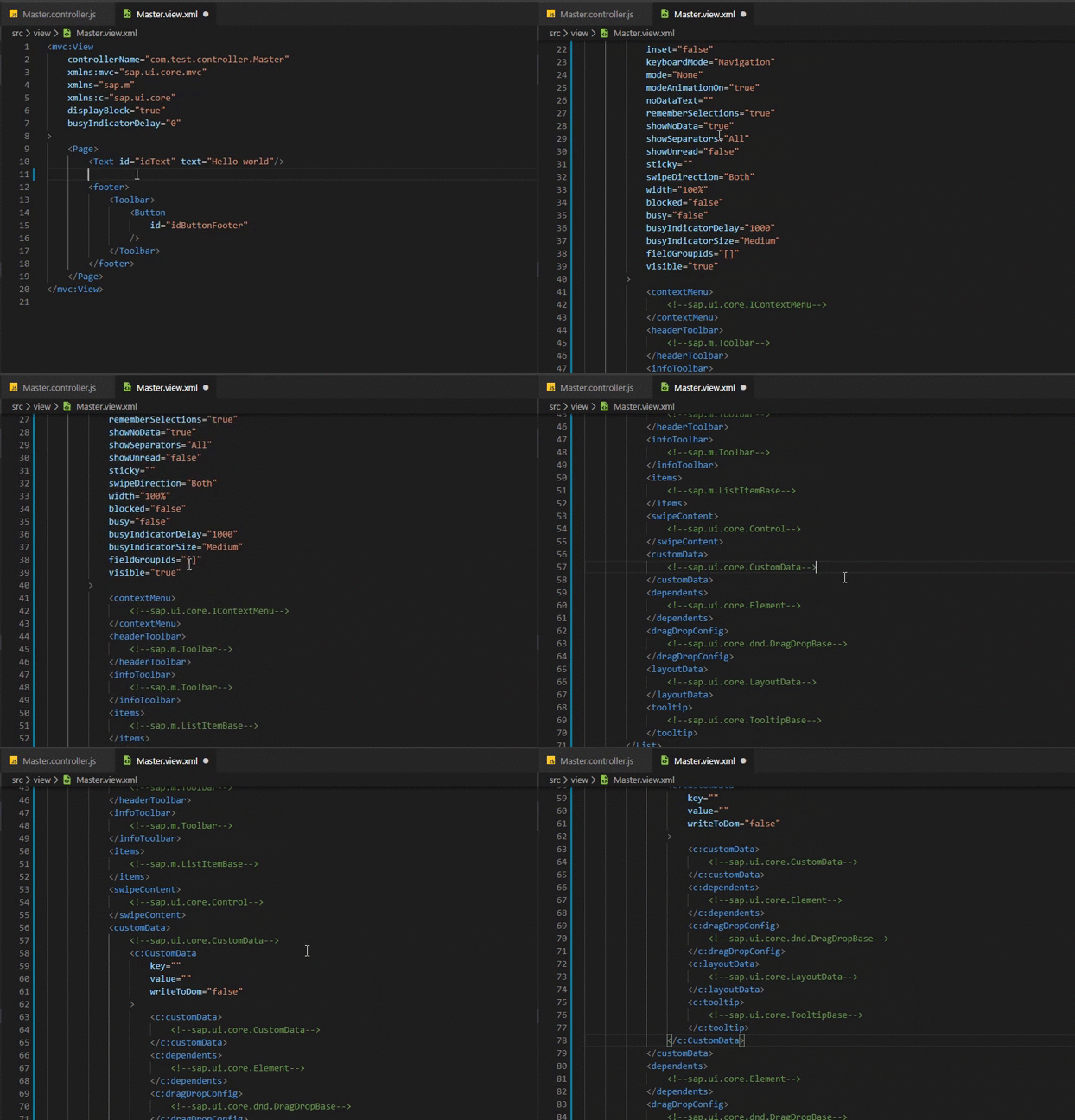
XML Completion Items for properties, aggregations, associations and events
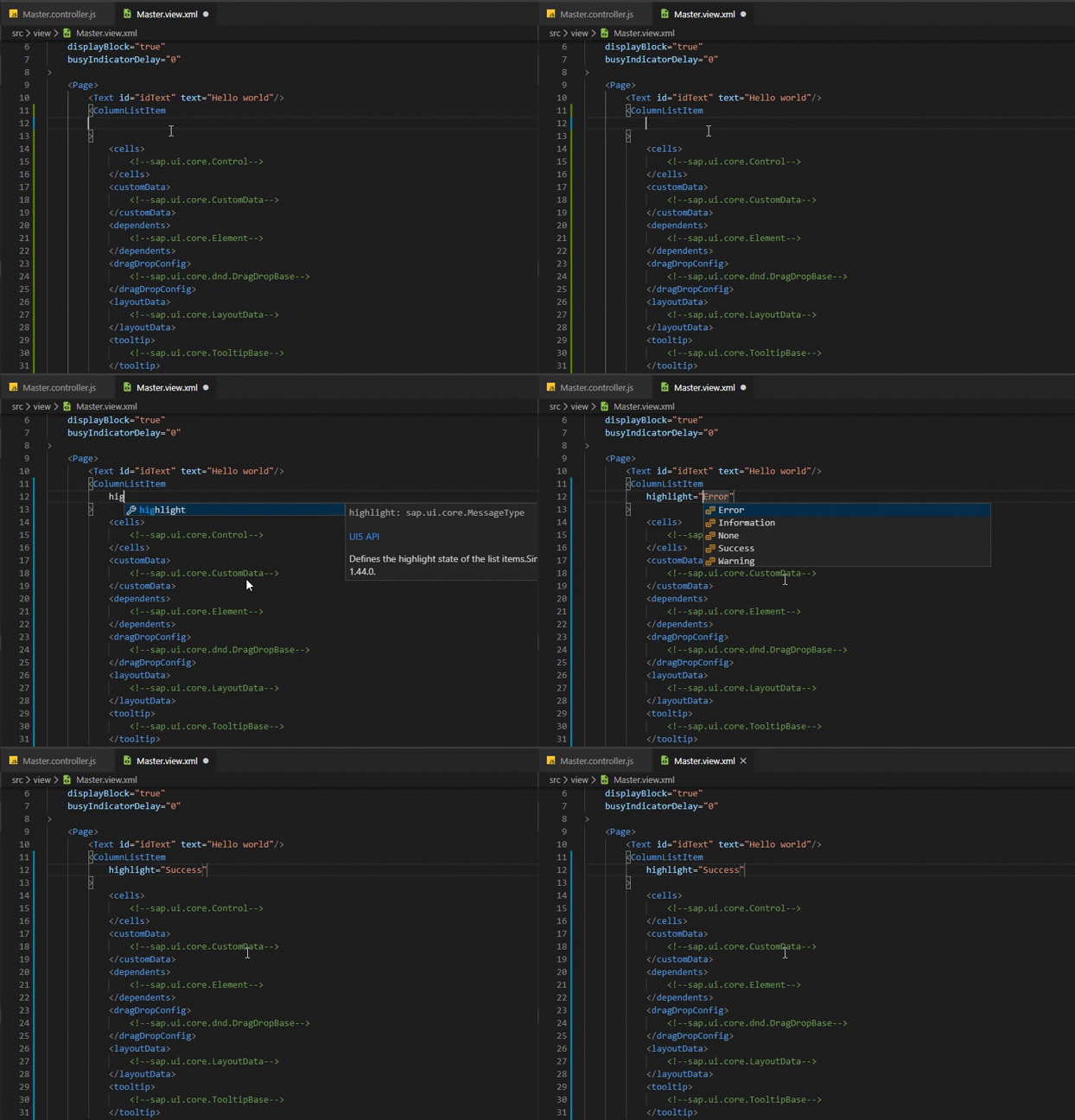
JS/TS
sap.ui.define
Strings for import in sap.ui.define are provided.
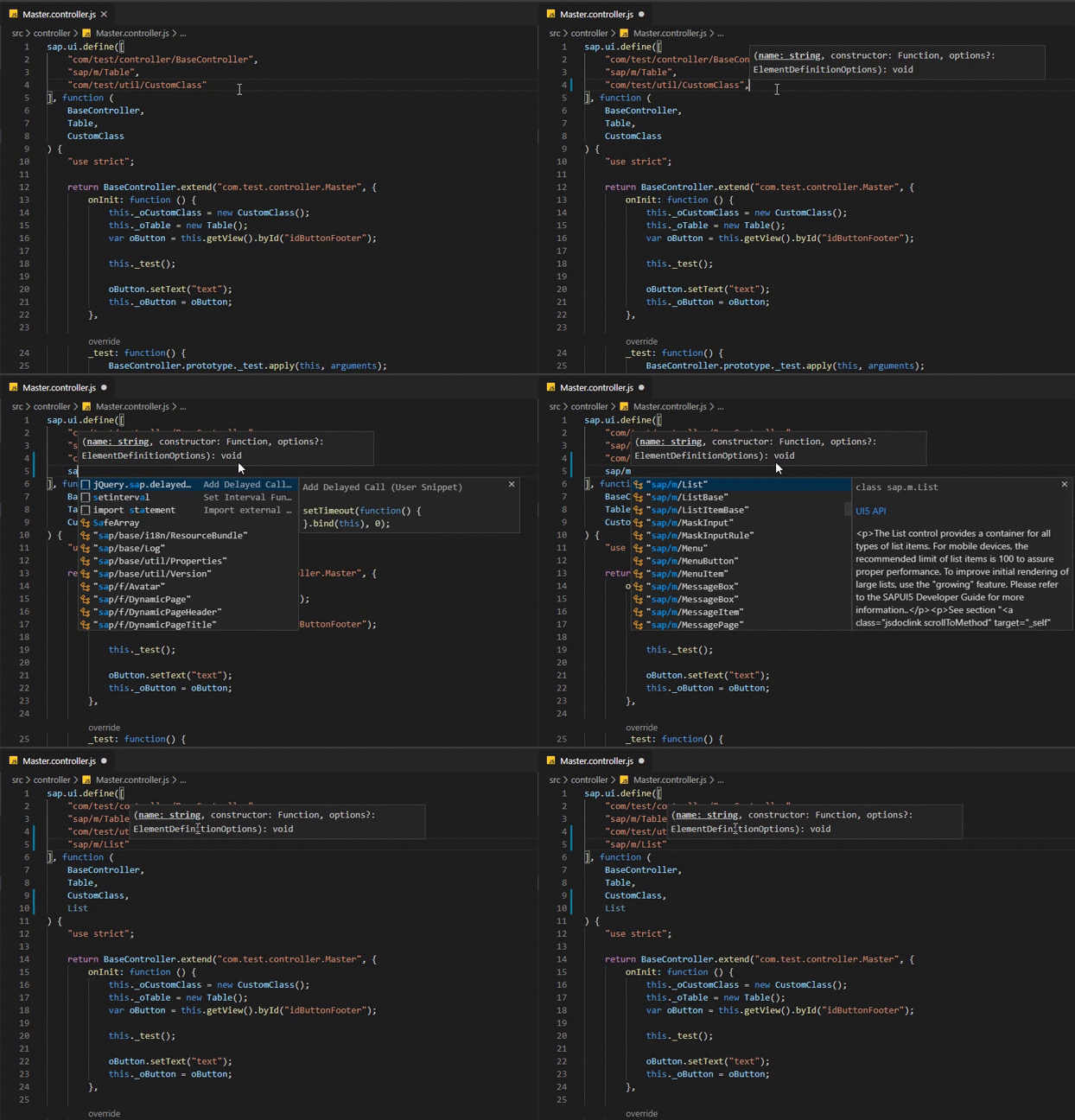
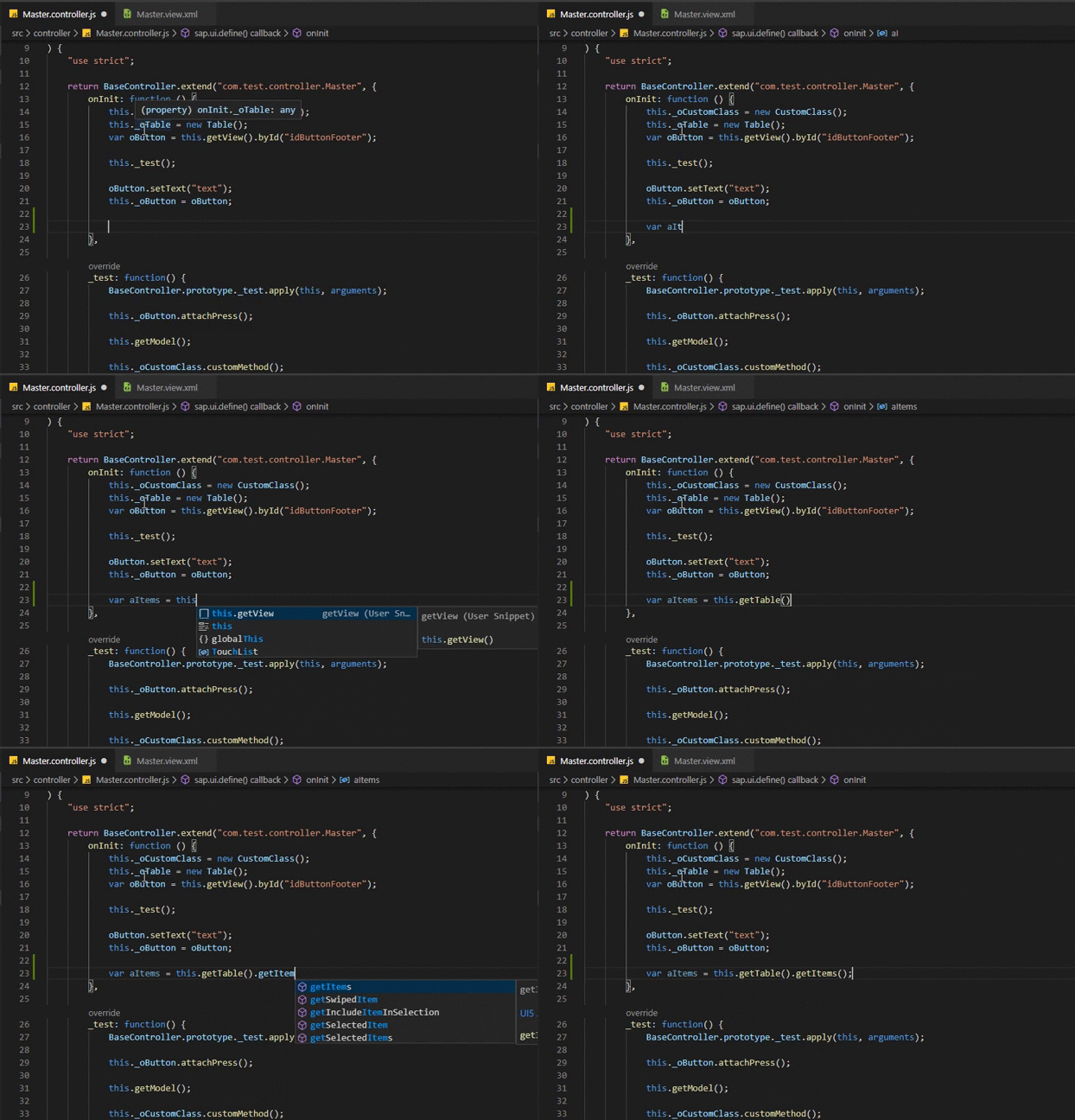
Control ID Completion Items
IDs from the corresponding view of the controller are provided for view.byId or controller.byId method
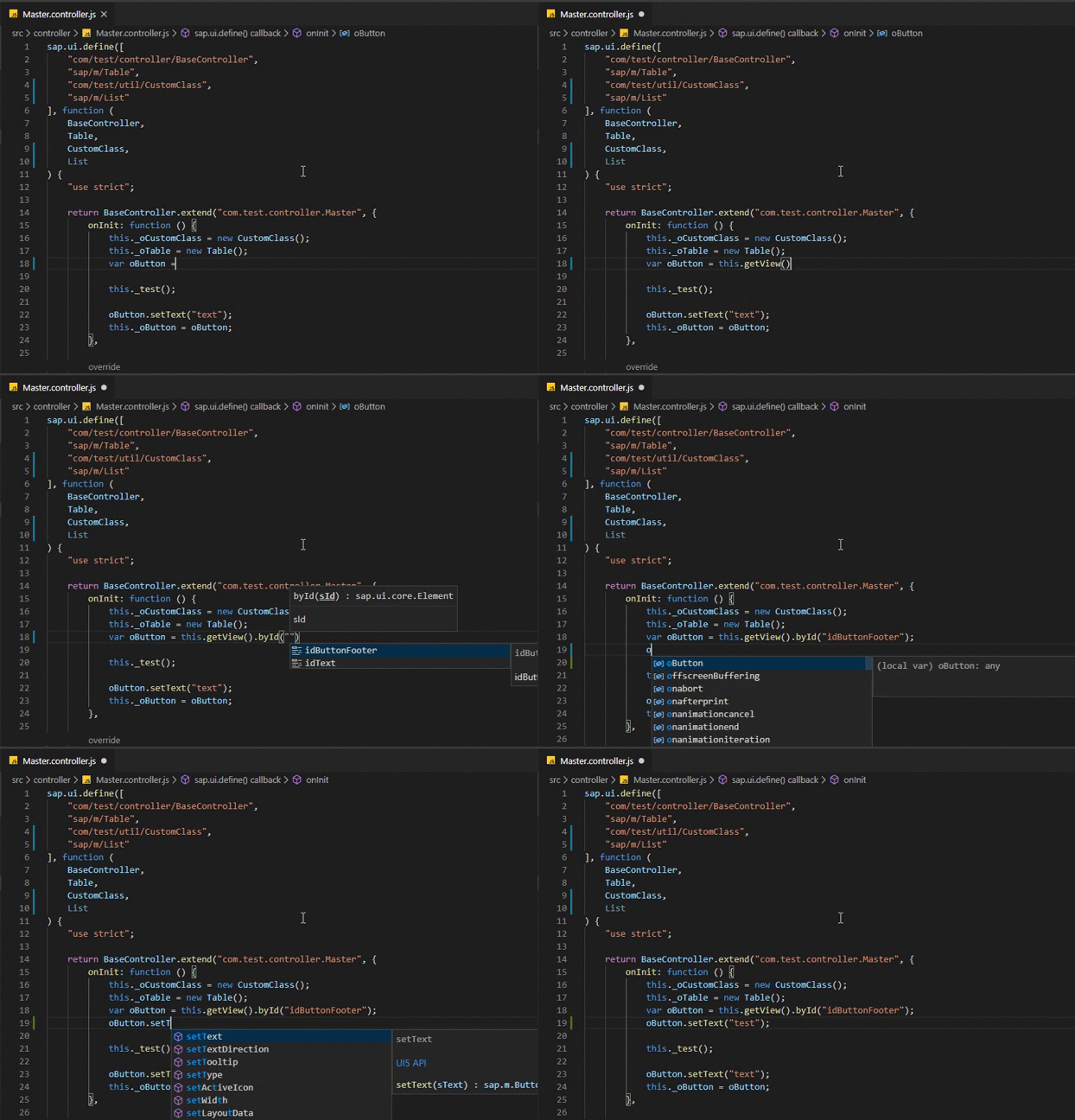
Dynamic Completion Items
Completion items which are generated dynamically depending on current variable type or method return value type. Trigger character - dot.
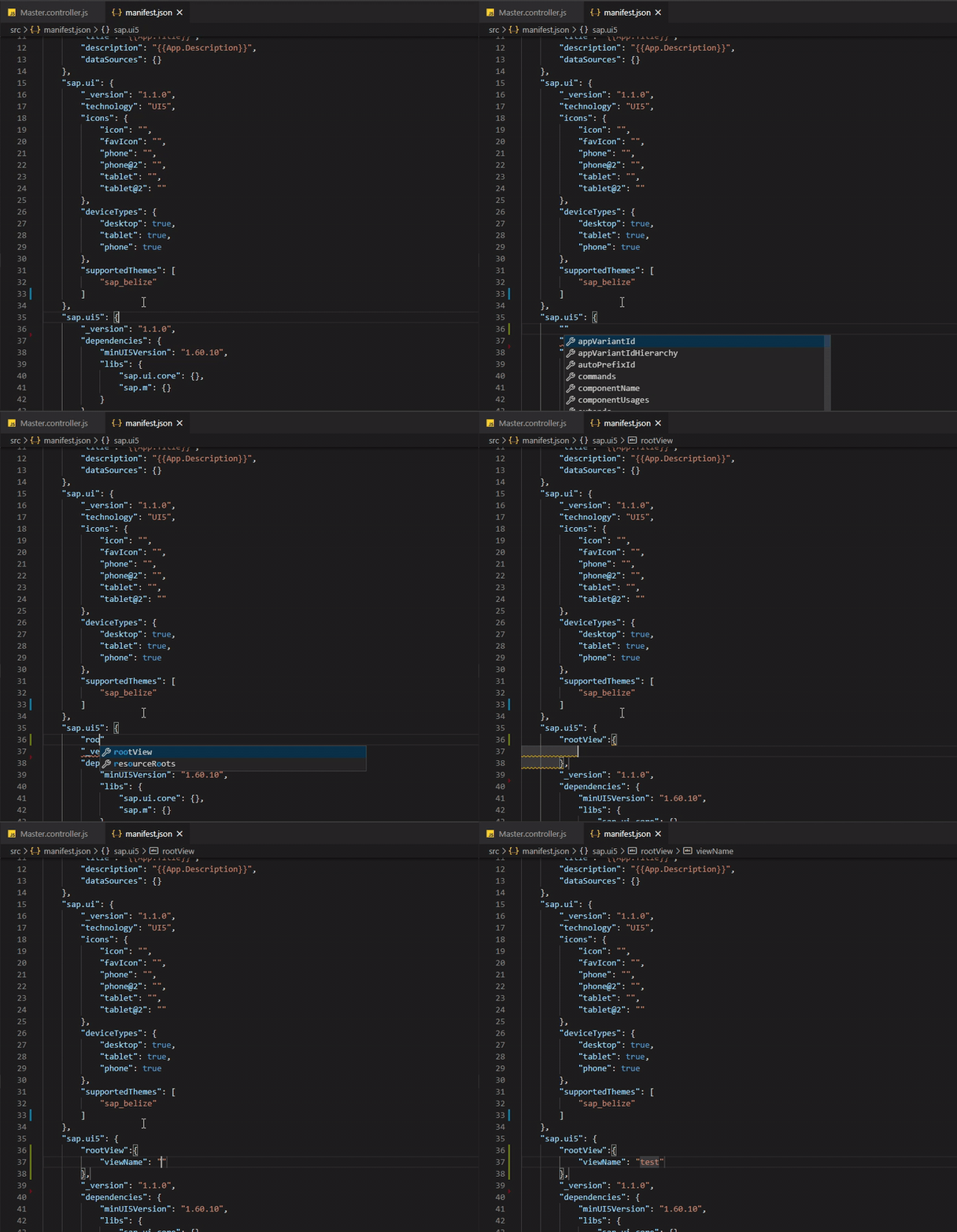
Manifest.json
Schema for manifest.json properties is provided.
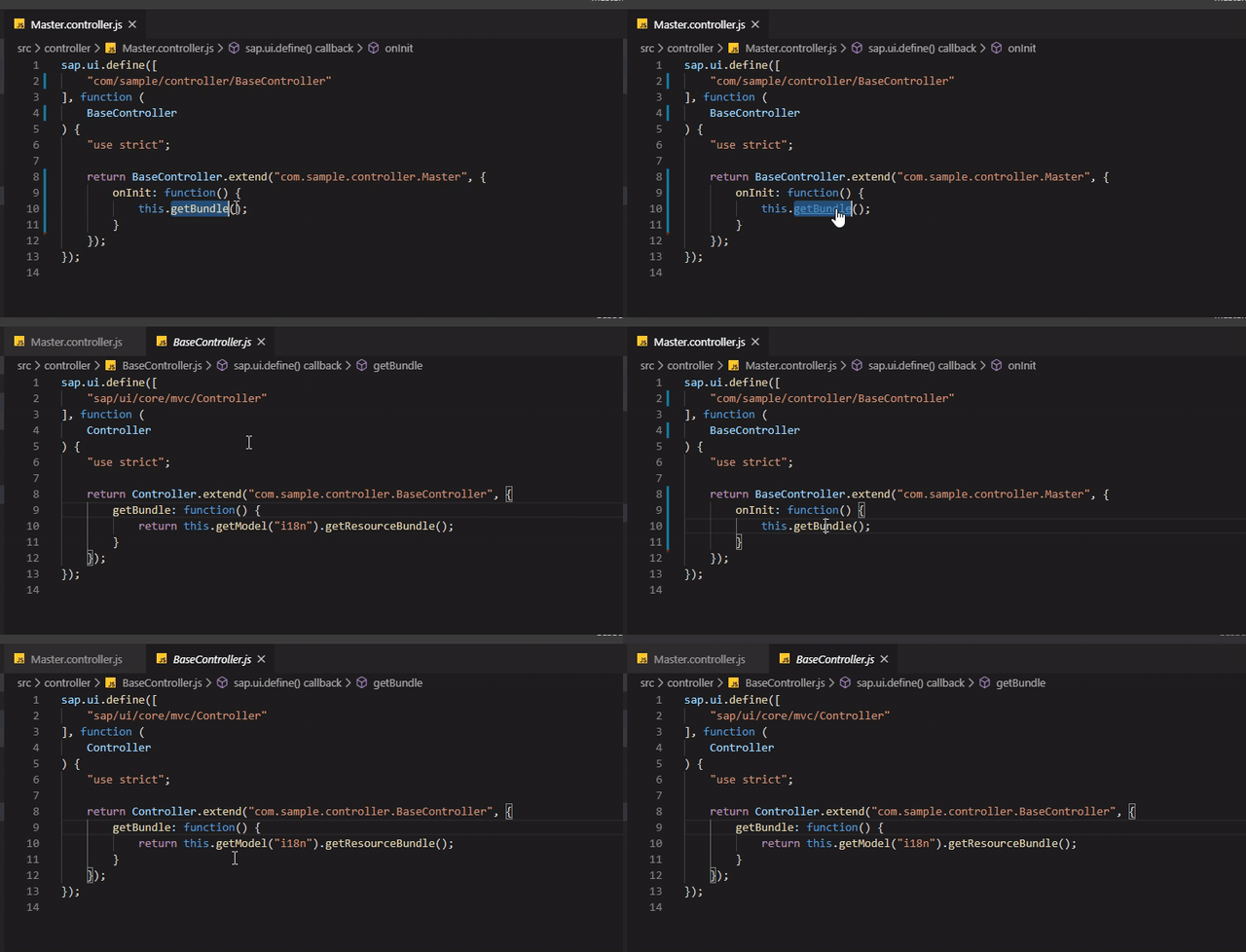
Method Definitions
Definitions for custom methods are provided.
Hotkey: Ctrl + Left Click
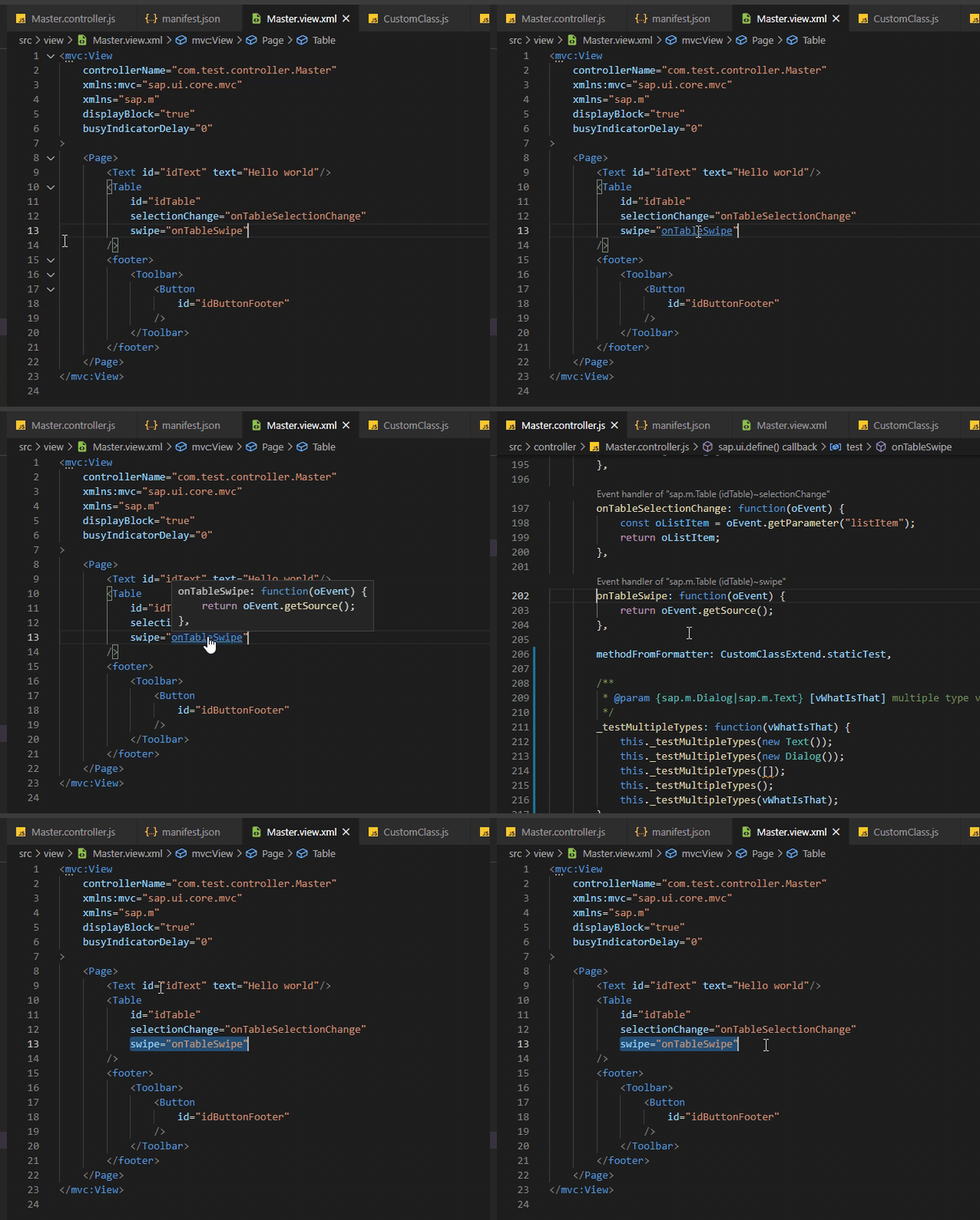
XML Event Handler Definitions
Definitions for event handlers are provided.
Hotkey: Ctrl + Left Click
CodeLens
CodeLens for Internalization Texts (translations), overriden methods, event handlers and member references is provided
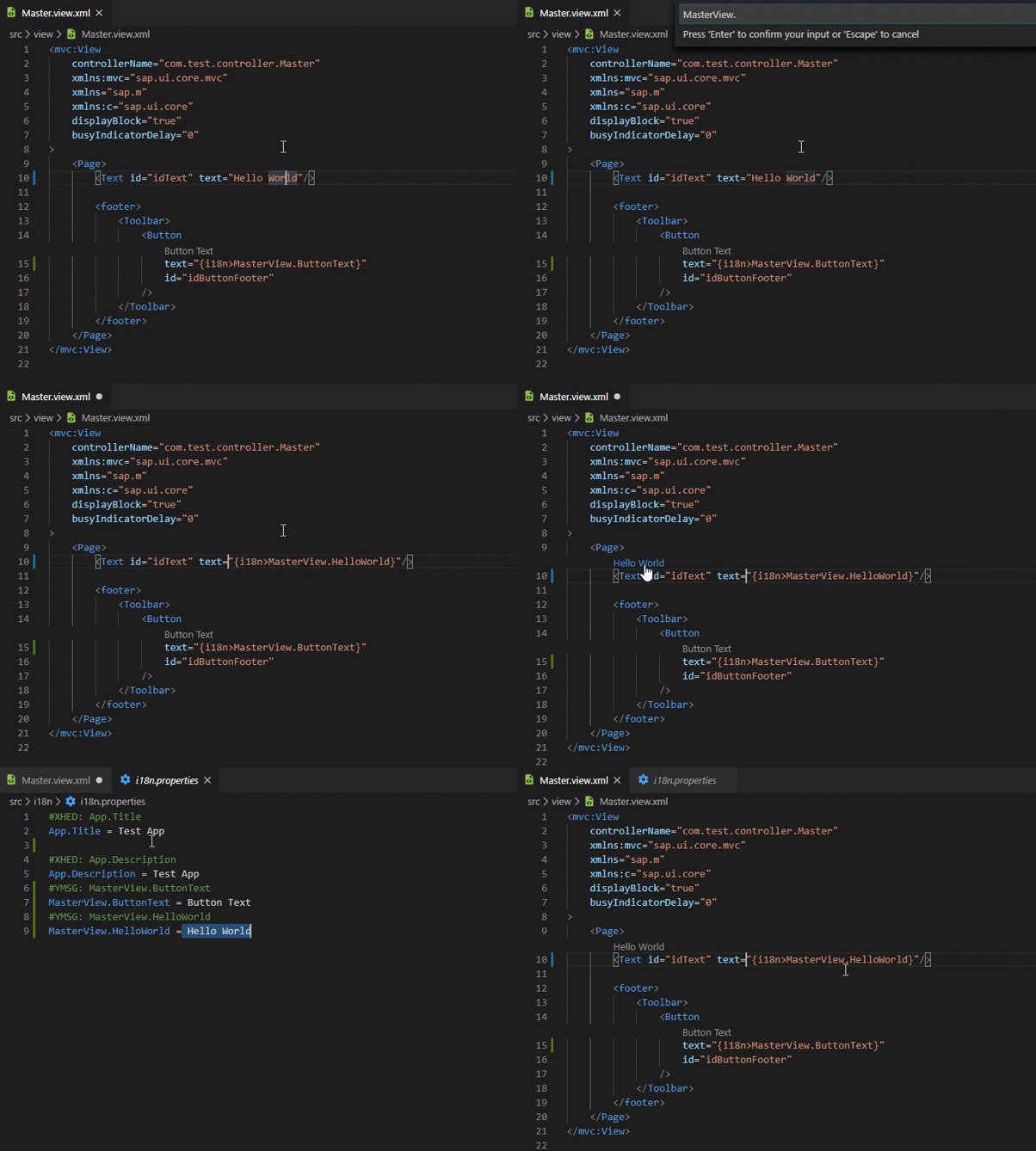
Related preference entries:
ui5.plugin.jsCodeLens
ui5.plugin.jsReferenceCodeLens
ui5.plugin.xmlCodeLens
ui5.plugin.propertiesCodeLens
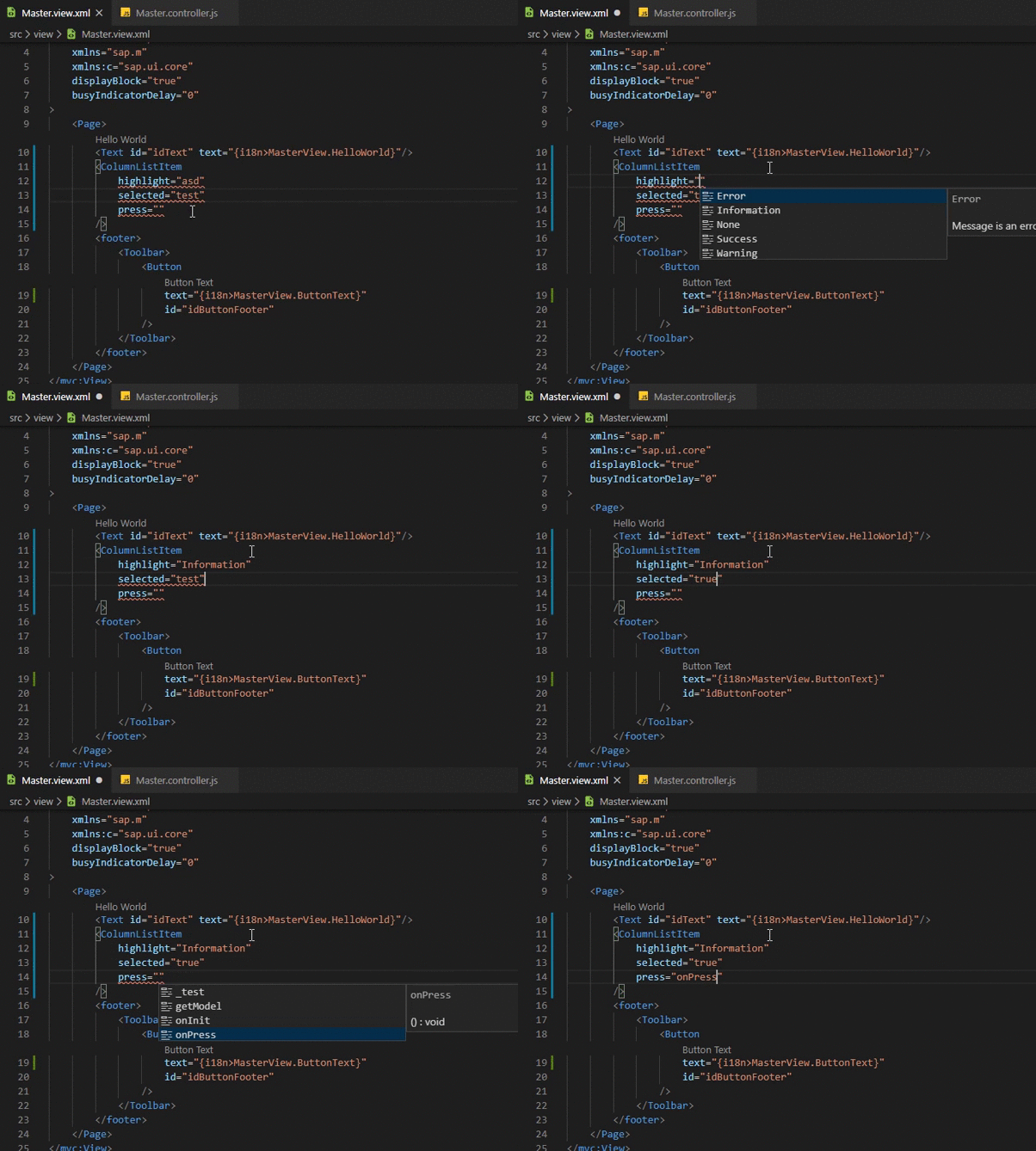
XML Diagnostics
See UI5 Linter for reference
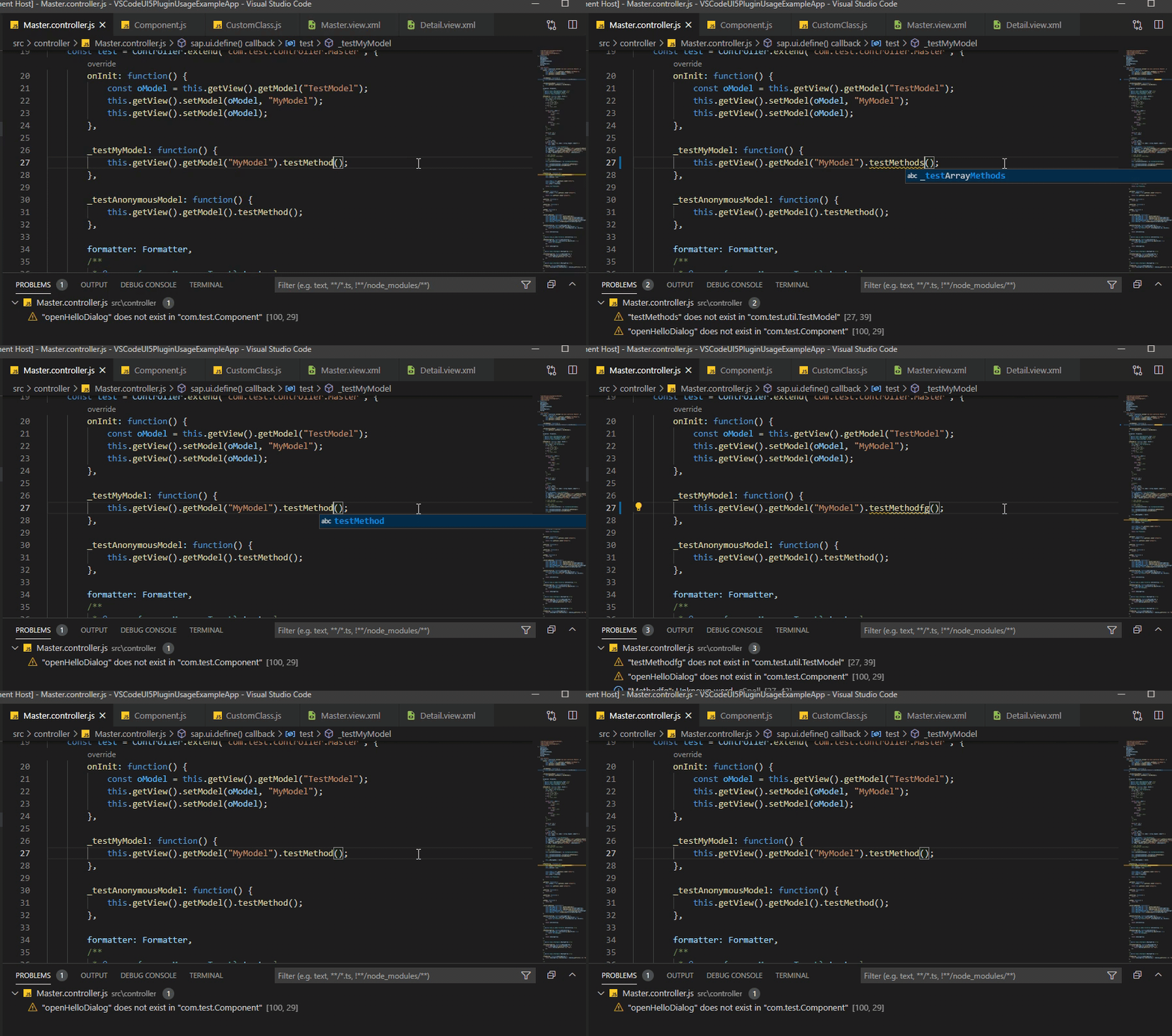
JS/TS Diagnostics
See UI5 Linter for reference
Properties (i18n) Diagnostics
See UI5 Linter for reference
Code Action Provider
Code Actions for UI5 modules import and inserting non-existent methods in .js/.ts files are provided.
Code Actions for creating event handlers in controllers from xml views/fragments are provided.
Code Action for renaming event handlers from xml views/fragments is provided.
Hotkey: Alt + Enter
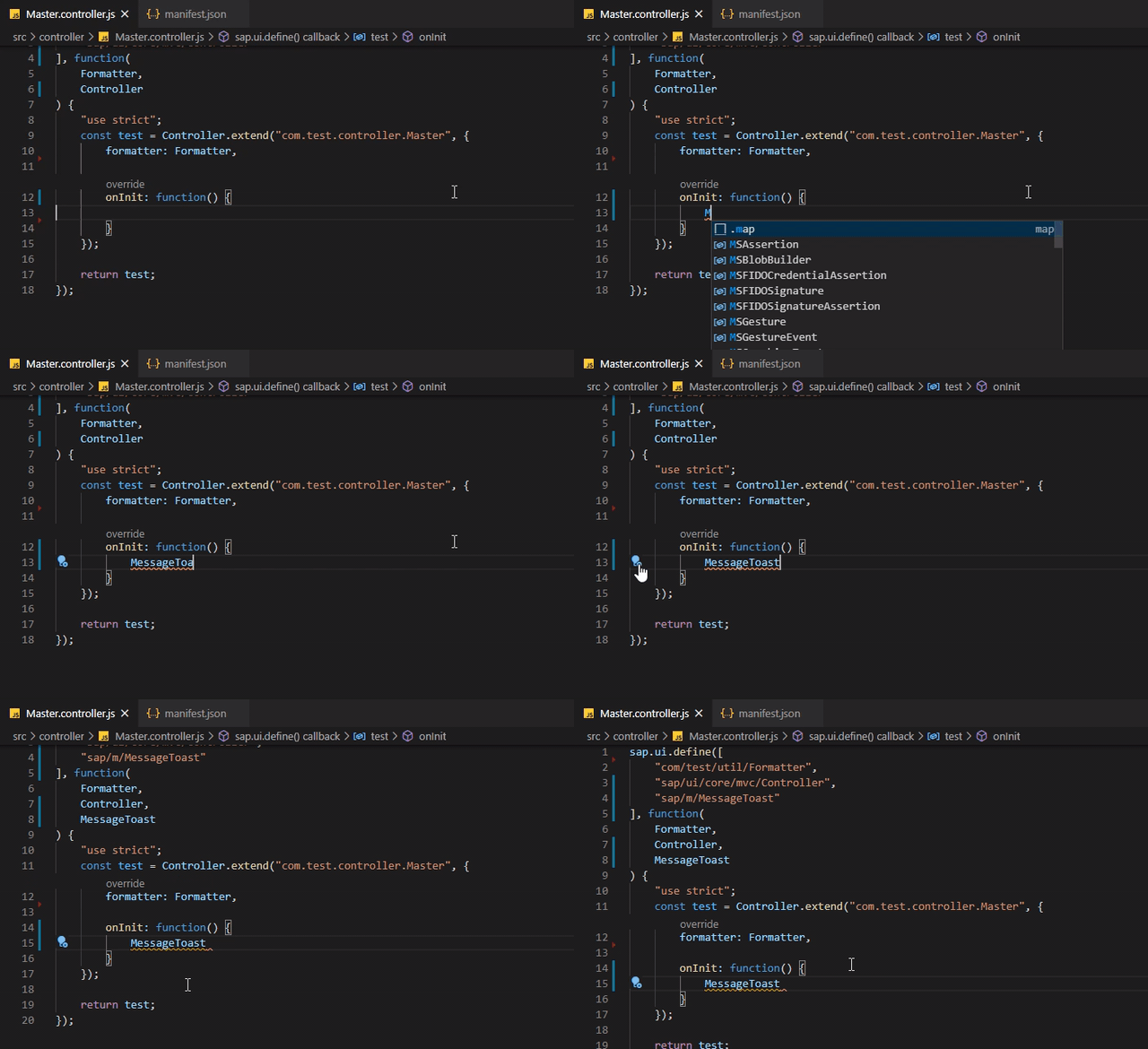
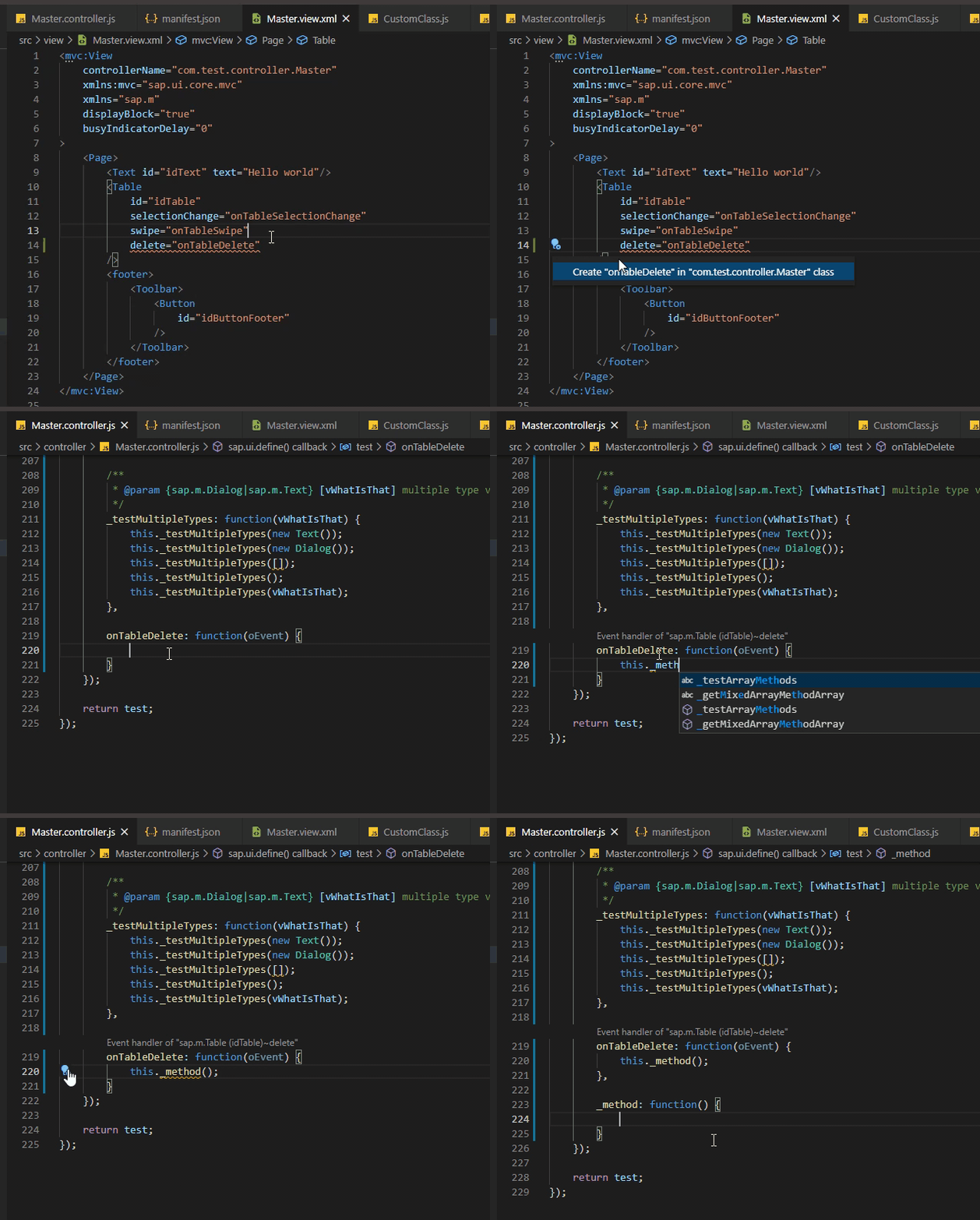
Helpful for TS! Check out
ui5.plugin.tsEventTypepreference entry. Handy if UI5 Version1.115.1+ is used, because the preference entry can be changed to{tsEvent}, in such case the correct event will be added automatically. Example:ListBase$SelectionChangeEventwill be generated, ifCreate methodaction will be selected on non existant event handler in XML viewsap.m.List->selectionChangeevent
Related preference entries:
ui5.plugin.tsEventModule
ui5.plugin.tsEventType
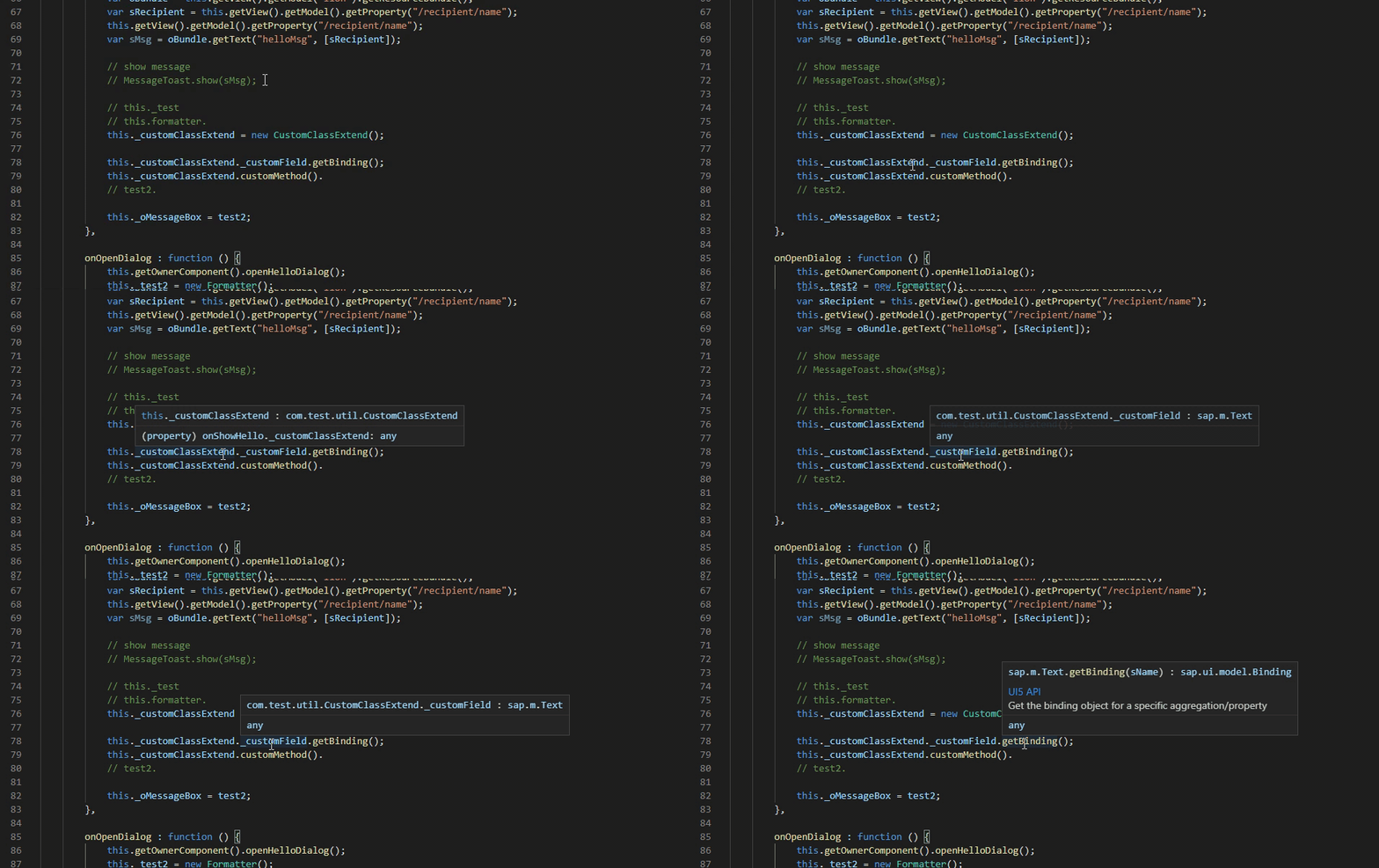
JS and XML Hover Provider
Information on hover is provided.
XML Formatter
XML Formatter is available.
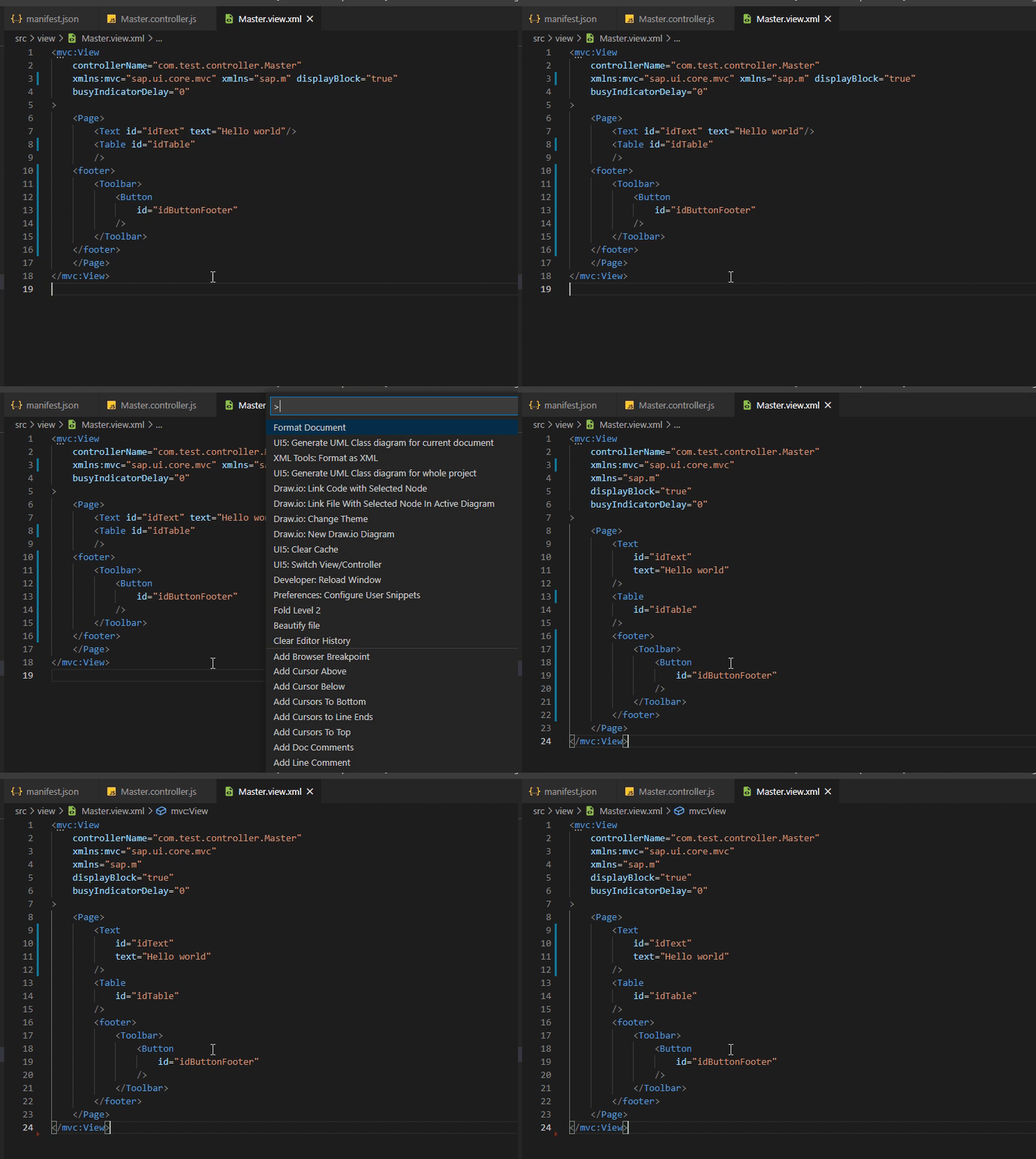
Related preference entries: ui5.plugin.xmlFormatterTagEndingNewline
ui5.plugin.xmlFormatterSpaceAfterSelfTagEnd
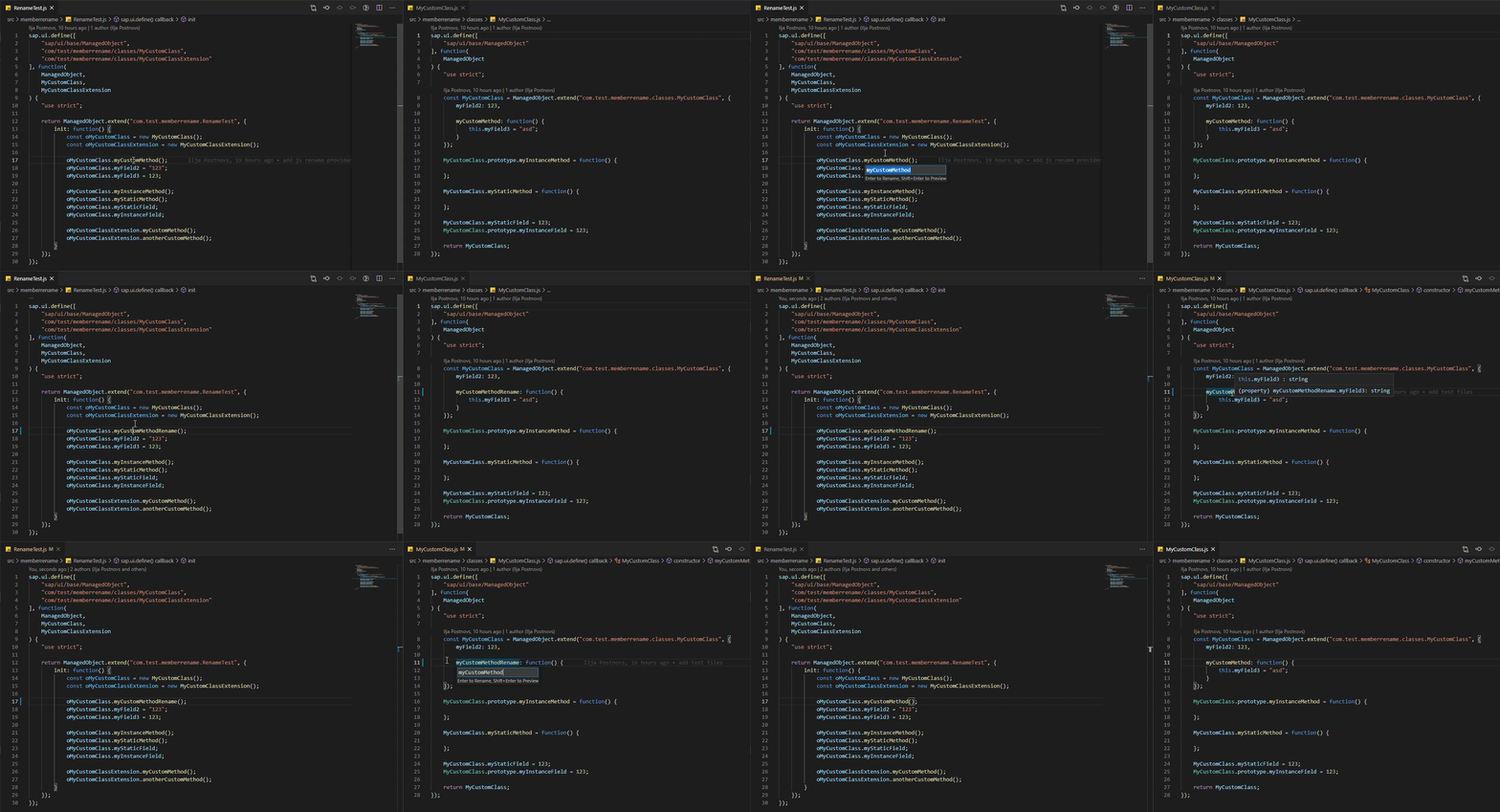
JS/TS Rename Provider
Rename provider for js/ts is provided.
The provider renames all references to the class for JS projects, and all references for the views/fragments for both TS/JS projects.
Commands
Move sap.ui.define to parameters
Hotkey: F5
Related preference entries: ui5.plugin.moveDefineToFunctionParametersOnAutocomplete
Export to i18n
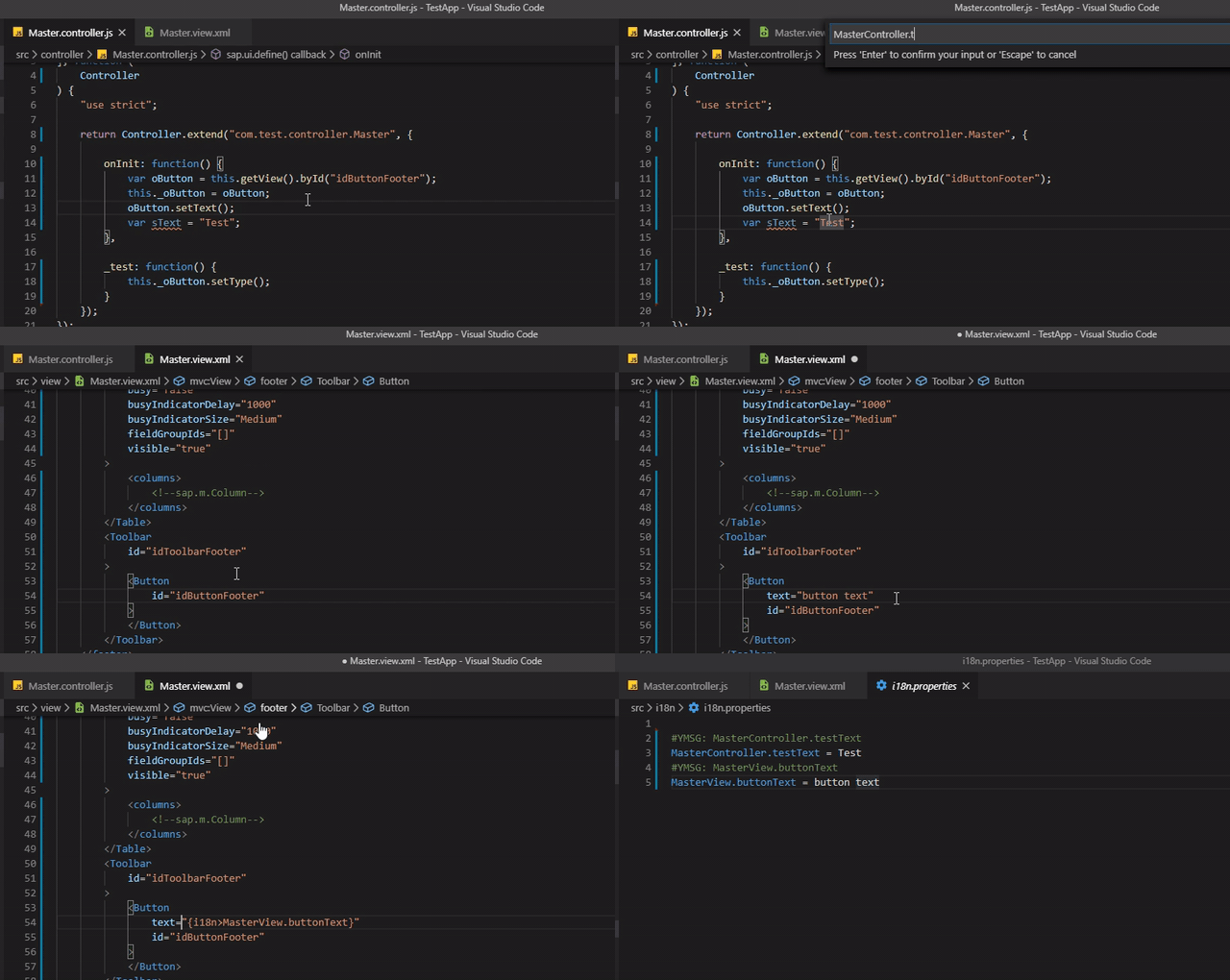
Set your position to the string you want to export to i18n.properties file and execute command. Works both in XML and JS files.
Info! If there is no selection, whole string will be exported. If there is a selection, only the selected part of the string will be exported.
this.getBundle()method which returnsResourceBundleshould be defined in Controller/BaseController
Related preference entries:
ui5.plugin.askUserToConfirmI18nId
ui5.plugin.addI18nTextLengthLimitation
ui5.plugin.textTransformationStrategy
Hotkey: F4
Export to i18n (bulk)
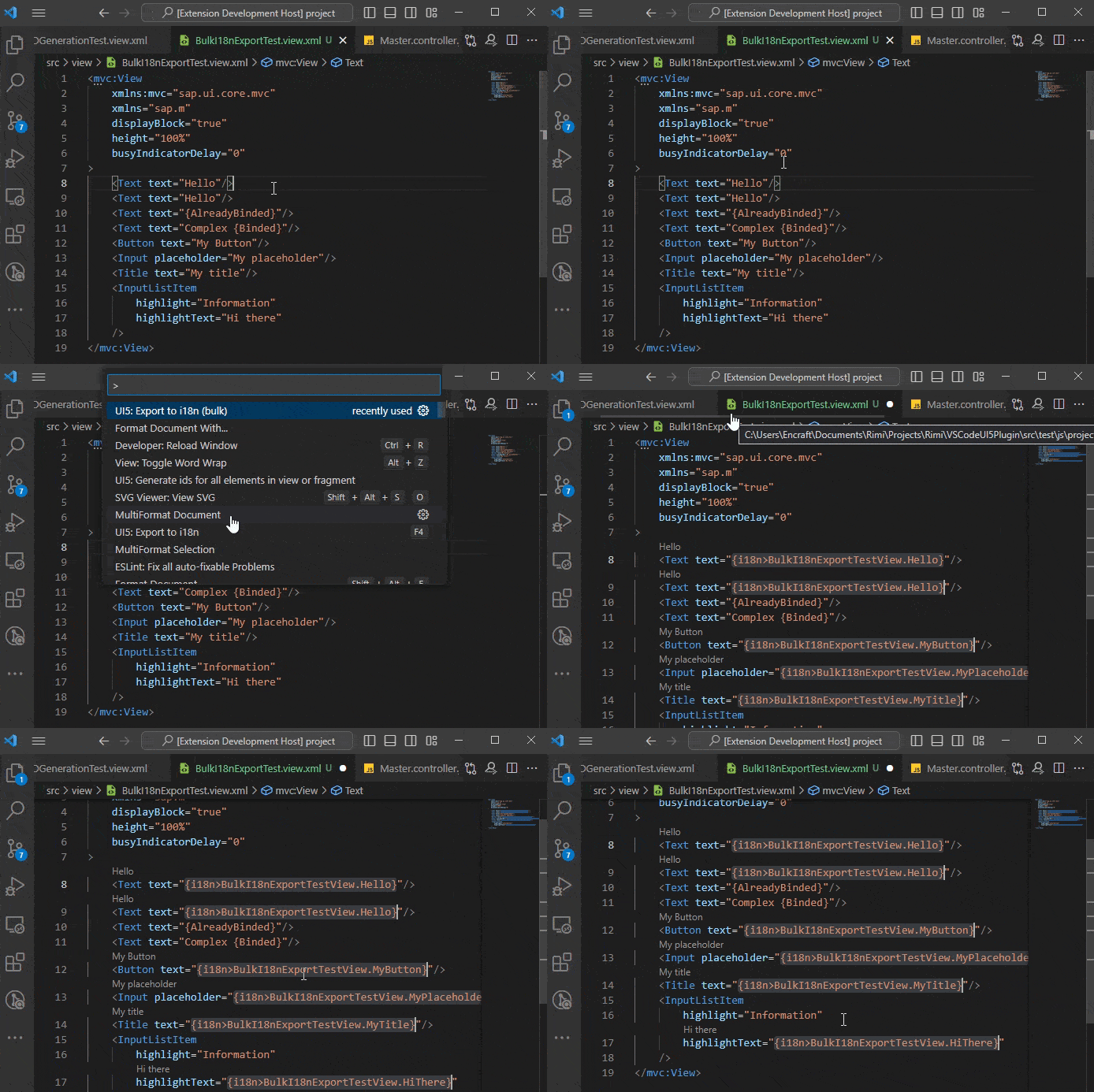
Open view or fragment and execute command. Works for XML files only.
Important! There is no info provided by SAP regarding which property should be exportable to i18n, that is why it is not possible to fully automate this process. This command exports only properties, which are configured to be exported. If there are some properties which are not exported, but should be, it is possible to adjust
ui5.plugin.bulkExportToi18nCommandDataVSCode preference entry. If you find yourself editing the preference entry, please open a ticket in github and share what was added, so it could be included into default value and work for everyone.
Related preference entries:
ui5.plugin.bulkExportToi18nCommandData
Switch View/Controller
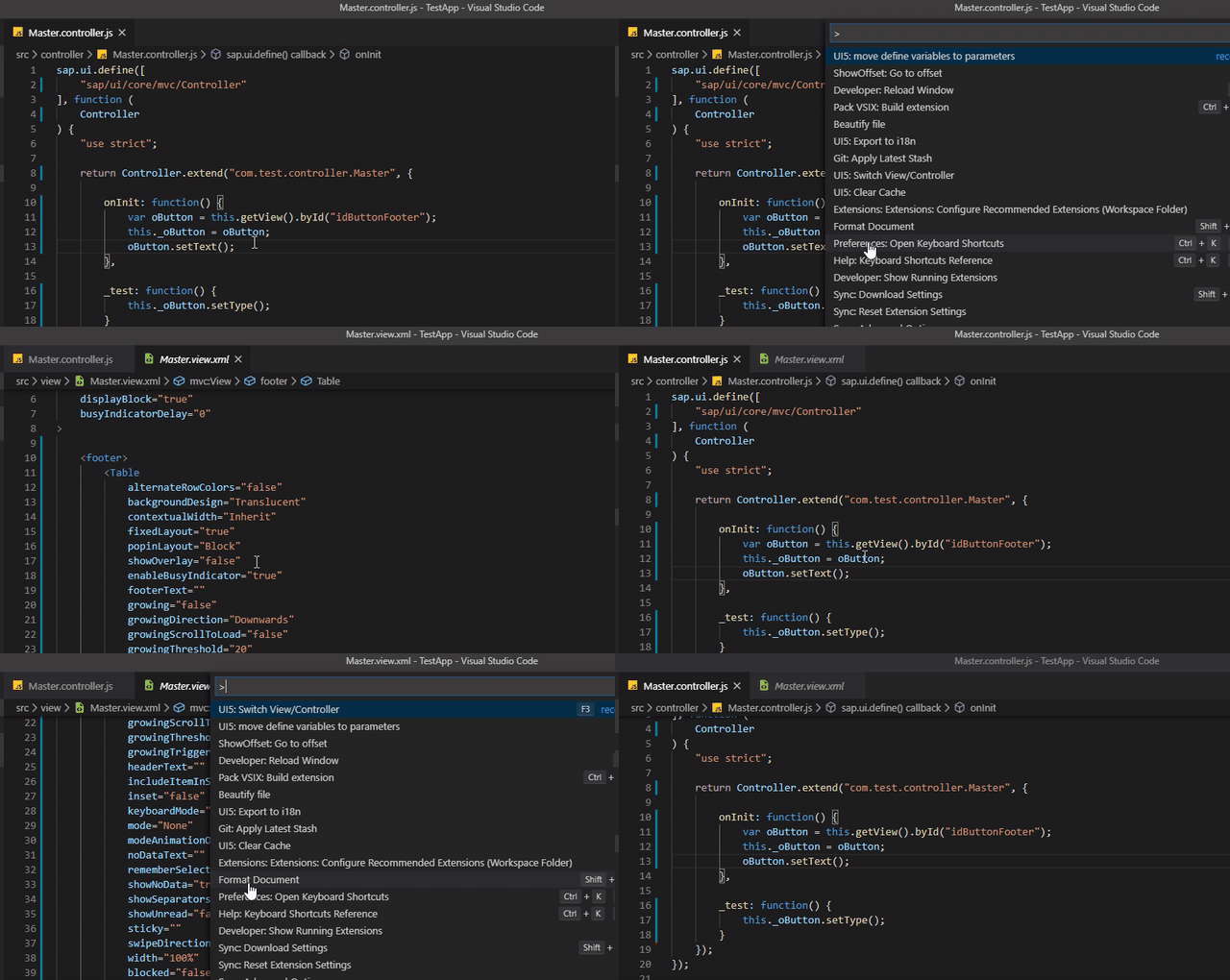
Goes to view from controller and to controller from view
If somebody uses MVC, the command actually switches between Model (Default model, which is set as this.getView().setModel(oModel) in the controller) View and Controller
For TS projects it is possible to add
@ui5modelJSDoc to the class, which should have a class name of the model to which the command will switch to. It will improve the performance issue, because reading type of default model might take seconds. Example:
/**
 * My Controller JSDoc
 * @ui5model {com.test.mvc.master.model.MyMasterModel}
 */
Hotkey: F3
Insert Custom Class name
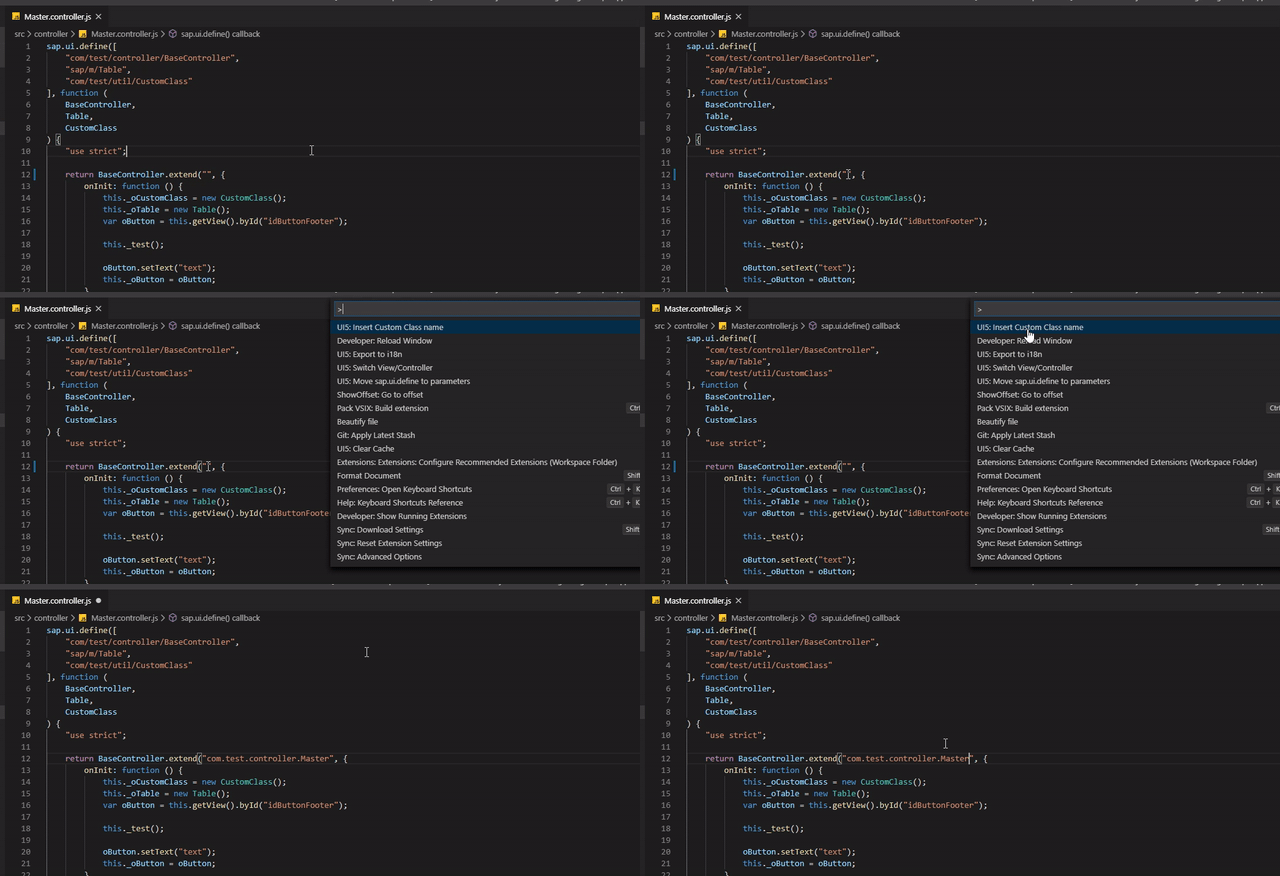
Inserts the class name into current position
Hotkey: F6
Clear Cache
Clears cache with SAPUI5 lib metadata
UML Class Diagram generation
UML Class diagram generates for the project of the currently opened file.
Command name:
UI5: Generate UML Class diagram for whole project
Also it is possible to generate ER diagram for opened metadata.xml file.
There are two ways to generate ER diagram:
- Open
metadata.xmlfile, execute commandUI5: Generate ER diagram from metadata.xml- Execute command
UI5: Generate ER diagram from metadata.xmland enter url tometadata.xml
It is possible to select in preferences which type of diagram to generate: DrawIO or PlantUML.
However, DrawIO is not supported anymore.
Recommended VSCode extensions:
DrawIO: hediet.vscode-drawio-insiders-build
PlantUML: jebbs.plantuml
UML Diagram example:
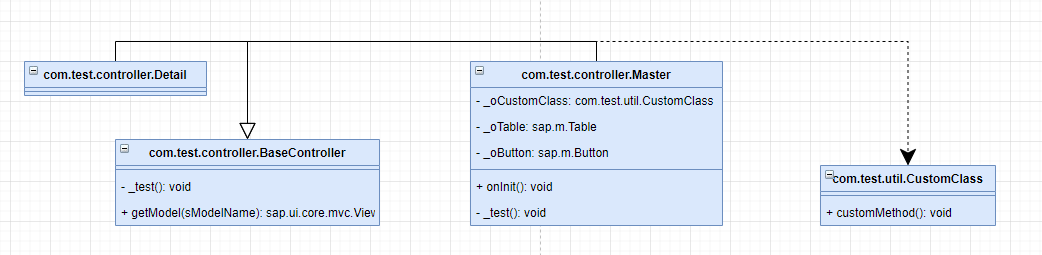
ER Diagram example:
Related preference entries:
ui5.plugin.umlGenerationPath
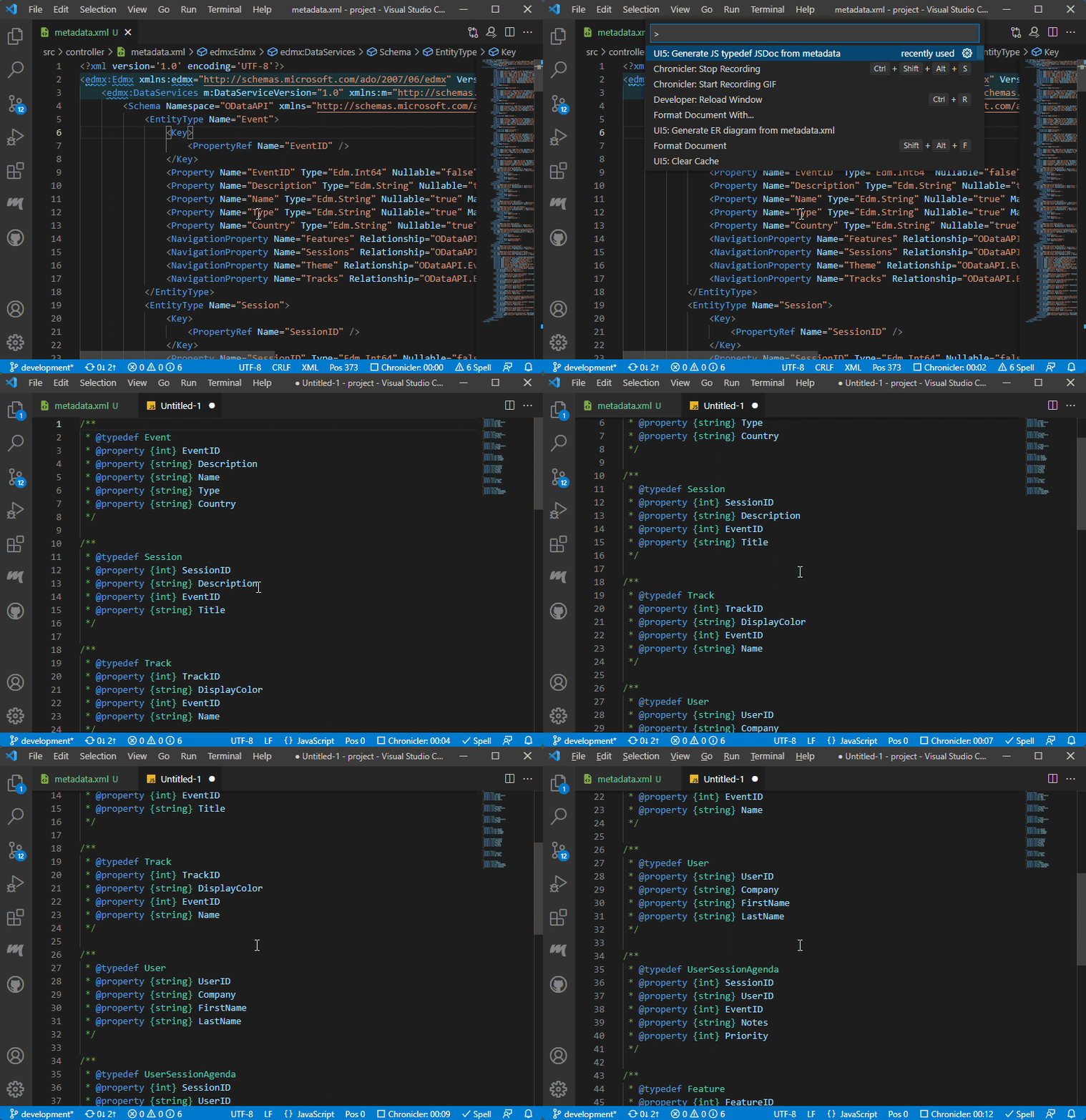
JSDoc typedef generation from metadata
There is a possibility to generate typedef JSDocs from metadata
There are two ways to generate typedefs:
- Open
metadata.xmlfile, execute commandUI5: JSDoc typedef generation from metadata - Execute command
UI5: JSDoc typedef generation from metadataand enter url tometadata.xml
Related preference entries:
ui5.plugin.JSTypeDefDocPath
(TS) Generate interfaces for XML files (id to class mapping)
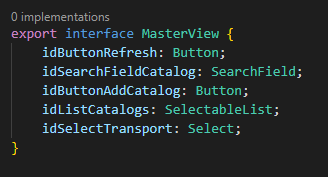
There is a possibility to generate mapping TS interfaces from control id to control type
Related preference entries:
ui5.plugin.XMLFileInterfacePath
ui5.plugin.generateXMLFileInterfacesOnSave
(TS) Generate interfaces for OData entities
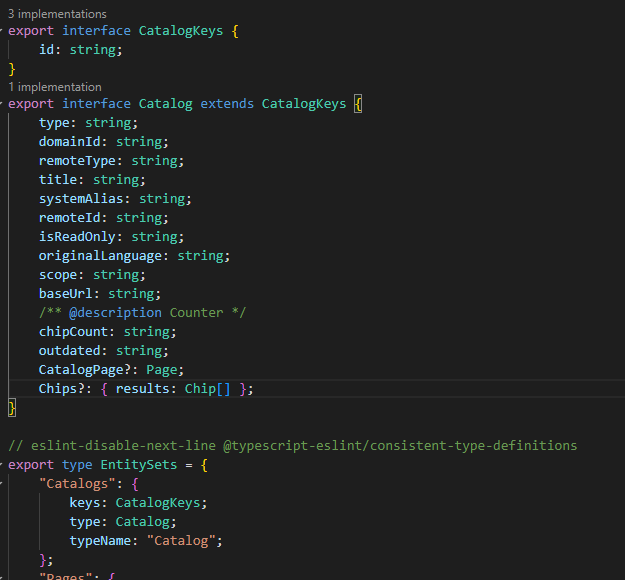
There is a possibility to generate TS interfaces for OData entities
There are two ways to generate interfaces:
- Open
metadata.xmlfile, execute commandUI5: (TS) Generate interfaces for OData entities - Execute command
UI5: (TS) Generate interfaces for OData entitiesand enter url tometadata.xml
Related preference entries:
ui5.plugin.TSODataInterfacesPath
ui5.plugin.TSODataInterfacesFetchingData
(TS) Generate interfaces for OData entities (Mass)
Works the same as previous command, but can be used for multiple OData models at once. ui5.plugin.massTSODataInterfacesFetchingData preference entry should be configured for this command to work.
Related preference entries:
ui5.plugin.massTSODataInterfacesFetchingData
Generate ids for all elements in view or fragment
Command, which generates IDs for elements in views and fragments. To generate ids, open a view or fragment and execute command.
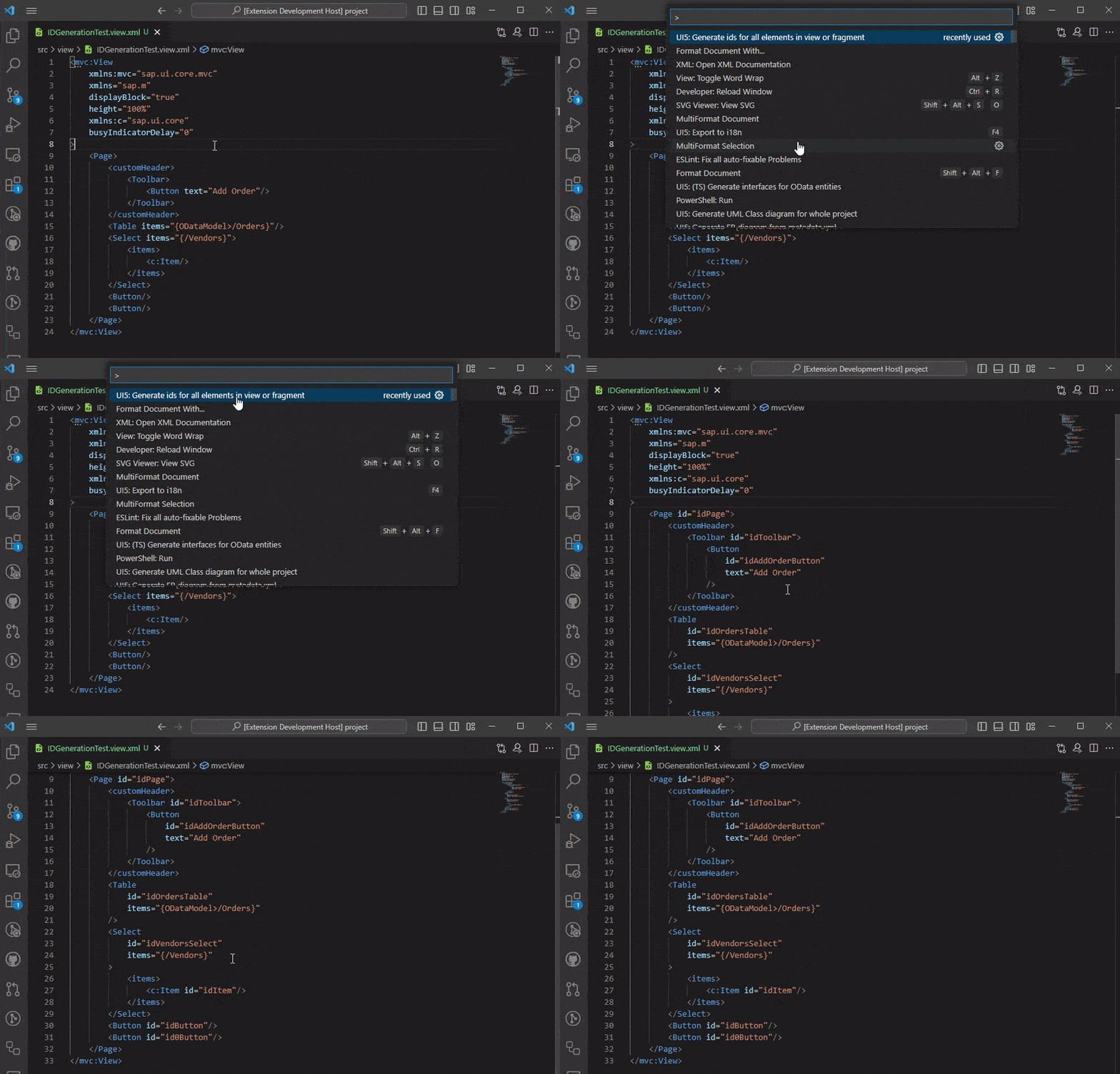
Related preference entries:
ui5.plugin.idGenerationFormula
ui5.plugin.generateIdsCommandData
Automatic template insertion
Inserts initial text for .js, .ts and .xml files
Extends "sap/ui/core/mvc/Controller" if file name ends with .controller.js/.controller.ts and "sap/ui/base/ManagedObject" if file name ends with .js/.ts
Hint!
sap/ui/core/mvc/Controllercan be changed to e.g.com/my/app/BaseControllerusingui5.plugin.insertManagedObjectModulepreference entry
Related preference entries:
ui5.plugin.insertControllerModule
ui5.plugin.insertManagedObjectModule
>
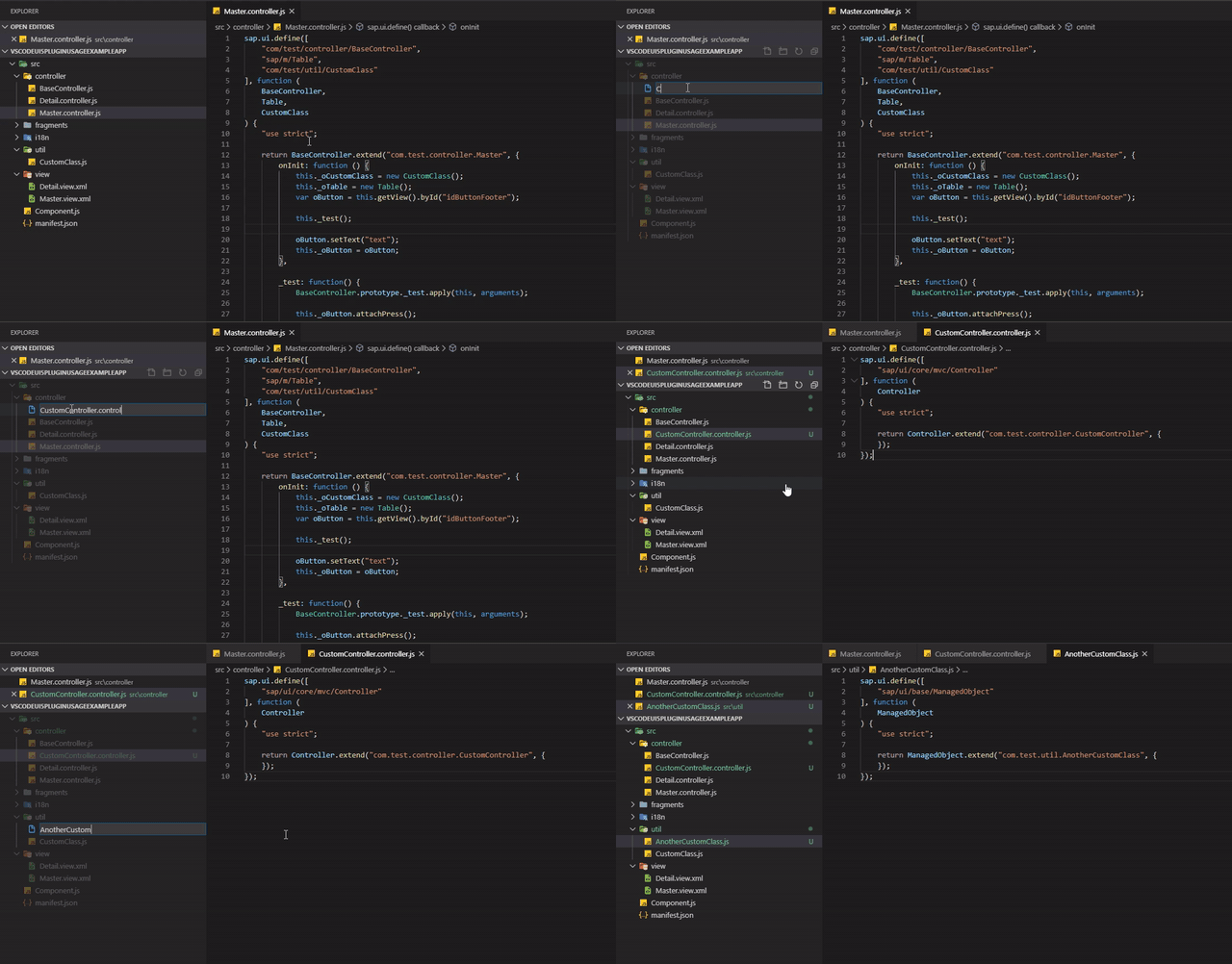
Automatic class name and class path renaming
Extension listens for .js/.ts file creation event (rename technically is file deletion and creation) and replaces all occurrences of class name to the new one
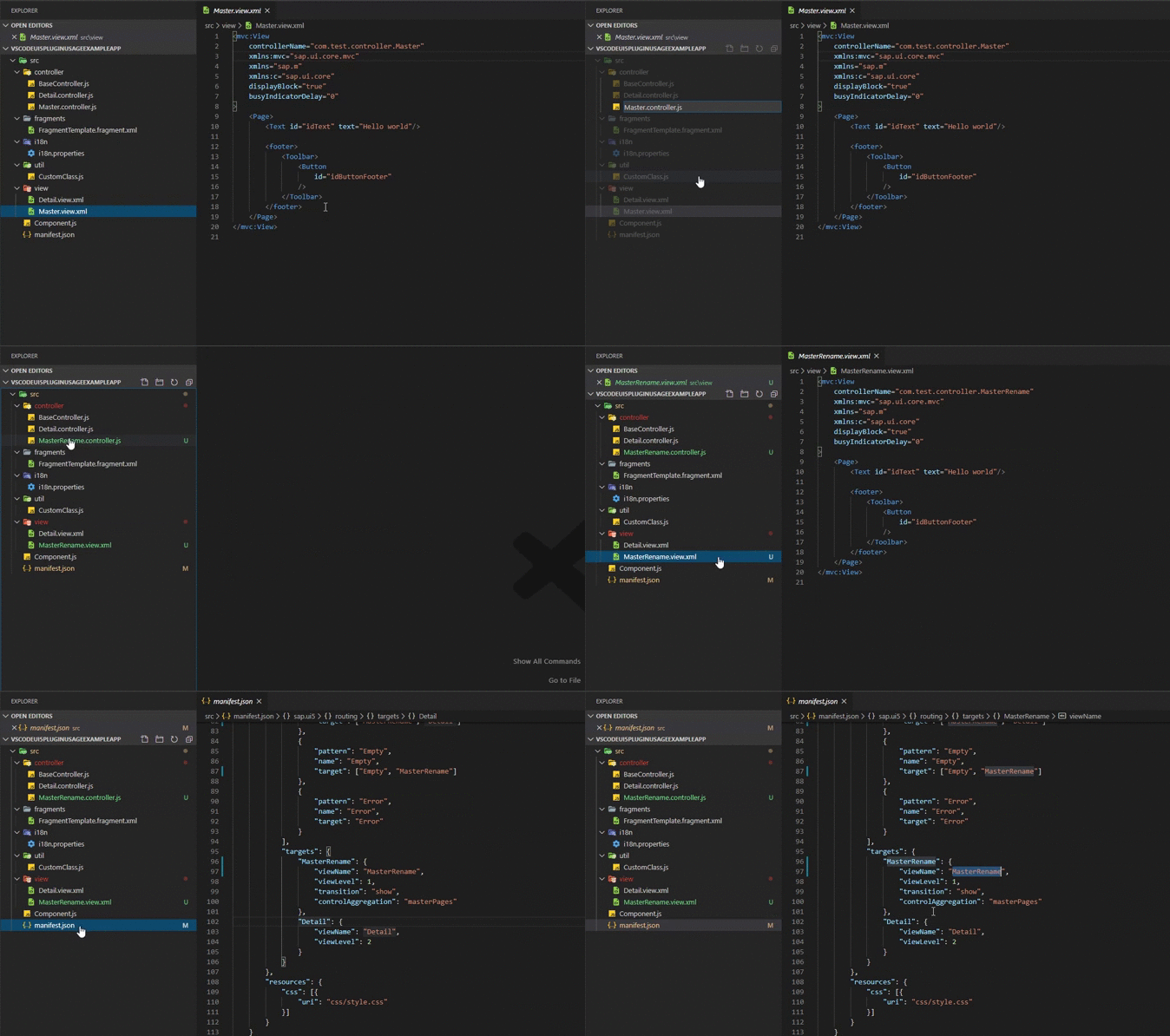
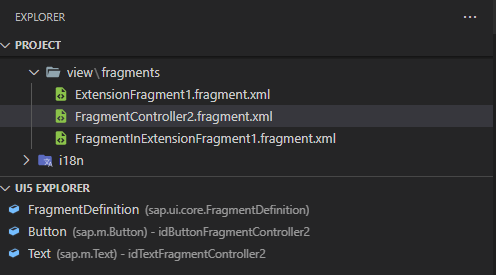
UI5 Explorer
Custom UI5 Explorer view in VSCode panel is available
-
For JS/TS files tree view contains fields and methods
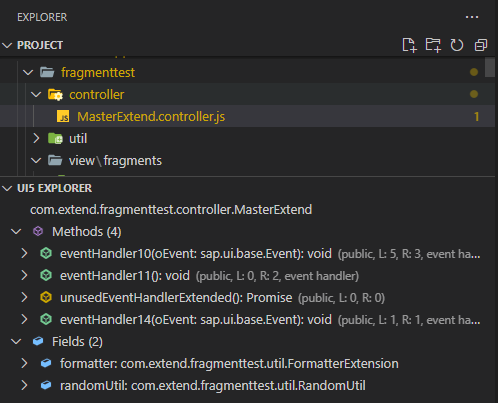
Coloring for methods is based on lines count and references count.
> Red color appears if there are more than 100 lines in one method
> Orange color appears if there are more than 50 lines in one method or there are 0 references (reference count is ignored if method is overriden)
> Green color appears for the rest of the cases -
For XML files tree view contains class tag list
UI5 Project Data
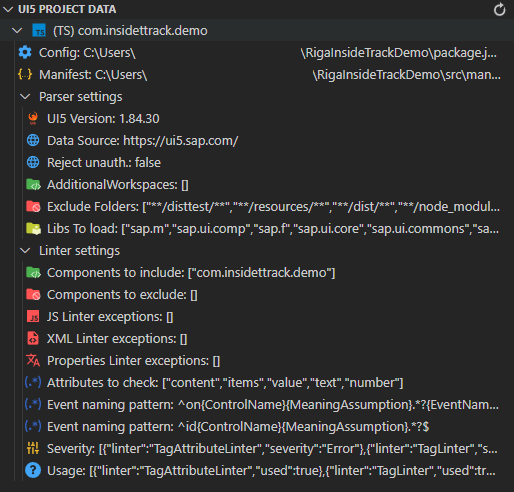
Custom UI5 Project Data view in VSCode panel is available
It represents the data about the project, like UI5 Version, config path etc. It makes easier to troubleshoot the config related issues.
View is not updated automatically, in order to do that, refresh button on the top right corner should be pressed.
Hotkeys
| Hotkey | Command |
|---|---|
| Alt + Enter | Quick Fix Action |
| F3 | Switch View/Controller |
| F4 | Export string to i18n |
| F5 | Move sap.ui.define imports to parameters |
| F6 | Insert custom class name |
Assumptions
- File starts with sap.ui.define (JS)
- Your class body is in AnyUI5Class.extend("name", {here}); (JS)
- You have manifest.json with App ID
- App ID (Component name) and i18n paths are defined in manifest.json
- File is without syntax errors
- Name of the UI5Class is written accordingly to file path. (E.g. "/src/control/Text.js" => "anycomponentname.control.Text")
- You have an access to https://ui5.sap.com for standard lib metadata preload
Proxy
If HTTP_PROXY or HTTPS_PROXY environment variables are set, https://ui5.sap.com will be requested using the proxy.
Known issues
acorn-loose
acorn-loose is used as JS parser. It has issues if you have mixed spaces and tabs. Example:
function() {
	 var oModel = this.getModel();
	var asd;
}
There is an unnecessary space before var oModel and acorn is parsing it incorrectly.
As a result - the file will not be parsed as expected and you might not get JS completion items and get errors in xml views regarding wrong values for event handlers.
Keep your code clean, it will help you to have the plugin working correctly :)
It's highly recommended to set formatting on save in your VS Code preferences, it will help to avoid such issues.
"editor.formatOnSave": trueStandard VSCode JS Formatter is not handling all formatting issues. hookyqr.beautify extension did, but it got deprecated. It's highly recommended to install some kind of formatter, e.g. Prettier, and use as JS formatter.
"[javascript]": {
	"editor.defaultFormatter": "<YourFormatter>"
}
ui5.sap.com damaged JSON response
For some reason ui5.sap.com sometimes might return damaged JSON when requesting standard library metadata. As a result, it is possible to get such error as:
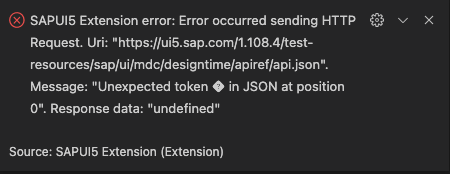
To solve it, please run UI5: Clear cache command and reload VSCode.
Things to consider using TS
- If any
.tsfiles are found andtsconfig.jsonis found, project is considered to be TS project src-genfolder is automatically excluded by extension if it's TS project. If build folder has different name, it should be added to folder exclusions in UI5 Parser configuration.- Folder with builded resources should be added to exclusions of
ui5parser. CheckexcludeFolderPatternsin package.json. - Not all linters work for TS, because TS has a lot out of the box features. E.g. Wrong field/method linter works only for JS, because TS has it's own syntax analysis for that.
ts-morphis used as TS parser and it has some drawbacks. When using typechecker to get type e.g. of the field or return type of the method,ts-morphmight hang up for about ~10s, which is not great. However, types are crucial for Reference CodeLens/Linters, specifically for fields in order to be able to distinguish them in views/fragments. As a workaround for performance issues, typechecker is not used to get field types. Because of that only simple structure is allowed.
Examples which should work as expected:
export default class Random {
  formatterInstance = new Formatter(),
  formatterObject = Formatter
}
At the same time type detection will work if the type is specifically written, e.g.
formatter: Formatter = ...- Disabling TS standard reference code lens should be considered. This extension contains its own reference code lens, which includes references to views and fragments.
Extension recommendations
- ESLint for additional linting
- Live Share for live code sharing with colleagues
- PlantUML for viewing diagrams generated by SAPUI5 Extension
- Prettier for pretty code
- TODO Highlight to not forget about your TODOs
- Template String Converter to be even more lazy
- Version Lens for updating your tooling
- YAML to get autocomplete for
ui5.yamland.ui5pluginrc.yamlwith this preference entry:
"yaml.schemas": {
    "https://raw.githubusercontent.com/iljapostnovs/VSCodeUI5Plugin/master/schema/packageSchema.json": [
        ".ui5pluginrc.yaml",
        ".ui5pluginrc.yml"
    ]
}- XML to get simple syntax linting
History
Other 2
Notes
- Fix: OData to TS type generation to correctly convert Collections into Arrays
- Fix: OData to TS type generation to correctly parse the Nullable property of FunctionImport parameters
Other 3
Notes
- UI5 Parser updated to v1.10.1
- UI5 Linter updated to v1.17.1
- Decrease min. VSCode engine version
Other 1
Notes
- New preference entry added:
ui5.plugin.parsingDelay. It serves as a delay for parsing, which can be handy for large projects in order to gain better performance.
- New preference entry added:
Other 2
Notes
- New preference entry introduced:
eventHandlerGenerationFormula - New Code Action provided: event handlers renaming according to
eventHandlerGenerationFormula
- New preference entry introduced:
Other 3
Notes
- UI5 Linter updated to v1.15.0
WrongOverrideLinternow checks if member is deprecated (#398)- Fix:
UnusedClassLinterdoesn't show error if any member is used outside the class (#387)
Other 3
Notes
- Commands which worked with V2 OData model only now works with V4 as well
- UI5 Parser updated to v1.6.4
- UI5 Linter updated to v1.11.1
Other 2
Notes
- UI5 Linter updated to v1.11.0
- Make XML Formatter preserve newlines. (Thanks to @netux)
Other 2
Notes
- UI5 Linter updated to v1.10.0
xmlFormatterSpaceAfterSelfTagEndpreference entry for XML formatter added. Readme. (Thanks to @netux)
Other 1
Notes
- Fix imported module name collision for
(TS) Generate interfaces for XML files (id to class mapping)command
- Fix imported module name collision for
Other 2
Notes
- XML Formatter doesn't replace
"with'in attribute value anymore for such cases as\{type: 'sap.ui.model.type.Date', formatOptions: \{UTC: true\}, constraints: \{\} \} - TS id to control generator command now ignores commented tags. Output is sorted now.
- XML Formatter doesn't replace
Other 3
Notes
- UI5 Parser updated to v1.6.1
- UI5 Linter updated to v1.8.3
- Missing autocompletions in XML issue fixed (#366)
Other 4
Notes
- UI5 Parser updated to v1.6.0
- UI5 Linter updated to v1.8.2
nodeProjectsconfiguration option added. Readme- Minor bugfixes for XML Completion items for custom controls
Other 1
Notes
- XML attribute completion items now are filtered by usage. If attribute already exists, no completion item will be shown for it.
Other 6
Notes
- UI5 Linter updated to v1.8.1
TagAttributeDefaultValueLinterconfiguration entry added. ReadmeEventTypeLinteradded. Readme- New command introduced: ui5plugin.generateIds.
- New preference entries introduced:
ui5.plugin.idGenerationFormula,ui5.plugin.generateIdsCommandData(Configuration Readme) - XML Formatter no longer replaces double backslash with single backslash
Other 1
Notes
sap/ui/base/Eventis not automatically imported anymore iftsEventvariable is added toui5.plugin.tsEventTypepreference entry
Other 4
Notes
tsEventvariable added toui5.plugin.tsEventTypepreference entry. Handy if UI5 Version1.115.1+ is used, because the preference entry can be changed to{tsEvent}, and then the necessary event will be added automatically. Comes as a replacement fortsEventvariable. (Check UI5 Type Definitions release notes)- UI5 Project Data view added
- UI5 Parser updated to v1.5.6
- UI5 Linter updated to v1.7.6
Other 4
Notes
tsEventParametersvariable added toui5.plugin.tsEventTypepreference entry. Handy if UI5 Version1.115.0+ is used, because the preference entry can be changed toEvent<{tsEventParameters}>, and then the necessary generic for event parameters will be added automatically.Example:
Event<$ListBaseSelectionChangeEventParameters>will be generated, ifCreate methodaction will be selected on non existant event handler in XML viewsap.m.List->selectionChangeevent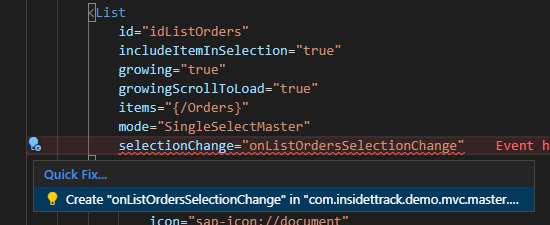 >
> 
- Typescript version updated to 5.1.3
- UI5 Parser updated to v1.5.4
- UI5 Linter updated to v1.7.4
Other 5
Notes
- UI5 Parser updated to v1.4.6
- UI5 Linter updated to v1.6.2
- XML attribute linter enhanced with
idandevent handlernaming style check ui5ignore-patternsin XML files added for ignoring naming style errorsui5ignorein XML files now supports specific attribute ignoring
Other 5
Notes
- UI5 Parser updated to v1.4.3
- UI5 Linter updated to v1.5.2
- Bugfix for linter not taking into account
jsClassesToExcludefor TS projects propertiesLinterExceptionsadded toui5linterconfiguration@ui5ignoreis now supported ini18n.properties
Other 2
Notes
- JS Reference CodeLens now shows references for class fields as well
- Export to i18n command now export either full string if there is no selection, or only selected part of the string
Other 6
Notes
- Fixed rename provider for TS
- Now
.propertiesfile has reference CodeLens - New preference entry:
ui5.plugin.propertiesCodeLens - Parsing of
.propertiesfile migrated to properties-file package (#322) - UI5 Parser updated to v1.4.0
- UI5 Linter updated to v1.4.0
Other 5
Notes
- Fix HTML markdown support for hover and completion items
- Fix XML completion items for
fragmentNameof Fragments - Add Special Setting support
- UI5 Parser updated to v1.3.0
- UI5 Linter updated to v1.3.0
Other 9
Notes
- Improved logic for code generator commands (such as TS Interface generators, UML diagram generators, Typedef generators etc.), now the choice for which project command should be executed will be either project of active selected document, or selected by user. Now the logic looks as follows:
1. Get currently opened document 2. Get parser instance for opened document 3. If parser doesn't exist or no document are open, get all parser instances. 4. If there is only one parser instance, it will be used automatically 5. If there are more than 1 parser instance, user prompt will be triggeredadditionalWorkspacesinpackage.jsonnow supports absolute path@ui5model,@abstractjsdoc support for classes added.@ui5modelcan be used as class JSDoc, useful for TS projects to overcome performance issues for switching between MVC- Hover providers now supports HTML format
- Completion item generation for sap standard library related variables fixed (e.g. there were no completion items for
sap.ui.getCore()) - Support for additional ESTree nodes added for JS projects:
ChainExpression,ArrayPattern,ForOfStatement,AssignmentPattern - Fixed
byIdmethod exception support for JS projects with new UI5 library versions which returnssap.ui.core.Element|undefinedinstead of oldsap.ui.core.Element - UI5 Parser updated to v1.2.3
- UI5 Linter updated to v1.2.3
Other 1
Notes
- i18n extraction allows setting i18n path in 'sap.app.i18n' and 'sap.app.i18n.bundleUrl'
Other 4
Notes
- New command added:
UI5: (TS) Generate interfaces for OData entities (Mass) - New preference entry added:
ui5.plugin.massTSODataInterfacesFetchingData Duplicate Translation Linteradded to properties linters- Global config handler added:
ui5.plugin.globalConfigurationPath
- New command added:
Other 10
Notes
- UI5 Parser updated to v1.0.0
- UI5 Linter updated to v1.0.0
- JSON schema for UI5 Parser and Linter entries in
package.jsonadded - UI5 Parser related VSCode preference entries removed, now they are controlled through package.json
- New VSCode preference entries added, now all code generators allows to adjust the path where the files will be saved relative to UI5 Project workspace:
ui5.plugin.umlGenerationPath,ui5.plugin.XMLFileInterfacePath,ui5.plugin.TSODataInterfacesPath,ui5.plugin.ERDiagramPath,ui5.plugin.JSTypeDefDocPath - New VSCode preference entry added for listening XML file changes and generating XML control id to class mapping automatically:
ui5.plugin.generateXMLFileInterfacesOnSave. - New VSCode preference added for setting the data for
ui5plugin.generateTSXMLFileInterfacescommand. Entry:ui5.plugin.TSODataInterfacesFetchingData, which allows to define username, password and url for metadata loading. - Typescript updated to v5.0.2
webappfolder is not automatically excluded from reading for TS projects anymore- Export string to i18n doesn't add additional translation if it already exists in
i18n.properties
Other 1
Notes
- Fix for
Clear cachecommand, which was not working when UI5 library metadata preload failed
- Fix for
Other 3
Notes
- Navigation data to OData TS interface generation added
- New preferences entry added:
ui5.plugin.xmlFormatterTagEndingNewline - UI5Parser updated
Other 1
Notes
- Update packages. Now parser checks both for
.tsfiles andtsconfig.jsonexistence
- Update packages. Now parser checks both for
Other 1
Notes
- ER Diagram generation from metadata now generates navigations to both ways (previously only "from" -> "to" navigation arrow was generated, now "to" -> "from" persists as well).
Other 1
Notes
- Add typescript interface generation for OData entities and id to type mapping in views and fragments
Other 1
Notes
- Update ui5-linter, adjusted linting logic for event handlers starting with "cmd"
Other 1
Notes
- Change mapping for JSTypeDocAdapter according to https://www.odata.org/documentation/odata-version-2-0/json-format/
Other 1
Notes
- XML Hover provider improvements, now property value hovers also works with parent class properties
Other 2
Notes
- XML Hover provider improvements, now it shows descriptions for attribute values
- JS Code actions provider improvements, now method inserter also inserts parameters
Other 1
Notes
- JS Class Completion items now shows if expression statement starts with upper case character or with "new" keyword
Other 1
Notes
- New command introduced: "UI5: Generate JS typedef JSDoc from metadata". Now you can generate typedef JSDoc from metadata.
Other 2
Notes
- XML formatter improvements, now it formats the attribute value
- Bugfixes for unused member linter and public member linter
Other 4
Notes
- Bugfixes
- Two preference entries added: ui5.plugin.addTagAttributes and ui5.plugin.addTagAggregations
- XML Completion items doesn't generate comments about aggregation type anymore
- Default value for ui5.plugin.addInheritedPropertiesAndAggregations preference entry is changed to false
Other 2
Notes
- Interface linter introduced
- Ignore access level modifiers property removed. Access level modifiers should always be taking into account.
Other 2
Notes
- Entity set names and navigation names added to the PlantUML ER diagram
- Now it is possible to provide source for metadata.xml via url
Other 2
Notes
- PlantUML diagram generation improvements
- Now there is possibility to generate ER PlantUML diagram for opened metadata.xml file
Other 2
Notes
- Add support for spread element
- Improve dependency detection for PlantUML. Also views and fragments are added to the UML diagram as well
Other 2
Notes
- Now it is possible to generate PlantUML diagram
- Abstract class linter introduced
Other 3
Notes
- Now it is possible to ctrl+click on overriden method to go to the parent implementation
- UI5 Explorer introduced
- Bugfixes
Other 3
Notes
- Bugfixes
- XML Formatter now formats empty class tags. E.g.
<Button></Button> -> <Button/> - XML Attribute linter now checks if entered value is the same as default value
Other 2
Notes
- Added support for @ui5ignore JSDoc tag, which will make ignore errors of Unused Member, Public Member, Wrong Field/Method linters.
- New preference entry introduced: ui5.plugin.codeGeneratorStrategy
Other 2
Notes
- Added error message for failed http requests
- Bugfixes for file/folder rename handler
Other 4
Notes
- Bugfixes
- Wrong file path linter also added for XML Linter
- Now you can control-click on fragment/view names to navigate into them
- Now you can control-click on id of control to navigate into view/fragment
Other 3
Notes
- Added support for fragments defined in manifest extensions
- Improve detecting of function used in XML files
- JS Rename now also renames event handlers in XML files
Other 2
Notes
- Refactoring
- Information message added if manifest reading is too slow or there are too much manifests found
Other 2
Notes
- node_modules and dist added to default exclusions
- ui5.plugin.excludeFolderPattern is now an array
Other 4
Notes
- Breaking (hopefully not really) change: Source folder preference entry removed, now plugin searches for manifest.json files and sets the namespaces relative to them using the id.
- Change XML completion items insert range
- Class completion items for JS Completion items introduced
- Bugfixes
Other 3
Notes
- Bugfixes
- Public member linter introduced
- Unused method linter now is replaced with unused member linter, which also checks fields
Other 3
Notes
- Support for controller extensions in manifest added
- Completion items for overriding methods/fields added
- Data types to JS method parameters Hover added
Other 8
Notes
- Bugfixes
- Performance improvements for XML and JS linting
- Code Actions for adding methods in custom class if they doesn't exist added
- Support for relative path import in SAP UI Define added
- JS Code lens for event handlers added
- Switch view controller now works for fragments and classes with first file where the fragment name was used
- XML Definition provider for event handlers added
- New VS Code settings added
Other 3
Notes
- Bugfixes
- Code Action for XML added. Now you can add missing event handler to the controller out of the view
- Completion items for event parameter names added
Other 4
Notes
- XML and JS Hover Provider introduced
- XML formatter introduced
- Completion items for methods now contains description
- Bugfixes
Other 3
Notes
- JS Completion items for first paramether of array methods (map, forEach, filter, find) introduced
- Data types are now added depending on hungarian notation as well
- Bugfixes
Other 2
Notes
- Projects that has a namespaces starting with "sap." now works fine as well
- Bugfixes for XML completion items
Other 2
Notes
- XML aggregation completion items are now merged with completion items of default aggregation type
- Bugfixes
Other 4
Notes
- Automatic template insertion for .xml files added
- Bugfixes
- XML Completion items for custom controls added
- rejectUnauthorized setting added
Other 4
Notes
- Code Actions for JS added. Now you can import variables to sap.ui.define.
- Hotkeys for commands added
- Schema for manifest.json added
- JS Code Lens for i18n texts added
Other 3
Notes
- Bugfixes
- XML Linting now checks for unused namespaces
- UI5 Metadata source URL can now be configured
Other 1
Notes
- Bugfix for multiple workspaces, when there are multiple apps with same component name begining (thanks to @CarlosOrozco88)
Other 1
Notes
- Bugfix for XML Linting and View -> Controller switching issues (thanks to @jeremies)
Other 4
Notes
- For convenience purposes now check for two source folders is supported: source folder from preferences ("src" as default) and webapp, if any is found - it will be used as source folder automatically.
- For "Export to i18n" command there is a list of text types to choose from
- For "Export to i18n" command three configuration options were added
- Bugfixes
Other 2
Notes
- Bugfixes for automatic file renaming on unix-like OS
- Bugfix for definition provider
Other 7
Notes
- Method and constructor Signature Helper is added.
- Custom class Method Completion Items now are generated using custom defined metadata, meaning that all property/event/aggregation/association methods will also be suggested.
- Now classes that returns objects only ("static classes", map of functions, usually formatters) are also recognized.
- XML linting is implemented. Now attribute values are validated.
- Improved parsing for custom classes. Now Class.prototype.method and Class.method are parsed as well.
- Bugfixes and refactoring
- CodeLens for i18n texts in xml introduced
Other 2
Notes
- Bugfixes for xml completion items
- Added value helps for properties which has enum values for xml files
Other 4
Notes
- Bugfixes
- Added parsing of destructured objects in function params
- Performance improvement for initial completion item generating
- Dynamic completion items for XML views added. Now autocomplition works for properties and events.
Other 2
Notes
- Proxy support is added. Now ui5.sap.com will be requested using environment variables https_proxy or http_proxy, if there are any.
- Now everything what is loaded from ui5.sap.com is cached.
Other 2
Notes
- Bugfixes
- Opening of the standard library documentation now happens on "Go to type definition" command instead of "Go to definition"
Other 2
Notes
- Method definition finder now opens new tab in the browser with documentation for the standard sapui5 methods
- Dynamic completion items now works with method return data type
Other 5
Notes
- "Insert Custom Class name" command added
- Now code templates are automatically added to new .js files
- Now on file renaming all occurrences of previous class name are replaced with new class name (for now works for .js files only)
- Bugfixes for method definition finder
- Partial support for ES6 added
Other 3
Notes
- Patch with bugfixes
- Add support of Completion item generation depending on this.byId (previously worked with this.getView().byId only)
- Now the extension is initialized only if there is manifest.json found in the workspace
Other 2
Notes
- Added support of "Go to Definition" for custom methods
- Minor bugfixes and major code refactoring
Others providing
Compare all 11 on the Linting page →- @cbs-consulting/cds-eslint@cbs-consulting/cds-eslintAn ESLint plugin for CDS files carrying one consultancy's own rules, published so that the consultancy's projects lint their CDS models the same way.independent, capESLint plugin with one consultancy's rules for CDS filesfrom CAP
- @cbs-consulting/tools@cbs-consulting/toolsShared ESLint configuration for SAPUI5 and CAP projects, the config rather than the rules, so a team adopts a house style by adding one dependency.independent, capShared ESLint configuration for SAPUI5 and CAP projectsfrom CAP
- ui5plugin-linterui5plugin-linterA command-line linter for UI5 projects, run as ui5linter, that checks JavaScript and TypeScript classes, XML views and fragments, and i18n properties files.independent, ui5Command-line linter for UI5 classes, XML views and i18n filesfrom UI5
- eslint-plugin-better-cap-configeslint-plugin-better-cap-configA set of ESLint rules that read CAP configuration and flag the cds settings that have since been deprecated, putting that check in the linter a project already runs, with no dependencies of its own.independent, capESLint rules flagging deprecated CAP configurationfrom CAP
- hana-linterhana-linterA command line that checks the names of the native SAP HANA artifact files in a CAP project, and the identifiers inside them, against regex rules the project keeps in a config file.independent, capRegex naming rules for SAP HANA artifacts in a CAP projectfrom CAP
- @sap/eslint-plugin-cds@sap/eslint-plugin-cdsSAP's ESLint plugin for CDS, carrying the model and environment rules capire calls best practice and universal for every CAP project.sap official, capSAP's ESLint plugin for CDSfrom CAP
- @sap-ux/eslint-plugin-fiori-tools@sap-ux/eslint-plugin-fiori-toolsESLint rules from the Fiori tools team, aimed at the parts of a project their generators produce.sap official, capESLint rules for projects the Fiori tools generators producefrom CAP
- vscode-ui5-language-assistantvscode-ui5-language-assistantSAP's VS Code extension for SAPUI5 and OpenUI5: completion, validation, hover tooltips, go to definition, quick fix and formatting for XML views, and completion and validation for manifest.json.sap official, ui5VS Code extension for SAPUI5 and OpenUI5 XML views and manifestfrom UI5
- @satiroglu/kaev@satiroglu/kaevA command line that runs rule-based checks over a SAPUI5 or OpenUI5 project, reporting each finding with a rule id, a category, a severity, a confidence and the file it sits in.independent, ui5Rule-based checker for SAPUI5 and OpenUI5 projectsfrom UI5
- @ui5/linter@ui5/linterSAP's static analysis tool for UI5 projects: it scans JavaScript, TypeScript, XML, JSON and other files for deprecated APIs, global variables and possible CSP violations, and fixes part of them with --fix.sap official, ui5Static analysis tool for UI5 projectsfrom UI5
Details
Sources
Sources are graph entities: the same page may back several entries, and an unreachable source flags every row that rests on it.
Compatibility and provenance
Contributors
History in the atlas
- Listed on bestofui5.org as ui5plugin and not yet in the atlas. Read from the repository README and package.json (name ui5plugin, displayName SAPUI5 Extension, version 1.21.1, Apache-2.0, engines vscode ^1.86.0) and the Marketplace page (identifier iljapostnovs.ui5plugin, description "Extension for working with UI5 projects"). The npm name ui5plugin is unpublished, so no npm link. No part_of edge: the README says the extension uses the parser and linter packages, which is a dependency and not a statement that they are parts of it. No capability for editor support on the UI5 door exists, so only linting is claimed.
- First seen.
For your agent
- Ref
artifact:iljapostnovs-ui5plugin- JSON
- /artifacts/iljapostnovs-ui5plugin.json
- MCP
- Connecting an agent