ui5plugin-linter
A command-line linter for UI5 projects, run as ui5linter, that checks JavaScript and TypeScript classes, XML views and fragments, and i18n properties files.
Rules about a UI5 project's own source: an XML attribute that is duplicated, a control class that does not exist or is deprecated, an unused class or member, a translation that is unused or duplicated, an ID or event handler that breaks the project's naming pattern (idNamingPattern, eventNamingPattern). It is installed globally or as a development dependency and run as ui5linter or npx ui5linter; --format formats views and fragments and --rmcache clears the parser's library cache. Severity per linter, exceptions for members, classes, tags and i18n IDs, and component include and exclude lists are read from package.json or an rc file such as .ui5pluginrc, and an @ui5ignore comment silences the findings on the method, tag or translation it precedes. The class metadata comes from ui5plugin-parserui5plugin-parserAn npm library that reads the metadata of the standard SAPUI5 classes and parses a project's own UI5 classes into objects listing their fields, methods, properties, aggregations, associations and events.independent, ui5, whose settings go in the same file, and the same linter is what ui5pluginui5pluginThe SAPUI5 Extension for Visual Studio Code: completion, definitions, CodeLens, diagnostics, code actions, hover and an XML formatter for UI5 views, controllers and manifest.json.independent, ui5 shows as diagnostics in VS Code.
Facts
Where it sits
Who is behind it

In the atlas: maintains 3, contributes to 3@iljapostnovsmaintainerMartín RodriguezContributes to this

In the atlas: contributes to 1@sovanta-MartinRodriguez1 contributor
Before choosing this
Conditions
PracticalFunctional boundary
Two of its JavaScript and TypeScript checks, EventTypeLinter and WrongNamespaceLinter, apply to TypeScript projects only.
What it declares
Every artifact
- Type
- CLI
- Origin
- Independently maintained
As a CLI
- Distributed through
- npm
Connections
Catching problems in code, models and configuration by rules
SAPUI5 extension for Visual Studio Code
npm library parsing SAPUI5 and project UI5 class metadata
Download
Install
npm add ui5plugin-linterDerived from the package name. No recipe recorded; the README has the configuration.
Architecture
Download
README
quoted from iljapostnovs/ui5plugin-linter under Apache-2.0, readUI5 Class Linter
Command Line Linter for UI5 based projects.
Any support is highly appreciated!



Summary
- How to use
- Linters
- Configuration
- Configuration example
- Default configuration
- Linter exceptions
- ID and Event Handler patterns in views and fragments
- XML Formatter
How to use
Execute in command line:
npm install ui5plugin-linter -gAfter installing the package globally the linter will be available:
ui5linterLinter also can be used from local node_modules:
npm install ui5plugin-linter --save-dev
npx ui5linter
TS vs JS
Initialization
If tsconfig.json is found in the CWD and any .ts files are found in the workspace, parser considers that it's TS project.
tsconfig.json should be located in CWD.
Folder exclusions
For convenience purposes UI5TSParser ignoressrc-gen folders, because they contain transpiled JS/XML files, which can make the parser to think that source files are there.
Important! If build folder name is different, it should be added to
excludeFolderPatternsin yourpackage.json.
Linters
JS/TS Linters
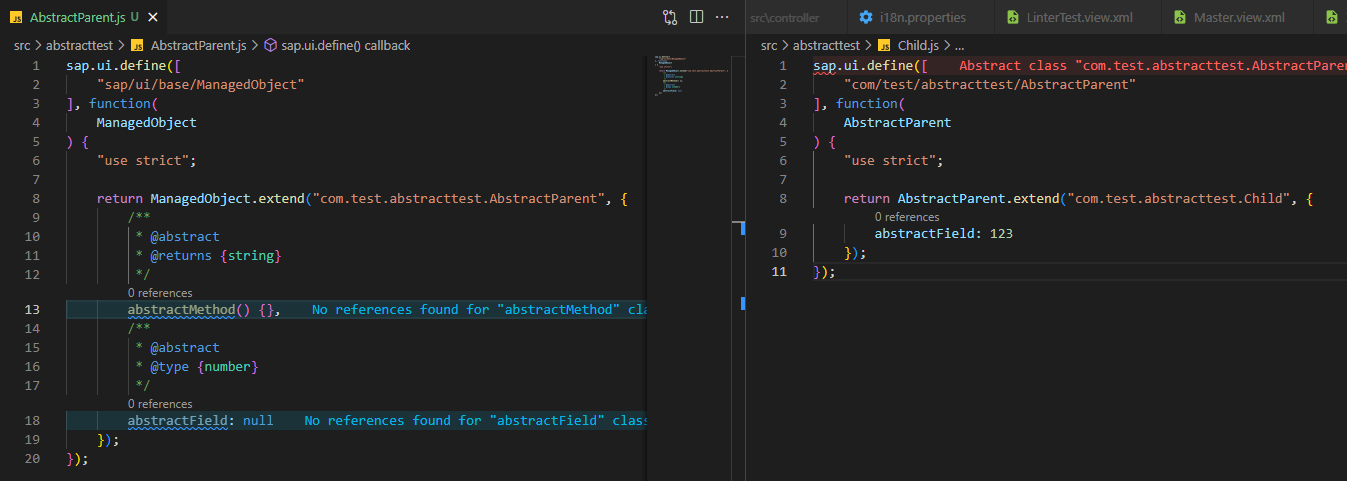
AbstractClassLinter
Linter, which checks if all members of parent class (which is abstract) are implemented.

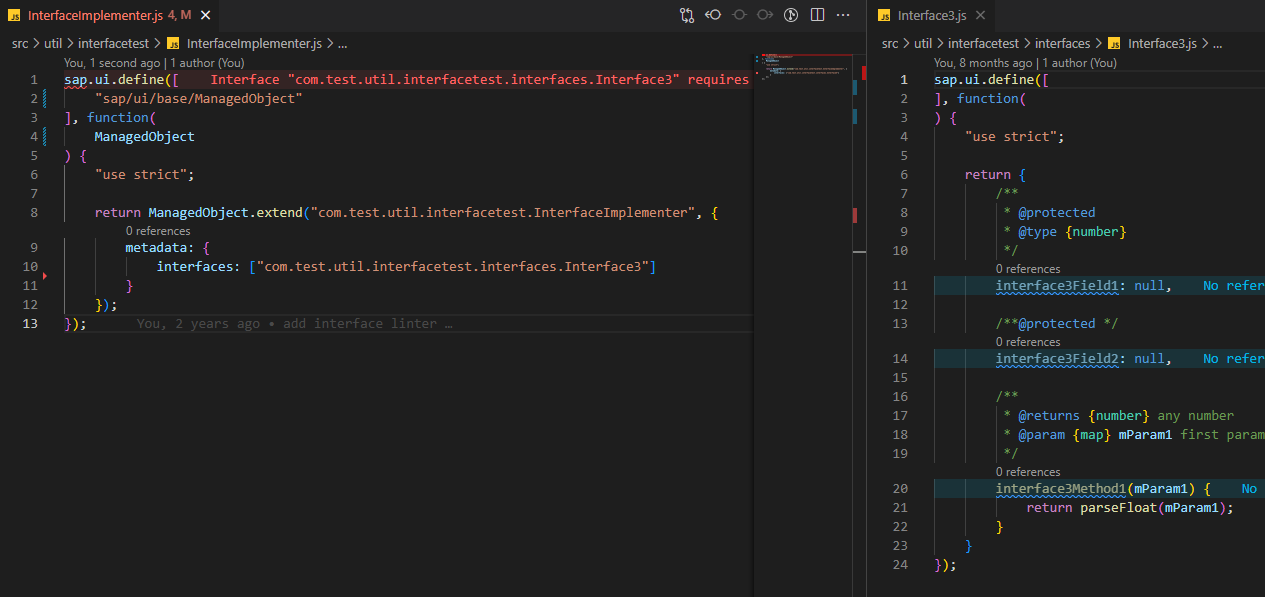
InterfaceLinter
Checks if interface members of an interface are implemented.

PublicMemberLinter
Checks if currently public member should be private. If no references for the member are found outside the current class, error will be shown.

UnusedMemberLinter
Checks if member is used anywhere.

WrongClassNameLinter
Checks if class name is correct.


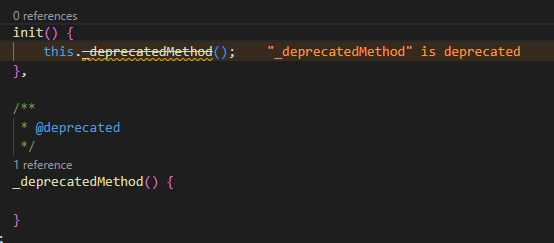
WrongFieldMethodLinter
Checks for several things:
- If member is deprecated
- If member exists

- If access level modifiers are used correctly. E.g. if private/protected member from another class is called, it's an error.

WrongFilePathLinter
Checks if all paths which starts with app id exists

WrongImportLinter
Checks if imported module exists and is not deprecated

WrongOverrideLinter
Checks if overriden member is not private and if parent member is not deprecated


WrongParametersLinter
Checks for several things:
- If all parameters are passed to the method
- If types of the parameters are correct

Hint! To set the type for the variable, JSDocs can be used.
/**@type {sap.m.Table}*/
let oTable;
Hint! To make parameter optional, JSDocs can be used.
/**
 * @param {string} mandatoryParam mandatory parameter
 * @param {string} [optionalParam] optional parameter
 */
myMethod(mandatoryParam, optionalParam) {}
UnusedClassLinter
Checks if class is used

WrongNamespaceLinter (TS only)
Checks if namespace is provided and if it is correct.




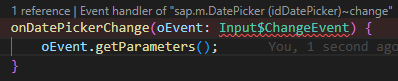
EventTypeLinter (TS only, 1.115.1+)
Checks if correct type for event variable is used in event handlers

XML Linters
TagAttributeLinter
Checks if attribute
- Exists
- Is not duplicated
- Value is correct
- Event handler exists
- Event handler and id naming style (check ID and Event Handler patterns in views and fragments)

TagAttributeDefaultValueLinter
Checks if entered value is not the same as default value

TagLinter
Checks if:
- Prefix is defined

- Aggregation exists

- Library of aggregation is the same as library of the class

- Class is not deprecated

- Class exists

UnusedNamespaceLinter
Checks if namespace is used
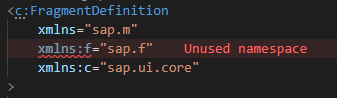
WrongFilePathLinter
Checks if class exists


Properties linters
UnusedTranslationsLinter
Checks if translation is used

DuplicateTranslationLinter
Checks if translation is not duplicated

Config
Linter config
UI5 Linter searches for package.json (or any other rc file, e.g. .ui5pluginrc) in your CWD (Current Working Directory) and locates the config there.
Supported rc file types:
.ui5pluginrc.ui5pluginrc.json.ui5pluginrc.yaml.ui5pluginrc.yml.ui5pluginrc.js
See configuration example below.
Cache
ui5plugin-parser preloads the library metadata and stores it in cache. IflibsToLoadwere changed, it is necessary to clear cache. It is possible by adding--rmcacheflag to ui5linter:ui5linter --rmcache
Configuration example
{
	"ui5": {
		"ui5parser": {
			"ui5version": "1.84.30",
			"dataSource": "https://sapui5.hana.ondemand.com/",
			"rejectUnauthorized": true,
			"libsToLoad": ["sap.uxap", "sap.viz"],
			//Handy to add additional workspace paths if e.g. library is outside of CWD
			"additionalWorkspaces": ["../MyLibrary"]
		},
		"ui5linter": {
			"severity": {
				"WrongParametersLinter": "Error",
				"WrongOverrideLinter": "Warning",
				"WrongImportLinter": "Information",
				"WrongFilePathLinter": "Hint"
			},
			"usage": {
				"WrongParametersLinter": true,
				"WrongOverrideLinter": false
			},
			"jsLinterExceptions": [
				{
					"className": "com.test.MyCustomClass",
					/*method or field name*/
					"memberName": "myCustomMethod",
					/*all classes which extends com.test.MyCustomClass will
        inherit this exception as well*/
					"applyToChildren": true
				}
			],
			/*classes to exclude from linting*/
			"jsClassExceptions": ["com.test.MyCustomClass1", "com.test.MyCustomClass2"],
			/*views and fragments to exclude from linting*/
			"xmlClassExceptions": ["com.test.view.Master", "com.test.fragment.MyToolbar"],
			/*array of i18n translation ids to be ignored by UnusedTranslationsLinter*/
			"propertiesLinterExceptions": ["MyView.MyButtonText", "MY_TRANSLATION_ID"],
			"componentsToInclude": ["com.test"],
			/*it makes sense to use only componentsToInclude or componentsToExclude, but not both at once.
      "componentsToExclude" comes in handy when you want to exclude e.g. libraries.
      "componentsToInclude" comes handy when you have many different components which project depends
      on, but it is necessary to lint only one*/
			"componentsToExclude": ["com.custom.library"]
		}
	}
}
Default linter config
Default config is as follows:
{
	"ui5": {
		"ui5linter": {
			"severity": {
				"WrongParametersLinter": "Error",
				"WrongOverrideLinter": "Error",
				"WrongImportLinter": "Warning",
				"WrongFilePathLinter": "Warning",
				"WrongFieldMethodLinter": "Warning",
				"WrongClassNameLinter": "Warning",
				"UnusedTranslationsLinter": "Information",
				"UnusedNamespaceLinter": "Error",
				"UnusedMemberLinter": "Information",
				"TagLinter": "Error",
				"TagAttributeLinter": "Error",
				"TagAttributeDefaultValueLinter": "Information",
				"PublicMemberLinter": "Information",
				"InterfaceLinter": "Error",
				"AbstractClassLinter": "Error",
				"UnusedClassLinter": "Error",
				"WrongNamespaceLinter": "Warning",
				"DuplicateTranslationLinter": "Error",
				"EventTypeLinter": "Error"
			},
			"usage": {
				"WrongParametersLinter": true,
				"WrongOverrideLinter": true,
				"WrongImportLinter": true,
				"WrongFilePathLinter": true,
				"WrongFieldMethodLinter": true,
				"WrongClassNameLinter": true,
				"UnusedTranslationsLinter": true,
				"UnusedNamespaceLinter": true,
				"UnusedMemberLinter": true,
				"TagLinter": true,
				"TagAttributeLinter": true,
				"TagAttributeDefaultValueLinter": true,
				"PublicMemberLinter": true,
				"InterfaceLinter": true,
				"AbstractClassLinter": true,
				"UnusedClassLinter": true,
				"WrongNamespaceLinter": true,
				"DuplicateTranslationLinter": true,
				"EventTypeLinter": true //true if UI5 version is >=1.115.1
			},
			"jsLinterExceptions": [
				{
					"className": "sap.ui.core.Element",
					"memberName": "getDomRef",
					"applyToChildren": true
				},
				{
					"className": "sap.ui.model.json.JSONModel",
					"memberName": "iSizeLimit",
					"applyToChildren": true
				},
				{
					"className": "sap.ui.model.Binding",
					"memberName": "*"
				},
				{
					"className": "sap.ui.model.Model",
					"memberName": "*"
				},
				{
					"className": "sap.ui.core.Element",
					"memberName": "*"
				},
				{
					"className": "sap.ui.base.ManagedObject",
					"memberName": "*"
				},
				{
					"className": "sap.ui.core.Control",
					"memberName": "*"
				},
				{
					"className": "sap.ui.xmlfragment",
					"memberName": "*"
				},
				{
					"className": "*",
					"memberName": "byId"
				},
				{
					"className": "*",
					"memberName": "prototype"
				},
				{
					"className": "*",
					"memberName": "call"
				},
				{
					"className": "*",
					"memberName": "apply"
				},
				{
					"className": "*",
					"memberName": "bind"
				},
				{
					"className": "*",
					"memberName": "constructor"
				},
				{
					"className": "*",
					"memberName": "init"
				},
				{
					"className": "*",
					"memberName": "exit"
				},
				{
					"className": "map",
					"memberName": "*"
				}
			],
			"jsClassExceptions": [],
			"xmlClassExceptions": [],
			"propertiesLinterExceptions": [],
			"componentsToInclude": [],
			"componentsToExclude": [],
			"idNamingPattern": "^id{MeaningAssumption}.*{ControlName}$",
			"eventNamingPattern": "^on{MeaningAssumption}{ControlName}.*?{EventName}$",
			"attributesToCheck": ["content", "items", "value", "text", "number"]
		}
	}
}
It is possible to override properties in your package.json. See Configuration example
In case of
jsLinterExceptionsthe exceptions which will be found inpackage.jsonof CWD will be added to the default exceptions, in the rest of the cases properties will be overwritten
Parser config
It is possible to add config for ui5plugin-parser as well.
Check ui5plugin-parser ->
Config default valuesas a reference for parser properties
See Configuration example
Linter exceptions
There are multiple ways to configure linter exceptions.
JS/TS
Member errors
To ignore class member errors, there are two ways to do it. Lets assume that there is a line, which gives incorrect amount of arguments error
this._myMethod("123", 643, true); //Method "_myMethod" has 2 (2 mandatory) param(s), but you provided 3In order to ignore this error, there are two ways to do it:
- Add
@ui5ignoreto method declaration JSDoc
/**
 * @ui5ignore
 */
_myMethod(sFirstParam, iSecondParam) {}- Add method to
jsLinterExceptionsinpackage.json:
{
	"ui5": {
		"ui5linter": {
			"jsLinterExceptions": [
				{
					"className": "com.test.MyClass",
					"memberName": "_myMethod",
					"applyToChildren": true
				}
			]
		}
	}
}
View and fragment errors
To ignore attribute and tag errors, <-- @ui5ignore --> can be used. It will ignore all errors of next tag and its attributes.
<!-- @ui5ignore -->
<RandomText
	randomProperty="123"
/>
To ignore specific attribute, <-- @ui5ignore ${attributeName1}, ${attributeName2} --> can be used. It will ignore all attribute errors
<!-- @ui5ignore randomProperty, secondRandomProperty -->
<Text
	randomProperty="123"
	secondRandomProperty="123"
	text="Valid property"
/>
To ignore all id and event handler pattern errors of the next tag, <-- @ui5ignore-patterns --> can be used.
<!-- @ui5ignore-patterns -->
<Text
	id="myRandomId"
/>
To ignore specific id or event handler pattern errors of the next tag, <-- @ui5ignore-patterns ${attributeName1}, ${attributeName2} --> can be used.
<!-- @ui5ignore-patterns id -->
<Button
	id="myRandomId"
	press="myRandomHandler"
/>
i18n errors
To ignore translation errors, # @ui5ignore comment right above the translation can be used
# @ui5ignore
MY_TITLE = Title
Other ways
Exclude whole class
To exclude whole class from linting, add class name to package.json. In case of JS Classes, use jsClassExceptions. In case of view and fragments, use xmlClassExceptions
{
	"ui5": {
		"ui5linter": {
			"jsClassExceptions": ["com.test.MyClass"]
		}
	}
}
Exclude i18n translations
To exclude translation from linting in 18n.properties file, add class name to package.json
{
	"ui5": {
		"ui5linter": {
			"propertiesLinterExceptions": ["MY_TRANSLATION_ID"]
		}
	}
}
Exclude other apps or libs
Lets assume that there is a library included in the project, and there is no need to lint it.
To exclude whole app or lib from linting, add app/lib id to package.json. There are two preference entries that can be used: componentsToInclude and componentsToExclude.
{
	"ui5": {
		"ui5linter": {
			"componentsToInclude": ["com.test.my.app"],
			"componentsToExclude": ["com.test.my.lib"]
		}
	}
}
ID and Event Handler patterns in views and fragments
In order to keep the same style for naming the id and any event handler in views and fragments, three configuration entries are available: idNamingPattern, eventNamingPattern, attributesToCheck. Every id and event handler generates individual RegExp, and the value is checked against it.
Hint! To disable naming style checking, just set
idNamingPatternor/andeventNamingPatternas empty string inpackage.json
Variables
In order to generate individual RegExp, there are variables available which will be applied at runtime. All variables are available in camelCase and PascalCase.
Example of eventNamingPattern: ^on{MeaningAssumption}{ControlName}.*?{EventName}$.
Variables: MeaningAssumption, ControlName, EventName.
<Input
	value="{ODataModel>Currency}"
	change=""
>
<!-- Pattern for 'change': ^onCurrencyInput.*?Change$ -->
ControlName variable
Variable is replaced with the name of the tag. Available for both id and event handler patterns.
<Text/>
<!-- ControlName => Text -->
<!-- controlName => text -->
<f:GridList/>
<!-- ControlName => GridList -->
<!-- controlName => gridList -->
EventName variable
Variable is replaced with the name of the event. Available for event handler patterns only.
<Button press="onButtonPress"/>
<!-- EventName => Press -->
<!-- eventName => press -->
<f:GridList borderReached="onGridListBorderReached"/>
<!-- EventName => BorderReached -->
<!-- eventName => borderReached -->
MeaningAssumption variable
Variable is replaced with guessed value taken from attribute. Available for both id and event handler patterns. This is the most tricky variable.
It is calculated as follows:
- Get value of
attributesToCheckconfiguration - Find first attribute from the control which exists in
attributesToCheckarray. - Parse attribute value
- If attribute value is a binding, use binding text as a source for
MeaningAssumption- Find binding path. If binding path is an object, parse it and take the text from
pathfield, otherwise crop{and} - Split string by
>, left part is model name, right part isbinding path- If model name is
i18n, find the translation ini18n.properties, transform value to PascalCase and return the value - Else, remove
/resultsfrombinding path, split the result by_, transform to PascalCase and return the value
- If model name is
- Find binding path. If binding path is an object, parse it and take the text from
- If attribute value is not a binding, transform the value to PascalCase and return it
- If attribute value is a binding, use binding text as a source for
| Attribute value | MeaningAssumption value |
|---|---|
| {/OrderItems} | OrderItems |
| {OrderId} | OrderId |
| {/OrderItems/results} | OrderItems |
| {ODataModel>/ORDER_ITEMS} | OrderItems |
| {MyModel>/Orders} | Orders |
| {i18n>APP_TITLE} | OrderApp (if text in i18n.properties is "Order App") |
Hint! >
MeaningAssumptionis pure heuristics and of course will not work for all the cases. If it works most of the time well, but there are some exceptions, it is possible to ignore specific tag attribute errors. Check View and fragment errors section.
Example.
<List
	id="idOrderItemsList"
	items="{ODataModel>/OrderItems}"
	press="onOrderItemsListPress"
/>
<!--
	ControlName => List
	controlName => list
	EventName => Press
	eventName => press
	MeaningAssumption => OrderItems
	meaningAssumption => orderItems
 -->
attributesToCheck configuration
This configuration is a list of attributes, where MeaningAssumption will be guessed from.
For instance, if attributesToCheck is set to "attributesToCheck": ["items"], the value will be guessed only from items attribute, e.g. in sap.m.List:
<List
	id="idOrdersList"
	items="{/Orders}"
/>
XML Formatter
It is possible to format fragments and views using CMD.
ui5linter --formatPath pattern
It is possible to set the path pattern of the files which should be formatted.
Default value: **/*.{fragment,view}.xml
ui5linter --format --path=**/*.{fragment,view}.xmlClosing tag on newline
It is possible to pass a parameter if closing tags (">", "/>") should be located on newline
ui5linter --format --tagEndNewlineAdd space before a self-closing tag
It is possible to pass a parameter if a space should be added before a self-closing tag ("/>")
ui5linter --format --tagSpaceBeforeSelfCloseIndentation
It is possible to pass a parameter which will determine indentation
ui5linter --format --indentation=space --spaces=4
ui5linter --format --indentation=tab
package.json interface
The technical interface of possible entries:
interface IUI5PackageConfigEntry {
	ui5?: IUI5LinterEntry;
}
interface IUI5LinterEntry {
	ui5linter?: IUI5LinterEntryFields;
}
interface IUI5LinterEntryFields {
	severity?: {
		[key in JSLinters | XMLLinters | PropertiesLinters]: Severity;
	};
	usage?: {
		[key in JSLinters | XMLLinters | PropertiesLinters]: boolean;
	};
	jsLinterExceptions?: JSLinterException[];
	jsClassExceptions?: string[];
	xmlClassExceptions?: string[];
	propertiesLinterExceptions?: string[];
	componentsToInclude?: string[];
	componentsToExclude?: string[];
	idNamingPattern?: string;
	eventNamingPattern?: string;
	attributesToCheck?: string[];
}
Enumerations:
enum PropertiesLinters {
	UnusedTranslationsLinter = "UnusedTranslationsLinter",
	DuplicateTranslationLinter = "DuplicateTranslationLinter"
}
enum XMLLinters {
	TagAttributeLinter = "TagAttributeLinter",
	TagAttributeDefaultValueLinter = "TagAttributeDefaultValueLinter",
	TagLinter = "TagLinter",
	UnusedNamespaceLinter = "UnusedNamespaceLinter",
	WrongFilePathLinter = "WrongFilePathLinter"
}
enum JSLinters {
	AbstractClassLinter = "AbstractClassLinter",
	InterfaceLinter = "InterfaceLinter",
	PublicMemberLinter = "PublicMemberLinter",
	UnusedMemberLinter = "UnusedMemberLinter",
	WrongClassNameLinter = "WrongClassNameLinter",
	WrongFieldMethodLinter = "WrongFieldMethodLinter",
	WrongFilePathLinter = "WrongFilePathLinter",
	WrongImportLinter = "WrongImportLinter",
	WrongOverrideLinter = "WrongOverrideLinter",
	WrongParametersLinter = "WrongParametersLinter",
	UnusedClassLinter = "UnusedClassLinter",
	WrongNamespaceLinter = "WrongNamespaceLinter",
	EventTypeLinter = "EventTypeLinter"
}
enum Severity {
	Warning = "Warning",
	Error = "Error",
	Information = "Information",
	Hint = "Hint"
}History
Other 1
Notes
- UI5 Parser updated to v1.10.1
Other 1
Notes
XMLFormatternow escapes single quote character in attribute value, if it is an object
Other 2
Notes
WrongOverrideLinternow checks if member is deprecated- Fix:
UnusedClassLinterdoesn't show error if any member is used outside the class
Other 3
Notes
- Fix
@ui5ignorefor tag attribute names - Fix properties linters to work with all properties files
- UI5 Parser updated to v1.7.6
- Fix
Other 2
Notes
- UI5 Parser updated to v1.7.0
- Feature: Variable declarations are now being searched above class declaration as well
Other 2
Notes
- Fix: Change priority of linting id and event handler style, now they are first priority
- Feature: Add
@ui5ignore-patternssupport for XML
Other 3
Notes
- UI5 Parser updated to v1.4.5
- Feature: XML attribute linter enhanced with
idandevent handlernaming style check ui5ignorein XML files now supports attribute ignoring
Other 3
Notes
- UI5 Parser updated to v1.4.2
propertiesLinterExceptionsadded toui5linterconfiguration@ui5ignoreis now supported ini18n.properties
Other 3
Notes
- UI5 Parser updated to v1.1.0
Duplicate Translation Linteradded to properties linters- Global config handler added
Others providing
Compare all 11 on the Linting page →- @cbs-consulting/cds-eslint@cbs-consulting/cds-eslintAn ESLint plugin for CDS files carrying one consultancy's own rules, published so that the consultancy's projects lint their CDS models the same way.independent, capESLint plugin with one consultancy's rules for CDS filesfrom CAP
- @cbs-consulting/tools@cbs-consulting/toolsShared ESLint configuration for SAPUI5 and CAP projects, the config rather than the rules, so a team adopts a house style by adding one dependency.independent, capShared ESLint configuration for SAPUI5 and CAP projectsfrom CAP
- ui5pluginui5pluginThe SAPUI5 Extension for Visual Studio Code: completion, definitions, CodeLens, diagnostics, code actions, hover and an XML formatter for UI5 views, controllers and manifest.json.independent, ui5SAPUI5 extension for Visual Studio Codefrom UI5
- eslint-plugin-better-cap-configeslint-plugin-better-cap-configA set of ESLint rules that read CAP configuration and flag the cds settings that have since been deprecated, putting that check in the linter a project already runs, with no dependencies of its own.independent, capESLint rules flagging deprecated CAP configurationfrom CAP
- hana-linterhana-linterA command line that checks the names of the native SAP HANA artifact files in a CAP project, and the identifiers inside them, against regex rules the project keeps in a config file.independent, capRegex naming rules for SAP HANA artifacts in a CAP projectfrom CAP
- @sap/eslint-plugin-cds@sap/eslint-plugin-cdsSAP's ESLint plugin for CDS, carrying the model and environment rules capire calls best practice and universal for every CAP project.sap official, capSAP's ESLint plugin for CDSfrom CAP
- @sap-ux/eslint-plugin-fiori-tools@sap-ux/eslint-plugin-fiori-toolsESLint rules from the Fiori tools team, aimed at the parts of a project their generators produce.sap official, capESLint rules for projects the Fiori tools generators producefrom CAP
- vscode-ui5-language-assistantvscode-ui5-language-assistantSAP's VS Code extension for SAPUI5 and OpenUI5: completion, validation, hover tooltips, go to definition, quick fix and formatting for XML views, and completion and validation for manifest.json.sap official, ui5VS Code extension for SAPUI5 and OpenUI5 XML views and manifestfrom UI5
- @satiroglu/kaev@satiroglu/kaevA command line that runs rule-based checks over a SAPUI5 or OpenUI5 project, reporting each finding with a rule id, a category, a severity, a confidence and the file it sits in.independent, ui5Rule-based checker for SAPUI5 and OpenUI5 projectsfrom UI5
- @ui5/linter@ui5/linterSAP's static analysis tool for UI5 projects: it scans JavaScript, TypeScript, XML, JSON and other files for deprecated APIs, global variables and possible CSP violations, and fixes part of them with --fix.sap official, ui5Static analysis tool for UI5 projectsfrom UI5
Details
Sources
Sources are graph entities: the same page may back several entries, and an unreachable source flags every row that rests on it.
Compatibility and provenance
Contributors
History in the atlas
- Listed on bestofui5.org and not yet in the atlas. Read from the repository README (https://github.com/iljapostnovs/ui5plugin-linter): "Command Line Linter for UI5 based projects."; the install, `--rmcache` and `--format` commands; the JS/TS, XML and properties checks; and "It is possible to add config for ui5plugin-parser as well." The npm record for 1.17.1 gives the bin `ui5linter`, Apache-2.0 and the ui5plugin-parser 1.10.1 dependency. It is a different tool from SAP's UI5 linter (github.com/UI5/linter), which the graph does not hold as an artifact.
- First seen.
For your agent
- Ref
artifact:iljapostnovs-ui5plugin-linter- JSON
- /artifacts/iljapostnovs-ui5plugin-linter.json
- MCP
- Connecting an agent