ABAP Architect
An Eclipse plug-in that generates ABAP type definitions and parsing code from a pasted JSON or XML sample and creates the matching DDIC objects in a connected system over ADT.
Reading someone else's JSON or XML payload into ABAP starts with writing the types by hand from a sample of it. Paste the payload into the plug-in's view and it writes TYPES: BEGIN OF ... END OF ... structures and table types for the objects and arrays it finds, a /ui2/cl_json=>name_mappings table where the JSON names differ from the ABAP ones, cl_ixml parsing code and tt:transform source for XML, and serialise, deserialise and SM59 HTTP client templates. Create DDIC takes the same plan into the connected system over ADT resourcesADT resourcesThe HTTP endpoint an ABAP system exposes as the adt ICF service under /sap/bc/adt, so a client outside the system can reach development objects, delivered with the platform rather than installed.sap official, abap: structures, table types, a transparent table, data elements and domains, created in dependency order, saved and activated, with the package and transport asked on every run and the Z/Y naming rule checked before the button enables. It reads a sample rather than a schema, so what it writes is the shape of the data it was shown, and it stops at the generated code and the created objects: nothing in it calls the service the payload came from, or keeps the objects in step with it afterwards.
Facts
Where it sits
Who is behind it

In the atlas: maintains 1, contributes to 1@murattahtaciiimaintainer
Before choosing this
Conditions
PracticalFunctional boundary
On an SAP BTP ABAP environmentSAP BTP ABAP environmentSAP's ABAP runtime on BTP: ABAP systems developed in the ABAP Cloud model on SAP HANA Cloud, for cloud apps, OData services and side-by-side extensions of SAP S/4HANA.sap official, btp system only the generated code is left: DDIC creation is not supported on ABAP Cloud, because classic DDIC object creation over REST is not available there. Create DDIC is also disabled where ADT is not installed in the same Eclipse, and Insert into Editor then works with any editor implementing ITextEditor instead of the ABAP one.
What it declares
Every artifact
- Type
- IDE extension
- Origin
- Independently maintained
- Runtime
- Java
As an IDE extension
- Installs into
- Eclipse
- Distributed through
- Eclipse update site
Connections
Turning typed data into JSON, CSV or protobuf and back
HTTP endpoint under /sap/bc/adt exposing ABAP development objects
The Java-based IDE and plugin platform, downloaded as an archive per operating system and extended through p2 update sites. For the things here, the installation SAP's ABAP Development ToolsABAP Development Tools for EclipseSAP's Eclipse plugins for ABAP: source, dictionary and CDS editors, Project Explorer, Outline and ABAP Unit, calling ADT resources on the connected system.sap official, abap and their companion plugins are added to.
SAP's Eclipse plugins for ABAP development over ADT
Download
README
quoted from murattahtaciii/abap-architect under EPL-2.0, readABAP Architect

Eclipse plug-in that generates ABAP type definitions from JSON/XML data and creates real DDIC objects (structure, table type, transparent table, data element, domain) in a connected SAP system via ADT (ABAP Development Tools).
JSON/XML verisinden ABAP tip tanımları üreten ve bağlı SAP sisteminde ADT üzerinden gerçek DDIC nesneleri (structure, table type, transparent table, data element, domain) oluşturan Eclipse eklentisi.
- GitHub: https://github.com/murattahtaciii
- LinkedIn: https://www.linkedin.com/in/murattahtacii/
English
Features
- ABAP Types: generates
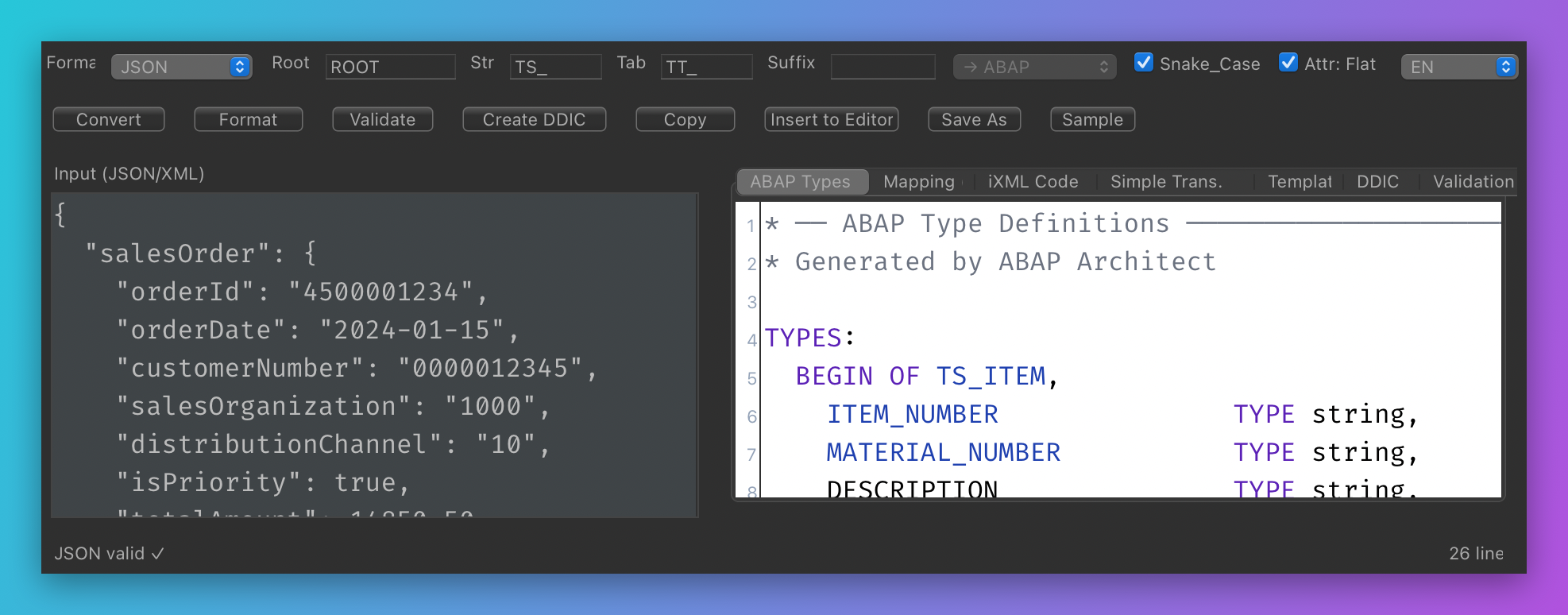
TS_*structures andTT_*table types for JSON objects/arrays and XML element/attribute analysis (TYPES: BEGIN OF ... END OF ...). - Mapping: generates
/ui2/cl_json=>name_mappingsfor JSON/ABAP name differences (SNAKE_CASE conversion, suffix support). - iXML Code: generates
cl_ixml-based parsing code for XML (attributes, arrays, nested nodes). - Simple Transformation: generates
tt:transformsource for XML. - Templates:
/ui2/cl_jsonserialize/deserialize and HTTP client (SM59) code templates. - Validation: JSON/XML syntax check with error line/column information.
- Create DDIC: creates the planned types as real DDIC objects in the connected SAP
system and activates them: Structure (TABL/DS), Table Type (TTYP), Transparent Table (TABL/DT),
Data Element (DTEL), Domain (DOMA). Names are suggested and validated according to the
Z/Y (or
/NAMESPACE/) rule; package/transport is asked on every run. - List packages / transports: lists packages (RIS search) and the user's modifiable transports from the connected system and fills the fields by selection.
- Insert into Editor: inserts the generated code at the cursor position in the active editor.
ADT ABAP editor is supported (via the
IAbapSourcePageadapter). - TR/EN interface, dark/light theme aware coloring, line numbers.
Screenshots
Main view (JSON input -> generated ABAP types):
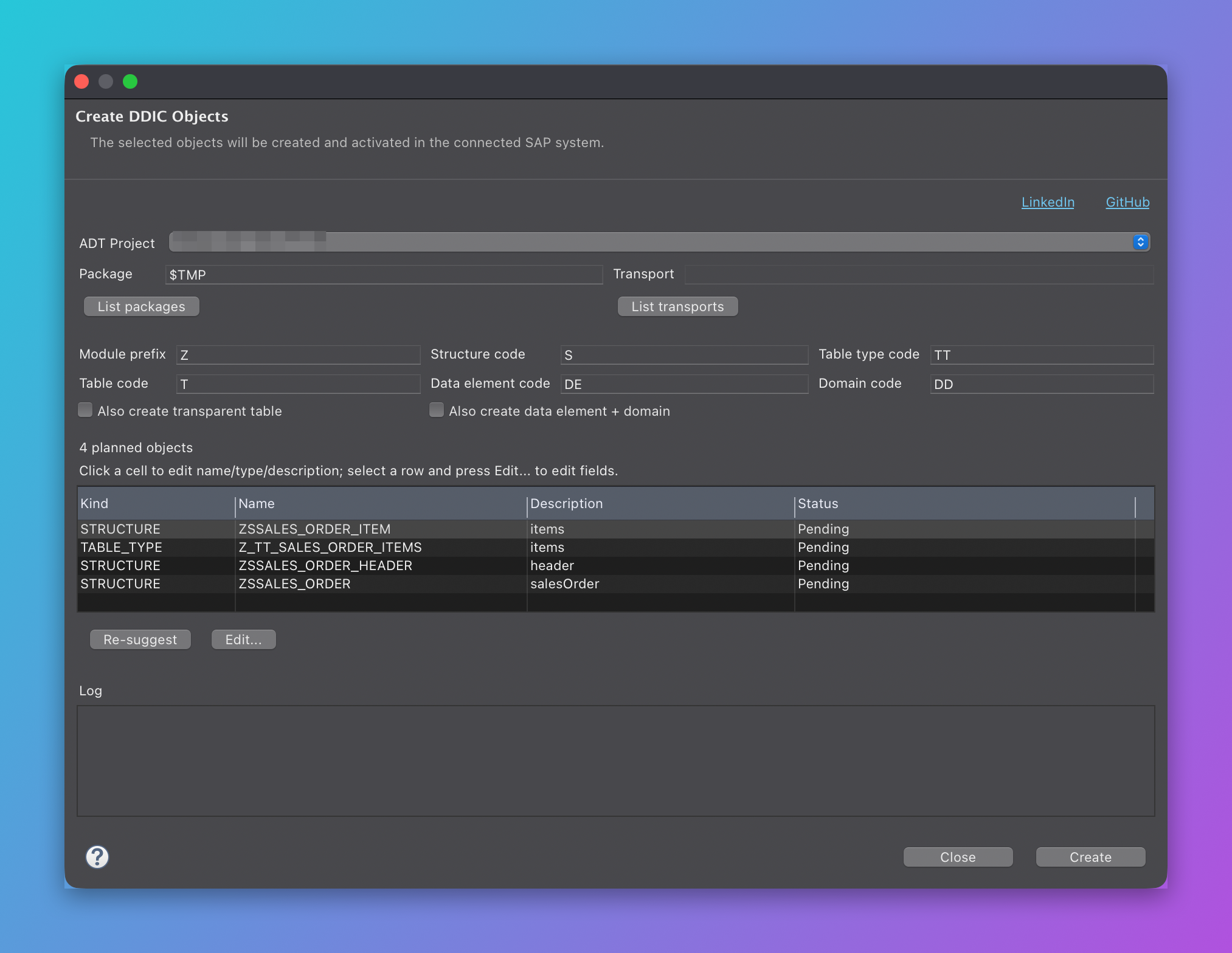
Create DDIC Objects dialog:
Requirements
- Eclipse IDE 2026-03 (4.39) or similar; Java 21+.
- ADT (ABAP Development Tools) is optional; without it "Insert into Editor" works with editors
implementing
ITextEditor, but "Create DDIC" is disabled (the plug-in has no compile-time dependency on ADT; reflection is used). - SAP backend: S/4HANA (on-premise) or NetWeaver 7.50+ (SAP_BASIS 750+) with ADT enabled. DDIC creation is not supported on SAP BTP ABAP Environment (ABAP Cloud) because classic DDIC object creation via REST is not available there.
Installation
Help > Install New Software... > Add...- Location:
https://murattahtaciii.github.io/abap-architect/ - Install "ABAP Architect" and restart Eclipse.
Local installation from a build:
- Build (see below) and take
releng/io.github.murattahtaciii.abaparchitect.site/target/repository. Help > Install New Software... > Add... > Local...and select that folder.
Build
Maven Wrapper (mvnw) is included; no local Maven installation required.
# Online (target platform: download.eclipse.org/releases/2026-03)
./mvnw clean verify

# Different Eclipse release (example)
./mvnw -Declipse.release=2025-12 clean verify

# Offline: creates a local target platform from the installed Eclipse
releng/sync-local-target.sh
./mvnw -Plocal-target clean verify
Output: releng/io.github.murattahtaciii.abaparchitect.site/target/repository/ (p2 update site).
Publish the update site to GitHub Pages (gh-pages branch):
releng/publish-site.shUsage
Window > Show View > Other... > ABAP Architect > ABAP Architect- Paste JSON or XML into the left pane (format is auto-detected; can be overridden).
- Inspect the output tabs; use Insert into Editor to add the generated code to the active editor.
- Settings:
Root(root structure name),Str/Tab(structure/table type prefixes),Suffix(ABAP/JSON target),Snake_Case,Attr: Flatfor XML.
Creating DDIC objects
- Paste JSON/XML data (the DDIC tab shows the plan preview).
- Press Create DDIC on the toolbar.
- In the dialog:
- ADT Project: the connected ABAP project (the active editor's project is preselected)
- Package: e.g.
$TMP(local) orZSD_PKG; a Transport is mandatory for non-$TMPpackages. List packages loads packages from the connected system (RIS search, DEVC); List transports loads the user's modifiable transports (official ADTIAdtTransportService.findTransportsfirst, CTS REST as fallback). - Naming:
<MODULE>_<CODE>_<NAME>: default codes are structureS, table typeTT, tableT, data elementDE, domainDD. - Objects table: double-click a cell to edit type (dropdown), name and description; invalid names are shown in red and the Create button is disabled while any name is invalid.
- Edit...: edits the fields of the selected object (name, ABAP type, length, decimals, description, key for tables; row type for table types; domain for data elements; data type for domains). Length/decimals are enabled per type; preset types fill them automatically.
- Press Create; matching objects are created in dependency order (domains -> data elements ->
structures/table types -> root -> table), saved and activated. The log shows
OK/ERRORwith SAP's response for each object.
Rules and notes:
- Names must be
Z.../Y...or/NAMESPACE/...; max 30 characters (16 for transparent tables). For structures/tables the 2nd or 3rd character must not be an underscore (SAP DT101); suggestions are fixed automatically. - Arrays (e.g.
items) become a separate structure + table type. In structures they are added as a tabular component (items : Z_TT_...;); transparent tables cannot contain deep components, so they are skipped there (the log informs about it). - Nested objects are referenced as a substructure component in structures
(
header : ZS_...;); in transparent tables they are flattened withinclude. Target objects are created first (topological ordering). - The transparent table key is the first elementary field; if it is a STRING it is automatically
converted to
CHAR(20)(STRING fields cannot be keys in DDIC). - The DDIC DDL source contains no comments and uses ASCII only (the backend DDL parser
rejects
//comments and non-ASCII characters). - When saving into a transportable package,
corrNris passed. If an object is already recorded in another transport (HTTP 409), the plug-in retries with the existing transport record. - If there is no SAP session, right-click the ADT project and Log On before creating.
License
Eclipse Public License 2.0 (EPL-2.0). See LICENSE.
Türkçe
Özellikler
- ABAP Types: JSON nesneleri için
TS_*structure, diziler içinTT_*table type üretir (TYPES: BEGIN OF ... END OF ...). XML için element/attribute analizine göre aynısını yapar. - Mapping: JSON alan adları ABAP alan adlarından farklıysa
/ui2/cl_json=>name_mappingstablosu üretir (SNAKE_CASE dönüşümü, Suffix desteği). - iXML Kodu: XML için
cl_ixmltabanlı ayrıştırma kodu üretir (attributeler, diziler, iç yapılar). - Basit Dönüşüm: XML için
tt:transform(Simple Transformation) kaynağı üretir. - Şablon:
/ui2/cl_jsonserialize/deserialize + HTTP istemci (SM59) kod şablonları. - Doğrulama: JSON/XML sözdizimi kontrolü, hata satır/sütun bilgisi.
- DDIC Oluştur: JSON/XML'den planlanan tipleri bağlı SAP sisteminde gerçek DDIC nesnesi
olarak oluşturur ve aktive eder:
Structure(TABL/DS),Table Type(TTYP),Transparent Table(TABL/DT),Data Element(DTEL),Domain(DOMA). İsimler Z/Y (veya/NAMESPACE/) kuralına göre önerilir ve doğrulanır; paket/transport her seferinde sorulur. - Paketleri / Transportları listele: bağlı sistemden paketleri (RIS arama) ve kullanıcının değiştirilebilir transportlarını listeler, seçimle alanları doldurur.
- Editöre Ekle: Üretilen kodu aktif editörde imlecin bulunduğu konuma ekler. ABAP
Development Tools (ADT) ABAP editörü desteklenir (
IAbapSourcePageadaptörü üzerinden). - TR/EN arayüz, koyu/açık tema uyumlu renklendirme, satır numaraları.
Ekran Görüntüleri
Ana görünüm (JSON girişi -> üretilen ABAP tipleri):
DDIC Nesneleri Oluştur diyaloğu:
Gereksinimler
- Eclipse IDE 2026-03 (4.39) veya benzeri; Java 21+.
- ADT (ABAP Development Tools) isteğe bağlıdır; yoksa "Editöre Ekle" standart
ITextEditoruygulayan editörlerle çalışır, ancak "DDIC Oluştur" devre dışı kalır (eklentinin ADT'ye derleme bağımlılığı yoktur, yansıma kullanılır). - SAP sistemi: S/4HANA (on-premise) veya NetWeaver 7.50+ (SAP_BASIS 750+) ve ADT aktif olmalı. SAP BTP ABAP Environment (ABAP Cloud) üzerinde DDIC oluşturma desteklenmez (klasik DDIC nesnesi oluşturma REST API'si orada kapalıdır).
Kurulum
Help > Install New Software... > Add...- Konum:
https://murattahtaciii.github.io/abap-architect/ - "ABAP Architect" kurun ve Eclipse'i yeniden başlatın.
Build çıktısından yerel kurulum:
- Build alın (aşağıya bakın) →
releng/io.github.murattahtaciii.abaparchitect.site/target/repository Help > Install New Software... > Add... > Local...ile o klasörü seçin.
Derleme
Maven Wrapper (mvnw) depoda bulunur; Maven kurulu olmasa da olur.
# Çevrimiçi (target platform: download.eclipse.org/releases/2026-03)
./mvnw clean verify

# Eclipse sürümü farklıysa (örnek)
./mvnw -Declipse.release=2025-12 clean verify

# Çevrimdışı: kurulu Eclipse kurulumunuzdan yerel target platform üretir
releng/sync-local-target.sh
./mvnw -Plocal-target clean verify
Çıktı: releng/io.github.murattahtaciii.abaparchitect.site/target/repository/ (p2 update site).
Update site'i GitHub Pages'e (gh-pages dalı) yayınlama:
releng/publish-site.shKullanım
Window > Show View > Other... > ABAP Architect > ABAP Architect- Sol panele JSON veya XML yapıştırın (biçim otomatik algılanır, üstteki listeden elle de seçilebilir).
- Sağdaki sekmelerden çıktıyı inceleyin; Editöre Ekle ile aktif editöre ekleyin.
- Ayarlar:
Root(kök yapı adı),Str/Tab(structure/table type ön ekleri),Suffix(+ hedefi ABAP/JSON),Snake_Case, XML içinAttr: Düz.
DDIC nesnesi oluşturma
- JSON/XML verisini yapıştırın (DDIC sekmesinde plan önizlemesi görünür).
- Araç çubuğundan DDIC Oluştur'a basın.
- Açılan pencerede:
- ADT Projesi: bağlı ABAP projesi (aktif editörün projesi otomatik seçilir)
- Paket: örn.
$TMP(lokal) veyaZSD_PKG;$TMPdışındaysa Transport zorunludur. Paketleri listele bağlı sistemden paketleri (RIS arama, DEVC) listeler; Transportları listele kullanıcının değiştirilebilir transportlarını getirir (önce resmi ADTIAdtTransportService.findTransports, yoksa CTS REST). - İsimlendirme:
<MODÜL>_<KOD>_<AD>; varsayılan kodlar: structureS, table typeTT, tabloT, data elementDE, domainDD. - Nesneler tablosu: satıra çift tıklayarak tip (dropdown), isim ve açıklama düzenlenir; geçersiz isimler kırmızı görünür ve geçersiz isim varken Oluştur pasiftir.
- Düzenle...: seçili nesnenin alanlarını düzenler (alan adı, ABAP tipi, uzunluk, ondalık, açıklama, tablolarda anahtar; table type için satır tipi; data element için domain; domain için veri tipi). Uzunluk/ondalık alanları tipe göre açılır-kilitlenir; hazır tipler değerleri otomatik doldurur.
- Oluştur'a basın; nesneler bağımlılık sırasına göre (domain → data element → structure/
table type → kök → tablo) oluşturulur, kaydedilir ve aktive edilir. Günlükte her nesne için
OK/HATAve SAP'nin döndürdüğü mesaj görünür.
Kurallar ve notlar:
- İsimler
Z.../Y...veya/NAMESPACE/...olmalıdır; en fazla 30 karakter (transparent tablo 16). Structure/tablolarda 2. veya 3. karakter alt tire olamaz (SAP DT101); öneriler otomatik düzeltilir. - Diziler (ör.
items) ayrı bir structure + table type olarak oluşturulur. Structure'larda tabular bileşen olarak eklenir (items : Z_TT_...;); transparent tablo derin bileşen içeremez, orada atlanır (günlükte bilgi verilir). - İç içe nesneler structure'da alt yapı bileşeni olarak referanslanır (
header : ZS_...;); transparent tablodaincludeile düzleştirilir. Hedef nesneler bağımlılık sırasına göre önce oluşturulur (topolojik sıralama). - Transparent tabloda anahtar, ilk elementary alandır; STRING ise otomatik olarak
CHAR(20)'ye çevrilir (DDIC'te STRING alan anahtar olamaz). - DDIC DDL kaynağı yorum satırı içermez ve yalnızca ASCII karakterler kullanır (backend
DDL parser'ı
//yorumlarını ve Türkçe karakterleri reddeder). - Transport'lu pakete kaydederken
corrNrgönderilir; nesne başka bir transportta kayıtlıysa (HTTP 409) eklenti mevcut transport kaydıyla yeniden dener. - SAP oturumu yoksa oluşturma öncesi ADT projesine sağ tıklayıp Log On yapın.
Lisans
Eclipse Public License 2.0 (EPL-2.0). Bkz. LICENSE.
History
Others providing
Compare all 12 on the Serialisation page →- ABAP JSON APIABAP JSON APIA JSON renderer and parser for ABAP built on the standard identity transformation, adding automatic camelCase conversion and support for polymorphic arrays.independent, abapJSON renderer and parser for ABAP with camelCase conversionfrom ABAP
- zcl_mdp_jsonzcl_mdp_jsonAn ABAP library that generates and parses JSON strings, documented in the repository's wiki rather than its README, which names no ABAP release or installation method.independent, abapABAP library generating and parsing JSON stringsfrom ABAP
- JSON2ABAPTypeJSON2ABAPTypeA generator that produces an ABAP type definition from a JSON structure, with the repository holding the code and pointing to a blog article and an SAP blog post for the rest.independent, abapGenerator of ABAP type definitions from JSON structuresfrom ABAP
- abap-protobufabap-protobufAn implementation of Protocol Buffers in ABAP, stating support for proto2 syntax only; its repository description names gRPC, which the README says nothing further about.independent, abapProtocol Buffers (proto2) implementation in ABAPfrom ABAP
- ZASISZASISThe ABAP String Interpreter: an ABAP component that reads named field values out of an unstructured string, such as a barcode or scanner payload, through regex RuleSets configured in a Fiori app and called from ABAP or over HTTP.independent, abapRegex RuleSets that read barcode strings into named fieldsfrom ABAP
- ABAP to JSON serializer and deserializerABAP to JSON serializer and deserializerAn open-source Z* version of SAP's standard /UI2/CL_JSON class, which serialises ABAP data to JSON and reads it back, installed with abapGit and needing SAP_BASIS 7.31 or later.sap official, abapOpen-source Z* version of /UI2/CL_JSON for ABAP to JSONfrom ABAP
- ajsonajsonA JSON parser and serialiser for ABAP that parses into a flexible, unstructured node tree rather than a fixed target structure, converting to one only when asked through to_abap.independent, abapJSON parser and serialiser for ABAP with a node treefrom ABAP
- sbcgua/text2tabsbcgua/text2tabA library that parses TAB-delimited text into an internal table of any flat ABAP structure, with non-strict, header and type-less modes, and serialises tables back to text in configurable formats.independent, abapParser of TAB-delimited text into ABAP internal tables and backfrom ABAP
- ABAP JSON Encoder/DecoderABAP JSON Encoder/DecoderA JSON encoder and decoder for ABAP, modelled on Go's encoding/json package, installed through abapGit with no other required package and documentation still marked under construction.independent, abapJSON encoder and decoder for ABAP, modelled on Go's encoding/jsonfrom ABAP
- ZwdCSVZwdCSVA CSV parser and generator for ABAP that follows RFC 4180, including line breaks embedded inside quoted fields, for strings and for files on the application server and the frontend.independent, abapRFC 4180 CSV parser and generator for ABAPfrom ABAP
- ABAP CSV ManagerABAP CSV ManagerA configurable CSV reader and writer for ABAP, with per-field format, validation and column-mapping options, reading into a flat or a dynamically typed internal table.independent, abapConfigurable CSV reader and writer for ABAPfrom ABAP
Details
Sources
Sources are graph entities: the same page may back several entries, and an unreachable source flags every row that rests on it.
Compatibility and provenance
Flavors
“SAP backend: **S/4HANA (on-premise) or NetWeaver 7.50+ (SAP_BASIS 750+)** with ADT enabled. DDIC creation is **not supported on SAP BTP ABAP Environment (ABAP Cloud)** because classic DDIC object creation via REST is not available there.” — murattahtaciii/abap-architect — README, Requirements
History in the atlas
- First seen.
For your agent
- Ref
artifact:murattahtaciii-abap-architect- JSON
- /artifacts/murattahtaciii-abap-architect.json
- MCP
- Connecting an agent