BASEnvSync
An extension for SAP Business Application Studio that zips a dev space's home-directory configuration files and loads them into another dev space.
A new dev space in SAP Business Application StudioSAP Business Application StudioSAP's development environment for business applications, delivered as a cloud service and opened in a browser, where work happens in preconfigured dev spaces.sap official, btp starts without the terminal or git configuration the developer had in the last one, and the files that hold it sit in the home directory, where nothing carries them across. This extension adds two commands to the BAS Command Palette. The export command collects the home-directory files it knows about (.bashrc, .bash_aliases, .profile, .npmrc, .gitignore, .gitconfig, .git-credentials, .inputrc, plus a .scripts folder) into a bas-env.zip the developer downloads; the import command opens a tab that uploads that zip into the target dev space and applies it. What sits in the BAS profile is out of scope: settings.json, the colour scheme, keymaps, the installed extension list. The readme points those at BAS's own profile export and import, a separate step to run first, and names SAP BAS and SAP Build CodeSAP Build CodeSAP's development environment on BTP for SAPUI5, SAP Fiori, mobile and CAP applications that run on the SAP BTP, Cloud Foundry Runtime, in which Joule generates models, services, logic, tests and apps.sap official, btp as where the extension installs.
Facts
Where it sits
Who is behind it
In the atlas: maintains 6, contributes to 3@qualituremaintainer
Before choosing this
Conditions
PracticalFunctional boundary
The exported file list is hard-coded, so a dev space whose setup lives in files the readme does not name is not carried across; the roadmap lists making the list flexible as open work. Nothing from the BAS profile is in the zip, so a developer who wants the colour scheme, the keymaps or the installed extensions uses the BAS profile export on its own.
What it declares
Every artifact
- Type
- IDE extension
- Origin
- Independently maintained
As an IDE extension
- Installs into
- does not say
- Distributed through
- does not say
Connections
Getting the IDE and its plugins onto a developer's machine
Browser-based development environment with dev spaces
Download
README
quoted from qualiture/BASEnvSync under MIT, read


BASEnvSync (extension for SAP BAS / SAP Build Code)
 |
|---|
| Transfer configuration files from one BAS workspace to another BAS workspace. Image was created with AI. |
About The Project
TL;DR: Exports and imports SAP Business Application Studio environment settings
If you're a developer working with SAP Business Application Studio ("BAS"), chances are you are using its terminal a lot. Having worked with Linux, OS X and macOS for decades, I developed a habit of tweaking the terminal shell to my taste. Carefully crafted, heavily customized Bash prompts displaying Git branch status, execution times, autocomplete, command history, custom aliases, etc:
> Imagine recreating prompts like this manually every time you create a new Dev Space...
If all this resonates with you, then this VSCode extension might just be for you as well.
Many years ago, when working in multiple SAP Business Application Studio developer spaces simultaneously, I had quite the struggle to make sure all my spaces more or less had the same developer experience / look and feel.
Not only terminal settings, but also global gitignore settings, git credentials, everything had to be set up again, which, as you probably have experienced yourself, was extremely time-consuming... Not to mention the "standard" BAS / VSCode settings, color scheme, keymaps, etc.
To mitigate that, I wrote a small shell script which allowed me to transfer these settings and configurations from one Dev Space to another, and in addition it transferred BAS' settings.json, keymap.json and an overview of any additional VSCode extensions you may have installed (see this deprecated repo).
However, one day that script failed to work properly. It turned out, after an update of the underlying platform of BAS -- Eclipse Theia -- it no longer stored the settings.json file directly on the file system anymore. Instead, it is now stored somewhere inside the user profile, and I was not able to easily access it anymore.
Luckily, BAS now lets you export / import your profile which contains all the user settings, and the installed extensions!
Nevertheless, I still needed to find a way to transfer other Dev Space settings, such as .bashrc, .bash_aliases, git settings, et al.
This VSCode extension lets you export your environment settings from one Dev Space, and lets you import those settings in another Dev Space.
How It Works
-
First, you need to install the BASEnvSync VSCode extension.
-
After installation, you have two new options in the BAS Command Palette:
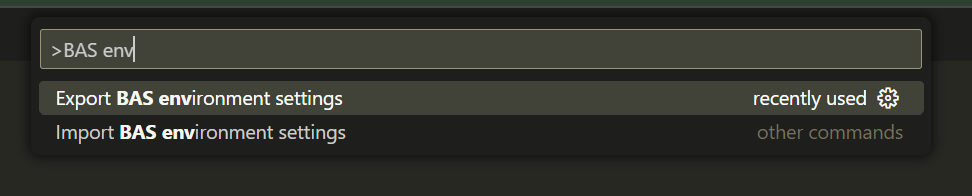
-
Because the exporting of the BAS profile (see next part) includes all the installed extensions, there is no need to reinstall the extension on the new Dev Space! Simply run the import and off you go!
The next part will outline how to export and import your profile and settings.
1) Exporting / importing BAS profile
Because this script does not export the BAS' settings.json file, you must export / import your BAS profile first:
From the source Dev Space:
- Click the "cogwheel" icon in the lower left, and select Profiles > Export Profile...
- Follow the steps to export your BAS profile, and save it to your local harddisk.
Just make sure the
BASEnvSyncextension is included in the profile export 😎
From the target Dev Space:
- Drag the downloaded
<profile-name>.code-profilefile into the Explorer. - Click the "cogwheel" icon in the lower left, and select Profiles > Import Profile...
- Follow the steps to import your BAS profile, and reload BAS
2) Exporting settings from source Dev Space
-
Open the Command Palette, and execute Export BAS environment settings
-
A file
bas-env.zipwill be created which you then download to your local hard disk.NB: If you run SAP BAS / SAP Build Code from a browser (as most of us would), you cannot save the file to your local hard disk directly. Choose a path inside your project folder to save the file. I would recommend choosing the root of your project folder. From there, right-click the
bas-env.zipfile from the Project Explorer and from the context menu, choose Download.to store the file locally.However, if you run SAP BAS / SAP Build Code inside VS Code via the Remote Development Extension, you will get the standard VS Code 'Save As' dialog which lets you save to your local harddisk directly.
This ZIP file will contain -- if available in your Dev Space -- the following items:
~/.bashrc~/.bash_aliases~/.profile~/.npmrc~/.gitignore~/.gitconfig~/.git-credentials~/.inputrc~/.scripts(folder)
NB: In most cases, you will notice the
~/.scriptsfolder is skipped; I created that folder containing some shell scripts to enhance Bash (history, autocomplete, etc)
Importing settings to target Dev Space
-
Open the Command Palette, and execute Import BAS environment settings
-
After 1-2 seconds, a new tab will open which allows you to upload the
bas-env.zipfile (the file you have downloaded earlier) by clicking the Select ZIP file to Upload button: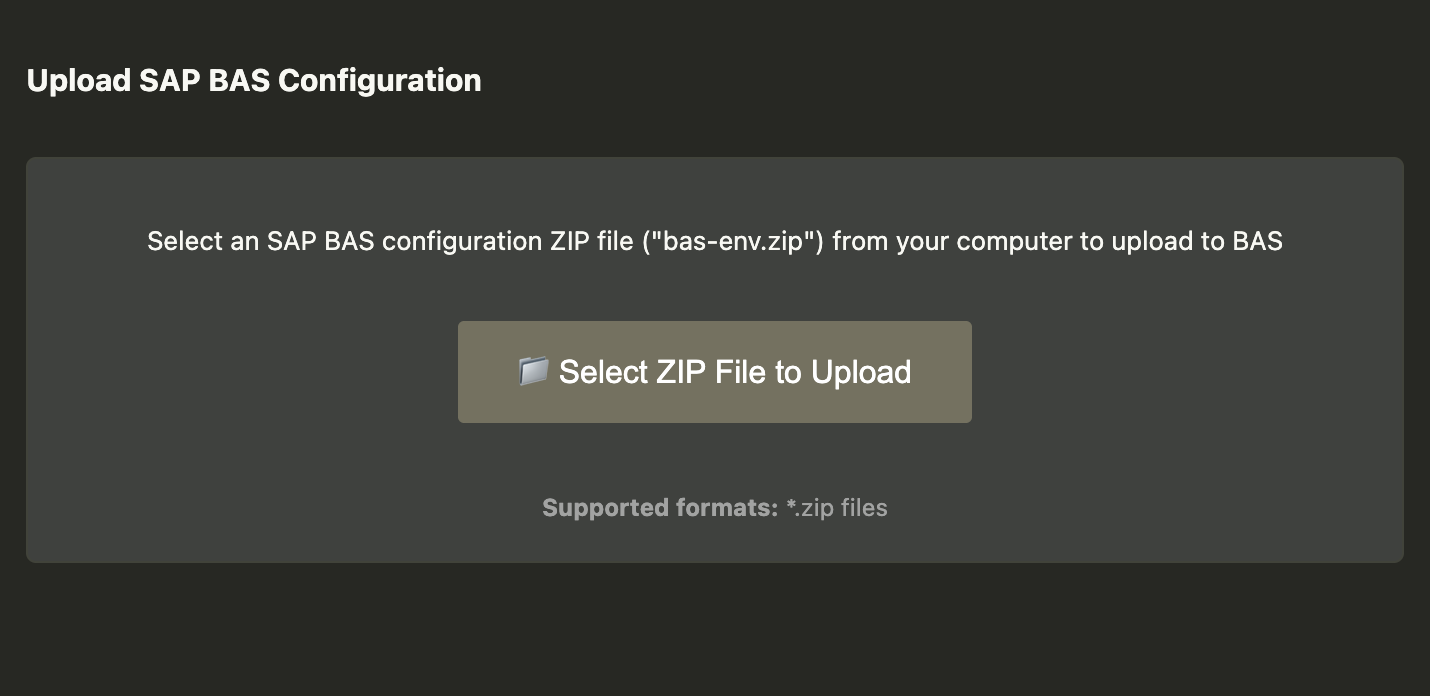
-
When the initial upload of the
bas-env.zipfile was successful, click the Transfer configuration to BAS button: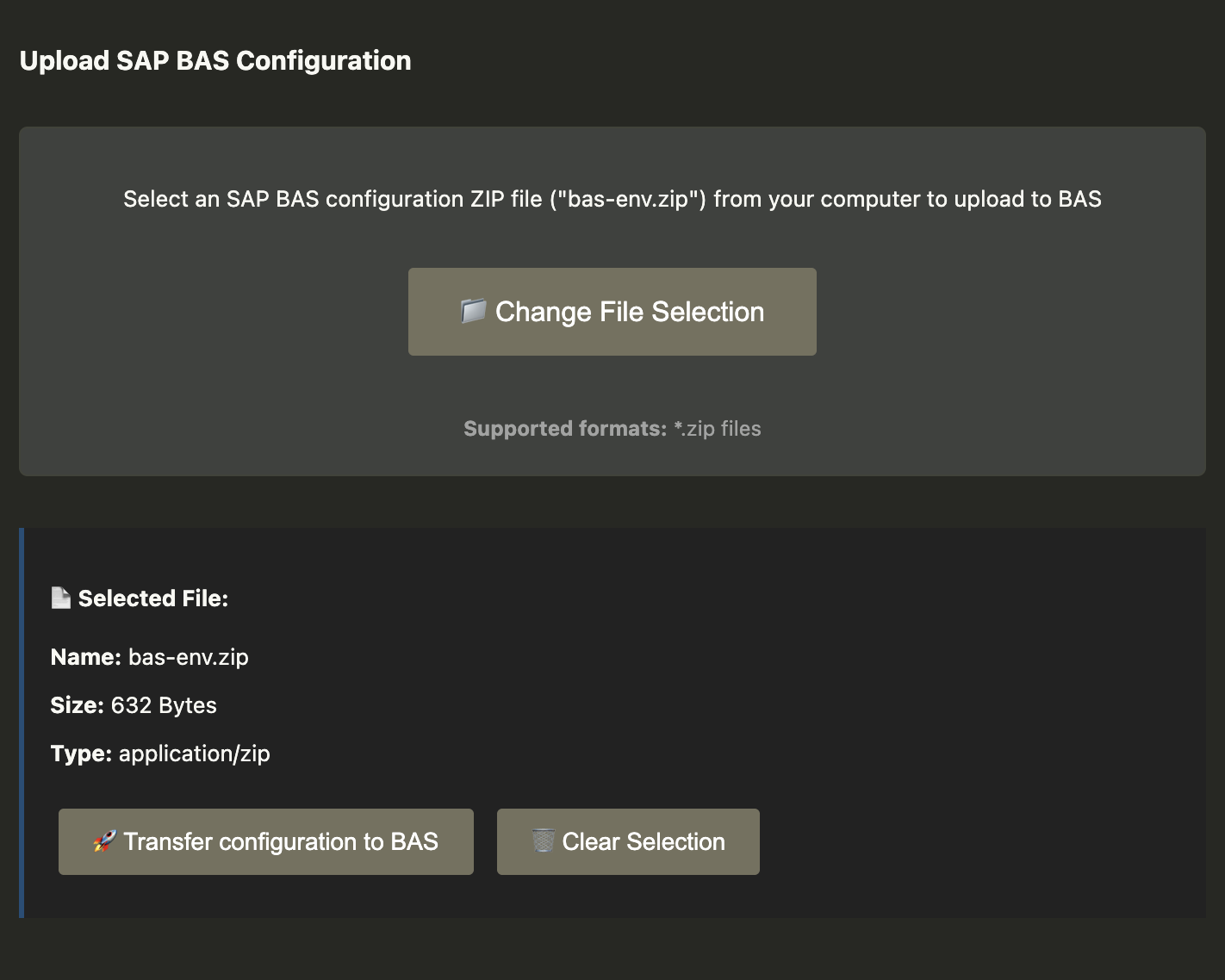
-
After the settings have been loaded, open a new terminal and examine the applied changes.
Roadmap
- Proper error handling
- Instead of a hard-coded list of files and folders to export, provide possibility of making this more flexible (config file? commandline arguments?)
Known issues
See the open issues for a list of known issues (and proposed features).
If you have any suggestions of bugs, please let me know. I might even find the time to fix / implement 😎
Contributing
Contributions are what make the open source community such an amazing place to learn, inspire, and create. Any contributions you make are greatly appreciated.
- Fork the Project
- Create your Feature Branch (
git checkout -b feature/AmazingFeature) - Commit your Changes (
git commit -m 'Add some AmazingFeature') - Push to the Branch (
git push origin feature/AmazingFeature) - Open a Pull Request
Contact
Robin van het Hof - @qualiture
Others providing
Compare all 4 on the IDE provisioning page →- eclipsADT-o-mateclipsADT-o-matA Windows PowerShell wizard that downloads an Eclipse release, installs ABAP Development Tools into it with the p2 director, and adds the ADT plugins picked from a catalog of fifteen.independent, abapPowerShell wizard installing Eclipse with ADT and pluginsfrom ABAP
- personal-application-studiopersonal-application-studioA Theia distribution for SAP developers, published as a Docker image with ABAP and UI5 language support and a template wizard already in it.independent, abapTheia distribution with ABAP and UI5 support as a Docker imagefrom ABAP
- adt-bundle-builderadt-bundle-builderA Windows build that downloads Eclipse, installs ABAP Development Tools and four more ADT plugins with the Eclipse p2 director, and zips the result as a portable IDE.independent, abapWindows build packaging Eclipse with ADT as a portable IDEfrom ABAP
Details
Sources
Sources are graph entities: the same page may back several entries, and an unreachable source flags every row that rests on it.
Compatibility and provenance
History in the atlas
- First seen.
For your agent
- Ref
artifact:qualiture-basenvsync- JSON
- /artifacts/qualiture-basenvsync.json
- MCP
- Connecting an agent