srbinfoandsupportjs
A JavaScript library that shows a UI5 dialog with application details such as device, resolution, browser zoom, app version and last commit.
Support staff who get an error report from an installed UI5 app need to know which browser, screen and product version it ran on. showSupportDialog shows that data, which covers browser and version, screen size, device zoom, the application URL, the product version taken from the last Git commit, local storage contents and an optional screenshot, with options to send it by email or copy it to the clipboard. The screenshot needs the separate html2canvas library, which is not bundled. showOverviewDialog lists the product's licences and those of its open-source dependencies, and initHiddenInfo opens either dialog after ten clicks on a chosen DOM element within 2000 milliseconds. Fixed data such as licences is read from an init() config object or from properties in the UI5 manifest.json.
Facts
Who is behind it

In the atlas: maintains 2, contributes to 2@michaelhenningersrbSRB Consulting TeamSRB Consulting TeamMaintains this

In the atlas: maintains 2@SRBConsultingTeammaintainers
Before choosing this
Signals
ActivityQuietRelease and repository quiet for 36 months
Both observable publication channels have been quiet for at least 24 full months. This may be normal for stable software; check whether its current state still fits your use.
What it declares
Every artifact
- Type
- Package
- Origin
- Independently maintained
As a package
- Where it runs
- Inside its host
- Distributed through
- does not say
Install
npm add srbinfoandsupportjsDerived from the package name. No recipe recorded; the README has the configuration.
README
quoted from SRBConsultingTeam/SRBInfoAndSupportJS under MIT, readSRBInfoAndSupportJS



Motivation
Our product installations are slowly piling up and support is becoming increasingly difficult. It is of course important for us to be able to identify errors quickly, simplify analyzes and be able to react quickly to problems.
For this reason I developed the JS Library SRBInfoAndSupport.js. This gives us the opportunity to evaluate important information quickly and easily.
The most important information for error identification includes:
- Browser designation ( version )
- Screen size
- URL of the application ( incl. port, hostname, path )
- Device Zoom
- Version of our product (last Git commit)
- What data is in the local storage
- Screenshot of the application
- ...
The most common application of the library will probably be to display a button that shows the user the important information mentioned above. This is very easy to do with the Lib. Simply integrate it into the project and a dialog is presented to the user with the following function call:
SRBInfoAndSupport.showSupportDialog("My dialog title", {
captureScreenshot: true,
});This call results in:
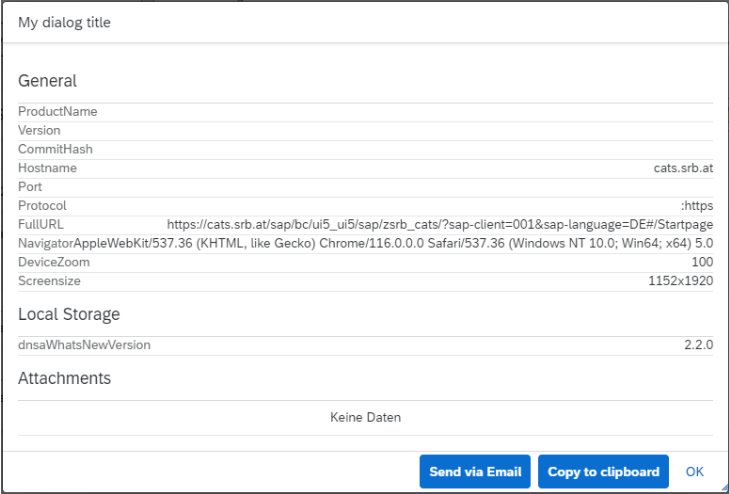
As can be seen in the screenshot, the users/developers now have the option of sending the data via email or copying it to the clipboard.
Furthermore, it is mandatory for legal reasons to display licenses. Both our product licenses and licenses for the libraries we use (open source libs etc.)
This is also covered by SRBInfoAndSupport.js. Using the following function call...
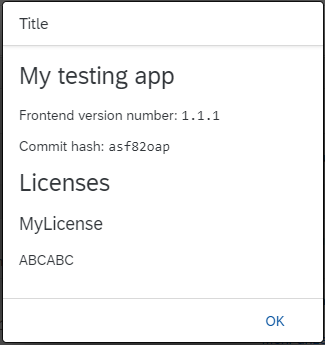
SRBInfoAndSupport.showOverviewDialog("Title");...a dialog is generated that displays all important information:
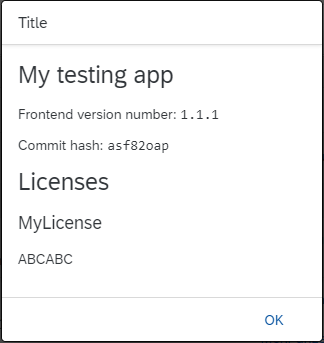
Important technical background:
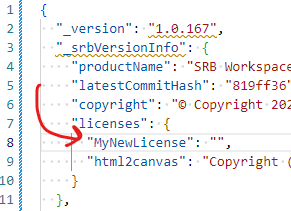
All displayed fixed data is loaded dynamically from configuration files. This has a significant advantage when making the library dynamic. For example, in the case of licenses, a JSON file containing the licenses is loaded from the configuration. If it is necessary to display a new license due to an extension of the application, this can simply be added to the configuration.
Here's an example:
Demo
If you check out this project, there is a "demo" app to see how the library works. Simply clone the repo and run npm run test in the demo folder ( npm install required to install all necessary packages ).
You can also use this link to see a working example: https://srbconsultingteam.github.io/SRBInfoAndSupportJS/demo/webapp/index.html
Getting started
Initialize the SRBJSLogger via the NPM CDN:
For initializing the Logger via CDN, simply copy and paste the following in the index file of the HTML5 app:
<script src="https://npmcdn.com/srbinfoandsupportjs/src/SRBInfoAndSupport.js"></script>
Or use the minified version
<script src="https://npmcdn.com/srbinfoandsupportjs/src/SRBInfoAndSupport.min.js"></script>
Initialize SRBInfoAndSupportJS via downloading the latest version:
Download the latest minified version from here. Place that file into a directory of the app's folder structure, where it can access that file. For UI5 apps, using the index.html bootrapping, instantiate the Logger like above via
<script src="/path/to/SRBInfoAndSupport.min.js"></script>
For UI5 apps, not using the index.html startup logic, paste the following in the ressources section of the manifest file:
"resources": { "js": [ { "uri": "path/to/SRBInfoAndSupport.min.js" } ] }Initialize the Logger temporarily via the browsers console. Just copy, paste and execute the following snippet in the browsers console:
var script = document.createElement("script");
script.type = "text/javascript";
script.src = "https://npmcdn.com/srbinfoandsupportjs/src/SRBInfoAndSupport.min.js";
script.addEventListener("load", function () {
  SRBInfoAndSupport.init({
    appname: "My testing app",
    version: "1.1.1",
    licenses: { MyLicense: "ABCABC" },
    copyright: "My version of the copyright",
    latestCommitHash: "asf82oap",
  });
});

document.head.appendChild(script);
Documentation
The documentation on this page is just an overview of the most relevant functions and features. Consider reading the JSDoc page!
The init function
SRBInfoAndSupport.init({
  appname: "My testing app",
  version: "1.1.1",
  licenses: { MyLicense: "ABCABC" },
  copyright: "My version of the copyright",
  latestCommitHash: "asf82oap",
});
or, if using the manifest properties instead:
SRBInfoAndSupport.init();Parameters
init(config[{}])
-
config - optional Configuration object for the init function. If provided, the following config object has to be used:
{
  "appname": "",
  "version": "",
  "licenses": {
    "MyLicense": ""
  },
  "copyright": "",
  "latestCommitHash": "asf82oap"
}
If this configuration object is not provided, the library is searching for manifest properties of the UI5 app, that is using the library.
Example manifest.json configuration:
  {
    "_version": "1.0.162",
    "_srbVersionInfo": {
      "productName": "My Product",
      "latestCommitHash": "3704aa5",
      "copyright": "© Copyright 2022 SRB Consulting Team GmbH. All Rights Reserved.",
      "licenses": {
        "My Product License": "",
        "html2canvas": "Copyright (c) Microsoft Corporation. Permission to use, copy, modify, and/or distribute this software for any purpose with or without fee is hereby granted. THE SOFTWARE IS PROVIDED 'AS IS' AND THE AUTHOR DISCLAIMS ALL WARRANTIES WITH REGARD TO THIS SOFTWARE INCLUDING ALL IMPLIED WARRANTIES OF MERCHANTABILITY AND FITNESS. IN NO EVENT SHALL THE AUTHOR BE LIABLE FOR ANY SPECIAL, DIRECT, INDIRECT, OR CONSEQUENTIAL DAMAGES OR ANY DAMAGES WHATSOEVER RESULTING FROM LOSS OF USE, DATA OR PROFITS, WHETHER IN AN ACTION OF CONTRACT, NEGLIGENCE OR OTHER TORTIOUS ACTION, ARISING OUT OF OR IN CONNECTION WITH THE USE OR PERFORMANCE OF THIS SOFTWARE."
      }
    },
    ...
  }
The support dialog function
SRBInfoAndSupport.showSupportDialog("My dialog title", {
  captureScreenshot: true,
});
Parameters
showSupportDialog(title[String], config[{}])
-
title - optional
The shown title of the support dialog
-
config - optional Configuration object, configuring the support dialog.
-
captureScreenshot true|false Indicates if a screenshot of the app shall be captured. For this, a extrenal library
html2canvasis necessary. This library is not shipped with the SRBInfoAndSupportJS. See https://github.com/niklasvh/html2canvas for how to initialize the library.Quick and dirty example that is initializing
html2canvas. You can use it in the browser console:var script = document.createElement("script"); script.type = "text/javascript"; script.src = "https://github.com/niklasvh/html2canvas/releases/download/v1.4.1/html2canvas.min.js"; document.head.appendChild(script);
Example:
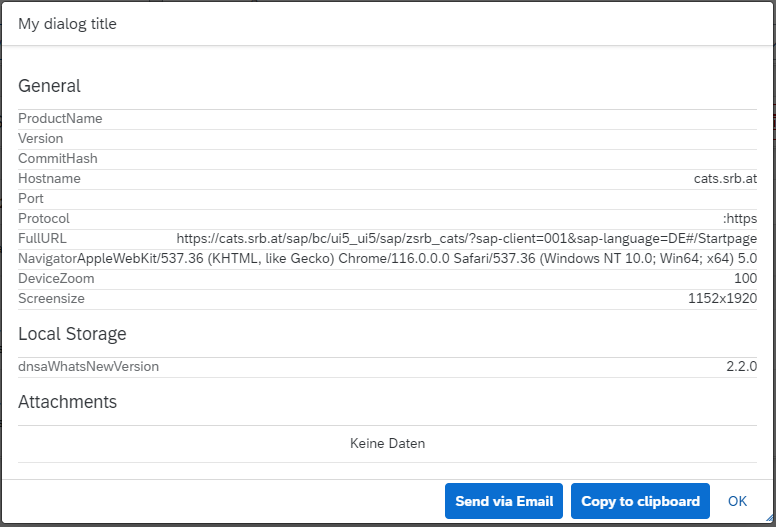
{ "captureScreenshot": true } -
Results in
The overview dialog function
SRBInfoAndSupport.showOverviewDialog("Title");Parameters
showOverviewDialog(title[String])
-
title
The title of the info dialog
Results in
The initializing hidden info
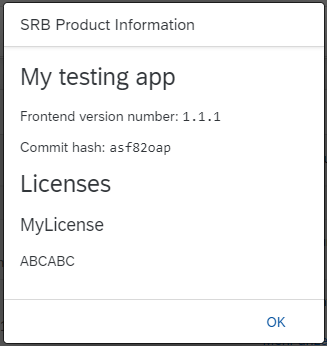
This function initializes a hidden feature. The feature is open the overview dialog or the support dialog, or both. The magic thing is that the dialogs are shown only after clicking on a specific DOM element a specific number of times in a specific time range. The number of clicks is 10 in a time range of 2000 milliseconds.
The DOM element that has to be clicked can be forwarded to the function via the parameter domElementId. What will be showing is set via overviewDialog and/or supportDialog.
SRBInfoAndSupport.initHiddenInfo({
  overviewDialog: true,
  supportDialog: false,
  domElementId: "__component0---Startpage--filterSearch",
});
Parameters
initHiddenInfo(config[{}])
-
config - optional Configuration object, configuring the hidden info feature.
-
overviewDialog true|false - optional
Shows the overview dialog if the hidden info is triggered by the user.
-
supportDialog true|false - optional
Shows the support dialog if the hidden info is triggered by the user.
-
domElementId String - optional
The DOM element ID that the user has to click.
Results in
-
History
Details
Sources
Sources are graph entities: the same page may back several entries, and an unreachable source flags every row that rests on it.
Compatibility and provenance
History in the atlas
- Listed on bestofui5.org and absent from the atlas. The npm description, "A JS library that shows a UI5 dialog with application details such as device, resolution, browser zoom, app version, and last commit.", and the README's manifest.json configuration name the stack. No provides edge: no capability on the UI5 door covers support or diagnostic information.
- First seen.
For your agent
- Ref
artifact:srbconsultingteam-srbinfoandsupportjs- JSON
- /artifacts/srbconsultingteam-srbinfoandsupportjs.json
- MCP
- Connecting an agent