CPIOps
A web app deployed into your own BTP subaccount that commits a Cloud Integration tenant's artifacts to GitHub or GitLab as extracted source files, each commit tagged with the artifact's CPI version.
CPIOps runs inside your own SAP BTP subaccount, reads a CPI tenant through a BTP destination and commits each artifact to GitHubGitHubA hosted git service: repositories, pull requests with reviews, and branch rulesets that decide what may reach a branch. Things here that push objects out of an SAP system, or keep a review record outside it, call its API and open their pull requests on it. or GitLabGitLabA hosted git service, on GitLab.com or self-managed, whose projects sit in groups that can be nested as subgroups up to 20 levels deep; the Git side for things here that commit SAP source pulled out of a tenant, a repository per object where that nesting allows one. as extracted source files instead of a zip, with every commit auto-tagged with its CPI version such as OrderToSAP_iFlow@1.4. The artifact list shows per artifact whether tenant and repository agree, as IN_SYNC, CPI_AHEAD or NOT_IN_GIT. Before each commit it runs Rune, a quality engine written in TypeScript that runs in the same CAP process and covers Groovy, XSLT, iFlow XML and ABAP BAdI source; error findings block the commit while warnings and info only surface. Git is used as plain file storage, so there are no webhooks to wire up, no runners to maintain and no pipeline config to write. Promoting artifacts across tenants is outside it; where a pipeline already does that, CPIOps sits alongside it.
Facts
Where it sits
Who is behind it
Before choosing this
Conditions
PracticalFunctional boundary
A pipeline that already promotes artifacts across tenants stays where it is; what CPIOps replaces is the work of building a pipeline just to get CPI artifacts into Git with history. If SAP ships native Git integration for the tenant, the documented answer is to stop using CPIOps, because the repository already holds the full commit history and nothing has to be migrated.
What it declares
Every artifact
- Type
- App
- Origin
- Independently maintained
As an app
- Where it runs
- does not say
- Distributed through
- does not say
Connections
Moving a change from development through test to production
Builds and runs integration flows between cloud and on premise
A hosted git service: repositories, pull requests with reviews, and branch rulesets that decide what may reach a branch. Things here that push objects out of an SAP system, or keep a review record outside it, call its API and open their pull requests on it.
A hosted git service, on GitLab.com or self-managed, whose projects sit in groups that can be nested as subgroups up to 20 levels deep; the Git side for things here that commit SAP source pulled out of a tenant, a repository per object where that nesting allows one.
Cloud Foundry runtime of SAP BTP for polyglot applications
Named, credentialed addresses of other systems resolved at runtime
Integration service on BTP with Cloud Integration and API Management
SAP's Node.js application router in front of business applications
A hosted git service: repositories, pull requests with reviews, and branch rulesets that decide what may reach a branch. Things here that push objects out of an SAP system, or keep a review record outside it, call its API and open their pull requests on it.
A hosted git service, on GitLab.com or self-managed, whose projects sit in groups that can be nested as subgroups up to 20 levels deep; the Git side for things here that commit SAP source pulled out of a tenant, a repository per object where that nesting allows one.
OAuth server issuing JWTs and holding scopes for BTP apps
Managed SAP HANA database service on BTP
Download
Learn more
- CPIOps: Quality Checks and Git Integration for All Your iFlowsCPIOps: Quality Checks and Git Integration for All Your iFlowsThe maintainer's own walkthrough of CPIOps: it scans a Cloud Integration tenant's Groovy, XSLT, iFlow XML and ABAP for hardcoded credentials, logged payload data, hardcoded URLs and missing exception handling, then commits each artifact to GitHub or GitLab as extracted source files tagged with its CPI version, so which artifacts are already in Git and which have drifted since the last commit is visible at a glance. Every commit runs under the reader's own Git token and lands on a feature branch, never on main or develop. A separate, optional AI review layer called Odin, off by default and run against a self-hosted model, adds advisory findings on top without being able to block a commit.Pavan_SJ, published 2026-08-03Pavan_SJ, SAP Community
README
quoted from asbrucon/CPIops under Apache-2.0, read

CPIOps: Bringing Git to SAP Integration Suite
CPIOps is a web app that runs inside your own SAP BTP subaccount. It connects to a CPI tenant and a Git repository, and lets you browse artifacts, run a quality check, and commit clean source files to Git from one screen, with no pipeline, CLI, or Docker required.
For the reasoning behind these design choices, see Why CPIOps.
Features
- Browse your CPI packages and artifacts live, straight from the tenant.
- See sync status at a glance:
IN_SYNC,CPI_AHEAD, orNOT_IN_GIT. - Run a quality check before every commit and read the report right there.
- Commit artifacts to Git as extracted source files, never as a zip.
- Every commit is auto-tagged with its CPI version, like
OrderToSAP_iFlow@1.4. - Works with GitHub or GitLab. On GitLab each iFlow is its own repo (
group/packageId/artifactId); on GitHub, which has no subgroups, each package is one repo (org/packageId) and every iFlow lives in its own folder. For GitHub set the Git Organization URL to your org (the owner must be an org or the token's own user) and use a token with thereposcope.
Architecture
Everything runs inside your BTP subaccount. Git is used as plain file storage, so there is nothing to set up on the Git side.
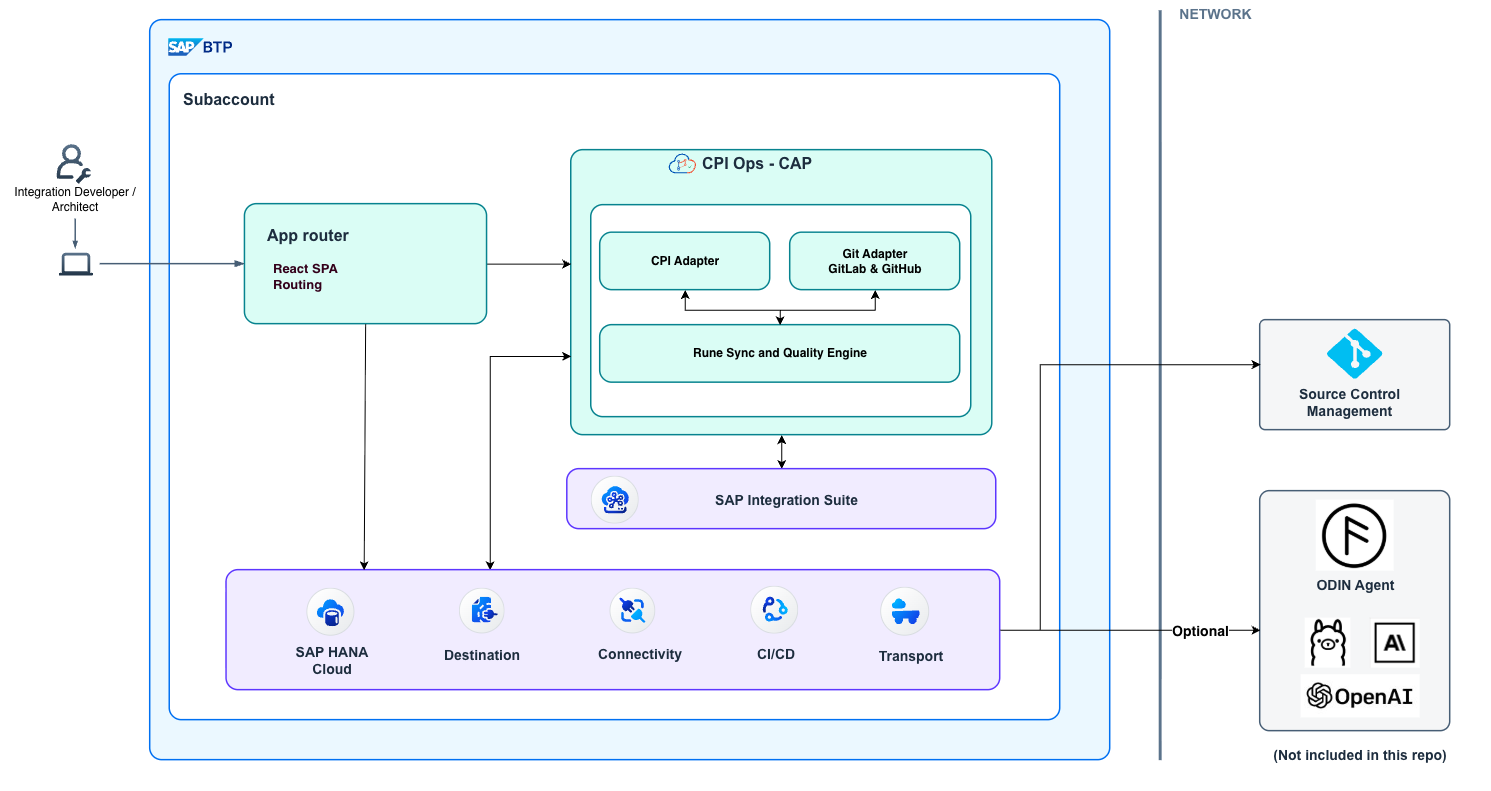
How it works
Connect CPI and Git in Settings, browse a package, run the quality check, and commit; the version tag gets applied automatically. See the full step-by-step walkthrough with video and gifs in docs/WALKTHROUGH.md.
Rune: the quality engine
Rune checks code before it reaches Git. It is written in pure TypeScript and runs inside the same
CAP process as the rest of the app, so there is nothing extra to install or patch on the tenant
side, with no JVM and no CodeNarc ruleset to sync. error findings block the commit; warnings and
info surface without getting in your way. It covers Groovy, XSLT, iFlow XML, and ABAP BAdI source.
See the full rule list, grouped by file type, in docs/RUNE.md.
Optional: AI review add-on
CPIOps can optionally connect to an AI review layer that reads iFlows, scripts, and mappings and adds advisory suggestions on top of Rune's findings. It never blocks a commit, it only advises. This layer is experimental, a separate closed add-on, and not part of this repository. Reach out if you'd like a demo.
Run locally
The app is two separate processes in local dev: the CAP backend (API + auth + DB) and the React
UI (Vite). The UI proxies /api and /odata calls to the backend, so both need to be running.
Prerequisites:
- Node.js and npm.
- Optionally,
@sap/cds-dkinstalled globally (npm i -g @sap/cds-dk) for convenience runningcdscommands directly. - A BTP destination service instance, bound locally via
cds bind(see step 1 below) — this is required for the app to start at all. Whether that destination actually points at a real CPI tenant is up to you: without one, the app still starts but there is nothing to browse or commit. See Creating the CPI Destination for the full walkthrough.
1. Start the backend (from cpiops/):
npm install

# Copy the example config files and fill in your own values
cp .env.example .env
cp .cdsrc-private.json.example .cdsrc-private.json
.env only needs LOG_LEVEL (optional) — the CPI destination name, Git provider, and Git group
URL aren't set from files at all; you configure them from the app's own Settings
screen once it's running, and they're stored in the app's database from then on.
In .cdsrc-private.json, fill in auth.users by hand (its IntegrationContent.credentials.destination
value doesn't matter — CPIOps always overrides it at runtime with whatever destination name you set
in Settings). For the destinations service, don't hand-edit the binding block — generate it
instead with cds bind (already available via the @sap/cds-dk devDependency, no global install
needed):
cf login                                              # if not already logged in and targeted at your space
cf create-service destination lite cpiops-destination-dev    # skip if you already have a destination service instance
cf create-service-key cpiops-destination-dev local            # skip if you already have a key for it

npx cds bind destinations -2 cpiops-destination-dev:local
cpiops-destination-dev / local are just suggested names for a first run — the dev suffix
keeps this local-only instance from colliding with the cpiops-destination instance the mta.yaml
deploy later creates in the same space. Use your own names if you already have an instance and key.
This reads your current cf target and the service key, then writes the resolved
destinations.binding block straight into .cdsrc-private.json under the [hybrid] profile, so
there's no CF org/space/API-endpoint JSON to copy by hand.
npm run build:api    # pulls the Integration Content OData metadata into CDS models
                      # (only needed once, or again if the SAP API definition changes)
npm run build:db     # deploys the local SQLite schema
npm run start:dev     # starts the CAP server on the `hybrid` profile
The server listens on http://localhost:4004 by default. In hybrid mode, auth is basic auth;
log in with the admin or developer user you set up in .cdsrc-private.json. The hybrid
profile is what lets the app run on a local SQLite database while still reaching your real CPI
tenant through a BTP destination. This port serves the OData/REST API only; there is no UI here.
2. Start the UI (from cpiops/app/cpiops-ui/, in a second terminal):
cd cpiops/app/cpiops-ui/
npm install
npm run dev
Vite serves the React app at http://localhost:5173 and proxies /api and /odata requests to
the backend on :4004 (see vite.config.ts). Open http://localhost:5173 in the browser; this
is the actual app UI for local development, not :4004.
Deploy to BTP
The app is built to run on Cloud Foundry in your BTP subaccount.
Before you start, you need:
- A BTP subaccount with Cloud Foundry enabled.
- Entitlements for XSUAA and Destination.
- The
cfCLI, logged in to your org and space. - The
mbtbuild tool installed.
Build and deploy:
npm run build:cf    # builds the multi-target archive with mbt
npm run deploy:cf   # deploys the archive to Cloud Foundry
After the deploy:
- Open the app at its approuter URL — find it with
cf app cpiops, or in the BTP cockpit under Cloud Foundry → your space → Applications → cpiops (the UI is bundled into and served by the approuter itself, not through HTML5 Application Repository). - Create a Destination that points to your CPI tenant — see Creating the CPI Destination for the full walkthrough (entitling the API plan, creating the service instance and key, and filling in the destination fields).
- Open Settings in the app and finish the CPI and Git connection.
For what each module and resource in mta.yaml does, see
Deployment details.
Settings
Once the app is open, set up:
- CPI connection: base URL and OAuth credentials for your tenant.
- Git: provider, repository, and access token.
- Branch model: a single
mainbranch, or an optionaldevelop→mainflow. - Quality thresholds: tune which Rune findings you care about.
Contributing
Bug reports and feature requests are welcome. Please open an issue in the repo first.
If you'd like to contribute code, please open an issue first to discuss the change before submitting a pull request. This is a young, mostly solo-maintained project, so an unsolicited PR may sit unreviewed for a while; talking it through first means your effort isn't spent on a direction the project isn't ready for.
License
Apache-2.0, see LICENSE.
Roadmap / Status
The full flow, browse, quality check, and commit, has been tested end-to-end against a real test CPI tenant.
Planned next: wiring up the optional AI review add-on (see Optional: AI review add-on) as a connectable layer instead of a separate demo.
Others providing
Compare all 2 on the Change promotion page →- SAP Cloud Transport ManagementSAP Cloud Transport ManagementMoves software deliverables between SAP BTP accounts along a modelled landscape of transport nodes and routes: Multitarget Application archives, and application-specific content such as SAP Cloud Integration iFlows.sap official, btpMoves MTA archives and content between SAP BTP accounts
Details
Sources
Sources are graph entities: the same page may back several entries, and an unreachable source flags every row that rests on it.
Compatibility and provenance
History in the atlas
- First seen.
For your agent
- Ref
artifact:asbrucon-cpiops- JSON
- /artifacts/asbrucon-cpiops.json
- MCP
- Connecting an agent