btp-spend-analysis
Sample integration flows for SAP Integration SuiteSAP Integration SuiteSAP's integration service on BTP: Cloud Integration for orchestration, API Management in front of it, and an MCP gateway that serves a managed API to agents.sap official, btp that pull SAP Ariba spend data into SAP DatasphereSAP DatasphereSAP's cloud data warehouse: spaces, modelled views and analytic models over data brought in or federated from source systems, with the business context carried along rather than rebuilt.sap official, btp for the SAP Analytics CloudSAP Analytics CloudSAP's SaaS front end for analytics: business intelligence, planning and predictive in one product, and the place a Datasphere analytic model is meant to end up being read.sap official, btp Spend Analysis business content.
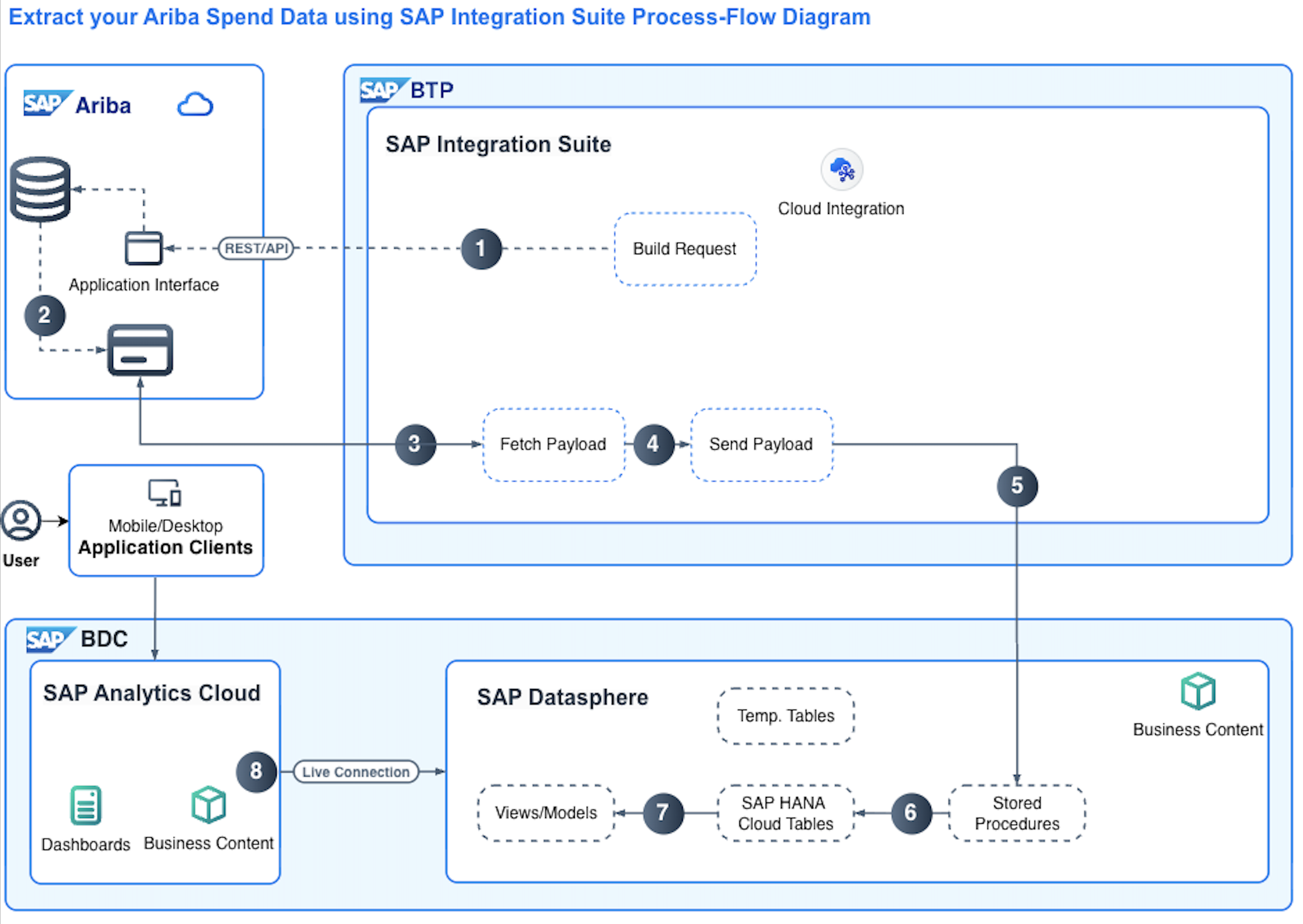
Ariba's Analytical Reporting API returns a format Datasphere has no direct ingestion mechanism for, so some ETL has to sit in between. This repository is that piece: a custom integration flow, released as a .zip and deployed into SAP Integration SuiteSAP Integration SuiteSAP's integration service on BTP: Cloud Integration for orchestration, API Management in front of it, and an MCP gateway that serves a managed API to agents.sap official, btp, that moves the data from Ariba and lands it in SAP DatasphereSAP DatasphereSAP's cloud data warehouse: spaces, modelled views and analytic models over data brought in or federated from source systems, with the business context carried along rather than rebuilt.sap official, btp, with the HANA SQL scripts and the documentation for the Intelligent Spend Analytics Discovery Mission beside it. The prebuilt Datasphere and SAP Analytics CloudSAP Analytics CloudSAP's SaaS front end for analytics: business intelligence, planning and predictive in one product, and the place a Datasphere analytic model is meant to end up being read.sap official, btp business content is downloaded separately, at step 5 of the mission's twelve. The integration is specific to the Ariba Spend Analysis entitlement.
Facts
Where it sits
Who is behind it

In the atlas: maintains 222@SAP-samplesmaintainerAjinkya PatilContributes to this

In the atlas: contributes to 112@ajinkyapatil8190Brian BernardContributes to this

In the atlas: contributes to 64@btbernardJeet KapaseContributes to this

In the atlas: contributes to 1@jeet-kapase-sapmjmoylan0Contributes to this

In the atlas: contributes to 1@mjmoylan0todd-r-hannaContributes to this

In the atlas: contributes to 1@todd-r-hanna5 contributors
What it declares
Every artifact
- Type
- Sample
- Origin
- By SAP
As a sample
- Form
- A tutorial's companion code
Connections
Moving and transforming messages between systems in middleware
SaaS for business intelligence, planning and predictive analytics
Cloud data warehouse with spaces, views and analytic models
Integration service on BTP with Cloud Integration and API Management
Download
README
quoted from SAP-samples/btp-spend-analysis under Apache-2.0, readSAP BTP Integration Suite Integration Flows for Ariba Spend Analysis
Description
Power up business content for SAP Analytics Cloud and SAP Ariba Spend Analysis using SAP Integration Suite.
The sample integration flows in this repository demonstrate how to use SAP BTP Integration Suite to pull data from the SAP Ariba Analytical Reporting API, process it into SAP Datasphere, and analyze it using the SAP Analytics Cloud Spend Analysis business content.
Watch a high level overview video of the business content that you will be unlocking.
Current Position - What is the challenge To power up the Ariba Spend Analytics Business Content for Datasphere and SAP Analytics Cloud, you need to move your Ariba data into Datasphere. Ariba provides an Analytical API for customers to access the data generated by the Spend Analysis entitlement. Due to the format of the API response, there is no direct ingestion mechanism for Datasphere to pull the Ariba data, therefore some form of ETL tooling needs to be introduced for that data movement.
Destination - What is the Outcome After following this Discovery Mission, you will have deployed the Datasphere and SAP Analytics Cloud Business Content for Spend; you will have deployed the Cloud Integration Suite IFlow into your Business Technology Platform space and used it to move data from your Ariba system into your Datasphere system.
How you get there - What is the solution The solution consists of the prebuilt business content for Datasphere and SAP Analytics Cloud to allow you visibility into your Spend data; a custom Integration Flow that orchestrates the transportation of data from Ariba to Datasphere.
Solution Diagram
Download and Installation
Integration Flows are attached as a .zip to this release. All SQL scripts are found in the /src/SQL dir
This git repository contains all Integration Flows, HANA SQL Scripts and documentation needed for the Intelligent Spend Analytics Discovery Mission. The integration is specific to the Ariba Spend Analysis entitlement and provides a way for BTP Cloud Integration to pull data from the Ariba Analytical API, process it into SAP Datasphere so that the SAP Analytics Cloud Spend Analysis business content can be used.
Step 1: Solution Overview and Architecture
Step 2: Review Prerequisites and Resources
Step 3: Datasphere Preparation
Step 4: Create the Datasphere Space
Step 5: Download the DWC Business Content
Step 6: Create the HANA artifacts
Step 7: Deploy the DWC Business Content
Step 8: Connect SAP Analytics Cloud Content
Step 9: BTP Cloud Integration Preparation
Step 10: Connect Cloud Integration Suite to Ariba
Step 11: Connect Cloud Integration Suite to DWC
Step 12: Deploy Integration Flows
Known Issues
How to obtain support
Create an issue in this repository if you find a bug or have questions about the content.
For additional support, ask a question in SAP Community.
Contributing
If you wish to contribute code, offer fixes or improvements, please send a pull request. Due to legal reasons, contributors will be asked to accept a DCO when they create the first pull request to this project. This happens in an automated fashion during the submission process. SAP uses the standard DCO text of the Linux Foundation.
License
Copyright (c) 2022 SAP SE or an SAP affiliate company. All rights reserved. This project is licensed under the Apache Software License, version 2.0 except as noted otherwise in the LICENSE file.
History
Notes
BTP Integration Flows to transport 10 Ariba table data to DWC.
Details
Sources
Sources are graph entities: the same page may back several entries, and an unreachable source flags every row that rests on it.
Compatibility and provenance
History in the atlas
- First seen.
For your agent
- Ref
artifact:sap-samples-btp-spend-analysis- JSON
- /artifacts/sap-samples-btp-spend-analysis.json
- MCP
- Connecting an agent