@cap-js/notifications
Publishes business notifications to SAP Build WorkZone from the application, so a user is told something happened without the UI polling for it.
Facts
Where it sits
Who is behind it

In the atlas: maintains 34@cap-jsmaintainerAjinkya PatilContributes to this

In the atlas: contributes to 112@ajinkyapatil8190Angel TonchevContributes to this
In the atlas: contributes to 1@AngelTonchevAnmol BinaniContributes to this

In the atlas: contributes to 1@AnmolBinaniChristian GeorgiContributes to this

In the atlas: maintains 1, contributes to 53@chgeoDaniel HutzelContributes to this

In the atlas: contributes to 32, wrote 3@danjoaDaniel SchlachterContributes to this

In the atlas: contributes to 10, wrote 9@DanSchlachterEric PContributes to this

In the atlas: contributes to 3@eric-pSAPIvan PaunovContributes to this

In the atlas: contributes to 1@ipaunovjeevitha011Contributes to this

In the atlas: contributes to 6@jeevitha011Ram Prasad GSContributes to this

In the atlas: contributes to 4@RamIndia22 contributors
Before choosing this
Conditions
LicenceSAP Developer License Agreement 3.2 CAP§ 1, 2, 3A cds-plugin is used with SAP CAP materials, or an artifact is explicitly identified as a CAP plugin or application.
- § 1 License. Productive customer applications are limited to SAP BTP or another SAP-licensed platform, and mass extraction to a non-SAP product is restricted except where solely required for SAP interoperability.
- § 2 Intellectual Property. The agreement retains SAP's rights in the covered materials and limits making APIs, tools or software available to third parties, while preserving ownership of customer applications subject to SAP's underlying rights.
- § 3 Artificial Intelligence Training. The agreement prohibits use of the covered materials and customer applications for training artificial-intelligence models or systems.
What it declares
Every artifact
- Type
- CDS plugin
- Origin
- By SAP
As a CDS plugin
- Declared for
- >=8.0
- Distributed through
- npm
Connections
Copy of @cap-js/notifications published under another scope
Telling a person something happened when they are not looking
CAP and SAPUI5 demo of recovery from a supply disruption
Copy of @cap-js/notifications published under another scope
Download
Install
npm add @cap-js/notificationsDerived from the package name. No recipe recorded; the README has the configuration.
README
quoted from cap-js/notifications under Apache-2.0, readNotifications Plugin
The @cap-js/notifications package is a CDS plugin that provides support for publishing business notifications in SAP Build Work Zone.
Table of Contents
- Setup
- Getting Started
- Running the Sample
- Define Notification Types
- Send Notifications
- Entity Notifications
- API Reference
- Test-drive Locally
- Run in Production
- Advanced Usage
- Contributing
- Code of Conduct
- Licensing
Setup
Requirements: Node.js >= 20, @sap/cds >= 8.
To enable notifications, simply add this self-configuring plugin package to your project:
npm add @cap-js/notificationsGetting Started
After installing the plugin, you can send notifications in two ways:
Quick start: Direct notification
Send a simple notification using notify():
const alert = await cds.connect.to("notifications")

await alert.notify({
  recipients: ["user@example.com"],
  title: "Book Order Received",
  description: 'Your order for "Wuthering Heights" is being processed.'
})
Recommended: Define notification types
Define a notification event in your service model with @notification:
using { CatalogService } from './cat-service';

extend service CatalogService with {
  @notification: {
    title: 'Book {{title}} Ordered',
    subtitle: '{{buyer}} ordered {{title}}'
  }
  event BookOrdered {
    title : String;
    buyer : String;
  }
}
Emit the event from your service handler:
this.on("submitOrder", async req => {
  // ... process order ...

  await this.emit("BookOrdered", {
    title: book.title,
    buyer: req.user.id,
    recipients: ["user@example.com"]
  })
})
The plugin intercepts the event and sends the notification automatically. During local development, notifications are printed to the console. No BTP connection required.
Running the Sample
This section uses the Bookshop sample included in this repository.
1. Start the sample app
cd tests/bookshop
npm install
cds watch
The server starts at http://localhost:4004. During local development, the plugin prints the notifications to the console thus no BTP account is yet needed.
2. Trigger a notification
The bookshop's submitOrder action reduces book stock and emits a BookOrderedNotify event. The plugin intercepts that event and sends a notification.
Open tests/bookshop/test/http/CatalogService.http in VS Code and click Send Request above the submitOrder block. This file has the server URL and credentials pre-configured.
In the server console you will see the notification printed to confirm the notification was successful.
3. Customize the notification type
Open tests/bookshop/srv/notifications.cds. This file defines the BookOrderedNotify event and all of its @notification annotations. Change the subtitle template to include the quantity:
// Before
subtitle: '{i18n>BOOK_ORDERED_SUBTITLE}',

// After
subtitle: '{{buyer}} ordered {{quantity}}x {{title}}',
Save the file and cds watch reloads automatically. Send the request again and the updated subtitle appears in the console output. From here, try adjusting the priority expression, adding a @description, or exploring the other annotations on the event.
4. Connect to SAP Build Work Zone
To see the notification appear in the Work Zone, you need a BTP subaccount with SAP Build Work Zone and the SAP Alert Notification service configured.
- Follow the SAP Build Work Zone setup guide to subscribe to the service and configure the required
SAP_Notificationsdestination in your subaccount. - Bind your local environment to the destination service instance in CF using
cds bind, then runcds watch --profile hybridto connect to BTP destinations from your local machine.
On startup the plugin registers your notification types automatically. Submitting an order will now deliver a notification to the bell in Work Zone for the recipient.
[!Note] The bookshop sample uses in-app notifications by default. The Work Zone bell icon shows notifications for recipients identified by their SAP BTP Global User ID (UUID). To test email delivery as well, additional setup is required. For enabling, see email delivery and default email delivery. For required BTP configuration see the SMTP mail destination guide.
Define Notification Types
Notifications are based on notification types: templates that define how a notification looks, including titles, subtitles, and email content. These types can be defined in two ways, both of which can be used together and are merged at startup.
Option A: CDS Annotations (recommended)
The recommended approach is to define the notification type directly in your service model by annotating events with @notification. The plugin discovers and registers them automatically during startup.
Define an event in your srv/ model:
using { CatalogService } from './cat-service';

extend service CatalogService with {

  @description: 'Sent when a book is ordered'
  @notification: {
    title        : 'Book {{title}} Ordered',
    publicTitle  : 'Book Ordered',
    subtitle     : '{{buyer}} ordered {{title}}',
    groupedTitle : 'Bookshop Updates'
  }
  @Common.SemanticObject: 'Books'
  @Common.SemanticObjectAction: 'display'
  event BookOrdered {
    title : String;
    buyer : String;
  }

}
Any event with at least one @notification annotation (the bare @notification flag or any @notification.* property) is picked up. The notification type key is derived from the event name. Namespace prefixes are stripped, my.bookshop.BookOrdered becomes BookOrdered.
[!Note] The plugin automatically injects a
recipientselement into every notification event at model-load time; you don't need to declare it yourself.
[!Important] The event must be contained within a service either by defining it directly inside a
serviceor by usingextend service/usingto include it in an existing one.
[!Note] Annotations can also be placed in a separate file using the standard CDS
annotatedirective.
Common annotations:
@notification: {
  title        : 'Book {{title}} Ordered',
  publicTitle  : 'Book Ordered',
  subtitle     : '{{buyer}} ordered {{title}}',
  groupedTitle : 'Bookshop Updates', // Group header for multiple notifications
  email: {
    subject: 'Your order: {{title}}',
    html   : './email-template.html' // Path to HTML template or inline HTML
  },
  priority: #HIGH // Priority: LOW, NEUTRAL, MEDIUM, HIGH
}
event BookOrdered { ... }
For a complete list of supported annotations and their mappings, see Annotation Reference.
Delivery channels (Option A only)
Use @notification.channels to specify which channels a notification type is delivered through:
@notification: {
  title   : 'Book Ordered',
  channels: ['email']
}
event BookOrdered { ... }
The supported values are email (SAP Mail) and workzone (SAP Build Work Zone). If no channel is specified, the channel defaults to the value of cds.env.requires.notifications.channels, or workzone if nothing is set.
i18n support (Option A only)
The @notification annotation values support {i18n>key} syntax. Keys are automatically resolved against your project's i18n bundles at startup. Templates are generated for each locale where at least one translation differs from the default language.
@notification.title:    '{i18n>BOOK_ORDERED_TITLE}'
@notification.subtitle: '{i18n>BOOK_ORDERED_SUBTITLE}'
event BookOrdered { ... }
HTML email templates (Option A only)
The email.html annotation accepts either an inline HTML string or a path to an .html file relative to the .cds source file. The file is read at startup and i18n placeholders within it are resolved.
@notification: {
  email: {
    subject: 'Your order: {{title}}',
    html   : './book-ordered-email.html'
  }
}
event BookOrdered { ... }
Priority (Option A only)
Notifications can be assigned different priority levels: LOW, NEUTRAL (default), MEDIUM, or HIGH. These priorities affect how notifications are displayed and sorted in SAP Build Work Zone.
Priorities can be set statically using # enum values, or dynamically using CDS Expression Language (CXL) with conditions evaluated at runtime.
Static priority:
@notification.priority: #HIGH
event BookOrdered { ... }
Dynamic priority:
Priority can be computed at runtime from event data using CDS ternary expressions evaluated against the database:
@notification.priority: (quantity > 5 ? #HIGH : #LOW)
event BookOrdered {
  quantity : Integer;
  title    : String;
}
Complex expressions using CDS functions are also supported:
@notification.priority: (days_between(orderDate, deliveryDate) > 7 ? #HIGH : #LOW)
event LateDelivery {
  orderDate    : Date;
  deliveryDate : Date;
}
Dynamic priority requires the event to be emitted via this.emit(...) so the plugin can intercept and evaluate it.
Build integration
Running cds build processes all @notification annotated events and generates a merged notification-types.json to the build output, combining types from CDS annotations with any types from the JSON file.
Option B: JSON file
An alternative approach is to define notification types statically in srv/notification-types.json or custom path (see Custom Notification Types Path):
[
  {
    "NotificationTypeKey": "BookOrdered",
    "NotificationTypeVersion": "1",
    "Templates": [
      {
        "Language": "en",
        "TemplatePublic": "Book Ordered",
        "TemplateSensitive": "Book '{{title}}' Ordered",
        "TemplateGrouped": "Bookshop Updates",
        "TemplateLanguage": "mustache",
        "Subtitle": "{{buyer}} ordered {{title}}."
      }
    ]
  }
]
[!Note] i18n resolution, HTML file paths, and priority annotations (
@notification.priority) are only available when using CDS annotations (Option A). The JSON file format uses pre-resolved strings.
Email delivery
Email delivery can be configured for notification types in both approaches. It requires the SAP Alert Notification Service with the business-notifications plan and a configured SMTP mail destination.
[!Warning] The
business-notificationsplan validates all of your notification types at registration time, not only the ones with email. This means every notification type in your app, even purely in-app ones, must haveTemplatePublic(mapped frompublicTitle) andTemplateGrouped(mapped fromgroupedTitle) set, or startup registration will fail.
Via CDS annotations:
@notification: {
  title        : 'Book {{title}} Ordered',
  publicTitle  : 'Book Ordered',
  subtitle     : '{{buyer}} ordered {{title}}',
  groupedTitle : 'Bookshop Updates',
  email: {
    subject: 'Your order: {{title}}',
    html   : './book-ordered-email.html'
  },
  channels: ['email']
}
event BookOrdered { ... }
Via JSON:
{
  "NotificationTypeKey": "BookOrdered",
  "Templates": [
    {
      "Language": "en",
      "TemplatePublic": "Book Ordered",
      "TemplateSensitive": "Book '{{title}}' Ordered",
      "TemplateGrouped": "Bookshop Updates",
      "TemplateLanguage": "mustache",
      "EmailSubject": "Your order: {{title}}",
      "EmailHtml": "<p>Thanks for ordering <b>{{title}}</b>!</p>"
    }
  ],
  "DeliveryChannels": [{ "Type": "MAIL", "Enabled": true, "DefaultPreference": true, "EditablePreference": true }]
}
Note:
Enabled,DefaultPreference, andEditablePreferenceare required ANS fields. Use the values as shown above without changing them.
Send Notifications
There are two patterns for sending notifications.
Pattern 1: Emit a CDS event (recommended)
If you defined your notification type as a CDS event with a @notification annotation, the plugin hooks into your service automatically. Simply emit the event from your service handler.
this.on("submitOrder", async req => {
  const book = await SELECT.one.from("Books").where({ ID: req.data.book })

  await this.emit("BookOrdered", {
    title: book.title,
    buyer: req.user.id,
    recipients: ["reader@bookshop.example"]
  })
})
The plugin registers an event handler which forwards the notification to ANS. You can still register your own event handlers if you need to process the event yourself. The plugin's handler runs alongside them.
Pattern 2: Call notify() directly
You can also connect to the notification service and call notify() directly. This works with or without pre-defined notification types.
Simple notification (no pre-defined type needed):
const alert = await cds.connect.to("notifications")

await alert.notify({
  recipients: [...readers()],
  priority: "HIGH",
  title: "New book arrived!",
  description: "Book 'Wuthering Heights' has been added to the catalog."
})
[!Note] The simple API supports only
recipients,priority,title, anddescription. For advanced properties use a named notification type or the low-level API.
Named notification type:
await alert.notify("BookOrdered", {
  recipients: [buyer.id],
  data: {
    title: book.title,
    buyer: buyer.name
  }
})
Batch notifications
It is possible to pass an array to notify() to send multiple notifications in a single call. This triggers only one outbox event, reducing the number of transactions when notifying many recipients. If some items fail, the successful ones are still delivered. Failures are logged as warnings, and the call only throws if all items fail.
alert.notify("BookOrdered", [
  { recipients: [buyer1.id], data: { title: book.title, buyer: buyer1.name } },
  { recipients: [buyer2.id], data: { title: book.title, buyer: buyer2.name } }
])
[!Warning] Batch sending is only available via
notify([...]). CDS event emission dispatches one event per call.
Alternatively, the default notification template can be used:
await alert.notify([
  { type: "BookOrdered", recipients: [buyer1.id], data: { title: book1.title, buyer: buyer1.name } },
  { type: "BookOrdered", recipients: [buyer2.id], data: { title: book2.title, buyer: buyer2.name } }
])
Entity Notifications
Entity notifications let you declaratively fire notifications when entity data is read or changed, without writing any handler code. Add a @notifications annotation directly to a CDS entity, each entry in the array defines one notification:
service CatalogService {
  @notifications: [{
    type      : 'BookOrdered',
    on        : ['READ'],
    recipients: ($self.createdBy),
    where     : ($self.stock < 5),
    priority  : #High
  }]
  entity Books as projection on my.Books;
}
Annotation properties
| Property | Required | Description |
|---|---|---|
type | yes | The name for this notification type (e.g. 'BookOrdered'). The plugin registers it automatically. |
on | yes | Array of CDS events to listen on: 'READ', 'CREATE', 'UPDATE' |
recipients | yes | Field reference (e.g. $self.createdBy) or literal recipient identifier |
where | no | Filter expression: only entities matching this condition fire a notification |
priority | no | #Low, #Neutral, #Medium, or #High |
parameters | no | Explicit mapping of notification template placeholders to entity fields |
Notification properties
By default, all entity fields are passed to the notification template. Use parameters to map only specific fields instead:
@notifications: [{
  type      : 'BookOrdered',
  on        : ['READ'],
  recipients: ($self.createdBy),
  parameters: { bookTitle: $self.title, bookId: $self.ID }
}]
entity Books as projection on my.Books;
This produces a notification with only the bookTitle and bookId properties set, matching the placeholders in the notification type template.
API Reference
Simple Notification
For notify({ recipients, title, ... }), no pre-defined notification type is needed. The plugin uses a built-in Default template.
| Parameter | Required | Description |
|---|---|---|
recipients | yes | Array of recipient identifiers: email addresses or SAP BTP Global User IDs (UUIDs) |
title | yes | Notification title string |
priority | no | LOW, NEUTRAL (default), MEDIUM, or HIGH |
description | no | Subtitle text |
Named Notification Type
For notify('TypeKey', payload) or notify({ type: 'TypeKey', ... }), a notification using a pre-defined notification type is sent.
| Parameter | Required | Description |
|---|---|---|
recipients | yes | Array of recipient identifiers: email addresses or SAP BTP Global User IDs (UUIDs) |
type | yes | Notification type key (e.g. 'BookOrdered') |
data | no | Key-value pairs used to fill mustache placeholders in the type template |
priority | no | LOW, NEUTRAL (default), MEDIUM, or HIGH |
Note: Recipients can be email addresses (e.g.
user@example.com) or SAP BTP Global User IDs (UUID format, e.g.a1b2c3d4-...). Inautomode (default), the plugin detects the format per recipient and uses the correct key automatically. See Authentication Identifier for details.
Validation
- Property values must not exceed 255 characters. Longer values cause the notification to be rejected.
- TargetParameters values longer than 250 characters are silently dropped.
- Event element names must not exceed 128 characters. Violations are caught at
cds buildtime.
Annotation Reference
Complete mapping of CDS annotations to notification fields:
| Annotation | ANS Field | Description |
|---|---|---|
@description | Description | Notification type description |
@notification.title | TemplateSensitive | Main notification title (supports placeholders) |
@notification.publicTitle | TemplatePublic | Public fallback title |
@notification.subtitle | Subtitle | Subtitle text |
@notification.groupedTitle | TemplateGrouped | Group header for multiple notifications |
@notification.email.subject | EmailSubject | Email subject line |
@notification.email.html | EmailHtml | Inline HTML or path to .html file |
@Common.SemanticObject | NavigationTargetObject | Navigation target object |
@Common.SemanticObjectAction | NavigationTargetAction | Navigation action |
@notification.priority | Priority | LOW, NEUTRAL, MEDIUM, or HIGH |
Test-drive Locally
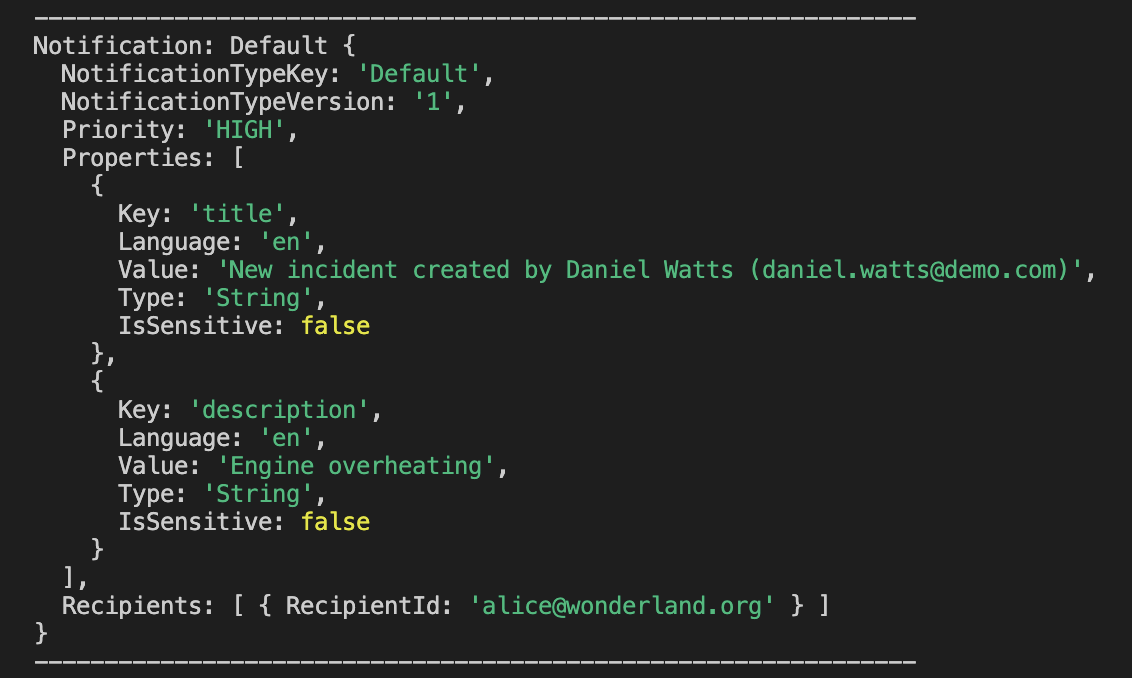
During local development, notifications are mocked and printed to the console. No external service is required.
Run in Production
Notification Destination
As a prerequisite, configure a destination named SAP_Notifications in your BTP subaccount. The plugin uses this destination by default to connect to the notification service in hybrid and production environments.
Notification Type Registration
Notification types are automatically registered and kept in sync with the notification service each time the application starts. Any additions, changes, or removals to your notification types, whether from CDS annotations or the JSON file, are applied on the next startup. No manual cds build or content deployment step is required.
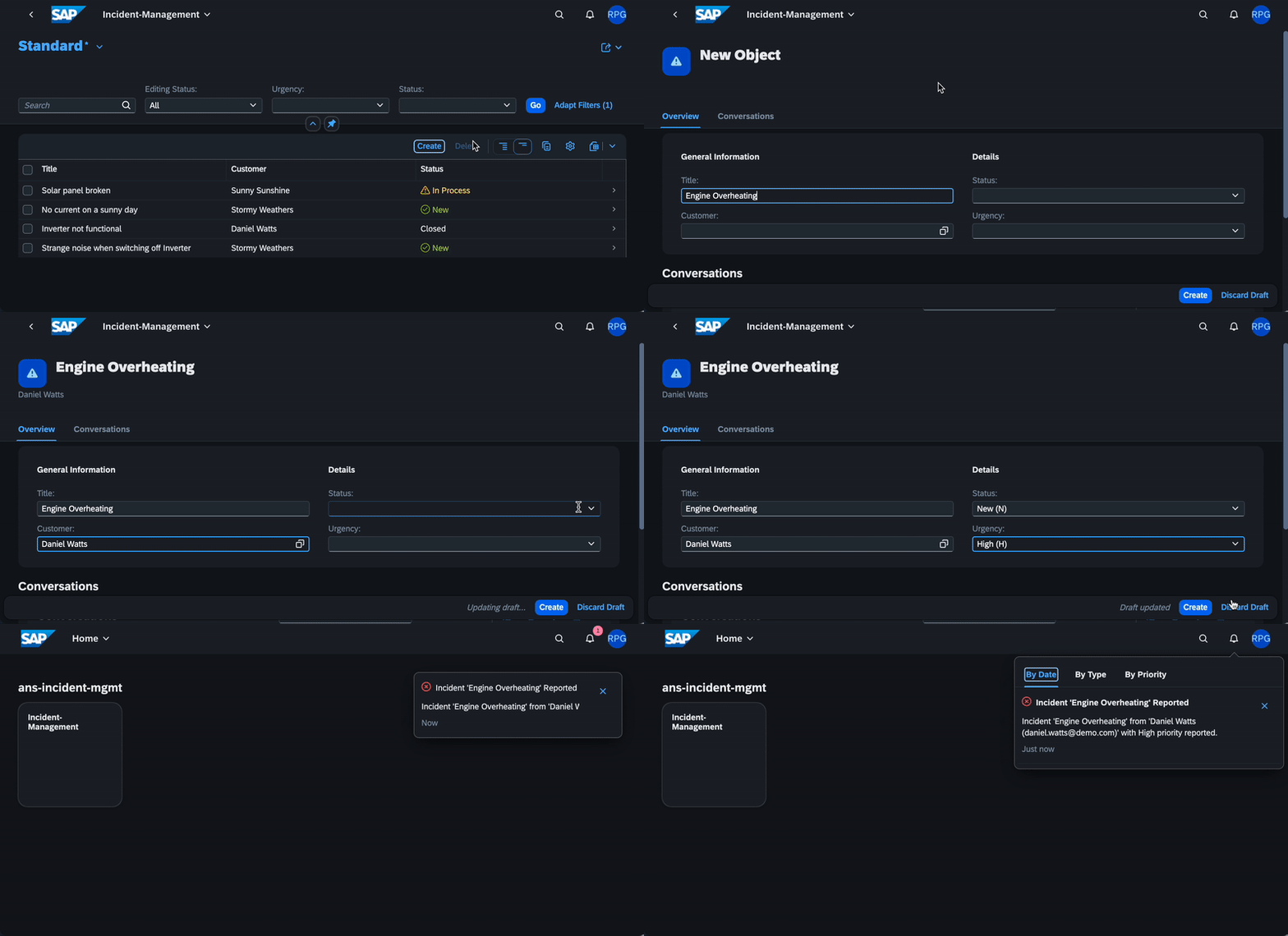
Integrate with SAP Build Work Zone
Once the application is deployed and integrated with SAP Build Work Zone, notifications appear under the Fiori notifications icon.
Advanced Usage
Custom Notification Types Path
The plugin reads srv/notification-types.json as the default JSON types file. To use a different path:
"cds": {
  "requires": {
    "notifications": {
      "types": "srv/my-notification-types.json"
    }
  }
}
Custom Notification Type Prefix
To make notification type keys unique per application, the plugin prefixes them with the application name from package.json by default. To use a custom prefix:
"cds": {
  "requires": {
    "notifications": {
      "prefix": "my-custom-prefix"
    }
  }
}
Custom Destination Name
To override the default SAP_Notifications destination name:
"cds": {
  "requires": {
    "notifications": {
      "destination": "MY_CUSTOM_DESTINATION"
    }
  }
}
Authentication Identifier
cds.env.requires.notifications.authenticationIdentifier controls which recipient key is used when publishing notifications.
auto(default): the recipient key is chosen per recipient. Values in UUID format are treated as SAP BTP Global User IDs and published withGlobalUserId; everything else is published withRecipientId. A warning is logged if a value is neither a UUID nor an email address. This allows mixing UUIDs and email addresses in the samerecipientsarray without any configuration.UserUUID: always useGlobalUserId. Use this when the Work Zone authentication identifier is set toUser ID.RecipientId: always useRecipientId. Use this when recipients are identified by email or login name.
Note
For email notifications sent with a User ID, a destination to the Identity Directory Service (IDS) must be configured for the email address lookup.
For Work Zone authentication identifier configuration, see Work Zone Subaccount Settings.
Default Channels
By default, all notification types use the workzone channel. To change the default for all types that don't have a channels annotation, set channels in your configuration:
"cds": {
  "requires": {
    "notifications": {
      "channels": ["email"]
    }
  }
}
Multiple channels are also supported:
"notifications": {
  "channels": ["email", "workzone"]
}
Per-event channels annotations always take precedence over this global default.
Outbox Behavior
By default, the notification service uses an outbox (outbox: true): notify() resolves as soon as the message is queued, not when it has been sent to ANS. This means the HTTP response from ANS is not returned. To send synchronously and receive the HTTP response:
"cds": {
  "requires": {
    "notifications": {
      "outbox": false
    }
  }
}
Disabling the Plugin
To disable the plugin without removing it, set enabled: false:
"cds": {
  "requires": {
    "notifications": {
      "enabled": false
    }
  }
}
This prevents the plugin from registering its hooks which results into no automatic this.emit() interception, no notification type registration, and no build task. Direct calls to cds.connect.to('notifications').notify() are not affected by this flag.
Low-level Notifications API
For full control, pass the complete notification object directly as described in the ANS API documentation.
With individual parameters
alert.notify({
  recipients: [...readers()],
  type: "BookOrdered",
  priority: "NEUTRAL",
  data: {
    title: book.title,
    buyer: buyer.name
  },
  OriginId: "Example Origin Id",
  NotificationTypeVersion: "1",
  ProviderId: "/SAMPLEPROVIDER",
  ActorId: "BACKENDACTORID",
  ActorDisplayText: "ActorName",
  ActorImageURL: "https://some-url",
  NotificationTypeTimestamp: "2022-03-15T09:58:42.807Z",
  TargetParameters: [{ Key: "string", Value: "string" }] //tell Work Zone which record to open when the user clicks on the notification
})
Passing the full notification object
alert.notify({
  NotificationTypeKey: "BookOrdered",
  NotificationTypeVersion: "1",
  Priority: "NEUTRAL",
  Properties: [
    { Key: "title", IsSensitive: false, Language: "en", Value: "Wuthering Heights", Type: "String" },
    { Key: "buyer", IsSensitive: false, Language: "en", Value: "reader@bookshop.com", Type: "String" }
  ],
  Recipients: [{ RecipientId: "reader1@bookshop.com" }, { RecipientId: "reader2@bookshop.com" }]
})
Contributing
This project is open to feature requests/suggestions, bug reports etc. via GitHub issues. Contribution and feedback are encouraged and always welcome. For more information about how to contribute, the project structure, as well as additional contribution information, see our Contribution Guidelines.
Code of Conduct
We as members, contributors, and leaders pledge to make participation in our community a harassment-free experience for everyone. By participating in this project, you agree to abide by its Code of Conduct at all times.
Licensing
Copyright 2026 SAP SE or an SAP affiliate company and contributors. Please see our LICENSE for copyright and license information. Detailed information including third-party components and their licensing/copyright information is available via the REUSE tool.
History
Fixes 1
Notes
Fixed
- Reset found condition when checking actions and templates.
Features 4, Changed 16, Fixes 4
Notes
Added
- Support for defining notification types via CDS
@notificationannotations as an alternative tosrv/notification-types.json. - Batch notification API: pass an array as the second argument to
notify()to send multiple notifications in a single outbox event. Each notification is dispatched independently, failures do not block the others. - Validation of
PropertiesandTargetParametersvalue lengths when emitting notifications. Property values exceeding 255 characters throw an error;TargetParametersentries with values longer than 250 characters are silently dropped before the notification is sent. - Log full response body and headers when the
notificationslogger is enabled at debug level.
Changed
IsSensitiveis now set totruefor all notification properties.- Return the full HTTP response from the REST notification handler.
Note: With outbox enabled (default), the application's
await notify()resolves when the message is queued; the return value is only available whenoutbox: false. - Support for email delivery channels via
@notification.channelsin CDS annotations andDeliveryChannelsin the JSON format. - Support for email templates via
@notification.email.subjectand@notification.email.htmlin CDS annotations, andEmailSubject/EmailHtmlin JSON templates. Theemail.htmlannotation accepts an inline HTML string or a path to an.htmlfile relative to the.cdssource file. - i18n support for CDS annotation string values using
{i18n>key}syntax. - Notification types are automatically registered and kept in sync with the notification service on application startup when running in hybrid or production mode.
- Allows to send notifications of
@notification-annotated events viathis.emit() - Batch notifications:
notify()now accepts an array of notification objects. Each item is sent individually; partial failures are logged as warnings and the call only throws if all items fail. - Static and dynamic notification priority via
@notification.priority. Accepts a fixed enum value (#HIGH,#LOW, etc.) or a CDS ternary expression evaluated against event data at runtime (e.g.(quantity > 5 ? #HIGH : #LOW)). cds.env.requires.notifications.channelsoption to adjust the default delivery for all notification types globallycds buildintegration: annotated events are compiled and written tonotification-types.jsonin the build output, merged with any types from the JSON file.- Log full response body and headers when the
notificationslogger is enabled at debug level. - Return the full HTTP response from the REST notification handler when
outbox:false - Validation of ANS length constraints at emit time:
Propertiesvalues exceeding 255 characters throw an error;TargetParametersvalues exceeding 250 characters are silently dropped. Event element names exceeding 128 characters are caught atcds buildtime. - Key elements (annotated with
keyin the event definition) are now included inTargetParametersonly and excluded fromProperties, matching ANS API expectations. - Support for disabling the plugin via
cds.requires.notifications.enabled: false.
Fixed
- Fixed
#EnumValueenum references in@notification.deliveryChannels. The{ "#": "..." }CSN form produced by the CDS compiler was not handled byresolveEnum, causing aTypeErrorat runtime. - Improved error messages when notification type registration fails, now surfacing the ANS error detail instead of a raw HTTP error dump.
- New default
autoforcds.env.requires.notifications.authenticationIdentifier. Each recipient is inspected: UUID values are published withGlobalUserId, everything else withRecipientId, with a warning when a value is neither a UUID nor an email. The previous valuesUserUUIDandRecipientIdare still supported for an explicit choice. In practice this means the plugin "just works" without configuration: applications can pass emails, UUIDs, or a mix of both, and the correct recipient key is chosen per value — no upfront configuration about Work Zone's authentication identifier required. buildNotificationFromEventnow respectsauthenticationIdentifierconfig when resolving recipient keys, consistent with the rest of the API.
- Support for defining notification types via CDS
Features 1, Fixes 1
Notes
Added
- Support switching the recipients identifier to GlobalUserId by setting
cds.env.requires.notifications.authenticationIdentifierto 'UserUUID'
Fixed
- Plugin now correctly works in a hybrid setup
- Support switching the recipients identifier to GlobalUserId by setting
Others providing
Compare all 5 on the Notifications page →- @neoimpulse/cap-js-notifications@neoimpulse/cap-js-notificationsA copy of the official @cap-js/notifications plugin republished under another scope, whose README points at the original and says nothing about what was changed.independent, capCopy of @cap-js/notifications published under another scope
- com.sap.cds:cds-feature-notificationscom.sap.cds:cds-feature-notificationsSends business notifications from a CAP Java application through SAP Alert Notification service, delivered to SAP Build Work Zone or email, or logged to the console in local mode.sap official, capBusiness notifications from CAP Java via SAP Alert Notification
- @cap-rp/notifications@cap-rp/notificationsA derived copy of the official notifications plugin under a different scope; its readme is @cap-js/notifications' with the name swapped.independent, capRenamed copy of @cap-js/notifications under another scope
- @expertum/cap-email-plugin@expertum/cap-email-pluginSends mail on entity lifecycle events from an annotation — @email.enabled on an entity, an HTML template with {{placeholder}} substitution, and a plugin-owned log entity recording what went out and what failed.independent, capAnnotation-driven mail on CAP entity lifecycle events
- @neoimpulse/cap-js-notifications@neoimpulse/cap-js-notificationsA copy of the official @cap-js/notifications plugin republished under another scope, whose README points at the original and says nothing about what was changed.independent, capCopy of @cap-js/notifications published under another scope
Details
Sources
Sources are graph entities: the same page may back several entries, and an unreachable source flags every row that rests on it.
Compatibility and provenance
Flavors
“**Requirements:** Node.js >= 20, `@sap/cds` >= 8.” — cap-js/notifications — README
Contributors










History in the atlas
- Publishes business notifications to SAP Build WorkZone from the application, so a user is told something happened without the UI polling for it.
- First seen.
For your agent
- Ref
artifact:cap-js-notifications- JSON
- /artifacts/cap-js-notifications.json
- MCP
- Connecting an agent