@cap-rp/notifications
A derived copy of the official notifications plugin under a different scope; its readme is @cap-js/notifications@cap-js/notificationsPublishes business notifications to SAP Build WorkZone from the application, so a user is told something happened without the UI polling for it.sap official, cap' with the name swapped.
Facts
Where it sits
Who is behind it

In the atlas: maintains 1@rohtashmaintainerapnabahikhataContributes to this

In the atlas: contributes to 1@apnabahikhata1 contributor
Before choosing this
Signals
ActivityQuietRelease and repository quiet for 24 months
Both observable publication channels have been quiet for at least 24 full months. This may be normal for stable software; check whether its current state still fits your use.
Conditions
LicenceSAP Developer License Agreement 3.2 CAP§ 1, 2, 3A cds-plugin is used with SAP CAP materials, or an artifact is explicitly identified as a CAP plugin or application.
- § 1 License. Productive customer applications are limited to SAP BTP or another SAP-licensed platform, and mass extraction to a non-SAP product is restricted except where solely required for SAP interoperability.
- § 2 Intellectual Property. The agreement retains SAP's rights in the covered materials and limits making APIs, tools or software available to third parties, while preserving ownership of customer applications subject to SAP's underlying rights.
- § 3 Artificial Intelligence Training. The agreement prohibits use of the covered materials and customer applications for training artificial-intelligence models or systems.
What it declares
Every artifact
- Type
- CDS plugin
- Origin
- Independently maintained
As a CDS plugin
- Declared for
- >=8
- Distributed through
- npm
Connections
Telling a person something happened when they are not looking
Download
Install
npm add @cap-rp/notificationsDerived from the package name. No recipe recorded; the README has the configuration.
README
quoted from rohtash/notifications under Apache-2.0, readNotifications Plugin
The @cap-rp/notifications package is a CDS plugin that provides support for publishing business notifications in SAP Build WorkZone.
Table of Contents
- Setup
- Send Notifications
- Use Notification Types
- API Reference
- Test-drive Locally
- Run in Production
- Advanced Usage
- Contributing
- Code of Conduct
- Licensing
Setup
To enable notifications, simply add this self-configuring plugin package to your project:
npm add @cap-rp/notificationsIn this guide, we use the Incidents Management reference sample app as the base, to publish notifications.
Send Notifications
With that you can use the NotificationService as any other CAP Service like so in you event handlers:
const alert = await cds.connect.to('notifications');You can use the following signature to send the simple notification with title and description
alert.notify({
  recipients: [ ...supporters() ],
  priority: "HIGH",
  title: "New high priority incident is assigned to you!",
  description: "Incident titled 'Engine overheating' created by 'customer X' with priority high is assigned to you!"
});- priority - Priority of the notification, this argument is optional, it defaults to NEUTRAL
- description - Subtitle for the notification, this argument is optional
Use Notification Types
1. Add notification types
If you want to send custom notifications in your application, you can add the notification types in the srv/notification-types.json file.
Sample: If you want to send the notification when the incident is resolved, you can modify the srv/notification-types.json as below:
  [
    {
      "NotificationTypeKey": "IncidentResolved",
      "NotificationTypeVersion": "1",
      "Templates": [
        {
          "Language": "en",
          "TemplatePublic": "Incident Resolved",
          "TemplateSensitive": "Incident '{{title}}' Resolved",
          "TemplateGrouped": "Incident Status Update",
          "TemplateLanguage": "mustache",
          "Subtitle": "Incident from '{{customer}}' resolved by {{user}}."
        }
      ]
    }
  ]
2. Use pre-defined types in your code like that:
  await alert.notify ('IncidentResolved', {
    recipients: [ customer.id ],
    data: {
      customer: customer.info,
      title: incident.title,
      user: cds.context.user.id,
    }
  })
API Reference
- recipients - List of the recipients, this argument is mandatory
- type - Notification type key, this argument is mandatory
- priority - Priority of the notification, this argument is optional, it defaults to NEUTRAL
- data - A key-value pair that is used to fill a placeholder of the notification type template, this argument is optional
Test-drive Locally
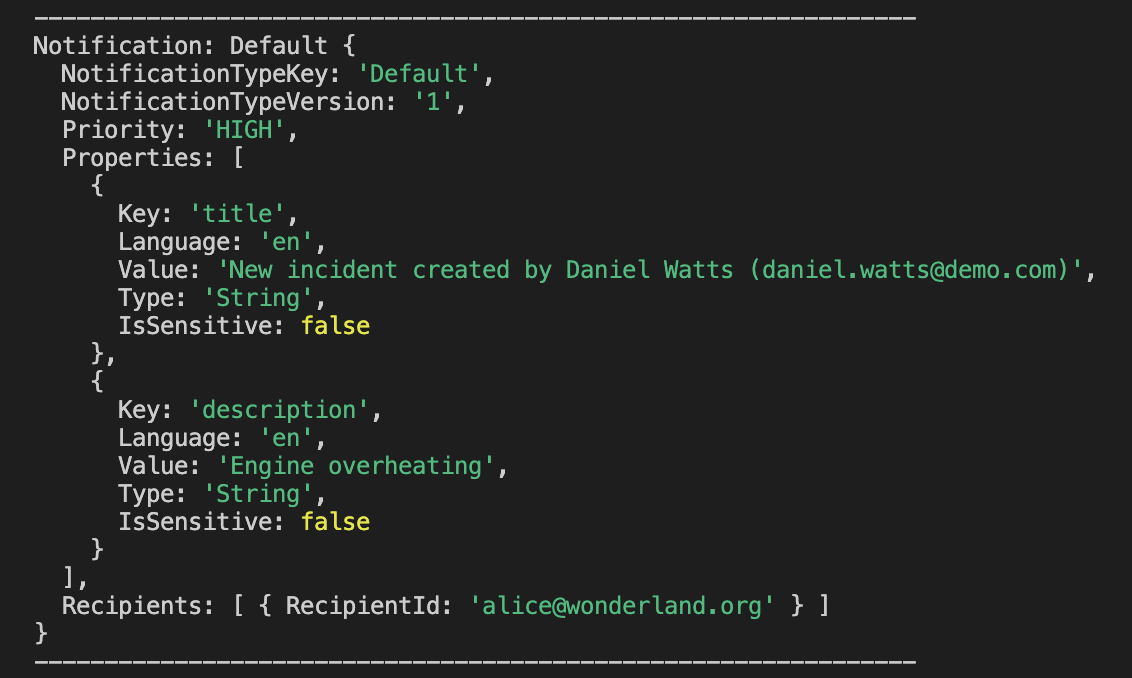
In local environment, when you publish notification, it is mocked to publish the nofication to the console.
Run in Production
Notification Destination
As a pre-requisite to publish the notification, you need to have a destination configured to publish the notification. In the package.json by default destination name SAP_Notifications is added, you can modify the destination name that you are configuring.
Integrate with SAP Build Work Zone
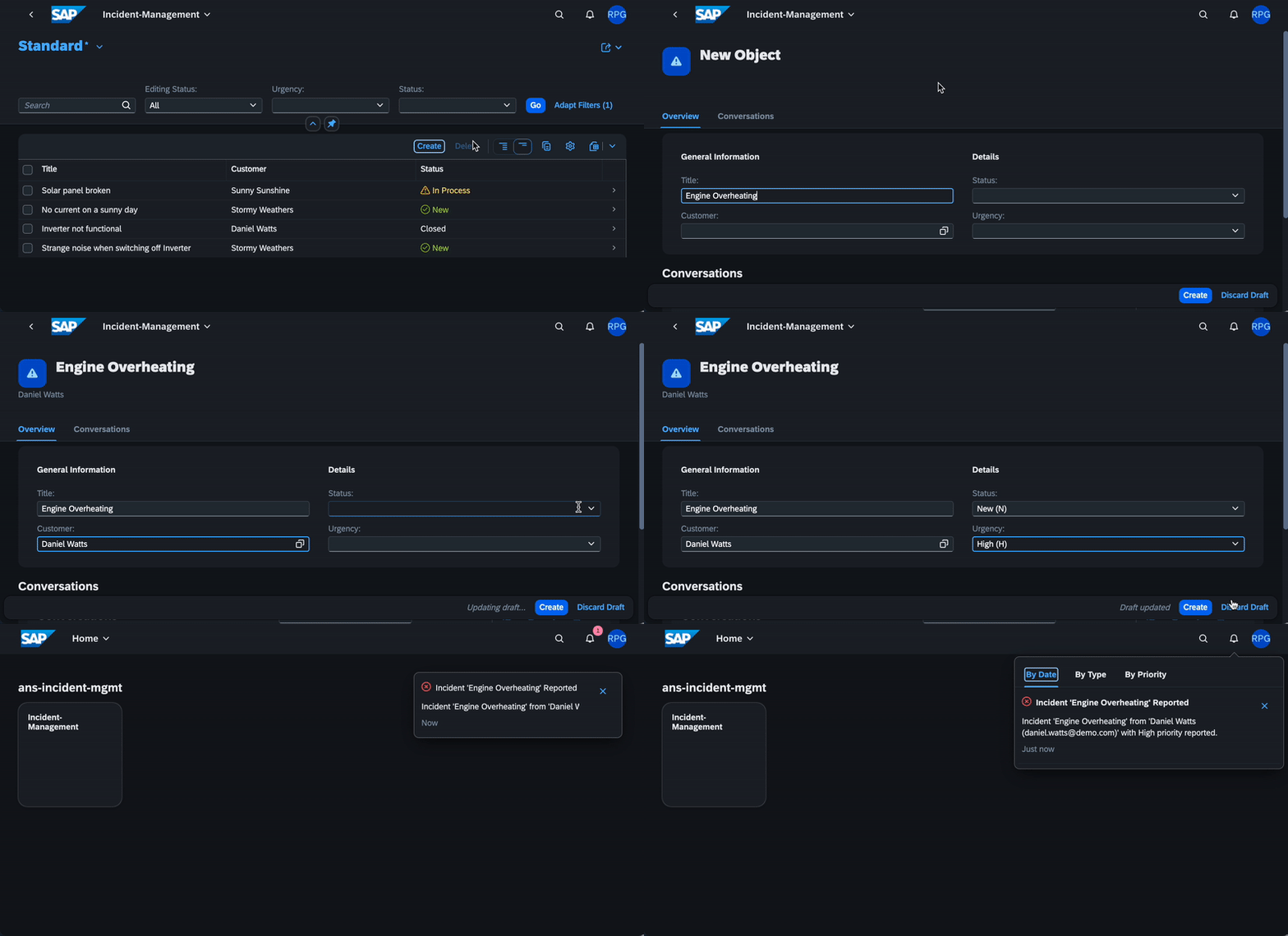
Once application is deployed and integrated with SAP Build Work Zone, you can see the notification under fiori notifications icon!
Advanced Usage
Custom Notification Types Path
Notifications plugin configures srv/notification-types.json as default notification types file. If you are using different file, you can update the file path in cds.env.requires.notifications.types
Custom Notification Type Prefix
To make notification types unique to the application, prefix is added to the type key. By default, application name is added as the prefix. You can update the cds.env.requires.notifications.prefix if required.
Low-level Notifications API
You can use these two signature to send the custom notification with pre-defined notification types.
With pre-defined parameters
By using this approach you can send notifications with the predefined parameters - recipients, data, priority, type and other parameters listed in the API documentation
alert.notify({
  recipients: [...supporters()],
  type: "IncidentResolved",
  priority: 'NEUTRAL',
  data: {
    customer: customer.info,
    title: incident.title,
    user: cds.context.user.id,
  },
  OriginId: "Example Origin Id",
  NotificationTypeVersion: "1",
  ProviderId: "/SAMPLEPROVIDER",
  ActorId: "BACKENDACTORID",
  ActorDisplayText: "ActorName",
  ActorImageURL: "https://some-url",
  NotificationTypeTimestamp: "2022-03-15T09:58:42.807Z",
  TargetParameters: [
    {
      "Key": "string",
      "Value": "string"
    }
   ]
  });
Passing the whole notification object
By using this approach you need to pass the whole notification object as described in the API documentation
alert.notify({
  NotificationTypeKey: 'IncidentCreated',
  NotificationTypeVersion: '1',
  Priority: 'NEUTRAL',
  Properties: [
    {
      Key: 'name',
      IsSensitive: false,
      Language: 'en',
      Value: 'Engine overheating',
      Type: 'String'
    },
    {
      Key: 'customer',
      IsSensitive: false,
      Language: 'en',
      Value: 'Dave',
      Type: 'String'
    }
  ],
  Recipients: [{ RecipientId: "supportuser1@mycompany.com" },{ RecipientId: "supportuser2@mycompany.com" }]
});
Contributing
This project is open to feature requests/suggestions, bug reports etc. via GitHub issues. Contribution and feedback are encouraged and always welcome. For more information about how to contribute, the project structure, as well as additional contribution information, see our Contribution Guidelines.
Code of Conduct
We as members, contributors, and leaders pledge to make participation in our community a harassment-free experience for everyone. By participating in this project, you agree to abide by its Code of Conduct at all times.
Licensing
Copyright 2023 SAP SE or an SAP affiliate company and contributors. Please see our LICENSE for copyright and license information. Detailed information including third-party components and their licensing/copyright information is available via the REUSE tool.
History
Others providing
Compare all 5 on the Notifications page →- com.sap.cds:cds-feature-notificationscom.sap.cds:cds-feature-notificationsSends business notifications from a CAP Java application through SAP Alert Notification service, delivered to SAP Build Work Zone or email, or logged to the console in local mode.sap official, capBusiness notifications from CAP Java via SAP Alert Notification
- @cap-js/notifications@cap-js/notificationsPublishes business notifications to SAP Build WorkZone from the application, so a user is told something happened without the UI polling for it.sap official, capBusiness notifications from CAP to SAP Build WorkZone
- @expertum/cap-email-plugin@expertum/cap-email-pluginSends mail on entity lifecycle events from an annotation — @email.enabled on an entity, an HTML template with {{placeholder}} substitution, and a plugin-owned log entity recording what went out and what failed.independent, capAnnotation-driven mail on CAP entity lifecycle events
- @neoimpulse/cap-js-notifications@neoimpulse/cap-js-notificationsA copy of the official @cap-js/notifications plugin republished under another scope, whose README points at the original and says nothing about what was changed.independent, capCopy of @cap-js/notifications published under another scope
Details
Sources
Sources are graph entities: the same page may back several entries, and an unreachable source flags every row that rests on it.
Compatibility and provenance
Flavors
“npm add @cap-rp/notifications” — rohtash/notifications — README
Contributors
History in the atlas
- A derived copy of the official notifications plugin under a different scope; its readme is @cap-js/notifications' with the name swapped.
- First seen.
For your agent
- Ref
artifact:cap-rp-notifications- JSON
- /artifacts/cap-rp-notifications.json
- MCP
- Connecting an agent