git-env-branches
A command line that shows, for a list of feature branches, which environment branches such as DEV, ACC and master each one has been merged into.
Reads the Git repository it runs in and, for the feature branches named with -b, prints a colour-coded overview of which environment branches each has been merged into, so a team on an environment branching strategy can see which change has reached DEV, ACC or master. Output colours separate fully merged branches, branches not fully merged, unmerged remote branches and local-only branches. With -c it offers, interactively, to delete fully merged and local-only branches, and -c ALL offers to delete any branch, which the README flags as a caution. It installs globally from npm and runs as git-env-branches or geb. It reads Git history only: the repository's host, a pipeline and what is deployed to each environment are outside what it sees, and the README assumes a dark terminal background.
Facts
Where it sits
Who is behind it
In the atlas: maintains 6, contributes to 3@qualituremaintainer
Before choosing this
Conditions
PracticalFunctional boundary
A team that does not keep one long-lived branch per environment has no environment branches for it to compare feature branches against. What it reports is the merge state of branches in Git, so it says nothing about whether a merged change has been built or deployed to the environment.
What it declares
Every artifact
- Type
- CLI
- Origin
- Independently maintained
As a CLI
- Distributed through
- does not say
Connections
Moving a change from development through test to production
Download
Install
npm add git-env-branchesDerived from the package name. No recipe recorded; the README has the configuration.
README
quoted from qualiture/git-env-branches under MIT, read




git-env-branches
An NPM command-line interface for tracking merges of your Git environment and feature branches.
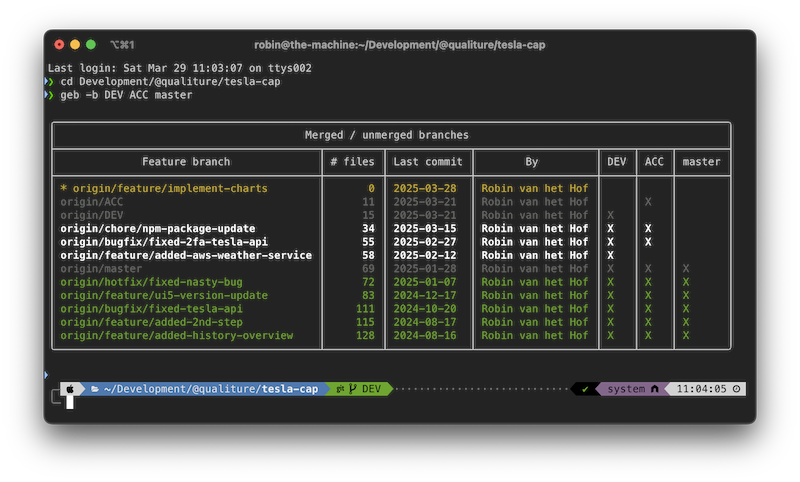
Table of Contents
About the project
This NPM package is aimed at development teams who employ the so-called environment branching strategy for merging feature branches.
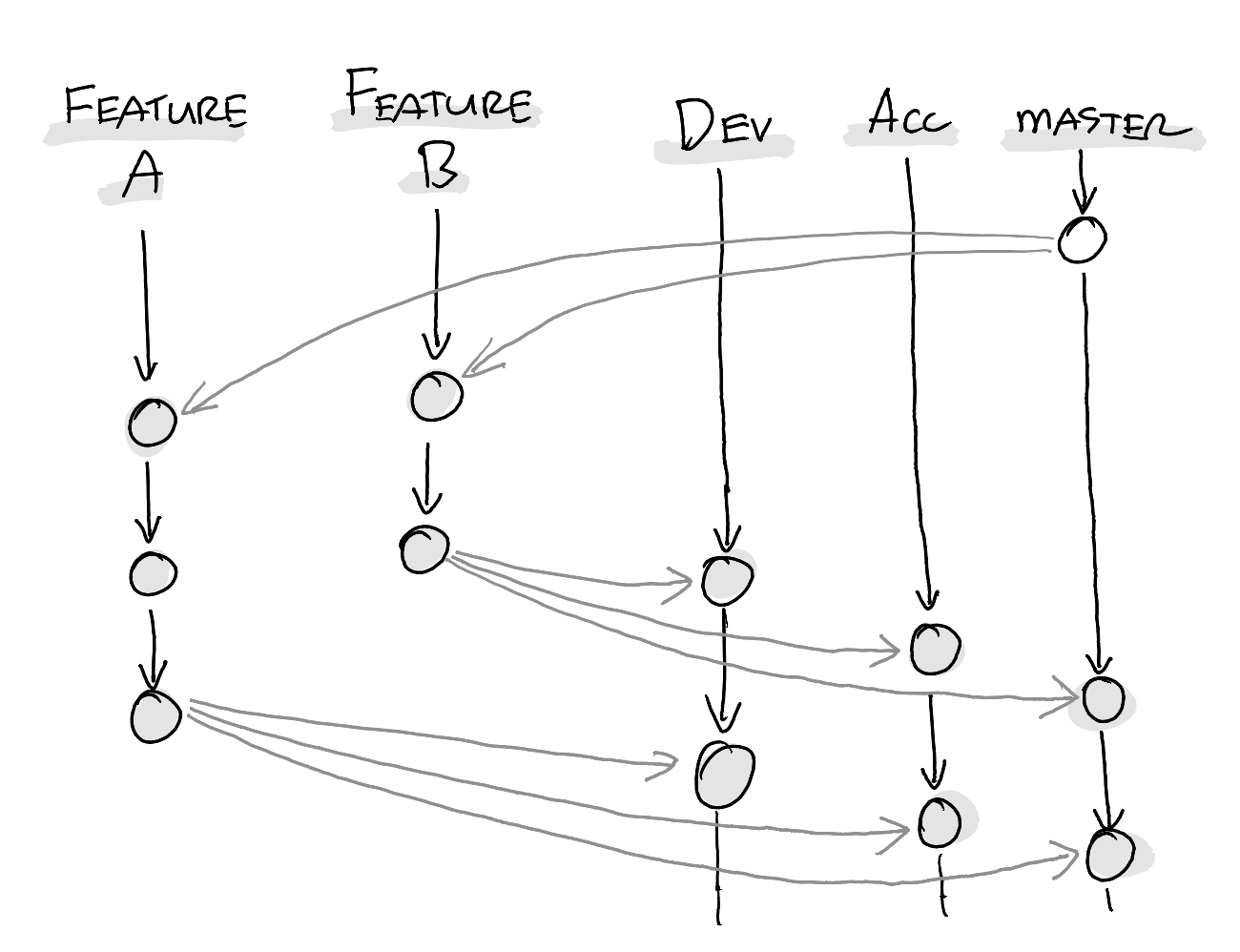
The basics of this strategy is that each target environment (DEV, ACC and PROD) have its own branch, and features/bugfixes/etc are merged independently from each other into these "environment branches", from which they will be deployed to their respective environments:
 |
|---|
| Feature branches A and B, merged independently into the environment branches DEV, ACC and master. Image was drawn on a reMarkable. |
When you have a small team and few longer-than-a-day running feature branches, it is somewhat manageable to have an understanding of what features have been merged to which environment.
However, when the team is larger and working on multiple feature branches and bugfixes simultaneously, it becomes virtually impossible to keep track of what has already been released to production, what could be released to production, and what is still in development. Especially during holidays or leaves, the risk is high that certain features never make it to production as well...
To mitigate that uncertainty, this small NPM package called git-env-branches was developed. For each locally available BitBucket/GitHub/GitLab repository, a developer could now check its merge state.
NB: Its functionality is not just limited to "environment branching strategy" only. Other, more "traditiojnal" strategies such as gitflow could also benefit from it. In addition, if you are working with project branches, you could check those as well.
How it works
Lets imagine a repository with three environment branches DEV, ACC and master.
In the root of that repository, the following command was executed:
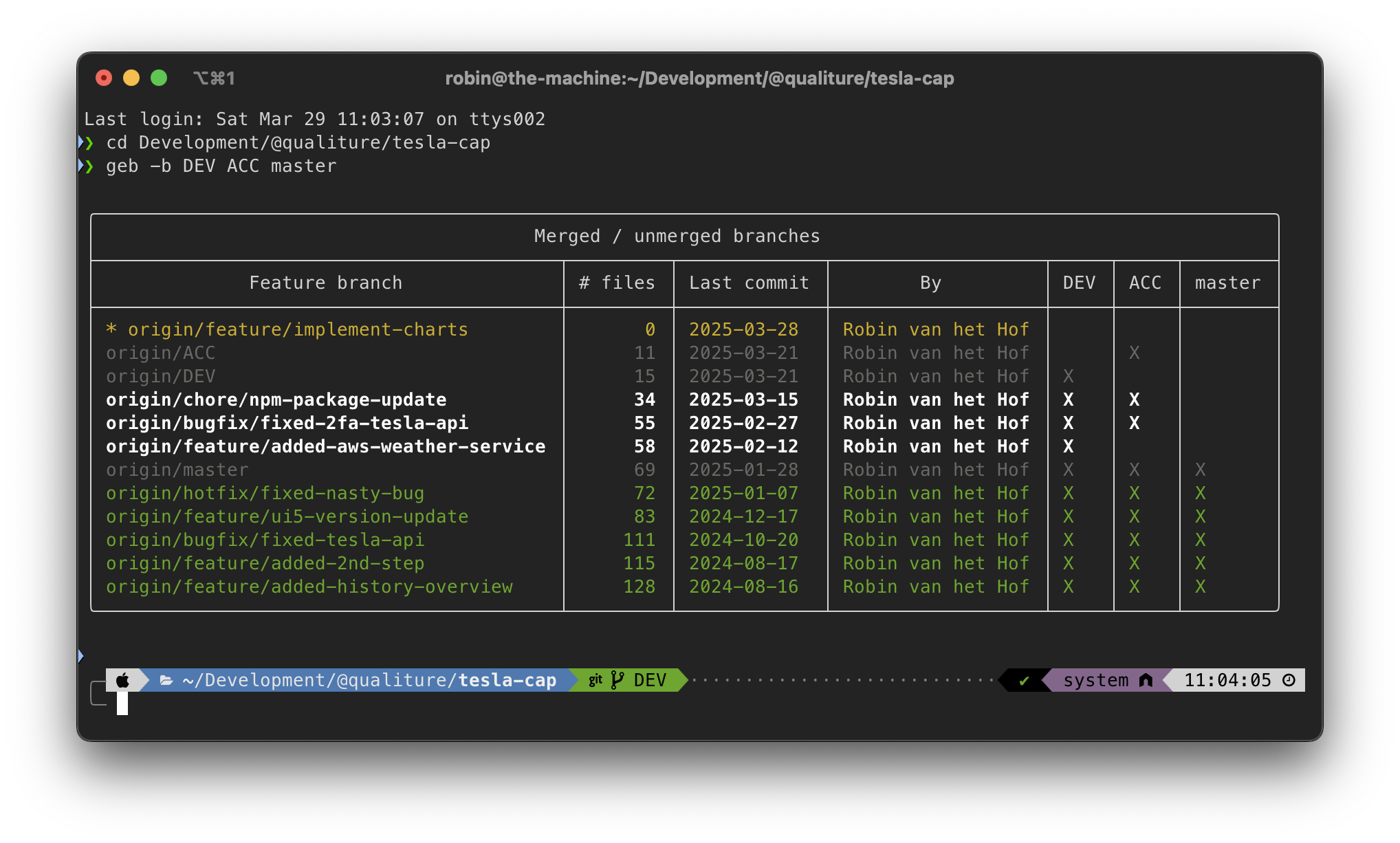
$ geb -b DEV ACC masterThis results in output similar to this :
 |
|---|
Displays all the repository's branches, and whether they have been merged in the DEV, ACC and master environment branches. |
When the CLI is executed with the three environment branches as parameters, it then outputs for every (feature) branch for that repo the last commit date, by whom, and in which environment branch these feature branches have been committed.
- indicates an environment branch as specified in the parameters and can thus be ignored.
- indicates branches which have not yet been fully merged in all specified environment branches.
- indicates branches which have been fully merged throughout the specified environment branches and could be removed.
- indicates remote branches which have not yet been merged. This may indicate either just created branches, or stale branches (to try something out, or for no longer valid fixes, etc)
- indicates local branches only, i.e., no corresponding remote branch exists. This could indicate that a remote branch has been deleted, but the local counterpart hasn't, and could also be removed.
As you can tell from the above, the branches in are the most important ones, since these branches haven't been merged to all specified environments.
This NPM package assumes (!) your terminal has a dark background. If you run a light-colored or, worse, a white terminal background color, you may not be able to properly read the bold white text.
As there seems no way of detecting the active terminal background color, I haven't found a viable solution to this problem, other than advising to run the terminal with a dark background...
Getting started
Prerequisites
- NodeJS must be installed
- Any Windows, Linux or macOS laptop
Installation
Install as global npm package:
npm install -g git-env-branchesOnce installed, you can use both git-env-branches or the shorthand geb command.
How to use
Type git-env-branches -h (or the shorthand geb -h) for all available options.
NB 1: The following command examples assume you have a Git repo with environment branches
DEV,ACCandmaster.
NB 2: For brevity, the following examples all use the shorthand
gebinstead ofgit-env-branches.
Check all feature branches
| Flag | Usage |
|---|---|
-b or --branches | geb -b <BRANCH1> <BRANCH2> <etc...> |
For example, to check all feature branches of your current project, do the following:
- Navigate to the root of your git repo.
- Execute
geb -b DEV ACC master(orgeb -b DEV ACC master) to list all feature branches and whether they are merged into yourDEV,ACCandmasterbranches.
NB: While the main use case for this script is checking feature branches against environment branches, you are not limited to specify environment branches. For instance, you chould check whether feature branches are merged into any branch, for instance project branches or release branches:
$ geb -b project/MyAwesomeProjectBranch$ geb -b release/release-2023-12-19Check all feature branches and delete merged branches interactively
| Flag | Usage |
|---|---|
-c or --cleanup | geb -b <BRANCH1> <BRANCH2> <etc...> -c |
Adding the -c or --cleanup flag gives you the option to interactively delete the fully merged branches as well as the local-only branches interactively.
Check all feature branches and delete ANY branches interactively
| Flag | Usage |
|---|---|
-c ALL or --cleanup ALL | geb -b <BRANCH1> <BRANCH2> <etc...> -c ALL |
Adding the -c ALL or --cleanup ALL flag gives you the option to interactively delete any branch interactively.
Contributing
Contributions are what make the open source community such an amazing place to be learn, inspire, and create. Any contributions you make are greatly appreciated.
- Fork the Project
- Create your Feature Branch (
git checkout -b feature/AmazingFeature) - Commit your Changes (
git commit -m 'Add some AmazingFeature') - Push to the Branch (
git push origin feature/AmazingFeature) - Open a Pull Request
Contact
Robin van het Hof - @qualiture / Linkedin
History
Details
Sources
Sources are graph entities: the same page may back several entries, and an unreachable source flags every row that rests on it.
Compatibility and provenance
History in the atlas
- First seen.
For your agent
- Ref
artifact:qualiture-git-env-branches- JSON
- /artifacts/qualiture-git-env-branches.json
- MCP
- Connecting an agent