joule-studio-setup-terraform
A TerraformTerraformAn infrastructure as code tool that defines cloud and on-premise resources in configuration files and creates or changes them through provider plugins. SAP publishes a plugin for BTP, so Terraform is the CLI a reader installs to run a BTP account's configuration. template that provisions an SAP BTP subaccount preconfigured for Joule Studio, with identity provider trust, a Cloud Foundry space, subscriptions and role collections.
Provisions a subaccount with trust to a custom identity provider, a Cloud Foundry environment with an org and a dev space, and subscriptions and role collections for SAP Build Process Automation, Joule Studio and SAP Build Work Zone. Five Terraform files carry it: the provider configuration, the input variables and their values, the subaccount with its subdomain sanitization logic, and services.tf, which holds the entitlements and subscriptions. It needs an existing BTP global account with SAP Cloud Identity ServicesCloud Identity ServicesIdentity Authentication and Identity Provisioning as one tenant: the login, the user store or the federation to a corporate identity provider, and the provisioning of users into whatever sits behind it.sap official, btp, the Joule and Build Process Automation entitlements already granted, and BTP credentials stored as GitHubGitHubA hosted git service: repositories, pull requests with reviews, and branch rulesets that decide what may reach a branch. Things here that push objects out of an SAP system, or keep a review record outside it, call its API and open their pull requests on it. Actions secrets before its Terraform Deploy workflow can run. It stops short of creating a Joule Formation, which the README says cannot be automated via Terraform yet and has to be done afterwards with the Joule booster.
Facts
Where it sits
Who is behind it

In the atlas: maintains 222@SAP-samplesmaintainerShrinivasan NeelamegamContributes to this

In the atlas: contributes to 4@neelamegams1 contributor
What it declares
Every artifact
- Type
- Sample
- Origin
- By SAP
As a sample
- Form
- A template or starter
Connections
Setting up cloud accounts, entitlements and access from code
Identity Authentication and Identity Provisioning as one tenant
A hosted git service: repositories, pull requests with reviews, and branch rulesets that decide what may reach a branch. Things here that push objects out of an SAP system, or keep a review record outside it, call its API and open their pull requests on it.
An infrastructure as code tool that defines cloud and on-premise resources in configuration files and creates or changes them through provider plugins. SAP publishes a plugin for BTP, so Terraform is the CLI a reader installs to run a BTP account's configuration.
Terraform and OpenTofu provider for SAP BTP global accounts
Download
README
quoted from SAP-samples/joule-studio-setup-terraform under Apache-2.0, readJumpstart your Joule Studio Setup with Terraform
Description
This repository contains Terraform scripts to setup an SAP BTP subaccount using the SAP BTP Terraform provider for Joule Studio within an exising Global account with Custom Identity Provider (Cloud Identity Services). It automatically sets up SAP Build Process Automation build-default plan, Joule standard plan, Cloud foundry, Role Collections, trust with custom IDP and more.
main.tf: Provider configuration (BTP and Cloud Foundry)variables.tf: Input variables for subaccountterraform.tfvars: Configurable input variables with valuessubaccount.tf: Subaccount creation with subdomain sanitization logicservices.tf: Subaccount entitlements and subscriptions for services(Joule, BPA, WZ, Roles, Role Collections)
What Gets Created
This Terraform configuration provisions the following resources:
| Resource | Description |
|---|---|
| Subaccount | New BTP subaccount with custom IDP trust |
| Cloud Foundry | CF environment with org and dev space |
| SAP Build Process Automation | Subscription (build-default plan) |
| Joule Studio | Subscription with standard plan |
| SAP Build Work Zone | Standard (free) |
| Role Collections | ProcessAutomationAdmin, ProcessAutomationDeveloper, Joule_Studio, Launchpad_Admin |
Estimated time: ~20-30 minutes for full provisioning of resources
Requirements
Before using this template, ensure you have:
| Requirement | Description |
|---|---|
| BTP Global Account | With Global Account Administrator access |
| Entitlements | Joule (standard plan) and Build Process Automation (build-default plan) |
| SAP Cloud Identity Services | IAS tenant for your global account |
| Platform User | SAP ID Service credentials for Terraform authentication |
Steps to find your Identity Provider URL
- Go to BTP Cockpit → Global Account → Account Explorer
- Click on any existing subaccount
- Navigate to Security → Trust Configuration
- Look for an entry like
xxxxx.accounts.ondemand.comand Copy the domain (e.g.,abc123xy.accounts.ondemand.com) - You will need this url in
Step 3of Setup and Configuration section
Don't have a custom IDP? Most BTP accounts include SAP Cloud Identity Services. If missing, contact your administrator to enable it for your global account.
Setup and Configuration
- Click Use this template button on this repository and choose Create a new repository
- Provide a repo name, make visibility of your repo as Private and select Create repository
- Update the
terraform.tfvarswith your global account subdomain and identity_provider and commit the change. This is one time update.
   globalaccount = "xxx-xxxx-xxxx-xxxx-xxx"
   identity_provider = "xxxxx.accounts.ondemand.com"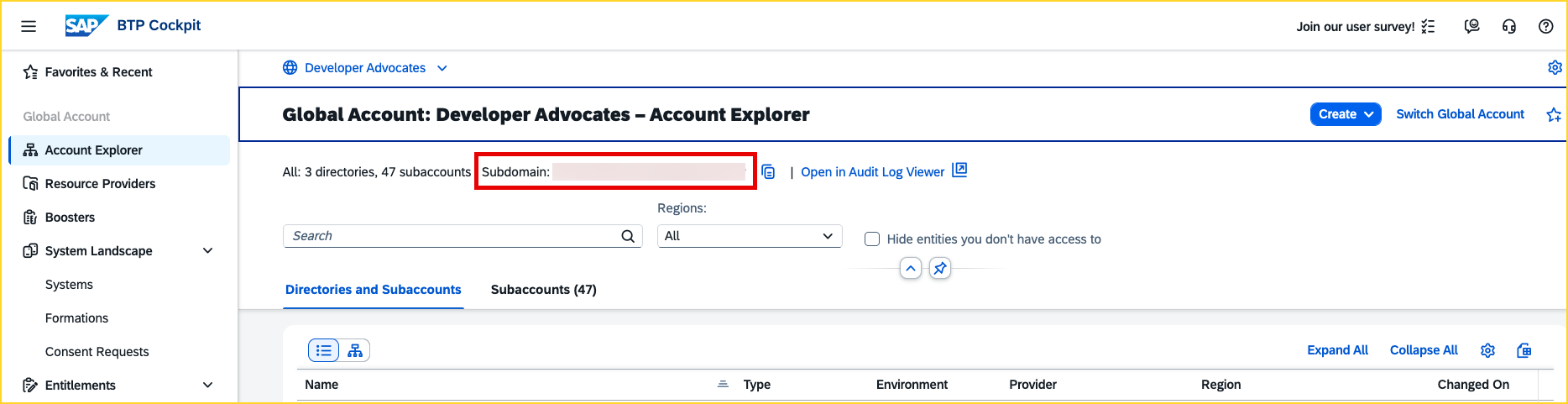
-
Add 2 Secrets from Settings → Secrets and variables → Actions → Secrets → New repository secret :
BTP_USERNAME- Your BTP emailBTP_PASSWORD- Your BTP password
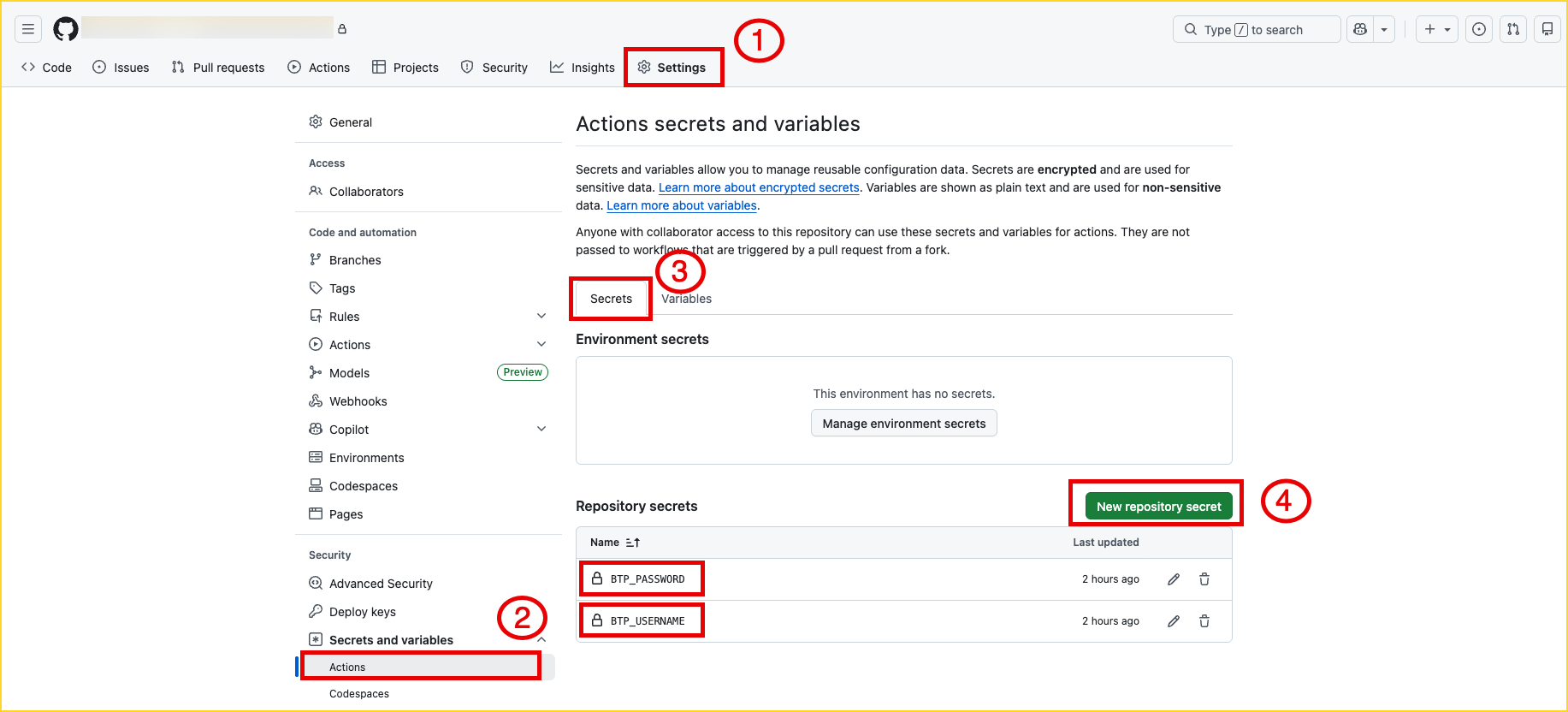
Note: The BTP username and password provided here should have administrator access within the global account mentioned in Step 3.
-
Add 2 Variables from Settings → Secrets and variables → Actions → Variables → New repository variable :
SUBACCOUNT_NAME- e.g.,my-joule-studioSUBACCOUNT_REGION- e.g.,eu10
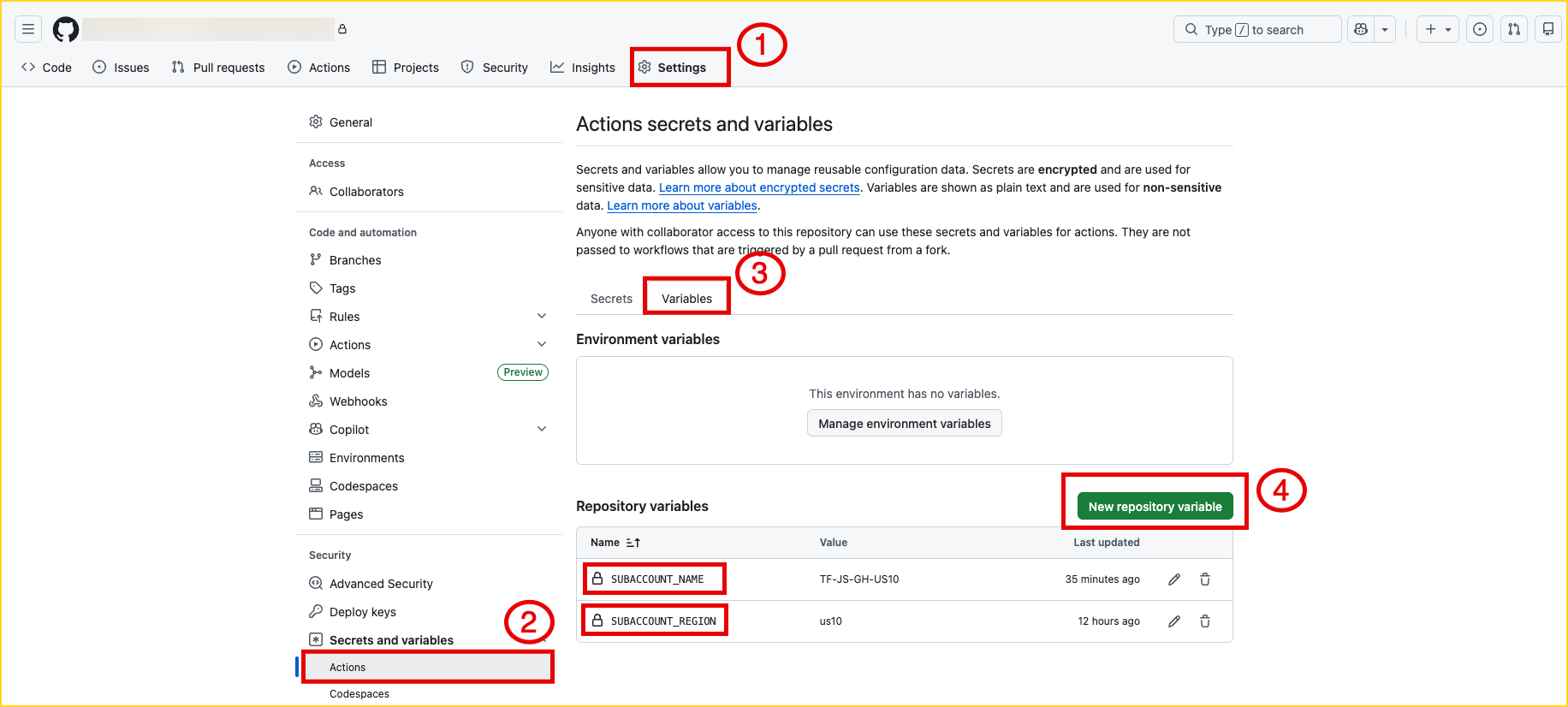
Note: These variables must be updated for each new subaccount since subaccount names must be unique and the region must be a Joule supported data center. By storing them as GitHub variables, they can be modified without changing the Terraform scripts(.tf files).
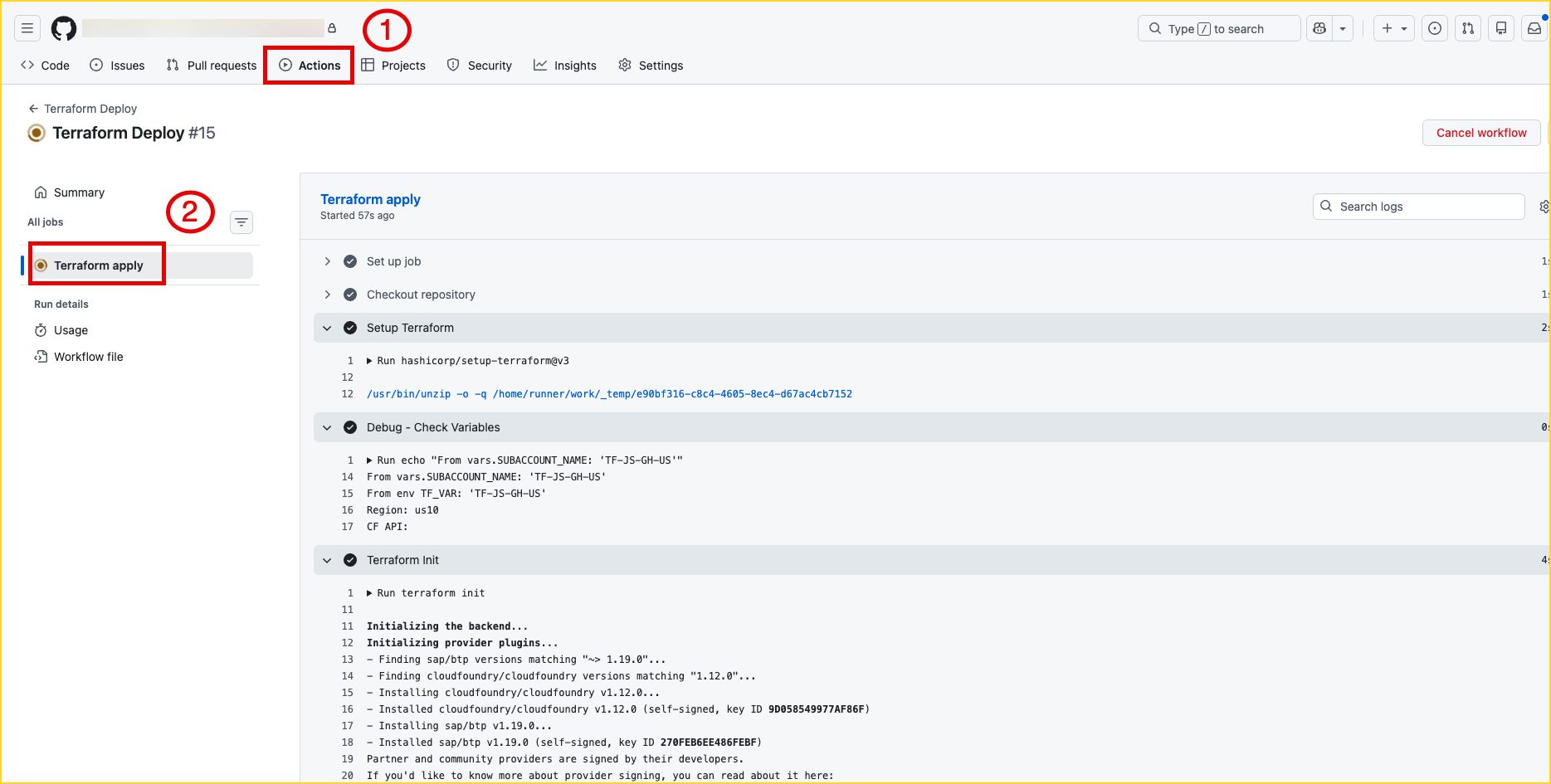
- Go to Actions → Terraform Deploy → Run workflow → From
Terraform action to performdropdown, selectapply→ Run workflow :
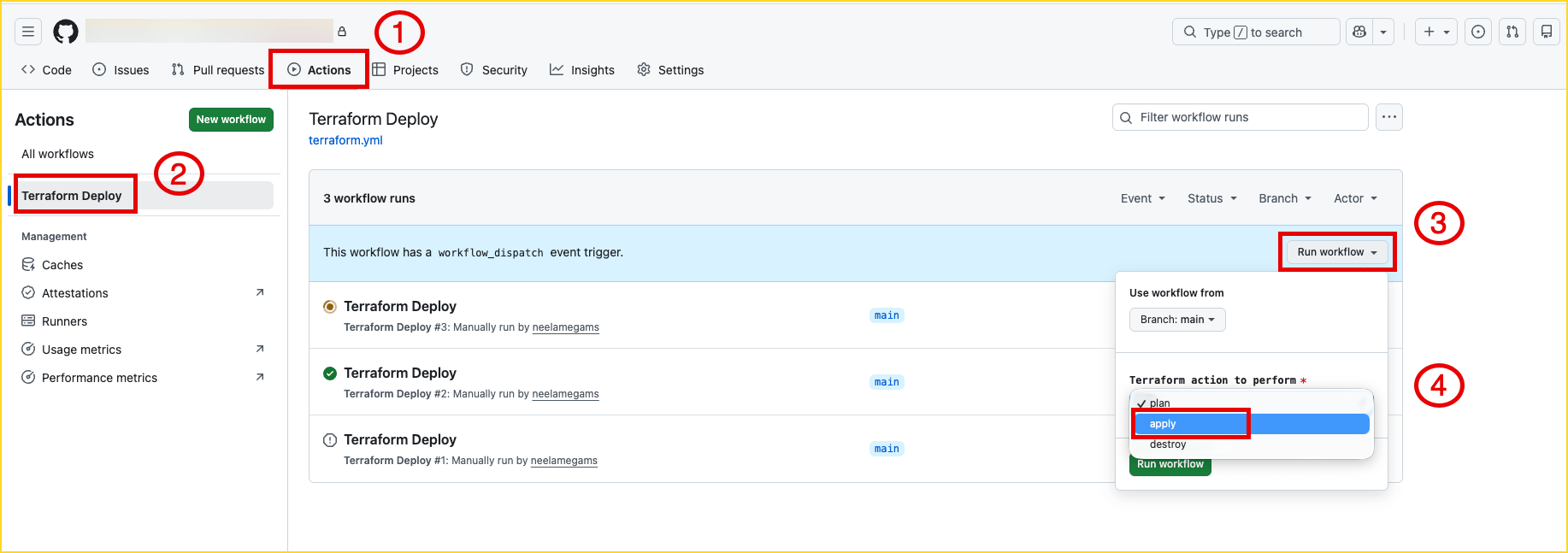
- Monitor the deployment from the Actions tab
Create a Joule Formation
The last step to complete the Joule Studio setup is to create a Joule Formation. By creating a formation, you logically group multiple systems and services together so they can work as a unified solution. The Formation is what makes Joule aware of the connected systems and able to orchestrate across them. Unfortunately, this cannot be automated via Terraform yet, so run the Joule booster after running the Terraform script to perform this step automatically.
Known Issues
No known issues at this time.
References
- SAP BTP Terraform Provider
- Learning journey and MOOC Course GH repo
- Run Joule Booster and Step by Step Video
- SAP help documentation and SAP Community blog post
How to obtain support
Create an issue in this repository if you find a bug or have questions about the content.
For additional support, ask a question in SAP Community.
Contributing
If you wish to contribute code, offer fixes or improvements, please send a pull request. Due to legal reasons, contributors will be asked to accept a DCO when they create the first pull request to this project. This happens in an automated fashion during the submission process. SAP uses the standard DCO text of the Linux Foundation.
License
Copyright (c) 2026 SAP SE or an SAP affiliate company. All rights reserved. This project is licensed under the Apache Software License, version 2.0 except as noted otherwise in the LICENSE file.
Details
Sources
Sources are graph entities: the same page may back several entries, and an unreachable source flags every row that rests on it.
Compatibility and provenance
Contributors
History in the atlas
- First seen.
For your agent
- Ref
artifact:sap-samples-joule-studio-setup-terraform- JSON
- /artifacts/sap-samples-joule-studio-setup-terraform.json
- MCP
- Connecting an agent