adt-bundle-builder
A Windows build that downloads Eclipse, installs ABAP Development ToolsABAP Development Tools for EclipseSAP's Eclipse plugins for ABAP: source, dictionary and CDS editors, Project Explorer, Outline and ABAP Unit, calling ADT resources on the connected system.sap official, abap and four more ADT plugins with the Eclipse p2 director, and zips the result as a portable IDE.
A Grunt pipeline that assembles the ABAP IDE instead of a developer assembling it: it downloads an Eclipse Java package from a URL set in the build file, runs eclipse.exe -application org.eclipse.equinox.p2.director against five update sites, and writes eclipse-dist.zip into ./dist. That zip is Eclipse with ABAP Development ToolsABAP Development Tools for EclipseSAP's Eclipse plugins for ABAP: source, dictionary and CDS editors, Project Explorer, Outline and ABAP Unit, calling ADT resources on the connected system.sap official, abap, ABAP Cleaner, ADT Extensions and two quick-fix plugins already in it, run from a folder or a USB drive. It targets Windows, and the build needs a Windows machine to run. SAP's own route is an update site each machine reaches for itself, which the README says often fails under the proxy restrictions of a Citrix environment; here the p2 install happens once and the zip is what gets distributed. The Eclipse download URL and the list of feature IDs are the two parameters the README documents changing, so a team that wants a different plugin set edits them and reruns npm start.
Facts
Where it sits
Who is behind it

In the atlas: maintains 4, contributes to 12@tobiashofmannmaintainerDomi BiglContributes to this

In the atlas: contributes to 7@bigld1 contributor
What it declares
Every artifact
- Type
- Build tool
- Origin
- Independently maintained
- Runtime
- Node.js
As a build tool
- Distributed through
- does not say
Connections
Getting the IDE and its plugins onto a developer's machine
SAP's Eclipse plugins for ABAP development over ADT
The Java-based IDE and plugin platform, downloaded as an archive per operating system and extended through p2 update sites. For the things here, the installation SAP's ABAP Development ToolsABAP Development Tools for EclipseSAP's Eclipse plugins for ABAP: source, dictionary and CDS editors, Project Explorer, Outline and ABAP Unit, calling ADT resources on the connected system.sap official, abap and their companion plugins are added to.
A cross-platform JavaScript runtime that servers, command line tools and scripts written in JavaScript are run with. For the things here, the prerequisite a repository names when its build is a set of npm scripts.
Download
README
quoted from tobiashofmann/adt-bundle-builder under Apache-2.0, readEclipse ADT bundle builder
This project builds Eclipse including the ADT plugin. The result is a portable version of Eclipse including the ABAP development tools. This portable Version can be used by SAP developers to run their own Eclipse version from a folder, USB drive, or by Citrix admins to provide ADT in a Citrix environment.
Current Eclipse release

Build
The short version to get your version of Eclipse + ADT:
npm i
npm start
The resulting zip file eclipse-dist.zip in the folder ./dist is your (portable) Eclipse + ADT.
Use case
SAP developers need as an IDE Eclipse with ADT to be able to develop (modern) SAP applications. Features like CDS or RAP are only available in ADT. The installation of ADT is, however, a manual task. Many times, this task is directed to the SAP developers. Meaning: the SAP developer is responsible of building his own IDE. In managed scenarios, where ADT is provided as a package and installed automtically on the developers laptop, the installations are many times outdated. The same holds true for Citrix environments. The bundling of Eclipse with ADT is a manual task. The people charged with this task do this not regularly, resulting in errors during builds and a long time between shipped ADT versions to the SAP developers. Too often, SAP developers have then work with an outdated ADT in Citrix or on their corporate computer. While Eclipse can be used to update ADT automatically, this often does not work due to proxy restrictions, specially in Citrix environments.
Solution
The goal of this project is provide a tool that builds a ADT bundle on top of Eclipse. This should ereduce the manual work involved and allow companies to ship the latest ADT version fast to their SAP developers.
Scenario 1
Have a (automatic) build of Eclipse with ADT included that can be used by SAP developers. The resulting ADT bundle is mainly intended to be used on Citrix. It can also provided as an all-in-one bundle to SAP developers for their computers (laptops). With this, SAP developers do not need to build their own ADT via the "official" way of downloading Eclipse and adding ADT manually. Windows Teams do not have to build their own ADT bundle manually and distribute it to SAP developer laptops. They can use this bundle; either as-is or as a starting point to add additional plugins.
Scenario 2
For Citrix environments, this bundle can be used to easily build a new ADT and provide it to SAP developers working on Citrix.
Target platform
The target platform of the ADT bundle is: Windows
Pre-requisites
The latest LTS release from Node.js should be used. As the build is for Windows, a node version manager (nvm) is recommended to install Node.js. Here are some information on how to install Node.js on Windows:
- https://learn.microsoft.com/de-de/windows/dev-environment/javascript/nodejs-on-windows
- https://github.com/coreybutler/nvm-windows#installation--upgrades
Build information
The target is a Windows version of Eclipse and ADT. Therefore, a Windows computer is required to run the build. The build is done by the Eclipse P2 Director. An Eclipse version is used as the foundation for the build.
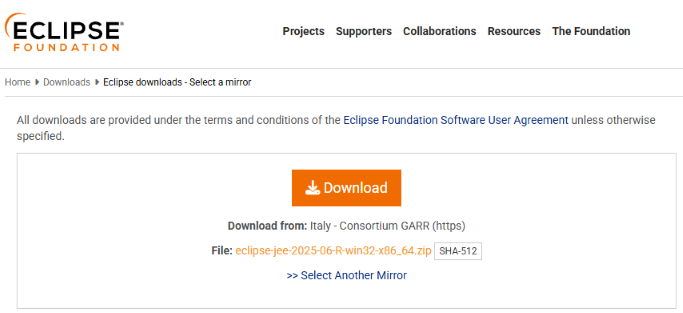
The build is done by running a set of GruntJS plugins. The starting point of the build process is the downloaded Eclipse ZIP. As Eclipse is not offering a default download URL to get the latest version, the URL needs to be provided manually.
An example URL:
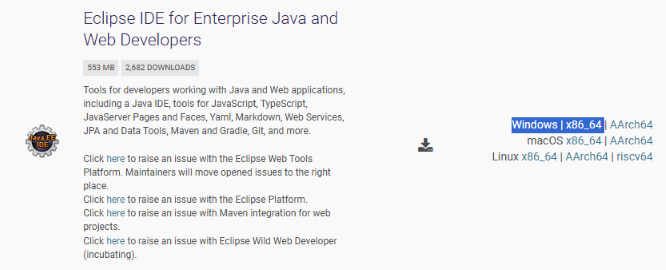
From the download page of Eclipse select the Java package.
Click on download and the extract the URL of the file from the download history / URL.

Configuration
The project is delivered with the intention that no additional configuration is needed. Starting the build process will result in a portable Eclipse version ready to be used by SAP developers.
The build configuration can be adjusted by changing the used Eclipse version, or by changing the list of the installed plugins.
Eclipse
The Eclipse download URL needs to be added as a parameter to the download task in the file Gruntfile.ks
downloadfile: {
  options: {
    dest: './downloads',
    overwriteEverytime: true
  },
  files: {
    'eclipse.zip': 'https://ftp.halifax.rwth-aachen.de/eclipse/technology/epp/downloads/release/2026-09/R/eclipse-jee-2026-09-R-win32-x86_64.zip'
  }
},
Plugins
The build will only add the ADT plugins. All available ADT plugins will be added, including e.g. the ones for WebDynpro ABAP development. The plugins to be installed are povided in the exec parameter:
exec: {
  eclipse: {
    command: 'build\\eclipse\\eclipse.exe -application org.eclipse.equinox.p2.director -repository https://download.eclipse.org/releases/2026-09,https://tools.hana.ondemand.com/latest,https://sap.github.io/abap-cleaner/updatesite,https://fidley.github.io/ADTPluginsUpdateSite/UpdateSite/,https://leuc.de/abapquickfixs4c -installIU com.sap.adt.tools.bopf.devedition.feature.group,com.sap.adt.core.devedition.feature.group,com.sap.adt.tools.hana.devedition.feature.group,com.sap.adt.wda.core.devedition.feature.group,com.sap.adt.pitools.tlf.devedition.feature.group,com.sap.adt.abapcleaner.feature.feature.group,com.abapblog.adt.quickfix.feature.feature.group,com.abapblog.adt.extension.feature.feature.group,de.leuc.adt.quickfix.feature.group -tag AddADT -destination .\\build\\eclipse -profile epp.package.jee',
    stdout: true,
    stderr: true
  },
},
Run build
The build is started by running:
npm i
npm start
The resulting file eclipse-dist.zip is stored in the folder dist.
Detailed build information
The ADT bundle is created using the Eclipse P2 Director application. The build process will instruct the p2 director appplication to connect to the Eclipse update site and to the ADT toooling site to resolve dependencies.
A latest Eclipse (Java Bundle) is used as the source for building the ADT bundle. Eclipse Downloads: https://www.eclipse.org/downloads/packages/
URL for Eclipse JEE: Mirror 1045
Eclipse installation
- Eclipse Update site: 2026-09 - https://download.eclipse.org/releases/2026-09
- Update site ADT https://tools.hana.ondemand.com/latest
- Update site ABAP Cleaner https://sap.github.io/abap-cleaner/updatesite
- Update site ABAP Quick Fix, Favorites, Commands https://fidley.github.io/ADTPluginsUpdateSite/UpdateSite/
- Update site Additional Quick Fixes S4 Conversion https://leuc.de/abapquickfixs4c
ADT feature IDs
The following ADT tools / features will be installed:
- com.sap.adt.tools.bopf.devedition.feature.group
- com.sap.adt.core.devedition.feature.group
- com.sap.adt.tools.hana.devedition.feature.group
- com.sap.adt.wda.core.devedition.feature.group
- com.sap.adt.pitools.tlf.devedition.feature.group
Additional ADT Plugins
The DSAG ADT Guide / Leitfaden lists several ADT plugins worth using. Some of those are added automatically to the ADT build. These are the plugins: ABAP Cleaner, ADT Extensions, Quick Fixes and Quick Fixes for S4 Conversion
ABAP Cleaner
- com.sap.adt.abapcleaner.feature.feature.group
ABAP Quick Fix
- com.abapblog.adt.quickfix.feature.feature.group
ADT Extensions - Commands
- com.abapblog.adt.extension.feature.feature.group
ABAP Quick Fixes S4 Conversion
- de.leuc.adt.quickfix.feature.group
ABAP Favorites
- ABAP_Favorites_Feature_Project.feature.group
(to be added)
(further add-ons)
- Further add-ons can be added manually. If you have a request to get an add-on added to the build process of the ADT bundle builder, please open an issue on the GitHub project page: https://github.com/tobiashofmann/adt-bundle-builder
The command to run Eclipse and install ADT is not run by GruntJS. Npm will run the command in a shell. This is because running the command from GruntJS resulted in performance problems or even crashed.
Run individual build steps
The build runs several Grunt tasks.
grunt.registerTask('1', ['clean:all']);
grunt.registerTask('2', ['mkdir:build']);
grunt.registerTask('3', ['downloadfile']);
grunt.registerTask('4', ['unzip']);
grunt.registerTask('5', ['zip']);
grunt.registerTask('6', ['clean:build']);
You can run them individually. Either by running npx grunt [[taskid]] like npx grunt 1 or using npm. Please note that Grunt is not used to run the Eclipse packaging step. The shell is used for this.
npm run clean
npm run prepare
npm run download
npm run unzip
npm run shell
npm run zip
npm run cleanup
Standalone command
Running the complete build process is not necessary. Given that an Eclipse version is available, the P2 director application can be run separately. The command used to add ADT to the Eclipse installation is given here. This is the same command used by the npm task.
p2 Director Application: eclipsec.exe
Command:
build\eclipse\eclipsec.exe -application org.eclipse.equinox.p2.director -repository https://download.eclipse.org/releases/2026-09,https://tools.hana.ondemand.com/latest,https://sap.github.io/abap-cleaner/updatesite,https://fidley.github.io/ADTPluginsUpdateSite/UpdateSite/,https://leuc.de/abapquickfixs4c -installIU com.sap.adt.tools.bopf.devedition.feature.group,com.sap.adt.core.devedition.feature.group,com.sap.adt.tools.hana.devedition.feature.group,com.sap.adt.wda.core.devedition.feature.group,com.sap.adt.pitools.tlf.devedition.feature.group,com.sap.adt.abapcleaner.feature.feature.group,com.abapblog.adt.quickfix.feature.feature.group,com.abapblog.adt.extension.feature.feature.group,de.leuc.adt.quickfix.feature.group,ABAP_Favorites_Feature_Project.feature.group -tag AddADTBundle -destination .\\build\\eclipse -profile epp.package.jee -destination .\\build\\eclipse -profile epp.package.jeeHistory
Others providing
Compare all 4 on the IDE provisioning page →- eclipsADT-o-mateclipsADT-o-matA Windows PowerShell wizard that downloads an Eclipse release, installs ABAP Development Tools into it with the p2 director, and adds the ADT plugins picked from a catalog of fifteen.independent, abapPowerShell wizard installing Eclipse with ADT and pluginsfrom ABAP
- personal-application-studiopersonal-application-studioA Theia distribution for SAP developers, published as a Docker image with ABAP and UI5 language support and a template wizard already in it.independent, abapTheia distribution with ABAP and UI5 support as a Docker imagefrom ABAP
- BASEnvSyncBASEnvSyncAn extension for SAP Business Application Studio that zips a dev space's home-directory configuration files and loads them into another dev space.independent, btpCarries home-directory dotfiles from one BAS dev space to anotherfrom BTP/BAIP
Details
Sources
Sources are graph entities: the same page may back several entries, and an unreachable source flags every row that rests on it.
Compatibility and provenance
Contributors
History in the atlas
- First seen.
For your agent
- Ref
artifact:tobiashofmann-adt-bundle-builder- JSON
- /artifacts/tobiashofmann-adt-bundle-builder.json
- MCP
- Connecting an agent