ui5-fontawesome-lib
A UI5 library that adds Font Awesome's regular, solid and brand icon sets to the sap-icon:// namespace, addressable from a standard Icon control, for UI5 1.120.33 or later.
UI5's built-in icon font only goes so far, and this library extends it with three Font Awesome styles addressable from a standard Icon control: sap-icon://fa-regular/…, sap-icon://fa-solid/… and sap-icon://fa-brands/…. It installs as an npm package that UI5 tooling loads automatically, or from a CDN by adding its resource root to the bootstrap, and needs UI5 1.120.33 or later. The free Font Awesome set ships by default; using the Pro set means registering a separate npm scope and rebuilding the library.
Facts
Where it sits
Who is behind it

In the atlas: maintains 69@ui5-communitymaintainerMario KernichContributes to this

In the atlas: maintains 8, contributes to 10, wrote 1@mariokernichMarco BeierContributes to this

In the atlas: contributes to 13@wridgeu2 contributors
What it declares
Every artifact
- Type
- Package
- Origin
- By a community org
As a package
- Where it runs
- Inside its host
- Distributed through
- npm
Connections
Custom controls, wrappers and icon fonts packaged for reuse
Download
Install
npm add ui5-fontawesome-libDerived from the package name. No recipe recorded; the README has the configuration.
README
quoted from ui5-community/ui5-fontawesome-lib under Apache-2.0, read🎨 UI5 FontAwesome Icons Library
Enhance your SAP UI5/OpenUI5 applications with modern Font Awesome icons! 🚀
This library seamlessly integrates Font Awesome icons into the SAP UI5 icon system, providing access to thousands of beautiful, scalable icons for your Fiori applications. Have a look at the ui5-icon-explorer project or directly visit ie.kernich.de for an example integration and interactive showcase of all free Font Awesome icons together with the built-in icons.





🎯 Features
- ✨ Seamless Integration: Use Font Awesome icons with standard UI5 Icon controls
- 🎨 3 Icon Styles: Regular, Solid, and Brand icons
- 🕰️ Backwards compatible: Works with UI5 1.71 and newer (uses
sap/ui/core/Libwhen available, falls back toCore#initLibraryon older releases)
📋 Icon Mapping
| Font Awesome Style | UI5 Namespace | Example Usage |
|---|---|---|
fa-regular | sap-icon://fa-regular | <Icon src="sap-icon://fa-regular/face-grin-hearts" /> |
fa-solid | sap-icon://fa-solid | <Icon src="sap-icon://fa-solid/face-grin-hearts" /> |
fa-brands | sap-icon://fa-brands | <Icon src="sap-icon://fa-brands/github" /> |
🛠️ Setup & Configuration
Add the fontawesome.icons.lib library dependency to your manifest.json and follow one of the next methods.
{
  "dependencies": {
    "minUI5Version": "1.71.0",
    "libs": {
      "sap.ui.core": {},
      "sap.m": {},
      "fontawesome.icons.lib": {}
    }
  }
}
If using TypeScript, add ui5-fontawesome-lib to types definition.
{
  "compilerOptions": {
    "types": [
      "@sapui5/ts-types-esm",
      "ui5-fontawesome-lib"
    ]
  }
}
Method 1: Using NPM Package (Recommended)
Install Dependencies
npm i ui5-fontawesome-libThat should be it. The UI5 tooling will recognize the UI5 dependency (verifiable via UI5 CLI command UI5 tree) and take care of loading it for you.
with UI5 middleware (alternative recommendation)
npm i ui5-fontawesome-lib && npm i -D ui5-middleware-servestaticAdd the following configuration to your ui5.yaml:
server:
  customMiddleware:
    - name: ui5-middleware-servestatic
      afterMiddleware: compression
      mountPath: /resources/fontawesome/icons/lib/
      configuration:
        npmPackagePath: 'ui5-fontawesome-lib/dist/resources/fontawesome/icons/lib'
Method 2: Using CDN
Add https://cdn.kernich.de/ui5-fontawesome-lib/resources/fontawesome/icons/lib to your resource roots for fontawesome.icons.lib
<script
  id="sap-ui-bootstrap"
  src="https://sdk.openui5.org/resources/sap-ui-core.js"
  data-sap-ui-resource-roots='{
    "my.example.app": "./",
    "fontawesome.icons.lib": "https://cdn.kernich.de/ui5-fontawesome-lib/resources/fontawesome/icons/lib"
  }'
  data-sap-ui-on-init="module:sap/ui/core/ComponentSupport"
  data-sap-ui-compat-version="edge"
  data-sap-ui-frame-options="trusted"
  data-sap-ui-async="true"
></script>
Method 3: Local setup (for development)
Clone this repository and add it as a dependency to your local UI5 project setup.
💻 Usage Examples
Basic Icon Usage
<!-- Regular icons -->
<Icon src="sap-icon://fa-regular/heart" />

<!-- Solid icons -->
<Icon src="sap-icon://fa-solid/star" />

<!-- Brand icons -->
<Icon src="sap-icon://fa-brands/github" />
With Icon Properties
<Icon
    src="sap-icon://fa-solid/rocket"
    size="2rem"
    color="#0070f3"
    tooltip="Launch application" />
In JavaScript/TypeScript
import Icon from "sap/ui/core/Icon";

const icon = new Icon({
    src: "sap-icon://fa-solid/check-circle",
    size: "1.5rem",
    color: "green"
});
🎨 Font Awesome Pro Support
Want to use Font Awesome Pro icons? Here's how to extend this library:
Setup Font Awesome Pro Icons
-
Follow the official Font Awesome tutorial: Font Awesome Pro Setup
-
Create
.npmrcfile:@fortawesome:registry=https://npm.fontawesome.com/ //npm.fontawesome.com/:_authToken=XXXXXXXX-XXXX-XXXX-XXXX-XXXXXXXXXXXX -
Install Pro package:
npm install --save @fortawesome/fontawesome-pro -
Update build process: Modify
generate.jsto include Pro font files by changingconst loadPro = false;toconst loadPro = true; -
Register new styles: Update
library.tsto register additional icon styles
🚀 Development
Quick Start
# Clone the repository
git clone https://github.com/ui5-community/ui5-fontawesome-lib.git
cd ui5-fontawesome-lib

# Install dependencies
npm install

# Start development server
npm start
Visit http://localhost:8080/ to see the icon browser with search functionality.
📸 Screenshot
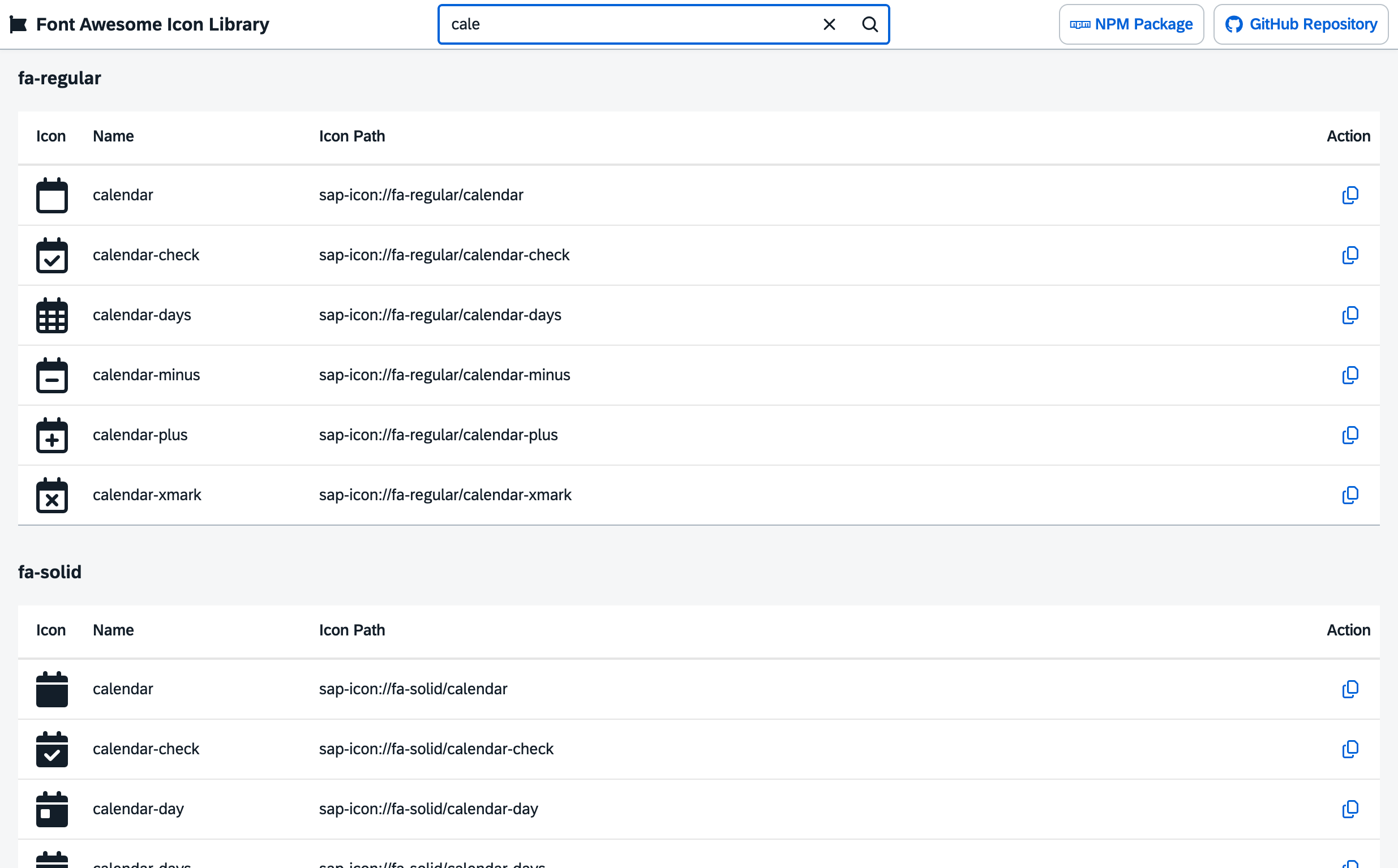
Interactive icon browser with search functionality - run npm start to see it in action!
Available Scripts
| Command | Description |
|---|---|
npm start | Start development server and get interactive demo of all icons |
npm run build | Build the library for production |
npm run check:ts | TypeScript type checking |
npm run check:lint | ESLint code quality check |
npm run check:ui5 | ui5lint check |
npm run check:all | Run all code quality checks |
npm run fix:lint | Automatically fix lint issues if possible |
Debugging
Enable sourcemaps in your browser's developer console to debug the original TypeScript code. Use Ctrl/Cmd + P in Chrome to open specific .ts files.
📊 Project Structure
ui5-fontawesome-lib/
├── src/                    # Source files
│   ├── fonts/             # Font Awesome font files
│   ├── library.ts         # Main library file
│   └── themes/            # UI5 themes
├── test/                  # Test files
├── dist/                  # Build output
└── scripts/               # Build and deployment scripts
🤝 Contributing
We welcome contributions! Please feel free to submit issues and pull requests.
Development Workflow
- Fork the repository
- Create a feature branch (
git checkout -b feature/amazing-feature) - Commit your changes (
git commit -m 'Add amazing feature') - Push to the branch (
git push origin feature/amazing-feature) - Open a Pull Request
📄 License
This project is licensed under the Apache Software License, version 2.0 - see the LICENSE file for details.
🔗 Links
⭐ Support
If you find this library helpful, please consider giving it a star on GitHub! ⭐
Made with ❤️ for the SAP UI5 community
History
Features 2
Notes
✨ New
- Support for UI5 versions older than 1.118 (#4):
sap/ui/core/Libis only available as of UI5 1.118. The library now usesLib.initwhen it is available and falls back toCore#initLibraryotherwise. Tested with UI5 1.71, 1.120 and 1.153. - Font Awesome 7.3.1 (was 7.0.0): all new and updated free icons of
fa-solid,fa-regularandfa-brands
Others providing
Compare all 15 on the Custom controls and libraries page →- custom-controlscustom-controlsThirteen custom controls for abap2UI5, a signature pad and a scanner that reads several barcodes at once among them, each one an ABAP builder class with a single render( ) method and all of them shipped in a BSP of their own.community org, abapThirteen custom UI5 controls for abap2UI5 appsfrom ABAP
- @abap2ui5/embed-control@abap2ui5/embed-controlA UI5 custom control that runs an abap2UI5 app inside a host UI5 app, with the abap2UI5 frontend loaded from the backend the app talks to.community org, ui5UI5 custom control that runs an abap2UI5 app inside a host appfrom UI5
- ui5-cc-timerbuttonui5-cc-timerbuttonA UI5 control library with TimerButton, an sap.m.Button that delays becoming enabled or visible and shows other text or an icon in the meantime, with the delay set in milliseconds.independent, ui5UI5 control library with a button that delays enabling or showingfrom UI5
- ui5-control-generatorui5-control-generatorA command-line generator that writes UI5 custom controls, in JavaScript or TypeScript, from the html files in a project, with control logic and renderer split into two files by default.independent, ui5Command line generator of UI5 custom controls from htmlfrom UI5
- @marianfoo/ui5-cc-dayjs@marianfoo/ui5-cc-dayjsA UI5 custom control that writes a date to the page through Day.js, with the input format, the output format and any shift of days or months set as control properties.independent, ui5UI5 custom control formatting dates with Day.jsfrom UI5
- ui5-cc-pdfviewerui5-cc-pdfviewerA UI5 custom control that renders a PDF from a base64 data URI with pdfjs-dist, so a file picked in the browser can be shown before it has been uploaded anywhere and has a URL.independent, ui5UI5 custom control rendering a PDF from a base64 data URIfrom UI5
- openui5-passwordopenui5-passwordAn OpenUI5 input control of password type that checks the typed value against length and character-class rules set as properties, and scores password strength in a separate property.independent, ui5OpenUI5 password input with strength scoring and rulesfrom UI5
- openui5-touropenui5-tourAn OpenUI5 control library for a step-by-step guided tour inside a UI5 app, where each TourStep has a title, content, a target control from the view and a placement.independent, ui5OpenUI5 control library for guided app toursfrom UI5
- ui5-lib-visualizationui5-lib-visualizationA UI5 control library that wraps the C3.js charting library as ui5.viz controls (Chart, ChartSeries, ChartDataPoint, ChartAxis, ChartLine, ChartArea and Color) declared in an XML view with data binding.independent, ui5UI5 control library wrapping C3.js charts as ui5.viz controlsfrom UI5
- UI5XUI5XAn OpenUI5 and SAPUI5 library of eight composite controls under the ui5x namespace: skeleton placeholders and a container that swaps them for content, loading wrappers for the responsive and the grid table, an accordion, a copy button, a segmented input and a chat feed.independent, ui5UI5 library of eight composite controls under the ui5x namespacefrom UI5
- openui5-cameraopenui5-cameraA UI5 control that renders a live camera preview from the device's camera and hands the app the picture as a base64-encoded PNG when the user taps it.independent, ui5UI5 control for live camera preview and PNG capturefrom UI5
- ui5-cc-chartui5-cc-chartA UI5 custom control that wraps Chart.js to render a line chart from label and value records, installed as a plain npm dependency with ui5-tooling-modules in ui5.yaml.community org, ui5UI5 custom control wrapping Chart.js for line chartsfrom UI5
- ui5-cc-mdui5-cc-mdA UI5 custom control that renders Markdown, including GitHub-flavoured syntax, to HTML inside an XML view, taking its content from a string, a file path or a model binding.community org, ui5UI5 custom control rendering Markdown to HTMLfrom UI5
- openui5-paginatoropenui5-paginatorA UI5 custom control that pages through large data in a table, for backends that serve pages over REST rather than OData.independent, ui5A UI5 custom control that pages through large data in a table, for backends that serve pages over REST rather than OData.from UI5
Details
Sources
Sources are graph entities: the same page may back several entries, and an unreachable source flags every row that rests on it.
Compatibility and provenance
Contributors
History in the atlas
- First seen.
For your agent
- Ref
artifact:ui5-community-ui5-fontawesome-lib- JSON
- /artifacts/ui5-community-ui5-fontawesome-lib.json
- MCP
- Connecting an agent